
2 vCPU vs 4 vCPU is a cloud VM sizing decision about how much concurrent compute a workload can use before CPU becomes the limiting resource. A 2 vCPU VM exposes two virtual processors to the guest operating system; a 4 vCPU VM exposes four. Four vCPUs can run more CPU-active work concurrently, but they do not automatically make every application twice as fast.
The extra virtual processors help only when the workload has enough runnable work—application threads, concurrent requests, workers, builds, tests, or other CPU-active tasks—to use them. If the real bottleneck is RAM, storage, a database query, serial code, or an external dependency, increasing vCPU count may change little.
Raff Technologies supports 3,000+ customers and 15,000+ VMs. In infrastructure reviews, the strongest reason to move from 2 vCPU to 4 vCPU is repeatable evidence: CPU pressure rises at the same time as p95/p99 latency, queue age, build duration, worker backlog, or another workload outcome that matters.
For the broader CPU, RAM, storage, and network decision, start with VM Sizing Guide. This guide stays narrow: what 2 vCPU and 4 vCPU mean, when 2 vCPU is enough, when 4 vCPU is justified, and when the correct upgrade is not more CPU.
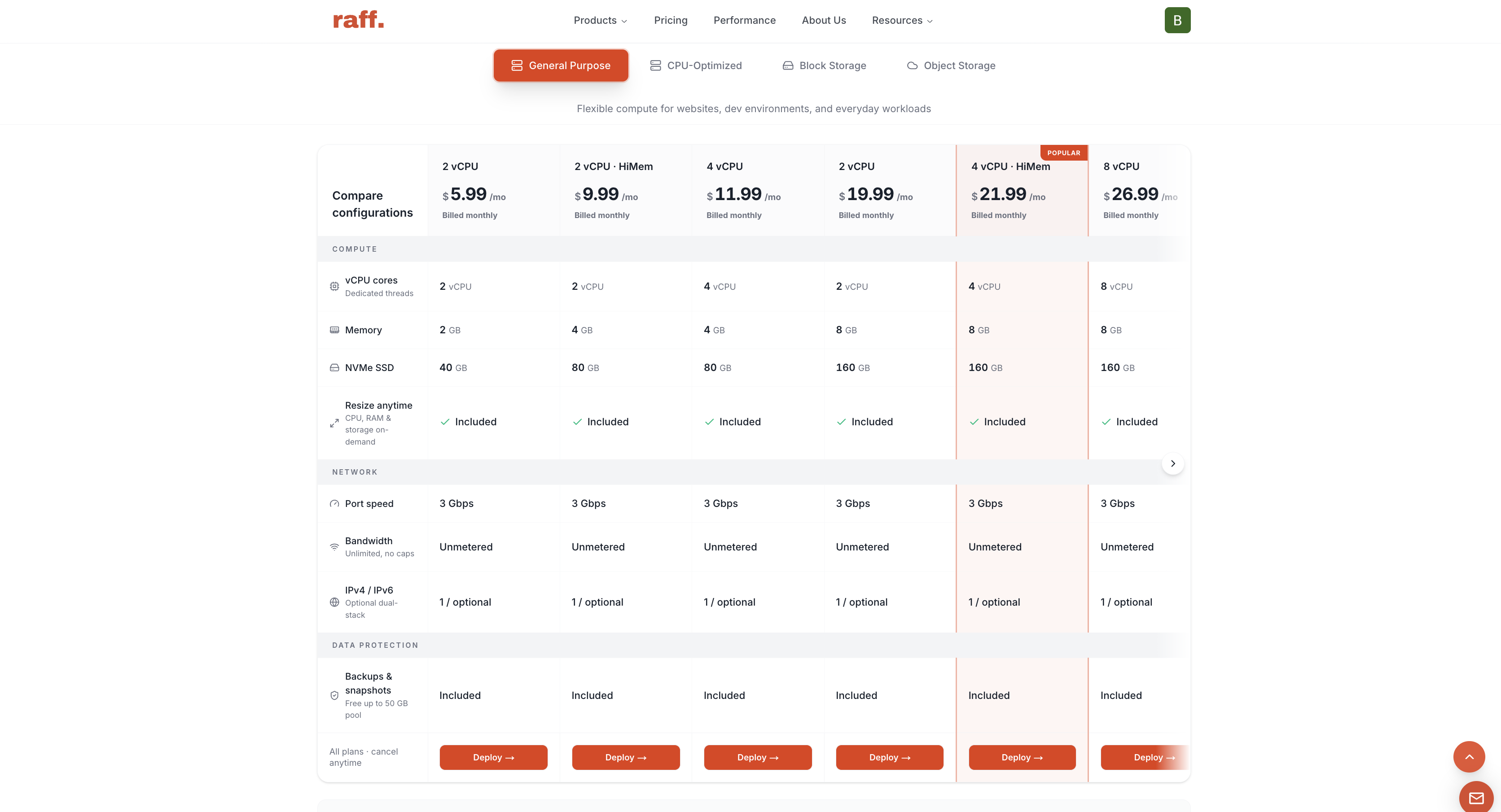
The screenshots in this article are retained from the June 2026 version of the guide. Use the current Raff pricing page for live plan sizes and prices.
What do 2 vCPU and 4 vCPU mean?
A vCPU, or virtual CPU, is a virtual processor presented to the guest operating system by the virtualization platform.
- 2 vCPU means the guest can schedule work across two virtual processors.
- 4 vCPU means the guest can schedule work across four virtual processors.
This does not mean that one vCPU universally equals one full physical CPU core. The relationship between virtual processors and physical CPU resources depends on the provider and machine class. Some platforms use shared CPU scheduling; others reserve or dedicate compute capacity.
That is why vCPU vs core is not a simple one-to-one comparison. For application sizing, the more useful question is whether the guest has enough virtual processors to complete runnable work within the required latency, throughput, or completion time.
On Raff, General Purpose VMs use shared vCPU, while CPU-Optimized VMs use dedicated compute. If CPU allocation predictability is the main question rather than core count, use Shared CPU vs Dedicated CPU.
2 vCPU vs 4 vCPU changes available parallel compute
The practical difference between 2 vCPU and 4 vCPU is the amount of compute that can be scheduled concurrently when the workload can use it.
A workload can benefit from more vCPU when it has:
- multiple application workers handling requests at the same time;
- background jobs that can run in parallel;
- build or test jobs that use several threads or processes;
- compression, transformation, indexing, or compilation work;
- several CPU-active services sharing one VM;
- enough concurrent requests to keep existing vCPUs busy.
A workload may gain little from more vCPU when it is primarily waiting on:
- database locks or slow queries;
- disk reads and writes;
- external APIs;
- network latency;
- a single-threaded code path;
- memory pressure or swap;
- application-level rate limits.
The core-count decision is therefore not “2 is small and 4 is production.” It is “does the workload have more runnable CPU work than 2 vCPU can process within the required latency or completion time?”
2 vCPU vs 4 vCPU at a glance
| Question | 2 vCPU | 4 vCPU |
|---|---|---|
| Virtual processors exposed to guest | 2 | 4 |
| Best fit | Focused or lighter workloads with CPU headroom | More concurrent CPU-active work |
| Typical examples | Small sites, APIs, dev, staging, light workers | Busier APIs, parallel workers, CI/build workloads |
| Upgrade trigger | CPU pressure begins affecting workload outcomes | Keep only if the extra compute materially improves outcomes |
| General Purpose 4 GB RAM reference | 2 vCPU / 4 GB / 80 GB — $17.99/mo | 4 vCPU / 4 GB / 80 GB — $24.99/mo |
This like-for-like 4 GB RAM comparison is useful because memory stays constant while vCPU count changes. It isolates the CPU-capacity decision more cleanly than comparing two plans where both CPU and RAM increase.
The decision framework starts with CPU pressure and queueing
Use workload evidence before changing core count.
| Evidence | Better first decision | Why |
|---|---|---|
| CPU is usually low or moderate | Stay on 2 vCPU | Extra CPU would sit unused most of the time |
| Brief CPU spikes during deploys or updates | Stay on 2 vCPU and observe | Short spikes do not prove a sustained constraint |
| Sustained CPU pressure aligns with rising p95/p99 latency | Evaluate 4 vCPU | Compute may be limiting request throughput |
| Worker queue grows while CPU remains saturated | Evaluate 4 vCPU | More concurrent compute may reduce backlog |
| Builds or tests are CPU-bound across repeat runs | Evaluate 4 vCPU | Parallel work can benefit from more schedulable CPU |
| Memory is tight, swap is active, or OOM events occur | Add RAM or choose a memory-forward shape | CPU is not the primary constraint |
| CPU is low but database latency is high | Diagnose queries, locks, memory, and storage | More vCPU may not touch the bottleneck |
| CPU is high but only one thread is busy | Optimize or parallelize the workload | More vCPU cannot accelerate serial work automatically |
| CPU timing consistency matters under sustained load | Evaluate dedicated CPU | Allocation model may matter more than core count |
The useful signal is pressure plus impact. High CPU by itself is not necessarily a problem. A batch worker can run at high utilization and still meet its deadline. An API can show a lower average while missing a tail-latency target during bursts.
A move from 2 to 4 vCPU is justified when the workload repeatedly runs out of compute capacity and the additional parallelism improves an outcome that matters.
2 vCPU fits focused workloads when CPU has headroom
A 2 vCPU VM is a reasonable starting point when the workload does not create sustained concurrent compute demand.
Typical fits include:
- small websites and content applications;
- development and staging environments;
- lightweight APIs;
- internal tools;
- early application backends;
- one or two modest application processes;
- low-frequency background jobs;
- test servers and temporary environments.
The important qualifier is CPU headroom, not project stage. A production service can stay on 2 vCPU if it meets its latency, throughput, and recovery requirements. A development build machine can justify 4 vCPU if compilation keeps both available vCPUs busy and completion time matters.
Raff’s current General Purpose lineup provides several 2 vCPU shapes:
| vCPU | RAM | NVMe SSD | Current monthly price |
|---|---|---|---|
| 2 | 2 GB | 40 GB | $12.99 |
| 2 | 4 GB | 80 GB | $17.99 |
| 2 | 8 GB | 160 GB | $27.99 |
These sizes show why CPU and memory should be evaluated separately. A workload can stay at 2 vCPU while moving from 2 GB to 4 GB or 8 GB RAM when memory, not compute, is the constraint.
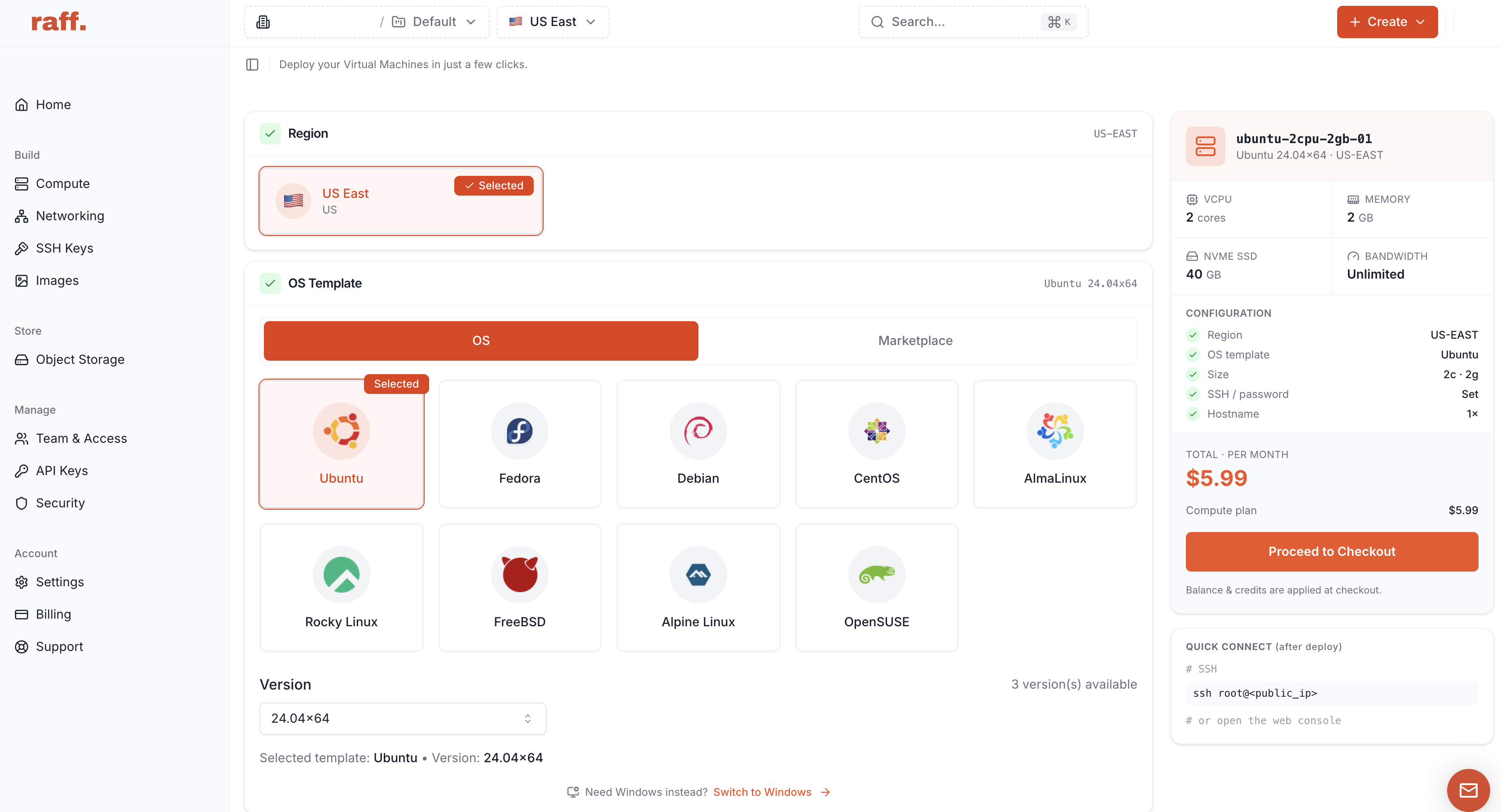
This June 2026 interface screenshot shows a historical 50 GB storage value. The current General Purpose 2 vCPU / 2 GB plan includes 40 GB NVMe.
For entry-size workload fit beyond CPU, use 2 vCPU / 2 GB Cloud VM Workloads.
4 vCPU fits workloads with repeatable concurrent compute
A 4 vCPU VM becomes useful when the workload can keep additional virtual processors busy with useful work.
Common candidates include:
- APIs with more concurrent CPU-active requests;
- multiple application workers;
- queue consumers processing independent jobs;
- CI runners with parallel test or build stages;
- application servers sharing CPU with scheduled jobs;
- data transformation or compression tasks;
- self-hosted services where several processes are CPU-active at the same time.
The move is especially defensible when 2 vCPU is already producing a measurable effect such as rising p95/p99 request latency, growing queue age, builds exceeding an acceptable duration, worker throughput falling behind arrival rate, or repeated CPU saturation during comparable workload windows.
Raff’s current General Purpose lineup includes these 4 vCPU shapes:
| vCPU | RAM | NVMe SSD | Current monthly price |
|---|---|---|---|
| 4 | 4 GB | 80 GB | $24.99 |
| 4 | 8 GB | 160 GB | $33.99 |
| 4 | 16 GB | 240 GB | $55.99 |
The 4 vCPU / 4 GB configuration is the cleanest comparison against a 2 vCPU / 4 GB VM because memory remains the same while compute capacity increases.
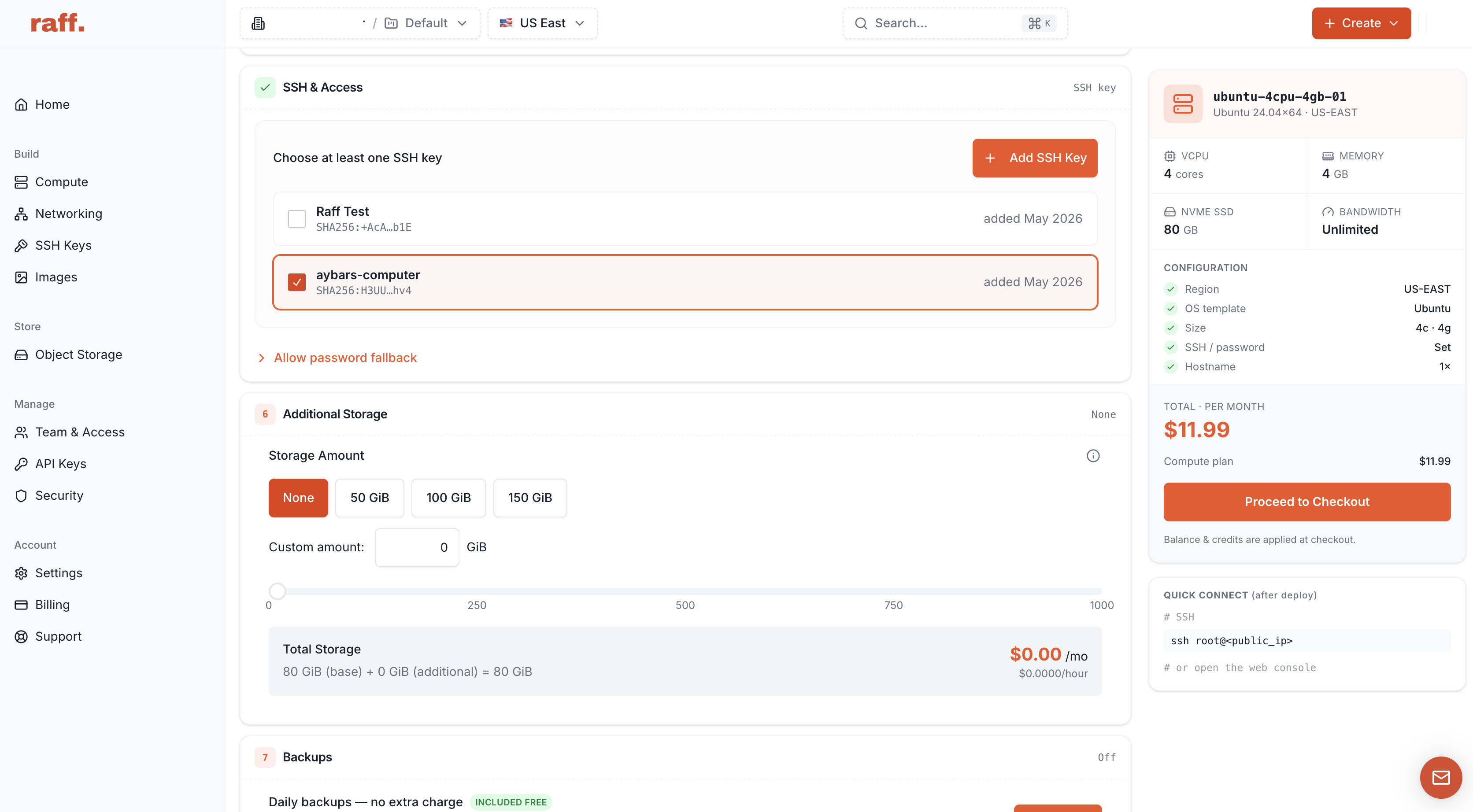
Four vCPU is not a reliability tier by itself. A 4 vCPU VM with a memory-constrained database can still be unstable, and a 4 vCPU application server can still wait on one slow downstream dependency.
Is 4 vCPU twice as fast as 2 vCPU?
Usually, no.
Doubling vCPU count increases available schedulable compute, but application performance rarely scales perfectly with core count. Serial code cannot use unlimited parallelism. Databases can wait on indexes, locks, memory, or storage. External dependencies set their own latency. A faster application tier can also expose a downstream bottleneck that was previously hidden.
The successful upgrade is not “CPU utilization fell.” It is “the workload outcome improved enough to justify the additional resources.”
If a repeatable workload completes materially faster or an API handles more requests within its latency target after moving from 2 vCPU to 4 vCPU, the extra compute is useful. If nothing meaningful changes, another constraint is probably controlling the workload.
RAM, storage, and CPU allocation can matter more than vCPU count
Before moving from 2 vCPU to 4 vCPU, rule out the other common constraints.
| Symptom | More likely next move |
|---|---|
| Swap activity, OOM events, container restarts | Add RAM / memory-forward VM |
| Database cache pressure or large working set | Add RAM or separate the database |
| Disk nearly full | Increase or separate storage |
| High I/O wait | Diagnose storage and application I/O |
| Slow query with comfortable CPU | Fix query/index/lock behavior |
| External API dominates request time | Optimize dependency path or caching |
| Sustained CPU with predictable parallel work | Add vCPU |
| Sustained CPU with timing variance that matters | Evaluate dedicated CPU |
For memory pressure, use High Memory VMs. For all-resource diagnosis, use Cloud Server Bottlenecks. For the current full plan ladder, use Raff General Purpose VM Plans.
Measure before and after moving from 2 vCPU to 4 vCPU
Treat a CPU upgrade as a testable infrastructure change.
Useful measurements include:
- CPU utilization over time;
- system load and runnable-task pressure;
- Linux CPU Pressure Stall Information (PSI) where available;
- request p50, p95, and p99 latency;
- queue depth and oldest-job age;
- worker throughput;
- build and test duration;
- error and timeout rate;
- memory and swap behavior;
- I/O wait;
- database latency.
Compare equivalent workload windows. Do not compare a busy production period on 2 vCPU with an idle period on 4 vCPU.
| Test | 2 vCPU baseline | 4 vCPU result | Keep the upgrade when... |
|---|---|---|---|
| Same API load | Record p95/p99, CPU pressure, errors | Repeat with same request mix | Tail latency or throughput improves materially |
| Same worker batch | Record queue age and completion time | Repeat same job set | Backlog clears faster without moving the bottleneck |
| Same CI pipeline | Record duration across several runs | Repeat same pipeline | Build/test time improves consistently |
| Same mixed app load | Record CPU, memory, database, I/O | Repeat with 4 vCPU | CPU pressure falls and the user-visible outcome improves |
Linux PSI is useful because it measures time tasks lose while waiting for CPU, memory, or I/O resources rather than only reporting percentage utilization.
Raff 2 vCPU vs 4 vCPU pricing
Raff’s General Purpose family uses shared vCPU and provides several memory ratios at both 2 vCPU and 4 vCPU.
Two useful like-for-like comparisons are:
- 2 vCPU / 4 GB / 80 GB at $17.99/month vs 4 vCPU / 4 GB / 80 GB at $24.99/month when the question is mainly CPU capacity;
- 2 vCPU / 8 GB / 160 GB at $27.99/month vs 4 vCPU / 8 GB / 160 GB at $33.99/month when the workload needs the same memory but different compute headroom.
Raff VMs currently use a 3 Gbps public connection with unmetered VM traffic and no egress fee. Pay-as-you-go VM billing is available. Check the live pricing page for current billing terms. Public IPs and other add-ons have separate pricing, so use the live Raff pricing page before deployment.