VPS hosting is a server model that gives a customer an isolated operating environment with allocated compute, memory, storage, networking, and administrative control on shared physical infrastructure.
The important decision is not simply whether a VPS is more powerful than shared hosting. It is whether your workload needs server-level control, whether your team can manage that control, and whether the monthly cost remains predictable after backups, licensing, storage, and operational work are included. Raff supports 3,000+ customers choosing VPS hosting and related infrastructure without hyperscaler billing complexity.
This guide focuses on choosing VPS hosting rather than explaining virtualization in depth. It compares the main alternatives, provides a decision framework, shows how to size a server, and identifies the operational requirements that separate an inexpensive test server from a production-ready environment.
VPS Hosting Is a Control and Responsibility Decision
VPS hosting sits between limited hosting products and more complex infrastructure platforms. It usually gives you root or administrator access, an independent operating system, allocated resources, and freedom to install the software your workload requires.
That control is valuable only when it solves a real constraint. A basic marketing website may not need a VPS. A custom API, Docker stack, database, remote Windows environment, background worker, or internal business application often does because the workload needs software, ports, services, permissions, or resource allocation that basic hosting cannot provide.
The same control also transfers responsibility to your team. Unless the service is managed, you are responsible for operating-system updates, access controls, firewall rules, application deployment, monitoring, backups, and incident recovery. A VPS can simplify infrastructure architecture, but it does not remove server administration.
A practical decision begins with four questions:
- Does the workload require root or administrator access?
- Can the team maintain the operating system and installed services?
- Is a fixed server size acceptable for the next stage of growth?
- What would happen if the server became unavailable or data had to be restored?
When the answers are clear, VPS hosting becomes easier to compare with the alternatives.
Compare VPS Hosting With the Real Alternatives
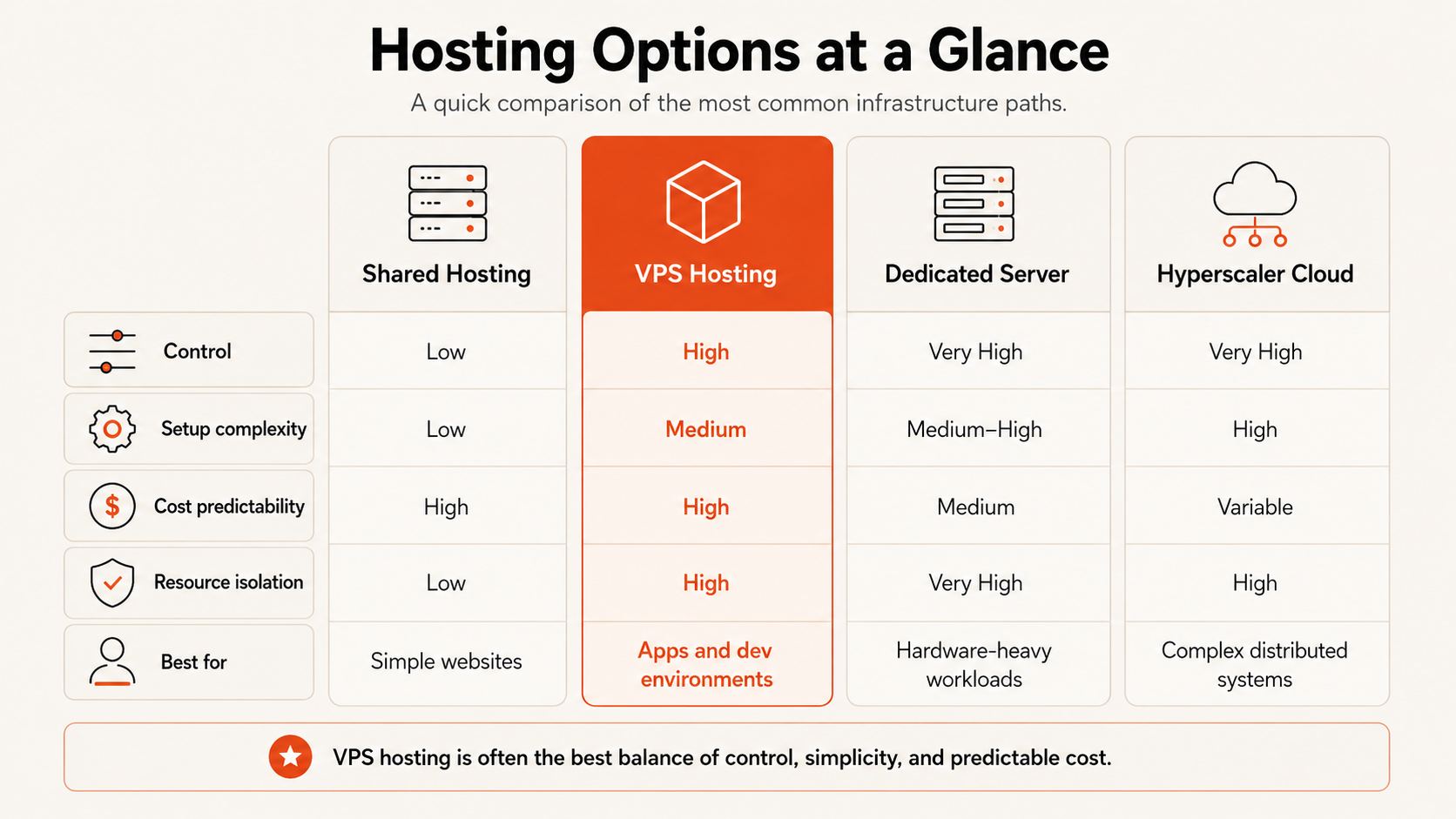
Choosing VPS hosting makes more sense when each option is evaluated by control, operating effort, isolation, scaling model, and cost visibility.
| Infrastructure option | Best fit | Control | Operating effort | Cost model | Main limitation |
|---|
| Shared hosting | Simple websites and standard content management systems | Low | Low | Usually fixed | Limited software, resources, and server access |
| Managed app platform | Teams deploying supported application stacks | Medium | Low to medium | Plan or usage based | Less operating-system freedom |
| VPS hosting | Custom applications, APIs, databases, Docker, and remote environments | High | Medium | Usually plan based | Server administration remains your responsibility |
| Dedicated server | Large fixed workloads or hardware-specific requirements | Very high | High | Fixed monthly | Higher commitment and slower resizing |
| Hyperscaler architecture | Distributed systems using many managed services | Very high | High | Detailed usage based | Greater architecture and billing complexity |
Shared hosting is appropriate when the provider's standard environment already supports the website. Moving that workload to a VPS may increase cost and maintenance without producing meaningful business value.
A managed app platform can be a better choice when a team wants deployment automation and does not need operating-system access. The trade-off is that the team works within the runtimes, deployment model, and service boundaries supported by the platform.
A dedicated server becomes relevant when a workload needs a large fixed resource pool, physical isolation, specialized hardware, or performance characteristics that justify renting an entire machine. It is usually a larger operational and financial commitment than a VPS.
A broader cloud architecture is useful when the application requires managed queues, event services, multiple availability zones, autoscaling groups, complex identity policies, or a large portfolio of integrated services. Small teams should not adopt that complexity before the workload requires it.
The terms VPS, cloud VM, and cloud server are often used differently by providers. The VPS vs cloud VM vs cloud server guide separates the terminology, while cloud VPS vs traditional VPS explains the infrastructure and operational differences.
Use a VPS Decision Framework Before Comparing Providers
Provider comparison should begin after the workload requirements are defined. Otherwise, buyers tend to compare entry prices and resource numbers without deciding what the server must actually accomplish.
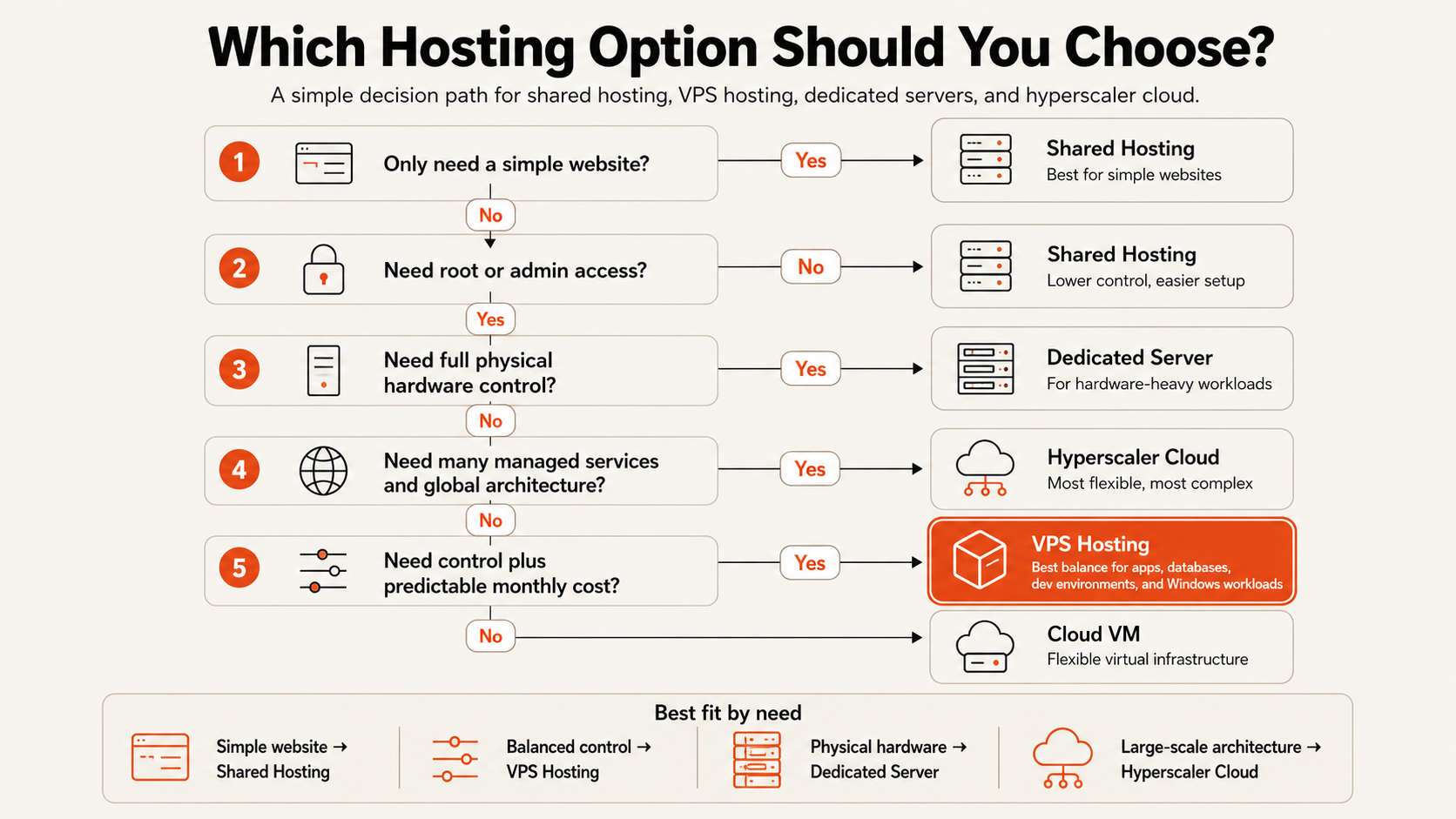
Use the following decision framework to establish the type of VPS service you need.
| Decision factor | Choose a VPS when | Consider another option when |
|---|
| Administrative control | You need custom packages, services, ports, users, or system settings | A standard website or supported app runtime is enough |
| Workload shape | Demand is reasonably stable or can be handled by planned resizing | Demand changes rapidly and needs automatic horizontal scaling |
| Team capability | Someone can manage updates, access, monitoring, and recovery | No one owns server operations |
| Data importance | You can define backup frequency and a tested restore path | The workload needs a managed data service with tighter recovery requirements |
| Architecture | One server or a small number of servers can support the workload | The system already requires distributed services across many nodes |
| Budget | A visible monthly plan helps forecasting | Usage-based elasticity is more important than monthly predictability |
| Compliance | The team can configure the required controls and document responsibility | The workload requires a managed compliance scope the provider does not offer |
Choose VPS hosting for controlled, understandable workloads
VPS hosting is usually a strong fit when the application can run on one server or a small number of clearly defined servers. Common examples include websites with custom stacks, APIs, SaaS prototypes, development environments, Docker deployments, background processing, small databases, internal tools, and remote Windows workloads.
It is also useful when a team wants infrastructure that can be described in simple terms: a defined number of virtual CPUs, a known amount of memory, a storage allocation, an operating system, an IP address, and a monthly price.
Avoid VPS hosting when the operating model is missing
A VPS is a poor choice when nobody is responsible for patching, access, monitoring, and recovery. Server control without operational ownership creates security and availability risk.
It may also be the wrong starting point when the workload already requires automatic horizontal scaling, multi-region failover, specialized managed services, or physical hardware control. In those cases, the infrastructure model should match the architecture rather than forcing the architecture onto one server.
Choose managed or unmanaged service deliberately
An unmanaged VPS normally gives the customer responsibility for the operating system and software above the infrastructure layer. This is suitable for teams that already know how to administer Linux or Windows and want maximum configuration freedom.
A managed VPS adds provider assistance for some administration tasks. The scope varies widely. Before comparing managed offers, confirm whether management includes patching, monitoring, backups, application support, security response, migration, and after-hours incidents. The word “managed” is not a complete service definition.
Match Linux or Windows to the software requirement
Linux is generally the default for open-source web stacks, containers, APIs, automation, and many database workloads. Windows is appropriate when the application requires Windows Server, Remote Desktop, Microsoft-specific frameworks, or business software built for Windows.
The choice should follow software compatibility and team experience. Windows licensing can add a separate monthly cost, while Linux administration may require command-line skills. Teams evaluating Remote Desktop or Windows applications can use the Windows VPS hosting guide for a more specific decision.
Size the VPS Around the Workload and Failure Margin
Server sizing should start with the workload, expected concurrency, operating-system overhead, and the amount of spare capacity required during traffic spikes or maintenance.
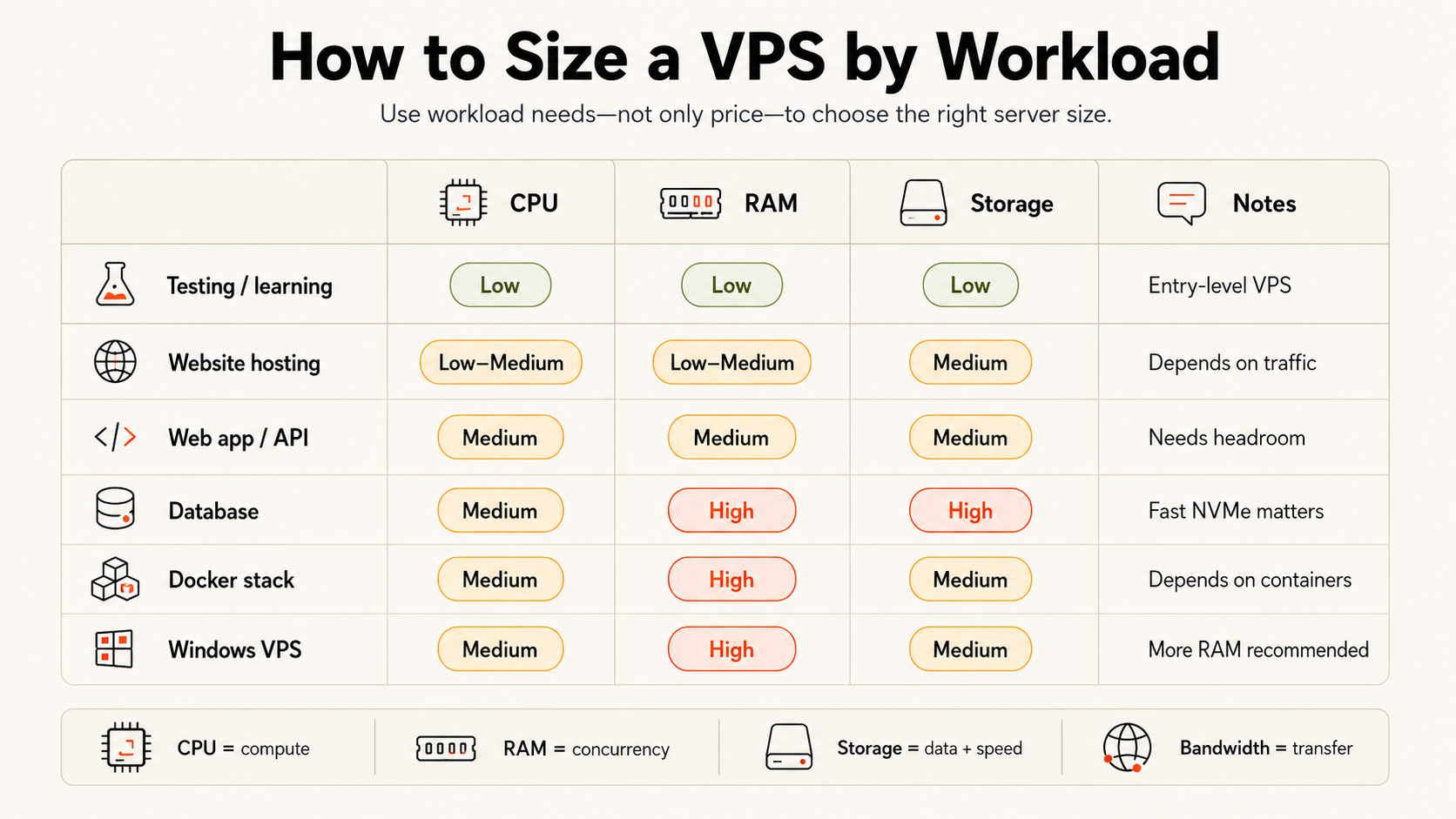
The following ranges are evaluation starting points, not performance guarantees. Application design, database behavior, caching, traffic patterns, and software versions can change the requirement significantly.
| Workload | Evaluation starting point | Main sizing risk |
|---|
| Development or staging server | 1–2 vCPU, 2–4 GB RAM | Running too many test services together |
| Small website or API | 2 vCPU, 4 GB RAM | Traffic spikes and background jobs |
| Production application or Docker stack | 2–4 vCPU, 4–8 GB RAM | Memory pressure across multiple services |
| Small production database | 2–4 vCPU, 8 GB RAM or more | Working set, write activity, and disk latency |
| Windows remote workload | 2–4 vCPU, 4–8 GB RAM or more | Concurrent users and application memory |
| Build or compute-heavy workload | Dedicated CPU sized to the job | CPU contention and sustained processing time |
CPU requirements follow workload behavior
More virtual CPUs help only when the software can use them. A lightly used website may not benefit from four cores, while parallel builds, encoding, data processing, and busy application servers can become CPU-bound quickly.
The distinction between shared and dedicated CPU also matters. Shared CPU plans are cost-effective for general workloads with variable utilization. Dedicated CPU is more appropriate when the application uses sustained processing capacity or needs more consistent compute availability.
Memory should include operating headroom
RAM must cover the operating system, application runtime, database, cache, web server, monitoring agents, and background services. A server that fits exactly during normal traffic has no margin for deployments, temporary spikes, or failed processes.
Memory pressure can produce slow responses, process termination, or heavy disk swapping. It is usually safer to leave measurable headroom than to operate continuously near the limit.
Storage decisions include speed, capacity, and recovery
Storage capacity is only one part of the decision. Database-heavy applications and workloads with frequent file operations also depend on latency and throughput. Teams should estimate current data, logs, temporary files, package growth, and backup retention before selecting capacity.
Critical data should not exist only on the VPS disk. The sizing plan must include backups, snapshots, or an external data copy that can be restored after deletion, corruption, or a failed change.
Bandwidth policy affects cost predictability
Check whether transfer is metered, capped, or unmetered, and whether the provider applies fair-use or sustained-use restrictions. Public websites, APIs, downloads, media delivery, and backup transfers can consume more bandwidth than a private development server.
For a more detailed resource model, use the guide to choosing the right VM size.
Price VPS Hosting by Total Operating Cost
The lowest plan price is not the same as the lowest operating cost. A useful VPS comparison includes the server, storage, data transfer, IP addresses, operating-system licenses, backups, snapshots, support, administration time, and the cost of resizing or migration.
Create a monthly cost model with these categories:
| Cost category | What to verify |
|---|
| Compute plan | vCPU allocation, shared or dedicated CPU, RAM, included disk |
| Additional storage | Price per GB, performance class, attachment limits |
| Data transfer | Included transfer, overage, port speed, restrictions |
| Operating system | Windows license, Remote Desktop licensing, BYOL rules |
| Protection | Backup price, snapshot price, retention, restore process |
| Networking | Public IPs, private networking, load balancing, firewall options |
| Support | Response scope, migration assistance, managed-service boundaries |
| Operations | Staff time for updates, security, monitoring, and incident response |
A cheaper server can be a rational choice for experiments, temporary environments, or noncritical workloads. The risk appears when a team buys an undersized or poorly supported plan for production and later pays through downtime, emergency migration, data recovery, or repeated manual work.
The cheap VPS vs reliable VPS guide examines that trade-off in more depth. This decision guide should not be used to select the lowest price; it should be used to identify the lowest-cost option that still meets the workload and recovery requirements.
Predictability also matters. Fixed plans help small teams forecast infrastructure cost, but only when the provider clearly states what is included. A low headline price becomes less useful when bandwidth, backups, storage, licensing, or support are unclear.
Security, Recovery, and Management Define Production Readiness
A server is not production-ready because the application starts successfully. Production readiness depends on how access is controlled, how changes are maintained, how failures are detected, and how data is recovered.
Access should be restricted before launch
Use SSH keys for Linux where practical, strong authentication for Windows, and firewall rules that expose only required services. Administrative interfaces should not be left open broadly when access can be restricted by address, VPN, private network, or another controlled path.
Create named user accounts, limit administrative privileges, rotate credentials when responsibilities change, and document who can access the server.
Updates require clear ownership
Operating-system and application updates need an owner and a schedule. Delaying every update creates security risk; applying every change immediately without testing creates availability risk. Small teams need a practical maintenance process with backup verification and a rollback plan.
Backups must support a defined recovery objective
A backup is useful only when the team knows what it contains, how often it runs, how long it is retained, and how to restore it. Define acceptable data loss and recovery time before choosing a backup schedule.
Snapshots can support quick rollback before a risky change, but they should not automatically replace an independent backup strategy. Application-consistent database backups may also be necessary.
Monitoring should reflect the failure modes
At minimum, monitor availability, CPU, memory, disk capacity, and the health of the application process. Add database, queue, certificate, and backup checks when those components become important.
Alerts should reach someone who can respond. Collecting metrics without response ownership does not reduce downtime.
The cloud security fundamentals guide provides a broader control framework for server access, networking, updates, and data protection.
Raff VPS Hosting Fits Predictable Small-Team Infrastructure
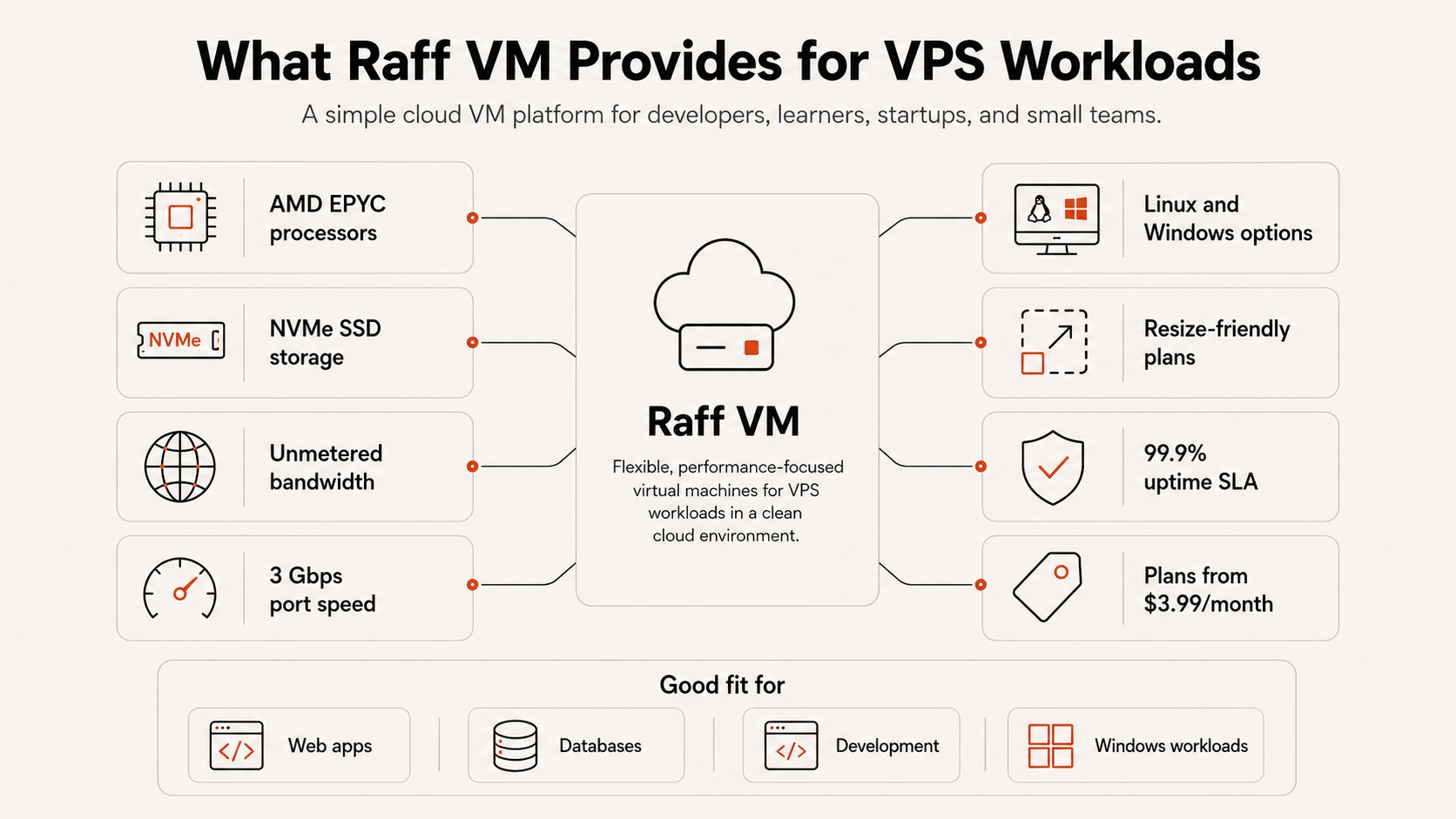
Raff VM is designed for developers, founders, and small teams that want a clear virtual-machine model without assembling a large cloud architecture first. The product decision is based on making the core variables visible: CPU model, memory, NVMe storage, bandwidth policy, operating-system choice, backup cost, and monthly plan price.
From Batuhan's product perspective, a VPS plan should be judged by how easily a team can explain it before deployment and operate it after launch. The useful comparison is not the lowest visible price. It is whether the resources, bandwidth, protection options, licensing, and upgrade path are clear enough to forecast.
Raff has deployed 15,000+ VMs across developer, startup, and business workloads. Raff includes a 99.9% uptime SLA for VM workloads.
Current Raff VM reference points include:
| Raff VM option | Included resources | Monthly price | Suitable evaluation use |
|---|
| General Purpose | 2 vCPU, 2 GB RAM, 40 GB NVMe | $8.49 | Development, lightweight services, and small sites |
| General Purpose | 2 vCPU, 4 GB RAM, 80 GB NVMe | $13.99 | Small applications, APIs, and general production workloads |
| CPU-Optimized | 2 dedicated vCPU, 4 GB RAM, 80 GB NVMe | $27.99 | Sustained compute and workloads needing dedicated CPU |
VM plans include a 3 Gbps unmetered public bandwidth policy. Snapshots and backups are priced at $0.06 per GB-month, and each VM includes 3 free backup slots. Windows compute is available with licensing handled separately from the compute plan.
These details do not make every workload a VPS workload. A managed application service may still be better when a team does not want server responsibility, and a distributed architecture may be necessary when one VM cannot meet availability or scaling requirements. Raff VM fits the decision when the workload benefits from clear server control, predictable resources, and a direct monthly cost model.
Use a Final VPS Provider Checklist
Use the final comparison only after the workload, management model, and recovery requirements have been documented.
Confirm each of the following before choosing a provider:
- The operating system supports the required application and team skills.
- The CPU allocation is clearly described as shared or dedicated.
- The plan has enough RAM for the operating system, services, and operating headroom.
- Storage type, capacity, expansion options, and pricing are documented.
- Bandwidth, port speed, limits, and overage rules are clear.
- Public IP, IPv6, firewall, and private-networking requirements are supported.
- Backup and snapshot prices, retention, and restore steps are understood.
- The server can be resized without an unexpected rebuild or long interruption.
- Support scope and managed-service boundaries are written clearly.
- The uptime commitment matches the workload's business impact.
- Monthly cost includes licenses, storage, protection, and likely growth.
- Someone owns patching, monitoring, access, and incident recovery after launch.
A provider should be rejected when an important operating assumption cannot be verified. Missing information about backups, bandwidth, CPU allocation, licensing, or support can create more risk than a visible price difference.
Choose the Simplest VPS That Meets the Requirement
VPS hosting is a strong choice when a workload needs server-level control, fits on one VM or a small number of VMs, and has a clear owner for security, maintenance, monitoring, and recovery. It is not automatically the right upgrade from shared hosting, and it is not a substitute for a distributed architecture when the application already requires one.
Define the workload first. Then choose the management model, operating system, CPU type, memory, storage, bandwidth, and protection plan. Compare providers only after those requirements are written down, and evaluate total monthly operating cost rather than the entry price alone.
The right VPS is usually the simplest server that meets today's requirement with enough capacity and recovery planning for the next stage. Raff VM is one option for teams that prefer transparent resource plans, unmetered bandwidth, and a direct path between shared and dedicated compute.
