
VM sizing is the process of matching vCPU, memory, storage, network capacity, and operating headroom to a workload's expected demand. Server sizing and virtual machine sizing follow the same principle: choose the smallest resource profile that can handle normal demand, expected peaks, and routine maintenance without creating avoidable performance risk.
The safest starting VM is not the largest plan you can afford or the cheapest plan that can boot the application. It is the smallest profile that can run the workload reliably, absorb expected peaks, and leave a clear path to resize when real usage provides better evidence.
Raff Technologies supports 3,000+ customers and 15,000+ VMs. In infrastructure reviews, a recurring sizing mistake is choosing from one headline number—usually vCPU—before identifying whether CPU, memory, storage, or a dependency will actually control latency, throughput, or stability.
Use this guide for the initial VM sizing decision. If a VM is already running and the goal is to reduce waste or correct over- or under-provisioning, use Right-Sizing Cloud Servers. If the deployed server is slow and the constraint is unclear, use Cloud Server Bottlenecks.
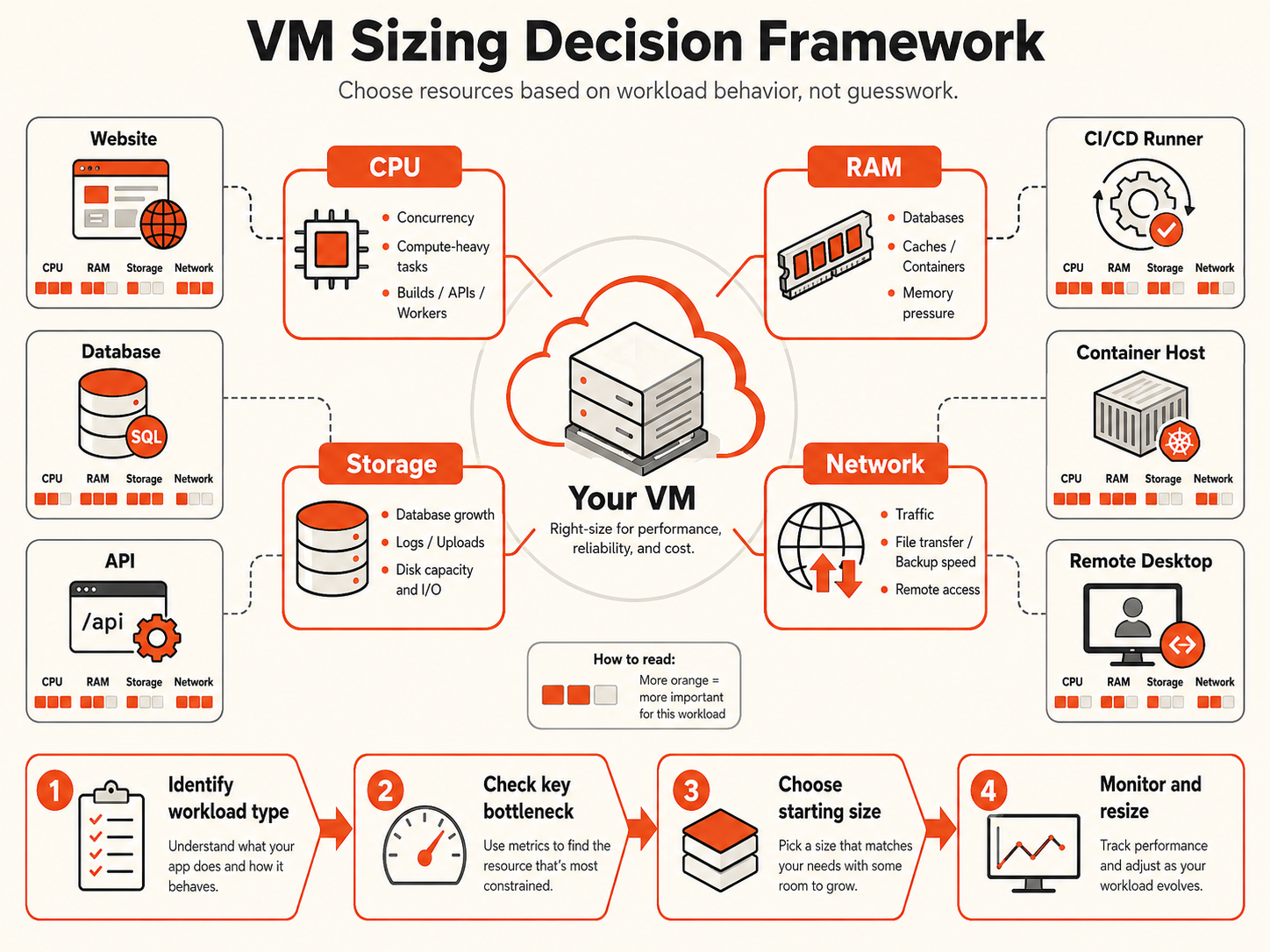
VM sizing starts with workload behavior and failure impact
A plan table shows capacity. The workload determines whether that capacity is useful.
Before choosing a VM size, describe the workload in operational terms:
- Is it production, staging, development, CI, or temporary testing?
- Is demand steady, bursty, scheduled, or still unknown?
- Does it serve users directly or process background work?
- Does it run a database, cache, queue, containers, builds, or remote sessions?
- Which failure appears first when capacity is tight: slow requests, queue growth, restarts, swap, or a full disk?
- How expensive is a slowdown or restart?
- Can the workload be resized or separated later without a major migration?
This prevents two opposite mistakes.
Undersizing creates latency, swap, failed jobs, OOM events, full disks, risky deployments, and operational noise. Oversizing spends money on unused capacity and can hide inefficient queries, memory leaks, unbounded workers, or poor application design.
The correct starting point sits between them: enough capacity for normal demand and known peaks, but not so much excess that the team loses the signal needed to understand the application.
The same environment label can require very different resources. A quiet production API may fit a smaller VM than a development build runner compiling several projects in parallel. Size the work, not the label.
CPU, RAM, storage, and network need separate sizing decisions
VM sizing improves when each resource is evaluated independently instead of assuming one larger plan fixes every problem.
CPU sizing: add vCPU when useful compute is waiting
CPU matters when useful work is waiting to be scheduled or completed: request handlers, builds, tests, workers, compression, indexing, encryption, and data transformation.
Useful CPU signals include:
- sustained CPU pressure during the affected workload period;
- growing runnable work or worker backlog;
- p95/p99 latency rising with compute demand;
- build or test duration increasing under equivalent work;
- one thread saturating while other vCPUs remain idle.
More vCPU helps only when the application has useful parallel work. A serial critical path, slow database query, external API, or storage wait may gain little from additional cores.
For the narrower choice, read 2 vCPU vs 4 vCPU Cloud VMs.
VM memory sizing: add RAM when the working set no longer fits safely
RAM is shared by the operating system, application runtime, database buffers, caches, containers, workers, and monitoring agents.
Stronger memory-pressure evidence includes:
- low available memory during normal peaks;
- sustained swap-in or swap-out activity;
- memory pressure or reclaim stalls;
- out-of-memory events;
- containers or processes restarting;
- database or application latency increasing with memory pressure.
Do not size memory from a universal utilization percentage. Linux can use otherwise idle RAM for useful filesystem cache. The better question is whether the working set fits safely and whether memory pressure affects the workload.
For memory-specific sizing, use How Much RAM Do I Need for a VPS? and High Memory VMs.
Storage sizing covers both capacity and I/O behavior
Storage sizing must cover how much data exists, how quickly it grows, and how the workload reads and writes it.
Include:
- operating-system and application files;
- database and index growth;
- uploads;
- logs;
- container images and volumes;
- temporary files;
- build artifacts;
- monitoring data;
- backup staging.
A disk can have free capacity and still be limited by I/O latency. It can also provide fast I/O and fail because logs or application data fill it. Track free space, growth rate, latency, throughput, and queueing separately.
If durable data needs an independent storage lifecycle, Raff Volumes are currently $0.08/GB-month. See Raff Volumes.
Network sizing includes latency and path behavior, not only bandwidth
APIs, file transfer, backups, media, replication, remote access, and service-to-service traffic depend on more than advertised port speed.
Consider:
- expected transfer volume;
- user geography;
- round-trip latency;
- packet loss and retransmissions;
- request and payload size;
- internal service traffic;
- whether traffic is included or metered for the specific product.
Raff VM traffic currently uses a 3 Gbps public connection with unmetered VM traffic and no egress fee. That does not remove latency from a remote dependency or inefficient application protocol, and transfer pricing can differ for non-VM products.
A practical VM sizing framework maps workload signals to the first decision
Use this framework before selecting a specific VM plan.
| Workload pattern or evidence | First resource to examine | Safer starting direction | What would change the decision |
|---|---|---|---|
| Static site or small proxy | Memory and storage | Small balanced VM | Dynamic features, traffic, or storage growth |
| Small web app or API | CPU concurrency and memory | Balanced VM | Sustained CPU pressure, memory pressure, or DB contention |
| Database-backed app on one VM | Memory, storage, DB behavior | Balanced VM with headroom | Working-set growth or app/DB contention |
| Dedicated database | Memory, storage latency, recovery needs | Memory-conscious shape | CPU-heavy queries or independent scaling needs |
| Container host | Aggregate CPU and memory | Balanced VM with OS headroom | More containers or one dominant service |
| CI/CD runner | CPU and temporary storage | Compute-oriented shape | Parallel job count and build duration |
| Background workers | CPU and queue depth | Size to measured throughput | Backlog growth or downstream bottleneck |
| File-heavy application | Storage growth and transfer | VM plus separate storage where useful | I/O or retention requirements |
| Unknown new workload | CPU/RAM balance | Smallest safe balanced VM | First week of real workload data |
Then answer five questions:
- What is the workload's main job? User requests, database work, background processing, builds, storage, or remote access?
- Which resource is most likely to become constrained first? CPU, memory, disk, or a dependency?
- What peak must the VM survive? Normal traffic peak, deployment, backup, scheduled job, or campaign?
- How much failure headroom is justified? A test VM and a revenue-critical API should not carry the same margin.
- What is the next safe change? Resize one resource, change CPU class, separate storage, or split a service?
A VM size is defensible when its resource profile matches the workload's likely constraint and the team knows which measurements will validate the choice.
Universal recommendations such as “production needs 4 vCPU” or “upgrade at 80% RAM” are too crude because they ignore workload behavior and failure impact.
General Purpose vs CPU-Optimized is a CPU allocation decision
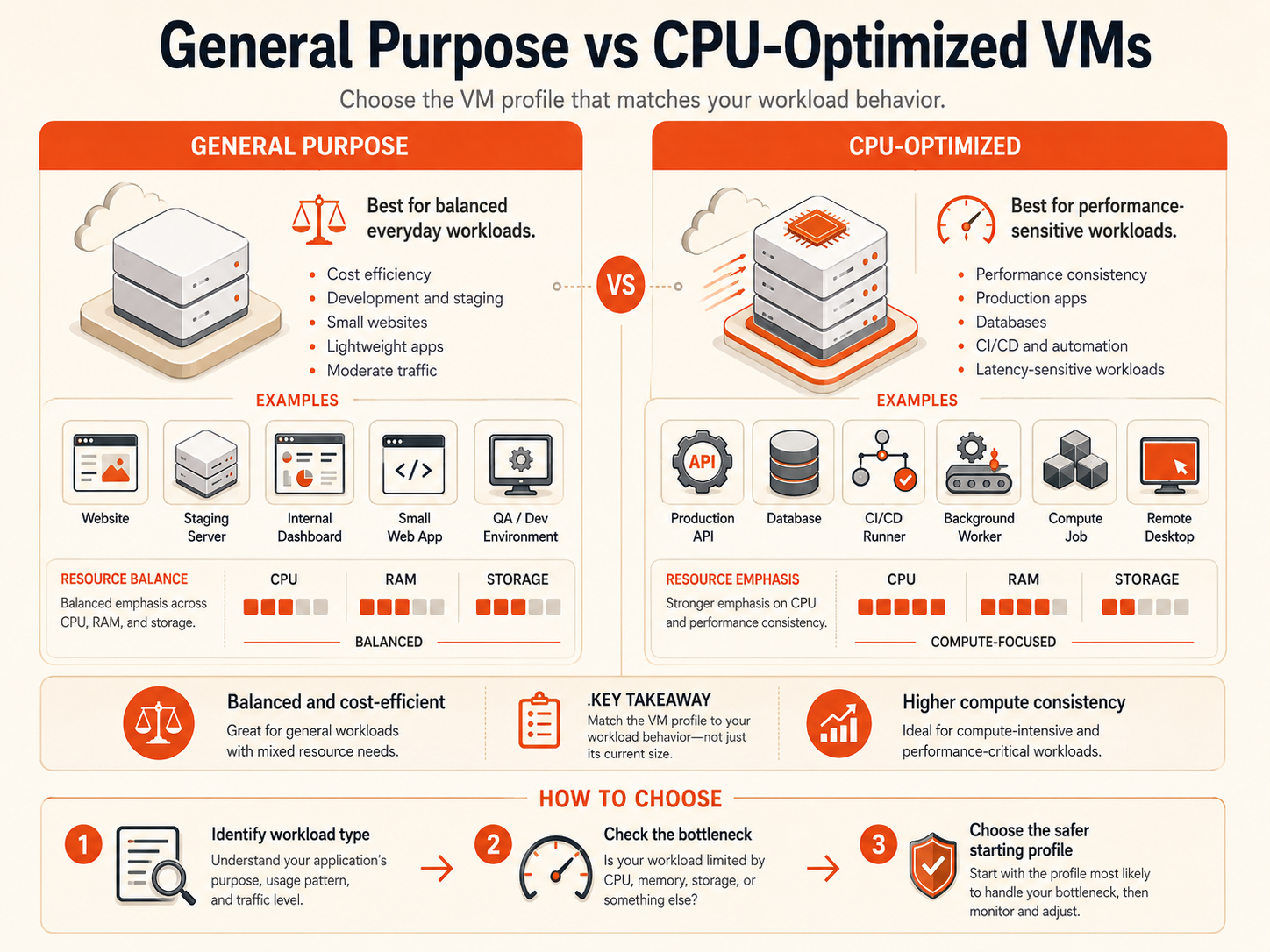
VM size and CPU allocation class are related but different decisions.
Raff General Purpose VMs use shared vCPU and are the natural starting point for variable or balanced workloads such as websites, development environments, staging, internal tools, and moderate application traffic.
Raff CPU-Optimized VMs use dedicated compute. They are more appropriate when sustained CPU demand and CPU predictability matter enough to justify a different allocation model, including CI/CD, workers, processing jobs, and latency-sensitive services.
| Evidence | Better direction |
|---|---|
| Workload is variable or still early | General Purpose |
| CPU bursts are occasional and acceptable | General Purpose |
| CPU has headroom but RAM is constrained | More memory, not a CPU-class change |
| Sustained compute demand controls completion time | Evaluate CPU-Optimized |
| CPU timing variance affects latency or business outcomes | Evaluate dedicated compute |
| Database is slow but CPU is comfortable | Diagnose query, lock, memory, and storage behavior first |
Use Cloud VM Types & Machine Classes for the full class decision and Shared CPU vs Dedicated CPU when CPU predictability is the main question.
Databases and container hosts need explicit operating headroom
Some workloads create resource pressure indirectly because several processes share the same VM.
A database-backed application may contain a reverse proxy, API runtime, PostgreSQL or MySQL, Valkey, background workers, scheduled jobs, and monitoring. A container host may package the same components separately while still sharing one memory and CPU budget.
Headroom should cover expected operational events, not only idle steady state. Package updates, deployments, migrations, backups, compaction, imports, and scheduled jobs are part of the workload.
When one service repeatedly dominates the host or needs different scaling and recovery behavior, a larger VM may no longer be the cleanest answer. Separate App and Database Server covers that architecture boundary.
Initial VM sizing and right-sizing are different stages
This guide answers what should we start with? Right-sizing answers does the running VM still fit? Keeping those intents separate avoids treating estimated pre-launch needs and measured post-launch behavior as the same task.
Before launch, choose the smallest safe starting profile with deliberate headroom and a resize path. After launch, use real evidence: CPU pressure, available memory, swap, OOM events, p95/p99 latency, queue depth, storage growth, I/O latency, database query time, and network path behavior.
If the server is already running and the goal is to reduce waste or correct under-provisioning, continue with Right-Sizing Cloud Servers. If the correct move is more capacity but you are deciding between a larger VM and multiple nodes, use Horizontal vs Vertical Scaling.
Current Raff VM sizes give multiple CPU-to-memory ratios
Raff's current General Purpose lineup spans 14 shared-vCPU plans, from 1 vCPU / 1 GB / 25 GB at $4.99/month to 16 vCPU / 32 GB / 320 GB at $139.99/month.
Useful current reference points include:
| General Purpose shape | Monthly price | Sizing interpretation |
|---|---|---|
| 1 vCPU / 1 GB / 25 GB | $4.99 | Very lightweight sites, tests, utilities |
| 1 vCPU / 2 GB / 50 GB | $8.99 | Small services needing more runtime memory |
| 2 vCPU / 2 GB / 40 GB | $12.99 | Lightweight apps, dev, test |
| 2 vCPU / 4 GB / 80 GB | $17.99 | Common small balanced application shape |
| 4 vCPU / 4 GB / 80 GB | $24.99 | More compute at the same memory level |
| 2 vCPU / 8 GB / 160 GB | $27.99 | Higher memory-to-vCPU ratio |
| 4 vCPU / 8 GB / 160 GB | $33.99 | Balanced midrange shape |
For sustained CPU workloads, Raff CPU-Optimized currently starts at 1 vCPU / 1 GB / 25 GB for $15.99/month. A like-for-like 2 vCPU / 4 GB / 80 GB comparison is $17.99/month General Purpose vs $36.99/month CPU-Optimized.
Raff supports hourly pay-as-you-go VM usage alongside monthly, yearly, and 24-month billing terms. Private networking through VPC is free. Public IPs and other add-ons should be checked separately on the live pricing page rather than assumed to be bundled with every VM.
For the full current plan ladder, use Raff General Purpose VM Plans.