
DNS for cloud applications maps public names such as app.example.com and api.example.com to the infrastructure that serves them. It also controls how long answers are cached, which systems can receive email, which certificate authorities may issue certificates, and how traffic moves during migrations or failures.
Use direct A or AAAA records for stable public IP addresses, CNAME records for subdomain aliases, and a load-balancer or health-checked DNS target when several application nodes must share traffic. Lower TTL before a planned cutover, but do not treat low TTL as instant failover. DNS should match the workload’s availability and recovery requirements.
DNS architecture should follow the public service boundary
Start by deciding which components internet users must resolve.
Users
  ↓ DNS
Public application endpoint or load balancer
  ↓ private network
Application, database, cache, queue, and internal services
Public DNS normally belongs on:
- websites and public APIs;
- load-balancer or reverse-proxy endpoints;
- public status and documentation services;
- email and verification records;
- intentionally public administration endpoints with strong access controls.
Databases, caches, queues, internal workers, and private dashboards usually do not need public records. They should use private addressing, internal DNS where available, and explicit network policy.
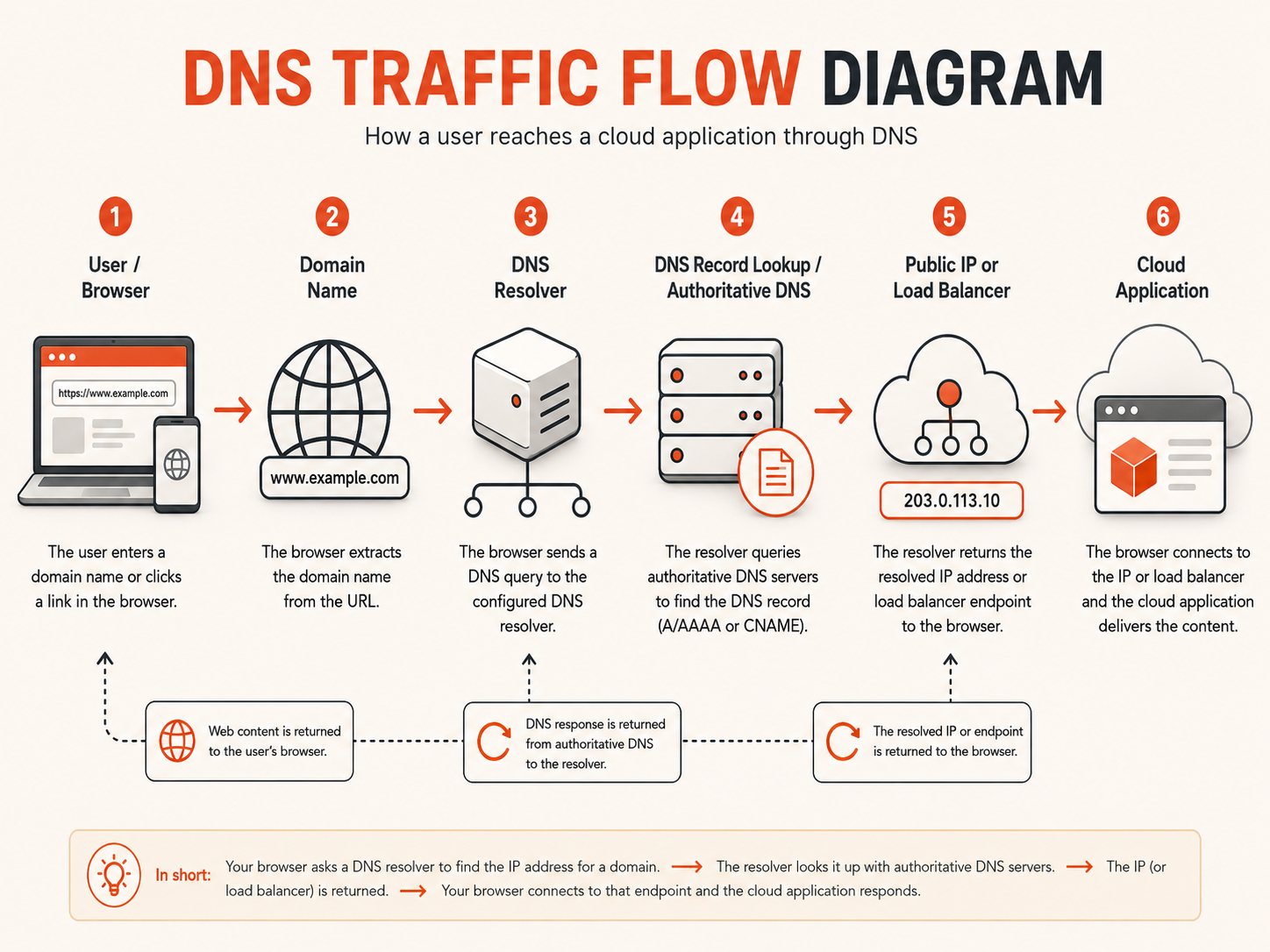
Use the record type that matches the destination
| Record | Purpose | Common cloud use |
|---|---|---|
| A | Maps a name to an IPv4 address | Public VM or IPv4 load-balancer endpoint |
| AAAA | Maps a name to an IPv6 address | Public IPv6 endpoint |
| CNAME | Makes one name an alias of another name | www, app, or api subdomain pointing to a provider hostname |
| MX | Identifies mail exchangers | Business or transactional email delivery |
| TXT | Stores service-defined text | Domain verification, SPF, DKIM, and DMARC data |
| NS | Delegates a DNS zone | Moving a zone or delegating a subdomain |
| CAA | Authorizes certificate authorities | Reducing unintended certificate issuance |
| SRV | Publishes service location data | Protocols that explicitly support SRV discovery |
| PTR | Maps an IP address back to a name | Reverse DNS, commonly relevant to mail systems |
The record is only one part of the decision. Also define the owner, TTL, expected destination, change process, and rollback path.
A record vs CNAME depends on whether the target is an address or a name
An A record points directly to an IPv4 address. An AAAA record points directly to an IPv6 address. A CNAME record points an alias to another DNS name, and the resolver then follows that name to its address records.
Choose an A or AAAA record when:
- the endpoint has a stable public IP;
- the DNS name should resolve directly to that address;
- the zone apex must retain other record types;
- the application team controls IP replacement and record updates.
Choose a CNAME when:
- the target is a provider-managed hostname;
- the provider may change the underlying addresses;
- a subdomain should follow another canonical name;
- the extra DNS lookup and provider dependency are acceptable.
A standards-compliant CNAME alias cannot normally coexist with other record data at the same name. This is why a traditional CNAME is unsuitable at many zone apexes: the apex also needs records such as NS and SOA. Some DNS providers offer ALIAS, ANAME, or CNAME-flattening behavior, but that is provider-specific rather than a standard CNAME.
Avoid long CNAME chains. They add dependencies, complicate troubleshooting, and can fail when any intermediate name is misconfigured.
IPv4 and IPv6 records must represent the same service readiness
Publishing an AAAA record tells IPv6-capable clients that the service is ready over IPv6.
Do not add AAAA merely because an address exists. Confirm:
- the application listens on IPv6;
- the firewall protects IPv6 as well as IPv4;
- the reverse proxy or load balancer accepts IPv6 traffic;
- TLS and health monitoring work over IPv6;
- logs distinguish both address families;
- the IPv6 path reaches the same healthy application behavior.
A broken IPv6 path can create intermittent failures for users whose clients prefer IPv6 even while IPv4 remains healthy.
TTL controls cache lifetime, not global propagation speed
TTL, or Time To Live, is the number of seconds a DNS resource record may remain cached before a resolver should request a fresh answer. RFC 1035 defines TTL as a cache lifetime in seconds.
A lower TTL shortens the intended cache window. It does not guarantee that every resolver, operating system, browser, or application will refresh at exactly that moment.
| Situation | Practical TTL direction |
|---|---|
| Stable production endpoint | Moderate or longer TTL |
| Planned migration | Temporarily lower TTL before the change |
| Health-checked DNS routing | Use the DNS provider’s supported range and failover model |
| Frequently changing development name | Shorter TTL may be reasonable |
| Mail, verification, and rarely changed records | Moderate or longer TTL is usually simpler |
There is no universal best number. Choose TTL from:
- acceptable cutover delay;
- authoritative DNS provider limits;
- expected change frequency;
- resolver query volume;
- failover design;
- operational ability to keep old and new endpoints available together.
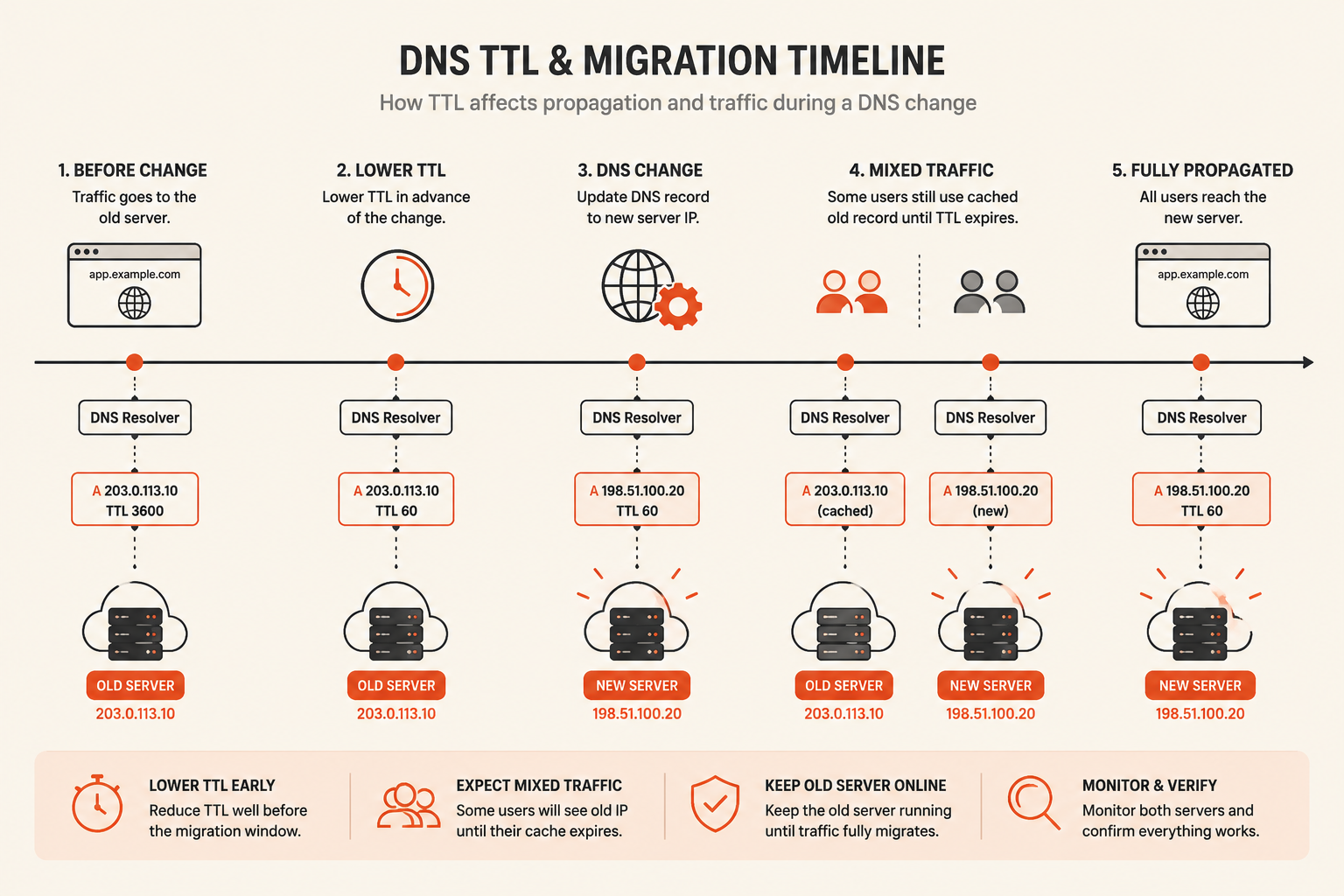
Lower TTL before the migration window
If the current TTL is one hour, changing it to five minutes at the start of the cutover does not remove answers already cached for the previous one-hour period.
Lower it early enough for the old TTL to expire. After the new endpoint is stable and old traffic has drained, increase it again if frequent changes are no longer expected.
Negative answers can also be cached
Resolvers may cache negative answers such as NXDOMAIN. Creating a record immediately after users have already queried a nonexistent name can therefore appear delayed.
This matters for new hostnames, validation records, and emergency names created during an incident. Provision critical names before they are required and verify the zone’s negative-caching behavior.
“DNS propagation” is several caches expiring at different times
An authoritative change can be correct while some users still receive an older cached answer.
The path can include:
- the authoritative DNS provider;
- recursive resolvers;
- enterprise or ISP caches;
- operating-system caches;
- browser and application caches;
- local proxies and service meshes.
For planned changes:
- verify the authoritative zone first;
- query more than one public resolver;
- keep the old endpoint available during overlap;
- ensure TLS works on both endpoints;
- monitor traffic reaching old and new destinations;
- avoid deleting the previous resource too early.
Do not promise a precise global propagation time. State the configured TTL and the planned overlap window instead.
Use six questions to choose the DNS design
What is the destination type?
Use an address record for a stable IP and an alias record for a provider-managed name. Confirm apex limitations before selecting CNAME-like behavior.
How much downtime can the workload tolerate?
A personal site may accept a manual record change. A revenue-producing application may need a load balancer, redundant endpoints, health checks, and rehearsed failover.
Is the application ready for more than one endpoint?
Active-active routing requires compatible application versions, externalized sessions and uploads, consistent data, and sufficient capacity at every healthy destination.
How quickly must traffic move?
TTL affects resolver refresh behavior, while health-check intervals, failure thresholds, endpoint readiness, and client connection reuse also affect recovery time.
Can old and new endpoints overlap?
Overlap makes migrations safer. When both endpoints can serve valid traffic, cached answers become less dangerous.
Who owns the change?
Every production zone needs named ownership, access control, auditability, rollback instructions, and an emergency contact path.
DNS failover is slower and less deterministic than load balancing
DNS failover changes the answers returned for new DNS queries. It does not directly move existing connections, clear client caches, or guarantee that every resolver immediately stops returning an unhealthy target.
Use a load balancer when the main requirement is:
- distributing traffic among application nodes;
- removing unhealthy backends quickly;
- preserving one public endpoint;
- connection draining;
- application-aware health checks within one architecture.
Use DNS routing or failover when the requirement is:
- moving between distinct public endpoints;
- active-passive disaster recovery;
- weighted migration between environments;
- geography-based endpoint selection;
- a failure boundary above one load balancer or region.
A resilient design may use both:
DNS routing or failover
  ↓
Regional load balancer
  ↓
Healthy application nodes
Google Cloud DNS documentation, for example, distinguishes weighted, geolocation, and failover routing policies and can remove unhealthy health-checked endpoints from eligible responses. Capabilities vary by DNS provider, so verify the exact health-check scope and failure behavior before relying on automation.
Manual, active-passive, and active-active models solve different problems
| Model | Suitable when | Main risk |
|---|---|---|
| Manual record change | Short interruption and operator involvement are acceptable | Detection and human response delay |
| Active-passive DNS failover | A tested standby endpoint exists | Standby drift and cached primary answers |
| Active-active DNS routing | Every endpoint can safely serve production | Data, release, and session inconsistency |
| Weighted routing | Traffic must move gradually | Weight does not guarantee exact request distribution |
| Geolocation routing | Regional service placement matters | DNS source location may differ from the end user |
| Load balancer only | One public architecture contains several nodes | The load balancer or region remains a shared boundary |
Choose the least complex model that meets the recovery objective.
Active-passive requires a usable standby, not only a record
A standby is useful only when it has:
- compatible application and runtime versions;
- current configuration and secrets;
- valid certificates;
- reachable dependencies;
- sufficient capacity;
- an understood data-recovery or replication path;
- monitoring and a tested health endpoint;
- a documented promotion and rollback process.
A DNS change cannot repair stale data or an untested application environment.
Active-active requires state and releases to work across endpoints
Before returning more than one production endpoint, confirm:
- sessions are externalized or portable;
- uploads do not exist only on one local disk;
- database consistency matches application expectations;
- background jobs do not run duplicate side effects;
- schema and API changes remain compatible during rollout;
- certificates and secrets exist in every location;
- health checks validate useful readiness;
- each endpoint can carry traffic when another fails.
Round-robin DNS alone is not a high-availability architecture. It can continue returning an unhealthy address unless the DNS service integrates health checks or operators remove the address.
DNS migration should be designed as an overlap, not a single edit
A safer migration has four phases.
Prepare
- inventory the existing zone;
- identify records controlled by other services;
- build and test the new endpoint;
- issue and validate certificates;
- verify firewall and application behavior;
- lower the relevant TTL early enough.
Change
- update the smallest required record set;
- confirm the authoritative answer;
- test through several resolvers and networks;
- watch application, TLS, error, and traffic metrics.
Overlap
- keep the previous endpoint healthy;
- preserve compatibility between old and new application versions;
- track residual traffic to the old address;
- avoid destructive database or configuration changes during the cache window.
Complete
- confirm old traffic has drained;
- restore the normal TTL where appropriate;
- remove obsolete addresses and records;
- update diagrams, inventories, and recovery instructions;
- retain rollback evidence and review the change.
This is a decision guide, not a promise that every DNS provider behaves identically. Test the real authoritative service and resolver path used by the application.
Zone delegation changes need additional care
Changing NS records moves authority for the zone, not only one application endpoint.
Before changing nameservers:
- reproduce every required record at the new provider;
- preserve MX, TXT, CAA, verification, and delegated subdomains;
- confirm DNSSEC requirements and DS records;
- compare answers between old and new authoritative servers;
- keep the old zone available during the transition;
- verify the registrar configuration after the change.
A missing record during nameserver migration can break email, certificates, integrations, and applications even when the main A record is correct.
DNS security needs account protection, DNSSEC, and certificate controls
Protect the registrar and DNS provider accounts
Use:
- multi-factor authentication;
- individual administrator identities;
- least privilege;
- audit logs and change alerts;
- controlled API tokens;
- rapid offboarding;
- protected recovery email accounts.
A compromised DNS account can redirect users without changing the application server.
DNSSEC authenticates DNS data
DNSSEC adds cryptographic signatures so validating resolvers can check that DNS data is authentic and has not been modified in transit. It does not encrypt DNS queries or make an unhealthy application available.
DNSSEC deployment requires coordination between the authoritative provider and the parent zone through DS records. Incorrect key or delegation changes can make a signed zone fail validation, so use the provider’s documented rollover and migration process.
ICANN announced a DNSSEC root trust-anchor rollover planned for October 11, 2026. Application teams normally depend on their DNS and resolver providers to handle root trust anchors, but operators of validating resolvers should follow the official readiness guidance.
CAA restricts certificate-authority authorization
CAA records let a domain owner specify which certificate authorities are authorized to issue certificates for the domain. CAA is an additional control, not a replacement for DNS account security, certificate monitoring, or correct validation.
Email and verification records need separate ownership
A web migration should not accidentally modify mail or verification data.
Protect:
- MX records;
- SPF data in TXT records;
- DKIM selectors;
- DMARC policy;
- domain-verification tokens;
- certificate-validation records;
- service-specific subdomain delegations.
Avoid creating multiple conflicting SPF records at the same name. Keep a record inventory showing which provider owns each value and what would break if it were removed.
Monitor resolution and the application behind it
A DNS check that returns the expected address does not prove the application is healthy.
Monitor the complete path:
- The expected authoritative nameservers answer.
- The hostname returns the intended record set.
- IPv4 and IPv6 behave as designed.
- The TCP and TLS connection succeeds.
- The certificate matches the hostname.
- The application returns a meaningful healthy response.
- Critical user workflows remain available.
Also alert on:
- unexpected record changes;
- nameserver or DS changes;
- certificate issuance and expiration;
- stale or abandoned hostnames;
- health-check state changes;
- traffic continuing to retired endpoints.
How this applies on Raff
Raff infrastructure can sit behind standard public DNS records.
A small application may point an A record to the public IPv4 address of a Raff VM. For a multi-node application, use a suitable traffic-distribution layer at the public edge and confirm current managed service availability before making it a dependency. Backend application and database traffic can stay on Raff VPC.
Public DNS
  ↓
Raff VM or traffic-distribution endpoint
  ↓ private network
Application and data services
Use the DNS provider for zone hosting, record management, DNSSEC, routing policies, and health-checked DNS behavior. Use Raff for the compute, private networking, storage, and recovery layers currently available to the application architecture, and pair those with the traffic-distribution layer that fits the workload.
Verify the current endpoint type, IP addressing, health-check behavior, and product availability on the live Raff product pages before changing production DNS.