
Load balancing distributes requests or connections across multiple backend servers so one application node does not define the workload's capacity, availability, deployment safety, or maintenance window.
Use load balancing when the application can run across interchangeable backends and one server has become an unacceptable capacity or failure boundary. Do not add it merely because a multi-server architecture looks more advanced.
For Raff Technologies workloads, the safer current design assumption is to treat load balancing as an architecture pattern, not as a dependency on a Raff-managed Load Balancer product. Raff's dedicated Load Balancer page is not currently treated as a generally available production dependency in this guide. Build the application so the traffic layer can be managed or self-operated, and verify current product availability before relying on a managed service.
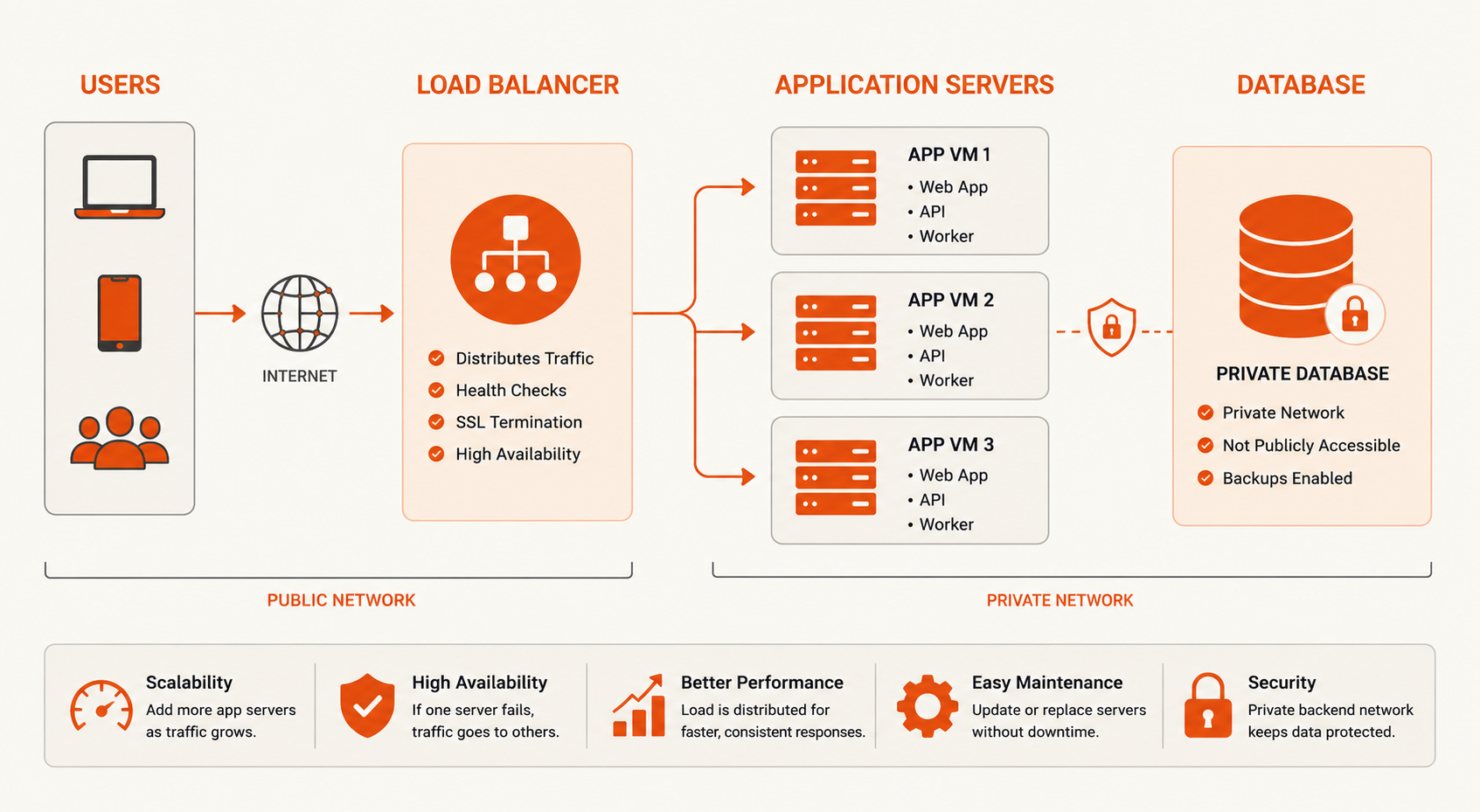
Load balancing: quick answer
A load-balanced application usually looks like this:
Internet
  ↓
Traffic-distribution layer
  ↓
App VM 1
App VM 2
App VM 3
  ↓ private network
Database / cache / queue
Before adding the traffic layer, verify four things:
- Any healthy backend can serve the next request.
- Sessions, uploads, and durable state are not trapped on one VM.
- The remaining fleet can absorb traffic after one backend fails.
- Health checks can distinguish a ready backend from one that should not receive traffic.
If any of these are false, fix the application or dependency model first.
When should you add a load balancer?
A load balancer becomes useful when one application server is the wrong boundary for the workload.
Common triggers are:
- one VM cannot safely handle expected peak traffic;
- one VM failure creates unacceptable downtime;
- deployments should happen without taking the whole application offline;
- maintenance should not require a complete outage;
- several interchangeable application nodes are already available;
- HTTP hostnames, paths, or protocols need different backend pools.
Do not use a load balancer to hide a different bottleneck.
| Measured problem | Better first move |
|---|---|
| One VM is CPU- or RAM-constrained | Optimize or resize the VM |
| Database latency dominates | Tune or scale the database |
| Sessions/files are local | Externalize state first |
| One-node failure is unacceptable | Add redundant backends + traffic distribution |
| Deployments interrupt users | Add multiple backends + draining/readiness |
| Traffic is low and predictable | Keep the simpler single-node design |
Use Horizontal vs Vertical Scaling if the main question is whether to scale up or scale out.
L4 vs L7 load balancing
Layer 4 load balancing distributes transport connections using information such as IP addresses, ports, and protocols. Layer 7 load balancing understands application-layer requests, usually HTTP/HTTPS, and can route using attributes such as hostname, path, headers, cookies, or methods.
| Capability | Layer 4 | Layer 7 |
|---|---|---|
| Typical traffic | TCP, UDP, TLS passthrough | HTTP, HTTPS |
| Routing basis | IP, port, protocol, connection | Host, path, header, method, cookie |
| Application awareness | Limited | High |
| Typical fit | Custom TCP services, passthrough, low-level connection routing | Websites, APIs, path/host routing |
| TLS behavior | Passthrough or termination depending on implementation | Commonly termination or re-encryption |
Choose L4 when the traffic layer should distribute connections without interpreting the application request.
Choose L7 when routing depends on HTTP behavior or when the edge should terminate TLS and make application-aware decisions.
L4 vs L7 is not a performance shortcut
The correct choice follows protocol and routing requirements. A simpler Layer 4 design may be appropriate for raw TCP. A Layer 7 design may be necessary when /api, /admin, and different hostnames need different backends.
The layer alone does not make the architecture more available. Health checks, state handling, spare capacity, and dependency resilience still determine failure behavior.
Load balancer health checks: liveness is not readiness
A load balancer should send new traffic only to a backend that is ready to serve production requests.
A successful TCP connection only proves that a port accepted a connection. It does not prove that the application can complete useful work.
| Check type | What it answers |
|---|---|
| Liveness | Is the process running or recoverable? |
| Readiness | Can this instance accept new production traffic? |
| Dependency check | Are required downstream systems available? |
| Synthetic check | Can a representative workflow complete? |
A good readiness endpoint should be:
- fast;
- deterministic;
- inexpensive;
- strict enough to remove a broken node;
- not dependent on every optional external service.
A poor health check can create an outage by removing healthy nodes or keeping unusable nodes in rotation.
What should happen when all backends are unhealthy?
This is one of the most important load-balancing failure modes to test.
Depending on the traffic layer and configuration, all-unhealthy behavior may return errors, stop forwarding traffic, or fall back to implementation-specific behavior.
Do not assume the answer. Verify the behavior before production and include it in the incident runbook.
A bad health-check deployment should not be able to surprise the team with a completely unknown failure mode.
Connection draining protects in-flight requests
Connection draining stops new traffic from reaching a backend while existing requests or connections are allowed to finish before the node is stopped, updated, or removed.
A safe sequence is:
- Mark the backend unavailable for new traffic.
- Allow routing state to propagate.
- Let active requests or connections finish.
- Stop the application or worker safely.
- Deploy, maintain, or terminate the node.
- Return it only after readiness succeeds.
The drain period should match real workload behavior. A short API request, large upload, streaming response, and long-lived WebSocket connection do not have the same lifecycle.
Failover requires spare capacity
A two-node application is not automatically highly available.
If each backend is already serving close to its maximum safe load, losing one node can simply move the outage to the remaining node.
Plan headroom for:
- one-backend failure;
- maintenance overlap;
- rolling deployments;
- cache warm-up;
- connection redistribution;
- temporary traffic spikes.
A useful test is simple:
Remove one backend during representative load and verify that latency and error rates stay within acceptable limits.
High availability is a capacity decision as well as a routing decision.
Sticky sessions do not make an application stateless
Sticky sessions keep a user or connection tied to a particular backend.
They can help legacy applications during a transition, but they preserve dependence on that node and can create uneven traffic.
Prefer external/shared state where appropriate:
| Local dependency | Better shared pattern |
|---|---|
| In-memory session | Shared session store or suitable token design |
| User uploads | Object storage or approved shared storage |
| Durable files | External authoritative storage |
| Background jobs | Shared queue with retry/ownership rules |
| Cache | Shared/distributed cache with defined loss behavior |
| Local database | Separate database service or VM |
Read Stateful vs Stateless Applications before adding interchangeable application replicas.
Load balancing application servers can expose the next bottleneck
Adding more application servers often increases pressure elsewhere.
Expect more:
- database connections;
- concurrent queries;
- lock contention;
- cache misses;
- queue consumers;
- outbound API calls;
- object-storage operations.
A faster application tier can move the bottleneck into the database or another shared service.
Measure the entire request path rather than treating backend count as the primary performance metric.
TLS termination changes the trust boundary
Common TLS patterns include:
| Pattern | Traffic path |
|---|---|
| Termination | HTTPS to traffic layer, HTTP to protected backend |
| Re-encryption | HTTPS to traffic layer, HTTPS to backend |
| Passthrough | Encrypted connection forwarded to backend |
Layer 7 routing commonly uses TLS termination so the traffic layer can inspect HTTP requests. Re-encryption protects the backend path. Passthrough keeps TLS termination at the application but limits application-aware routing at the edge.
If TLS terminates before the application, configure trusted proxy headers carefully. The backend should trust forwarding headers only from the expected proxy/traffic layer, not from arbitrary clients.
Backends should normally use private networking
The public traffic layer should not require every backend VM to expose its application port to the internet.
A cleaner pattern is:
Internet
  ↓
Traffic-distribution layer
  ↓ private network
App VM 1
App VM 2
  ↓ private network
Database / cache / queue
Use Raff VPC for private communication between Raff workloads. Current Raff VPC traffic is private and unmetered, with no separate VPC charge.
Restrict backend ports to the sources that actually need them. Private reachability does not replace authentication or firewall policy.
Use VPC Architecture for Multi-VM Applications for the private-network design.
Reverse proxy vs load balancer
A reverse proxy is an entry point that forwards client requests to backend services. A load balancer is a traffic-distribution role that spreads traffic across multiple backends.
The same software can often perform both jobs, but the architecture question is different.
- One backend behind Nginx can still be a reverse-proxy architecture without load balancing.
- Several interchangeable backends behind a traffic layer is load balancing.
Use Reverse Proxy vs Load Balancer when deciding whether the workload actually needs a backend pool.
Rolling deployments depend on draining and version compatibility
A basic rolling deployment can follow this sequence:
- Drain one backend.
- Deploy the new version.
- Wait for readiness.
- Return the backend to traffic.
- Continue to the next node.
During the rollout, old and new application versions may run at the same time.
Keep compatibility in:
- database schemas;
- session formats;
- queue messages;
- cache keys;
- APIs;
- background jobs.
Use Blue-Green vs Rolling Deployments for the release-strategy decision.
Align timeouts and retries across the request path
A request may cross a client, CDN, traffic layer, reverse proxy, application server, database, and external API.
Each layer can have its own:
- connect timeout;
- request timeout;
- response timeout;
- idle timeout;
- retry policy.
Document which layer should fail first. Avoid retries at several layers that multiply traffic during an incident.
Do not automatically retry non-idempotent actions such as payment or order creation unless the application has an idempotency design.
Monitor the traffic layer and application separately
Useful load-balancing metrics include:
- request or connection rate;
- p50/p95/p99 latency;
- frontend and backend error rates;
- healthy/unhealthy backend count;
- health-check failure reasons;
- active connections;
- timeout/reset counts;
- distribution by backend;
- draining duration.
Also monitor:
- backend CPU and memory;
- database connections and latency;
- cache hit/miss behavior;
- queue depth;
- external dependency errors.
A healthy traffic layer can forward requests to an application that is returning logical errors. A failed health check may be caused by routing, firewall, TLS, timeout, or application problems.
How to design a load-balanced architecture on Raff today
A current Raff architecture can use the live building blocks around the traffic layer without assuming that Raff's managed Load Balancer is generally available.
A practical growth path is:
Stage 1
One Raff VM
Application + reverse proxy

Stage 2
Resize if CPU/RAM is the measured limit

Stage 3
Multiple interchangeable Raff VMs
Traffic-distribution layer
Raff VPC
Separate database / managed database

Stage 4
Health checks + draining + monitoring
Object storage/shared state
Data Protection + tested recovery
Relevant live Raff products include:
- Raff VM for application backends;
- VPC for private backend traffic;
- Security for network exposure controls;
- Object Storage for shared assets and uploads where appropriate;
- Managed Databases for a separate data layer;
- Data Protection for snapshot and backup recovery.
If you want a managed traffic-distribution service, confirm the current Raff Load Balancer product status before making it an architectural dependency.