Managed database vs self-hosted database is mainly a decision about who owns production database operations. The engine may be the same PostgreSQL or MySQL, but responsibility for patching, backups, recovery tooling, monitoring, failover, storage growth, upgrades, and incidents changes materially between the two models.
For most small product teams, a managed database is a practical starting point when the service supports the required engine features and the team wants to reduce host-level database work. Self-hosting makes sense when there is a documented need for operating-system access, unsupported extensions, custom topology, exact version control, or another capability the managed service does not provide.
Raff supports both paths. Teams can use Raff Managed Databases to reduce database-platform operations or run a database on Raff VM when deeper control is required. Raff Managed Databases currently supports PostgreSQL, MySQL, Valkey, ClickHouse, and Kafka.
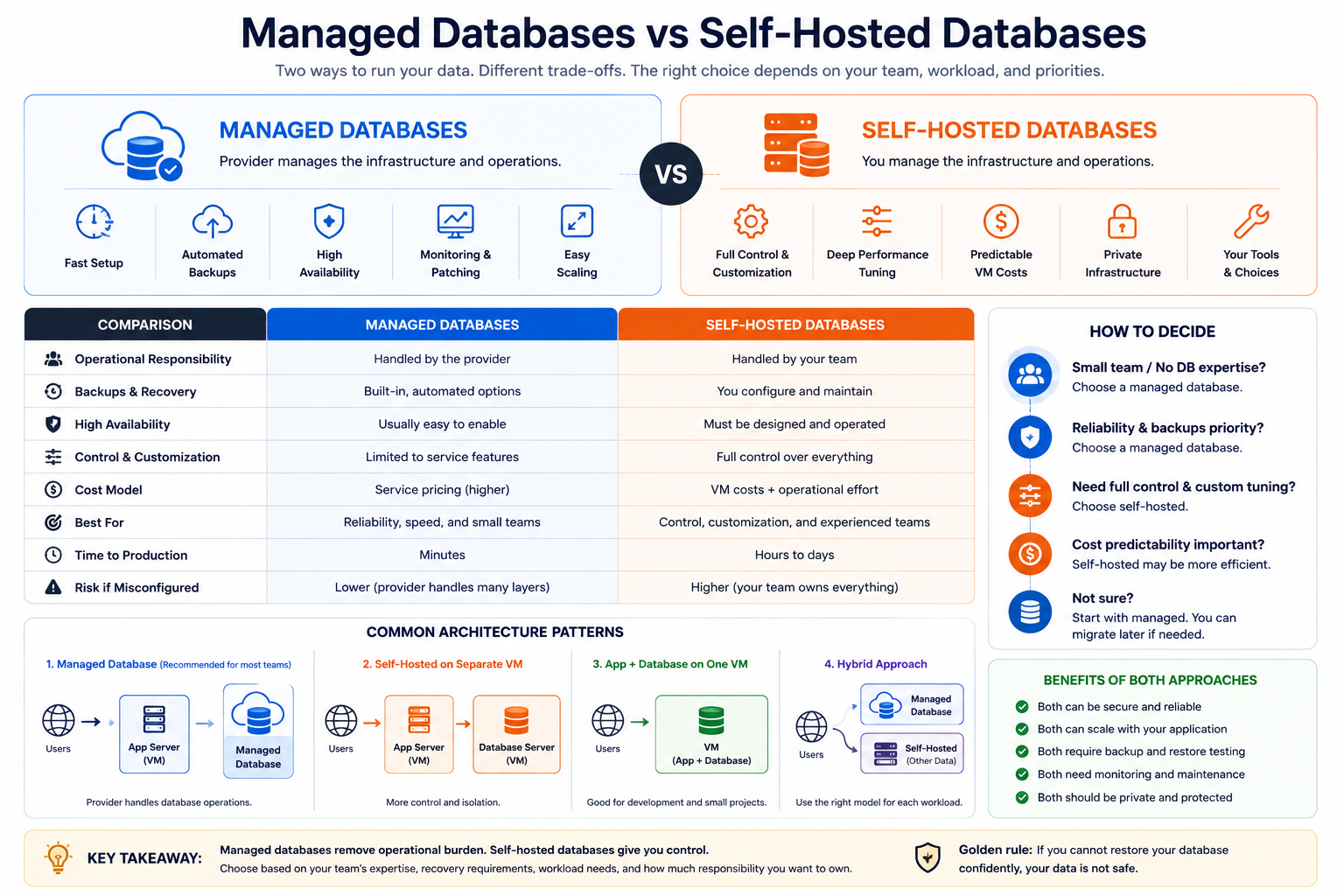
Managed database vs self-hosted: quick decision
| Question | Managed database | Self-hosted database |
|---|
| Who patches the database platform? | Provider within service policy | Your team |
| Who manages the OS? | Provider | Your team |
| Who provides backup tooling? | Provider within plan scope | Your team |
| Who validates recovery? | Shared responsibility | Your team |
| Who designs schemas and indexes? | Your team | Your team |
| Root / OS access | Usually no | Yes |
| Unsupported extensions/custom binaries | Often restricted | Usually possible |
| High availability | Available where supported by the service | You design and operate it |
| Monitoring platform | Included to the service's defined scope | You build or integrate it |
| Operational flexibility | Lower | Higher |
| Host-level operational work | Lower | Higher |
| Typical fit | Teams reducing recurring database-platform operations | Teams with hard control requirements and database-operations capability |
The important distinction is that managed does not mean "no database work." It means the provider owns more of the platform lifecycle while your team still owns schemas, queries, indexes, migrations, credentials, connection behavior, capacity decisions, and application correctness.
If the managed column fits your requirements, compare Raff Managed Databases, Managed PostgreSQL, or Managed MySQL. If the self-hosted column contains a hard requirement, evaluate the same workload on Raff VM and include the operational work in the cost model.
What does a managed database actually manage?
A managed database service normally takes responsibility for more of the database platform layer. Depending on the provider and plan, that can include database installation, operating-system maintenance, patching workflows, backup infrastructure, point-in-time recovery tooling, storage management, service monitoring, replication or high-availability options, failover tooling, private-network integration, and controlled upgrades.
The exact boundary matters because "managed" is not a universal specification.
Before choosing any managed database, verify:
- What exactly is backed up?
- How long are backups retained?
- Is point-in-time recovery available?
- Who initiates restore operations?
- What is the expected failover behavior?
- Are maintenance windows configurable?
- Which versions and extensions are supported?
- How are storage and connections scaled?
- Is private networking available?
- What is the migration or export path if you leave?
Those answers are more useful than the label "fully managed."
What remains your responsibility with a managed database?
Managed services remove platform work, not application responsibility. Your team still owns:
- schema design;
- migrations;
- indexes;
- query performance;
- transaction behavior;
- connection pooling;
- users, roles, and application credentials;
- least-privilege access;
- retention decisions;
- capacity planning;
- application behavior during failover;
- validating that restored data is actually usable.
A provider cannot know whether a restore point contains a business-level error, whether a migration should be rolled back, or whether an index matches your application's real access pattern.
That is why the useful promise of a managed database is less infrastructure operations, not "the database runs itself."
What self-hosting really means in production
Self-hosting gives your team more control because your team owns more of the stack:
VM provisioning
+ OS hardening
+ database installation
+ version selection
+ patching
+ TLS
+ firewall rules
+ monitoring
+ alerts
+ backups
+ restore tests
+ storage growth
+ replication
+ failover
+ upgrades
+ incident response
+ decommissioning
Installing PostgreSQL or MySQL can take minutes. Operating it safely over time is the larger responsibility.
Self-hosting is justified when the additional control solves a real requirement, for example:
- root or OS access is required;
- a required extension is unsupported by the managed service;
- exact database binaries or patch timing matter;
- custom authentication modules are needed;
- the application requires filesystem-level access;
- the team needs a custom replication or clustering topology;
- restricted superuser operations are required;
- an architectural or compliance requirement demands deeper infrastructure ownership.
More control also creates more operational obligations.
Managed database cost vs self-hosted cost
A self-hosted database can have a lower infrastructure invoice and still have a higher total operating cost.
A useful self-hosted cost model includes:
Primary VM
+ standby or replica capacity
+ storage
+ backup storage
+ monitoring
+ networking
+ engineering time
+ on-call response
+ patching
+ upgrades
+ restore testing
+ incident recovery
A managed database cost model includes:
Managed database plan
+ optional HA or replicas
+ storage growth
+ backup retention beyond included limits
+ networking or transfer where applicable
+ engineering time for schema, queries, and migrations
The comparison must use the same reliability target. Comparing one self-hosted VM with a managed HA database is not a fair price comparison because the operating outcomes are different.
A team that already has mature automation, monitoring, backup tooling, and on-call coverage may operate self-hosted databases efficiently. The correct model depends on the existing operating capability, not only the provider invoice.
Operator time is often the hidden small-team cost
For a small team, engineering attention may matter more than the compute invoice.
Routine database work can include checking backup failures, reviewing storage growth, security patching, replica health, connection saturation, restore testing, upgrade preparation, and incident response.
Operational pattern from Raff: when the same engineer owns product delivery and database operations, backup, patching, recovery, and incident work quickly becomes part of the database's real cost.
The useful question is not "Which monthly price is lower?" It is "Which model gives us the required reliability with an operating burden our team can sustain?"
Recovery requirements should come before price
Two questions should shape a production database architecture before price comparison:
- How much data can the business afford to lose?
- How long can the application be unavailable?
These become the RPO and RTO targets.
Document:
- backup frequency;
- retention;
- point-in-time recovery requirements;
- restore procedure;
- restore owner;
- expected restore duration;
- application validation after recovery;
- the date and result of the last restore test.
Backups that have never been restored are assumptions, not proven recovery plans.
A managed service can provide backup and PITR tooling, but the application team still needs to select the safe restore point and verify application correctness. A self-hosted team owns both the database and the recovery platform, including engine-aware backups, storage, retention, encryption, automation, monitoring, and restore tests.
VM snapshots can be useful, but they should not automatically be treated as database-consistent backups without a tested procedure.
High availability is not the same as backup
Replication and high availability reduce downtime from certain failures. They do not protect against every data-loss scenario.
A destructive application query, for example, can be replicated to a standby immediately.
A production design may therefore require both:
High availability
+ independent backups or PITR
Managed services can reduce the operational work around both. Self-hosting can provide similar outcomes, but the team must design, operate, test, and document them.
Scaling is easier only when the bottleneck is understood
Managed databases can simplify resizing, storage expansion, replicas, and connection-management options, but a larger database does not fix every problem.
Before scaling, determine whether pressure comes from inefficient queries, missing indexes, excessive connections, memory pressure, storage latency, lock contention, replication lag, write amplification, long-running transactions, or retry storms.
Connection capacity deserves special attention. A simple estimate is:
application instances x pool size
+ workers and jobs
+ admin connections
+ monitoring
+ recovery headroom
A database can have available CPU and still reject traffic because the connection limit has been exhausted.
Managed services reduce infrastructure work around scaling. They do not remove the need to understand workload behavior.
Security ownership differs between the models
In both models, your team owns application credentials, secret storage, least privilege, database users and roles, destructive-operation controls, data classification, and application vulnerabilities.
With self-hosting, your team additionally owns more of the OS patching, host hardening, database patching, firewall configuration, TLS deployment, backup security, vulnerability response, and monitoring infrastructure.
Where possible, keep database traffic on private or tightly restricted network paths rather than exposing a database broadly to the public internet.
Portability and exit planning matter before purchase
Managed services reduce operational work but can introduce service-specific constraints. Before choosing a provider, verify supported engine versions, extensions, export methods, backup portability, migration tooling, network access, maintenance policy, upgrade policy, capacity limits, and the expected effort required to leave.
The managed architecture is easier to evaluate when the exit path is understood before it is needed.
Self-hosting offers more direct control over database files and configuration, but custom clustering, filesystem layouts, and home-grown tooling can create their own migration complexity.
Managed PostgreSQL vs self-hosted PostgreSQL
PostgreSQL is a common case where the engine is already chosen and the remaining question is operations.
Managed PostgreSQL fits when supported extensions meet the workload, the service's backup and recovery capabilities satisfy the requirement, the team wants less maintenance work, and product engineering time matters more than host control.
Self-hosted PostgreSQL fits when an unsupported extension is mandatory, OS-level tuning is required, custom replication or topology is needed, exact version or patch control matters, or database operations are already a mature internal capability.
Raff Managed PostgreSQL has a permanent $0 free tier with 1 vCPU, 1 GB RAM, and 2 GB storage for compatibility testing. Paid plans start at $7.99/month.
For a deeper decision, see Postgres Hosting: Managed vs Self-Hosted. If the managed path already fits, review Raff Managed PostgreSQL.
Managed MySQL vs self-hosted MySQL
The same framework applies to MySQL.
Managed MySQL can reduce work around maintenance, backups, monitoring, and availability when the service limits fit the application. Self-hosting becomes more attractive when the team needs host access, deeper configuration control, custom plugins, or topology that the managed service does not support.
Raff Managed MySQL also has a permanent $0 free tier with 1 vCPU, 1 GB RAM, and 2 GB storage. Paid plans start at $7.99/month.
See MySQL Hosting: Managed vs Self-Hosted for the engine-specific decision. If the operating model is already clear, review Raff Managed MySQL.
How Raff supports both database operating models
Raff provides two paths because not every production workload should be forced into the same operating model.
Raff Managed Databases
Raff Managed Databases currently supports PostgreSQL, MySQL, Valkey, ClickHouse, and Kafka.
The commercial value is operational: reduce the amount of infrastructure work the application team must own around provisioning, maintenance, monitoring, backup and recovery tooling, networking, and supported availability features.
Current engine capabilities, limits, HA options, backup behavior, and pricing should be checked on the live product pages before production purchase.
Self-hosted database on Raff VM
A Raff VM is the path when deeper database or operating-system control is required.
The database remains self-managed. Your team owns installation, configuration, patching, monitoring, backups, restore testing, scaling, security, availability, and incident response inside the guest environment.
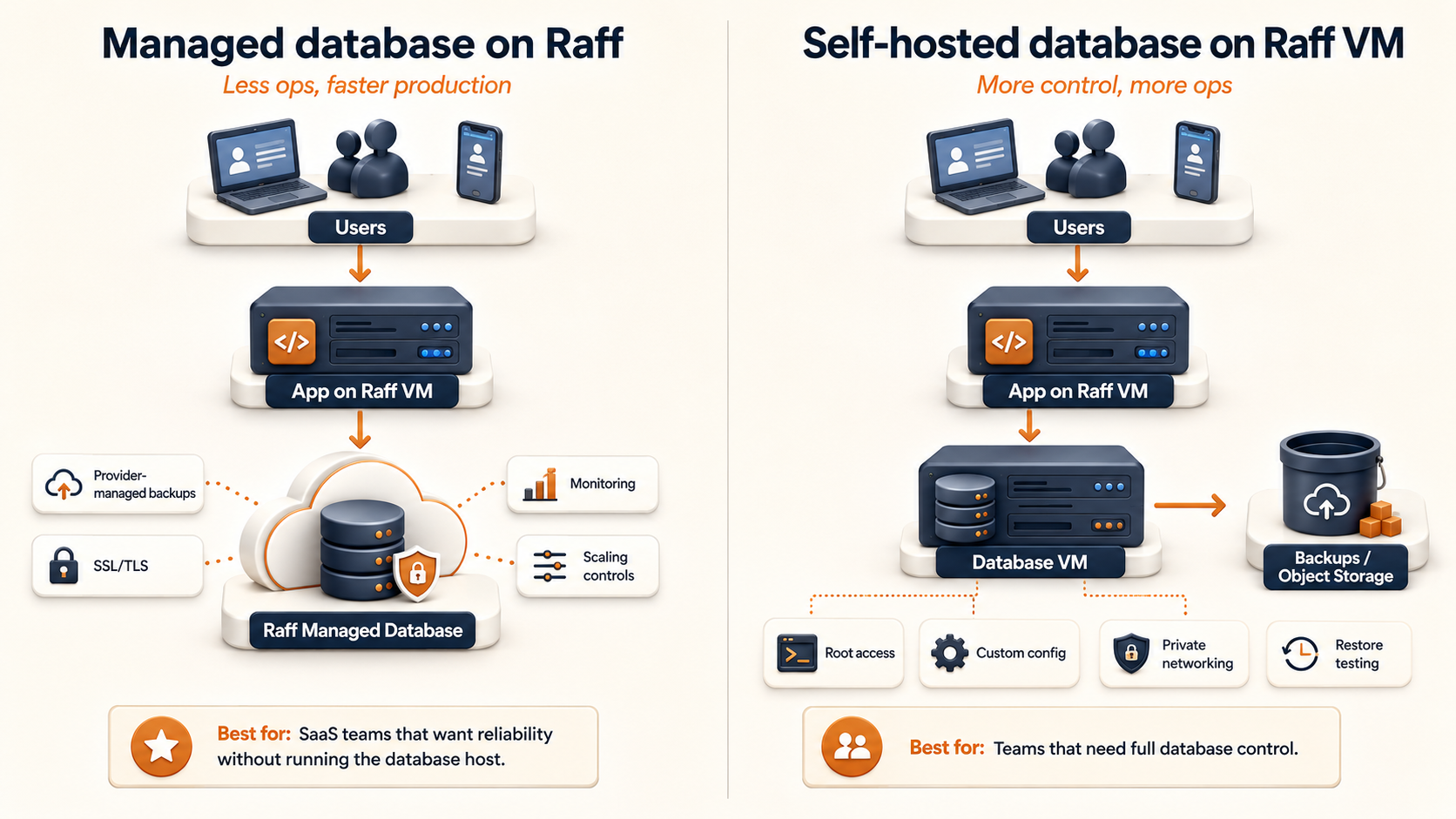
The architecture can be as simple as:
Application
  -> private/restricted connection
Managed Database
or, when control is required:
Application VM
  -> private network
Database VM
  -> customer-operated backups, monitoring, patching, HA and recovery
The second model simply transfers more responsibility to the customer team.
If you are deciding when application and database workloads should use separate servers, read Separate App and Database Server for the infrastructure-boundary decision.
Which Raff path should you choose?
Choose Raff Managed Databases when:
- you do not need OS or root access;
- supported versions and extensions fit the application;
- your team wants less database-platform operations;
- managed backup, recovery, and monitoring tooling are valuable;
- reducing on-call surface area matters;
- you want a simpler production operating model.
Choose a self-hosted database on Raff VM when:
- root access is required;
- a required extension or plugin is unsupported;
- custom topology is necessary;
- exact binary or patch control is required;
- your team already has mature database automation and on-call ownership;
- a documented technical requirement justifies the additional operational burden.
If neither list is decisive, identify the blocker that prevents the managed model. A concrete blocker is a stronger reason to self-host than a general preference for control.
Production database buying checklist
Before paying for either model, write down:
- Required engine and version.
- Required extensions or plugins.
- Expected database size and monthly growth.
- Peak connections.
- Required RPO and RTO.
- Whether HA is required.
- Backup retention requirement.
- Private-network requirement.
- Security or compliance constraints.
- Who owns incidents and restores.
- Expected migration or exit path.
- Total monthly cost including operator time.
If these are unknown, the plan price alone is not enough information to choose a production database.
Conclusion
Managed database vs self-hosted is a decision about operational ownership, not simply database software.
A managed database fits when standard service capabilities meet the workload and the team wants to reduce recurring database-platform work. Self-hosting fits when a hard technical or control requirement needs deeper access and the team can sustain the complete operational lifecycle.
Compare both models using the same recovery, availability, security, and performance requirements. Then include engineering time and incident ownership in the cost calculation.
Sources

