
Nginx and Apache HTTP Server can both serve websites, terminate TLS, proxy application traffic, and run production workloads. Choose Nginx when you want a centralized, reverse-proxy-first edge for a new API, application server, static site, or container workload. Choose Apache when the application depends on .htaccess, an Apache module, delegated per-directory configuration, or an existing operating model that already works.
The decision should not rely on a generic claim that one server is always faster. Application code, PHP-FPM or another runtime, database latency, caching, TLS, storage, and configuration often affect user experience more than the web-server name.
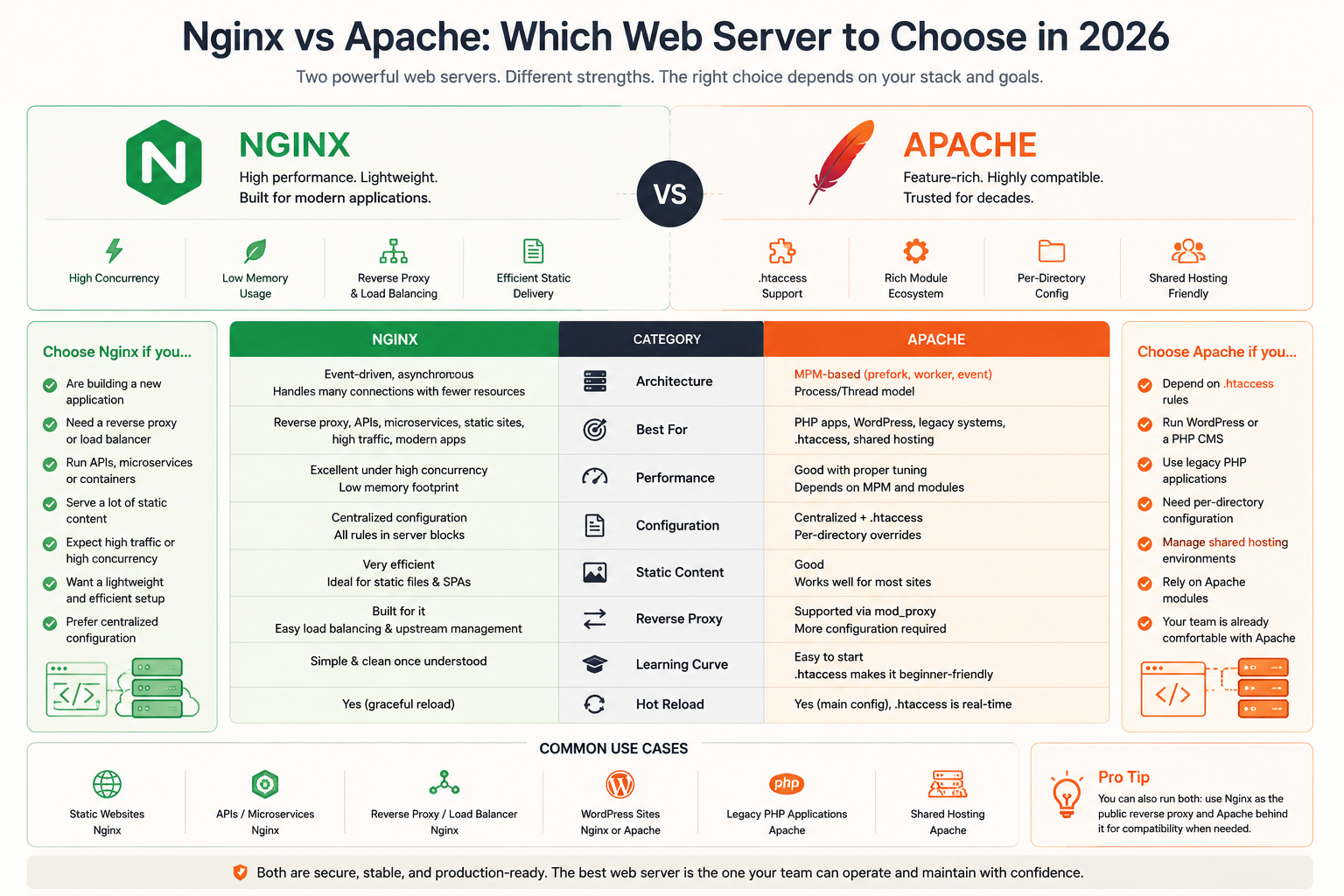
Nginx vs Apache at a glance
| Decision area | Nginx | Apache HTTP Server |
|---|---|---|
| Common architecture | Event-driven master and worker processes | Modular server using one selected Multi-Processing Module |
| Configuration model | Central configuration | Central configuration plus optional .htaccess overrides |
| Reverse proxy | Native and widely used role | Supported through mod_proxy and protocol modules |
| Dynamic applications | Proxies to PHP-FPM, Node.js, Python, Java, containers, or other runtimes | Proxies to application runtimes and supports FastCGI through mod_proxy_fcgi |
| Static files | Strong fit | Fully capable |
| Per-directory delegation | No .htaccess equivalent | Native .htaccess support when enabled |
| Shared-hosting compatibility | Less natural | Strong fit for delegated directory control |
| Operational simplicity | Strong for centrally managed VPS deployments | Strong when existing modules and Apache conventions are already standardized |
| Best default | New reverse-proxy-first applications | Compatibility-driven or delegated-configuration workloads |
A useful rule is:
Choose the server whose configuration and application model your team can keep secure, observable, testable, and repeatable.
Nginx vs Apache market share
Apache is still widely used, but it no longer leads. W3Techs measures Nginx at 31.6% of all websites and Apache at 23.1% as of August 2026, with Cloudflare's server at 29.0% and LiteSpeed at 15.0%. Adoption numbers describe the ecosystem, not your workload: Apache's share includes a large installed base of shared hosting and long-running deployments, and both servers remain actively maintained. Use market share to gauge community size and documentation depth, not as a reason to switch by itself.
Use six questions to make the decision
Does the application require .htaccess?
If the application, plugin, control panel, or customer workflow writes .htaccess rules, Apache is normally the lower-risk choice.
Nginx does not process .htaccess. Rewrite, access, caching, and header rules must be translated into central Nginx configuration.
Is the server primarily a reverse proxy?
Nginx is a natural default when the public server mainly forwards requests to an application on localhost, a private IP, a container, or a group of upstream nodes.
Apache can perform the same role through mod_proxy, mod_proxy_http, mod_proxy_fcgi, WebSocket support, and load-balancing modules. Existing Apache expertise can therefore outweigh the benefit of changing products.
Who is allowed to change configuration?
Use central configuration when a small operations team owns the complete server. Use delegated directory configuration only when content owners genuinely need limited control without access to the main server files.
Apache’s own documentation recommends main-server configuration instead of .htaccess when administrators control the server, because central configuration is loaded at startup and is easier to govern.
What application model already exists?
A Node.js, Python, Go, Java, or container application commonly expects a separate application process behind a reverse proxy. Nginx fits this pattern cleanly.
A migrated WordPress, Drupal, or traditional PHP estate may already depend on Apache rewrite rules, modules, virtual-host conventions, and support procedures. Preserving a working model may be safer than translating it during migration.
Is there evidence that the current server is the bottleneck?
Do not switch because of a generic performance comparison.
Measure:
- time to first byte and total request latency;
- application and database time;
- static-file throughput;
- concurrent connections;
- CPU and memory under representative traffic;
- TLS handshake cost;
- upstream queueing and timeouts;
- error rate and saturation;
- deployment and recovery time.
A slow database query remains slow behind either server.
Can the team operate the change safely?
A migration changes more than a package. It can affect redirects, headers, real-client IP handling, TLS, compression, cache rules, upload limits, timeouts, WebSockets, logging, file permissions, and application routing.
Stay with the current server when the expected benefit is smaller than the migration and operating risk.
Nginx uses an event-driven worker model
Nginx normally runs a master process that manages worker processes. Workers use non-blocking, event-driven request handling so one worker can manage many active connections without assigning one dedicated process or thread to every idle connection.
This design fits:
- reverse proxying;
- static assets;
- APIs with many concurrent connections;
- long-lived connections when configured correctly;
- centralized routing to several application services;
- a public edge in front of private runtimes.
The architecture does not make every Nginx deployment fast automatically. Worker count, connection limits, buffers, upstream behavior, operating-system limits, TLS, logging, and application latency still matter.
Nginx supports testing configuration with nginx -t and reloading it so new workers use the new configuration while old workers shut down gracefully. That makes a validate-before-reload workflow practical for production changes.
Apache uses selectable Multi-Processing Modules
Apache HTTP Server uses one Multi-Processing Module, or MPM, to determine how it handles network connections and request processing.
On Unix-like systems, common MPMs include:
event;worker;prefork.
Apache’s current documentation describes event as the default on supported threaded Unix-like platforms. Event MPM is designed so threads are used for active processing rather than remaining tied to every keep-alive connection.
This matters because comparisons based only on old prefork deployments can misrepresent modern Apache behavior.
Apache’s modular architecture is a major advantage when the workload depends on specific authentication, authorization, proxy, rewrite, language, or hosting modules. It also means performance and memory behavior depend on the chosen MPM and loaded modules.
Performance depends on the complete request path
There is no responsible evergreen multiplier such as “Nginx is always twice as fast” or “Apache always uses a fixed percentage more memory.” Those numbers depend on test hardware, versions, modules, TLS settings, file sizes, cache state, concurrency, logging, and the application behind the server.
Static-file tests favor a different problem than application tests
A static benchmark measures how the web server reads and sends files. It may be useful for documentation, media, frontend assets, or downloads.
It does not predict the performance of:
- WordPress with PHP and database queries;
- a Node.js API;
- an application using external services;
- authentication-heavy traffic;
- uploads and long-running requests;
- cache-miss behavior.
Dynamic workloads are often limited behind the web server
For dynamic requests, inspect:
Client
  ↓
Nginx or Apache
  ↓
Application runtime
  ↓
Database, cache, queue, or external API
If the runtime takes 400 ms and the proxy adds only a small fraction of that time, changing the proxy will not transform the response.
Benchmark the configuration you would actually operate
Use:
- the same VM profile;
- the same TLS configuration;
- the same application and dataset;
- equivalent compression and logging;
- realistic keep-alive behavior;
- representative request sizes;
- warm and cold cache scenarios;
- latency percentiles, not only requests per second;
- error and timeout rates under saturation.
A result is useful only when it reflects the production decision.
Nginx is a strong default for a reverse-proxy-first application
Nginx’s proxy module passes requests to HTTP or HTTPS upstreams and supports header control, buffering, caching, timeouts, connection behavior, and upstream groups.
A typical architecture is:
Internet
  ↓ HTTPS
Nginx
  ↓ localhost or private network
Node.js, Python, Go, Java, PHP-FPM, or containers
This separates responsibilities:
- Nginx owns the public HTTP and TLS boundary;
- the application runtime owns business logic;
- the database and internal services stay private.
Nginx is a good default when:
- the application already listens on an internal port;
- configuration is centrally managed;
- the public edge serves static assets and proxies dynamic requests;
- multiple internal applications need path or hostname routing;
- the team wants one consistent server-block model.
Do not expose the application runtime publicly merely because it can listen on a network port. Keep the web server or load balancer as the intended public entry point.
Apache is also a capable reverse proxy
Apache’s mod_proxy family supports HTTP, FastCGI, WebSocket, HTTP/2 upstreams, load balancing, and other protocols through separate modules.
Apache is a reasonable reverse-proxy choice when:
- the team already operates Apache safely;
- authentication or authorization modules are integrated at the edge;
- the same server also hosts Apache-dependent applications;
- the migration cost of replacing Apache has no measured benefit;
- existing virtual-host and logging standards are mature.
The comparison is therefore not “Nginx proxies and Apache does not.” It is a decision between two different configuration and module ecosystems.
.htaccess is a delegation feature with a cost
Apache .htaccess files allow configuration directives to be placed inside a directory tree and applied without editing the main server configuration.
This is useful when:
- customers or application owners do not have root access;
- a shared-hosting platform delegates limited control;
- a CMS or plugin distributes rewrite rules;
- a migration must preserve existing directory-level behavior.
It is less attractive when one operations team controls the complete VPS.
Apache’s documentation notes two important trade-offs:
- the server may search the directory path for
.htaccessfiles on requests when overrides are enabled; - delegated configuration gives users permission to alter server behavior.
When Apache is retained on a centrally managed server, prefer main virtual-host or directory configuration where practical. If overrides are required, allow only the directive categories or individual directives the application needs rather than using a broad AllowOverride All without review.
WordPress can run on either server
WordPress officially recognizes both Apache and Nginx as robust web-server choices.
Choose Apache for WordPress when:
- the site or plugins depend on
.htaccess; - it is moving from a shared-hosting environment;
- support procedures assume Apache;
- preserving current rewrite behavior reduces migration risk.
Choose Nginx for WordPress when:
- the team controls the server configuration;
- PHP runs through PHP-FPM;
- rewrite and cache rules are managed centrally;
- the team already operates Nginx;
- the site is part of a broader reverse-proxy-first platform.
Neither choice fixes slow plugins, inefficient database queries, insufficient PHP workers, poor caching, or an undersized VM.
The lower-risk choice is the one that preserves required behavior and can be maintained consistently.
PHP-FPM reduces the architectural difference for PHP workloads
Both servers can forward PHP requests to PHP-FPM.
Nginx typically uses FastCGI configuration to pass PHP scripts to the PHP-FPM service. Apache supports PHP-FPM through mod_proxy_fcgi together with mod_proxy.
Once both use PHP-FPM, application performance may depend more on:
- PHP worker count and process management;
- opcode caching;
- application code;
- database performance;
- object and page caching;
- filesystem and storage latency;
- memory limits;
- request timeouts.
Choose the web server from configuration ownership and compatibility, then tune the runtime from evidence.
Configuration structure changes how teams operate
Nginx centralizes behavior
Nginx rules are normally stored in configuration files controlled by administrators or automation. This makes it easier to:
- review the complete routing model;
- test configuration before reload;
- version configuration as code;
- apply one security baseline;
- prevent application directories from silently changing server behavior.
The trade-off is that application-specific rewrite rules must be translated and deployed through the central process.
Apache can centralize or delegate behavior
Apache can keep everything in central virtual-host and directory configuration, or permit selected .htaccess overrides.
This flexibility fits shared hosting and inherited application estates. It also creates more places to inspect during troubleshooting.
Choose one ownership model deliberately. A server becomes difficult to operate when some behavior is in automation, some in virtual hosts, some in .htaccess, and some in undocumented modules.
Security depends more on configuration and maintenance than brand
Both servers can be operated securely and both can be exposed through unsafe configuration.
A production baseline includes:
- supported packages and timely security updates;
- TLS configuration and certificate renewal monitoring;
- public access limited to required ports;
- restricted SSH or administrative access;
- private application, database, cache, and queue ports;
- least-privilege service accounts;
- minimal loaded modules;
- controlled file ownership and permissions;
- access and error logging;
- secret protection;
- configuration backups and rollback;
- tested recovery after a failed change.
For reverse proxies, also validate:
- trusted proxy and real-client IP settings;
- forwarded host and protocol headers;
- request-body and upload limits;
- upstream TLS verification where used;
- WebSocket and long-lived connection behavior;
- timeout and retry policy;
- prevention of an unintended open proxy.
Apache’s documentation explicitly warns against enabling forward proxying without securing it. Reverse-proxy rules should expose only intended backends.
Protocol support rarely decides the comparison by itself
Both products support modern web delivery, including TLS and HTTP/2 when the relevant modules and packages are enabled.
The operational questions are more useful:
- Is the protocol enabled on the deployed build?
- Does TLS negotiation work as expected?
- Are certificates renewed and monitored?
- Do reverse-proxy headers preserve the correct scheme and host?
- Does the application support WebSockets or streaming correctly?
- Can the team debug the protocol path?
Do not select a server from a feature checkbox without confirming the version and package available on the target operating system.
Caching and compression need workload-specific ownership
Nginx and Apache both provide caching and compression capabilities through their configuration and modules.
Before enabling them, define:
- which responses are safe to cache;
- cache keys and variation by host, cookie, or authorization;
- invalidation behavior;
- stale-content behavior;
- compression types and CPU cost;
- maximum object sizes;
- observability for hit ratio and bypass reasons.
Incorrect caching can leak personalized content or serve stale application state. The team should understand the cache policy rather than copying a generic snippet.
For many applications, a CDN, application cache, or dedicated cache layer may be a better owner for some content than the VM web server.
Load balancing can happen inside the server or outside the VM
Both Nginx and Apache can distribute requests to upstream servers.
An external managed load balancer may be preferable when the team needs:
- one platform-managed public endpoint;
- health-aware removal of VM backends;
- infrastructure-level separation from the application hosts;
- easier replacement of web-server nodes;
- a clear boundary before several reverse proxies.
A common scaled architecture is:
Internet
  ↓
Load balancer
  ↓
Nginx or Apache on App VM 1
Nginx or Apache on App VM 2
  ↓ private network
Application dependencies
Do not confuse the host web server with the complete availability design. Database, storage, DNS, sessions, and deployment behavior must also tolerate node loss.
Switching servers is justified only by a defined benefit
Good reasons to move from Apache to Nginx
.htaccessdelegation is no longer needed;- the platform is standardizing on a reverse-proxy-first model;
- configuration is being centralized as code;
- the application estate is moving to separate runtimes or containers;
- representative testing shows a meaningful operational or capacity benefit;
- the team has Nginx expertise and a tested migration plan.
Good reasons to move from Nginx to Apache
- the application requires Apache-only behavior or modules;
- translating
.htaccesscreates excessive risk; - a control panel or shared-hosting workflow depends on Apache;
- the support team standardizes on Apache;
- existing Apache automation reduces operating cost.
Weak reasons to switch
- a generic benchmark from different hardware;
- an unsupported claim that one server is always faster;
- familiarity with the product name but not its configuration;
- replacing a stable server while the actual bottleneck is the application or database.
A migration needs behavioral equivalence
Before changing servers, inventory:
- domains and virtual hosts;
- redirects and rewrite rules;
- document roots;
- static-file paths;
- MIME types;
- compression;
- security headers;
- access restrictions;
- client IP forwarding;
- TLS certificates and protocols;
- upload and body-size limits;
- proxy timeouts;
- WebSockets and streaming;
- log formats and monitoring;
- PHP-FPM or application sockets;
- health checks;
- startup and reload behavior.
Validate the replacement in parallel. Use a test hostname or controlled traffic path, compare responses and logs, then keep a rollback path during cutover.
A successful homepage request does not prove that authentication, uploads, redirects, admin routes, APIs, background callbacks, and large requests behave correctly.
Using Nginx and Apache together is a compatibility pattern
Nginx can sit in front of Apache:
Internet
  ↓
Nginx public edge
  ↓
Apache application server
This can preserve .htaccess or Apache-module behavior while centralizing TLS, static assets, or public proxying in Nginx.
Use the pattern when it solves a specific compatibility problem. Avoid it as a default because it adds:
- two configuration layers;
- two sets of logs and timeouts;
- additional header and client-IP handling;
- more failure and debugging points;
- another service to patch and monitor.
One well-operated server is usually better than two layers with unclear ownership.
Choose by workload and operating model
| Workload | Better starting direction | Reason |
|---|---|---|
| New Node.js, Python, Go, or Java application | Nginx | Clean reverse-proxy-first model |
| Static site or frontend assets | Nginx | Simple centralized file-serving configuration |
Existing WordPress migration with .htaccess | Apache | Lower rewrite and compatibility risk |
| WordPress managed centrally with PHP-FPM | Either | Team knowledge and cache design matter more |
| Shared hosting with delegated directory rules | Apache | .htaccess supports controlled delegation |
| Existing Apache application with mature automation | Apache | Avoid migration without measured benefit |
| Container application behind one VM edge | Nginx | Common centralized routing pattern |
| Edge requiring Apache authentication modules | Apache | Module integration may be the deciding factor |
| Multi-node application | Either behind a load balancer | Availability design is larger than the host server |
What we see in Raff deployment work
In Raff deployment guides, Nginx commonly appears as the public edge for applications that run in a separate process, including modern PHP-FPM and reverse-proxy workflows. The reason is operational fit: one central configuration can route traffic, keep the runtime private, and be validated before reload.
Apache remains the safer decision when a migrated site already depends on .htaccess or Apache-specific behavior. Rewriting a working estate only to follow a default recommendation can introduce more risk than value.
The repeatable lesson is:
Compatibility and operational ownership decide the server first. Performance tuning follows measurement.
How this applies on Raff
Both Nginx and Apache can run on a Raff VM. The VM provides the Linux compute environment; your team remains responsible for installing, configuring, patching, monitoring, and recovering the web-server and application stack.
A practical single-VM architecture is:
DNS
  ↓
Raff VM public IP
  ↓
Nginx or Apache on ports 80 and 443
  ↓ localhost
Application runtime
For a multi-node application:
DNS
  ↓
Raff Load Balancer
  ↓
Application VMs
  ↓ Raff Private Cloud Network
Database, cache, queue, and storage
Use Private Cloud Networks for supported backend communication, Load Balancers when traffic must reach several healthy application nodes, and Data Protection as part of the recovery plan.
Verify current VM profiles, load-balancer behavior, networking, and pricing on the live product pages before deployment.