
Raff API keys let small teams automate cloud infrastructure tasks such as creating virtual machines, managing projects, attaching storage, configuring networking, creating snapshots, scheduling backups, and integrating Raff into scripts, CI/CD pipelines, CLI workflows, or Terraform.
The practical answer is simple:
Use Raff API keys when a task is repeated often enough that dashboard clicks become slow, inconsistent, or risky. Start with low-risk automation, scope keys carefully, and treat every API key like production access.
That framing matters because API keys are powerful.
A dashboard is manual. An API key is programmable. A script can repeat the same action hundreds of times.
That is useful when the script is correct. It is dangerous when the script is careless.
For small teams, the goal is not to automate everything on day one. The goal is to automate the work that creates the most operational value with the least unnecessary risk.
Good first targets include:
- creating test VMs
- creating staging environments
- managing SSH keys
- scheduling backups
- creating snapshots before deployments
- cleaning up temporary resources
- provisioning repeatable demo environments
- managing firewall rules
- listing infrastructure inventory
- integrating Raff into internal tools
Raff API keys turn infrastructure into a programmable system. Used well, they help small teams move faster without building a large DevOps department.
Used poorly, they can create security and cost risk.
This guide explains how Raff API keys work, when small teams should use them, common automation patterns, security best practices, and how to build a safer automation workflow on Raff.
Quick answer: when should a small team use API keys?
Use API keys when a cloud operation needs to be repeatable, scriptable, consistent, or connected to another tool.
| Situation | Should you automate? | Why |
|---|---|---|
| Creating a one-off VM manually | Not required | Dashboard is fine |
| Creating the same staging VM every week | Yes | Repetition creates drift and wasted time |
| Taking snapshots before deployments | Yes | Reduces human forgetfulness |
| Scheduling backups | Yes | Recovery should not depend on memory |
| Creating preview environments | Yes | Good fit for repeatable scripts |
| Deleting temporary test servers | Yes | Prevents unnecessary cost |
| Managing production firewall rules | Carefully | High impact; needs review and logging |
| Rotating credentials | Yes | Security workflows should be repeatable |
| Scaling production automatically | Carefully | Needs monitoring, limits, and rollback |
| Giving a third-party tool full access | Avoid unless necessary | Use least privilege and scoped access |
A useful rule:
Automate repeated work first. Automate risky production work only after the workflow is tested, scoped, logged, and reversible.
Small teams should not treat API automation as an all-or-nothing decision.
Start with simple workflows. Build trust. Then expand.
What Raff API keys are
A Raff API key is a credential that allows scripts, tools, or applications to authenticate with the Raff API.
Instead of clicking through the dashboard, a script can send API requests to perform infrastructure actions.
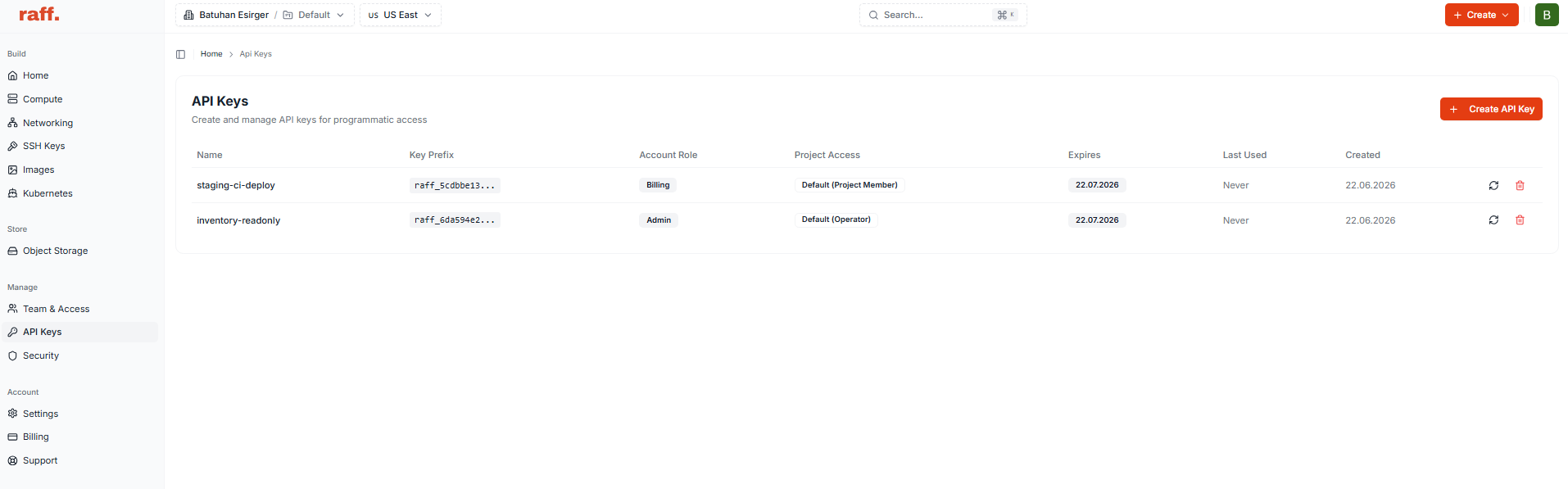
Depending on permissions and project scope, API-driven workflows can interact with platform areas such as:
- virtual machines
- projects
- networking
- VPCs
- public IPs
- firewalls
- volumes
- snapshots
- backups
- backup schedules
- SSH keys
- team members
- roles
- permissions
- API keys
In practical terms, an API key lets your automation act on behalf of your account or project.
That means it should be protected carefully.
A good mental model:
Dashboard access = human control
API key access = programmable control
If a human can make a mistake with the dashboard, a script can make the same mistake faster.
That is why API keys should be scoped, stored securely, rotated, and monitored.
API keys are infrastructure credentials
An API key is not just a random token.
It is an infrastructure credential.
Depending on the role and scope assigned to it, an API key may be able to create resources, delete resources, modify networking, trigger backups, update projects, or change infrastructure state.
That makes API key security part of infrastructure security.
Treat API keys like:
- SSH private keys
- production database passwords
- cloud provider credentials
- deployment secrets
- admin tokens
Do not paste API keys into chat tools, tickets, public docs, screenshots, repository files, or local scripts that will be shared.
A leaked key can lead to:
- unauthorized infrastructure changes
- accidental or malicious VM creation
- unexpected billing
- deletion or modification of resources
- exposure of project metadata
- weakened firewall posture
- broken backup workflows
- disruption of production systems
The safest API key is one that has only the access it needs, is stored in a secrets manager or secure CI/CD variable, and can be revoked quickly if compromised.
How Raff API authentication works at a high level
Most authenticated Raff API requests use an API key header.
A typical request pattern looks like this:
curl -X GET "https://api.rafftechnologies.com/api/v1/vms" \
  -H "X-API-Key: $RAFF_API_KEY"
For project-scoped mutating operations, include a project identifier:
curl -X POST "https://api.rafftechnologies.com/api/v1/vms" \
  -H "X-API-Key: $RAFF_API_KEY" \
  -H "X-Project-ID: $RAFF_PROJECT_ID" \
  -H "Content-Type: application/json" \
  -d '{
    "name": "staging-api-01",
    "pricing_id": "replace_with_plan_id",
    "template_id": "replace_with_template_id",
    "region": "replace_with_region"
  }'
Keep examples like this as patterns, not permanent copy-paste commands.
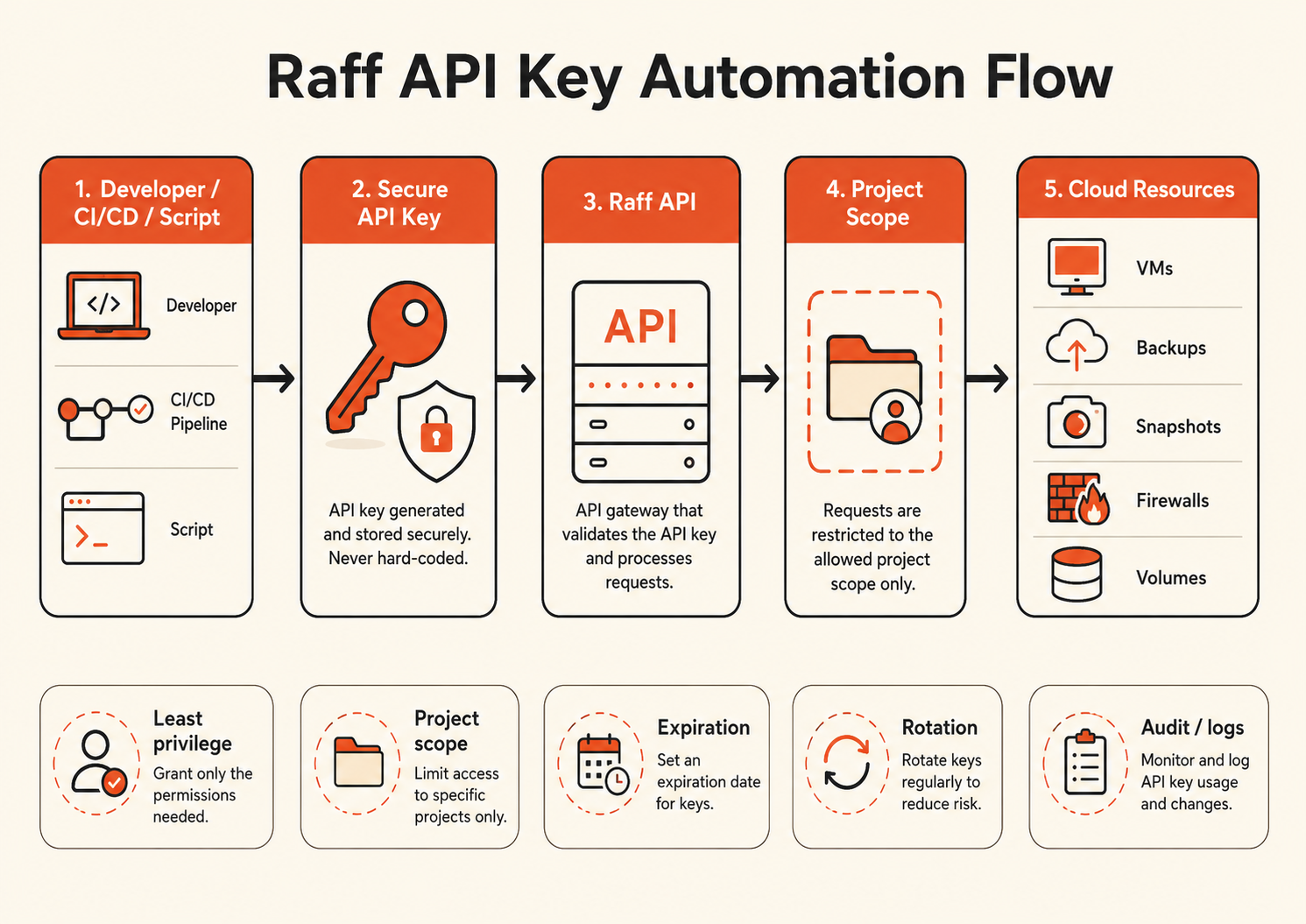
Before implementing production automation, always check the current Raff API reference for the exact endpoint, required fields, response shape, and resource limits.
The safest pattern is:
API key
  ↓
Project scope
  ↓
Role / permissions
  ↓
Specific automation task
Do not use one all-powerful key for every script.
Why API automation matters for small teams
Small teams usually have limited time.
The same people may handle product development, deployments, support, bug fixes, security, customer onboarding, documentation, and infrastructure.
Manual infrastructure work becomes a problem when it is:
- repeated often
- easy to forget
- sensitive to small mistakes
- required during deployments
- needed outside working hours
- dependent on one person
- difficult to reproduce
- undocumented
- connected to production reliability
Automation helps by turning repeated infrastructure actions into documented workflows.
Instead of remembering every step, the team can run a script, CI/CD job, CLI command, or Terraform workflow.
This reduces:
- configuration drift
- forgotten backup steps
- inconsistent staging environments
- manual cleanup work
- repetitive VM provisioning
- deployment mistakes
- undocumented operational knowledge
For small teams, automation is not about enterprise complexity.
It is about making simple operations repeatable.
What to automate first
The best first automations are useful, low-risk, and easy to verify.
Start with workflows where mistakes are easy to detect and recover from.
1. Infrastructure inventory
A simple script that lists VMs, volumes, snapshots, backups, and public IPs can immediately help operations.
Example use cases:
- weekly infrastructure report
- unused resource review
- cost cleanup
- stale VM detection
- public IP inventory
- backup coverage check
This is a safe first step because it reads state without changing anything.
2. Temporary environment cleanup
Small teams often create test servers and forget them.
A cleanup script can list temporary VMs by tag, project, or naming convention and delete only resources that match a strict rule.
Example:
Delete VMs tagged temporary=true
Only if older than 48 hours
Only in non-production project
Require confirmation before deletion
This saves cost without touching production.
3. Snapshot before deployment
Before a major deployment, an automation can create a snapshot of the relevant VM or volume.
This gives the team a nearby rollback point.
Example workflow:
CI/CD pipeline starts
  ↓
Create snapshot
  ↓
Wait for snapshot status
  ↓
Deploy application
  ↓
Run health check
  ↓
Notify team
This is one of the most valuable early automations because humans often forget pre-deployment safety steps.
4. Backup schedule checks
Backups should not depend on memory.
A small script can verify that production VMs have backup schedules and alert if a required schedule is missing.
Example:
List production VMs
  ↓
Check backup schedule exists
  ↓
Report missing backup coverage
  ↓
Notify responsible owner
This is better than discovering missing backups during an incident.
5. Staging VM provisioning
If staging environments are frequently recreated, automate them.
A script can create a VM from a known template, attach SSH keys, configure networking, and run a bootstrap script.
This helps every environment start from a known baseline.
Common Raff API automation use cases
VM provisioning
API keys can help create repeatable VM provisioning workflows.
A provisioning workflow may:
- create a project
- select a region
- select a pricing plan
- select an OS template
- attach SSH keys
- create a VM
- add tags
- attach firewall rules
- connect the VM to a VPC
- run a bootstrap script after SSH becomes available
This is useful for:
- staging environments
- demo servers
- test environments
- preview apps
- CI/CD runners
- training environments
- customer-specific deployments
Manual VM creation is fine once.
Automation is better when the same pattern repeats.
Deployment automation
API keys can support deployment workflows around your VM lifecycle.
For example:
Developer merges to main
  ↓
CI/CD pipeline runs tests
  ↓
Snapshot is created
  ↓
App server is updated
  ↓
Service restarts
  ↓
Health check runs
  ↓
Team receives deployment result
The API key does not replace your deployment system.
It connects Raff infrastructure actions into the deployment system.
Good deployment automation should include:
- pre-deployment snapshot
- health checks
- rollback plan
- logs
- notifications
- production approval where needed
Do not automate risky production deployments without visibility.
Backup and snapshot workflows
API automation is useful for backup and snapshot discipline.
Examples:
- create snapshot before OS update
- create backup before migration
- verify backup schedules exist
- report failed or missing backups
- list restore points for critical VMs
- clean up old manual snapshots
- trigger backup before high-risk changes
A practical backup automation should not only create backups.
It should also check that recovery points exist and can be found quickly.
A better workflow:
Create backup
  ↓
Wait for completion
  ↓
Verify backup status
  ↓
Record backup ID
  ↓
Notify team
Creating a backup is not enough if nobody checks whether it completed.
Networking and firewall automation
Networking automation should be handled carefully because mistakes can lock teams out or expose services.
Useful workflows include:
- create firewall rules from templates
- attach firewall to a VM network interface
- keep database ports private
- open temporary admin access
- remove temporary admin access after a window
- audit public-facing rules
- create VPCs for internal services
- attach VMs to private networks
High-risk networking automation should include guardrails:
- never modify production firewall rules without review
- preserve known admin access
- log every change
- use dry-run mode where possible
- validate rule sets before applying
- avoid broad public exposure
A firewall automation script should be more conservative than a human operator.
Ephemeral testing environments
Ephemeral environments are temporary environments created for a specific task and destroyed afterward.
They are useful for:
- pull request previews
- QA testing
- client demos
- isolated bug reproduction
- release validation
- performance experiments
- training sessions
A typical flow:
Pull request opened
  ↓
Create temporary VM
  ↓
Deploy branch
  ↓
Run tests or allow review
  ↓
Destroy VM when done
The key detail is cleanup.
Every ephemeral environment should have:
- owner
- expiration time
- tag
- project scope
- cleanup workflow
Otherwise, temporary infrastructure becomes permanent cost.
Internal tools and dashboards
Small teams can also use API keys to build internal infrastructure dashboards.
Examples:
- list all active VMs
- show production backup status
- display monthly resource inventory
- show unattached volumes
- report snapshots by age
- show public IP usage
- alert on untagged resources
- show which project owns which resources
This helps non-specialists understand infrastructure without needing full dashboard access.
API key security best practices
API key automation should be secure by design.
Use project-scoped keys where possible
Do not give one key broad account access if the automation only needs one project.
A staging cleanup script should not have production access.
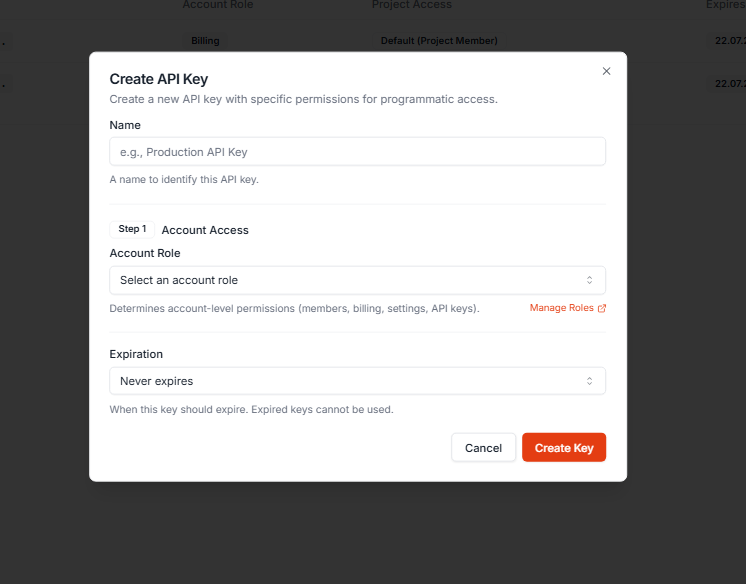
A backup verification script should not be able to delete VMs unless it genuinely needs that permission.
Scope should follow purpose.
Use least privilege
Give each key only the permissions needed for the task.
Examples:
| Automation task | Safer key scope |
|---|---|
| List infrastructure inventory | Read-only access where possible |
| Create staging VMs | Staging project only |
| Trigger backups | Backup-related permissions only |
| Manage production firewall | Restricted role, approval workflow |
| Cleanup temporary VMs | Non-production project only |
| CI/CD deployment | Specific project and deployment-related actions |
Avoid using owner-level keys in routine automation.
Store keys in secure places
Safe storage options include:
- CI/CD secret variables
- secrets manager
- encrypted environment variables
- secure deployment platform variables
- password manager for manual use
- local
.envfiles excluded from Git for development
Unsafe storage includes:
- Git repositories
- public issue trackers
- chat messages
- screenshots
- shared documents
- hardcoded scripts
- plain text files on shared machines
Always add .env to .gitignore:
.env
.env.local
*.secret
Rotate keys regularly
API keys should be rotated on a planned schedule and immediately after suspected exposure.
A rotation workflow:
Create or regenerate key
  ↓
Update CI/CD secret
  ↓
Run test workflow
  ↓
Disable old key
  ↓
Monitor for failed jobs
  ↓
Revoke old key
Do not rotate blindly without confirming the new key works.
Use separate keys for separate workflows
Avoid one key for everything.
Better pattern:
raff-ci-deploy-prod
raff-staging-cleanup
raff-backup-checker
raff-inventory-readonly
raff-terraform-prod
This makes it easier to revoke one workflow without breaking everything else.
It also makes audit trails easier to understand.
Never log full API keys
Scripts should avoid printing secrets.
Bad:
echo "Using key: $RAFF_API_KEY"
Better:
echo "Using Raff API key from environment"
If you need to identify a key, use its name or prefix, not the full secret.
Revoke unused keys
Unused keys are security debt.
Review API keys regularly and revoke keys that belong to:
- old scripts
- former team members
- abandoned CI/CD jobs
- temporary projects
- one-off migrations
- test automations
- retired tools
A good rule:
If nobody owns the key, revoke it.
A simple automation maturity path
Small teams should grow automation in stages.
Stage 1: Manual dashboard operations
This is fine early.
Use the dashboard when tasks are rare, simple, and not production-critical.
Stage 2: Read-only scripts
Start with inventory and reporting.
Examples:
- list VMs
- list backups
- list snapshots
- list public IPs
- report resources by project
This builds confidence without changing infrastructure.
Stage 3: Safe write automation
Move to controlled actions in non-production.
Examples:
- create staging VM
- create snapshot
- trigger backup
- attach SSH key
- create temporary environment
Stage 4: CI/CD integration
Connect Raff actions to deployment pipelines.
Examples:
- snapshot before deployment
- deploy to staging
- create preview environments
- cleanup after tests
- notify team
Stage 5: Infrastructure as code
Use Terraform or repeatable configuration workflows for more complex environments.
This is useful when infrastructure state needs review, versioning, and reproducibility.
Stage 6: Production automation with guardrails
Automate production only when the workflow has:
- least-privilege key
- project scope
- logs
- monitoring
- dry-run mode where possible
- manual approval for risky actions
- rollback path
- clear owner
Automation should improve reliability, not hide risk.
Example: safe staging environment workflow
A safer staging environment workflow might look like this:
Developer requests staging environment
  ↓
Automation checks project scope
  ↓
Automation creates VM from approved template
  ↓
SSH key is attached
  ↓
Firewall template is applied
  ↓
VM is tagged owner=team-name and expires_at=date
  ↓
Application bootstrap script runs
  ↓
Health check confirms readiness
  ↓
URL is shared with the team
  ↓
Cleanup job deletes environment after expiration
This workflow solves several problems:
- staging is repeatable
- access is controlled
- firewall rules are consistent
- cost is controlled through expiration
- cleanup is automatic
- ownership is visible
The important detail is not just creation.
It is lifecycle.
Every automated resource should have an owner, purpose, and cleanup rule.
Example: pre-deployment snapshot workflow
For production deployments, the safest first automation is often a snapshot.
A workflow:
CI/CD deployment starts
  ↓
Create VM or volume snapshot
  ↓
Wait for snapshot operation to complete
  ↓
Store snapshot ID in deployment logs
  ↓
Deploy application update
  ↓
Run health checks
  ↓
If healthy: mark deployment successful
  ↓
If unhealthy: alert team and use rollback plan
This gives your team a recovery point before risky changes.
The script should not delete the snapshot immediately. Keep it long enough to validate the deployment.
After the release is stable, old snapshots can be cleaned up according to a retention rule.
Example: API key rotation workflow
Key rotation should be predictable.
A simple process:
Identify key owner and workflow
  ↓
Create or regenerate key
  ↓
Update secret in CI/CD or tool
  ↓
Run safe test action
  ↓
Confirm production workflow still works
  ↓
Disable or revoke old key
  ↓
Record rotation date
Do not wait for a leak to learn how key rotation works.
Practice it as part of normal operations.
Common mistakes to avoid
Using one admin key for every script
This is the most common mistake.
If every automation shares one powerful key, one leak can affect everything.
Use separate scoped keys.
Committing keys to Git
Never commit API keys to repositories.
Even private repositories are not a safe place for secrets.
Automating deletion too early
Delete operations should be treated carefully.
Start with list and report workflows. Then add deletion only with strict filters, confirmations, and project scope.
Forgetting project scope
A script intended for staging should not be able to affect production.
Use projects and scoped keys to create boundaries.
Skipping dry-run mode
For cleanup, firewall, and deletion workflows, dry-run mode is valuable.
A dry run shows what would happen without making changes.
Not logging automation actions
Automation should leave a trail.
At minimum, log:
- workflow name
- key name or prefix
- project
- resource IDs
- action taken
- timestamp
- result
- error message if failed
Ignoring rate limits and errors
Automation should handle errors gracefully.
Plan for:
401invalid key403insufficient permission404missing resource409resource conflict429rate limit5xxtemporary server-side error
Do not assume every request succeeds.
Treating API automation as a replacement for backups
Automation can trigger backups or snapshots.
It does not replace recovery planning.
Backups still need retention, monitoring, and restore testing.
Best practices for production automation
Use these rules before allowing automation to touch production.
Use named keys
A key named API key 1 is not helpful.
Use names that explain purpose:
prod-deploy-ci
prod-backup-checker
staging-preview-cleanup
terraform-production
inventory-readonly
Require ownership
Every key should have an owner.
The owner is responsible for:
- purpose
- permissions
- rotation
- tool usage
- removal when no longer needed
Separate production and staging
Use separate projects and separate keys.
Do not reuse staging automation credentials in production.
Use approvals for risky actions
Actions such as deleting VMs, changing production firewall rules, or resizing production infrastructure should have manual review unless the workflow is mature and heavily guarded.
Build rollback into the workflow
Automation should not only move forward.
It should know what to do if something fails.
Monitor automation failures
A failed automation job can silently create operational risk.
Alert when:
- backups fail
- cleanup fails
- deployment automation fails
- key rotation breaks a workflow
- permissions are denied unexpectedly
- rate limits are hit repeatedly
Review keys regularly
Add API key review to your operations rhythm.
For example:
Monthly:
* List active API keys
* Confirm owner
* Confirm purpose
* Check last rotation
* Revoke unused keys
* Review permissions
This keeps automation from becoming invisible risk.
How this applies on Raff
Raff is designed to support small teams that want cloud infrastructure without unnecessary operational complexity.
The API fits that model because it allows teams to move from manual dashboard work to repeatable infrastructure workflows.
Useful Raff automation paths include:
- API scripts for simple tasks
- Raff CLI for command-line workflows
- Terraform provider for infrastructure as code
- project-scoped automation
- role-based access
- backup and snapshot workflows
- VM provisioning workflows
- firewall and VPC automation
- infrastructure inventory scripts
A practical Raff automation architecture:
Developer or CI/CD system
  ↓
Secure API key
  ↓
Raff API
  ↓
Project-scoped infrastructure
  ↓
VMs, VPCs, firewalls, volumes, backups, snapshots
This gives a small team a controlled path from idea to repeatable infrastructure.
A founder-led team might start with dashboard operations. A growing engineering team might add scripts. A production team might move critical infrastructure into Terraform and CI/CD.
All three are valid stages.
The goal is not to become more complex.
The goal is to make the team’s most repeated infrastructure tasks safer and faster.
Recommended Raff API key model for small teams
A simple small-team model:
| Key name | Scope | Purpose |
|---|---|---|
inventory-readonly | Account or project read access | Reporting and resource inventory |
staging-ci-deploy | Staging project | Create/update staging resources |
preview-env-cleanup | Non-production project | Delete expired temporary environments |
prod-backup-checker | Production project | Verify backups and snapshots |
terraform-prod | Production project | Infrastructure as code, tightly controlled |
prod-deploy-snapshot | Production project | Create pre-deployment snapshots |
This is much safer than one key named:
main-admin-key
Small teams do not need enterprise bureaucracy.
They need simple boundaries.
Production API automation checklist
Before using Raff API keys in production, review this checklist:
- Does the key have a clear name?
- Does the key have an owner?
- Is the key scoped to the correct project?
- Does the key use least privilege?
- Is the key stored in a secure secret store?
- Is the key excluded from Git?
- Is the workflow logged?
- Does the workflow handle API errors?
- Is there a dry-run mode for risky changes?
- Is there a rollback plan?
- Are destructive actions reviewed?
- Are backups or snapshots used before risky changes?
- Is key rotation documented?
- Are unused keys revoked?
- Are production and staging keys separated?
- Is the workflow monitored?
- Does the team know how to revoke the key quickly?
If an API key can affect production but nobody owns it, do not use it.
Conclusion
Raff API keys help small teams move from manual cloud operations to repeatable infrastructure workflows.
That is valuable because small teams do not have time to repeat the same dashboard steps forever. VM provisioning, staging environments, snapshots, backups, cleanup jobs, SSH keys, firewall rules, and infrastructure inventory can all become safer and faster when automated carefully.
The important word is carefully.
An API key is powerful infrastructure access. It should be scoped, stored securely, rotated, monitored, and owned by someone on the team. The best automation uses least privilege, project boundaries, dry-run modes, logging, recovery points, and clear rollback steps.
Start small.
Automate read-only reporting first. Then automate staging. Then automate backups and snapshots. Move production workflows into API automation only when the process is tested and controlled.
On Raff Technologies, API keys, projects, roles, the CLI, Terraform provider, and the REST API give small teams a practical way to build reliable automation without building a large DevOps department.
The goal is not automation for its own sake.
The goal is fewer mistakes, faster delivery, safer infrastructure, and more time spent building the product.