
Self-hosting means running software on infrastructure you control instead of relying entirely on a third-party SaaS provider. It makes sense when control, portability, customization, private connectivity, or a more predictable infrastructure cost is worth the responsibility of operating the service yourself.
A self-hosted service still needs compute, storage, backups, patching, monitoring, access control, and a named owner. When those responsibilities are unclear, SaaS or a managed service is usually the safer choice.
Raff Technologies supports 3,000+ customers and 15,000+ VMs. For small teams, the useful self-hosting decision is not “Can this app run on a server?” Most open-source software can. The better question is whether your team can secure, update, observe, back up, and restore it after it becomes important.
This self-hosting guide explains what self-hosted means, when it makes sense, what kind of self-hosted server to start with, and which operational controls should exist before a service becomes business-critical.
What does self-hosted mean?
Self-hosted means the application runs on infrastructure you or your team control rather than on the software vendor's fully managed hosting environment. That infrastructure can be your own hardware, a rented VPS, or a cloud VM.
The key distinction is control and responsibility, not physical ownership of the machine. Renting a cloud VM and operating your own application on it is still self-hosting because you control the software environment and remain responsible for operating the service.
| Question | Hosted SaaS | Self-hosted |
|---|---|---|
| Who runs the application platform? | Vendor | Your team |
| Who controls the server environment? | Vendor | Your team |
| Who handles OS/runtime updates? | Vendor or platform | Your team |
| Who protects app data and configuration? | Shared/vendor-defined | Your team within your design |
| Cost model | Subscription, seats, usage, or plan | Infrastructure + operations |
| Customization | Limited to supported platform features | Broad server/runtime control |
| Recovery model | Vendor-defined | Your team designs and tests it |
Common examples include running Nextcloud instead of relying only on hosted file-sharing SaaS, n8n instead of a fully managed automation runtime, or a self-hosted CMS instead of a hosted website builder.
Self-hosting does not automatically mean better privacy, lower cost, or higher security. Those outcomes depend on how the service is designed and operated.
Self-hosting is an ownership decision
Self-hosting changes who is responsible when the service fails or needs maintenance.
With SaaS, the vendor typically owns much of the application platform, host lifecycle, and service maintenance. With self-hosting, your team owns more of the operating surface:
- operating system and runtime;
- application deployment and updates;
- authentication and administrator access;
- firewall and network exposure;
- persistent application data;
- database and file backups;
- restore testing;
- monitoring and alerting;
- incident response;
- migration and exit planning.
The benefit is control. The cost is recurring operational responsibility.
A useful first question is:
If this service fails outside working hours, who is expected to restore it and from what backup?
If nobody owns that answer, the application is not ready to become critical infrastructure.
Why teams choose self-hosting
Data and infrastructure control
Self-hosting can give a team direct control over where application data, logs, uploaded files, configuration, and credentials are stored.
This can matter when:
- data location is an internal requirement;
- the application needs a private network path;
- the team wants direct export and migration access;
- custom retention rules are required;
- the service needs root or runtime-level configuration.
Control is not the same as security. The team must still patch the host and application, restrict access, protect secrets, and maintain recoverable backups.
Portability and vendor independence
Many self-hosted applications use standard Linux environments, Docker containers, common databases, and exportable files. That can make them easier to move than a proprietary service with limited export options.
Real portability requires:
- documented deployment steps;
- exportable application data;
- known database and storage dependencies;
- tested backups;
- reproducible configuration;
- team-controlled credentials and encryption material.
An open-source license alone does not make an application portable.
Customization and private integration
Self-hosting can be useful when the application needs custom plugins, runtime packages, direct filesystem access, custom ports, private APIs, internal databases, or a workflow that the hosted edition does not support.
This is one of the strongest business reasons to self-host: the infrastructure boundary itself is part of the requirement.
Cost structure
Self-hosting can replace per-seat or usage-based software pricing with infrastructure pricing. That can be attractive for lightweight tools used by many people or for services with steady resource usage.
But total self-hosting cost is broader than the VM bill:
compute and storage
+ backup and recovery infrastructure
+ monitoring
+ administrator time
+ updates
+ incident response
+ migration work
= total operating cost
Self-hosted server is also a commercial evaluation intent: once the operating model is justified, teams usually need to compare infrastructure capacity and total cost rather than only the software choice.
The self-hosting decision framework
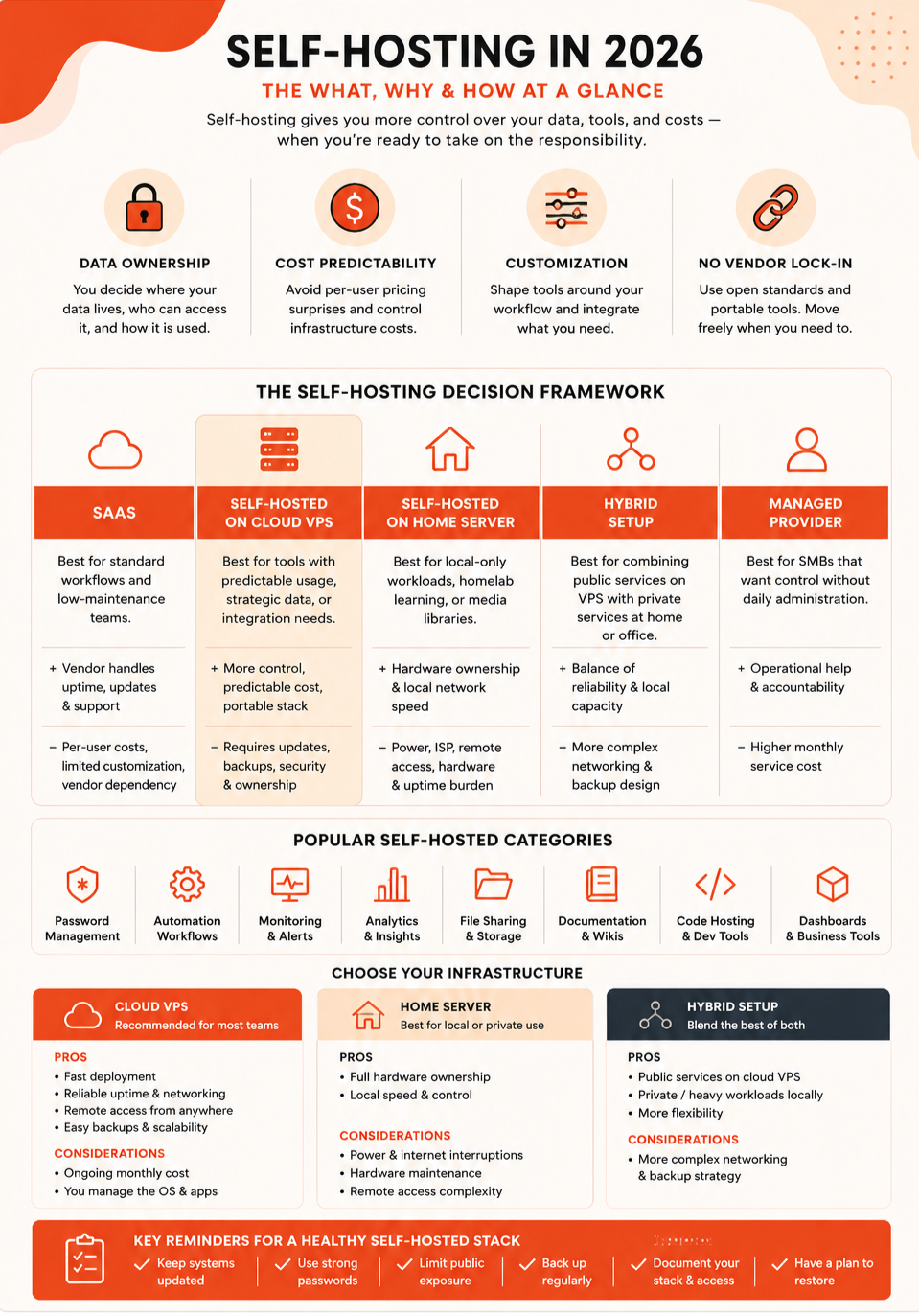
Use these five questions before moving a tool away from SaaS.
1. Is the workload strategically worth owning?
Good candidates often include:
- internal automation;
- monitoring;
- documentation;
- analytics;
- dashboards;
- developer tooling;
- internal APIs;
- lightweight workflow systems;
- controlled file or data services.
A poor first self-hosted workload is one where specialized providers remove substantial operational risk and your team has no specific reason to own the infrastructure.
2. Can the team operate it?
Confirm that someone can:
- deploy and update the application;
- understand its database and storage model;
- secure public and administrative access;
- monitor failures;
- restore data;
- roll back a failed upgrade;
- document the setup for another operator.
3. Is the data recoverable?
Identify which databases, volumes, files, secrets, and configuration must survive a failed host or bad deployment.
A VM snapshot can help with server-level recovery, but it does not replace application-aware backups for every database or multi-service stack.
4. Is the workload portable?
Confirm how the service would move to another VM or provider. Test export and restore before the application becomes difficult to replace.
5. Is the benefit greater than the burden?
Choose self-hosting when control, integration, portability, data handling, or cost structure clearly justifies the operating work.
SaaS vs self-hosted vs managed vs hybrid
SaaS vs self hosted is a commercial evaluation, but it should still be decided from responsibilities rather than subscription price alone.
| Model | Best when | Main trade-off |
|---|---|---|
| SaaS | Workflow is standard and operations should remain with vendor | Less infrastructure control |
| Self-hosted cloud VM | Team needs server/runtime/data-path control | Team owns operation and recovery |
| Managed service | Team wants a service without operating its complete platform | More service constraints and provider-defined boundaries |
| Home or office server | Local workloads, labs, or hardware-connected services matter | Power, internet, hardware, and remote-access risks |
| Hybrid | Different workloads have clear placement reasons | More networking and operational complexity |
Most small teams should use a mixed model. Keep commodity, high-maintenance systems in SaaS or managed services. Self-host the workloads where ownership creates a measurable advantage.
Cloud VM vs home or office server
Cloud VM
A cloud VM is usually the practical default for internet-facing or remotely accessed self-hosted services because it provides data-center networking, remote administration, predictable resource sizes, and no local hardware maintenance.
It commonly fits:
- internal web applications;
- automation platforms;
- monitoring tools;
- dashboards;
- APIs;
- documentation systems;
- containerized services;
- self-hosted business tools.
Home or office server
Local hardware can make sense for labs, local-only services, media libraries, large local storage, or hardware-connected workloads.
Operational risks include:
- local power failure;
- internet outage;
- router and firewall configuration;
- hardware replacement;
- physical security;
- remote-access recovery;
- off-site backup requirements.
Business-critical remote services should not depend on office infrastructure unless those risks are deliberately handled.
Hybrid model
Hybrid infrastructure is useful when each workload has a clear placement reason. Public services can run in the cloud while local storage or hardware-dependent workloads remain on-premises.
Avoid hybrid architecture when it simply duplicates systems without clear ownership, recovery, or network boundaries.
What self-hosted server do you need?
A self-hosted server can be a VPS or cloud VM sized for the application, its database, background jobs, and operational headroom.
Do not choose the server from a fixed “number of apps per VM” rule. Containers and applications have very different CPU, RAM, storage, and network behavior.
Use a workload-based starting framework instead:
| Starting shape | Reasonable first use | Current Raff General Purpose reference |
|---|---|---|
| 1 vCPU / 1 GB RAM | Minimal Linux service, reverse proxy, tiny utility | 25 GB NVMe — $4.99/mo |
| 1 vCPU / 2 GB RAM | One lightweight app with more runtime headroom | 50 GB NVMe — $8.99/mo |
| 2 vCPU / 2 GB RAM | Focused app, dev/staging, light container workload | 40 GB NVMe — $12.99/mo |
| 2 vCPU / 4 GB RAM | Small production app, modest Docker stack, app + light DB | 80 GB NVMe — $17.99/mo |
| 4 vCPU / 8 GB RAM | Larger multi-service workload or heavier application stack | 160 GB NVMe — $33.99/mo |
These are infrastructure references, not app-specific guarantees. A database-heavy service, JVM application, build workload, media processor, or multi-user Windows workload can need a different shape.
Use VM Sizing Guide to size CPU, memory, storage, and network together. If memory is the main question, use How Much RAM Do I Need for a VPS?.
Start with the smallest size that gives normal workload and maintenance enough headroom, then resize from actual measurements.
Start with one low-risk self-hosted service
A safer adoption path is gradual.
Stage 1: prove the operating model
Begin with a service that can be unavailable without stopping the business. Use it to learn:
- deployment;
- DNS and TLS;
- firewall rules;
- administrator access;
- backups;
- monitoring;
- update and rollback procedures.
Stage 2: run in parallel
Before replacing an important SaaS product, operate the self-hosted version beside it. Confirm users can work with it and that the team can update, back up, and restore it.
Stage 3: document the stack
Maintain:
- service inventory;
- named owner;
- domain and network path;
- data location;
- backup schedule;
- restore steps;
- update policy;
- administrator accounts;
- exposed ports;
- dependencies;
- migration plan.
Self-hosting becomes fragile when the stack exists only in one person's memory.
Security responsibilities for self-hosted services
A self-hosted application is secure only when the full path is maintained.
Minimum controls include:
- a supported operating system and application version;
- restricted administrative access;
- least-privilege users and service accounts;
- strong authentication and MFA where supported;
- minimal public ports;
- TLS for public application traffic;
- secrets kept outside source code;
- regular security updates;
- monitoring and alerting;
- backups isolated from the production failure path.
Keep databases, caches, internal dashboards, and administrative services private where possible. Expose only the application endpoints that users or integrations actually require.
For a broader checklist, use Cloud Security Fundamentals.
Backups and recovery are part of self-hosting
Protect the application data, not only the VM.
A recoverable stack may need:
- database-aware backups;
- uploaded files and object data;
- container volumes;
- application configuration;
- secrets and encryption keys;
- deployment definitions;
- DNS and certificate information;
- enough documentation to rebuild the service.
Define Recovery Point Objective and Recovery Time Objective based on business impact, then test a restore into a separate environment.
A backup job that has never been restored is not proof that the service can recover.
Raff Data Protection provides VM snapshot and automated backup workflows. Object Storage can be used where the application or backup tooling supports S3-compatible storage. Application-aware database backups remain the workload owner's responsibility when the database is self-hosted.
Containers simplify deployment but do not remove operations
Docker and Docker Compose can make self-hosted deployments repeatable. They do not remove the need to operate the host, network, storage, updates, and backups.
A small stack can look like:
Cloud VM
  ↓
Docker Compose
  ├── reverse proxy
  ├── application
  ├── worker
  └── database or external database
For persistent services, document volumes, database backups, image versions, update order, and rollback steps.
Read Docker vs Virtual Machines for the VM/container boundary decision.
When managed services are the better answer
A managed database, app platform, or SaaS product can be the better choice when the workload is valuable but owning its infrastructure does not create enough benefit.
Choose a managed path when:
- the service is production-critical and the managed boundary meets requirements;
- operations expertise is limited;
- recovery requirements are strict;
- maintenance competes with product engineering;
- the service supports the required network and data controls;
- the team does not need host-level customization.
For databases specifically, Managed Database vs Self-Hosted covers the responsibility and recovery trade-off.
Common self-hosting failure patterns
Replacing too many tools at once
Each service adds updates, credentials, storage, logs, and failure modes. Prove one service before expanding.
No named owner
Shared responsibility without a named operator often becomes no responsibility during an incident.
No restore test
Persistent data without a tested recovery path is not production-ready.
Public exposure by default
Do not expose databases, container ports, dashboards, SSH, or admin panels without a specific need and access policy.
Excessive customization
Deep modifications can make upstream updates difficult. Customize where the business receives measurable value.
Depending on one maintainer
Document the system, store credentials safely, and ensure another person can recover it.
Treating a cheap VM as the whole cost
The infrastructure bill is only one line. Maintenance, backup, recovery, monitoring, and engineering time are part of the self-hosting decision.
How this applies on Raff
Raff Cloud Servers provide Linux VM infrastructure for self-hosted applications with root access, NVMe storage, VPC networking, firewall controls, and data-protection options.
Current Raff VM public networking uses a 3 Gbps connection with unmetered VM traffic and no VM egress fee. Hourly pay-as-you-go usage is available alongside monthly, yearly, and 24-month VM billing terms. Public IPs and other add-ons are priced separately, so verify the live pricing page before deployment.
A practical Raff self-hosting pattern is:
Public users
  ↓
Required HTTPS endpoint
  ↓
Linux application VM
  ↓ private VPC path where appropriate
Database / internal service
  ↓
Backup or object-storage workflow
Useful building blocks include:
- Raff VM for application or Docker hosts;
- VPC for private service-to-service communication;
- Volumes for persistent block storage;
- Object Storage for S3-compatible object data;
- Data Protection for VM snapshots and automated backups;
- Managed Databases when database host operations should be separated from the self-hosted app.
The point is not to use every product. Start with the smallest architecture that you can secure and recover, then separate stateful or high-impact services when a real requirement appears.