Introduction
Shared vs dedicated vCPU is one of the first infrastructure decisions that affects both performance and cost on a cloud VM. When you choose between these two VM classes on Raff, you are really choosing between cheaper pooled compute and more predictable reserved compute.
That sounds simple, but many teams still get it wrong. They either pay for dedicated CPU too early, before the workload needs it, or they stay on shared CPU too long and blame the application for performance problems that are really about compute consistency.
A vCPU is a virtual CPU presented to your VM by the hypervisor. The key difference is not whether the VM can run your application at all. Both classes can do that. The difference is how CPU time is allocated, how stable performance feels under sustained load, and how much you pay for that stability.
In this guide, you will learn what shared and dedicated vCPU actually mean, where each model works best, how to think about cost versus predictability, and how Raff’s two VM classes map to real workloads. By the end, you should be able to choose the right class for your current stage without overbuying or underspecifying.
What Shared and Dedicated vCPU Actually Mean
The easiest way to think about shared vs dedicated vCPU is this:
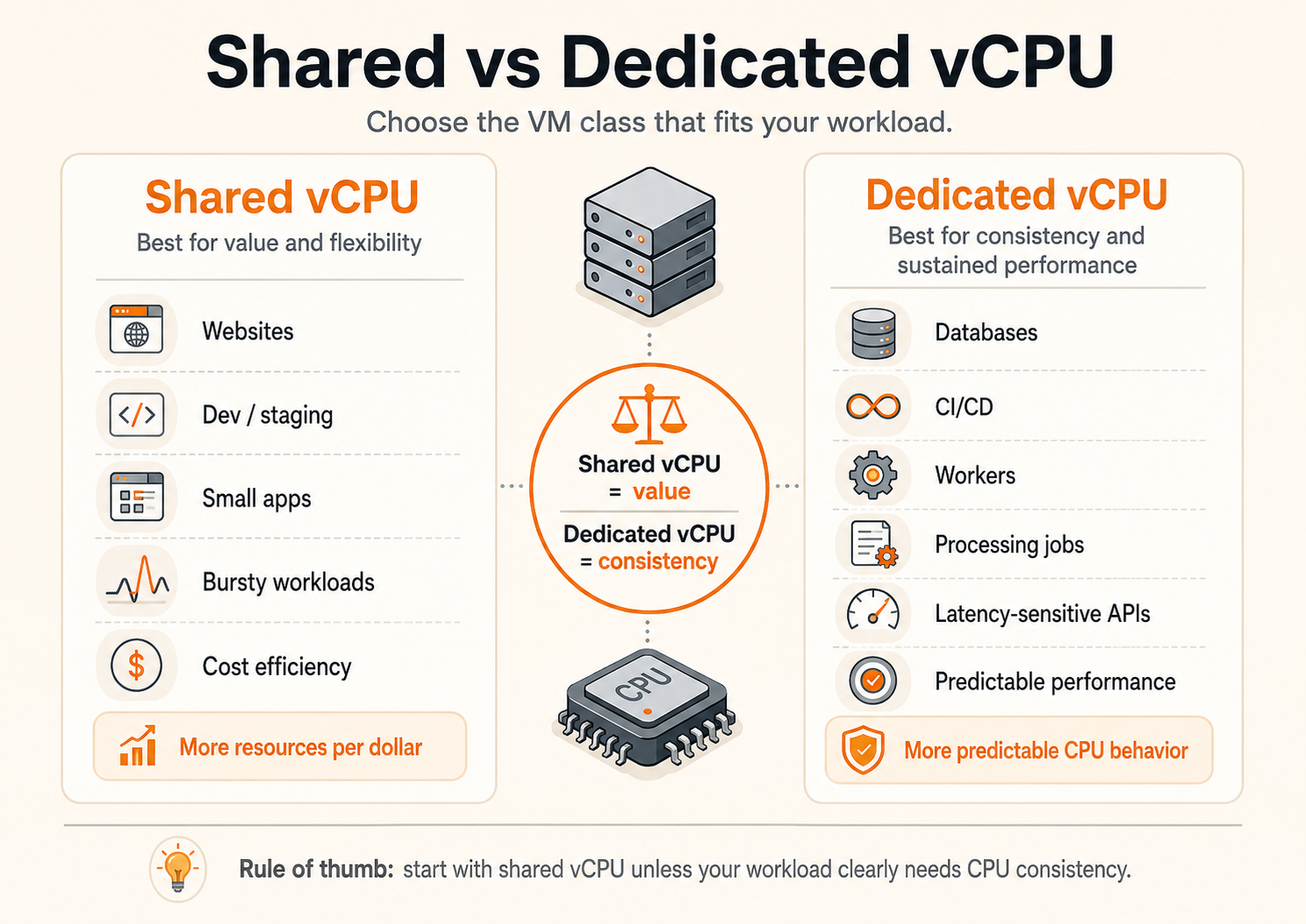
- Shared vCPU gives your VM access to CPU resources that are pooled across multiple tenants on the host.
- Dedicated vCPU gives your VM CPU cores that are reserved for your instance.
That is the architectural difference. But the buying decision is about behavior, not just definitions.
Shared vCPU
Shared vCPU is the more economical model. Your VM gets virtual CPU capacity, but that compute time is scheduled alongside other workloads on the same physical host. In practice, this means you can get excellent value for everyday applications, especially when your traffic is moderate or bursty rather than constantly CPU-bound.
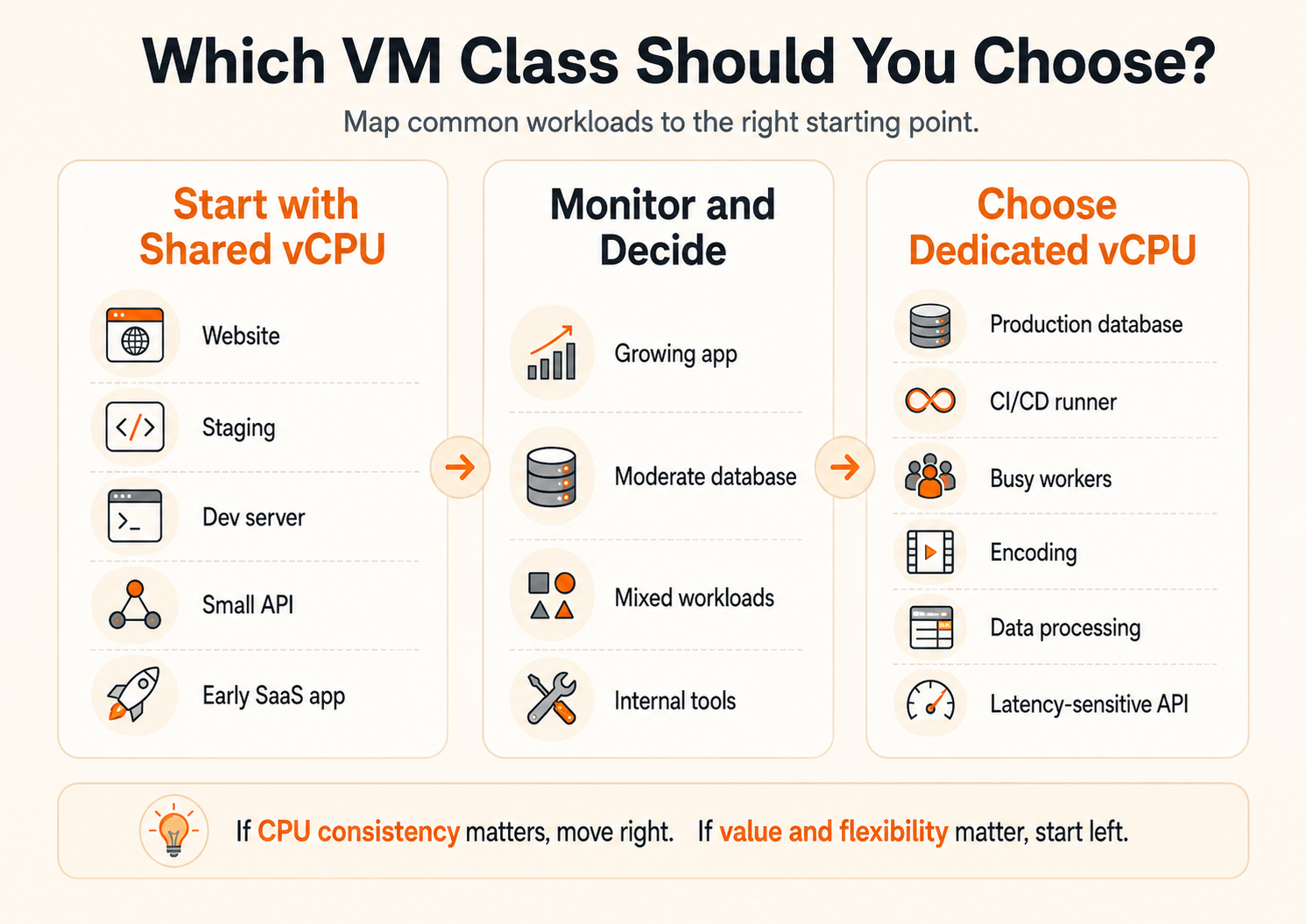
This is why shared vCPU works well for:
- web servers
- internal tools
- development environments
- staging environments
- small APIs
- early SaaS products
- side projects
- background apps that are not under continuous load
The main advantage is cost efficiency. On Raff, the General Purpose line gives you a lot more resources per dollar than the CPU Optimized line. That matters because many small teams are not actually compute-bound all day. They need enough headroom for occasional spikes, but not guaranteed CPU isolation 24/7.
The trade-off is that performance is less predictable under sustained pressure. That does not mean it is “bad.” It means it is a model designed for value and flexibility rather than hard consistency.
Dedicated vCPU
Dedicated vCPU is the more performance-stable model. CPU cores are reserved for your VM, so your application is not competing for CPU time in the same way a shared model does.
That makes dedicated vCPU the better fit when CPU consistency matters more than maximum resources per dollar.
Typical dedicated vCPU workloads include:
- production databases
- CI/CD runners
- video encoding
- data processing
- busy application workers
- latency-sensitive APIs
- workloads that are CPU-bound for long periods
The advantage is not always a dramatic top-line speed increase. The real win is predictability. Dedicated vCPU reduces jitter, noisy-neighbor risk, and performance variance. For production systems, that predictability can matter more than raw average throughput.
The trade-off is price. You are paying for reserved compute, so you get fewer total resources per dollar than a shared VM. That only makes sense when the workload can actually use the guarantee.
The Real Decision Is Cost vs Predictability
A lot of guides explain shared and dedicated CPU as if the choice were obvious:
- shared = cheap
- dedicated = powerful
That is too shallow to be useful.
The real decision is not “Which is better?” The real decision is:
Do you need guaranteed CPU behavior enough to pay for it now?
That question is more useful because it forces you to think about what kind of pain you are trying to avoid.
If your issue is simply that you need more RAM, more disk, or more general headroom, moving from shared to dedicated may not be the right first fix. Sometimes the better move is just moving up a larger shared tier.
If your issue is that the application becomes inconsistent under CPU pressure, shows longer tail latencies, or suffers during sustained compute-heavy work, dedicated vCPU may be exactly the right move.
A Simple Mental Model
Use this mental model:
- Shared vCPU buys you more total resources per dollar.
- Dedicated vCPU buys you more confidence in CPU behavior.
That distinction matters because different teams optimize for different risks.
A founder shipping a product demo usually cares about keeping costs low while having enough resources to run a working stack.
A team with a production PostgreSQL database or a build pipeline cares less about maximizing resources per dollar and more about keeping performance stable when load is real.
Why Teams Often Choose the Wrong Class
The most common mistake is assuming that “production” automatically means “dedicated.”
That is not true.
Many production workloads are perfectly fine on shared compute for a long time, especially if traffic is moderate and CPU use is not sustained. A low-traffic SaaS app, a content site, or an internal admin system may get far more value from a larger shared VM than from a smaller dedicated one.
The second common mistake is the opposite: treating dedicated vCPU as unnecessary until the application is already hurting. Teams often accept latency spikes, slow background jobs, or inconsistent build times longer than they should because the application “usually works.”
The best decision is usually driven by behavior you can observe:
- sustained CPU utilization
- performance variance under real load
- p95/p99 latency instability
- build times that jump unpredictably
- worker queues that stop clearing reliably
- database performance that degrades under moderate concurrency
Those are stronger signals than the label “production” or “development.”
Raff’s Two VM Classes and Why the Distinction Matters
Raff makes the choice explicit with two VM classes:
- General Purpose for shared CPU
- CPU Optimized for dedicated CPU
That is useful because it turns an abstract compute concept into a practical product decision.
Raff’s own public FAQ defines the difference clearly: General Purpose uses shared CPU resources and is ideal for web servers, development environments, and variable workloads where occasional performance fluctuations are acceptable. CPU Optimized reserves dedicated CPU cores for the instance and is intended for more consistent performance on workloads like databases, CI/CD, and encoding.
That framing is important because it is not just technical classification. It is product guidance. Raff is effectively telling customers not to default to the expensive option. Its public FAQ even recommends starting with General Purpose and resizing later if needed.
That is a good decision framework, especially for small teams.
Side-by-Side: Shared vs Dedicated vCPU
| Dimension | Shared vCPU | Dedicated vCPU |
|---|---|---|
| CPU allocation | Pooled with other VMs | Reserved for your VM |
| Cost efficiency | Higher | Lower |
| Performance consistency | Moderate | High |
| Best for | Websites, staging, dev, light apps | Databases, CI/CD, encoding, sustained workloads |
| Noisy-neighbor sensitivity | Higher | Lower |
| Burst-friendly value | Strong | Moderate |
| Latency stability | Less predictable | More predictable |
| Ideal buying mindset | Start here unless proven otherwise | Move here when CPU consistency becomes important |
This table is useful, but the most important line is the last one. Shared vCPU is usually the rational starting point. Dedicated vCPU becomes rational when the workload justifies buying stability.
What the Pricing Difference Is Really Telling You
The pricing gap between the two classes is not arbitrary. It reflects what you are buying.
In Raff’s current public pricing structure, General Purpose offers far more resources per dollar because it uses shared CPU. CPU Optimized costs more because it gives you dedicated CPU behavior.
That means the same budget can buy very different outcomes depending on the class.
For example, a budget that buys a small dedicated VM can often buy a larger shared VM with more RAM and storage. That is why many teams should not jump straight to dedicated vCPU. If the real bottleneck is memory or general capacity, a bigger shared VM may solve the problem more effectively.
Example: Same Budget, Different Outcome
Here is the kind of trade-off teams should actually think about:
| Budget Range | General Purpose | CPU Optimized | What You’re Really Choosing |
|---|---|---|---|
| ~$5/mo | 2 vCPU / 4 GB / 50 GB | — | Cheapest useful shared starting point |
| ~$10/mo | 4 vCPU / 8 GB / 120 GB | 1 vCPU / 2 GB / 50 GB | More total resources vs dedicated consistency |
| ~$20/mo | 8 vCPU / 16 GB / 240 GB | 2 vCPU / 4 GB / 80 GB | Bigger multi-purpose headroom vs smaller guaranteed compute |
| ~$36/mo+ | 12+ vCPU / 32 GB+ | 4 vCPU / 8 GB / 120 GB | Large shared capacity vs serious production compute |
This is why “dedicated is faster” can be a misleading buying rule. Sometimes a larger shared VM gives you a better real-world result because the application needs more RAM, more concurrency headroom, or more total resources more than it needs CPU isolation.
When Shared vCPU Is the Right Choice
Shared vCPU is the right choice when your workload benefits more from affordability and total resources than from reserved CPU consistency.
Choose shared first when you are running:
Websites and standard web apps
Most small websites, CMS installs, internal dashboards, brochure sites, and moderate-traffic APIs do not need dedicated CPU on day one. They need enough memory, enough disk, and reasonable compute headroom.
A General Purpose VM is often the right fit here because the workload is bursty. Traffic comes in waves, pages render, API requests complete, and then load drops again. You are not pinning CPU all day.
Development and staging environments
Development environments are classic shared-vCPU workloads. They need flexibility, not expensive guarantees. The same is true for staging, where realism matters but perfect compute consistency usually does not.
If you are spinning environments up and down, or maintaining multiple non-production instances, shared compute keeps costs under control without making those environments useless.
Early SaaS products
Small teams often overestimate how much “production seriousness” they need at the infrastructure level. Early SaaS products usually need simple, cost-efficient compute more than they need strict performance guarantees.
If you are still validating the product, refining the architecture, or serving moderate traffic, General Purpose is often the smarter economic choice.
Bursty workloads with low sustained CPU pressure
Some apps spike briefly, then go quiet. Shared vCPU is a strong fit for that pattern. You get good value without paying for consistency you are not actually using all the time.
When Dedicated vCPU Is the Right Choice
Dedicated vCPU is the right choice when your system needs CPU stability more than it needs maximum resources per dollar.
Choose dedicated when you are running:
Production databases
Databases are one of the clearest dedicated-vCPU use cases. They can be sensitive not only to average performance, but also to jitter and inconsistent CPU access. If your database is central to production and is under continuous use, CPU Optimized is usually the safer class.
CI/CD pipelines and build workers
Build systems, tests, and runners often benefit from predictable CPU far more than general app servers do. If your team loses time because pipelines fluctuate wildly in duration, dedicated CPU is worth considering.
Encoding, processing, and queue workers
Any workload that is intentionally CPU-heavy for long stretches is a better fit for dedicated compute. If the VM is always “doing work” rather than just waiting for requests, shared CPU may become less attractive.
Latency-sensitive production APIs
Not every API needs dedicated compute. But when request latency and consistency matter directly to user experience or downstream systems, CPU Optimized becomes much easier to justify.
Workloads where performance variance is the real problem
This is the key point. The best reason to move to dedicated is not that the app is “slow.” It is that performance becomes inconsistently slow under CPU pressure in ways that affect reliability, deadlines, or user experience.
Workload Recommendations by Use Case
The most useful way to choose is to map the class to the actual workload shape.
| Workload | Better Starting Choice | Why |
|---|---|---|
| Small marketing site | Shared vCPU | Low sustained compute pressure, high cost sensitivity |
| WordPress or CMS site | Shared vCPU | Usually memory and I/O matter more before CPU isolation does |
| Internal admin tool | Shared vCPU | Good value, low-risk workload |
| Early SaaS monolith | Shared vCPU | More total resources per dollar and easier starting cost |
| Staging environment | Shared vCPU | Realistic enough without paying for reserved compute |
| PostgreSQL / MySQL under real production use | Dedicated vCPU | Better consistency for sustained DB activity |
| CI/CD runner | Dedicated vCPU | Predictable build and test execution |
| Video encoding / batch processing | Dedicated vCPU | Long-running CPU-heavy workload |
| Busy queue workers | Dedicated vCPU | Continuous compute makes reserved cores more valuable |
| Real-time or latency-sensitive API | Dedicated vCPU | Lower variance matters more than maximum resource count |
This table is not a hard law. It is a practical starting point.
The Upgrade Path Matters More Than the First Choice
One reason this decision is less risky on Raff than on many platforms is that the product guidance already assumes change over time.
Raff’s public FAQ explicitly tells customers to start with General Purpose if they are unsure, then resize to CPU Optimized later when the workload needs more stable compute. That is smart product design because most teams do not know the “perfect” class on day one.
Your first VM class is not a permanent identity. It is a starting assumption.
That matters because infrastructure decisions are easier when the platform makes iteration normal.
A team that starts small on shared compute is not making a low-ambition decision. It is making a data-driven decision. If later metrics show CPU variance becoming a real problem, moving to CPU Optimized is a rational next step.
Signals That It’s Time to Move from Shared to Dedicated
Many teams ask this too late.
The right moment to move is not when the application is already failing. It is when the pattern becomes clear enough that you are paying an operational cost for inconsistency.
Watch for these signals:
1. CPU use is sustained, not occasional
If the VM is regularly under CPU pressure rather than only during bursts, the economics of shared compute become less attractive.
2. Performance variance is hurting real work
If pipeline durations swing unpredictably, workers lag behind, or p95 latency gets noisy under moderate load, dedicated CPU may be the more efficient choice even if the monthly price is higher.
3. The app is clearly CPU-bound, not RAM-bound
If adding memory or moving to a larger shared tier does not solve the problem, the issue may be CPU predictability rather than general headroom.
4. A single workload has become business-critical
For background tools, occasional variance is acceptable. For critical databases, important deployment systems, or revenue-sensitive APIs, predictability has more value.
Signals That You Should Stay on Shared Longer
The opposite signals matter too.
Stay on shared longer when:
- your traffic is still modest
- CPU spikes are brief
- the app is mostly waiting on disk, network, or database calls
- your real bottleneck is memory, not CPU behavior
- budget flexibility matters more than maximum consistency
- you still have architectural improvements to make before compute guarantees are the main limiter
A surprising amount of “we need dedicated CPU” is actually “we need a better cache strategy,” “we need to reduce app overhead,” or “we need a slightly larger VM.”
That is why it is important not to treat dedicated compute as a shortcut for all performance questions.
How to Make the Decision Without Overthinking It
If your team wants a practical rule, use this one:
Start with shared vCPU if:
- you are launching something new
- you are still learning the workload
- cost efficiency matters a lot
- occasional variance is acceptable
- the workload is bursty or moderate
Start with dedicated vCPU if:
- the workload is already known to be CPU-heavy
- latency stability matters from day one
- the VM will run continuous compute-heavy jobs
- a database or runner is central to production
- you already know the cost of inconsistency is higher than the cost of the upgrade
This is one of those infrastructure decisions where “start simple and move when the evidence is clear” is usually the best rule.
Raff-Specific Guidance: Which Class Fits Which Stage?
A useful way to think about Raff’s VM classes is by stage of operational maturity.
General Purpose fits teams that need:
- affordable production beginnings
- staging and development environments
- websites and standard app hosting
- flexible resource value
- fast launches without overcommitting
CPU Optimized fits teams that need:
- more stable production behavior
- dedicated compute for sustained work
- better consistency for jobs, queues, and databases
- less tolerance for jitter
- more confidence under steady CPU pressure
That is why Raff’s public FAQ recommendation to start with General Purpose and resize later is sensible. It matches how small teams actually grow.
Most teams do not need perfect compute guarantees first.
They need a clear starting point and a clean upgrade path.
Conclusion
Shared vs dedicated vCPU is not a question of beginner vs serious infrastructure. It is a question of what kind of risk you are paying to reduce.
Shared vCPU is the better choice when you want more total resources per dollar and your workload can tolerate some performance variance. Dedicated vCPU is the better choice when consistent CPU behavior matters more than maximizing raw resource count for the budget.
The mistake is not choosing shared. The mistake is staying on shared after the workload clearly needs predictability. The mistake is not choosing dedicated. The mistake is paying for dedicated before the workload benefits from it.
If you are unsure, Raff’s own guidance is the right one: start with General Purpose, observe the workload, and move to CPU Optimized when the evidence says consistency matters more than price efficiency.
For next steps, compare your expected workload against the available Linux VM options, review the broader virtual machine lineup, and check the current pricing page before sizing your first deployment. If your next question is about scaling rather than CPU class, read Horizontal vs Vertical Scaling. If your next question is about how to launch machines consistently, read VM Provisioning Models.
Our cloud solutions team sees this decision often: the best VM class is rarely the most “powerful” one on paper. It is the one that matches the stage your workload is actually in.