
A single-VM architecture runs the application and most supporting roles on one server. A multi-VM architecture separates roles such as the app, database, background workers, cache, storage, and traffic routing across independent systems. Start with one VM when simplicity is the main requirement. Split roles when measurement shows that one shared failure domain, resource pool, deployment process, or recovery path has become unacceptable.
Multi-VM does not mean microservices or Kubernetes. A monolithic SaaS application can remain one codebase while its infrastructure is separated gradually.
Single VM vs multi-VM architecture at a glance
| Decision factor | Single VM | Multi-VM |
|---|---|---|
| Initial setup | Simpler | More components and networking |
| Cost structure | One shared resource pool | Capacity purchased by role |
| Deployment | One server may affect every role | Roles can be deployed independently |
| Failure boundary | One host can affect the whole system | Failures can be isolated by role |
| Scaling | Increase the whole VM | Scale selected roles independently |
| Data recovery | App and data recovery may be coupled | Each stateful role can have its own recovery plan |
| Observability | Fewer systems, but shared signals | Clearer role-level metrics with more tooling |
| Best fit | Prototypes, internal tools, early production | Growing production workloads with measured separation needs |
A useful rule is:
Keep one VM while its shared boundaries remain acceptable. Add another role only when you can name the risk, bottleneck, or operating constraint that the split removes.
Use a six-part topology decision
Before moving from one VM to several, review six questions:
- Capacity: Which role is exhausting CPU, memory, storage, connections, or throughput?
- Failure isolation: Which services should continue if one role fails or is restarted?
- Recovery: Which data needs its own backup, restore, and recovery objective?
- Deployment: Which roles need separate release or maintenance windows?
- State: Which sessions, files, jobs, and records prevent an app node from being replaced?
- Operations: Can the team monitor, secure, deploy, and recover the additional system?
A split is justified when the operational benefit exceeds the additional network, monitoring, security, and recovery work.
A single VM is a valid production starting point
One VM can run a reverse proxy, web application, API, database, worker, cache, scheduled jobs, and monitoring for an early product.
This topology is often appropriate when:
- traffic and job volume are modest
- brief maintenance downtime is acceptable
- one team owns the complete workload
- the database and files are still small enough to recover predictably
- deployments are infrequent
- app, worker, and database resource usage do not interfere materially
- the product is still validating demand
The value is operational clarity. There is one host to deploy, inspect, secure, back up, and pay for.
The architecture should still be production-aware. Use separate processes, explicit service ownership, resource monitoring, restrictive firewall rules, documented backups, and a tested restore path. “Single VM” should not mean “undocumented server.”
Use Production VPS Checklist for SaaS Apps to review the production baseline before deciding whether more servers are needed.
One VM becomes risky when unrelated roles share every boundary
A single host couples several concerns:
- CPU and memory
- storage capacity and latency
- operating-system maintenance
- application deployment
- network exposure
- monitoring and logs
- backup and restore
- incident blast radius
The architecture may still work under normal traffic while becoming hard to operate during failure or maintenance.
Common warning signs include:
- background jobs delay user requests
- database activity competes with the application for memory or disk I/O
- uploads or logs threaten database free space
- one deployment restarts the app, workers, and scheduler together
- a backup job causes noticeable production latency
- every capacity increase requires resizing unrelated roles
- an app-server rebuild also requires moving customer data or files
- a restore would recover several unrelated services together
- incidents are difficult to isolate because every signal comes from one host
One warning does not require a complete redesign. It identifies the role that should be measured first.
Diagnose the constraint before adding servers
Multi-VM architecture does not automatically solve performance.
If the database query plan is the bottleneck, adding app servers can increase pressure. If an external API controls request latency, separating workers will not remove that dependency. If the application leaks memory, a new topology may only spread the problem.
Correlate user impact with:
- request and job latency
- error rate
- CPU and memory pressure
- disk latency and capacity
- database query, lock, and connection behavior
- queue age and depth
- upload and processing volume
- backup duration
- deployment and restart impact
Use Cloud Server Performance Bottlenecks to find where work is waiting before changing the topology.
Multi-VM architecture separates infrastructure roles
Multi-VM means that roles run on separate VMs or suitable managed services. It does not require splitting the application code into microservices.
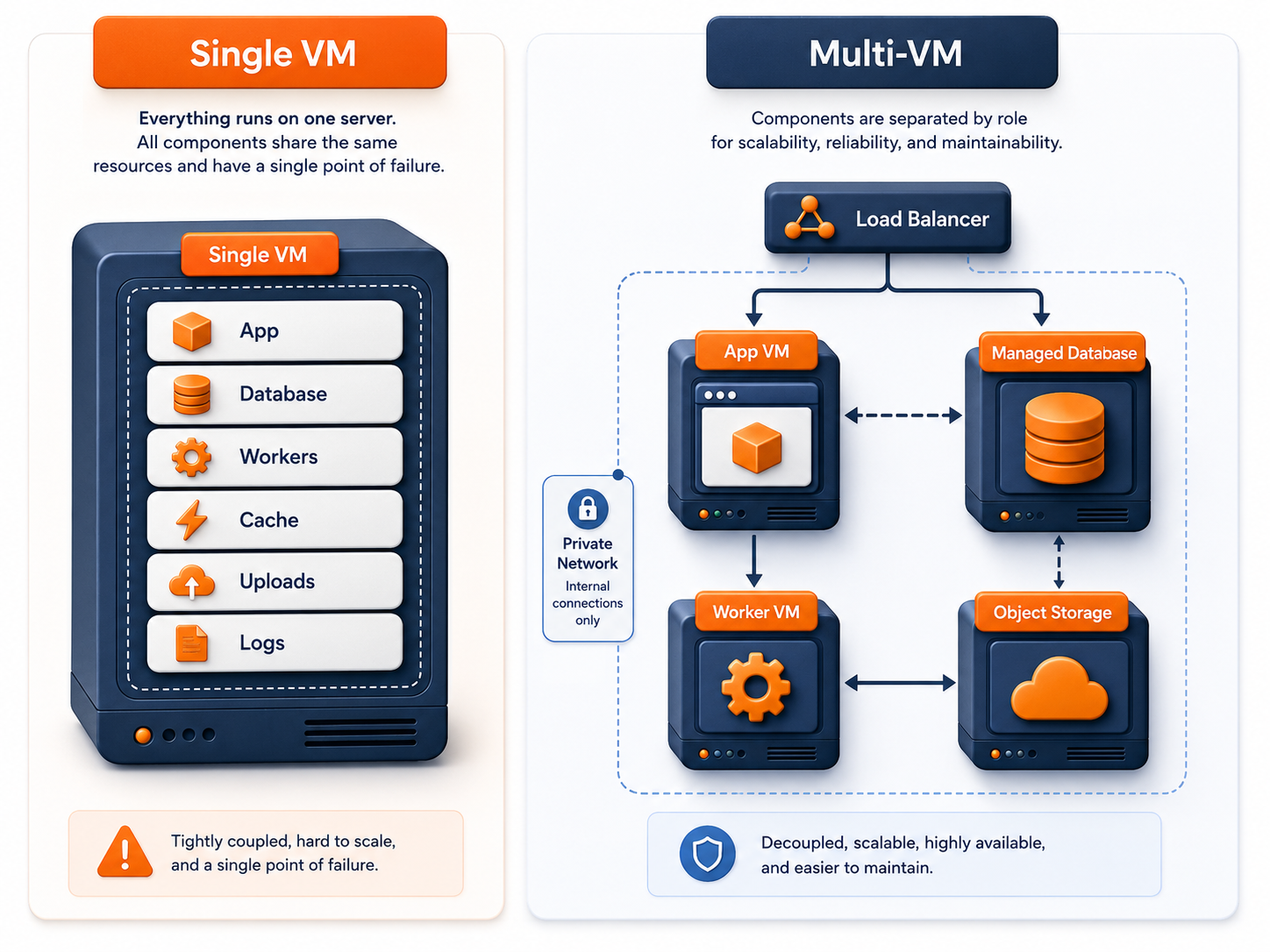
A monolithic application might use:
Users
  ↓
Application VM
  ↓ private network
Database
  ↓
Object storage and background workers
The app and workers may still run the same codebase with different commands. Infrastructure separation allows each role to have its own capacity, access, deployment, and recovery boundaries.
Choose the first split from the evidence
The database is a common first split because it owns durable business data, but it is not automatically first for every application.
| Observed constraint | Likely first split |
|---|---|
| Database memory, storage, backup, or maintenance risk | Database |
| CPU-heavy jobs delay web requests | Background workers |
| Durable uploads block VM replacement or horizontal scaling | Object storage |
| Cache or queue is critical and competes with the app | Cache or queue |
| One app node cannot meet traffic or availability needs | Additional app nodes and load balancing |
| Security policy requires separate access boundaries | Sensitive backend role |
| App deployment must not affect scheduled jobs | Worker or scheduler |
Select one change, migrate it safely, and confirm that the user-facing or operational result improves before continuing.
Split the database when data needs an independent boundary
Separate the database when its lifecycle no longer matches the application server.
Useful triggers include:
- database storage grows independently of application compute
- backups or maintenance affect the application
- the database needs stricter network and administrator access
- the app VM should be replaceable without moving customer records
- database memory and disk behavior require independent tuning
- database recovery objectives differ from app-server recovery
Users
  ↓
Application VM
  ↓ private network
Database VM or managed database
The split creates a clearer data boundary, but it also introduces network latency, credentials, connection management, and a second failure domain. Measure connection usage and query behavior after migration.
Use Separate App and Database Server for the detailed decision.
Move durable files away from replaceable compute
Local application storage is simple on one VM, but it can block later scaling.
When user uploads exist only on one app server:
- another app node may not see the file
- replacing the VM requires copying durable data
- app-server backups grow with file volume
- storage and compute cannot scale independently
- failed uploads and partial processing are harder to reconcile
A cleaner model is:
Application VM
  ↓
Database stores file metadata
  ↓
Object storage stores durable objects
Keep disposable temporary files local when bounded and safe to recreate. Move customer uploads, exports, media, and other durable objects to shared storage when they must survive app-node replacement.
Separate workers when background work affects users
Background jobs often have a different resource and failure profile from web traffic.
Workers may process:
- emails and notifications
- reports and exports
- imports
- image or document processing
- billing tasks
- integration synchronization
- scheduled cleanup
A separate worker VM is justified when job execution consumes enough CPU, memory, database capacity, or deployment attention to affect the user-facing app.
Web or API VM
  ↓
Queue or job store
  ↓
Worker VM
The worker design must handle retries, duplicate execution, job ownership, and graceful shutdown. Adding workers without database and dependency headroom can create a new bottleneck.
Separate cache or queue when it becomes critical state
A small local cache may remain on one VM. A cache or queue deserves an independent boundary when its failure, memory usage, or restart behavior has meaningful product impact.
Review:
- whether the data is disposable or authoritative
- whether several app and worker nodes need shared access
- memory growth and eviction behavior
- queue persistence and retry semantics
- connection limits
- recovery after restart
Do not move a cache merely because a multi-server diagram includes one. Split it when the application needs independent scaling, shared access, or failure control.
Add multiple app VMs only after externalizing state
Horizontal app scaling requires requests to move safely between nodes.
Before adding app servers, externalize or deliberately manage:
- user sessions
- uploaded files
- background jobs
- scheduled tasks
- required cache state
- configuration and secrets
- application logs and metrics
Microsoft’s scale-out guidance recommends avoiding instance stickiness and resolving backend bottlenecks before adding instances. AWS similarly recommends offloading state so servers can be replaced without availability impact.
Use Stateful vs Stateless Applications before adding a load balancer.
Load balancing adds routing, not complete availability
A load balancer can distribute new traffic and remove unhealthy app nodes from rotation. It does not automatically make the database, storage, DNS, application deployment, or load-balancer layer resilient.
A multi-node app tier needs:
- meaningful readiness checks
- externalized state
- connection draining
- compatible deployments
- enough remaining capacity after one node fails
- shared observability
- database connection planning
Users
  ↓
Load balancer
  ↓
App VM 1   App VM 2
  ↓ private network
Database, cache, queue, and storage
Use Load Balancing Explained for L4, L7, health-check, timeout, and failover decisions.
More VMs do not automatically create high availability
Role separation and redundancy are different architectural choices.
A separate database VM isolates resources but remains one database node. Two app VMs improve the app tier only if traffic routing, state, and remaining capacity are designed correctly. Several roles may still depend on one network, credential, deployment pipeline, or storage system.
Review each failure domain:
- app node
- worker
- database
- queue or cache
- object storage
- load balancer
- DNS
- external dependencies
- shared configuration and secrets
Multi-VM architecture improves isolation when boundaries are intentional. It can also create more failure modes when ownership and recovery are unclear.
Compare cost by role and risk
A multi-VM design has a higher visible infrastructure cost, but it may avoid scaling every role together.
On one VM, a worker CPU spike can force a larger plan for the app, database, and cache at the same time. After separation, worker capacity can change without resizing the database. The reverse can also be true: several lightly used VMs may cost more and create unnecessary operations.
Evaluate:
- infrastructure spend by role
- expected downtime cost
- recovery time
- engineering and on-call time
- deployment risk
- unused capacity
- monitoring and tooling overhead
Use current product and pricing pages during implementation rather than embedding temporary plan prices in an evergreen architecture decision.
A staged SaaS topology path
The architecture should evolve one justified boundary at a time.
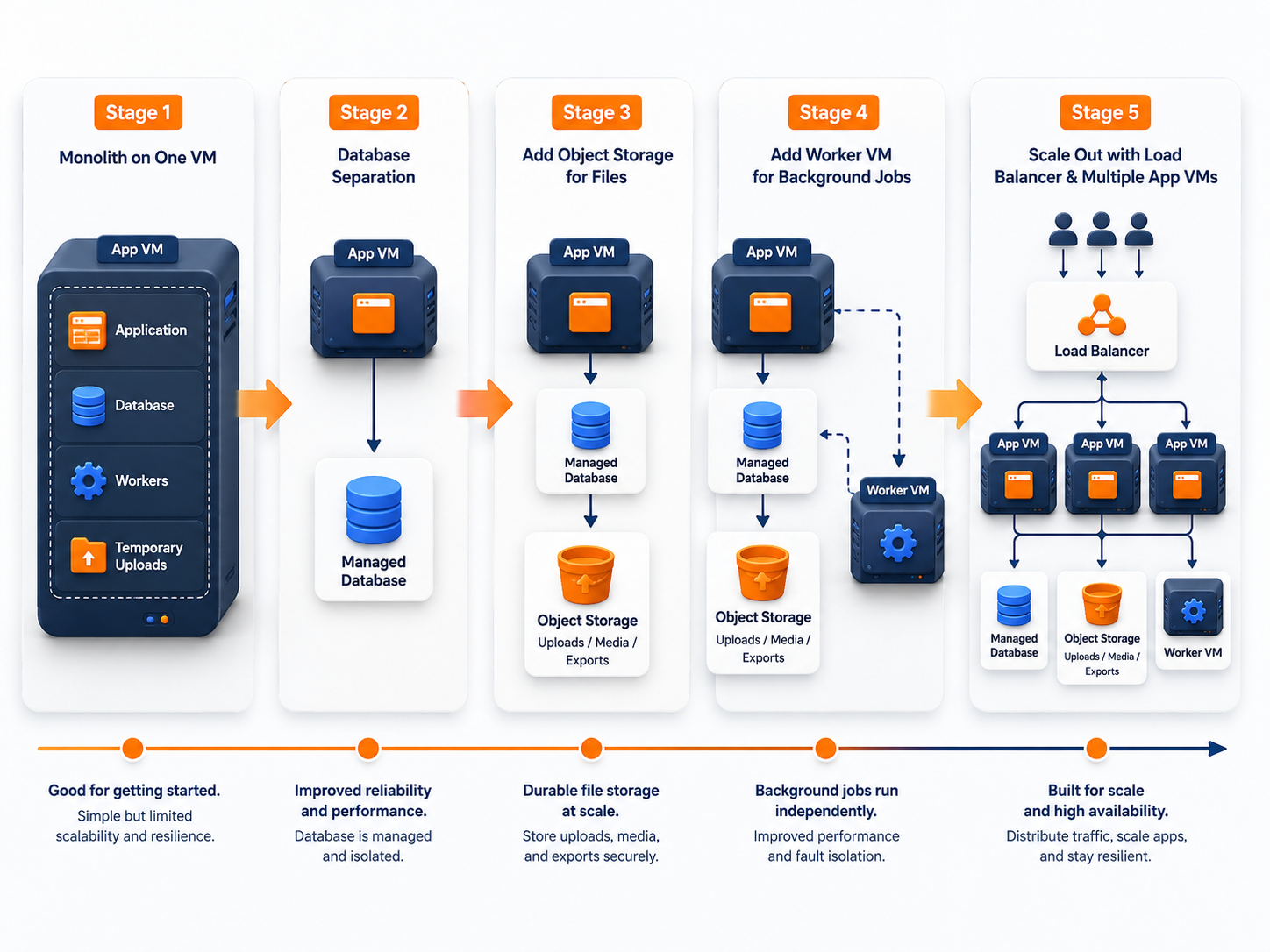
Stage 1: One VM
Application + database + worker + cache
Priorities:
- production baseline
- monitoring
- backup and restore
- clear service ownership
- documented separation triggers
Stage 2: Separate the most valuable boundary
This may be the database, worker, files, or another role according to measured risk.
Application VM
  ↓
Separated role
Stage 3: Externalize durable and shared state
Move sessions, files, jobs, and other state that would prevent application-node replacement.
Stage 4: Add independent capacity
Scale the database, workers, or other role according to its own workload.
Stage 5: Add multiple app nodes
Introduce load balancing when traffic, deployment safety, maintenance, or app-tier availability requires more than one node.
The next stage should solve a current constraint. It should not exist only because the diagram looks more mature.
Private networking becomes important after separation
Once services are separated, internal traffic should use controlled private paths where available.
Raff VPC can connect VMs and supported managed services through private networking. A common topology is:
Public internet
  ↓
Load balancer or application entry point
  ↓ private network
Application, database, workers, cache, and internal services
Private networking reduces unnecessary public exposure, but it does not replace firewall rules, authentication, encryption, database permissions, or application security.
Use a migration plan for every split
A role split should have a defined sequence:
- Measure the existing workload and define success.
- Create the new role and restrict access.
- Configure monitoring, backups, and ownership.
- Synchronize or migrate state where required.
- Test with production-like behavior.
- Cut traffic or processing over deliberately.
- Observe latency, errors, resource use, and recovery signals.
- Keep a rollback path until the result is stable.
- Remove obsolete data, credentials, rules, and services.
Do not split several stateful roles in one change unless the migration requires it. Smaller changes make cause and rollback clearer.
Single VM vs multi-VM decision matrix
| Evidence | Better next move |
|---|---|
| No measured contention or recovery problem | Keep one VM |
| One resource is constrained but roles remain compatible | Resize vertically |
| Database needs independent recovery or tuning | Separate database |
| Workers affect user-facing latency | Separate workers |
| Durable files block replacement | Move files to object storage |
| App node must be replaceable | Externalize state |
| One app node is the capacity boundary | Add app nodes and load balancing |
| One app node is the availability boundary | Add redundancy and failure capacity |
| Team cannot operate several roles safely | Improve automation and observability first |
Use Horizontal vs Vertical Scaling when the main decision is resize versus add instances.
How this applies on Raff
A Raff topology can combine:
- Raff Cloud Servers for application and worker roles
- Managed Databases when the database should have a separate managed boundary
- Object Storage for durable shared files
- a suitable traffic-distribution layer when several replaceable application nodes need to serve traffic; confirm current managed service availability before making it a dependency
- Raff VPC for controlled private communication
- Data Protection according to recovery needs
Choose only the components the workload currently needs. Verify current capabilities and pricing on the live product pages before implementation.
Pre-split checklist
Evidence
- The current bottleneck or risk is measured.
- The role being separated has a clear owner and purpose.
- Success criteria are defined.
State and data
- Durable data has an authoritative location.
- Sessions, uploads, and jobs are mapped.
- Backup and restore behavior is documented.
Operations
- Monitoring exists for the new role.
- Access and private-network rules are defined.
- Deployment and maintenance ownership are clear.
- The team can diagnose cross-service failures.
Migration
- Data synchronization and cutover are planned.
- Rollback is possible.
- Obsolete services and credentials will be removed.
- The architecture diagram and runbooks will be updated.