
Snapshots and backups protect cloud workloads in different ways. Use snapshots for fast rollback around a known change, and use backups for retained recovery from deletion, corruption, compromise, or infrastructure loss. Many production systems need both capabilities over their lifecycle, but a provider may require you to choose one protection mode for a VM at a time.
A snapshot is a point-in-time capture of VM or disk state. A backup is a recovery copy created on a schedule and kept across a retention window. The practical difference is short-term rollback versus durable recovery history.
Raff Technologies provides snapshot and automated-backup workflows through Data Protection. On Raff, a VM with backups enabled cannot also take snapshots at the same time, so choose the protection mode that matches the current recovery requirement and add application-level or database-aware copies where needed.
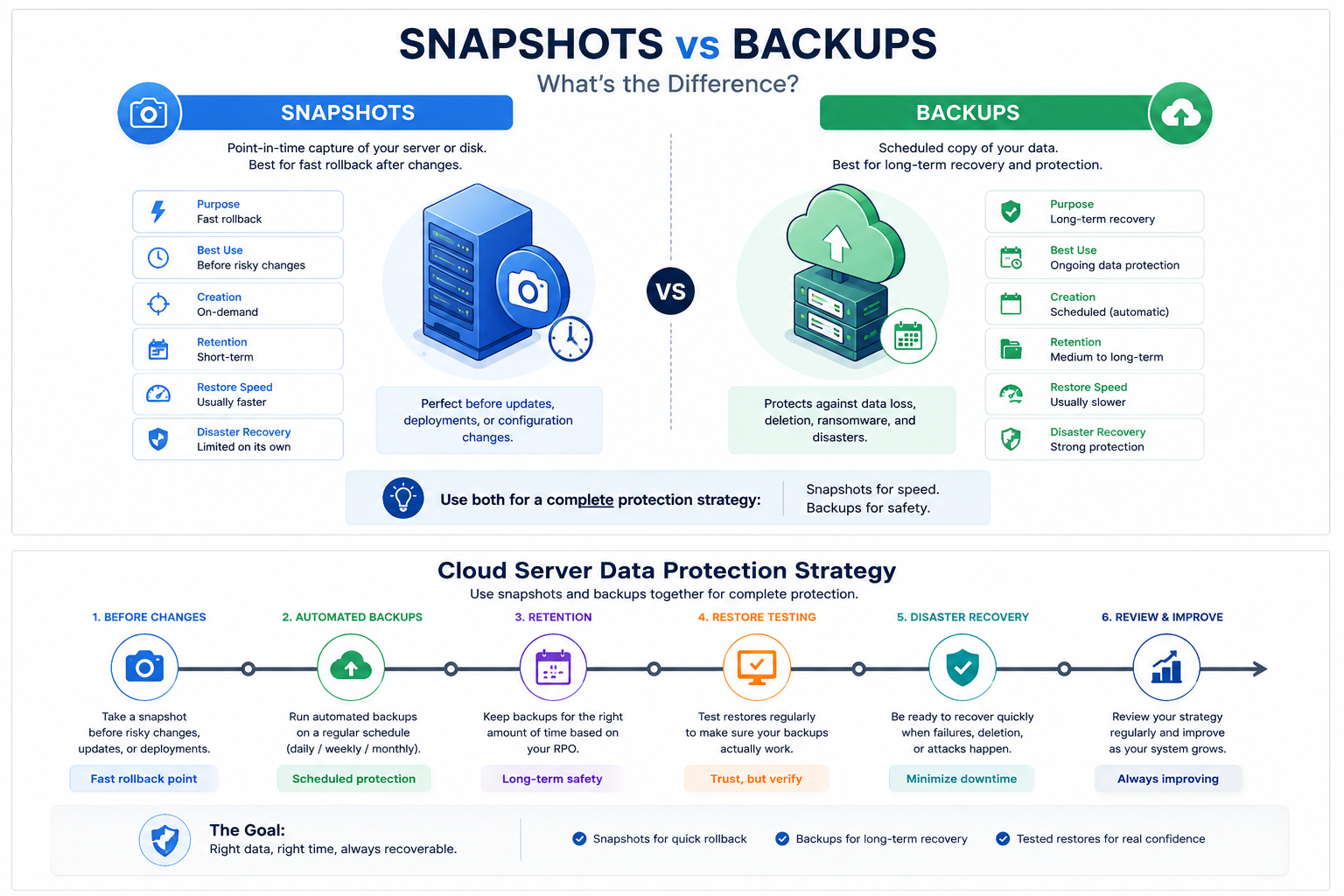
Snapshot vs backup: quick comparison
| Question | Snapshot | Backup |
|---|---|---|
| Main purpose | Fast rollback | Retained recovery |
| Best timing | Before a risky change | On a recurring schedule |
| Typical scope | VM, disk, or volume state | VM, files, database, or application data |
| Retention | Usually short and change-oriented | Usually policy-driven across time |
| Application consistency | Often crash-consistent unless coordinated | Can be application-aware |
| Best for old data recovery | Limited | Stronger |
| Best for deployment rollback | Strong | Supporting role |
| Independent copy by default? | Not necessarily | Depends on design |
| Should it be the only protection control? | No | No |
A useful rule is:
Snapshot = return to a recent infrastructure state. Backup = recover a usable copy from history.
What is a snapshot in cloud computing?
A cloud snapshot is a point-in-time representation of a VM, disk, or volume that can be used to return infrastructure to a previous state. It is most useful when the team knows which upcoming change may need to be reversed.
Common snapshot use cases include:
- operating-system upgrades;
- major application releases;
- database migrations;
- package or runtime updates;
- firewall or network changes;
- storage reconfiguration;
- risky troubleshooting actions.
Snapshots are operational checkpoints. Their main advantage is rollback speed, not long-term retention.
The important question is not only whether a snapshot exists, but where it is stored, which administrative boundary controls it, how long it is retained, and whether the application can recover consistently from that state.
What is a cloud backup?
A cloud backup is a recovery copy retained so the workload or its data can be restored after a failure that may be older, wider, or more destructive than the event a snapshot was created for.
Backups can protect against:
- accidental deletion;
- long-undetected corruption;
- ransomware;
- failed deployments;
- destroyed or unavailable VMs;
- storage loss;
- application mistakes;
- compromised administrator accounts;
- the need to restore an older version.
A backup strategy defines:
- what is protected;
- how often copies are created;
- where copies are stored;
- how long they are retained;
- who can delete or restore them;
- which recovery point should be selected;
- how the restored service is validated.
A successful backup job is not the same as a successful recovery. The copy must be restorable and complete enough to rebuild the service.
VM snapshot vs backup
For a virtual machine, the same distinction still applies.
A VM snapshot is useful when the goal is to reverse a recent infrastructure or software change. A VM backup is useful when the goal is to recover the VM or important data after a broader incident or from an older point in time.
| Scenario | Better first control |
|---|---|
| Patch or upgrade may need immediate rollback | Snapshot |
| Application deployment may fail | Snapshot + existing backup |
| File was deleted several days ago | Backup |
| Database corruption was discovered late | Database-aware backup / retained backup |
| VM is destroyed | Backup |
| Administrator account is compromised | Independently protected backup |
| Need point-in-time database recovery | Engine-aware backup + transaction logs/WAL |
A snapshot can be part of a backup strategy, but a snapshot is not automatically a backup. If production and the snapshot share the same administrative or failure boundary, one event can affect both.
Why snapshots are not enough by themselves
Snapshots may share the same failure path
A snapshot often remains inside the same cloud account, platform, or administrative boundary as the source VM. If that boundary is compromised or the snapshot is deleted through the same control plane, production and recovery may both be affected.
Snapshots preserve bad state too
A snapshot captures the system as it exists. If files were already deleted, encrypted, or corrupted before the snapshot was created, the recovery point may contain the same problem.
Snapshots may not be application-consistent
A storage-level snapshot can capture a database while writes are in progress. The result may be crash-consistent rather than transaction-aware.
Crash-consistent means the disks represent a point that the operating system and applications must recover from similarly to an unexpected power loss. For important databases, use engine-aware backup or point-in-time recovery mechanisms as well.
Snapshots can encourage weak retention
A snapshot created before a deployment may be valuable for hours or days, but keeping a collection of undocumented snapshots does not create a deliberate recovery policy.
Each recovery point should have a purpose, owner, and retention expectation.
Backup types solve different recovery needs
| Backup type | Best use | Main limitation |
|---|---|---|
| VM backup | Rebuild the complete server state | May not provide granular application recovery |
| File backup | Restore selected files or directories | Does not recreate the whole workload |
| Logical database backup | Portable or selective database restore | Can be slower for large databases |
| Physical database backup | Faster full database recovery | Engine- and version-specific |
| Transaction-log or WAL archive | Point-in-time database recovery | Requires complete retention and testing |
| Object-storage copy | Independent files, exports, and archives | Restore process must be documented |
The correct design depends on the workload and recovery objective, not the label of the backup tool.
When should you use a snapshot?
Use a snapshot when:
- a specific change is about to happen;
- rollback speed matters;
- the safe rollback window is short;
- the workload can recover correctly from infrastructure state;
- an independent backup already exists for more serious data loss.
Examples include taking a snapshot immediately before an OS update, package upgrade, configuration change, or application deployment with meaningful rollback risk.
After the change has been validated and the rollback window is over, old snapshots should be reviewed instead of accumulating indefinitely.
When should you use backups?
Use a backup when:
- data changes continuously;
- deletion may be discovered late;
- historical recovery points matter;
- the VM or storage may become unavailable;
- ransomware or account compromise is in scope;
- recovery must outlive a deployment window;
- the business needs a defined retention policy.
Backups are the stronger control when the recovery question is “Can we restore what mattered from the correct historical point?” rather than simply “Can we undo the change we just made?”
When should you use both?
Production workloads commonly need both rollback and retained-recovery capabilities over time because they solve different problems. On Raff, those capabilities are not enabled simultaneously on the same VM: a VM with backups enabled cannot also take snapshots.
Use both capabilities across the workload lifecycle when customer or business data is involved, downtime matters, deployments are risky, or historical recovery points are required. If your provider allows concurrent use, snapshots can protect change windows while backups retain recovery history. On Raff, choose either snapshots or automated backups for a VM at a given time, then use application-level exports, database-aware backups, or Object Storage when you need an additional independent recovery layer.
RPO and RTO change the answer
Recovery Point Objective (RPO) defines how much recent data the business can lose. Recovery Time Objective (RTO) defines how quickly the service must return.
Snapshots can reduce RTO after a recent infrastructure change because they can provide a fast rollback path. Backups can support the required RPO by preserving repeated recovery points across time.
Neither result is automatic. A fast snapshot may contain the wrong state. A frequent backup may still take too long to restore.
Use RPO vs RTO for Cloud Backups to define recovery targets before choosing frequency and retention.
Databases need application-aware recovery
A VM snapshot or VM backup may protect disk state without understanding database transactions.
Important databases may also require:
- logical dumps;
- physical base backups;
- transaction-log or WAL archiving;
- point-in-time recovery;
- replication for availability.
Replication is not a backup. It normally reproduces unwanted changes such as accidental deletion or corrupted writes as well as valid changes.
For PostgreSQL-specific protection, read PostgreSQL Replication vs Backups vs Snapshots.
If teams do not want to operate the database host and its backup lifecycle themselves, Raff also provides Managed Databases for supported engines.
Retention is where backups become more valuable
Snapshots are usually most useful around a short operational window. Backups become more valuable when a problem is discovered days or weeks later.
A retention policy can combine:
- frequent recent recovery points;
- daily short-term backups;
- weekly medium-term copies;
- longer-lived copies where business or legal requirements justify them.
Retention should follow:
- how quickly failures are detected;
- acceptable data loss;
- compliance and business requirements;
- data change rate;
- restore time;
- storage cost.
Raff Data Protection currently supports automated backup retention through configurable recovery points. Use the live Data Protection page for the current recovery-point limits and retention behavior, and choose the setting from the workload's RPO and RTO rather than keeping the maximum by default.
Separate recovery copies from the production failure path
The more important the workload, the more important it is that one mistake cannot remove both production and every recovery point.
Separation can involve:
- different credentials or roles;
- restricted deletion permissions;
- a different storage location or service;
- independent application-level exports;
- offline or provider-independent copies where business impact justifies them.
The familiar 3-2-1 backup principle is useful as a resilience model: keep multiple copies, use more than one storage type or failure boundary, and maintain at least one copy separated from the primary environment.
Not every small workload needs the same implementation, but production backups should not depend on the exact same failure that destroys production.
Restore testing matters more than backup-job status
A snapshot or backup is useful only when the team can restore from it.
A full test should confirm:
- The correct recovery point can be located.
- Required credentials and encryption keys are available.
- Replacement infrastructure can be created.
- Data restores without integrity errors.
- The application starts.
- DNS, certificates, secrets, and networking are restored.
- Critical user workflows succeed.
- Measured data loss meets RPO.
- Measured recovery time meets RTO.
Testing only a file download does not prove complete service recovery.
For important workloads, restore into an isolated environment so testing does not overwrite the current production system.
Design snapshot and backup coverage together
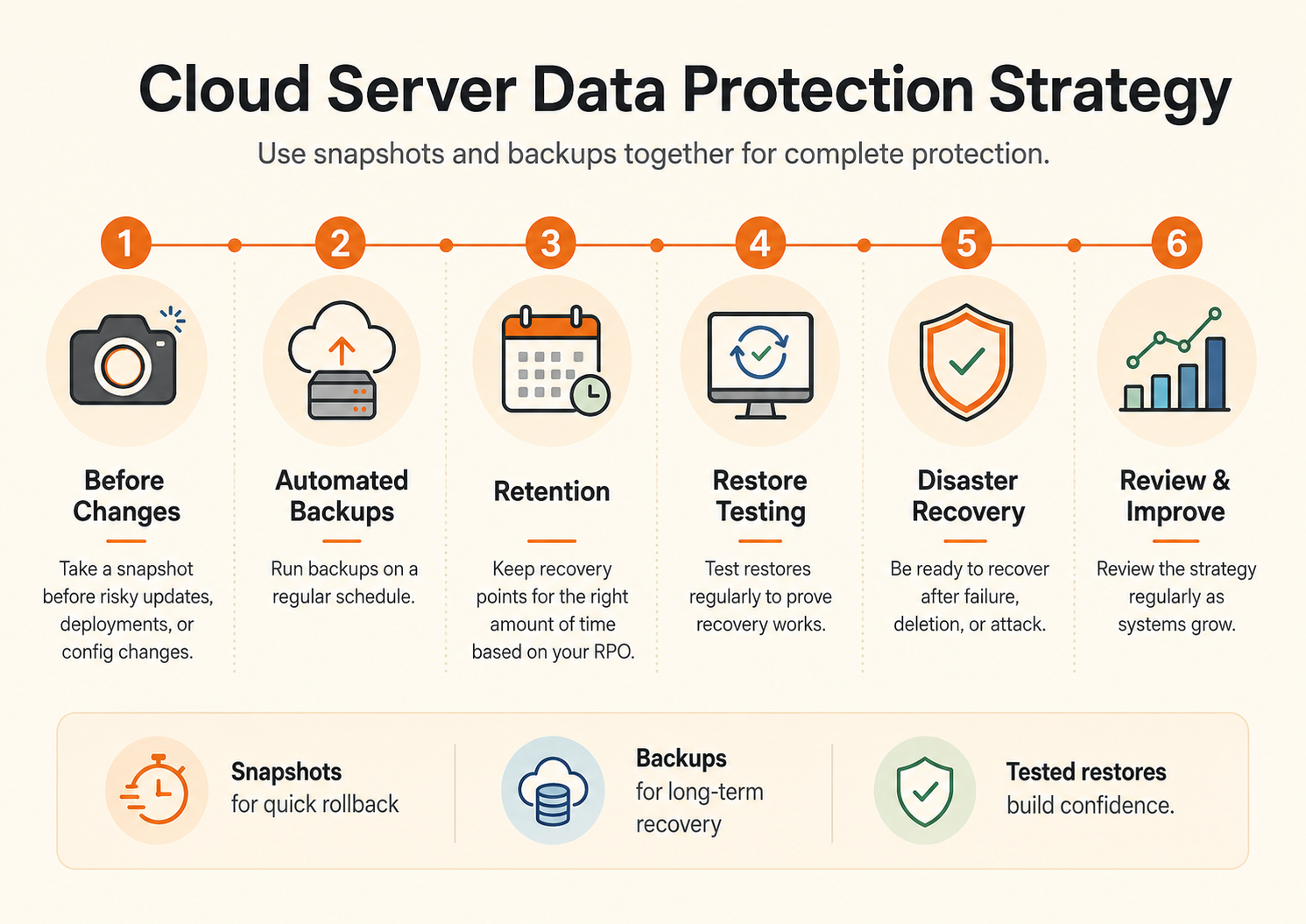
A practical production pattern is:
For a VM using snapshots:
Create rollback points around risky changes.

For a VM using automated backups:
Retain scheduled recovery points.

For databases:
Add engine-aware backups or point-in-time recovery.

Regularly:
Restore into an isolated environment and validate the service.
This separates four concerns that are often mixed together: rollback, historical recovery, application consistency, and disaster recovery.
Current Raff snapshot and backup pricing
Raff Data Protection is the current product path for VM snapshots and automated backups.
Current Raff Data Protection uses a shared protection-storage allowance for snapshots and backups. The free pool starts with 50 GB per account plus an additional allowance based on protected VM disk capacity. Storage above the free pool is currently $0.06/GB-month. Automated backups use configurable recovery points, and a VM with backups enabled cannot also take snapshots. Use the live Data Protection and pricing pages for the exact current limits before implementing a cost-sensitive policy.
These are storage and retention references, not a recommendation to retain every recovery point for the same duration. Verify the live pricing page before implementing a cost-sensitive policy because product pricing can change.
Volumes are currently $0.08/GB-month and can provide persistent block storage with a lifecycle separate from the VM. Object Storage can be used for compatible application exports and backup objects when the workload or backup software supports S3-compatible storage.