
Caddy and Nginx are both production-ready web servers and reverse proxies, but they optimize for different operating styles. Caddy is the simpler default when you want automatic HTTPS and a short configuration. Nginx is the stronger default when your team already has Nginx expertise, needs very explicit edge control, or operates a mature Nginx estate.
If you are comparing Caddy server vs Nginx for a new VPS application in 2026, start with the operating model rather than a benchmark headline. Both are fast enough for many application workloads. The bigger difference is how much TLS, routing, configuration, and maintenance work your team wants to own.
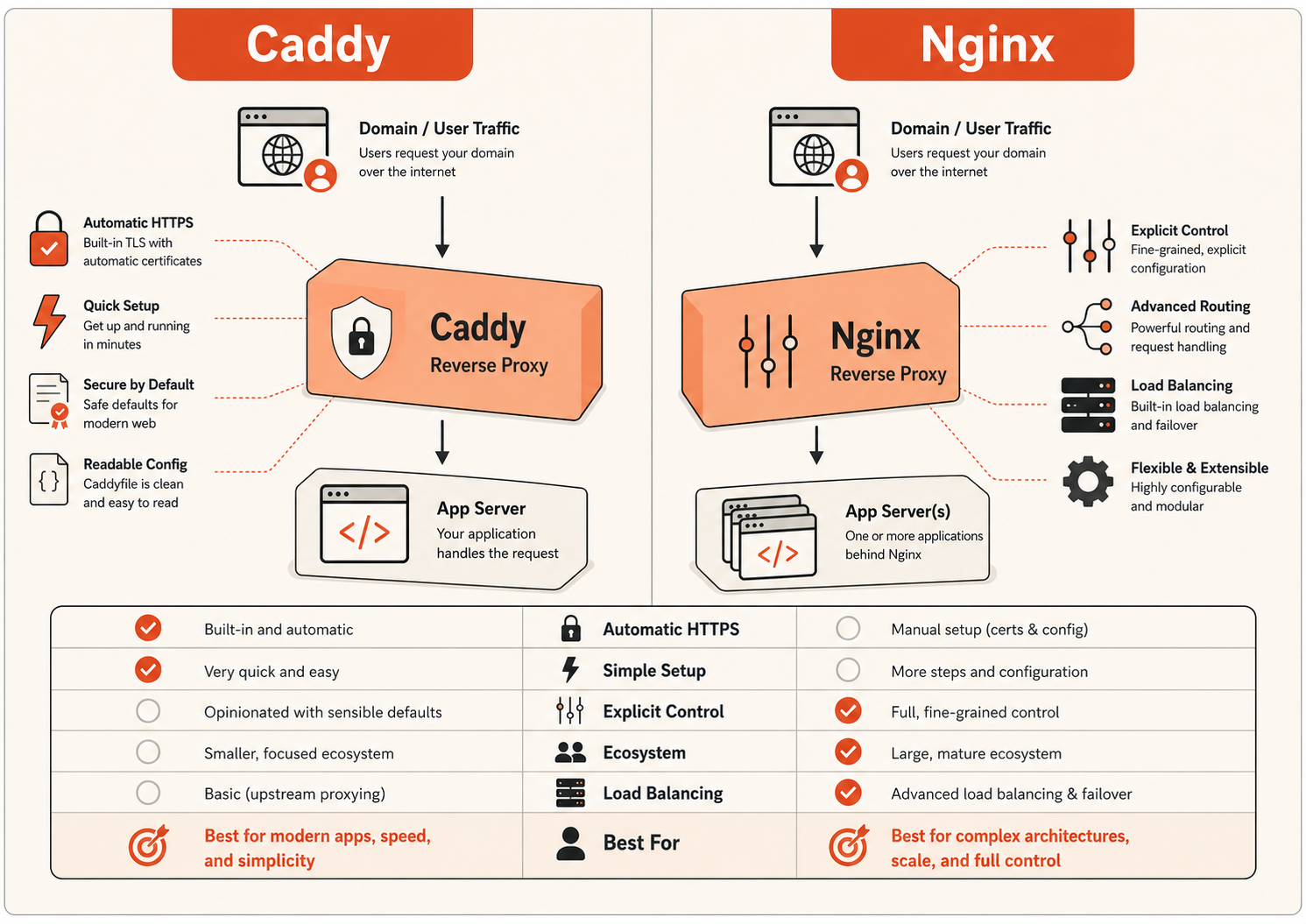
Caddy server vs Nginx: quick answer
| Decision area | Caddy | Nginx |
|---|---|---|
| New app on one VPS | Best default | Strong |
| Automatic HTTPS | Built in | Usually separate certificate automation |
| Configuration size | Shorter for common setups | More explicit |
| Existing production ecosystem | Growing | Very large |
| Complex legacy routing | Capable | Strong fit |
| Team already standardized on Nginx | Usually no reason to switch | Best default |
| Small team with limited DevOps time | Strong fit | Good if already familiar |
| Load balancing | Strong | Strong |
| Static file serving | Strong | Strong |
| Fine-grained operational control | Good | Excellent |
For most new small-team deployments, Caddy wins on operational simplicity. For established environments, Nginx often wins because the team already has the configs, tooling, documentation, and production experience to run it safely.
That is the practical Caddy vs Nginx decision.
Are Caddy and Nginx the same thing?
No. They overlap heavily, but they are different products with different configuration and automation models.
Both can:
- serve websites and static files;
- terminate HTTPS;
- reverse-proxy application traffic;
- route by hostname or path;
- forward headers;
- support WebSockets and streaming;
- distribute traffic across multiple upstreams;
- sit in front of Node.js, Python, Go, Java, PHP, containers, and other application runtimes.
The important difference is how those capabilities are exposed and operated.
Caddy is designed around secure defaults and automation, especially automatic HTTPS. Nginx gives operators a mature, highly explicit configuration model with a much larger installed base and ecosystem.
Can Caddy be used as a web server?
Yes. Caddy is not only a reverse proxy. It can serve static files, terminate TLS, handle redirects, add headers, compress responses, and proxy application traffic.
That matters because searches for Caddy web server vs Nginx often imply two different use cases:
- serving files directly; and
- acting as the public reverse proxy in front of an application.
Both Caddy and Nginx can do both.
For a modern application server, the common pattern is still:
Internet
  ↓ HTTPS
Caddy or Nginx
  ↓ localhost/private network
Application runtime
The application might listen on 127.0.0.1:3000, while Caddy or Nginx owns public ports 80 and 443.
Caddy vs Nginx performance in 2026
There is no useful universal statement such as “Caddy is X% faster” or “Nginx is always faster.” Public tests disagree because the result changes with hardware, tuning, payload size, TLS, protocol version, logging, compression, connection count, and the type of upstream workload.
Independent tests illustrate the problem. One tuned reverse-proxy benchmark found Nginx ahead on throughput and p95 latency in several workloads, while another benchmark showed the result changing with response size and configuration. That is why a single requests-per-second number is a poor production decision rule.
A more useful summary is:
| Performance area | Practical expectation |
|---|---|
| Memory footprint | Nginx is often lighter, especially in minimal configurations |
| High-concurrency proxying | Tuned Nginx has a long track record and can be extremely efficient |
| Default HTTPS experience | Caddy reduces setup work because certificate automation is integrated |
| Small and medium application workloads | Either proxy is usually fast enough; the app or database often becomes the bottleneck first |
| Large files / streaming | Test the exact workload; buffering, disk, network, and tuning matter |
| HTTP/2 and modern TLS | Both are production-capable when configured correctly |
| HTTP/3 | Caddy has native support in its modern HTTP stack; validate your exact deployment requirements before making this the deciding factor |
For most SaaS apps, internal tools, APIs, and dashboards, optimize in this order before replacing the reverse proxy:
- application latency;
- database queries;
- caching;
- VM CPU and memory pressure;
- disk and network bottlenecks;
- then proxy-level tuning.
If the app takes 300 ms to generate a response, saving a tiny amount at the proxy layer will not transform the user experience.
How to benchmark Caddy vs Nginx properly
If proxy performance genuinely matters, test the configuration you would actually run:
- same VM size;
- same operating system;
- same TLS settings;
- same backend application;
- same keep-alive behavior;
- same compression and logging;
- representative response sizes;
- realistic concurrency;
- p50, p95, and p99 latency;
- error and timeout rate under saturation;
- memory and CPU usage during the test.
The winner of a synthetic static-file test is not automatically the winner for your API or application.
HTTPS: Caddy has the simpler default
This is Caddy's clearest advantage.
Caddy's HTTPS workflow is integrated into the server. When you configure a public hostname and DNS points to the server, Caddy can automate certificate issuance, renewal, and HTTP-to-HTTPS redirects as part of the normal configuration.
A basic Caddy reverse proxy can be this small:
app.example.com {
    reverse_proxy localhost:3000
}
Nginx can run an equally secure HTTPS edge, but certificate issuance and renewal are normally handled through separate ACME tooling, platform automation, or an existing certificate-management process.
That means an Nginx deployment commonly has more operational pieces to track:
- certificate issuance;
- renewal jobs;
- certificate paths and permissions;
- TLS server blocks;
- redirects;
- reload behavior;
- expiry monitoring.
If your team already automates these well, this is not a disadvantage. If you are starting from zero, Caddy removes work.
Caddy vs Nginx security
Neither product is automatically “secure” just because of its name. Security depends on patching, configuration, network exposure, TLS settings, upstream trust, and how safely changes are operated.
The difference is mostly in the default operating model.
Caddy security advantage: fewer certificate moving parts
Caddy reduces the amount of manual TLS lifecycle work for common public-hostname deployments. Fewer certificate steps can reduce configuration mistakes for small teams.
Nginx security advantage: mature explicit control
Nginx gives experienced operators very detailed control over headers, TLS, upstream behavior, caching, request limits, timeouts, routing, and access policies. Teams with mature Nginx standards can apply those controls consistently across a large estate.
Security baseline for either proxy
Whichever server you choose:
- expose only ports that should be public;
- keep application and database ports private;
- patch the operating system and proxy package;
- validate forwarded-client-IP settings;
- configure upload and request limits deliberately;
- review WebSocket and streaming behavior;
- monitor 4xx/5xx rates and upstream failures;
- back up configuration;
- test reload and rollback procedures;
- avoid copying internet configuration snippets you do not understand.
The safer proxy is the one your team can keep correctly configured over time.
Configuration: Caddy is shorter, Nginx is more explicit
For a simple application running on port 3000, Caddy may need only:
app.example.com {
    reverse_proxy localhost:3000
}
A comparable Nginx HTTP reverse-proxy configuration is more explicit:
server {
    listen 80;
    server_name app.example.com;

    location / {
        proxy_pass http://127.0.0.1:3000;
        proxy_set_header Host $host;
        proxy_set_header X-Real-IP $remote_addr;
        proxy_set_header X-Forwarded-For $proxy_add_x_forwarded_for;
        proxy_set_header X-Forwarded-Proto $scheme;
    }
}
This is not a flaw in Nginx. It reflects a different philosophy.
Caddy tends to express the desired outcome with fewer directives. Nginx tends to expose more of the mechanics directly.
For a new operator, Caddy is usually easier to read. For a team that has operated Nginx for years, the explicit configuration may actually be easier because it matches existing playbooks and expectations.
Reverse proxy features: both are capable
Caddy's reverse_proxy supports multiple upstreams, load-balancing policies, retries, active and passive health checks, header manipulation, request rewriting, streaming, and configurable transports.
Nginx supports reverse proxying and upstream groups with well-established load-balancing methods such as round robin, least connections, and IP hash, plus a deep set of proxy and timeout controls.
For a simple multi-backend Caddy deployment:
app.example.com {
    reverse_proxy 10.0.0.10:3000 10.0.0.11:3000
}
A simple Nginx equivalent:
upstream app_backend {
    server 10.0.0.10:3000;
    server 10.0.0.11:3000;
}

server {
    listen 80;
    server_name app.example.com;

    location / {
        proxy_pass http://app_backend;
    }
}
For many small and medium multi-VM applications, either can work well. The deciding question is usually who will operate the configuration, not whether the feature exists.
When Caddy is the better choice
Choose Caddy when most of these are true:
- the project is new;
- the application runs on one or a few VMs;
- the team is small;
- you want HTTPS with minimal setup;
- configuration should stay short and easy to review;
- you do not already have a mature Nginx platform;
- the edge rules are straightforward;
- you want to reduce certificate-management work.
Typical examples:
- founder-led SaaS apps;
- internal tools;
- staging environments;
- dashboards;
- small APIs;
- self-hosted developer tools;
- single-VM application stacks.
For these workloads, the operational simplicity is often more valuable than squeezing out the last bit of proxy-level efficiency.
When Nginx is the better choice
Choose Nginx when most of these are true:
- your team already runs Nginx in production;
- you have tested Nginx templates and automation;
- the environment has complex rewrites or routing;
- you need detailed caching or header behavior;
- you are inheriting a mature application estate;
- support procedures and monitoring already assume Nginx;
- switching would create migration risk without a clear benefit.
For established infrastructure, “Caddy is simpler” is not enough reason to migrate. Existing expertise is an operational asset.
If you are also comparing Nginx with Apache, see Nginx vs Apache: Which Web Server to Choose.
Caddy vs Nginx on a VPS
Both fit a VPS architecture well.
A clean single-VM deployment looks like:
Users
  ↓
DNS
  ↓
Caddy or Nginx on 80/443
  ↓
Application on localhost
  ↓
Private database/cache
A practical firewall policy is:
| Port | Service | Public? |
|---|---|---|
| 22 | SSH | Restrict where possible |
| 80 | HTTP redirect / ACME path | Yes |
| 443 | HTTPS | Yes |
| 3000 | Application runtime | No |
| 5432 | PostgreSQL | No |
| 3306 | MySQL | No |
The key rule is simple:
Expose the reverse proxy, not every backend service.
That architecture matters more to production safety than the logo on the proxy.
What we would choose for a new small-team deployment
For a new Raff VM deployment where one application needs HTTPS and reverse proxying, we would normally start with Caddy if the team has no existing proxy standard. The reason is not that Nginx is obsolete or slow. It is that Caddy gets the team to a small, readable, HTTPS-first configuration with fewer certificate-management steps.
We would choose Nginx instead when the customer already has Nginx configuration, team knowledge, monitoring, or routing patterns worth preserving.
That is the operational decision we care about:
Do not create a new infrastructure standard unless the benefit is larger than the migration and maintenance cost.