Docker Compose is the better default for most small teams until a real multi-node coordination problem appears. Kubernetes becomes worth adopting when you need cluster scheduling, service discovery, standardized rollouts, self-healing across nodes, or many workloads that are becoming difficult to operate as individual VMs.
For Raff Technologies users, the practical path is usually staged rather than binary: run Docker Compose on a Raff VM, externalize state as the application grows, split workloads across VMs when necessary, and adopt Kubernetes only when orchestration removes more operational burden than it creates.
The decision is not “Which technology is more advanced?” It is “Which operating model solves our current production risks with the least unnecessary complexity?”
| If your situation looks like this | Better default |
|---|
| One app, one host, small team | Docker Compose on a VM |
| Database or workers need isolation | Compose + separate infrastructure roles |
| Multiple app VMs but simple coordination | Multi-VM architecture |
| Many replicas/services need consistent scheduling and rollouts | Kubernetes |
| Nobody can own cluster operations | Stay on VMs for now |
Docker defines Compose as a tool for defining and running multi-container applications. Kubernetes is a container orchestration system for automating deployment, scaling, and management of containerized applications. The important difference is therefore not container support; it is the operational layer each tool asks your team to own.
Docker Compose vs Kubernetes: the practical difference
Docker Compose gives a team a compact application definition, usually in compose.yaml, for containers that run together. It works especially well when one server is a reasonable failure and scaling boundary.
Kubernetes adds a cluster control model. Workloads are scheduled across nodes and managed through controllers, services, configuration objects, health checks, rollout behavior, and a common API.
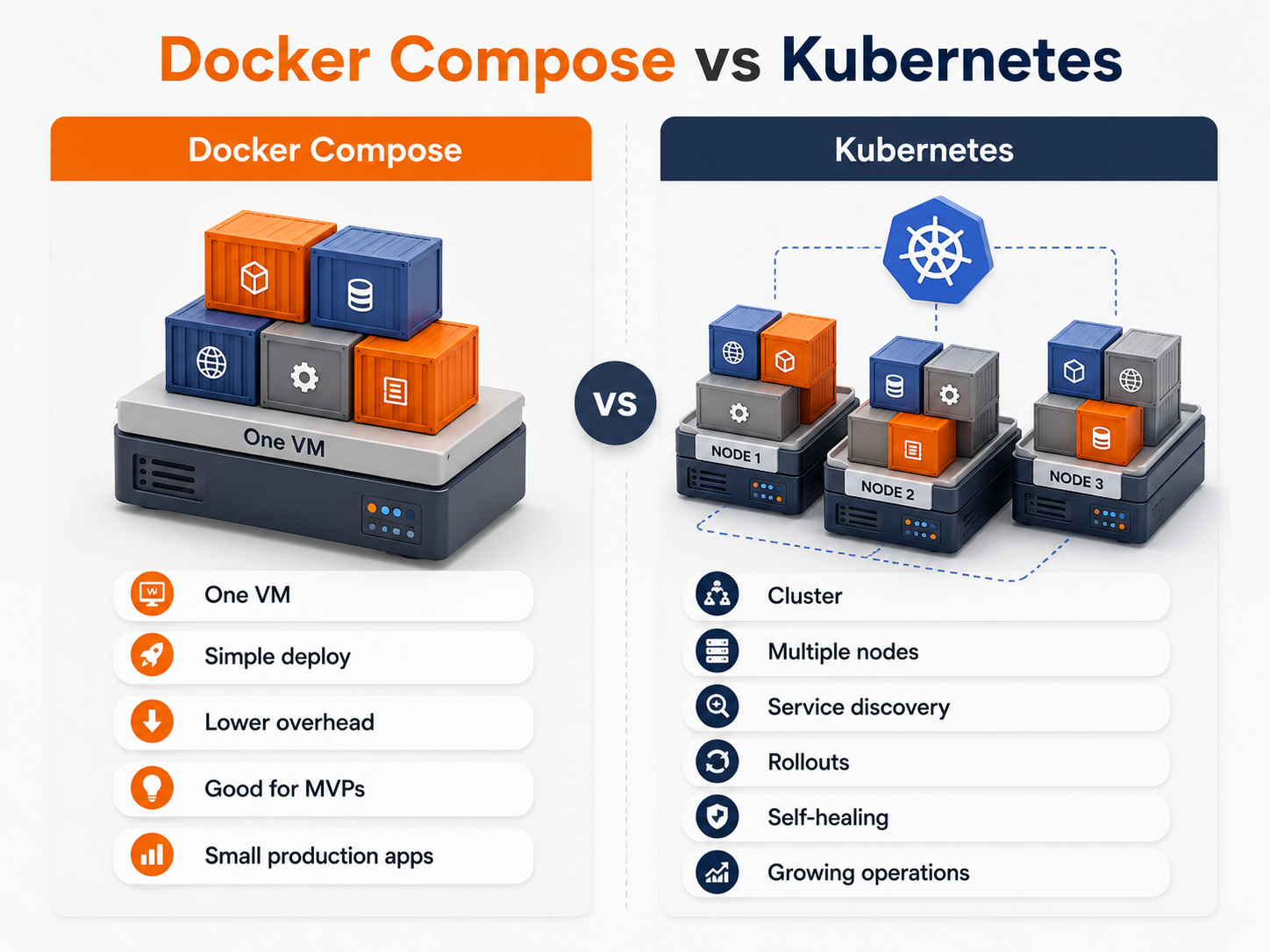
| Area | Docker Compose | Kubernetes |
|---|
| Main operating scope | One host/project | Cluster of nodes/workloads |
| Learning curve | Lower | Higher |
| Deployment | Compose + CI/CD or host automation | Declarative cluster deployment |
| Multi-node scheduling | No native cluster scheduler | Core capability |
| Service discovery | Simple container/project networking | Cluster services and DNS |
| Self-healing | Container restart behavior | Workload controllers reschedule/reconcile |
| Scaling | Usually host-level/manual | Replica and cluster-aware patterns |
| Best fit | MVPs and smaller production systems | Systems where cluster coordination is valuable |
Docker Compose is not “unprofessional,” and Kubernetes is not automatically “production-grade by default.” Either can be operated badly. The right choice is the smallest model your team can operate reliably.
When Docker Compose is enough for production
Compose is often a good production choice when:
- one VM can handle the workload comfortably;
- traffic is low or predictable;
- the application is a monolith or a small set of services;
- deployments can happen on one host without unacceptable downtime;
- the team wants a short incident path and easy debugging;
- the database is managed separately or its recovery process is well understood;
- horizontal multi-node scheduling is not required;
- the business is still validating product-market fit.
A typical setup might be:
Raff VM
  ├─ reverse proxy
  ├─ application
  ├─ worker
  ├─ cache
  └─ telemetry agent
For durable production state, it is usually better to separate the components whose recovery requirements differ from the application process. That can mean a managed database and object storage while the web application still runs under Compose.
Production Compose still needs production discipline
Compose removes cluster complexity; it does not remove operational responsibility. A serious production setup should have:
- versioned Compose configuration;
- pinned or deliberately versioned images;
- TLS and a reverse proxy;
- firewall rules and restricted administration access;
- restart policies and useful health checks;
- centralized or durable logs;
- monitoring and actionable alerts;
- backup and restore procedures;
- a repeatable CI/CD path;
- a documented rollback procedure;
- secrets handled outside images and source control;
- a plan for host failure.
If the application is already unreliable on one VM because releases, backups, configuration, or observability are weak, Kubernetes will usually move those problems into a more complicated environment rather than solve them.
Signs you are outgrowing Docker Compose
The strongest Kubernetes signals are coordination problems, not simply higher traffic.
Look for these patterns:
- several application instances need scheduling across hosts;
- different services need independent replica counts;
- manual placement of workloads across VMs is becoming fragile;
- deploy and rollback behavior must be consistent across many workloads;
- service discovery between many components is becoming operational work;
- failed workloads need automatic rescheduling on healthy nodes;
- environment drift is causing incidents;
- one team is repeatedly building its own ad-hoc orchestration scripts;
- the cost of coordinating VMs is becoming higher than the cost of operating a cluster.
A useful decision rule is:
Switch when Kubernetes removes recurring coordination work that your team already has—not when you expect to need it someday.
Do not skip the multi-VM middle ground
Many small teams jump mentally from “one Compose VM” directly to “Kubernetes.” There is a useful middle stage.
App VM
  ↓ private network
Managed Database
  ↓
Object Storage
  ↓
Worker VM
This architecture can remove several single-host risks without introducing a cluster. It lets web traffic, jobs, data, and durable files scale on different timelines.
The sequence may look like:
- Move the database out of the application host.
- Move durable uploads to object storage.
- Move background jobs to a worker VM if they compete with web traffic.
- Add another application VM when one app host is no longer enough.
- Adopt Kubernetes when coordinating these application workloads becomes the bottleneck.
See Single Server vs Multi-Server Architecture before treating Kubernetes as the next mandatory step.
When Kubernetes earns its complexity
Kubernetes becomes a stronger fit when the application genuinely benefits from cluster-level primitives such as:
- workload scheduling across nodes;
- replica management;
- rolling application updates;
- readiness and liveness checks;
- stable service discovery;
- declarative configuration;
- centralized workload conventions;
- automated reconciliation after failures;
- stronger separation between application workloads and nodes.
That does not mean every workload belongs inside the cluster. A small team can run stateless application workloads on Kubernetes while keeping databases and durable object data in services designed for those roles.
When not to switch to Kubernetes yet
Stay with Compose or a VM-based architecture when most of these are true:
- one or two servers still meet the workload requirement;
- deployments are simple and repeatable;
- failure recovery is documented and tested;
- the team does not need a multi-node scheduler;
- workload placement is not consuming meaningful engineering time;
- one person would become the only Kubernetes operator;
- monitoring and incident response are still immature;
- the application depends heavily on host-local state;
- the main scaling problem can be solved by resizing or separating one infrastructure role.
A cluster is another production system. If nobody has the capacity to monitor, secure, upgrade, and recover it, adopting Kubernetes can reduce application simplicity faster than it increases reliability.
Kubernetes readiness is more than having containers
A Docker image can run on Kubernetes, but that does not make the application operationally ready for Kubernetes.
Before migrating, verify that:
- the application can run more than one replica safely;
- sessions are not tied to one process or container;
- durable uploads are externalized;
- background workers are modeled separately from web processes;
- scheduled jobs will not accidentally execute multiple times;
- health endpoints represent actual readiness;
- application logs can be collected centrally;
- metrics and alerts exist;
- secrets are handled intentionally;
- releases can roll forward and back repeatably;
- stateful components have backup and restore procedures;
- someone owns cluster operations.
If these foundations are missing, fix them before the migration. They improve reliability even if you ultimately remain on VMs.
Externalize the database before the cluster when possible
Putting an application on Kubernetes does not mean its database must move into Kubernetes too.
Databases introduce storage, recovery, upgrade, consistency, and failure-handling concerns that differ from stateless application workloads. Running them successfully in Kubernetes is possible, but small teams should make that an intentional platform decision rather than an automatic consequence of container adoption.
A simpler early pattern is:
Application VMs or Kubernetes
        ↓ private connectivity
Managed Database
For Raff workloads, review Raff Managed Databases and Managed vs Self-Hosted Databases. Whichever model you choose, backup and restore testing still matters; see Database Backup Strategy for SaaS Apps.
Move durable uploads away from local app disks
Local application disks become an obvious constraint once multiple replicas or replaceable nodes enter the architecture.
A safer pattern is:
Application
  ↓
Database: file metadata
Object Storage: file objects
Using object storage means a replacement application container or VM does not also need to carry the only copy of user-generated files.
Raff Object Storage is S3-compatible and can serve as the durable object layer for uploads, exports, media, and backup archives. For the architectural trade-offs, read App Uploads: VM Disk vs Object Storage.
Cost means infrastructure plus engineering ownership
Comparing Compose and Kubernetes only by VM/node price misses the larger cost.
Kubernetes can add work around:
- cluster and node sizing;
- ingress and networking;
- observability;
- secrets and access control;
- workload policies;
- upgrade planning;
- backup/recovery for cluster-dependent state;
- CI/CD or GitOps changes;
- on-call knowledge;
- developer learning.
Compose can be cheaper while the application is small because there are fewer layers to operate. Kubernetes can become cheaper in practice when it replaces enough repeated coordination, manual scheduling, risky deployments, or failure handling.
Ask:
Are we currently spending more engineering time and reliability budget coordinating workloads without Kubernetes than we would spend owning Kubernetes?
If the answer is no, the migration can wait.
For cluster economics, see Kubernetes Cost Optimization for Startups and Raff pricing.
A practical migration path from Docker Compose to Kubernetes
Do not combine every infrastructure change into one migration.
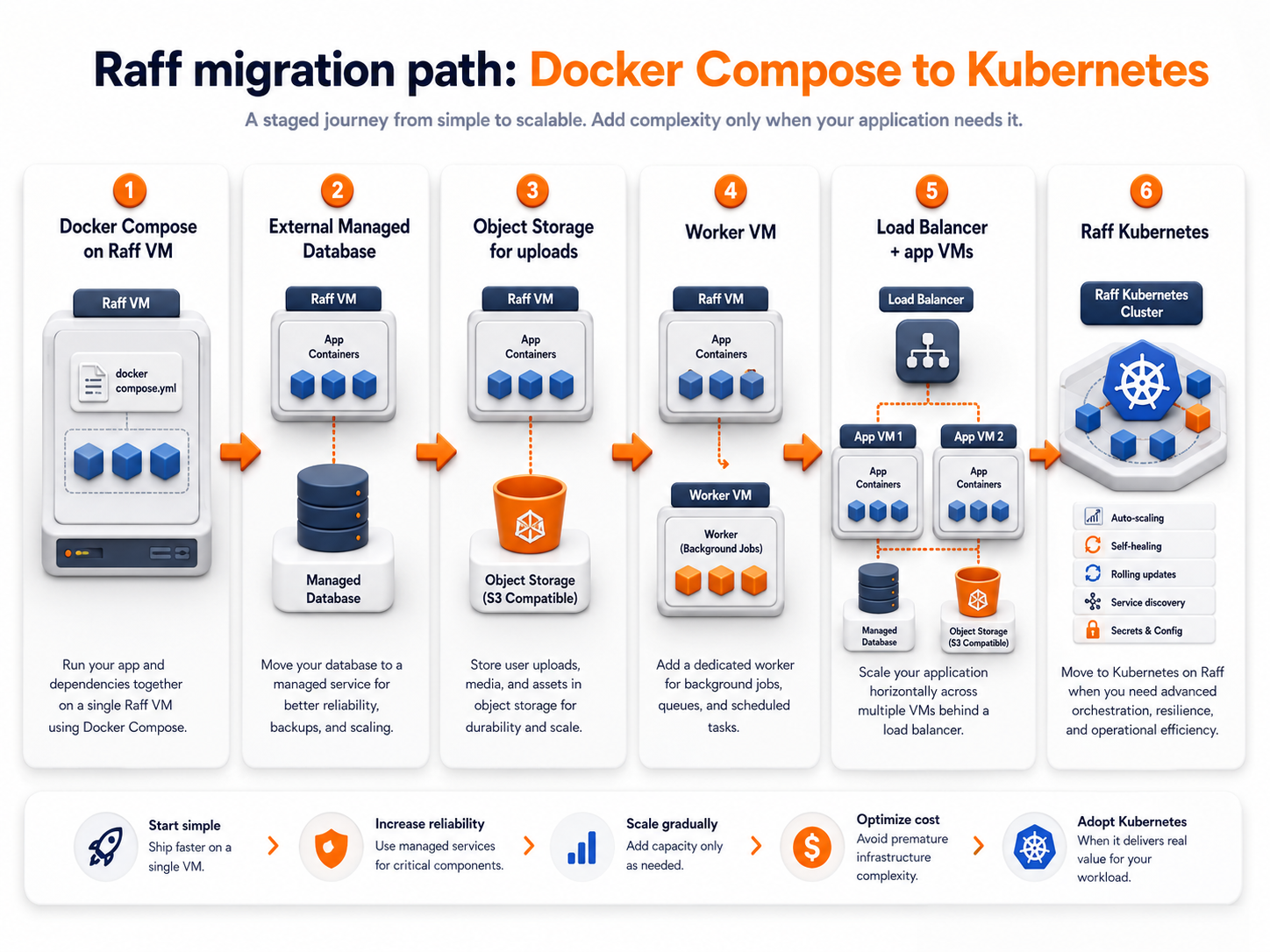
Stage 1 — Compose on one Raff VM
Keep the application simple and document deployment, backups, recovery, and monitoring.
Stage 2 — Externalize production data
Move the database to Raff Managed Databases or a deliberately managed database VM when the application host is no longer the right data boundary.
Stage 3 — Externalize durable files
Move uploads and other object data to Raff Object Storage.
Stage 4 — Separate competing workloads
Move workers or other resource-heavy jobs onto another VM when they interfere with user-facing traffic.
Stage 5 — Add more application capacity
Use multiple application instances when availability or throughput requires them. At this stage, measure how much manual coordination the team is accumulating.
Stage 6 — Move to Kubernetes when orchestration is the bottleneck
Adopt Kubernetes when workload scheduling, rollouts, service discovery, replica coordination, and recovery across application nodes are now recurring problems.
This sequence keeps each migration tied to a specific production constraint.
Raff path: VM first, Kubernetes when it solves a measured problem
Raff supports a staged infrastructure path rather than forcing every workload into the same model.
A small team can start with Raff VM and Docker Compose. As state and workloads separate, Raff Managed Databases, Raff Object Storage, and Raff VPC can support clearer infrastructure boundaries. When the team needs a cluster operating model, Raff Kubernetes becomes the orchestration layer.
Raff VM + Docker Compose
       ↓
Managed Database / Object Storage
       ↓
Multiple application or worker VMs
       ↓
Raff Kubernetes when orchestration is justified
The commercial decision should remain workload-driven. Do not pay the engineering cost of Kubernetes because it looks like the next maturity badge. Adopt it when it directly reduces a production or delivery problem your team can name.
Pre-Kubernetes checklist
Before switching, confirm:
If several items are unresolved, improving the existing VM/Compose system is probably the higher-return next step.
Conclusion
For small teams comparing Kubernetes vs Docker Compose, start with Compose unless you can identify a real cluster-level problem.
Compose is a strong fit for one-host and smaller production systems because it keeps deployments and debugging understandable. Multi-VM architecture can extend that model substantially by separating databases, uploads, workers, and application capacity.
Kubernetes becomes the better choice when coordinating those workloads across nodes is itself becoming expensive: scheduling, replicas, service discovery, health-based recovery, consistent rollouts, and environment standardization are problems the team repeatedly has to solve.
On Raff, the path can stay incremental: Raff VM → managed data/storage services → multiple workload VMs → Raff Kubernetes when orchestration earns its place.
Sources