Invoice Ninja is a self-hosted invoicing and business workflow platform for invoices, quotes, expenses, clients, recurring billing, tasks, and payments. On Ubuntu 24.04, the current official Docker direction is the Debian-based Invoice Ninja image with MySQL, Redis, persistent application volumes, and a reverse proxy for HTTPS.
Raff Technologies is the VM platform used by the original tutorial. The saved tested environment remains Raff VM with 2 vCPU, 4 GB DDR5 RAM, 40 GB NVMe storage, Ubuntu 24.04 LTS. This revision re-verifies the deployment guidance against current Invoice Ninja documentation, Docker files, and image tags on September 5, 2026 without claiming a new end-to-end machine test.
This guide pins Invoice Ninja 5.13.37, the current Debian-image release at verification time. It also corrects an important operational detail that older tutorials often miss: the current Debian container includes two Laravel queue workers and the Laravel scheduler under Supervisord, so you do not need a separate host cron job or queue container when you use the current official Debian image as shown here.
The application container remains private. Only Caddy publishes ports 80 and 443. MySQL, Redis, Nginx, PHP-FPM, queue workers, and the scheduler stay inside the Docker network.
Prerequisites:
- Ubuntu 24.04 with SSH and sudo access
- A domain such as
billing.example.compointing to the VM - Public TCP 80 and 443 available for HTTPS
- A tested recovery path before firewall changes
- A secure off-server destination for Invoice Ninja backups
Step 1 — Verify Ubuntu, DNS, resources, and existing listeners
Confirm the operating system and architecture:
cat /etc/os-release
uname -m
Check memory, CPU, and free disk space:
nproc
free -h
df -h /
Set your Invoice Ninja domain and verify DNS:
export INVOICE_NINJA_DOMAIN=billing.example.com

dig +short A "$INVOICE_NINJA_DOMAIN"
dig +short AAAA "$INVOICE_NINJA_DOMAIN"
Only publish an AAAA record if IPv6 actually reaches this server and is protected consistently.
Inspect current listeners:
sudo ss -tulpn
Ports 80 and 443 should be available for Caddy. No Invoice Ninja, MySQL, or Redis port will be published directly on the host.
Verify: Ubuntu should report 24.04, DNS should resolve to this VM, resource headroom should be understood, and no unexpected production service should already own TCP 80 or 443.
Step 2 — Install Docker Engine and Docker Compose v2
Install Docker from Docker's official Ubuntu repository:
sudo apt update
sudo apt install -y ca-certificates curl gnupg
sudo install -m 0755 -d /etc/apt/keyrings
sudo curl -fsSL https://download.docker.com/linux/ubuntu/gpg \
  -o /etc/apt/keyrings/docker.asc
sudo chmod a+r /etc/apt/keyrings/docker.asc
Add the repository:
sudo tee /etc/apt/sources.list.d/docker.sources >/dev/null <<EOF
Types: deb
URIs: https://download.docker.com/linux/ubuntu
Suites: $(. /etc/os-release && echo "${UBUNTU_CODENAME:-$VERSION_CODENAME}")
Components: stable
Architectures: $(dpkg --print-architecture)
Signed-By: /etc/apt/keyrings/docker.asc
EOF
Install Docker Engine and Compose:
sudo apt update
sudo apt install -y \
  docker-ce docker-ce-cli containerd.io \
  docker-buildx-plugin docker-compose-plugin
sudo systemctl enable --now docker
Verify:
sudo docker version
docker compose version
sudo docker run --rm hello-world
For a standalone walkthrough, see Install Docker on Ubuntu 24.04.
Verify: Docker should be active, Compose v2 should respond, and the hello-world container should run successfully.
Step 3 — Prepare the firewall without risking SSH lockout
Open a second SSH session before changing firewall state.
If UFW is already active, verify your real SSH rule and allow HTTP/HTTPS:
sudo ufw status numbered
sudo ufw allow 80/tcp comment 'Invoice Ninja HTTP/ACME'
sudo ufw allow 443/tcp comment 'Invoice Ninja HTTPS'
If UFW is inactive, do not enable it blindly from a single remote shell. Follow the lockout-safe procedure in Set Up UFW Firewall on Ubuntu 24.04.
Do not open MySQL 3306, Redis 6379, PHP-FPM 9000, or an internal Nginx port publicly.
Verify: SSH should remain reachable from the second session, only the required public web ports should be allowed, and there should be no public firewall rule for MySQL, Redis, or Invoice Ninja internals.
Step 4 — Create the deployment directories and production secrets
Create the stack directories:
sudo mkdir -p /opt/invoice-ninja/{nginx,backups}
sudo chown -R "$USER":"$USER" /opt/invoice-ninja
cd /opt/invoice-ninja
chmod 700 backups
Generate an Invoice Ninja/Laravel application key from 32 random bytes:
APP_KEY="base64:$(openssl rand -base64 32 | tr -d '\n')"
Generate database credentials and a one-time bootstrap administrator password:
DB_PASSWORD="$(openssl rand -hex 32)"
DB_ROOT_PASSWORD="$(openssl rand -hex 32)"
INITIAL_ADMIN_PASSWORD="$(openssl rand -base64 24 | tr -d '\n')"

printf '%s\n' "$INITIAL_ADMIN_PASSWORD" > .initial_admin_password
chmod 600 .initial_admin_password
Prompt for the administrator email:
read -rp 'Initial Invoice Ninja admin email: ' IN_USER_EMAIL
read -rp 'Invoice Ninja domain (for example billing.example.com): ' INVOICE_NINJA_DOMAIN
read -rp 'ACME certificate email: ' ACME_EMAIL
Verify: .initial_admin_password should exist with mode 600, and the generated application/database secrets should not be written into shell history manually.
Step 5 — Create a current Invoice Ninja 5.13.37 environment file
Create .env:
cat > .env <<EOF
APP_URL=https://${INVOICE_NINJA_DOMAIN}
APP_KEY=${APP_KEY}
APP_ENV=production
APP_DEBUG=false
REQUIRE_HTTPS=true
NINJA_ENVIRONMENT=selfhost
IS_DOCKER=true

PHANTOMJS_PDF_GENERATION=false
PDF_GENERATOR=snappdf
TRUSTED_PROXIES='*'

CACHE_DRIVER=redis
QUEUE_CONNECTION=redis
SESSION_DRIVER=redis
REDIS_HOST=redis
REDIS_PASSWORD=null
REDIS_PORT=6379

FILESYSTEM_DISK=debian_docker

DB_CONNECTION=mysql
DB_HOST=mysql
DB_PORT=3306
DB_DATABASE=ninja
DB_USERNAME=ninja
DB_PASSWORD=${DB_PASSWORD}
DB_ROOT_PASSWORD=${DB_ROOT_PASSWORD}

IN_USER_EMAIL=${IN_USER_EMAIL}
IN_PASSWORD=${INITIAL_ADMIN_PASSWORD}

MAIL_MAILER=log
MAIL_HOST=smtp.example.com
MAIL_PORT=587
MAIL_USERNAME=null
MAIL_PASSWORD=null
MAIL_ENCRYPTION=null
MAIL_FROM_ADDRESS=${IN_USER_EMAIL}
MAIL_FROM_NAME='Invoice Ninja'

MYSQL_ROOT_PASSWORD=${DB_ROOT_PASSWORD}
MYSQL_USER=ninja
MYSQL_PASSWORD=${DB_PASSWORD}
MYSQL_DATABASE=ninja

SCOUT_DRIVER=null

ACME_EMAIL=${ACME_EMAIL}
INVOICE_NINJA_DOMAIN=${INVOICE_NINJA_DOMAIN}
EOF

chmod 600 .env
The current official Debian Docker example uses Redis for cache, queues, and sessions and sets IS_DOCKER=true. It also uses FILESYSTEM_DISK=debian_docker and supports Snappdf with Chrome/Chromium built into the Debian image.
TRUSTED_PROXIES='*' follows the current Docker example. In this architecture the application container is never published directly; only the private Docker network can reach it. If you later place the application on a broader network or expose it outside this Compose project, restrict trusted proxies to the actual proxy CIDR.
Keep MAIL_MAILER=log until the deployment is verified. Configure real SMTP only after login, queues, scheduler, PDF generation, and backups work.
Verify: .env should be mode 600, APP_ENV=production, APP_DEBUG=false, REQUIRE_HTTPS=true, QUEUE_CONNECTION=redis, and the bootstrap credentials should still be present for first startup only.
Step 6 — Create the pinned Docker Compose stack
Create compose.yaml:
cat > compose.yaml <<'EOF'
services:
  app:
    image: invoiceninja/invoiceninja-debian:5.13.37
    container_name: invoice-ninja-app
    restart: unless-stopped
    env_file:
      - ./.env
    volumes:
      - invoice_ninja_app_public:/var/www/html/public
      - invoice_ninja_app_storage:/var/www/html/storage
    depends_on:
      mysql:
        condition: service_healthy
      redis:
        condition: service_healthy
    networks:
      - invoice_ninja_net

  nginx:
    image: nginx:alpine
    container_name: invoice-ninja-nginx
    restart: unless-stopped
    volumes:
      - ./nginx:/etc/nginx/conf.d:ro
      - invoice_ninja_app_public:/var/www/html/public:ro
      - invoice_ninja_app_storage:/var/www/html/storage:ro
    depends_on:
      app:
        condition: service_healthy
    networks:
      - invoice_ninja_net

  mysql:
    image: mysql:8.4
    container_name: invoice-ninja-mysql
    restart: unless-stopped
    environment:
      MYSQL_DATABASE: ${MYSQL_DATABASE}
      MYSQL_USER: ${MYSQL_USER}
      MYSQL_PASSWORD: ${MYSQL_PASSWORD}
      MYSQL_ROOT_PASSWORD: ${MYSQL_ROOT_PASSWORD}
    volumes:
      - invoice_ninja_mysql_data:/var/lib/mysql
    healthcheck:
      test: ["CMD", "mysqladmin", "ping", "-h", "localhost", "-u${MYSQL_USER}", "-p${MYSQL_PASSWORD}"]
      interval: 10s
      timeout: 5s
      retries: 10
    networks:
      - invoice_ninja_net

  redis:
    image: redis:7.4-alpine
    container_name: invoice-ninja-redis
    restart: unless-stopped
    volumes:
      - invoice_ninja_redis_data:/data
    healthcheck:
      test: ["CMD", "redis-cli", "ping"]
      interval: 10s
      timeout: 5s
      retries: 10
    networks:
      - invoice_ninja_net

  caddy:
    image: caddy:2
    container_name: invoice-ninja-caddy
    restart: unless-stopped
    depends_on:
      - nginx
    ports:
      - "80:80"
      - "443:443"
    environment:
      INVOICE_NINJA_DOMAIN: ${INVOICE_NINJA_DOMAIN}
      ACME_EMAIL: ${ACME_EMAIL}
    volumes:
      - ./Caddyfile:/etc/caddy/Caddyfile:ro
      - invoice_ninja_caddy_data:/data
      - invoice_ninja_caddy_config:/config
    networks:
      - invoice_ninja_net

networks:
  invoice_ninja_net:
    driver: bridge

volumes:
  invoice_ninja_app_public:
    name: invoice_ninja_app_public
  invoice_ninja_app_storage:
    name: invoice_ninja_app_storage
  invoice_ninja_mysql_data:
    name: invoice_ninja_mysql_data
  invoice_ninja_redis_data:
    name: invoice_ninja_redis_data
  invoice_ninja_caddy_data:
    name: invoice_ninja_caddy_data
  invoice_ninja_caddy_config:
    name: invoice_ninja_caddy_config
EOF
Invoice Ninja's older invoiceninja/invoiceninja image now carries a deprecation notice directing users to the Debian-based image. This guide therefore pins the current Debian release rather than using the mutable latest tag.
Verify: The app image should be exactly invoiceninja/invoiceninja-debian:5.13.37, MySQL/Redis should have no ports: block, and only Caddy should publish ports 80/443.
Step 7 — Create the internal Nginx and public Caddy reverse-proxy configuration
Create the Nginx snippets used by the official Debian layout:
cat > nginx/invoiceninja.conf <<'EOF'
client_max_body_size 20M;
client_body_buffer_size 20M;
server_tokens off;
fastcgi_buffers 32 16K;

gzip on;
gzip_comp_level 2;
gzip_min_length 1M;
gzip_proxied any;
gzip_types *;
EOF
Create the Laravel Nginx virtual host:
cat > nginx/laravel.conf <<'EOF'
server {
  listen 80 default_server;
  server_name _;

  root /var/www/html/public;
  index index.php;
  charset utf-8;

  add_header X-Frame-Options "SAMEORIGIN";
  add_header X-Content-Type-Options "nosniff";

  location / {
    try_files $uri $uri/ /index.php?$query_string;
  }

  location = /favicon.ico { access_log off; log_not_found off; }
  location = /robots.txt { access_log off; log_not_found off; }

  error_page 404 /index.php;

  location ~ \.php$ {
    fastcgi_pass app:9000;
    fastcgi_param SCRIPT_FILENAME $realpath_root$fastcgi_script_name;
    include fastcgi_params;
  }

  location ~ /\.(?!well-known).* {
    deny all;
  }
}
EOF
Create Caddyfile:
cat > Caddyfile <<'EOF'
{
  email {$ACME_EMAIL}
}

{$INVOICE_NINJA_DOMAIN} {
  encode zstd gzip

  header {
    Strict-Transport-Security "max-age=31536000"
    X-Content-Type-Options "nosniff"
    X-Frame-Options "SAMEORIGIN"
    Referrer-Policy "same-origin"
    -Server
  }

  reverse_proxy nginx:80
}
EOF
Validate the Compose model:
sudo docker compose config >/dev/null && echo 'Compose config is valid'
Verify: The Compose file should validate, Caddy should proxy only to the private Nginx service, and neither Nginx nor PHP-FPM should be directly exposed on the host.
Step 8 — Start Invoice Ninja and verify the built-in health check
Pull all images first:
cd /opt/invoice-ninja
sudo docker compose pull
Start the stack:
sudo docker compose up -d
Inspect service state:
sudo docker compose ps
The current Debian Invoice Ninja image includes an application health check that calls the internal /health route through PHP-FPM.
Inspect the app health status:
sudo docker inspect \
  --format '{{.State.Health.Status}}' \
  invoice-ninja-app
Check MySQL and Redis:
DB_PASSWORD="$(sed -n 's/^DB_PASSWORD=//p' .env)"

sudo docker compose exec -T mysql \
  mysqladmin ping -h localhost -uninja -p"$DB_PASSWORD"

sudo docker compose exec -T redis redis-cli ping
Test HTTPS:
INVOICE_NINJA_DOMAIN="$(sed -n 's/^INVOICE_NINJA_DOMAIN=//p' .env)"
curl -I "https://$INVOICE_NINJA_DOMAIN"
Verify: The app container should become healthy, MySQL should report alive, Redis should return PONG, Caddy should obtain a trusted certificate, and the public domain should respond over HTTPS.
Step 9 — Verify the queue workers and scheduler managed by Supervisord
The current Debian image starts three application-side process groups automatically:
- PHP-FPM;
- two
queue:workprocesses; - one
schedule:workprocess.
Check Supervisord from inside the app container:
sudo docker compose exec app supervisorctl status
Expected process names include:
php-fpm
queue-worker_00
queue-worker_01
scheduler
You can also inspect the process list:
sudo docker compose exec app ps aux | grep -E \
  'php-fpm|queue:work|schedule:work' | grep -v grep
This is why this Docker deployment does not need the host cron line commonly used by manual Invoice Ninja installations:
* * * * * php artisan schedule:run
Do not run a duplicate host scheduler unless you intentionally redesign the process model.
Verify: PHP-FPM, both queue workers, and the scheduler should all report RUNNING. Recurring invoices and scheduled notifications depend on this scheduler/queue path, so do not consider the deployment production-ready if these processes are missing.
Step 10 — Log in, rotate the bootstrap password, and remove bootstrap credentials
Display the bootstrap email and temporary password only when needed:
grep '^IN_USER_EMAIL=' /opt/invoice-ninja/.env
sudo cat /opt/invoice-ninja/.initial_admin_password
Open:
https://billing.example.com
Use the existing tutorial screenshots as visual references:
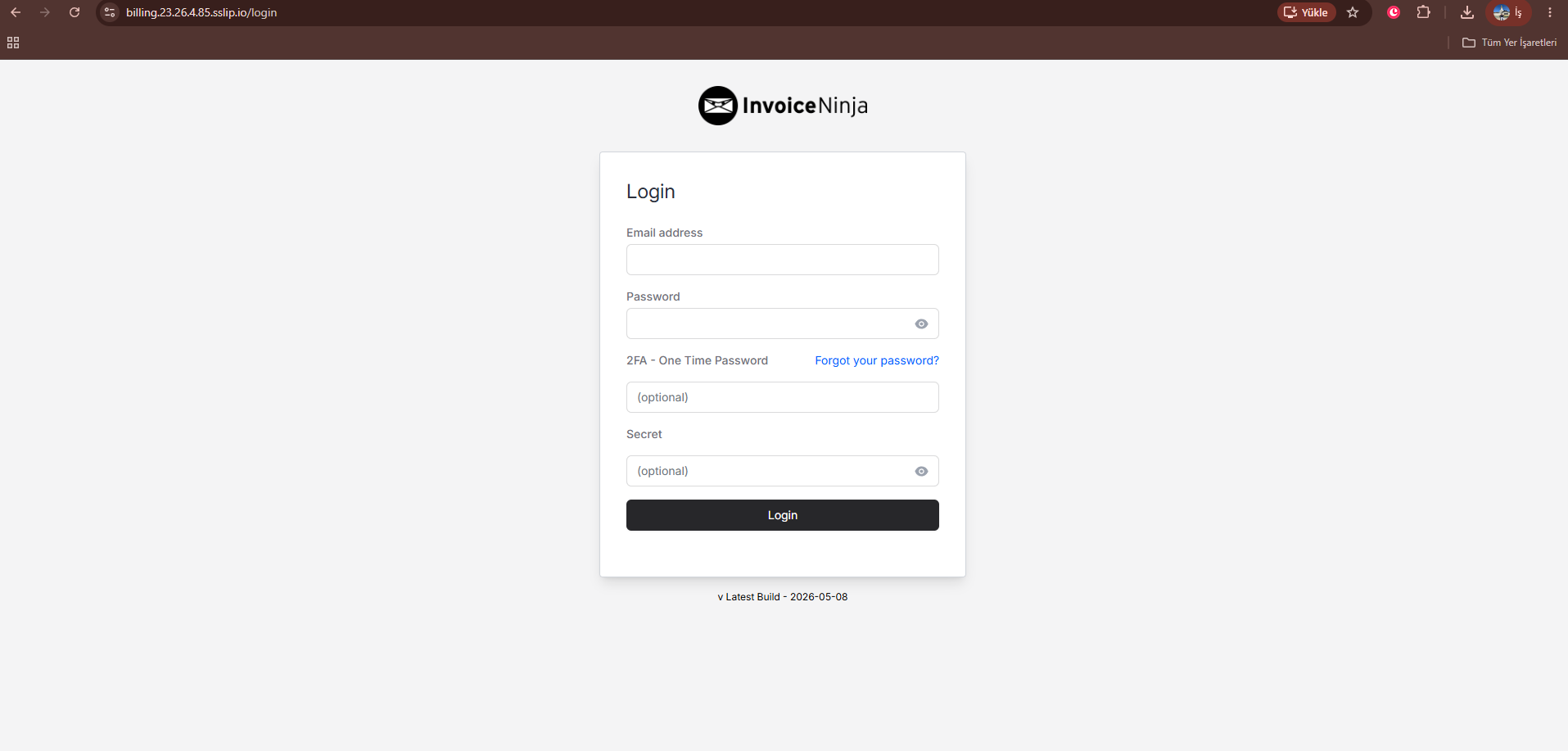
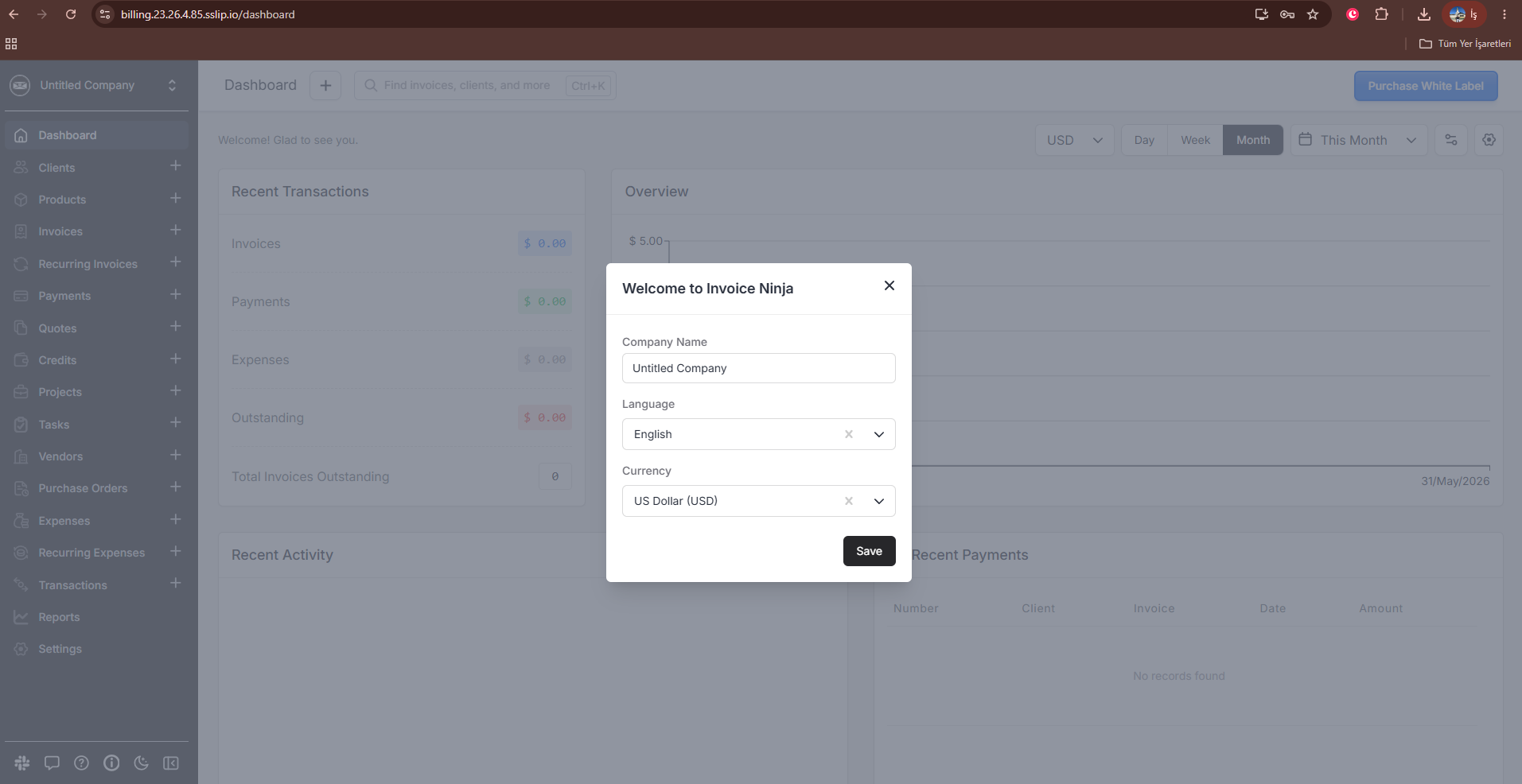
After the first successful login:
- Change the administrator password in Invoice Ninja.
- Sign out and sign back in with the new password.
- Create one disposable test client.
- Confirm the client persists after refresh.
- Delete the disposable test client after verification.
Remove the bootstrap variables from .env:
cd /opt/invoice-ninja
sed -i '/^IN_USER_EMAIL=/d;/^IN_PASSWORD=/d' .env
rm -f .initial_admin_password
sudo docker compose up -d app nginx
The official Debian image warns that if those variables are not explicitly set on first initialization, defaults can be used. They are useful for first-run bootstrap only and should not remain in the long-lived production configuration.