
Kubernetes cost optimization means reducing unnecessary cluster spend while preserving the performance, reliability, and delivery speed the workload actually needs.
For most teams, the best sequence is straightforward: measure where the cluster cost goes, separate workload cost from idle capacity, right-size CPU and memory requests, tune autoscaling, remove unused environments, simplify node pools, and control storage and observability growth. Tooling helps, but optimization starts with accurate workload signals and clear ownership.
At Raff Technologies, we treat Kubernetes cost as an infrastructure design problem rather than a hunt for one cheap setting. A cluster can be well utilized and still be expensive because of storage, duplicated environments, unnecessary replicas, or operational overhead. It can also look underutilized for a valid reason when the spare capacity protects an important availability or scaling requirement.
This guide focuses on a practical Kubernetes cost optimization workflow for startups and small platform teams. For the architecture decision that comes before optimization, see Kubernetes vs Docker Compose for Small Teams.
Kubernetes cost optimization at a glance
A useful optimization loop has seven steps.
| Step | Question | Typical action |
|---|---|---|
| 1. Measure | Where does cluster cost actually go? | Break cost down by cluster, namespace, workload, storage, and idle capacity |
| 2. Allocate | Which team, product, or environment owns the spend? | Use labels, namespaces, and cost-allocation tooling |
| 3. Right-size | Are requests materially above normal usage? | Adjust CPU and memory requests from observed workload behavior |
| 4. Autoscale | Does capacity follow real demand? | Tune HPA, VPA, and node scaling for the workload |
| 5. Remove idle | Which resources stay allocated without useful work? | Delete, scale down, consolidate, or schedule non-production resources |
| 6. Optimize infrastructure | Are nodes, storage, and supporting services matched to the workload? | Simplify node pools, improve placement, review persistent storage and external services |
| 7. Govern | Will the waste return next month? | Add quotas, ownership, budgets, retention policies, and recurring reviews |
Do not start with the most advanced autoscaler or a list of optimization tools. Start by making the cost visible enough that the team can explain it.
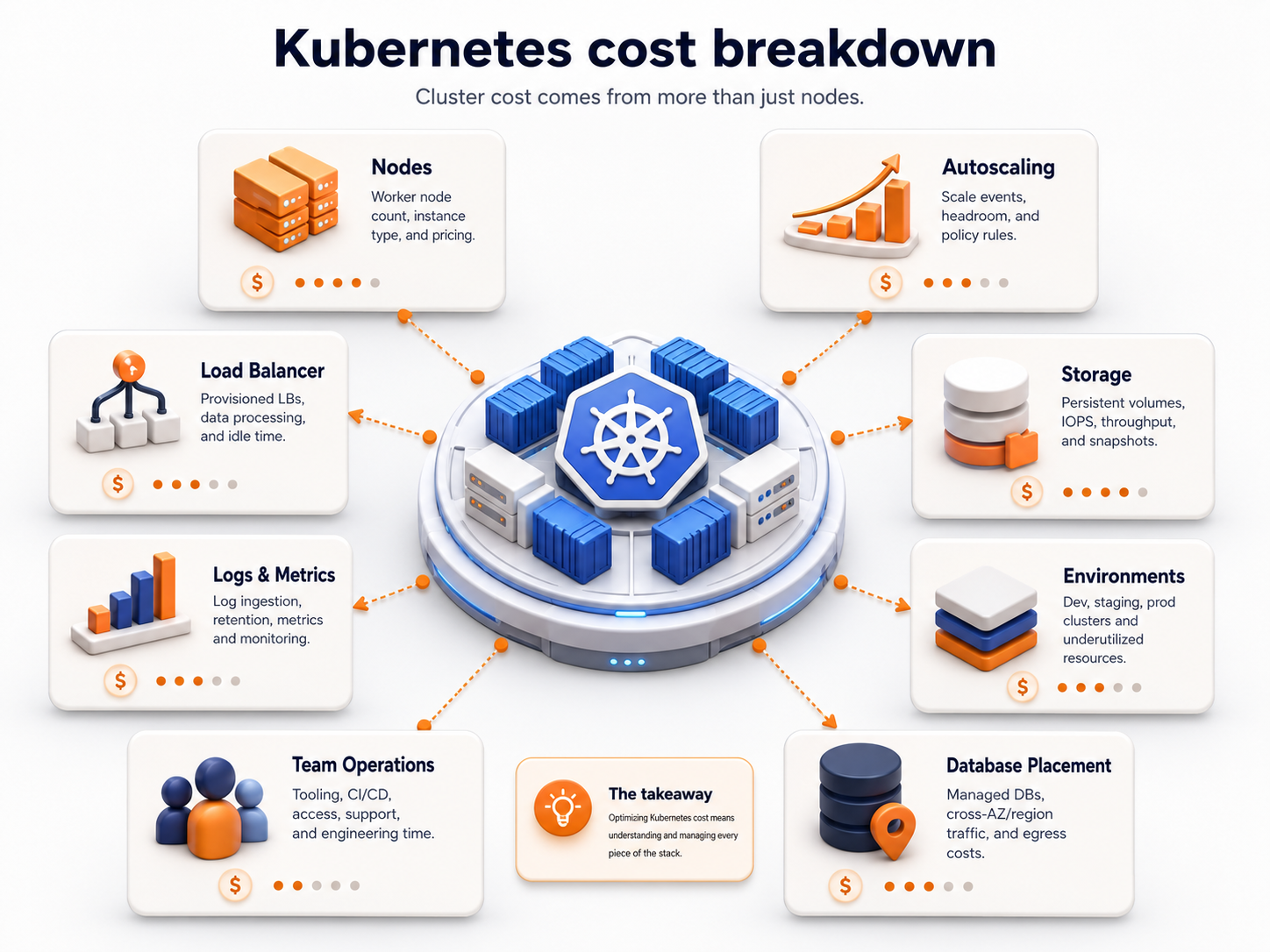
Measure total cluster cost before trying to reduce it
Kubernetes makes resource consumption dynamic. Pods appear and disappear, workloads share nodes, PersistentVolumes have separate lifecycles, and application teams often share the same cluster. The cloud invoice therefore tells you what the infrastructure cost, but not always which workload caused that cost.
A practical cost model separates three categories:
Total cluster cost
= workload-attributed cost
+ idle or unallocated capacity
+ shared cluster overhead
This distinction matters.
Workload-attributed cost is the portion associated with application workloads: CPU, memory, persistent storage, load balancers, and other resources that can be tied to a namespace, deployment, job, or team.
Idle cost is provisioned capacity that is not currently allocated to useful workload demand. Some idle capacity is waste. Some is intentional headroom.
Shared overhead includes resources that support the cluster as a whole, such as system workloads and platform-level components.
OpenCost formalizes this type of allocation model and can break Kubernetes cost down by concepts including containers, Pods, deployments, labels, namespaces, and clusters. That makes it useful when the question changes from “Why is the cluster expensive?” to “Which workload, environment, or team is responsible for the increase?”
For a small team, begin with a weekly or monthly view showing:
- total cluster cost;
- cost by production and non-production;
- cost by namespace or application;
- CPU and memory requested versus used;
- idle node capacity;
- persistent storage cost;
- load-balancer and networking cost where applicable;
- observability and backup cost outside the node bill.
If the team cannot explain the largest cost categories, optimization is still a measurement problem.
Cost allocation needs a stable ownership model
Cost data becomes more useful when infrastructure has consistent ownership metadata.
A cluster can be technically healthy while still being financially opaque because workloads are named inconsistently and nobody can tell which product or environment owns them.
Use labels and namespaces that make these dimensions visible:
environment = production | staging | preview
team = platform | api | data
service = web | worker | reporting
owner = team-name
cost-center = product-or-business-unit
You do not need an enterprise chargeback program to benefit from allocation. Even a five-person engineering team gains value from being able to answer:
- How much does production cost compared with staging?
- Which service is driving the latest increase?
- Which preview environments still exist?
- How much node capacity is currently idle?
- Which workload is reserving the most memory?
This is the foundation for showback—making cost visible to the team that creates it. Formal chargeback can come later if the organization actually needs it.
Right-size CPU and memory requests from observed behavior
Resource requests are one of the most important Kubernetes cost signals because the scheduler uses them when deciding where Pods can run.
If requests are much higher than the workload normally needs, the scheduler sees less free capacity than the physical nodes may actually have. That can lead to poor bin packing and additional nodes.
If requests are too low, the workload may compete aggressively for resources or become difficult to schedule safely during real demand.
The goal is not to make every request as small as possible. The goal is to make requests reflect the workload’s operating envelope.
A practical rightsizing process is:
- Collect historical CPU and memory usage across representative traffic periods.
- Separate normal operation, predictable peaks, deployments, and batch windows.
- Compare requests with actual use for each important container.
- Identify consistently over-requested and under-requested workloads.
- Adjust one workload class at a time.
- Re-measure latency, errors, throttling, OOM events, queue time, and scheduling behavior.
- Keep enough headroom for the workload’s real failure and traffic model.
Avoid sizing from one quiet hour or one unusual peak. Use enough history to understand the workload pattern.
CPU and memory should not be tuned identically
CPU and memory fail differently.
CPU can be throttled when a configured CPU limit is reached. Memory pressure is less forgiving: containers that exceed available or enforced memory can be terminated by the kernel.
That means “reduce every request and limit by 30%” is not a safe optimization strategy.
Review CPU and memory separately, and connect the change to application behavior. A web API, JVM service, queue worker, and in-memory cache can require very different safety margins even when their average utilization looks similar.
For the official mechanics, see Kubernetes resource management for Pods and containers.
VPA is a rightsizing tool, not a replacement for measurement
The Vertical Pod Autoscaler adjusts or recommends CPU and memory resources for workloads according to observed demand.
That makes VPA useful when requests drift away from actual use, but the team still needs to understand what the recommendation means for the application.
VPA is most useful when:
- workload resource needs change over time;
- many deployments have stale requests;
- manual rightsizing does not happen consistently;
- the team wants recommendations before automating changes.
Use recommendation-only or controlled rollout modes first when automatic resource changes could affect a sensitive production workload.
The important point is that rightsizing and horizontal scaling solve different problems. VPA changes resources per Pod; HPA changes the number of Pods.
Tune HPA only after requests and metrics are trustworthy
The Horizontal Pod Autoscaler changes replica count based on observed metrics such as CPU, memory, or custom metrics.
That can improve both performance and cost when capacity tracks actual demand. It can also scale waste when the underlying signals are wrong.
Common HPA cost problems include:
- minimum replica counts that are higher than the availability requirement;
- CPU targets based on inflated requests;
- scaling on a metric that does not represent user demand;
- background jobs increasing a metric intended for web traffic;
- slow scale-down behavior leaving excess capacity for long periods;
- production autoscaling settings copied into staging and previews.
Kubernetes calculates CPU utilization for HPA relative to resource requests, which is another reason accurate requests matter.
A better workflow is:
measure workload
→ right-size requests
→ choose the correct scaling metric
→ tune HPA behavior
→ observe replica and node response
→ validate cost and user impact
For request-driven services, traffic or queue metrics can sometimes represent demand better than raw CPU. The right metric depends on the application.
See Kubernetes Horizontal Pod Autoscaling for current HPA behavior.
Node autoscaling solves a different layer of the problem
Pod autoscaling and node autoscaling are related but not interchangeable.
HPA changes the number of Pods. Node autoscaling changes cluster capacity so those Pods have somewhere to run.
A simple sequence looks like this:
Demand rises
→ HPA creates more Pods
→ Pods need additional schedulable capacity
→ node autoscaler adds nodes
The reverse should also work. When demand falls, workloads scale down and unused node capacity should eventually be removable when the cluster’s availability and disruption rules permit it.
Node autoscaling is less effective when:
- Pod requests are inflated;
- PodDisruptionBudgets prevent consolidation unexpectedly;
- workloads use restrictive affinity or anti-affinity rules;
- many specialized node pools leave fragmented capacity;
- local storage or topology constraints make workloads difficult to move;
- minimum node counts are higher than the actual resilience requirement.
Autoscaling does not fix poor scheduling economics. It automates whatever constraints you have already designed.
Simplify node pools before adding more of them
Node pools are useful when workloads have materially different resource or scheduling requirements. Too many pools can create fragmentation.
For a small team, every new node class should answer a real requirement such as:
- a memory-heavy workload;
- compute-intensive processing;
- a workload that needs different isolation;
- a different availability or scheduling policy;
- specialized hardware.
Avoid creating separate pools simply because every service feels unique.
A cost-aware cluster often has fewer workload classes than application services.
| Workload group | Possible treatment |
|---|---|
| General web/API workloads | Shared general node pool |
| Background workers | Shared worker pool only if their resource pattern materially differs |
| Memory-heavy workloads | Separate memory-oriented capacity when measurement justifies it |
| Non-production | Smaller or schedulable capacity with stricter cleanup |
| Specialized hardware | Dedicated pool only for workloads that need it |
The goal is enough separation to schedule efficiently without turning the cluster into many small islands of stranded capacity.
For a deeper node-level decision, continue with Kubernetes Node Pools: Design, Sizing, and Workload Placement.
Idle capacity is not automatically waste
A low utilization percentage does not prove the cluster is poorly optimized.
Production systems may need spare capacity for:
- traffic bursts;
- a node failure;
- rolling updates;
- rescheduling after maintenance;
- short-lived batch workloads;
- latency objectives that would be missed at high saturation.
The useful question is whether the idle capacity has a reason.
Classify idle capacity into three groups:
- Required headroom — justified by availability, scaling, or recovery needs.
- Temporary headroom — needed for a known migration, launch, or maintenance window.
- Unowned waste — capacity that remains because nobody has reviewed or removed it.
Optimization should target the third category first.
If removing one node would make a production service unable to survive the failure scenario it was designed for, that node is not necessarily waste. Cost decisions must preserve the reliability model.
Non-production environments are often the easiest savings
Production usually receives the most attention, but staging, QA, previews, demos, and migration environments can create a large fixed baseline.
Audit every non-production environment against five questions:
- Does it need to run 24/7?
- Does it need production-sized replicas?
- Does it need production-sized persistent storage?
- Does it need production log retention?
- Who owns deletion or scale-down?
Preview environments should normally have an automatic end condition. A pull request that was merged weeks ago should not still own compute, storage, and a load balancer.
Staging should match production where parity is necessary for release confidence, not necessarily in full capacity.
Useful controls include:
- TTL or automated cleanup for previews;
- scheduled scale-down for environments unused outside working hours where operationally safe;
- stricter ResourceQuotas for non-production namespaces;
- smaller log-retention windows;
- smaller datasets where full production data volume is unnecessary.
For the environment design decision, use Development, Staging, and Production Cloud Environments.
ResourceQuota and LimitRange create financial guardrails
Kubernetes ResourceQuota can cap aggregate resource requests and limits inside a namespace. LimitRange can define default, minimum, and maximum resource behavior for resources in that namespace.
These controls are useful when several teams or environment types share a cluster.
For example:
production
  → capacity driven by service objectives

staging
  → smaller namespace quota

preview
  → strict quota + automatic deletion

batch
  → bounded concurrency and resource budget
Quotas do not optimize an application by themselves. They prevent one namespace or workflow from consuming an unlimited share of cluster capacity without an explicit decision.
See Kubernetes Resource Quotas for the current behavior.
Persistent storage can outgrow compute savings
A team can right-size every Pod and still have a rising Kubernetes bill because storage keeps growing.
Review:
- PersistentVolume capacity;
- unattached or abandoned volumes;
- snapshots and backup retention;
- database data growth;
- log volumes written to persistent disks;
- storage classes that provide more performance than the workload uses;
- development PVCs that survive after their workloads are deleted.
Persistent storage deserves a lifecycle owner just like compute.
For application uploads, media, exports, and backup archives, object storage may be a better architecture than keeping growing file collections on cluster volumes. The right choice depends on whether the application needs block/filesystem semantics or API-based object access.
Use App Uploads: VM Disk vs Object Storage for that decision.
Network and load-balancer cost should be visible separately
Node utilization is not the complete Kubernetes bill.
Depending on the provider and architecture, cost can also come from:
- public load balancers;
- cross-zone or cross-region traffic;
- NAT or gateway services;
- public egress;
- service-to-service traffic patterns;
- external managed services reached from the cluster.
A service that looks inexpensive in CPU may still have a high delivery cost if it moves large amounts of data.
Track network-heavy workloads separately and avoid assuming that reducing Pod CPU automatically reduces total platform cost.
Observability needs retention and sampling policies
Kubernetes produces a large amount of operational data: container logs, node metrics, events, traces, application metrics, ingress logs, and audit data.
Visibility is necessary. Unlimited retention is not.
Define observability policy by environment and diagnostic value.
| Environment | Practical policy |
|---|---|
| Production | Keep the data required for operations, incident analysis, security, and business requirements |
| Staging | Shorter retention unless a release process requires more |
| Preview | Minimal retention with environment cleanup |
| Temporary test | Retain only what the test needs |
Review high-cardinality metrics, duplicated log streams, verbose debug logging, and traces that are collected but never used.
The goal is not to reduce observability until incidents become harder to diagnose. It is to stop paying indefinitely for telemetry that has no operational purpose.
OpenCost and Kubecost solve the visibility layer
Cost tooling is valuable once the team knows what decisions it wants to make.
OpenCost is a vendor-neutral open-source project for measuring and allocating Kubernetes and cloud infrastructure costs. Its model can attribute costs to Kubernetes objects and expose workload, idle, and shared costs.
Kubecost builds on the OpenCost cost-allocation engine and adds a broader product experience around Kubernetes cost management.
A small team can use tooling like this to answer questions such as:
- cost by namespace;
- cost by deployment or service;
- idle cost;
- request efficiency;
- cost trends by environment;
- shared infrastructure allocation;
- showback to teams or products.
Do not select a tool only because its dashboard looks comprehensive. Decide first which cost decisions you need the tool to support.
For a single cluster, the first useful outcome may simply be a weekly report that identifies the biggest workload, idle, storage, and non-production cost changes.
Use a recurring Kubernetes cost review
Optimization fails when it happens only after the invoice surprises someone.
A short monthly review is enough for many small teams.
Cost movement
- What changed since the previous review?
- Which workloads created the increase?
- Did cost rise because of users, reliability, data, or waste?
Resource efficiency
- Which workloads are materially over-requested?
- Which workloads regularly hit CPU, memory, or latency limits?
- Is node capacity fragmented?
Autoscaling
- Are minimum replicas still justified?
- Does HPA scale on the right signal?
- Can nodes scale down after demand falls?
Environments
- Which preview, QA, migration, and demo workloads still exist?
- Do they need to run continuously?
Storage and observability
- Which volumes and snapshots are growing?
- Are retention policies still appropriate?
- Is telemetry volume growing faster than application traffic?
Ownership
- Does every large resource have a team or service owner?
- Does every temporary resource have an end condition?
The output should be a small action list with owners, not only a cost dashboard screenshot.
When optimization should become architecture simplification
Sometimes the cluster is expensive because the cluster solves a problem the product no longer has—or never had.
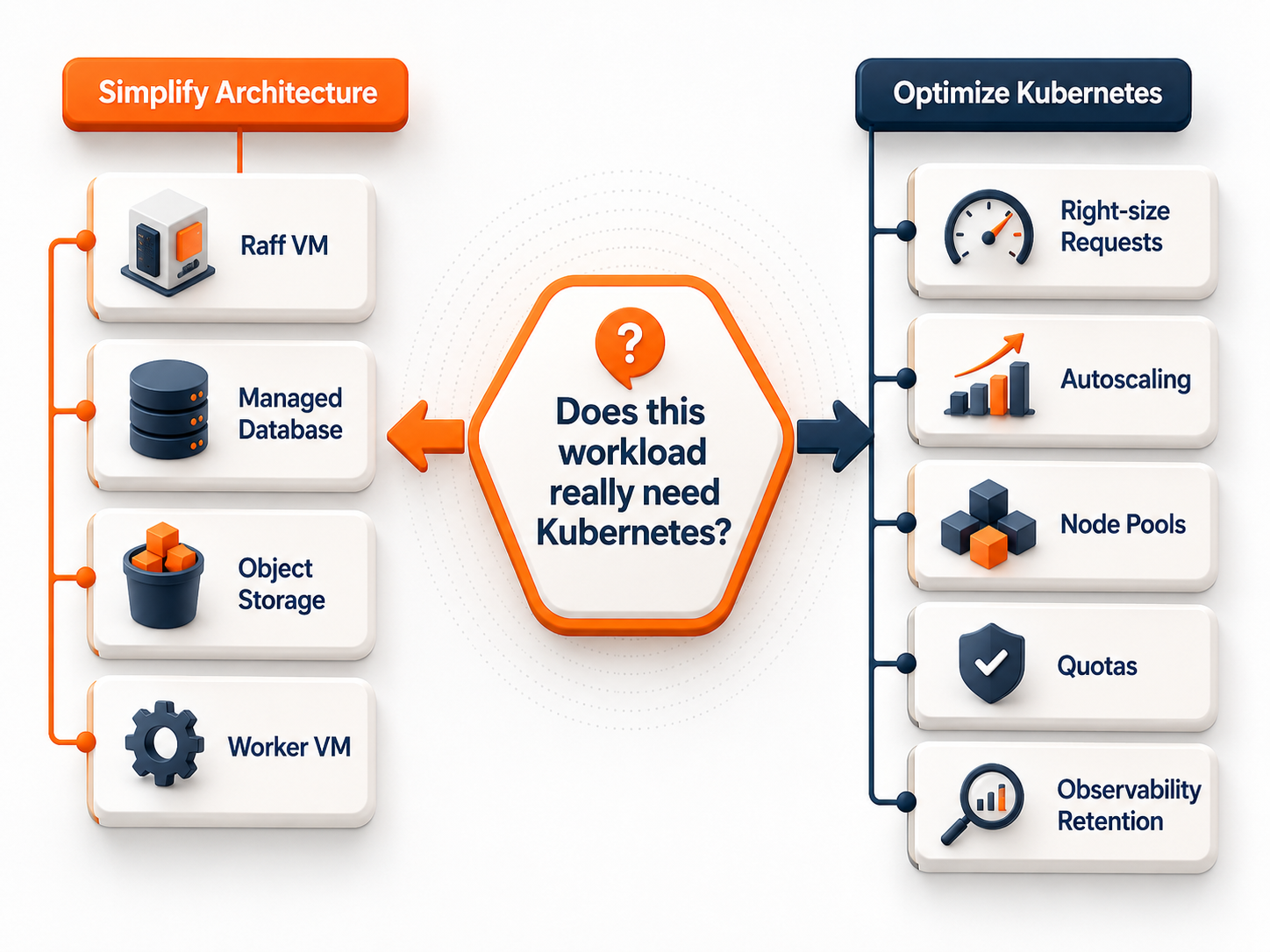
Consider a simpler deployment model when:
- one or two application services dominate the cluster;
- the team does not benefit from Kubernetes scheduling or service orchestration;
- most environments are small and static;
- cluster operations consume more engineering time than the workload justifies;
- a VM or Docker Compose deployment can meet the same reliability and deployment requirements more simply.
Do not migrate away from Kubernetes only because average utilization is low. Compare the complete operating model: deployment, scaling, failure recovery, observability, security, and engineering time.
Likewise, do not keep Kubernetes only because the migration already happened. Architecture is a current business decision, not a sunk-cost obligation.
How this applies on Raff
Raff supports both a managed Kubernetes path and simpler VM-based architectures.
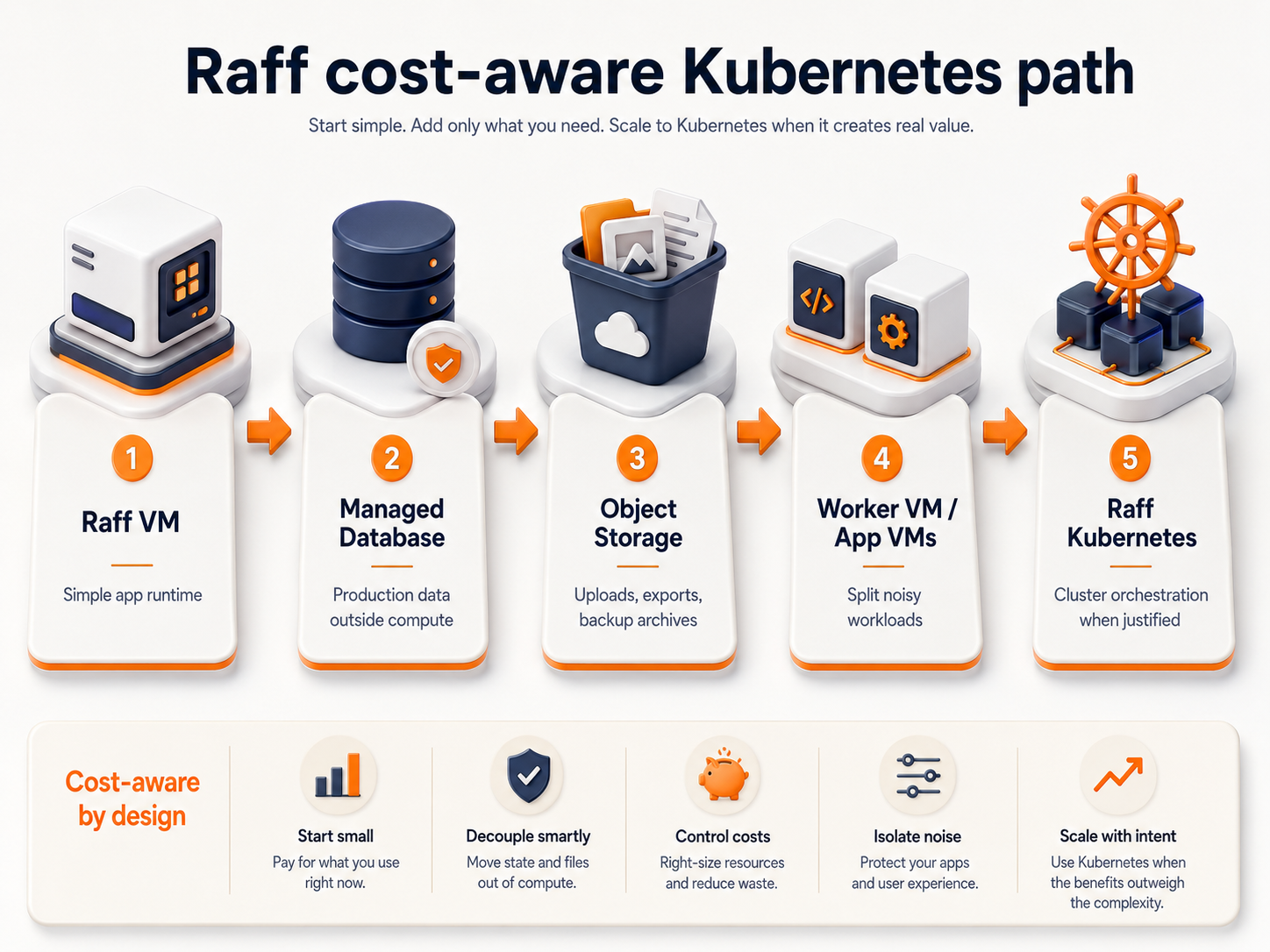
For a Kubernetes workload, use the live Raff Kubernetes and Raff pricing pages for current node options, product availability, and pricing instead of relying on plan numbers embedded in an evergreen guide.
A cost-aware Raff architecture can combine:
- Raff Kubernetes for workloads that benefit from Kubernetes orchestration;
- Raff VM when a workload is simpler to operate directly on a VM;
- Managed Databases when database operations should have a separate managed boundary;
- Object Storage for durable uploads, media, exports, and archives that do not need a mounted filesystem.
The optimization principle remains the same: keep each workload on the infrastructure layer that matches its operational requirements.
Raff Technologies should not be used as a reason to move every application into Kubernetes. The stronger decision is to use Kubernetes where scheduling, multi-node operations, rollout control, and service coordination create measurable value, then optimize that cluster from actual usage data.
