
Docker volume vs bind mount comes down to ownership. Use a named Docker volume when the persistent data belongs to the containerized application and Docker should manage the storage object. Use a bind mount when the container intentionally needs a specific file or directory owned by the host.
For most production application state on a single Docker host, a named volume is the cleaner default. Docker's current documentation calls volumes the preferred mechanism for persistent data generated by and used by containers. Bind mounts remain the right tool for host-managed configuration, certificates, source trees, export directories, and other workflows where the host path itself matters.
Raff Technologies hosts the Docker VM layer; Docker storage choices still remain part of the guest-OS and application design. A Docker named volume is not the same thing as a Raff block Volume, and neither a named volume nor a bind mount is automatically a backup.
Application-owned persistent state → named volume. Host-owned path → bind mount. Temporary in-memory state → tmpfs. Critical data → add a separate backup and restore plan.
Docker volume vs bind mount: quick answer
| If you need... | Better default |
|---|---|
| Application/database state managed through Docker | Named volume |
| A specific host file or directory inside the container | Bind mount |
| Direct host editing or inspection | Bind mount |
| Less dependence on hard-coded host paths | Named volume |
| Host-managed config that the container should not change | Read-only bind mount |
| Temporary data that should not persist to disk | tmpfs |
| Data shared across multiple containers on one host | Usually named volume |
| Data shared across multiple Docker hosts | Requires a deliberate shared-storage architecture |
| Protection from deletion, corruption, or host loss | Separate backup/recovery system |
The comparison is not “which mount type is more professional?” A production Compose stack can correctly use both.
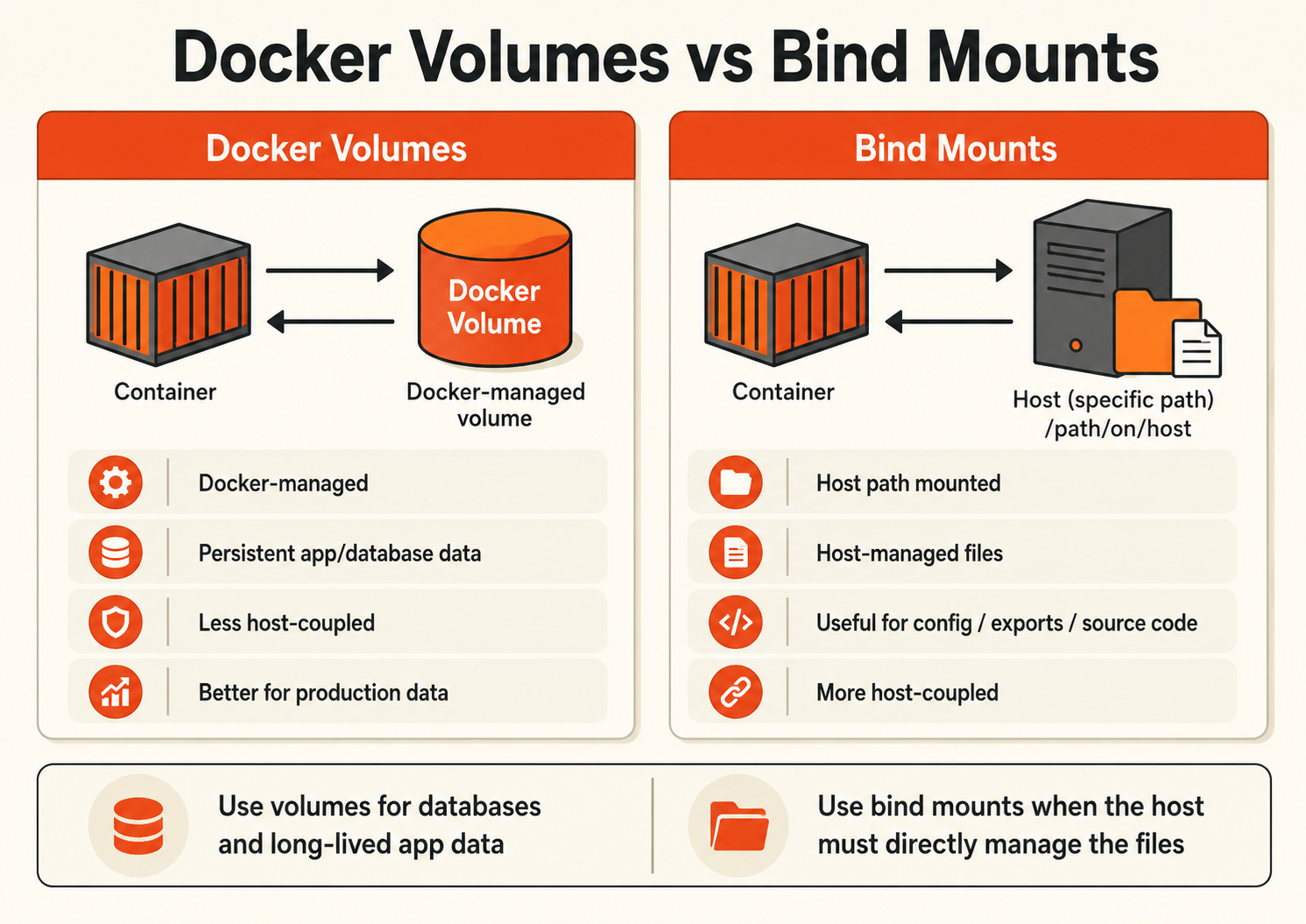
What is a Docker volume?
A Docker volume is a persistent storage object created and managed by the Docker daemon.
Its lifecycle is independent from the lifecycle of one container:
Container A
   ↓
Named volume: app_data
   ↑
Container A recreated
Removing the container does not automatically remove the named volume. Docker can create, list, inspect, and remove volume objects independently.
Typical commands are:
docker volume create app_data
docker volume ls
docker volume inspect app_data
Docker's current documentation recommends volumes when the container generates persistent data, especially when the data should survive container replacement or should not depend on a specific host directory structure.
A useful production rule is:
If an operator should think of the data as application state, start with a named volume unless another storage requirement says otherwise.
What is a Docker bind mount?
A Docker bind mount maps an existing path from the Docker daemon host directly into the container.
For example:
Host
/srv/my-app/config.yml
        ↓
Container
/app/config.yml
The host path is part of the deployment contract.
That makes bind mounts useful when:
- a host-side process manages the file;
- operators need direct host access;
- configuration should come from a known host path;
- certificates are maintained outside the container;
- development source code should appear immediately inside a container;
- another host process collects or writes files in the same directory.
Docker bind mounts are read-write by default. A container with a writable bind mount can create, modify, or delete files on the host path, so production bind mounts should be narrow and read-only whenever write access is unnecessary.
Example:
services:
  app:
    image: my-app
    volumes:
      - /srv/my-app/config.yml:/app/config.yml:ro
Bind mounts also make a workload more host-specific. The same path, file, ownership, permissions, and expected directory structure must exist when the workload moves to another Docker host.
Docker mount types are broader than just volumes and bind mounts
For Linux application storage, the main decision is usually among:
- volume mounts for Docker-managed persistent data;
- bind mounts for host-path-backed data;
- tmpfs mounts for temporary in-memory data.
Docker's current storage documentation also lists additional mount types such as image mounts and named pipes, and Compose supports platform-specific mount forms.
For ordinary persistent application state, however, the practical production comparison remains Docker volumes vs bind mounts.
Docker volumes vs bind mounts: ownership is the real difference
| Decision area | Named Docker volume | Bind mount |
|---|---|---|
| Storage object managed by | Docker | Host/operator |
| Source path | Docker-managed | Explicit host path |
| Host-path coupling | Lower | High |
| Direct host access | Not the intended workflow | Core feature |
| Survives container recreation | Yes unless explicitly removed | Yes while host path remains |
| Read/write default | Read/write | Read/write |
| Good default for app-owned state | Yes | Only when host ownership is intentional |
| Good for host-managed config | Less direct | Yes, often ro |
| Cross-host move | Requires migration/restore | Requires migration/restore of host path |
| Backup included | No | No |
One subtle but important point: Docker's documentation says directly manipulating the underlying files of Docker-managed volume storage from the host is not the supported interaction model. If direct host-side file access is a requirement, that is a strong signal for a bind mount instead.
A named volume reduces path coupling. It does not make live data magically portable between servers.
Named volumes are usually the safer default for application-owned state
Typical volume workloads include:
- PostgreSQL or MySQL data directories;
- Redis persistence;
- self-hosted application state;
- generated service data;
- data shared by several containers on the same Docker host.
Example:
services:
  db:
    image: postgres:16
    restart: unless-stopped
    volumes:
      - db_data:/var/lib/postgresql/data

volumes:
  db_data:
The Compose definition describes a storage object called db_data rather than hard-coding /srv/postgres-data into the service.
That improves deployment clarity, but production ownership still includes:
- capacity monitoring;
- Linux ownership and permissions;
- application consistency;
- backup frequency;
- restore procedure;
- migration to a replacement host;
- recovery after accidental deletion or corruption.
Docker-managed does not mean provider-managed, replicated, backed up, or highly available.
With the default local volume model on a single Docker host, losing the host can still mean losing the live volume unless the data exists elsewhere in a recoverable form.
Bind mounts are right when the host must own the files
Bind mounts are not merely a development shortcut.
They are a valid production pattern when host ownership is intentional.
Examples include:
- a host-managed reverse-proxy configuration;
- TLS certificates maintained by a host-side agent;
- an export directory consumed by another host service;
- a directory collected by an existing host backup workflow;
- carefully scoped socket or device integration;
- files generated outside Docker that a container must read.
A good production bind mount answers three questions:
- Why does this file belong to the host instead of the containerized application?
- Does the container really need write access?
- What creates the path, owns it, and restores it on a replacement server?
Avoid broad mounts such as entire home directories or system directories unless the workload has a documented reason.
Mounting /var/run/docker.sock deserves special treatment: access to the Docker daemon socket gives a container a high-trust control path to the Docker host. It should not be treated like an ordinary config-file mount.
--mount vs -v: production behavior differs when paths are missing
Docker supports both --mount and -v / --volume syntax.
For Docker Engine commands, Docker currently recommends the more explicit --mount syntax.
A key safety difference for bind mounts is the source path:
docker run \
  --mount type=bind,source=/srv/my-app/config,target=/app/config \
  my-app
With --mount, a missing bind source path returns an error by default. That is often useful in production because a missing required path fails loudly rather than silently changing the deployment.
Docker Compose has a related nuance: short bind-mount syntax can create a missing host source directory for backward compatibility. Compose long syntax lets you disable that behavior with create_host_path: false.
Example:
services:
  app:
    image: my-app
    volumes:
      - type: bind
        source: /srv/my-app/config
        target: /app/config
        read_only: true
        bind:
          create_host_path: false
This can prevent a typo or missing deployment step from turning into an empty directory mounted over a required application path.
Mounting over existing container files can hide them
This is one of the easiest Docker storage mistakes to make.
If a bind mount is placed over a container directory that already contains files, the files from the image are obscured while the mount is active.
Example:
Image contains:
/app/config/default.yml

Bind mount:
/srv/config → /app/config

Result:
The image's /app/config contents are hidden by the host mount.
A non-empty Docker volume mounted over an existing container path also obscures the underlying image files.
An empty volume behaves differently: Docker copies the existing container-directory contents into the empty volume by default. The volume-nocopy / Compose nocopy option disables that initialization behavior.
Before mounting over a populated image path, ask:
- Does the image ship required defaults there?
- Should the external storage replace those files?
- Should an empty volume be pre-populated?
- Is a first-run initialization workflow expecting those files?
Permissions still matter with both mount types
Volumes do not bypass Linux permissions.
If the container runs as UID 1001, the files in the mounted storage still need ownership or permissions that allow UID 1001 to use them.
Bind mounts make this especially visible because host UID/GID values meet container UID/GID expectations directly.
Production tests should use the same user model as production. A deployment that only works because the container runs as root can fail after security hardening—or may already have more privileges than the application needs.
Also account for:
- SELinux labeling on applicable hosts;
- read-only mounts;
- umask and created-file ownership;
- application-specific permission requirements.
Docker Compose volume vs bind mount: use both when ownership differs
A production Compose stack can mix mount types intentionally:
services:
  app:
    image: my-app
    restart: unless-stopped
    volumes:
      - app_data:/app/data
      - /srv/my-app/config.yml:/app/config.yml:ro

  db:
    image: postgres:16
    restart: unless-stopped
    volumes:
      - db_data:/var/lib/postgresql/data

volumes:
  app_data:
  db_data:
This communicates three separate ownership decisions:
app_datais application-owned persistent state.db_datais database-owned persistent state./srv/my-app/config.ymlis host-owned configuration exposed read-only.
The point is not to standardize every mount on one type. The point is to make each mount explainable.
What does docker compose down -v delete?
This is operationally important because the -v flag can remove real application data.
By default:
docker compose down
removes the Compose containers and networks, but named volumes normally remain.
When you run:
docker compose down -v
Docker Compose removes:
- named volumes declared in the Compose
volumessection; and - anonymous volumes attached to the removed containers.
External volumes are not removed by docker compose down.
A bind mount is different: its data is a normal host path, not a Docker named-volume object, so docker compose down -v does not mean “delete the host directory.” The bind mount disappears with the container, but the underlying host files remain unless something else deletes them.
For production data, treat docker compose down -v as a destructive command and verify backups before using it on a stateful stack.
Volumes and bind mounts do not solve multi-host storage
A named volume with Docker's default local storage model belongs to a Docker host.
If you move the workload to another host, the new host does not automatically receive the old volume contents.
Likewise, a bind mount depends on the host path existing on the new server.
For multi-host persistence, you need an explicit architecture such as:
- backup + restore during host migration;
- attached block storage moved or reconstructed according to provider capabilities;
- a supported shared-storage system;
- a volume driver backed by external storage;
- application-native replication;
- managed database/storage services.
Do not infer multi-host availability from the fact that Docker calls something a “volume.”
Docker volume vs bind mount performance
Do not choose purely from generic benchmark claims.
Docker's documentation recommends volumes for high-performance persistent I/O and notes that volumes avoid the container writable-layer storage-driver overhead.
That comparison is mainly volume vs container writable layer, not a universal guarantee that a volume will beat every bind mount on every host.
Actual performance depends on:
- host filesystem;
- storage device;
- Docker Desktop vs native Linux;
- virtualization/file-sharing layer;
- workload I/O pattern;
- sync/fsync behavior;
- database configuration.
For a production database, measure the real deployment rather than assuming the mount label determines performance.
Backup strategy matters more than mount type
A Docker volume is not a backup. A bind mount is not a backup.
Both can preserve corrupted or deleted data just as persistently as healthy data.
Recovery planning should answer:
- What state is business-critical?
- Is filesystem-level backup safe for this application?
- Does the database require dump, physical backup, or point-in-time recovery?
- Is there a recovery copy outside the affected VM?
- What are the RPO and RTO?
- Has restore been tested on a clean host?
For live databases, casually copying the data directory while writes continue can be unsafe unless the database and backup method explicitly support that workflow.
A stronger model is:
Container image       = replaceable application package
Live volume/bind path = current persistent state
Database-aware backup = consistent recovery copy
VM backup/snapshot    = infrastructure recovery point
Off-VM copy           = protection from host loss
For a complete Compose workflow, see Docker Compose Backup and Restore Strategy.
Production decision framework
| Question | Better default |
|---|---|
| Database or long-lived app state? | Named volume |
| Host process must edit/collect files? | Bind mount |
| Host-managed config? | Read-only bind mount |
| Development source code? | Bind mount |
| Temporary in-memory state? | tmpfs |
| Avoid hard-coded host path? | Named volume |
| Need direct host file access? | Bind mount |
| Need state on another Docker host? | Explicit migration/shared-storage plan |
| Loss would hurt production? | Separate backups + tested restore |
Production checklist:
- Name important volumes clearly.
- Document why every bind mount exists.
- Use
rowhen the container does not need writes. - Prefer explicit mount syntax for critical paths.
- Prevent silent creation of required Compose bind paths where appropriate.
- Confirm UID/GID ownership and permissions.
- Monitor disk growth.
- Inventory which mounts contain business-critical state.
- Use application-aware database backups where required.
- Keep recovery copies outside the affected VM when host loss matters.
- Test restoration.
- Treat
docker compose down -vas destructive for named-volume data.
How this applies on Raff
Raff VM provides the Linux compute boundary on which Docker Engine and Docker Compose can run.
Keep these layers separate:
Raff VM
  ↓
Linux filesystem / attached storage
  ↓
Docker volume or bind-mount design
  ↓
Container application
A Docker named volume using the default local driver is not the same product as Raff Volumes. Raff Volumes are infrastructure block storage attached to the VM; Docker then needs an intentional guest-filesystem and mount design on top of that storage.
Similarly, Raff Data Protection can support infrastructure-level recovery, but it does not remove the need for application-aware backup procedures for consistency-sensitive databases.
For a small production Docker stack, a clean model is:
Raff VM
  |
  +-- named Docker volumes for app-owned state
  |
  +-- narrow read-only bind mounts for host-owned config
  |
  +-- application-aware database backup
  |
  +-- infrastructure recovery plan
Raff VMs remain self-managed at the guest OS and application level. Your team owns Docker upgrades, Compose configuration, mount permissions, application consistency, storage growth, and workload-level restore testing.
When a single-host Compose environment starts requiring multi-node scheduling, service placement, or cluster-level orchestration, compare it with Kubernetes vs Docker Compose for Small Teams.