MySQL vs PostgreSQL vs MongoDB is a three-database selection guide for teams that have not yet narrowed the choice to two engines. MySQL and PostgreSQL are relational databases; MongoDB is document-oriented. The goal here is to decide which overall data model, query pattern, ecosystem, and operating model best fits the application.
Raff supports managed PostgreSQL and MySQL, while MongoDB can be self-hosted on Raff VM. If your shortlist is already MongoDB vs MySQL, use the dedicated MongoDB vs MySQL comparison. If the decision is PostgreSQL vs MySQL or MongoDB vs PostgreSQL, use those dedicated two-engine comparisons instead. This page intentionally stays at the broader three-way decision level.
MySQL, PostgreSQL, and MongoDB fit different application shapes
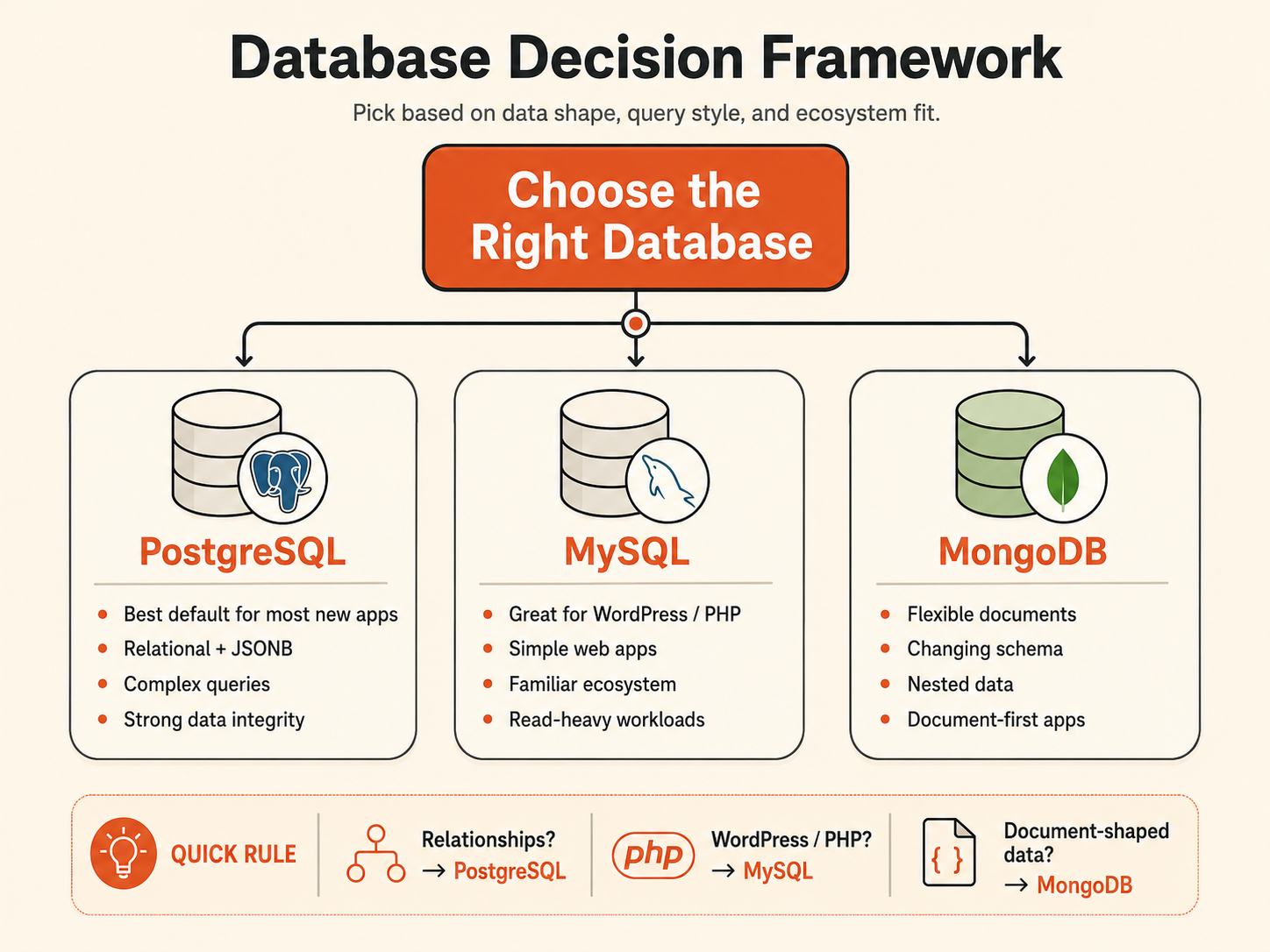
MySQL and PostgreSQL are relational database management systems. They organize structured data into tables and support SQL, indexes, joins, constraints, and transactions.
MongoDB is a document database. It stores BSON documents in collections and is designed around document-shaped records that may contain nested objects and arrays.
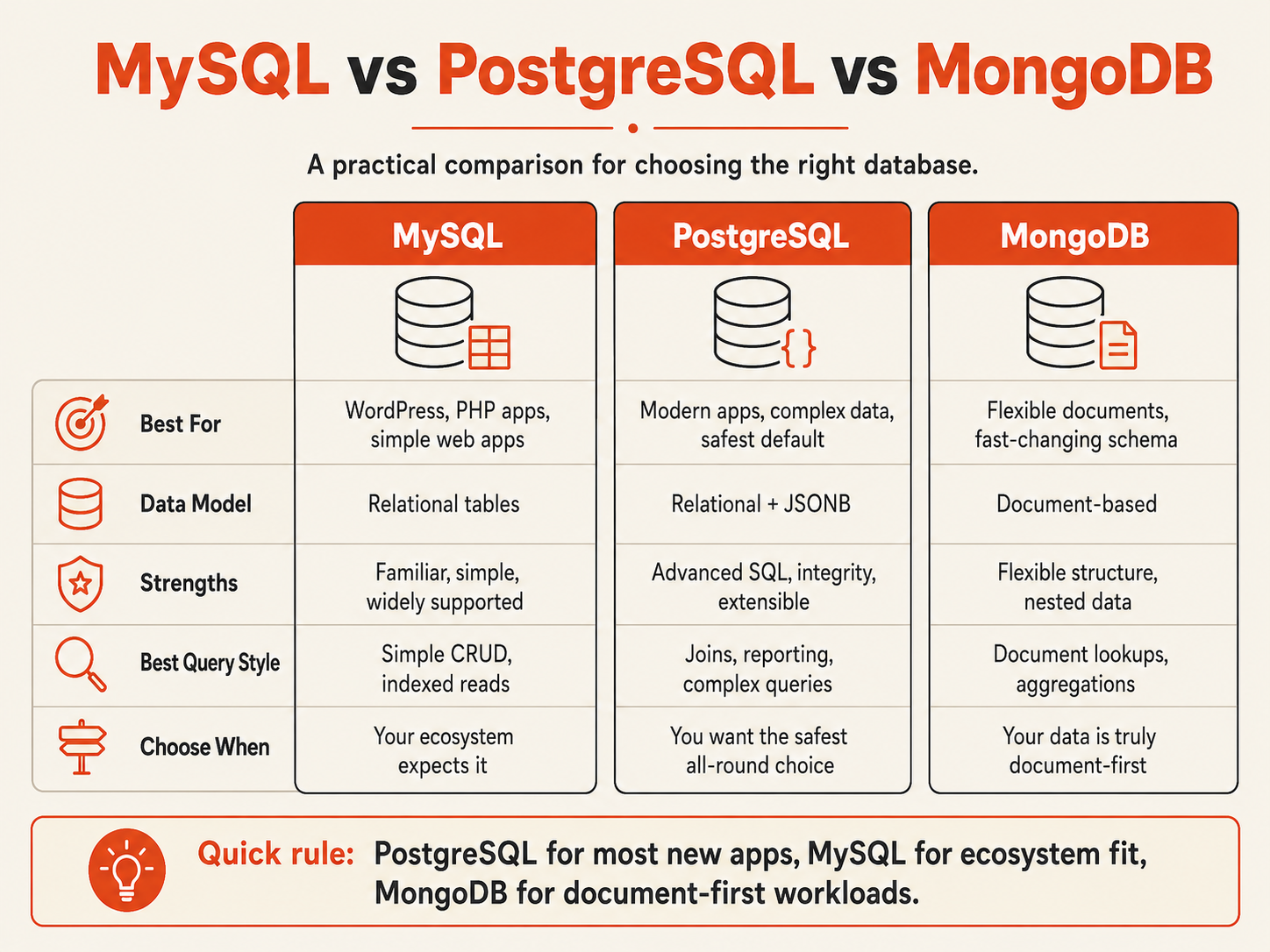
| Decision area | MySQL | PostgreSQL | MongoDB |
|---|
| Primary model | Relational | Relational with extensive extension and JSONB capabilities | Document |
| Relationship handling | Foreign keys and joins | Foreign keys, joins, constraints, advanced relational querying | Embedding or references |
| Flexible fields | Native JSON type | JSON and JSONB | Native document structure |
| Transactions | InnoDB transactions | Relational transactions | Single-document atomicity plus multi-document transactions |
| Strong ecosystem fit | WordPress, WooCommerce, PHP and established MySQL apps | SaaS, data-rich relational apps, extension-driven workloads | Document-first apps and MongoDB-native stacks |
| Query style | SQL | SQL | MongoDB Query Language and aggregation |
| Typical scaling path | Optimize, resize, cache, replicas, then more complex architectures if needed | Optimize, resize, pooling, replicas, partitioning, then more complex architectures if needed | Replica sets and native sharding when horizontal distribution is required |
The practical distinction is the shape of the product's data. A subscription system with users, organizations, invoices, permissions, and payments is relational. A configuration record or catalog item with bounded nested attributes may be naturally document-shaped.
The decision framework starts with data relationships
Use requirements that are expensive to change later.
| Workload signal | MySQL | PostgreSQL | MongoDB |
|---|
| WordPress or WooCommerce | Strong default | Usually unnecessary | Poor fit |
| Existing MySQL application with stable operations | Strong reason to stay | Change only for a documented requirement | Change only for a documented requirement |
| New SaaS app with many related entities | Viable | Strong default | Use only if the domain is genuinely document-first |
| Complex joins and reporting | Viable | Strong fit | Usually more modeling friction |
| Flexible metadata inside a relational core | JSON columns | Strong fit with JSONB | Possible, but may add a second data model unnecessarily |
| Self-contained documents with variable fields | Possible | Possible with JSONB | Strong fit |
| PostgreSQL extensions such as PostGIS or pgvector are required | No equivalent extension model | Strong fit | Different ecosystem |
| Vendor software explicitly requires MySQL | Strong fit | No | No |
| Native document sharding is a product requirement | Different architecture required | Different architecture required | Strong fit |
| Team already operates one engine reliably | Keep it unless requirements disagree | Keep it unless requirements disagree | Keep it unless requirements disagree |
Choose MySQL when the surrounding application or software ecosystem already expects MySQL and the relational model fits.
Choose PostgreSQL when the product is relational and benefits from PostgreSQL-specific capabilities, JSONB, extensions, richer query patterns, or an existing PostgreSQL standard.
Choose MongoDB when the document itself is the natural read and write boundary and most application behavior stays inside that boundary.
Customer pattern from Raff: small teams usually narrow this decision faster when they write down relationship complexity, required extensions, and existing engine expertise before comparing hosting plans.
Once the engine decision is clear, the next question is operational: managed or self-hosted. For PostgreSQL and MySQL, Raff provides dedicated Managed PostgreSQL and Managed MySQL paths. If you still need to compare operating responsibility, start with Managed vs Self-Hosted Databases.
MySQL is a practical fit for established relational web workloads
MySQL is a relational database commonly used by websites, content management systems, ecommerce software, PHP applications, and established business systems.
It is a strong fit when:
- WordPress or WooCommerce is part of the stack;
- vendor software explicitly supports or requires MySQL;
- the team already has tested MySQL backup and recovery procedures;
- schemas and query patterns are stable;
- SQL reporting and relational integrity matter;
- the application already performs reliably on MySQL.
Modern MySQL deployments commonly use InnoDB, which provides transactions, row-level locking, crash recovery, and foreign-key support. MySQL also provides a native JSON data type and JSON functions, so bounded flexible metadata does not automatically require a document database.
For the relational two-engine decision, continue with PostgreSQL vs MySQL. If MySQL is already the chosen engine, compare Managed MySQL with MySQL Hosting: Managed vs Self-Hosted before deciding how much database operations work your team wants to own.
PostgreSQL fits relational and hybrid application workloads
PostgreSQL is a relational database with strong data-integrity features, extensive SQL capabilities, JSONB, and an extension model that can add specialized functionality.
It is a strong fit when:
- a SaaS product has many related entities;
- transactions span several business records;
- reporting and complex joins are important;
- relational data needs bounded flexible metadata;
- JSONB queries and indexes are useful;
- an approved PostgreSQL extension is required;
- the team already standardizes on PostgreSQL.
A common hybrid pattern keeps core product fields relational while using JSONB only for flexible metadata:
id
organization_id
status
created_at
metadata_jsonb
This preserves explicit ownership, relationships, constraints, and common filters while allowing selected attributes to vary.
For the dedicated PostgreSQL decision, use Postgres Hosting: Managed vs Self-Hosted for SaaS or MongoDB vs PostgreSQL. If PostgreSQL is already the selected engine, review Managed PostgreSQL as the commercial next step rather than restarting the engine comparison.
MongoDB fits applications built around bounded documents
MongoDB stores BSON documents in collections and supports nested fields, arrays, indexes, replica sets, transactions, aggregation, and sharding.
It is a strong fit when:
- one document is the natural business aggregate;
- records have variable but governed fields;
- most reads retrieve the whole aggregate;
- nested objects belong with the parent record;
- document-oriented tooling is already part of the stack;
- horizontal document sharding is a real requirement rather than a future possibility.
The warning sign is relationship pressure. If ordinary product behavior repeatedly requires cross-collection references, multi-document transactions, relationship-heavy reporting, and repeated reconstruction of business entities, the application may be fighting the document model.
For the direct MySQL comparison, use MongoDB vs MySQL. This page should remain the broader three-engine chooser.
There is no useful universal winner for MySQL vs PostgreSQL vs MongoDB performance.
Database performance depends on schema or document design, indexes, query shape, working set, connection behavior, transaction scope, memory, storage latency, concurrency, and the exact engine version and configuration.
Use representative evidence:
| Signal | What to inspect |
|---|
| Query latency | p50, p95, and p99 for real application operations |
| Query plans | scans, joins, aggregation stages, indexes, and estimated versus actual work |
| Concurrency | active transactions, waits, locks, retries, and deadlocks |
| Connections | application pools, workers, jobs, and administrative sessions |
| Memory | working set, cache effectiveness, temporary work, and swapping |
| Storage | latency, throughput, growth, and maintenance behavior |
| Write behavior | transaction size, log generation, document growth, and contention |
| Recovery | backup duration and measured restore time |
Scaling should follow the measured bottleneck. Fix inefficient queries and indexes before introducing distributed architecture. Resize memory or storage when the working set demands it. Add replicas when read or availability requirements justify them. Introduce sharding or more complex partitioning only when simpler approaches no longer meet the workload.
If performance is the reason for considering a migration, reproduce production-like data, concurrency, and queries first. An engine migration is too disruptive to justify with an unrelated benchmark.
Operations and recovery can outweigh feature differences
Choosing an engine also chooses a set of operating responsibilities.
Teams must account for patching, upgrades, monitoring, credentials, network access, backups, retention, restore testing, replication, high availability, connection management, storage growth, migrations, and incident response.
A managed database transfers more of the platform work to the provider, while the application team still owns schemas, queries, indexes, credentials, migrations, capacity decisions, and application behavior during recovery.
A self-hosted database provides deeper operating-system and database control, but the team owns the complete database operating model.
Use Managed vs Self-Hosted Databases when the engine is chosen but the hosting model is still undecided.
Raff supports different deployment paths by engine
Raff Managed Databases currently supports PostgreSQL, MySQL, Valkey, ClickHouse, and Kafka. PostgreSQL and MySQL therefore have managed paths on Raff. MongoDB is not currently a Raff Managed Database engine, but it can run as a self-hosted workload on Raff VM.
The practical sequence is:
Choose the data model
  -> choose the engine
  -> choose managed or self-hosted operations
  -> size and validate the production workload
Do not reverse that sequence by choosing an engine only because one hosting option looks convenient today.
Conclusion: use this page for the three-engine decision
MySQL, PostgreSQL, and MongoDB can all support production applications, but they encourage different data and operating models.
Choose MySQL when the application ecosystem already expects MySQL and relational SQL fits the workload. Choose PostgreSQL when relationships, constraints, richer SQL, JSONB, extensions, or an existing PostgreSQL standard matter. Choose MongoDB when bounded documents are genuinely the application's natural read and write unit.
Once the shortlist reaches two engines, move to the dedicated comparison rather than continuing to broaden the decision here: PostgreSQL vs MySQL, MongoDB vs PostgreSQL, or MongoDB vs MySQL.
Sources