
Store durable customer uploads in object storage once those files must survive VM replacement, scale independently from application compute, or be shared by more than one app instance. Keep VM disk for temporary, regenerable, or low-risk files that can remain tied to one server.
For Raff Technologies workloads, that usually means keeping the operating system and application runtime on the VM, keeping structured ownership and file metadata in a database, and putting durable uploads in S3-compatible Object Storage.
The important decision is not whether a VM can store files. It can. The question is whether those files should remain part of the VM's lifecycle.
If application uploads are private, use S3 Bucket Security: Credentials, Policies, and Private Access to define bucket exposure, credential scope, and presigned URL controls.
VM disk vs object storage for app uploads: quick answer
| Situation | Better starting point | Why |
|---|---|---|
| Prototype or demo | VM disk | Lowest operational overhead |
| Temporary processing files | VM disk | Short-lived and easy to recreate |
| Cache or regenerable thumbnail | VM disk | Losing it does not lose source data |
| Small internal tool with low-risk files | VM disk can be reasonable | Simplicity may matter more than separation |
| Customer uploads are product data | Object storage | Files should survive app-server changes |
| Multiple app servers or workers need the same files | Object storage | Shared API access avoids server-to-server file sync |
| Upload volume grows independently from CPU/RAM | Object storage | Storage capacity can scale separately from compute |
| Private files need controlled downloads | Object storage | Presigned URL or controlled API patterns fit well |
| Reports, exports, media, and attachments need retention | Object storage | These are durable file objects |
| App VM is being resized mainly because uploads are growing | Object storage | Storage growth should not force compute growth |
A useful rule is:
If replacing the application VM should not mean migrating or recovering customer files, those files should not live only on the VM disk.
For the wider storage decision, see Object Storage vs Block Storage vs VM Disk.
App uploads become production data when users depend on them
Uploads include more than profile pictures.
Typical SaaS and web-app file data includes:
- user avatars and images;
- PDFs and documents;
- product media;
- attachments;
- CSV imports;
- generated reports;
- invoices;
- exports;
- audio and video;
- design assets;
- application-generated archives.
These files often start in a local directory:
App VM
  ↓
/var/www/app/uploads
That can be perfectly reasonable at the beginning.
The architecture changes when that directory becomes the authoritative copy of customer data. At that point:
- a VM rebuild becomes a file-recovery event;
- a second app server creates a synchronization problem;
- growing uploads increase pressure on the server disk;
- VM backups get larger because application files are mixed with compute state;
- moving or resizing compute can require moving customer files too.
The storage layer is now controlling the compute lifecycle.
Keep VM disk for files that belong to one server
VM disk remains the simplest option when the files are naturally coupled to the application server.
Good examples include:
- temporary upload staging;
- image-processing scratch space;
- caches;
- generated files that can be recreated;
- short-lived exports;
- package or application artifacts;
- local development files;
- low-risk internal-tool files with a documented backup path.
VM disk is especially reasonable when all of these are true:
- there is one application server;
- file growth is predictable;
- files are not critical customer records;
- the workload can be restored as one unit;
- there is enough disk headroom;
- no other server or worker needs the same files;
- simplicity is more valuable than independent storage lifecycle.
A single-server architecture is not automatically bad architecture. Separation is useful when it solves a real lifecycle, scaling, recovery, or multi-server problem.
Move durable customer files to object storage
Object storage gives application files a lifecycle independent from the VM.
A common production model is:
User uploads file
  ↓
Application validates request
  ↓
Object Storage stores file
  ↓
Database stores owner + object key + metadata
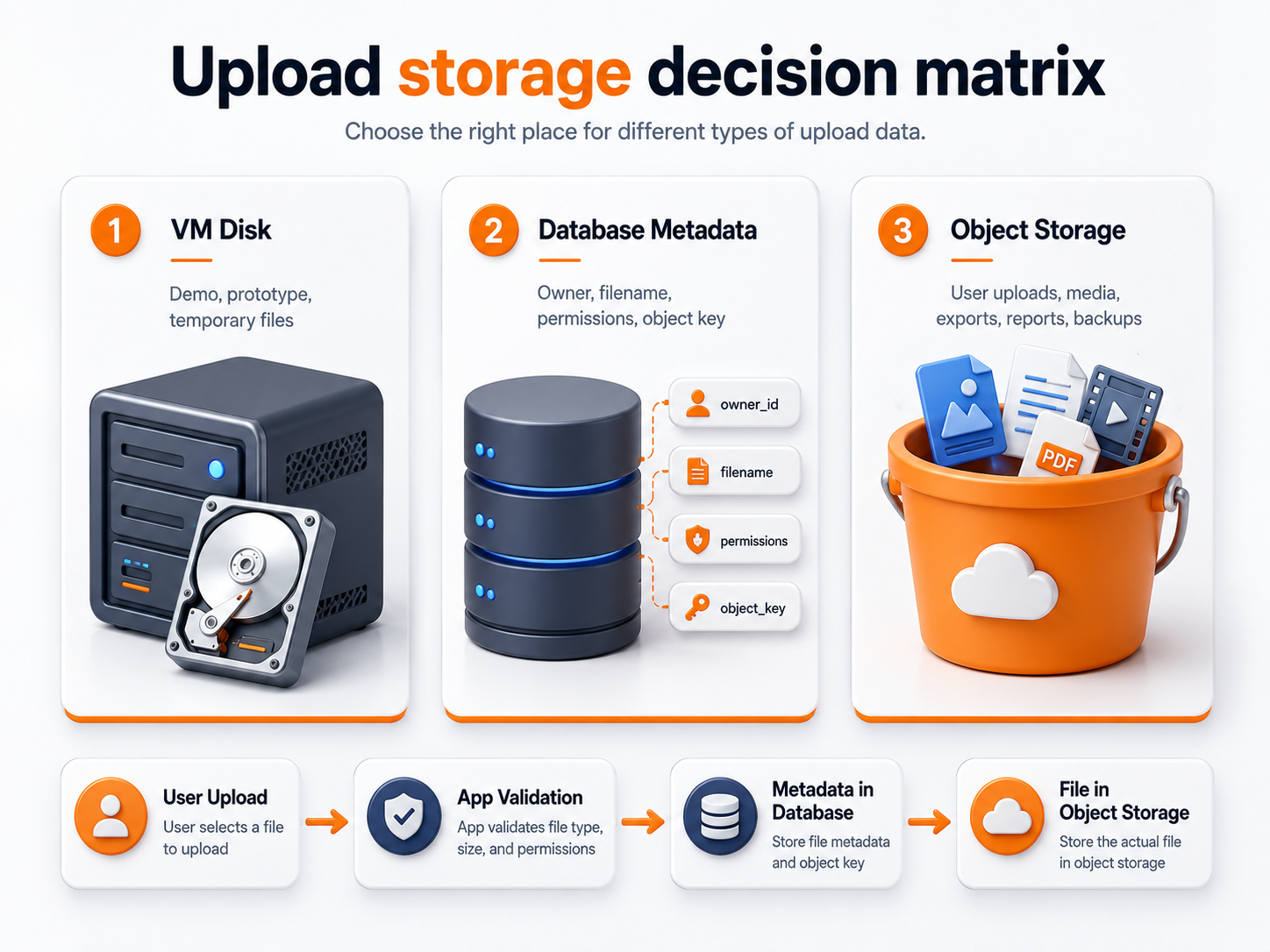
This boundary improves several things at once.
Compute becomes replaceable
The app server can be rebuilt, resized, reimaged, or duplicated without first copying the entire upload directory.
File capacity can grow independently
If customer uploads double but CPU and RAM demand stay flat, the application should not necessarily need a larger VM.
Multiple application instances can use the same files
Stateless app nodes and workers can retrieve the same objects through the storage API rather than maintaining synchronized local directories.
File delivery gets its own access model
Applications can keep objects private and grant controlled access after checking user or tenant permissions.
VM backup scope becomes cleaner
The VM backup can focus on server state while durable file data uses a storage and recovery model designed for objects.
Store file metadata in the database and file bodies in object storage
For most SaaS applications, the clean pattern is:
Database = business state. Object storage = file body.
A file record can contain fields such as:
| Field | Purpose |
|---|---|
id | Application-level file ID |
user_id / account_id | Ownership boundary |
object_key | Location in object storage |
original_filename | User-facing filename |
content_type | MIME/content type |
size_bytes | File size |
status | Uploading, processing, ready, failed, deleted |
visibility | Private, public, or controlled |
checksum | Integrity or deduplication signal |
created_at | Creation time |
deleted_at | Deletion workflow state |
The database answers:
- who owns the file;
- which customer or project it belongs to;
- whether the user may access it;
- whether processing completed;
- whether the file should still exist.
Object storage answers:
- which object exists;
- how it is retrieved;
- how large it is;
- which storage key identifies it.
This separation makes authorization and storage responsibilities easier to reason about.
S3 uploads are an application integration pattern, not a storage architecture by themselves
Searches for S3 uploads often mix two separate questions:
- Where should durable application files live?
- How should the browser or application upload those files?
This guide answers the first question. Once object storage is the chosen file layer, the upload path can be implemented in several ways.
App-server proxy upload
Browser
  ↓
App server
  ↓
Object storage
This is simple to understand, but large uploads consume application-server bandwidth and connection time.
Direct-to-object-storage upload
Browser
  ↓ request authorization
App server
  ↓ returns controlled upload permission
Browser
  ↓
Object storage
A direct-upload design can reduce load on application servers, especially for larger media or document uploads.
The application should still control:
- who may upload;
- allowed size;
- allowed content type;
- destination object key;
- ownership metadata;
- post-upload processing;
- deletion permissions.
Do not treat direct upload as bypassing application authorization. The app authorizes the operation even when it does not relay every byte.
Presigned URLs help keep private uploads off the public internet surface
A common S3-compatible pattern is to keep objects private and issue time-limited presigned URLs after the application verifies access.
For downloads:
User requests file
  ↓
Application checks tenant + permission
  ↓
Application creates short-lived signed URL
  ↓
User downloads object
For uploads:
User requests upload
  ↓
Application validates account + file policy
  ↓
Application creates controlled upload permission
  ↓
Client uploads object
This avoids making an entire bucket public just because users need temporary access to particular files.
AWS documents the general S3 presigned URL model in its presigned URL documentation. For Raff, use the capabilities documented on the current Object Storage page as the source of truth for provider-specific behavior.
Upload security must be designed above the storage layer
Moving files to object storage does not make uploads safe automatically.
The application should define controls for:
- allowed file types;
- maximum upload size;
- authentication;
- tenant ownership;
- authorization before upload and download;
- filename handling;
- content validation;
- malware scanning where appropriate;
- processing isolation;
- credential scope;
- deletion permissions;
- logging and auditability.
The OWASP File Upload Cheat Sheet is a useful security reference because upload risk comes from application behavior as much as from the storage system.
Do not rely on an unguessable object key as authorization. A user should receive access because the application verified permission, not because the URL happened to be hard to predict.
Multi-server applications should avoid local upload ownership
The weakness of VM-local uploads becomes obvious when a second application instance is added.
Suppose uploads remain on local disk:
Load balancer
  ├── App VM A → /uploads
  └── App VM B → /uploads
Now a file uploaded through VM A may not exist on VM B.
Teams usually respond with one of four patterns:
- synchronize upload directories;
- force sticky sessions;
- mount a shared filesystem;
- move durable files into object storage.
For ordinary web and SaaS uploads, object storage is often the cleaner boundary because every stateless application instance can use the same file API.
Load balancer
  ├── App VM A ─┐
  └── App VM B ─┼→ Object Storage
      Workers ──┘
This also makes app-node replacement easier because no individual node owns the customer file set.
Object storage is not the right answer for every application file
Use object storage for file-like data that works naturally through an API.
Strong fits include:
- uploads;
- images;
- video;
- documents;
- generated reports;
- exports;
- archives;
- static assets;
- backup artifacts.
Do not force object storage onto workloads that require ordinary mounted filesystem semantics.
Examples that may fit block storage better include:
- self-hosted database data directories;
- search indexes;
- stateful application directories;
- persistent Docker service data;
- software that expects normal in-place filesystem I/O.
For that distinction, use Block Storage for Databases & Containers: When to Use Volumes.
Separate storage growth from compute growth
One of the strongest commercial and operational reasons to move uploads out of the VM is independent scaling.
Imagine the application has enough CPU and RAM, but customer documents are growing rapidly.
With VM-local uploads:
more customer files
→ more VM disk pressure
→ larger server / migration pressure
With object storage:
app compute remains adequate
→ object capacity grows independently
The application server can then be sized for application runtime rather than for years of accumulated customer files.
This does not mean object storage always reduces cost. The correct comparison includes:
- stored capacity;
- data-transfer pattern;
- request/access pattern;
- engineering work;
- backup/recovery design;
- operational complexity;
- whether file growth would otherwise force larger compute.
Use the live Raff Object Storage and pricing pages for current commercial values instead of relying on hard-coded numbers in an evergreen guide.
Recovery should treat files and metadata as one business dataset
Separating file bodies from the application VM improves architecture, but recovery still needs coordination.
If the database says a customer owns object accounts/42/invoices/a.pdf, recovery is incomplete if:
- the database record exists but the object is missing;
- the object exists but the database record is gone;
- the database is restored to Monday while files reflect Wednesday deletions;
- credentials cannot access the bucket after recovery;
- a restored application points at the wrong environment or object prefix.
Recovery planning should define:
- database recovery point;
- object/file recovery expectations;
- credential recovery;
- deletion behavior;
- how application-to-object consistency is checked;
- how restored environments avoid writing into production storage accidentally.
For the wider model, see Cloud Storage Architecture for Production Apps: Backup & Recovery.
Migration from VM disk to object storage should end with one source of truth
A safe migration does not require a big-bang cutover, but it should have a clear end state.
A practical sequence is:
- Create a structured file record. Record ownership, current path, target object key, type, size, and migration status.
- Define the bucket/key model. Decide how tenants, projects, or file types map into object keys.
- Copy existing files. Upload current durable files and verify representative objects, counts, sizes, and checksums where practical.
- Switch new writes. New durable uploads should go to object storage.
- Use temporary read fallback if needed. During migration, read object storage first and local disk second.
- Verify production workflows. Upload, download, delete, authorization, processing, export, and recovery flows should all work.
- Remove local authority. Delete old local copies only after the new source of truth is proven.
The dangerous state is indefinite dual ownership.
If half the files are authoritative on the VM and half are authoritative in object storage, every incident and migration becomes harder to reason about.
How Raff fits the app-upload architecture
Raff currently provides the infrastructure layers needed for this separation:
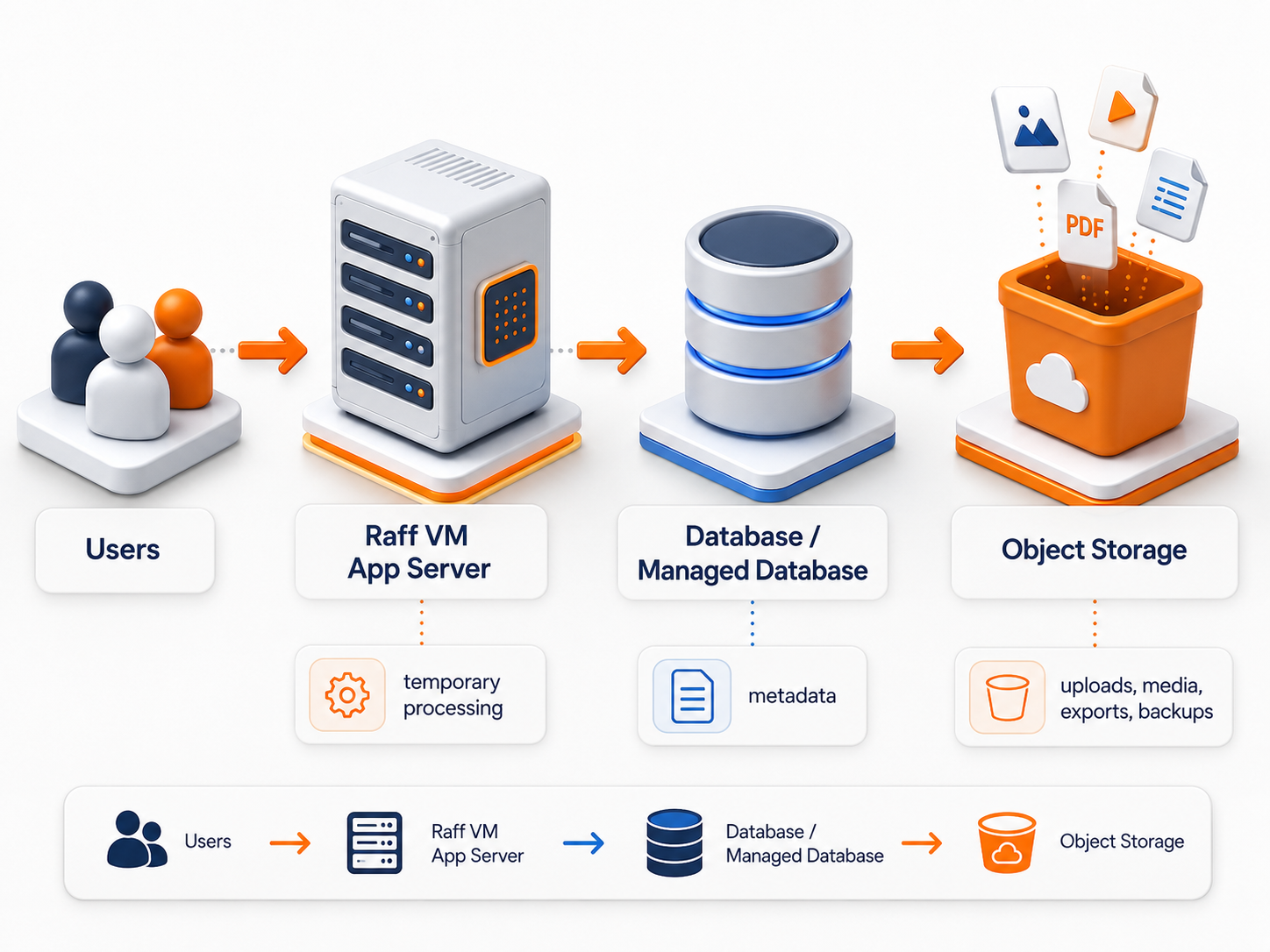
Users
  ↓
Raff VM / Raff Apps
  └── application runtime

Database layer
  └── ownership, object keys, status, metadata

Raff Object Storage
  └── durable uploads, media, reports, exports
Raff Object Storage is S3-compatible, so applications can use common S3 SDK and API patterns for object operations. Current pricing, limits, supported S3 features, access controls, and other mutable product details should be verified on the live product page before implementation.
A clean workload mapping is:
- Raff VM → OS and application runtime;
- Object Storage → durable API-addressed files;
- Managed Databases or a self-hosted database → structured metadata and ownership;
- Volumes → disk-like state when an application truly needs filesystem semantics;
- Data Protection → recovery workflows for the infrastructure layers it protects.
The objective is not to use every product. It is to keep customer files from becoming an accidental dependency on one replaceable application server.