
Restore testing proves that a production workload can return to a usable state from a real recovery point—not merely that a backup job completed. A useful test validates the recovery point, compute, storage, database, application, credentials, networking, external files, monitoring, and critical business workflows together, then measures the result against Recovery Point Objective (RPO) and Recovery Time Objective (RTO).
For Raff Technologies workloads, the key planning detail is that VM backup restores are currently in-place: the selected VM is powered off and overwritten with the chosen recovery point. That means routine isolated recovery exercises and the exact VM-backup restore path are related but not identical tests. Teams should validate both where the workload risk justifies it.
A backup tells you a recovery copy exists. A restore test tells you whether the service can actually return.
Use Disaster Recovery Plan for Small Teams to place restore testing inside a broader recovery runbook with RPO/RTO, owners, dependency order, validation, and traffic-return criteria.
Restore testing checklist: what a complete test proves
A production restore test should answer these questions:
- Can the correct recovery point be identified quickly?
- Can the VM or replacement environment reach a usable infrastructure state?
- Are required filesystems, volumes, and external storage paths available?
- Does the database contain the expected recovery point?
- Can the application start with the correct configuration and secrets?
- Do critical user or staff workflows work?
- Can monitoring confirm the recovered system is stable?
- Does actual data loss remain inside the approved RPO?
- Does total recovery time remain inside the approved RTO?
- Can the team repeat the process from a documented runbook?
A green backup dashboard answers only part of the first question.
| Recovery layer | What the test should prove |
|---|---|
| Recovery point | The selected backup, snapshot, or database recovery point represents the intended time |
| Compute | The VM can return or replacement compute can be rebuilt safely |
| Storage | Required disks, volumes, mount points, and paths are present |
| Application | Services start and remain healthy |
| Database | Data is consistent and matches the intended recovery point |
| Credentials | SSH keys, secrets, certificates, database credentials, and API credentials are usable |
| Networking | Private routes, firewall rules, DNS, TLS, and service connectivity work |
| Object/file data | Uploads, reports, archives, and other external files are reachable |
| Observability | Logs, monitoring, health checks, and alerts work |
| Business workflow | The agreed customer or staff journey completes successfully |
Restore testing should end when the agreed service works, not when the VM powers on.
Start with the failure scenario
A restore test is more useful when it models a specific incident instead of proving the easiest possible recovery path every time.
Rotate scenarios such as:
- failed application deployment;
- operating-system update failure;
- accidental file deletion;
- database corruption;
- bad schema migration;
- compromised administrator credential;
- deleted VM;
- attached-volume failure;
- loss of application secrets or certificates;
- failure discovered several days after it began.
The scenario determines which recovery point should be used and which parts of the service must be validated.
| Failure scenario | Recovery path to validate |
|---|---|
| Failed deployment | Pre-change snapshot or known-good application state |
| OS update failure | Pre-maintenance infrastructure recovery point |
| Accidental file deletion | Historical file, object, or server recovery point |
| Database corruption | Database-aware backup or PITR target |
| Bad schema migration | Known-good database recovery point before the migration |
| Credential compromise | Recovery path using rotated credentials and protected recovery copies |
| VM loss | VM backup or clean rebuild plus independent data recovery |
| Failure discovered late | Older retained recovery point rather than only the newest copy |
A recovery program that repeatedly restores only the newest point can miss the exact incidents retention is supposed to protect against.
Separate isolated recovery testing from destructive production restore
Routine recovery exercises should reduce the chance of creating a second incident.
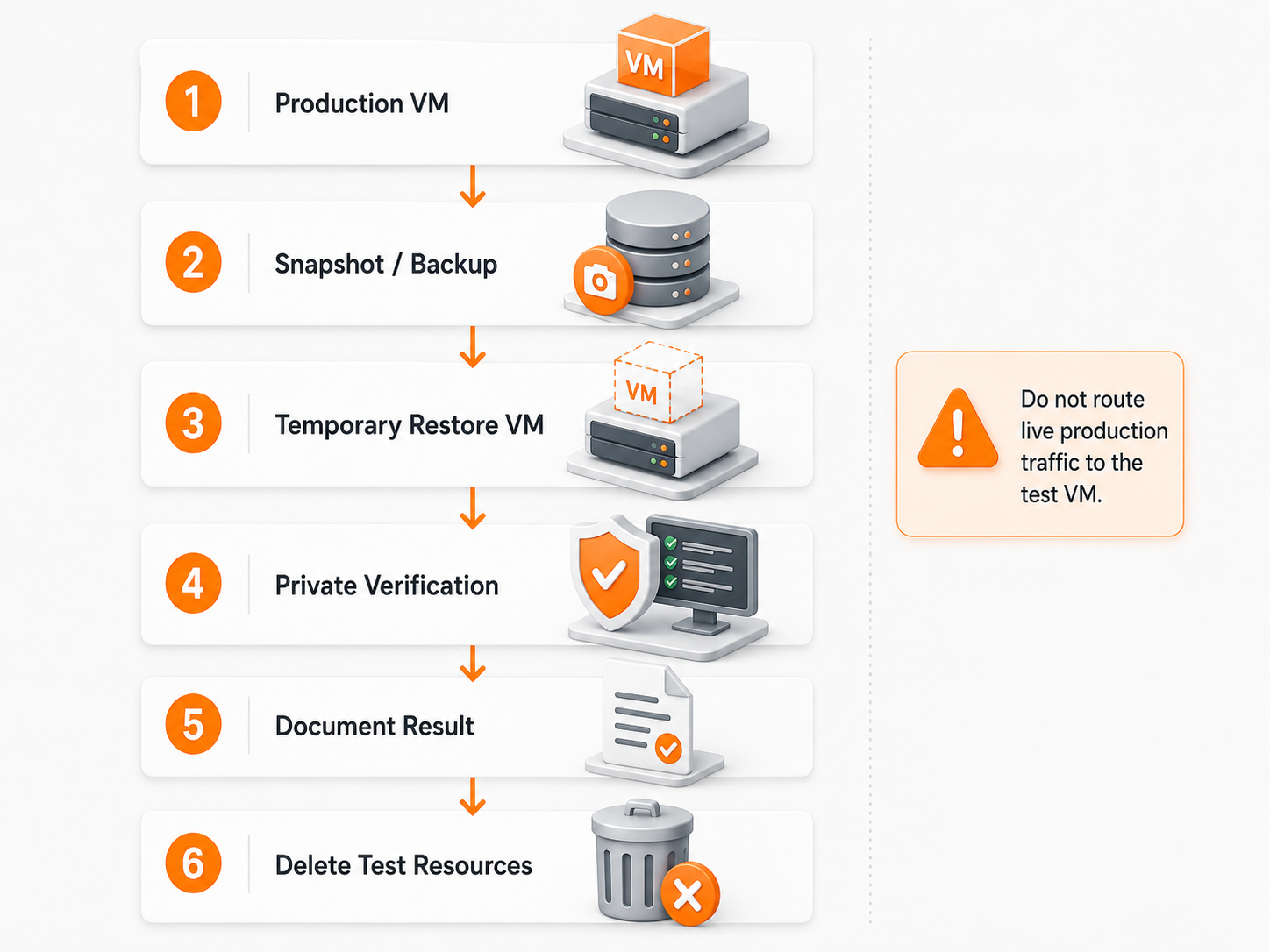
When the recovery mechanism allows it, isolate the restored workload:
Production workload
  ↓
Selected recovery point
  ↓
Isolated restore or rebuilt test environment
  ↓
Application + data validation
  ↓
Measured RPO / RTO evidence
  ↓
Cleanup
Isolation should prevent the recovered system from accidentally:
- sending real customer email;
- charging payment methods;
- replaying production webhooks;
- running scheduled jobs twice;
- writing into the live production database;
- deleting or overwriting production objects;
- receiving normal production traffic.
Use separate test hostnames, credentials, database targets, storage prefixes, and network paths where practical.
Raff VM backups require a separate in-place restore exercise
The current Raff Data Protection model restores a VM backup in place: the VM is powered down and overwritten with the selected recovery point, then started again.
That means a routine isolated rebuild can prove many parts of the recovery design, but it does not prove the exact same control-plane restore path.
For important workloads, distinguish between:
- isolated service-recovery test — prove the application, database, files, credentials, and recovery runbook without overwriting production;
- rebuild test — prove that replacement compute can be created and connected to persistent data or restored application state;
- controlled in-place backup restore — validate the provider's actual VM-backup restore path during an approved maintenance window where destructive overwrite is acceptable.
Design the test before using the restore action.
RPO validation measures the actual recovered data
Recovery Point Objective (RPO) is the maximum acceptable data-loss window.
A restore test should record:
- simulated failure time;
- selected recovery-point timestamp;
- newest expected record, file, or transaction;
- newest usable recovered record, file, or transaction;
- resulting data-loss window.
Example:
Simulated failure:          14:00
Selected recovery point:    13:50
Newest verified data:       13:48
Measured data-loss window:  12 minutes
Approved RPO:               15 minutes
Result:                     Pass
The recovery-point timestamp alone is not enough. The team should confirm the state that the application can actually use after recovery.
For transactional workloads, use database-native validation instead of assuming the VM recovery timestamp exactly represents database recoverability.
Use Database Restore Testing: RPO, RTO, and Recovery Validation when database recovery is the primary objective.
RTO validation measures the whole path to usable service
Recovery Time Objective (RTO) is the maximum acceptable time until the agreed service is usable again.
Measure each recovery phase:
| Phase | What to record |
|---|---|
| Decision | Time to identify the incident and choose recovery |
| Recovery-point selection | Time to locate and approve the correct recovery point |
| Infrastructure | Time to restore or rebuild compute and storage |
| Data | Time to recover database, files, or persistent volumes |
| Configuration | Time to recover secrets, certificates, configuration, and deployment state |
| Application | Time to start and stabilize services |
| Validation | Time to prove critical workflows |
| Traffic return | Time to reopen the service safely |
A VM that boots in 10 minutes can still have a two-hour operational RTO if credentials, database recovery, validation, and traffic restoration consume another 110 minutes.
Record time to usable service, not provider restore duration alone.
Validate the VM and storage boundary first
Before testing application behavior, confirm the recovered infrastructure matches the expected design.
Check:
- expected operating system and version;
- boot state;
- administrative access;
- disk capacity;
- filesystem health;
- attached volumes;
- mount points;
- ownership and permissions;
- network interfaces;
- private connectivity;
- firewall behavior;
- system time;
- failed system services;
- recovery-related system logs.
If the application depends on a mounted block volume, confirm the expected filesystem is actually mounted.
One dangerous failure mode is:
/data should contain an attached volume
  ↓
VM starts but volume is not mounted
  ↓
application starts anyway
  ↓
application writes into empty /data on the boot disk
The service may appear healthy while new state is being written into the wrong storage layer.
For workloads using separate volumes, also verify that the expected recovery process for the volume is documented independently from the VM boot disk.
Application validation must represent real service readiness
A process being running or a health endpoint returning 200 is not enough.
Define a minimum set of business-relevant checks before the exercise.
Examples include:
- user authentication;
- one critical read;
- one controlled write in the isolated environment;
- one representative API request;
- file upload and retrieval;
- background job execution;
- queue or cache connectivity;
- report generation;
- one important internal staff workflow;
- one customer-facing transaction that does not trigger real side effects.
The acceptance test should represent what the business actually needs from the service after an incident.
Database recovery needs its own validation
A VM-level recovery point does not automatically prove that an active database meets the recovery objective.
Verify:
- database engine starts without unresolved recovery errors;
- expected databases, schemas, tables, or collections exist;
- roles and permissions are present;
- migrations are at the intended state;
- recent critical records match the selected recovery point;
- application credentials connect successfully;
- representative reads work;
- controlled writes work where appropriate;
- replication, failover, or managed-database connectivity is understood after recovery.
For PostgreSQL, MySQL, and other transactional engines, database-native backups or point-in-time recovery can be more appropriate for data recovery than relying on a VM backup alone.
For managed databases, the service provider may operate the recovery mechanism while the application team still owns recovery-point selection, data validation, reconnect behavior, and the decision to return traffic.
Object storage and uploads belong in the same recovery test
Modern applications often keep durable files outside the VM.
Test:
- expected buckets and object prefixes exist;
- application credentials can read required objects;
- a controlled test write succeeds where appropriate;
- database object keys match the files that actually exist;
- reports, exports, uploads, and media remain reachable;
- a recovery environment cannot overwrite production objects accidentally.
For an application that stores customer files in Raff Object Storage, a VM recovery test is incomplete if the restored application cannot reconnect to those objects.
This is particularly important when the database and object data can be restored to different points in time. A database record that references a missing object is still a recovery defect.
Secrets, certificates, and access often determine real recovery time
Infrastructure can return before the team is able to use it.
The recovery plan should prove that responders can obtain:
- SSH or administrator access;
- application secrets;
- database credentials;
- object-storage credentials;
- TLS certificates and private keys;
- API keys;
- webhook secrets;
- deployment credentials;
- encryption keys required for recovery.
Do not place secret values inside the restore runbook.
Instead record:
- where the secret is stored;
- who can retrieve it;
- what emergency-access path exists;
- how it is rotated after an incident;
- what happens if the primary identity system is unavailable.
A technically complete backup is not operationally useful if the credentials required to restore it disappeared with the failed environment.
Networking, DNS, and TLS must be part of service recovery
A recovered application can be healthy internally while still being unreachable to users.
Validate:
- private routes;
- firewall or security-group rules;
- public ingress where required;
- DNS or temporary recovery hostname;
- TLS certificates;
- load-balancer or reverse-proxy configuration;
- service-to-service connectivity;
- database routes;
- outbound access needed for third-party dependencies.
When testing in isolation, deliberately prevent production traffic until validation is complete.
A useful traffic-return gate is:
Infrastructure healthy
+ data validated
+ application workflows pass
+ dependencies reachable
+ monitoring active
= traffic may return
Observability should confirm that recovery is stable
The test should verify that the recovered workload returns with enough telemetry to detect a second failure.
Check:
- system logs;
- application logs;
- database errors;
- health checks;
- monitoring targets;
- alert delivery;
- CPU and memory behavior;
- disk capacity and I/O errors;
- queue or worker backlog;
- failed integrations.
A service can pass one manual functional check and still fail again minutes later because of saturation or an unresolved dependency.
Observability provides evidence that recovery is stable enough for traffic to return.
Restore evidence should be recorded, not remembered
A useful restore-test record contains:
Test date:
Workload:
Failure scenario:
Recovery owner:
Recovery point:
Restore started:
Infrastructure ready:
Data verified:
Application ready:
Traffic-ready time:
Approved RPO:
Measured RPO:
Approved RTO:
Measured RTO:
Critical workflows tested:
Issues found:
Manual workarounds:
Remediation owners:
Next review trigger/date:
This turns recovery into an operating control rather than institutional memory.
The most valuable output is not simply “restore passed.” It is a measured recovery path with named gaps, owners, and follow-up work.
Restore-test cadence should follow business risk and architecture change
There is no universal monthly or quarterly restore-testing cadence for every VM.
Choose cadence from:
- business impact;
- required RPO and RTO;
- data change rate;
- architecture complexity;
- deployment frequency;
- database growth;
- age of the last successful recovery evidence;
- changes to backup policy;
- changes to storage, networking, identity, or application dependencies;
- findings from recent incidents.
| Change or risk | Restore-test response |
|---|---|
| Rebuildable low-impact workload | Periodic rebuild validation may be sufficient |
| Customer-facing production application | Recurring end-to-end recovery exercise |
| Short RPO or RTO | More frequent evidence and stronger automation review |
| Major storage or database migration | Test the new recovery path after the change |
| Backup-policy or retention change | Revalidate recovery-point selection and restore behavior |
| Credential or identity change | Reconfirm emergency recovery access |
| Major incident | Re-test the corrected path after remediation |
Test when the architecture or recovery risk changes materially, not only because a calendar reminder exists.
How Raff maps to restore testing
Raff provides different recovery and storage layers, and each one should be tested according to its own responsibility boundary.
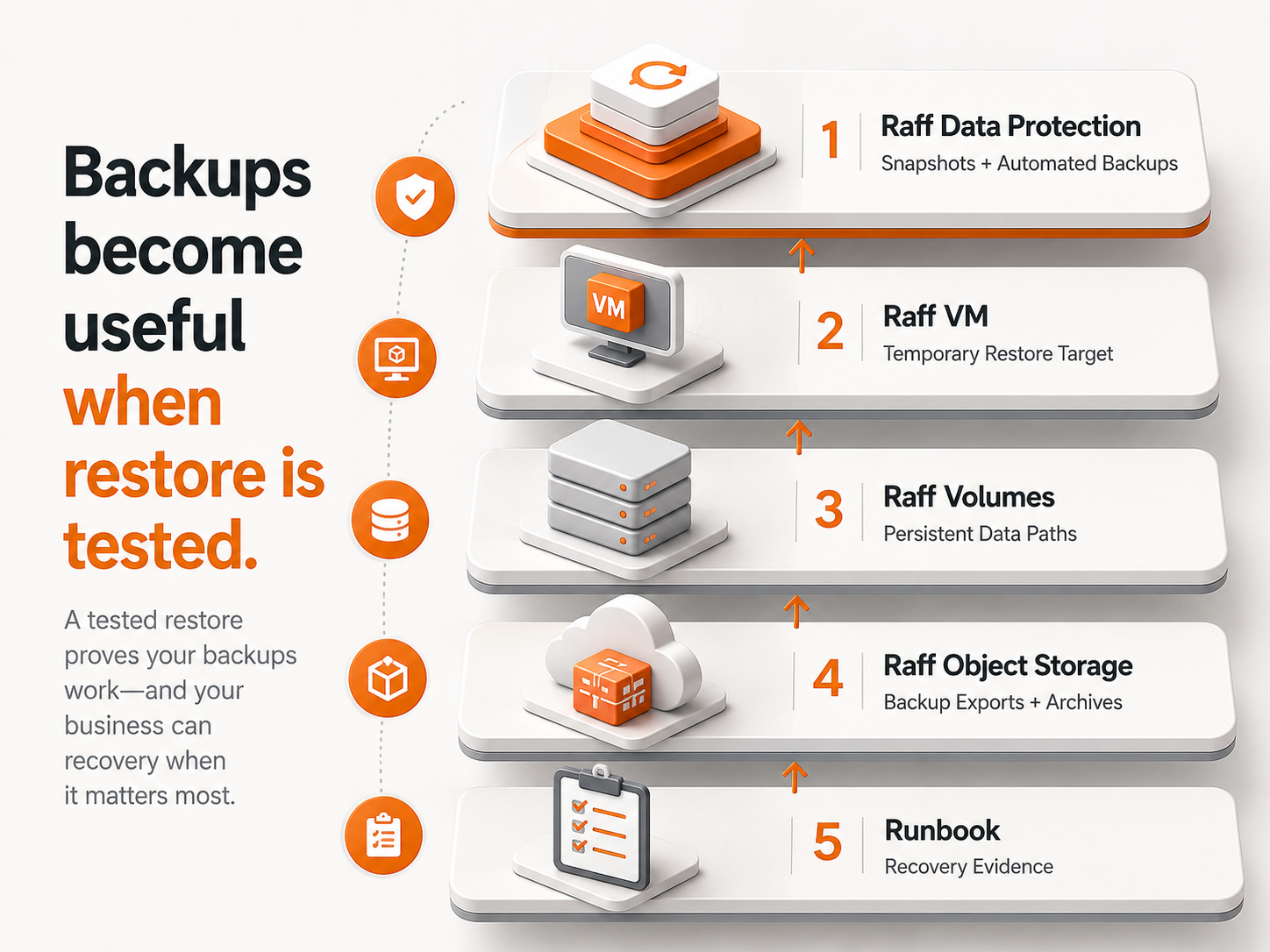
| Requirement | Raff-oriented path |
|---|---|
| VM-level scheduled recovery points | Data Protection |
| Durable files and compatible backup artifacts | Object Storage |
| Persistent disk-like application state | Volumes |
| Replacement compute for rebuild exercises | Raff VM |
| Managed database recovery | Managed Databases |
As reviewed on September 16, 2026, Raff Data Protection currently provides scheduled VM backups stored on a separate backup pool, configurable retained recovery points, and one-click in-place VM restore. The restored VM is powered off and overwritten with the selected recovery point.
The architecture implication is straightforward: do not assume that the provider's VM backup restore automatically creates an isolated test VM.
For important systems, combine the appropriate exercises:
- use isolated rebuild/application recovery to test the complete service safely;
- use database-native recovery tests for transactional data where required;
- validate file/object recovery separately when durable files live outside the VM;
- use a controlled maintenance window when proving the exact in-place VM restore path.
The application owner still defines RPO, RTO, acceptance criteria, recovery ownership, and traffic-return conditions.
