
Cloud VM vs app platform is a hosting decision that compares server-level infrastructure control with a managed application deployment model for production software.
For a startup, the useful question is not only where the code can run. It is which operational responsibilities the team should own now. Raff Technologies supports both managed application deployments and full cloud VMs, and the same architectural trade-off appears across early production systems: the cheapest first deploy is not always the easiest system to operate six months later.
This guide anchors Raff's app-platform and deployment-workflow coverage. It explains when a managed app platform is the cleaner starting point, when a cloud VM is worth the additional responsibility, how the cost model changes as a stack grows, and when a hybrid architecture is reasonable. If you already know you need server-level control, continue with the production VPS checklist for SaaS apps.
Cloud VMs and app platforms split responsibility differently
A cloud VM gives the team an operating system, compute, memory, disk, networking, and administrative control. The team decides what packages are installed, how processes start, which ports are open, how traffic is routed, how the server is patched, and how the workload is recovered.
An app platform moves part of that operating layer into the platform. The team provides source code or a container, configures environment variables and service settings, and uses a managed deployment workflow for builds, releases, routing, TLS, process lifecycle, and scaling behavior.
That difference is the practical boundary between Infrastructure as a Service and Platform as a Service. The exact feature set varies by provider, but the responsibility trade-off remains consistent: a VM gives more control and more operating work; an app platform gives more managed behavior and more platform conventions.
A startup should therefore compare responsibility, not only features.
| Responsibility | Managed app platform | Cloud VM |
|---|---|---|
| Operating-system maintenance | Mostly abstracted | Team-owned |
| Build and deploy workflow | Platform-managed | Team-designed |
| Runtime packages | Platform or container boundary | Full OS control |
| Reverse proxy and TLS | Usually managed | Team-owned |
| Background processes | Platform service model | Any supported process model |
| Firewall and server hardening | Shared with platform | Primarily team-owned |
| Logs and process inspection | Platform surface | Platform plus OS-level access |
| Scaling | Platform controls | Resize, split services, or add servers |
| Portability | Depends on packaging and services | High when the server is reproducible |
Neither model is more mature by definition. The better choice is the one whose operating boundary matches the workload and the team.
The decision framework starts with control, speed, and ownership
A startup should choose between a cloud VM and an app platform by evaluating deployment speed, runtime control, background work, storage, cost shape, debugging, and recovery ownership.
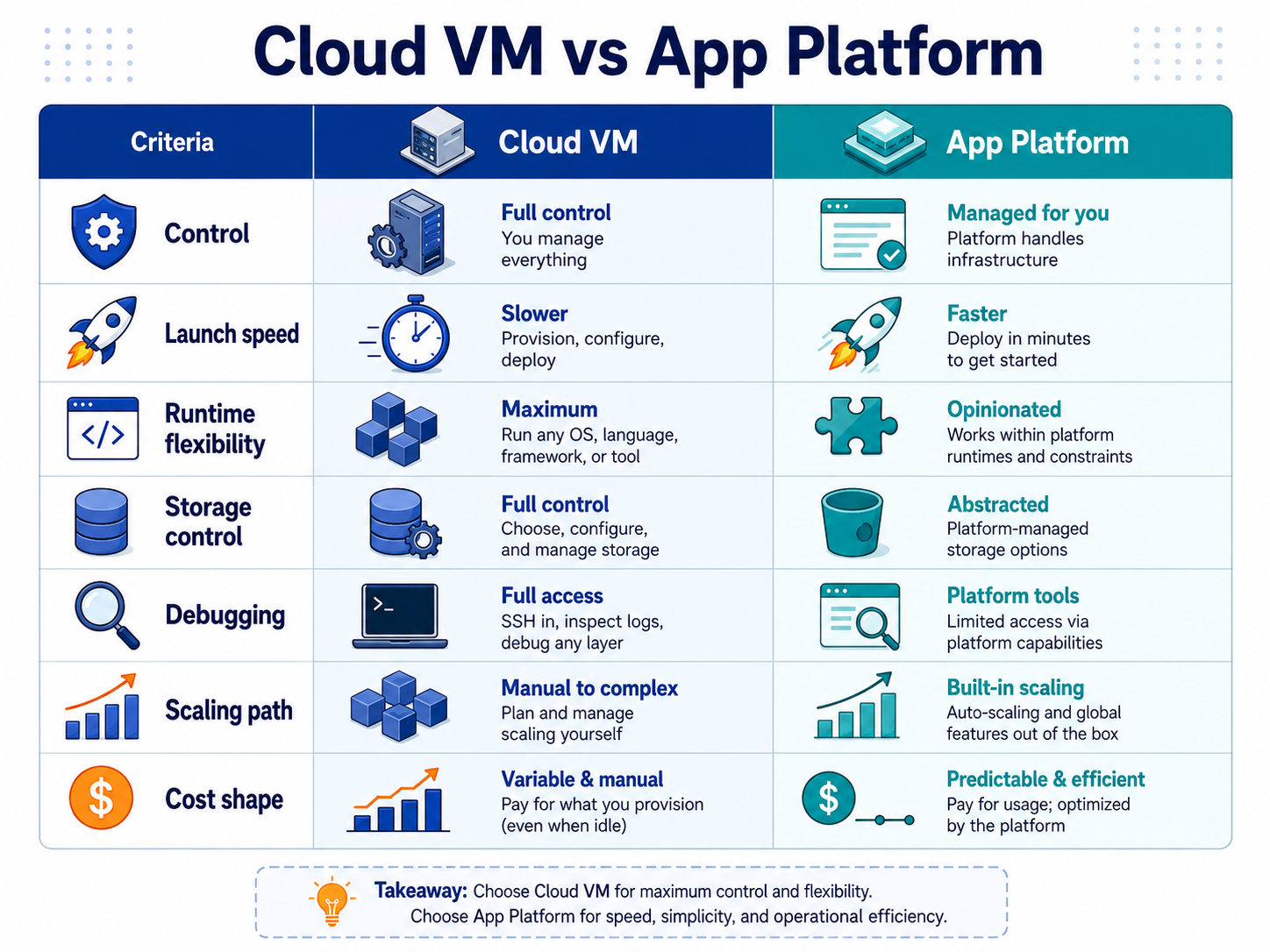
| Decision area | Choose an app platform when | Choose a cloud VM when |
|---|---|---|
| Launch speed | Standard deployment workflow is valuable | Infrastructure customization is required |
| Team skill | Server administration should be minimized | Linux and server operations have a clear owner |
| Runtime control | Buildpacks or containers cover the runtime | Custom packages, daemons, kernel-facing tools, or OS configuration matter |
| Background work | Workers and cron fit platform service types | Process topology needs unrestricted control |
| Networking | Managed public/private service patterns are enough | Custom ports, proxies, routes, or host networking matter |
| Persistent data | Managed databases and platform volumes fit | Filesystem layout or self-hosted services need direct control |
| Debugging | App logs and platform metrics are enough | OS logs, sockets, processes, and network tools are needed |
| Scaling | Managed horizontal scaling is preferred | Vertical sizing or custom multi-server architecture is preferred |
| Cost model | Paying for managed service boundaries is acceptable | Bundling compatible workloads on one server is useful |
| Portability | Platform workflow is acceptable | Reproducible server or container control is a priority |
At Raff, one practical review signal is 2+ long-running processes or custom system packages. When either appears, we treat VM control as a serious candidate instead of assuming a managed platform is still the simplest answer.
That is a decision heuristic, not a hard technical limit. A platform can support several processes, and a VM can run one simple web service. The point is to notice when the workload is becoming more operationally specific than the original deployment model.
App platforms fit standardized deployment workflows
An app platform is strongest when the application can fit a managed build-and-run model without repeated exceptions.
Good candidates include:
- a web app or API deployed from Git;
- a containerized service with a clear start command;
- a background worker that fits the platform worker model;
- scheduled jobs that fit managed cron behavior;
- applications that use managed databases rather than self-hosting the database engine;
- teams that value preview deployments and release rollback more than OS access;
- small engineering teams with no dedicated server-operations owner.
The operational advantage is focus. The team can spend less time configuring reverse proxies, certificate renewal, process supervision, base-image maintenance, and deployment plumbing.
That advantage is meaningful for a startup. Infrastructure work has an opportunity cost, especially when the application is still changing quickly. A platform that removes routine server work can be economically sensible even when its invoice is higher than raw compute.
The limit appears when the team repeatedly works around platform assumptions. Custom system dependencies, unusual network behavior, long-running stateful processes, specialized filesystems, host-level observability, or a growing collection of platform-specific services can turn managed convenience into constraint.
For provider-specific app-platform trade-offs, continue with Render Alternative 2026, Vercel Alternative 2026, or Netlify Alternative 2026. Those comparisons are useful only after the workload itself fits the app-platform model.
Cloud VMs fit workloads that need operating-system control
A cloud VM is the better starting point when the application needs a server rather than only a managed runtime.
Typical signals include:
- custom Linux packages or native libraries;
- several long-running services on one host;
- Docker Compose or another multi-process server layout;
- a reverse proxy with custom routing behavior;
- self-hosted databases during an early stage;
- queue workers with specific CPU, memory, or disk requirements;
- private services that need custom ports or network rules;
- host-level monitoring or security agents;
- server-side file processing with explicit filesystem requirements;
- a deployment process that must remain portable across infrastructure providers.
A VM also gives a startup a gradual architecture path. One production server can later split into an application server, database service, worker tier, object storage, load balancer, or separate internal services as evidence justifies the change.
That flexibility is useful only if the server is operated properly. A VM adds responsibilities that an app platform usually hides: patching, firewall review, administrator access, backup policy, monitoring, disk growth, service supervision, and restore testing.
A badly operated VM is not more professional than a managed platform. It is simply a larger failure surface.
If a startup chooses the VM path, use Single VM vs Multi-VM Architecture for SaaS Apps before splitting services prematurely. The first architecture should be understandable before it becomes distributed.
Cost changes when the full production stack is counted
Cloud VM vs app platform pricing should be compared as a production system, not as one line item.
A managed app service can begin with a small compute tier, but production cost may later include web services, workers, databases, persistent storage, preview environments, logs, and additional instances. A VM may combine several compatible processes on one server, but the startup pays in operating time and must size enough headroom for the combined workload.
Use the full cost model:
| Cost area | App platform | Cloud VM |
|---|---|---|
| Web runtime | Per service or instance | Included in selected VM capacity |
| Worker runtime | Often a separate service | Can share a VM when safe |
| Database | Usually a separate managed service | Self-hosted or separate managed database |
| Persistent files | Platform volume or object storage | VM disk, volume, or object storage |
| Public transfer | Provider-specific | Provider-specific |
| Backups | Platform/service-specific | VM and workload backup plan |
| Scaling | More instances or larger service tiers | Resize or split architecture |
| Engineering time | Lower OS burden | Higher server-operations burden |
Current Raff pricing illustrates why the units must not be treated as equivalent. Raff Apps starts at $3/month, while Raff General Purpose VMs start at $4.99/month. Raff Apps Starter is $6.99/month for 0.5 vCPU and 1 GB RAM. A Raff General Purpose VM with 2 vCPU, 4 GB RAM, and 80 GB NVMe storage is $17.99/month.
Those numbers do not prove that one model is cheaper for every workload. An app tier and a VM plan include different responsibilities and different resource boundaries. The useful comparison is the complete stack at the capacity and operating model the application actually needs.
A startup should also put engineering time into the model. If a managed platform consistently saves several hours of operational work, the higher infrastructure bill may still be the lower business cost. If the platform requires several always-on services and the team already has strong server operations, a VM can become the simpler cost structure.
Data, background work, and networking expose the real platform fit
The hosting decision often becomes clear when the team maps stateful data, background work, and internal traffic.
Persistent data needs its own lifecycle
User uploads, database files, generated reports, and backups should not be treated as generic application disk.
For many production systems:
- relational data belongs in a managed database or a deliberately operated database server;
- user uploads and shared files fit object storage;
- mounted persistent filesystems fit a volume when filesystem semantics are required;
- backups need an independent recovery policy.
Read Object Storage vs Block Storage vs VM Disk before choosing storage only because it is convenient inside the first deployment.
Background work changes the process model
A simple web service can become a different workload after the product adds queues, email processing, media conversion, imports, scheduled reports, or data synchronization.
An app platform is still a good fit if workers and cron jobs are first-class platform services and the cost remains clear. A VM becomes more attractive when several processes need custom supervision, local coordination, specialized packages, or a shared host-level environment.
Networking exposes hidden assumptions
A managed platform should make normal service-to-service connectivity easy. A VM gives more freedom when the workload needs custom public ports, specific reverse-proxy behavior, private subnets, unusual routing, or direct packet-level troubleshooting.
The principle is not to choose the most configurable option. It is to avoid paying for flexibility the team does not need while preserving the controls the workload actually requires.
Hybrid architectures work when ownership stays clear
Cloud VM vs app platform does not need to be a permanent binary choice.
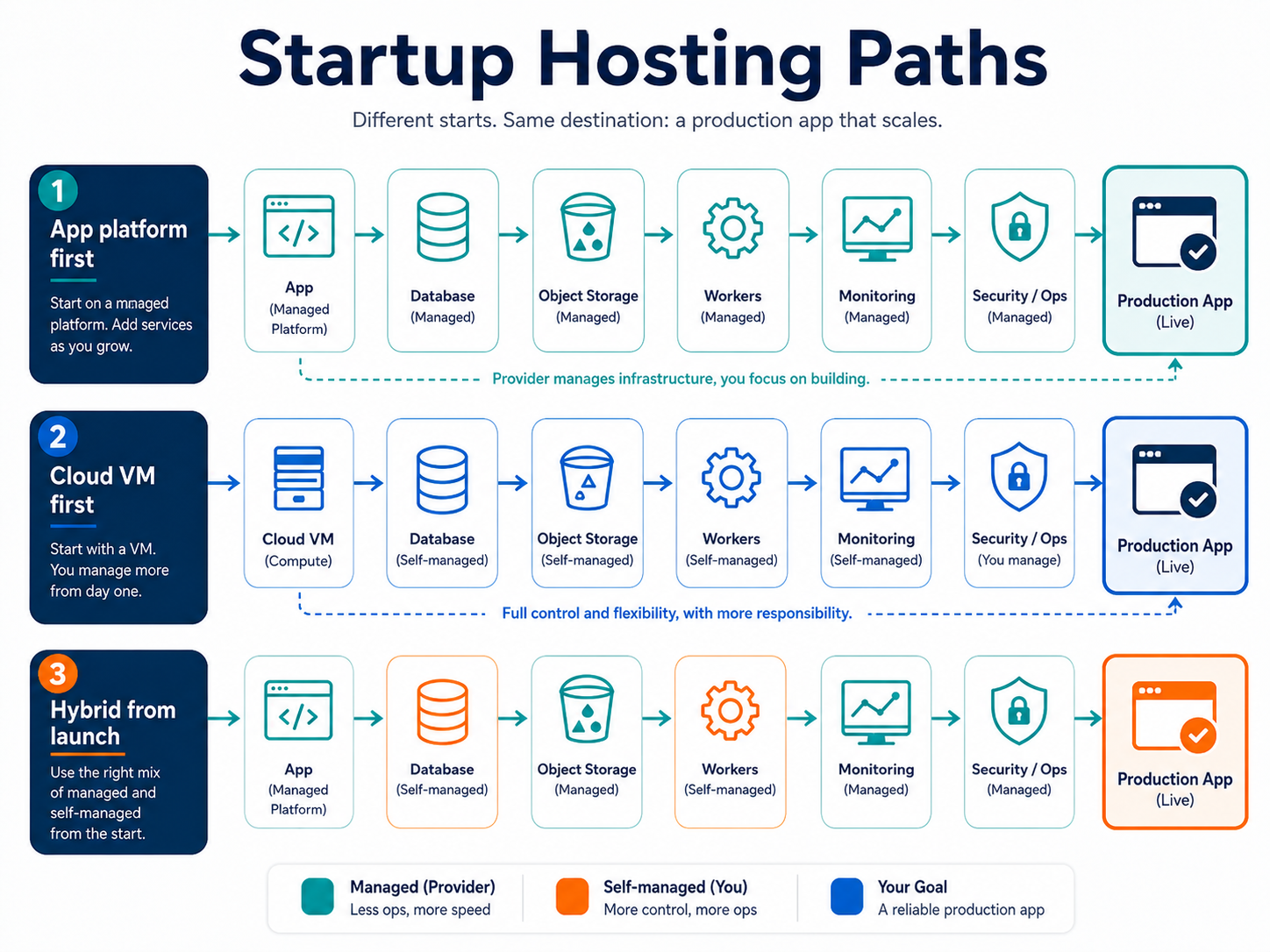
| Pattern | When it fits | Main risk |
|---|---|---|
| App platform first | Standard web app, API, demo, or early production service | Platform constraints appear as workload complexity grows |
| Cloud VM first | Custom runtime, several processes, server-specific networking, or controlled filesystem | Server operations are neglected |
| Hybrid | Managed app plus database, object storage, or a specialized VM | Ownership and cost become fragmented |
A hybrid design is healthy when each boundary is explicit. The application can run on a managed platform while a managed database and object storage hold durable state. A VM can run a specialized worker while the public app remains on a platform. A VM-hosted application can use managed data services to reduce database operations.
The test is operational clarity. The team should be able to answer:
- Where does each process run?
- Where does durable data live?
- Which component is public?
- Who owns deployments and patches?
- Where are logs and alerts reviewed?
- How does rollback work?
- What is restored after a failure?
If those answers are unclear, adding another hosting model is more likely to add risk than flexibility.
A useful startup architecture should also have an exit condition. The team should know what signal would trigger a move from platform to VM, from one VM to multiple services, or from self-hosted state to managed data products. That keeps architecture tied to workload evidence rather than preference.
Raff Apps and Raff VM map to different responsibility models
Raff now supports both sides of this decision.
Raff Apps is the managed application path. It supports GitHub deployments, Dockerfiles, buildpacks, full Docker Compose imports, public and private services, workers, cron jobs, one-off jobs, persistent volumes, preview environments, immutable revisions, one-click rollback, managed database connections, and scale-to-zero behavior. Current plans start at $3/month, public application egress is priced at $0, team seats are not billed, and a spend cap is enabled by default.
Raff VM is the server-control path. Current General Purpose VM pricing starts at $4.99/month. VM plans include NVMe storage, 3 Gbps public network ports, unmetered bandwidth, private networking, DDoS protection, console and root access, and resize controls.
These are not competing products inside the Raff architecture. They are different operating boundaries.
Choose Raff Apps when the application fits managed service types and the team wants the platform to own more deployment and runtime operations. Choose a Raff VM when the workload needs unrestricted server configuration, custom packages, broader process control, or host-level troubleshooting.
The platforms can also connect to the same wider data and infrastructure services. That makes a gradual path possible: start with the operating model that fits today, then add or separate components when the workload provides a reason.
The first-hand rule from earlier in this guide remains useful: at Raff, 2+ long-running processes is a signal to evaluate VM control rather than assume a platform default. It is not a requirement to migrate; it is a prompt to review responsibility, cost, and debugging needs before complexity becomes expensive.