
A production VPS is ready for a SaaS launch only when the team can explain how traffic reaches the app, who can administer the server, where persistent data lives, how failures are detected, and how the service is restored. The goal is not to eliminate every risk before launch. It is to make the remaining risks visible, owned, and recoverable.
Raff supports 3,000+ customers and 15,000+ VMs. For a small SaaS team, production readiness should therefore be judged by measurable capacity, controlled access, recoverable data, and an operating model the team can actually support.
At Raff, the production-readiness decision is deliberately operational: if the team cannot explain the traffic path, administrative boundary, recovery path, and capacity limit, adding more infrastructure does not make the workload ready.
Use this checklist to choose one of three outcomes:
- Launch: the current design has enough headroom and a tested recovery path.
- Fix first: the architecture can stay, but access, backups, monitoring, or capacity needs correction.
- Redesign: one VM carries a failure mode that resizing alone will not solve.
Production readiness is narrower than a product launch checklist
This guide covers the VPS and surrounding infrastructure. It does not replace product work such as billing, onboarding, legal pages, analytics, customer support, or launch communications.
A launch-ready server should have:
- measured CPU, memory, disk, and network behavior
- one intended public traffic path
- restricted administrative access
- protected secrets
- controlled persistent storage
- backups aligned with RPO and RTO
- a tested restore and rollback procedure
- infrastructure and application health checks
- a named incident and recovery owner
Use evidence instead of universal utilization thresholds
There is no reliable rule that every SaaS VM becomes unsafe at one CPU, memory, or disk percentage. Resource behavior depends on the runtime, database, traffic pattern, background work, caching, and storage growth.
Review each resource using measured behavior:
| Resource | Launch signal | Fix or redesign signal |
|---|---|---|
| CPU | Spikes recover and request latency stays acceptable | Sustained saturation or queue growth under expected load |
| Memory | Working set remains stable with no repeated OOM events | Swapping, OOM kills, or unbounded process growth |
| Disk capacity | Growth rate and retention are known | Logs, uploads, temporary files, or database growth are unbounded |
| Disk performance | Deploys, queries, and writes complete predictably | Storage latency blocks requests or background jobs |
| Network | Expected transfer and dependencies are understood | User traffic, backups, or uploads compete unpredictably |
| Database | Queries, migrations, and backups complete in the required window | Locks, slow queries, or recovery needs dominate the VM |
Size from realistic tests and operating headroom, not the cheapest plan that starts the application.
Make the traffic path easy to explain
A small SaaS stack should have one intended public entry point.
DNS
  ↓
HTTPS reverse proxy or load balancer
  ↓
Application service
  ↓
Database, cache, queue, and storage
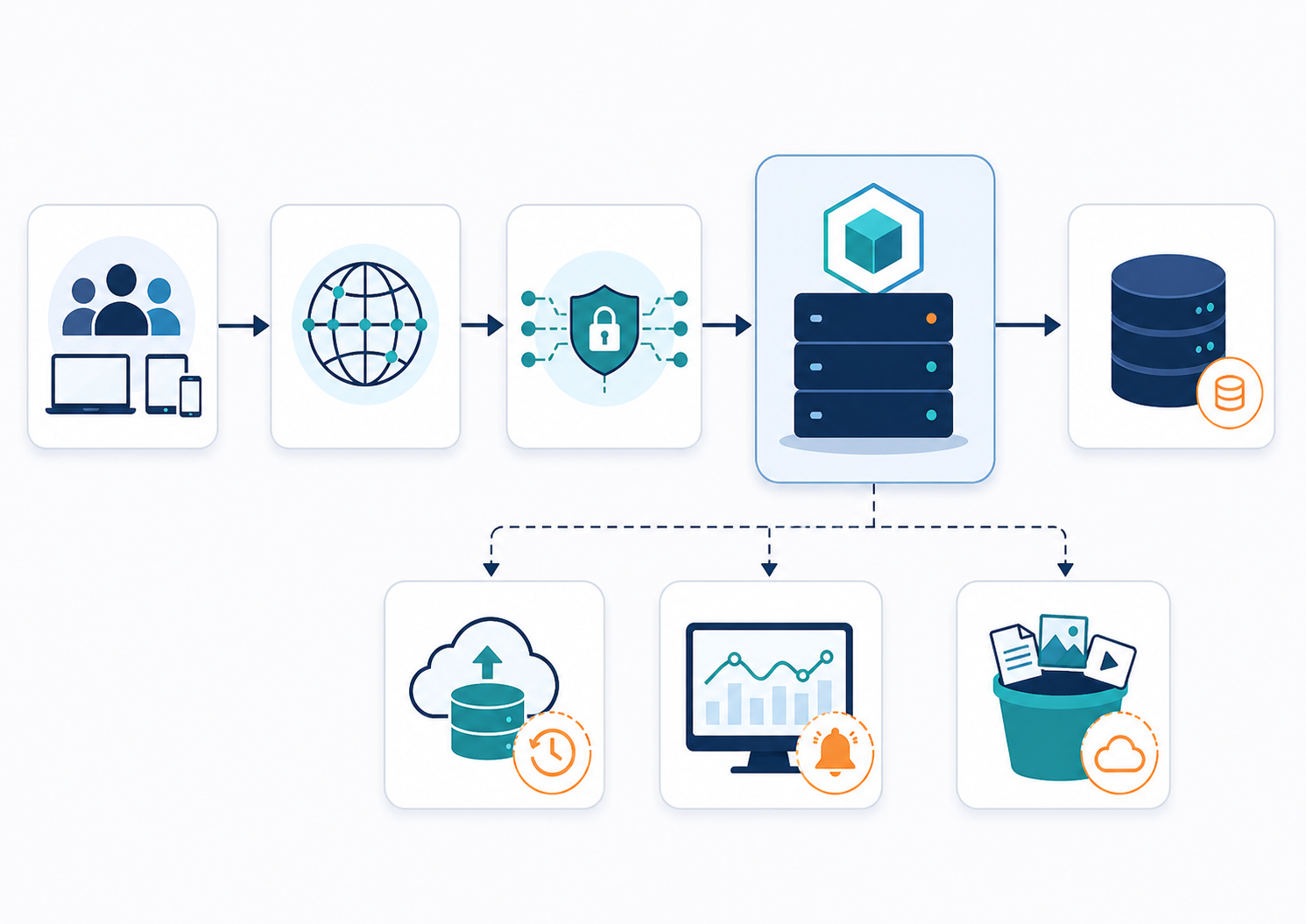
Before launch, confirm:
- only required user-facing ports are public
- application runtime ports cannot bypass the intended edge
- databases, caches, queues, and metrics endpoints use private or restricted paths
- old staging domains and test routes are removed
- TLS, redirects, and DNS records are correct
- health checks test a meaningful application response
Review access and secrets
Development shortcuts should not become permanent production access.
Check:
- every administrator has an individual identity
- SSH keys and Windows accounts have named owners
- shared or unknown credentials are removed
- root or administrator privilege is limited to people who need it
- former teammates and contractors are offboarded
- SSH, RDP, and admin panels are restricted
- secrets are not stored in source code, images, screenshots, or chat
- deployment and automation tokens have limited scope
- emergency access is documented and protected
A public application does not require public administration. Use Private vs Public Admin Access for the access-model decision.
Decide where persistent data belongs
The VM disk is usually appropriate for the operating system, application runtime, deployment files, and bounded working data. It becomes risky when independently valuable data can fill the server or must be recovered on a different schedule.
| Data | Practical starting point | Move or separate when |
|---|---|---|
| Application code | VM disk and repeatable deployment | Deployments depend on manual server state |
| Database | Same VM can fit an early workload | Performance, scaling, or recovery needs become independent |
| User uploads | VM disk for small bounded use | Uploads grow, need independent delivery, or complicate backups |
| Logs | Local short retention | Long retention, search, audit, or incident needs grow |
| Exports and archives | Temporary local storage | Files must outlive the VM or be shared externally |
Object storage is often the better destination for uploads, media, exports, and backup objects because those files can scale independently from application compute. Block storage or a separate database layer may be appropriate when state requires a different performance or recovery boundary.
Prove backup, restore, and rollback
NIST defines RPO as the point in time to which data must be recovered after an outage and RTO as the acceptable recovery duration before business impact becomes unacceptable.
Before launch, write both targets and verify that the current design can meet them.
A minimum recovery test should prove:
- A usable recovery point exists.
- Required credentials and encryption keys are available.
- Replacement compute and storage can be created.
- Database and file data restore successfully.
- The application starts with compatible configuration.
- DNS, certificates, secrets, and private paths can be restored.
- A critical user workflow succeeds.
- Measured data loss and recovery time meet the targets.
A snapshot before a deployment helps with short rollback. It should not be the only retained recovery control. Read Cloud Snapshots vs Backups for the distinction.
Monitor the service users experience
Server metrics are necessary but insufficient. A VM can be reachable while authentication, payments, background workers, webhooks, or database writes are failing.
Monitor both layers:
Infrastructure
- CPU and memory pressure
- disk capacity and storage latency
- network behavior
- process and service status
- backup completion
- certificate expiration
Application
- health endpoint
- request latency and error rate
- login or another core user journey
- queue depth and failed jobs
- database connection and query behavior
- important webhook or integration failures
CISA recommends logging user activity, administrator actions, network events, and system changes, then assigning alerts and response ownership. Keep the alert set small enough that someone will act on it.
Choose single VM, larger VM, or split architecture
Launch on one VPS
A single VPS can be a sound starting point when:
- the workload is early and understandable
- the database and uploads are bounded
- realistic tests show sufficient headroom
- backups and restore have been tested
- one-server downtime matches the business tolerance
- the team benefits from operational simplicity
Resize the VPS
Resize when the architecture is still appropriate but measured CPU, memory, or storage demand requires more capacity.
A larger VM is not a complete fix for:
- uploads that grow without limit
- a database needing a separate recovery target
- background jobs blocking user requests
- a requirement for host-level redundancy
- an exposed or undocumented access model
Split services
Separate a component when it creates a distinct scaling, security, availability, or recovery boundary. Common candidates are databases, workers, object storage, and public edge services.
The added reliability is useful only when the team can operate the extra components.
How this applies on Raff
Raff VM provides Linux and Windows VM foundations with NVMe storage, current VM networking, and full server control. Verify current plan sizes and prices on the live product page rather than relying on a historical price in an evergreen guide.
A practical early architecture may use:
- one Raff Linux VM for the reverse proxy, application, and worker
- Object Storage for user uploads, media, archives, or backup objects
- Data Protection for snapshots and scheduled infrastructure recovery
- Raff VPC when application and database services are separated
Start simple, but make storage, access, monitoring, and recovery explicit before real customer data arrives.
Production VPS launch checklist
Capacity
- Realistic workload test completed
- Resource bottlenecks identified
- Growth and headroom understood
- Disk growth and log retention bounded
Traffic and security
- Public entry path documented
- Only required ports exposed
- Admin access restricted
- Individual users and keys reviewed
- Secrets protected and scoped
Data and recovery
- Persistent data inventory complete
- RPO and RTO written
- Backups scheduled
- Restore tested
- Deployment rollback documented
Operations
- Infrastructure and app health checks active
- Alerts reach a named owner
- Logs support troubleshooting and incident review
- Runbook records deploy, rollback, and restore actions
- First post-launch review is scheduled