In short
For most small production Active Directory environments, two writable domain controllers in one AD site is the simplest reliable design when both servers share a low-latency private network. Let the Knowledge Consistency Checker (KCC) build replication connections automatically, run AD-integrated DNS on both DCs where appropriate, and verify replication with repadmin /replsummary and repadmin /showrepl.
Use multiple AD sites only when the network topology needs them: different offices, regions, routed locations, or WAN/VPN paths where client locality and intersite replication policy matter. Then map subnets to sites and configure site links intentionally. Microsoft’s default intersite replication interval is 180 minutes, with a supported minimum of 15 minutes; 15 minutes is an option, not a universal best practice.
Raff Technologies recommends keeping domain-controller traffic on private networking or VPN, maintaining at least two DCs for production, and treating replication as availability—not as backup.
The two-DC topology decision is usually simple
| Scenario | Recommended topology | Why |
|---|---|---|
| Two DCs in one low-latency private network | One AD site | Simplest topology; KCC handles replication automatically |
| Office plus cloud DC | Separate sites when the network paths/subnets are distinct | Helps clients locate an appropriate DC and controls intersite replication |
| Two cloud regions | Separate sites when they represent distinct routed locations | Lets you model locality, site-link cost, interval, and schedule |
| Two DCs in one region but different subnets | One or more sites depending on actual network topology | A subnet boundary alone does not automatically require a new site |
| Branch with limited physical security | Consider an RODC | Can reduce credential exposure at the branch |
| Only one production DC | Add another writable DC | Removes a major identity/DNS single point of failure |
| MSP serving unrelated customers | Keep customer identity boundaries separate | Avoids mixing unrelated tenants in one forest without a deliberate design |
A useful rule is:
One reliable network location → usually one AD site.
Distinct network locations / WAN paths → model sites and subnets.
Production identity → avoid relying on one DC.
If you still need to create the first domain controller, start with Windows Server 2025 Domain Controller Setup.
Active Directory replication topology controls where changes flow
Active Directory Domain Services is multi-master for most directory changes. A writable domain controller can accept changes such as password updates, group membership changes, computer joins, DNS records, and many directory-object updates, then replicate them to its partners.
Topology determines:
- which domain controllers replicate directly;
- how same-site and cross-site replication differ;
- how clients associate with an AD site;
- which network paths intersite replication can use;
- how site-link cost, interval, and schedule influence replication;
- how resilient authentication and AD-integrated DNS remain when one DC is unavailable.
Unhealthy replication can surface as stale group membership, inconsistent Group Policy, missing DNS records, password-change confusion, SYSVOL inconsistency, or clients contacting an unexpected DC.
The goal is not to create the most elaborate topology. The goal is to make the AD topology reflect the real network and then prove that replication is healthy.
Sites, Subnets, Site Links, and KCC each solve a different problem
AD site
An Active Directory site represents one or more well-connected IP subnets. Sites influence DC location and replication behavior. A site should describe network topology, not merely an office name or an organizational chart.
Subnet object
A subnet object maps an IP prefix to a site, for example:
10.10.0.0/24 → us-east
10.20.0.0/24 → office-ny
Subnet mappings are how AD understands where clients and servers live from a network perspective. If you operate multiple sites, missing or incorrect subnet mappings can cause clients to select remote DCs or report that their network location is not mapped to a site.
In a very small one-site environment, administrators often leave the default site and do not create elaborate subnet objects. That can work, but saying Sites/Subnets are “not required” is too broad: explicit subnet mappings become important as soon as site-aware locality, multiple routed networks, or future multi-site growth matters.
Site link
A site link represents connectivity between two or more AD sites. It carries:
- member sites;
- cost;
- replication frequency;
- replication schedule.
Cost becomes especially important when more than one route exists between three or more sites.
KCC
The Knowledge Consistency Checker (KCC) automatically creates and maintains replication connection objects based on the topology. In normal environments, administrators define the sites, subnets, and site-link policy and let KCC construct the connections.
Do not manually build a replication mesh unless you have a documented reason. Manual connection objects make the topology harder to reason about and can interfere with the benefits of automatic topology management.
Global Catalog
A Global Catalog (GC) contains a full writable replica of its own domain plus a partial replica of objects from other domains in the forest. In a small single-domain, two-DC deployment, making both DCs Global Catalog servers is usually a practical choice for lookup and logon resilience. Multi-domain forests can require more deliberate GC placement.
A single-site two-DC deployment is the default small-business pattern
Use one AD site when both DCs have reliable, low-latency connectivity and there is no meaningful WAN boundary that should change client locality or replication behavior.
Example:
AD Site: us-east
Private subnet: 10.10.0.0/24

DC01
* writable domain controller
* DNS
* Global Catalog
* FSMO roles initially

DC02
* writable domain controller
* DNS
* Global Catalog
* replication partner
Do not think of these as a traditional “primary” and “secondary” server for normal directory writes. Active Directory is multi-master for most changes. DC01 may hold FSMO roles, but DC02 is still a writable domain controller and should be able to authenticate users and provide AD-integrated DNS independently when the design calls for it.
Within one site, KCC creates the replication connections automatically. You do not need to create an IP site link specifically between two DCs that are already members of the same site.
Verify a new second DC before relying on it
After promoting DC02, confirm both DCs are visible:
Get-ADDomainController -Filter * |
    Select-Object HostName, Site, IsGlobalCatalog, IPv4Address
Then verify replication:
repadmin /replsummary
repadmin /showrepl
Also confirm SYSVOL and NETLOGON exist on both DCs:
net view \\DC01
net view \\DC02
Expected shares include:
SYSVOL
NETLOGON
A successful promotion wizard is not sufficient evidence by itself. The second DC should have healthy inbound and outbound replication, current AD-integrated DNS data, working locator records, and functioning SYSVOL before you treat it as a resilience path.
DNS configuration for two domain controllers must avoid DNS islands
AD replication problems are often DNS problems. Domain controllers use DNS to locate directory services and each other.
Microsoft’s current DNS client guidance is more nuanced than the common “always point each DC to the other DC first” rule.
For an additional DC during promotion, configure its DNS client to use an existing healthy DNS server that is authoritative for the AD domain. Do not make a newly promoted DC depend only on its own DNS service before you have verified that inbound and outbound AD replication and DNS-zone replication are current.
After replication is healthy, a DNS-hosting DC can use itself, another authoritative AD DNS server, or a combination as preferred/alternate DNS depending on topology and failure requirements. The important invariants are:
- DCs and domain members use DNS servers authoritative for the AD namespace;
- AD-integrated DNS zones and locator records replicate correctly;
- no DC or domain member uses an ISP/public resolver as its AD DNS client;
- external names are resolved through DNS forwarders or root hints rather than by bypassing AD DNS;
- a preferred/alternate pair is designed around real network failure boundaries, not copied blindly from a tutorial.
Verify DNS client configuration:
ipconfig /all
Verify AD locator records:
Resolve-DnsName -Type SRV _ldap._tcp.dc._msdcs.example.com
Resolve-DnsName -Type SRV _kerberos._tcp.example.com
If you just promoted DC02, confirm both DCs have current domain and _msdcs data before changing DNS dependencies.
Multi-site topology is for real network boundaries
Use multiple AD sites when the network has distinct locations or paths where client locality or intersite replication policy matters, for example:
- office plus cloud;
- two cloud regions;
- headquarters plus branch;
- a primary site plus a disaster-recovery location;
- locations connected by WAN or VPN where bandwidth/latency differs materially.
Example:
Site: us-east
Subnet: 10.10.0.0/24
DC01

Site: office-ny
Subnet: 10.20.0.0/24
DC02

Site Link: us-east__office-ny
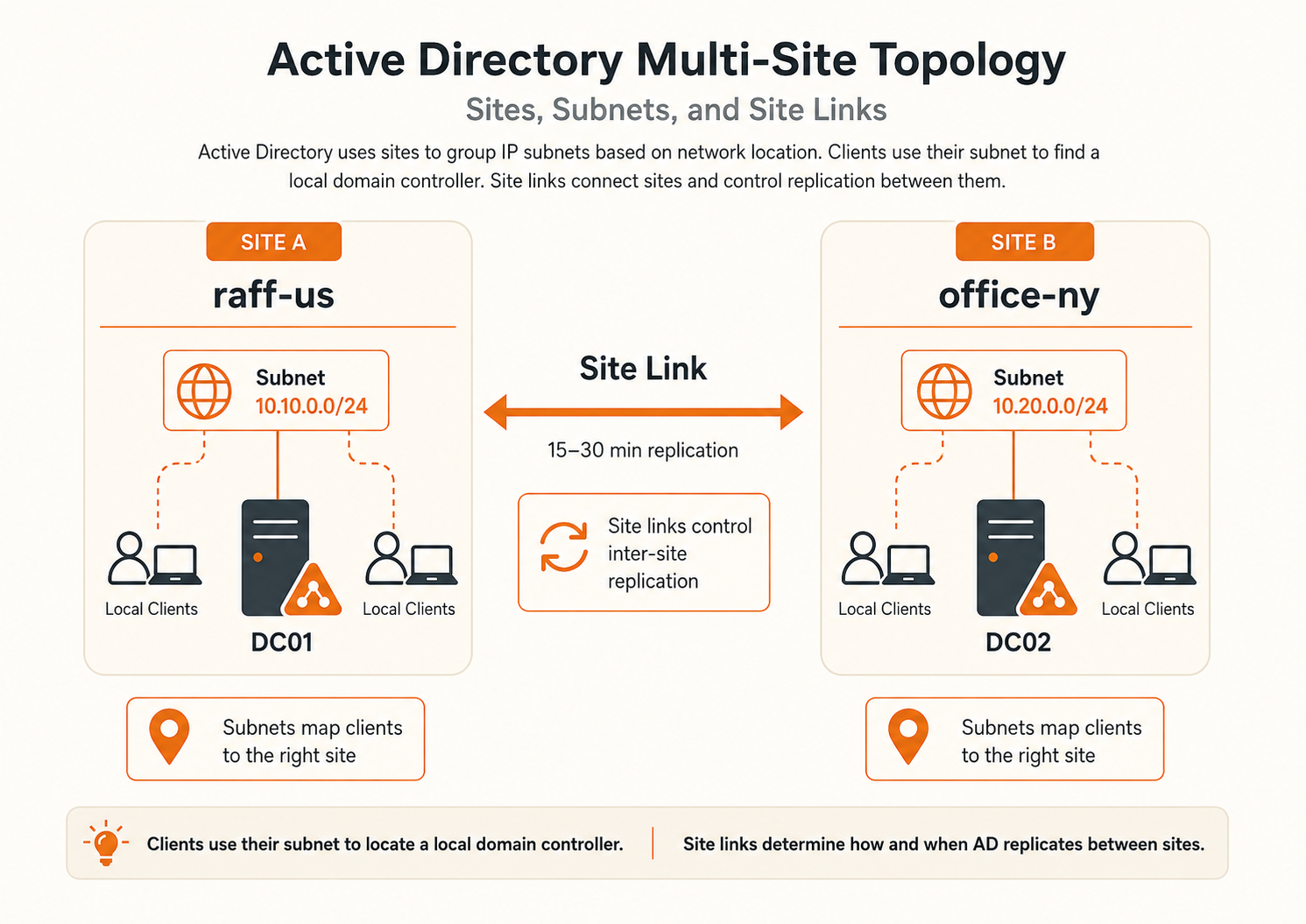
Do not create a second site merely because a second DC exists. Two DCs can belong to the same AD site. Likewise, different subnets can belong to the same site when they are connected as one well-connected network location.
Step 1 — Create sites that reflect the network
Open Active Directory Sites and Services:
dssite.msc
Create names that identify the network location clearly, for example:
us-east
office-ny
dr-site
Avoid generic names such as site1 or newsite that become meaningless later.
You can also inspect sites with PowerShell:
Get-ADReplicationSite -Filter *
Step 2 — Map every relevant subnet to the correct site
In Active Directory Sites and Services → Subnets, create the network prefixes used by clients and domain controllers and associate each prefix with its intended site.
Example:
10.10.0.0/24 → us-east
10.20.0.0/24 → office-ny
Then verify client site discovery:
nltest /dsgetsite
If a client contacts an unexpected remote DC, subnet mapping is one of the first things to check.
Step 3 — Place each domain controller in the intended site
Confirm the DC site assignments:
Get-ADDomainController -Filter * |
    Select-Object HostName, Site, IPv4Address
Site assignment should match the network where the DC is actually reachable. Do not move DC objects between sites simply to force a preferred server without correcting the subnet/topology design that clients use.
Step 4 — Configure the site link deliberately
For intersite replication, configure the link between sites under:
Active Directory Sites and Services
→ Inter-Site Transports
→ IP
A site link has three planning inputs:
| Property | What it controls |
|---|---|
| Cost | Relative preference when multiple site-link paths exist |
| Replication frequency | How often scheduled intersite replication can occur |
| Schedule | When the site link is available for replication |
You can inspect site links with:
Get-ADReplicationSiteLink -Filter * |
    Select-Object Name, Cost, ReplicationFrequencyInMinutes, SitesIncluded
The default intersite replication interval is 180 minutes
Microsoft documents 180 minutes (3 hours) as the default site-link replication interval and 15 minutes as the minimum configurable interval.
That means this is a valid custom configuration:
Set-ADReplicationSiteLink `
    -Identity "us-east__office-ny" `
    -ReplicationFrequencyInMinutes 15
But 15 minutes should not be presented as the default or as the correct value for every SMB deployment.
Choose the interval based on:
- acceptable directory-change latency;
- bandwidth and WAN cost;
- number of sites and replication hops;
- frequency of identity/DNS changes;
- failure and recovery requirements;
- whether intersite change notification is deliberately enabled.
A shorter interval reduces latency but increases replication traffic. If the default 180 minutes is too slow for the business, test a lower value and monitor the link rather than changing every site link to 15 minutes automatically.
Microsoft also supports enabling change notification on an intersite site link for designs that need faster cross-site propagation. That is a separate setting and should be enabled intentionally after considering network capacity and topology.
Same-site and cross-site replication behave differently
Within a site, Active Directory is designed for fast replication and uses change notifications. The first replication partner is notified roughly 15 seconds after a change; additional partner notifications follow with a short delay.
Across sites, Active Directory is bandwidth-aware and site-link policy matters. By default, the site-link interval is 180 minutes and the link schedule is available throughout the week unless you restrict it.
This distinction matters when troubleshooting “replication is slow.” First determine whether the affected DCs are in the same site or different sites.
Site-link cost matters when more than one path exists
In a simple two-site topology with one direct site link, cost usually does not change routing because there is only one available path.
With three or more sites, site-link cost helps AD calculate preferred replication routes. Lower total cost is preferred, subject to topology and schedule constraints.
Example:
Site A ↔ Site B cost 100
Site B ↔ Site C cost 100
Site A ↔ Site C cost 300
The lower-cost path through Site B may be preferred over the higher-cost direct path. Document costs so future administrators understand why they exist.
Let KCC choose connection objects unless there is a specific exception
KCC runs on domain controllers and builds the replication topology from the configured site and site-link model.
Normally, you should not manually create persistent connection objects just because you want two DCs to replicate. Manual objects can survive topology changes and make later troubleshooting harder.
Inspect current replication partners with:
repadmin /showrepl
Use Active Directory Sites and Services to inspect generated connection objects, but treat manual connection creation as an advanced exception rather than normal setup.
FSMO roles do not make one DC the normal “master” of the other
Active Directory has five operations-master roles:
| Role | Scope | Main responsibility |
|---|---|---|
| Schema Master | Forest | Schema changes |
| Domain Naming Master | Forest | Adding/removing domains and partitions |
| PDC Emulator | Domain | Time hierarchy, password-change priority, lockout and compatibility functions |
| RID Master | Domain | Allocates RID pools |
| Infrastructure Master | Domain | Cross-domain reference maintenance |
The first DC in a new forest initially holds all five roles. For a small two-DC, single-domain environment, keeping the FSMO roles together on one healthy DC is often a perfectly reasonable operational choice.
That does not turn the second DC into a read-only or passive server. Both writable DCs still participate in normal multi-master directory replication.
Check the role holders:
netdom query fsmo
Or:
Get-ADForest | Select-Object SchemaMaster, DomainNamingMaster
Get-ADDomain | Select-Object PDCEmulator, RIDMaster, InfrastructureMaster
Pay particular attention to the PDC Emulator because the domain time hierarchy ultimately depends on it. Document its external time-source design and recovery procedure.
Transfer FSMO roles when the current owner is healthy
For planned role movement:
Move-ADDirectoryServerOperationMasterRole `
    -Identity "DC02" `
    -OperationMasterRole SchemaMaster, DomainNamingMaster, PDCEmulator, RIDMaster, InfrastructureMaster
Normal patch reboots do not require moving FSMO roles. Transfer them when there is a real operational reason.
Seize FSMO roles only for a failed owner that will not return normally
A role transfer is cooperative. A role seizure is a recovery action used when the current owner is unavailable.
Do not seize roles casually. Before seizure, understand whether the old DC can safely return, whether metadata cleanup is required, and which role-specific recovery rules apply.
Document the procedure before an outage, not during one.
Both DCs are commonly Global Catalog servers in a small single-domain forest
For most small single-domain two-DC environments, enabling the Global Catalog on both writable DCs is a practical default. It improves directory lookup and logon resilience if one DC is unavailable.
Verify:
Get-ADDomainController -Filter * |
    Select-Object HostName, Site, IsGlobalCatalog
Do not generalize this into “every DC in every forest must be a GC.” Multi-domain and specialized topologies can require different placement decisions.
repadmin /replsummary is the fast replication health check
repadmin /replsummary is one of the most useful first checks when users report inconsistent AD behavior.
Run:
repadmin /replsummary
Focus on:
- source and destination DSAs;
- largest replication delta;
- failures;
- total attempts;
- failure percentage.
A healthy environment should not show persistent or increasing replication failures. A recent change can create a normal short delta; repeated DNS, RPC, authentication, or connectivity failures require investigation.
repadmin /showrepl explains which partner or naming context is failing
Run:
repadmin /showrepl
Review:
- source DC;
- naming context;
- last attempt;
- last successful replication;
- error code and message.
Common causes include:
- DNS lookup failure;
- blocked RPC connectivity;
- time problems;
- authentication/access errors;
- offline DCs;
- incorrect routes or firewalls;
- stale or failed-DC metadata.
When /replsummary says replication is unhealthy, /showrepl gives you the partner-level detail needed to investigate.
Force replication only for controlled testing or recovery checks
A common command is:
repadmin /syncall /AeD
This can be useful after planned topology work when you want to test replication promptly. It is not a repair strategy for broken DNS, blocked RPC, bad site design, or an offline domain controller.
Fix the underlying cause instead of scheduling forced replication as a substitute for healthy topology.
Client site and DC discovery should match the topology
From a domain-joined client:
nltest /dsgetsite
nltest /dsgetdc:example.com
If a client belongs to office-ny but consistently discovers a remote DC when a local DC should be available, check:
- the client IP and subnet mask;
- the subnet object in AD Sites and Services;
- the subnet-to-site association;
- DNS and DC locator records;
- local DC health and reachability.
Do not solve an incorrect site mapping by hardcoding clients to one DC.
SYSVOL and Group Policy depend on healthy domain-controller replication
SYSVOL contains Group Policy files and logon scripts. Check that both DCs expose:
SYSVOL
NETLOGON
Then verify Group Policy behavior from a client:
gpupdate /force
gpresult /r
If users receive different GPO results depending on which DC they contact, investigate AD replication, SYSVOL/DFSR health, DNS, and GPO state before editing several policies at once.
For GPO design after replication is healthy, use Active Directory Group Policy Setup.
Domain-controller network rules must account for more than LDAP
AD DS and replication rely on several protocols, including DNS, Kerberos, LDAP, SMB, RPC Endpoint Mapper, Global Catalog, and dynamic RPC ports. Modern Windows Server commonly uses the dynamic RPC range:
49152-65535
Do not expose this service surface broadly to the public internet. Keep DC-to-DC and domain-member traffic on trusted private networking or VPN and apply firewall rules to the actual topology.
For host-side rules, see Configure Windows Firewall on a Windows VPS.
Replication is availability, not backup
A second DC protects you from the loss of one domain controller. It does not protect you from every administrative mistake because many unwanted directory changes replicate too.
Plan:
- regular system-state backups;
- tested domain-controller recovery;
- protected backup copies outside the live DC;
- documented DSRM credentials;
- Active Directory Recycle Bin where appropriate;
- FSMO recovery procedures;
- failed-DC metadata cleanup procedures.
VM snapshots or infrastructure recovery points can be useful additional controls, but they should not be the only Active Directory recovery plan.
A practical monitoring schedule should match business criticality
Avoid treating “weekly” or “daily” as universal rules. The more critical the directory, the more useful continuous monitoring or scheduled automated health checks become.
At minimum, check replication:
- after promoting or demoting a DC;
- after changing Sites, Subnets, or Site Links;
- after firewall or VPN changes;
- after DNS changes;
- after a DC outage or restore;
- when users report authentication, GPO, or stale-directory behavior.
For an actively managed production domain, automate detection of persistent replication failures rather than relying only on a manual monthly checklist.
Common two-DC topology mistakes are avoidable
Treating DC01 as “primary” and DC02 as passive
Normal AD directory changes are multi-master. FSMO role ownership does not make the other writable DC a passive replica.
Putting both DCs on the same failure boundary
Two VMs do not provide much resilience if they depend on the same fragile host, storage, network path, or administrative failure domain. Separate failure dependencies where practical.
Creating multiple sites without subnet mappings
Sites only help client locality when the network is modeled correctly. Map relevant subnets to the correct sites.
Setting every site link to 15 minutes
Microsoft’s default intersite interval is 180 minutes and the supported minimum is 15 minutes. Pick a lower value only when the latency requirement justifies the additional replication traffic.
Hardcoding “other DC first, self second” for DNS everywhere
DNS client order depends on promotion stage, replication health, topology, and failure design. The consistent rule is to use authoritative AD DNS and avoid public resolvers as AD DNS clients.
Manually creating connection objects without a reason
Let KCC manage normal replication connections.
Ignoring the PDC Emulator time hierarchy
Know which DC holds the PDC Emulator role and how the forest-root PDC is configured for reliable time.
Opening AD ports to the public internet
Use private connectivity or VPN. AD DS is not a single-port public application.
Treating replication as backup
Replication copies mistakes too. Maintain recoverable system-state backups.
Raff’s recommended baseline for a small two-DC deployment
A simple same-site architecture is:
Private network
│
├── DC01
│   ├── AD DS
│   ├── AD-integrated DNS
│   ├── Global Catalog
│   └── FSMO roles initially
│
└── DC02
    ├── AD DS
    ├── AD-integrated DNS
    ├── Global Catalog
    └── writable replication partner
For different routed locations:
Site A + mapped subnet(s)
        ↓
configured site link
        ↓
Site B + mapped subnet(s)
Start simple, make the site model match the actual network, and use health checks instead of assuming replication is working.