
In short
People searching for an Azure VPS or Azure Windows VPS are usually comparing Microsoft Azure Virtual Machines with a simpler Windows VPS provider. Both can run Windows Server, RDP, IIS, SQL Server, Active Directory, and business software, but they solve different infrastructure problems.
Choose Azure when the VM is part of a broader Azure architecture that depends on services such as Azure SQL, Azure Functions, Azure App Service, Azure Monitor, Microsoft Entra integrations, Azure Policy, Defender for Cloud, or specific Azure regions and compliance programs.
Choose Raff Technologies when the workload is mainly a self-managed Windows Server VM and you value a simpler VM-first platform, predictable monthly planning, Raff-provided Windows Server licensing through SPLA or eligible BYOL, and unmetered VM bandwidth without Azure-style internet egress charges.
The practical decision is:
Need the Azure ecosystem around the VM? Choose Azure.
Need the Windows VM itself? Compare Raff directly.
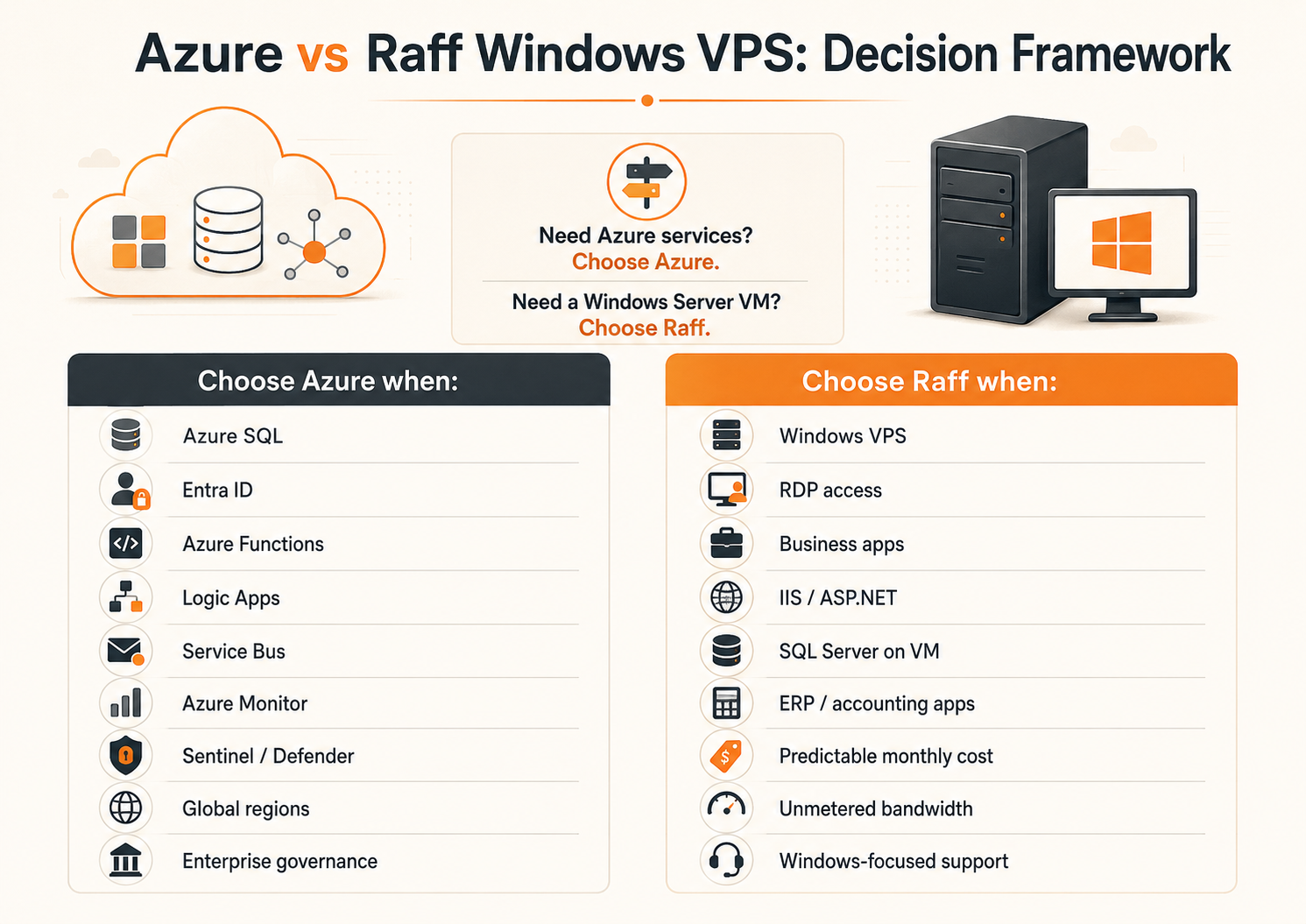
Azure Windows VPS vs Raff: quick verdict
| Workload | Better starting point | Why |
|---|---|---|
| QuickBooks, Sage, tax software, ERP, or another Windows business app over RDP | Raff | Focused Windows VM model without requiring Azure-native services |
| IIS or ASP.NET application on a self-managed Windows Server | Raff or Azure | Raff is simpler when the app only needs a VM; Azure fits better when the app uses other Azure services |
| SQL Server on a self-managed Windows VM | Raff or Azure | Depends on networking, licensing, monitoring, HA, and wider platform dependencies |
| Azure SQL, Functions, Service Bus, App Service, or Logic Apps | Azure | These are Azure-native services, not plain VM features |
| Enterprise governance using Entra ID, Azure Policy, Defender for Cloud, and Azure Monitor | Azure | Native integration is the main value |
| Small business replacing an office Windows server | Raff | A simpler VM-first model is often easier to operate |
| MSP hosting separate Windows workloads for clients | Raff | Focused Windows infrastructure and predictable monthly planning can simplify repeatable client environments |
| Global multi-region application using several Azure regions | Azure | Azure provides a much broader global cloud footprint |
| Remote Windows desktop for a small team | Raff | Good fit when the requirement is primarily Windows Server plus RDS/RDP rather than Azure Virtual Desktop |
| Azure Virtual Desktop deployment with Entra and Azure management integrations | Azure | The workload depends on the Azure desktop platform |
This is not a comparison of the entire Azure platform against one Raff VM. It is a comparison of Azure Virtual Machines and Raff Windows VMs for the same self-managed Windows Server workload.
What is an Azure VPS?
Microsoft does not position the product as "Azure VPS." The comparable Azure service is Azure Virtual Machines.
An Azure Windows VM gives you administrator access to a Windows Server guest operating system running on Azure infrastructure. You select a VM family and size, disk resources, networking, region, Windows image, and other services you want around it.
A Raff Windows VPS is also infrastructure as a service. You receive a Windows VM that you administer yourself, but the product model is intentionally narrower and more VM-focused.
For both providers, the customer is still responsible for the guest workload unless a separate managed service says otherwise. That includes areas such as:
- Windows configuration;
- application installation and updates;
- user access;
- firewall policy;
- database maintenance;
- backup design;
- restore testing;
- monitoring;
- RDS design and licensing where applicable.
Side-by-side comparison
| Area | Azure Windows VM | Raff Windows VM |
|---|---|---|
| Platform scope | Hyperscale cloud platform with a very broad service catalog | Focused cloud VM platform |
| Best fit | Azure-connected apps, enterprise governance, global architectures | Windows Server, RDP, business apps, IIS, SQL Server, SMB and MSP workloads |
| Billing model | Metered Azure resource pricing with multiple cost components | Fixed monthly VM plans; Raff does not use hourly VM billing |
| Windows Server licensing | Windows software charges are part of Windows VM pricing unless eligible Azure Hybrid Benefit is applied | Raff-provided SPLA licensing or eligible customer BYOL |
| Storage | Azure Managed Disks are separate resources | Base VM storage is included in the selected Raff plan; extra volumes are optional |
| Internet bandwidth | First 100 GB/month of internet egress is currently free, then Azure applies usage-based rates that vary by source continent and routing option | Raff VM traffic is unmetered under current VM network terms |
| Networking | VNet, subnet, NIC, NSG, public IP, private endpoints, gateways, routing, and other Azure services | Simpler VM and private-network model |
| Managed cloud services | Extensive | Smaller catalog focused around Raff products |
| Global region breadth | Extensive | More limited |
| Enterprise governance | Deep Azure-native governance and identity ecosystem | Simpler infrastructure controls |
| Support path | Microsoft and Azure support plans plus partner ecosystem | Raff infrastructure support focused on the Raff platform and Windows VM workloads |
| Migration complexity | Low when staying in Azure; leaving can be simple or complex depending on dependencies | Straightforward target when the source workload is mostly a portable Windows VM |
The important difference is not whether both providers can boot Windows Server. They can. The difference is the amount of platform around the VM and whether your workload benefits from that platform.
Pricing: compare the full Windows VM cost
A fair Azure VM vs VPS comparison needs more than the compute line item.
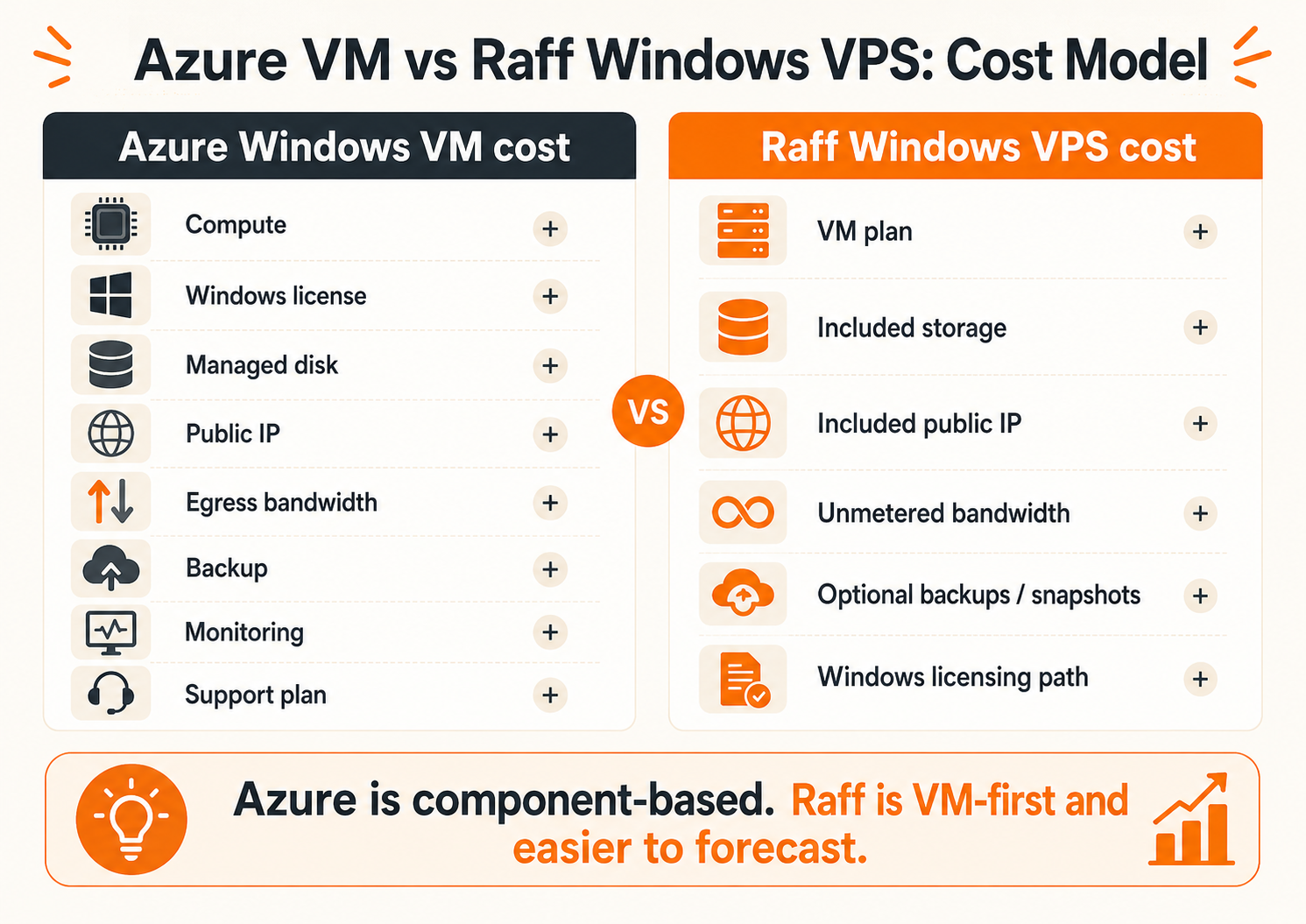
For Azure, the monthly total can include:
- VM compute;
- Windows Server software charges unless Azure Hybrid Benefit applies;
- managed disks;
- public IP and networking resources where applicable;
- internet egress after the free allowance;
- backup;
- snapshots;
- monitoring and logs;
- security services;
- support plans.
For Raff, compare:
- the selected Windows VM plan;
- the applicable Windows Server licensing path;
- RDS access licensing if staff use Remote Desktop Services;
- optional extra volumes;
- optional backup and snapshot storage;
- application-specific licensing such as SQL Server or Microsoft 365 Apps.
Use the current Raff pricing page and the Azure Pricing Calculator on the same day. Avoid comparing an old blog price against a current provider quote.
Why this page does not publish one Azure VM price
Azure pricing changes with:
- region;
- VM family and size;
- Windows or Linux image;
- pay-as-you-go, reservation, savings plan, or Spot model;
- Azure Hybrid Benefit eligibility;
- disk type and size;
- networking and egress pattern;
- backup and monitoring choices;
- commercial agreement and currency.
One hard-coded Azure monthly figure would therefore be misleading. Build both provider totals around the same CPU, RAM, storage, bandwidth, Windows licensing, backup, and support assumptions.
Azure internet egress vs Raff unmetered bandwidth
Azure's current bandwidth pricing lists the first 100 GB per month of internet egress as free. Usage above that allowance is billed by tier, and the rate varies by source continent and whether traffic uses Microsoft's premium global network or the transit-ISP routing preference.
That matters when a Windows workload regularly moves data out of the cloud, for example:
- large file downloads;
- offsite backups;
- SQL exports;
- document delivery;
- web application assets;
- media files;
- data replication;
- migration traffic.
Raff's current VM network model uses unmetered VM bandwidth, so there is no Azure-style per-GB internet egress line item on the VM bill.
Do not assume that every RDP session itself creates huge transfer charges. The cost difference becomes more material when the workload moves larger volumes of files or application data.
Windows Server licensing: Azure Hybrid Benefit vs Raff SPLA or BYOL
The old version of this comparison incorrectly described Raff's production path as starting from an evaluation license. That is not the production licensing model to compare.
Azure Windows licensing
Windows software charges are included in normal Azure Windows VM pricing. Eligible customers can reduce the Windows Server software portion with Azure Hybrid Benefit.
Microsoft currently requires qualifying Windows Server licenses with active Software Assurance or qualifying subscription rights. For Windows VMs, Azure Hybrid Benefit requires at least 8 eligible core licenses per VM, even when the VM has fewer than eight virtual cores. Larger VMs require licenses matching the VM core count.
Azure Hybrid Benefit can materially change the economics for organizations that already own the right Microsoft licensing.
Raff Windows licensing
For production Raff Windows VMs, the practical choices are:
- Raff-provided Windows Server licensing through SPLA, or
- eligible customer BYOL under the applicable Microsoft outsourcing and Flexible Virtualization Benefit rules.
Windows Server BYOL outside Azure should not be described as ordinary License Mobility through Software Assurance. For the current Raff licensing model, use Windows Server Licensing: SPLA, BYOL, CALs & RDS.
If staff will use the server as a daily shared Remote Desktop environment, also review RDS CAL Licensing. Administrative RDP and a production RDS deployment are different licensing scenarios.
Where Azure is the better fit
Azure is usually the stronger choice when the Windows VM is only one component of a larger Azure architecture.
Azure-native application services
Keep the workload on Azure when it materially depends on services such as:
- Azure SQL Database;
- Azure App Service;
- Azure Functions;
- Azure Service Bus;
- Azure Logic Apps;
- Azure Storage;
- Azure Key Vault;
- Private Endpoints;
- Azure Monitor;
- Defender for Cloud;
- Microsoft Sentinel;
- Azure Policy.
Moving only the Windows VM would not replace those services. The project would become an application and architecture migration rather than a VM migration.
Enterprise identity and governance
Azure is also a natural fit for organizations that have standardized operations around Microsoft Entra ID, Azure RBAC, Azure Policy, Defender, Sentinel, centralized logging, enterprise landing zones, and existing Azure networking.
In those environments, governance integration can be worth more than a lower or simpler VM bill.
Global and regulated architectures
Choose Azure when the workload depends on a specific Azure region, broad global region coverage, sovereign offerings, or Azure-specific compliance and enterprise procurement requirements.
A focused VM provider should not pretend to match Azure's global platform footprint.
Azure Virtual Desktop
If the requirement is a large desktop virtualization environment using Azure Virtual Desktop, Azure-native identity and management, the correct comparison is not a single Windows VPS. AVD is its own platform architecture.
Where Raff is the better fit
Raff becomes more compelling when the Azure environment is essentially a self-managed Windows Server with a few basic infrastructure resources around it.
A common portable workload looks like:
Windows VM
+ disk
+ private/public networking
+ RDP or RDS
+ installed business application
+ backup
Examples include:
- accounting applications;
- ERP and inventory software;
- tax software;
- legacy Windows applications;
- IIS and ASP.NET applications;
- SQL Server on a self-managed VM;
- small RDS environments;
- MSP-managed client servers;
- replacement for an aging office Windows server.
In these cases, Raff can remove platform layers that the workload is not using while keeping the Windows Server environment familiar.
Predictable monthly infrastructure planning
Raff Windows VMs use fixed monthly plans rather than hourly VM billing. This can make recurring budgeting easier for servers that run continuously.
That does not automatically make Raff cheaper in every scenario. Azure reservations, savings plans, Azure Hybrid Benefit, or a heavily optimized architecture can materially reduce Azure cost. Compare the actual configuration and licensing rights.
Simpler platform surface
A small business often does not need to learn resource groups, several Azure network resources, multiple billing meters, policy frameworks, and optional management services just to run one Windows business application.
A narrower platform can be an advantage when the requirement is narrow too.
Windows workload focus
Raff's Windows Hub and support workflows are built around common Windows VM use cases such as RDP, IIS, SQL Server, Active Directory, business software, migration, firewall configuration, and Windows performance troubleshooting.
Application vendors still remain responsible for their own software, and customers remain responsible for guest-OS administration unless a separate managed service applies.
Shared responsibility is similar for a self-managed VM
Switching from Azure VM to Raff Windows VM does not make guest operating-system work disappear.
For a self-managed Windows VM on either platform, plan ownership for:
- Windows Update;
- local and domain accounts;
- RDP/RDS security;
- Windows Firewall;
- IIS and application updates;
- SQL Server maintenance;
- antivirus or EDR policy;
- backup scheduling;
- restore testing;
- monitoring;
- application licensing;
- incident response.
The physical infrastructure is the provider's responsibility. The guest OS and application workload remain customer responsibilities unless a contract explicitly changes that boundary.
Azure VM migration to Raff: when it is straightforward
Migration is simplest when the Azure VM has few Azure-specific dependencies.
Good candidate
Windows Server
IIS or business application
SQL Server or local app database
RDP/RDS users
Managed disk
Public/private IP
Basic backup
Needs deeper redesign
Windows Server
+ Azure SQL
+ Azure Files
+ Private Endpoints
+ Entra-dependent services
+ Key Vault
+ Service Bus
+ Functions
+ Azure Monitor/Sentinel workflows
The second architecture is not merely a VM move. Each Azure service needs a replacement, migration, or decision to remain in Azure.
Step 1: inventory the Azure workload
Document:
- VM size and utilization;
- Windows Server version;
- disk sizes and used capacity;
- public and private IP configuration;
- NSG/firewall rules;
- IIS sites;
- SQL Server instances;
- business applications;
- users and service accounts;
- RDP/RDS model;
- scheduled tasks;
- certificates;
- backup jobs;
- DNS records;
- Azure-native dependencies.
Do not size the destination from the Azure VM name alone. Review actual CPU, RAM, storage, and application behavior.
Step 2: identify services that cannot move with the VM
Search the Azure subscription and the application configuration for dependencies on:
- Azure SQL;
- Azure Storage or Azure Files;
- Key Vault;
- Private Endpoints;
- Entra application identities;
- Functions;
- Logic Apps;
- Service Bus;
- Azure Backup;
- Azure Monitor;
- Defender for Cloud;
- Sentinel;
- Azure-specific DNS or networking.
Decide whether each dependency stays in Azure, moves to another service, or is replaced.
Step 3: choose the Raff destination by workload
Select CPU, RAM, and storage based on real utilization and growth rather than matching an Azure SKU name mechanically.
Useful planning guides:
If the workload is business-critical, include backup and rollback capacity before cutover.
Step 4: migrate by application, not just by disk
The migration method depends on the workload:
- file copy for ordinary data;
- SQL Server backup and restore for databases;
- application vendor migration tools;
- IIS configuration and certificate migration;
- side-by-side application installation;
- server-role migration for Windows roles;
- image-based migration only when the workload and licensing model support it.
For business software, vendor-supported migration is generally safer than assuming a cloned disk will behave correctly on different infrastructure.
Step 5: test the real business workflow
Before cutover, verify:
- RDP or RDS login;
- application launch;
- user permissions;
- database connectivity;
- reports and exports;
- printing where needed;
- scheduled tasks;
- DNS;
- firewall rules;
- backups;
- restore procedure;
- external integrations.
A successful Windows boot is not sufficient migration validation.
For a broader checklist, use Windows Server Migration Checklist for Small Businesses.
When Azure can still be cheaper
A comparison page should include the cases where Azure economics improve.
Azure can become more competitive when you already have qualifying Azure Hybrid Benefit rights, commit to a reservation or savings plan, use auto-shutdown for non-production systems, right-size aggressively, or replace a self-managed VM with an Azure managed service that reduces operational work.
That is why the useful comparison is not:
Azure list price vs Raff list price
It is:
Your optimized Azure architecture
vs
Your required Raff architecture
Include licensing, storage, bandwidth, backups, operations, and the services the application actually needs.
Decision checklist
Choose Raff Windows VM when most of these are true:
- the workload is primarily one or more Windows Server VMs;
- the application is self-managed;
- users need RDP or a small RDS environment;
- business software or IIS runs directly on Windows Server;
- Azure-native services are not central to the workload;
- predictable monthly infrastructure cost matters;
- outbound data transfer is meaningful;
- the team prefers a simpler VM-first platform;
- the environment is managed by a small IT team or MSP.
Choose Azure when most of these are true:
- the application depends on multiple Azure-native services;
- the organization already operates an Azure landing zone;
- Entra, Azure Policy, Defender, Sentinel, or Azure Monitor are core to operations;
- global region coverage or an Azure-specific geography is required;
- Azure Virtual Desktop is the target architecture;
- existing Microsoft licensing makes Azure Hybrid Benefit valuable;
- the team already has mature Azure operations and cost-management practices.
Raff recommendation
For a buyer asking only for an Azure Windows VPS, start by listing the Azure services the workload actually uses.
If the list is mostly:
Virtual Machine
Disk
Network
RDP
Windows application
Backup
then Raff is worth comparing as a simpler Azure VM alternative.
If the list includes several platform dependencies such as Azure SQL, Functions, Service Bus, Key Vault, Private Endpoints, Entra-based application integrations, Sentinel, or Azure Policy, keeping the workload on Azure may be the better engineering decision.