• Pricing
  • Performance
  • About Us
PricingPerformanceAbout Us
Sign InSign Up
  • Pricing
  • Performance
  • About Us
PricingPerformanceAbout Us
Sign InSign Up
Sign InGet Started

High-Performance Cloud Infrastructure

Empowering businesses with enterprise-grade cloud solutions at competitive prices. Built for reliability and simplicity. Designed for growth.

SOC 2 Compliant
ISO 27001
99.9% Uptime

Stay Updated

3000+

Customers

15,000+

VMs Deployed

24/7

Human Support

Products

Build

  • Raff VM
  • Raff Windows VM
  • Raff Apps
  • Kubernetes

Templates

  • Linux VM
  • Forex VM
  • n8n VM

Store

  • Raff S3
  • Raff Databases

Support

  • Documentation
  • API Reference
  • CLI
  • Terraform Provider
  • Contact
  • FAQ
  • Status

Company

  • About
  • Pricing
  • Blog
  • Release Notes
  • Performance
  • Status

Account

  • Sign In
  • Sign Up
  • Reset Password

Legal

  • Terms of Service
  • Privacy Policy
  • Service Level Agreement
  • Acceptable Use Policy

© 2026 Raff Technologies. All rights reserved.

System Status
getting started
getting startedbeginner18 min read·Updated Jul 11, 2026

Azure Virtual Desktop Alternative: Raff Windows VPS/RDP for Small Businesses

Learn when Raff Windows VPS/RDP is a simpler Azure Virtual Desktop alternative for small businesses that need remote users, Windows apps, shared files, backups, and office server migration.

Aybars Altınyay
Aybars Altınyay
Platform Engineer & Technical Writer

Raff Windows VPS/RDP is a simpler Azure Virtual Desktop alternative for small businesses that do not need full virtual desktop infrastructure. If your team mainly needs secure remote access to Windows apps, shared files, accounting software, legal files, tax software, ERP tools, Microsoft Access, or an old office server replacement, a Raff Windows VM can be the more direct path. Azure Virtual Desktop is powerful when you need full VDI, Windows 10/11 multi-session desktops, host pools, RemoteApp publishing, and Azure-native desktop management.

This article is not a general Azure VM comparison. Raff already has a separate Azure VM alternative article for that.

This guide answers a more specific Windows Hub question:

Can a small business use Raff Windows VPS/RDP instead of Azure Virtual Desktop when it only needs remote access to Windows apps and files?

For many SMBs, the answer is yes.

Use Raff Windows VM when your business needs a cloud-hosted Windows Server for remote access, apps, files, and shared workloads.

Explore Windows VM

The real problem: most SMBs do not need full VDI

Many small businesses search for Azure Virtual Desktop because they need remote work.

But the actual need is often much simpler:

What the buyer saysWhat they usually mean
We need Azure Virtual DesktopStaff need remote access to Windows apps
We need cloud desktopUsers need the same apps and files from home
We need VDIWe are tired of remoting into office PCs
We need RemoteAppUsers need one or two business apps
We need Azure remote desktopOur old office server is hard to access
We need secure remote accessRDP/VPN/workstation access is messy

Azure Virtual Desktop may solve those problems, but it may also introduce more platform than the business needs.

If the business does not need host pools, Windows 10/11 multi-session desktops, image management, FSLogix profile strategy, RemoteApp publishing, and Azure-native governance, a Windows VPS/RDP model can be simpler.

What Raff Windows VPS/RDP gives small businesses

Raff Windows VM gives small businesses a cloud-hosted Windows Server environment that users can access with Remote Desktop.

That means your team can run Windows-based workloads in one central place instead of depending on individual office PCs or local servers.

Raff Windows VPS/RDP featureWhy it matters for SMBs
Windows Server 2019, 2022, and 2025 optionsChoose the Windows Server version your apps support.
Full administrator accessInstall supported apps, configure roles, manage users, and control the server.
RDP-ready accessUsers and admins can connect to the Windows environment remotely.
Fast deploymentStart testing without waiting for physical hardware.
AMD EPYC processors and NVMe SSD storageGives business apps a strong infrastructure foundation.
Unmetered bandwidthHelps avoid surprise bandwidth bills for normal SMB usage.
99.9% uptime SLAUseful for teams relying on the server for daily access.
24/7 supportImportant when RDP, Windows, or app access affects business work.
Backups and snapshotsHelps protect the server before changes, migration, and production use.
Private networking and DDoS protectionUseful when designing safer business infrastructure.
API and Terraform supportHelpful for MSPs and technical teams managing repeatable environments.

The point is not that Raff Windows VPS has every AVD feature. It does not. The point is that many small businesses do not need every AVD feature.

They need a reliable Windows Server they can connect to, manage, back up, and use for business workloads.

Azure Virtual Desktop is powerful, but it is a different product

Azure Virtual Desktop is Microsoft’s desktop and app virtualization service on Azure. It can deliver full desktops and remote applications, including Windows 10/11 multi-session experiences.

That is useful when the business needs a true VDI platform.

AVD can involve:

AVD componentWhat it means
Host poolsGroups of session hosts that deliver desktops or apps
Session hostsVirtual machines that run user sessions
Application groupsPublished desktops or RemoteApps
WorkspacesUser-facing organization of resources
User profilesOften requires profile-container planning
Azure identity and networkingEntra ID, AD DS, Azure networking, and access design
Scaling plansCapacity management for changing user demand
Image managementStandardized desktop/app images
Azure monitoring and governanceOperational management inside Azure

That is valuable for the right organization. But it can be too much platform for a small business that only needs a Windows Server environment for apps, files, and RDP access.

When Raff Windows VPS/RDP is the smarter path

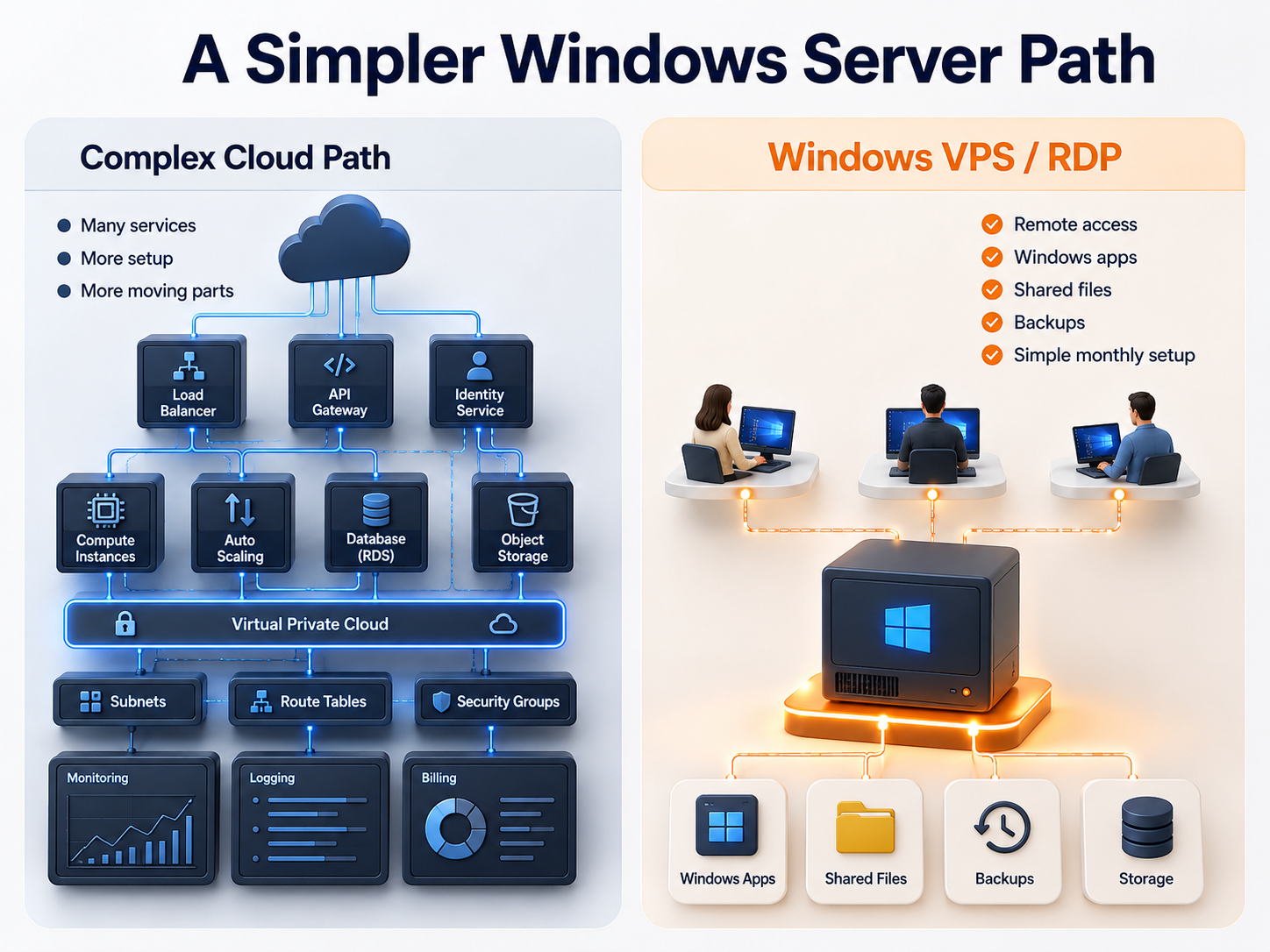
Raff Windows VPS/RDP is usually the better starting point when the business needs a practical cloud Windows Server.

Comparison visual showing a complex cloud server setup versus a simpler Windows VPS RDP path for small business remote access, Windows apps, shared files, backups, and storage

Business needWhy Raff Windows VPS/RDP fits
Remote employees need Windows appsUsers connect to one hosted Windows environment.
Business apps run on Windows ServerThe VM becomes the app environment.
Shared folders and mapped drives matterUse Windows Server file shares and permissions.
Old office server needs replacementMove to a cloud Windows Server model.
Accounting or legal teams need central filesKeep apps, files, reports, and backups in one environment.
MSP needs repeatable client setupStandardize client Windows environments.
Small team needs predictable infrastructureVM pricing is easier to understand than full AVD design.
Migration needs to be simpleBuild, test, sync, cut over, and keep rollback ready.

The practical rule:

If you need a cloud Windows Server, use Windows VPS. If you need full desktop virtualization, evaluate AVD.

When Azure Virtual Desktop is still the better fit

Be honest about the boundary. Azure Virtual Desktop is better when the business actually needs VDI.

Choose AVD when you need:

RequirementWhy AVD fits
Windows 10/11 multi-session desktopAVD is built for this scenario.
Full virtual desktop infrastructureHost pools, session hosts, workspaces, and app groups are native.
RemoteApp publishing at scaleAVD is designed for app/desktop delivery.
Enterprise desktop governanceAzure-native management can be valuable.
Large desktop fleetAVD scales for broader desktop strategies.
Standardized desktop imagesImage management is part of the VDI model.
Mature Azure operations teamMore moving parts are easier to operate.
Existing AVD architectureStaying with AVD may be better than rebuilding.

Raff Windows VPS is not a full AVD replacement for enterprise desktop virtualization. It is a simpler alternative for SMBs that never needed full VDI.

Raff Windows VPS/RDP use cases

Remote employees

Remote employees often need access to Windows apps, shared files, and reports. They do not always need a full virtual desktop platform.

A Raff Windows VM can give remote staff a central environment for:

NeedExample
Windows appsAccounting, ERP, Access, legal, tax, or legacy apps
Shared filesDepartment folders, client files, project folders
ReportsPDFs, Excel exports, app reports
Remote accessRDP/RDS-style access planning
BackupsVM, file, app, and snapshot protection
MSP supportCentral server instead of many office PCs

Read next: Windows VPS for Remote Employees.

Accounting firms

Accounting firms often compare VDI tools because staff need access to QuickBooks, Sage, tax software, client folders, PDFs, and reports.

For many accounting firms, Raff Windows VPS/RDP is a cleaner starting point:

Accounting needRaff Windows VPS/RDP fit
QuickBooks DesktopCentral Windows environment after licensing/vendor checks
Sage 50/100/300Sized Windows Server environment
Tax softwareSeasonal remote users and client files
Client foldersCentralized file structure and permissions
BackupsProtect app data, files, and server state
Remote staffAccess from home or branch office

Read next: Windows VPS for Accounting Firms.

Law firms

Law firms need controlled access to case files, legal apps, scanned documents, templates, billing exports, and PDFs.

A Raff Windows VM can help when:

Law firm needRaff Windows VPS/RDP fit
Case filesCentral shared folders with permissions
Legal appsHosted Windows Server environment where supported
Remote attorneys/paralegalsAccess through a planned remote model
Confidential filesNamed users and access groups
BackupsRestore planning for case files and app data
Office server replacementMove away from local hardware dependency

Read next: Windows VPS for Law Firms.

File server replacement

Some buyers think they need AVD, but the real requirement is a cloud file server.

A Raff Windows VM can work as a cloud file server when users access files through Remote Desktop, RD Gateway, VPN/private access, or another controlled model.

File server needRaff Windows VPS/RDP fit
Shared foldersCentral location for business files
NTFS permissionsUsers and groups
Mapped drivesFamiliar Windows workflow
Remote accessAccess inside the hosted session
BackupsFile-level and VM-level protection
MigrationMove from old local server to cloud Windows Server

Do not expose SMB directly to the public internet.

Read next: Windows VPS as a Cloud File Server.

MSP client environments

MSPs often need repeatable Windows environments for different clients.

Raff Windows VPS/RDP can help MSPs standardize:

MSP needRaff fit
One server per clientCleaner isolation and documentation
Remote usersPlanned RDP/RDS/RD Gateway model
Client appsInstall supported Windows apps
BackupsStandard backup/snapshot process
MigrationBuild, test, cut over, rollback
SupportCentral environment instead of many PCs

Read next: Windows VPS for MSP Client Environments.

Review remote users, apps, files, RDS licensing, backups, migration scope, and whether your business needs Windows VPS or full VDI.

Talk to Windows Engineer

Simple Raff Windows VPS/RDP architecture

For many SMBs, the architecture can be simple.

Text
Remote users ↓ Secure access model RDP / RDS / RD Gateway / VPN ↓ Raff Windows VM ↓ Windows apps + shared files + reports ↓ Backups + snapshots + restore planning

The important part is not only the VM. It is the whole operating model.

Plan:

LayerWhat to decide
UsersWho connects and from where?
AccessAdmin RDP, RDS Session Host, RD Gateway, VPN, or RemoteApp-style use?
AppsWhich Windows apps will run? Are they supported?
FilesWhich folders move? What permissions apply?
LicensingWindows, RDS CALs, SQL Server, app licenses, Microsoft 365 Apps
SecurityFirewall, user accounts, offboarding, logs, passwords
BackupsVM backup, file backup, app/database backup, snapshots
MigrationTest copy, user testing, cutover, rollback
SupportWho owns Windows, app, user, and backup issues?

This is the difference between “just opening RDP” and running a real remote business environment.

RDP, RDS, and licensing still matter

A Windows VPS with RDP access does not automatically mean unlimited staff desktop sessions.

There are different access models:

Access modelBest fit
Admin RDPOne or two administrators managing the server
RDS Session HostMultiple staff users need desktop/app sessions
RD GatewayControlled access to RDS resources over the internet
VPN/private accessUsers connect privately before accessing internal services
RemoteApp-style workflowUsers need specific apps rather than a full desktop

Microsoft states that each user or device connecting to an RD Session Host running Windows Server needs a Remote Desktop Services Client Access License. Microsoft also explains that Azure Virtual Desktop licensing has eligible license requirements for users, depending on the scenario.

Practical takeaway:

Raff provides the Windows VM infrastructure. The customer or MSP still needs to plan RDS CALs, app licenses, Microsoft licenses, and vendor support.

Why Raff Windows VPS/RDP can be easier to price

Azure Virtual Desktop cost estimation can include Azure compute, session hosts, storage, user profiles, networking, monitoring, scaling choices, and eligible user licensing.

Raff Windows VPS is usually easier for SMBs to budget because the core model starts with a Windows VM plan, then adds the workload decisions: users, storage, backups, application licenses, RDS CALs, and migration.

Pricing areaRaff Windows VPS/RDP approach
Base serverChoose a Windows VM plan
UsersSize by active users and workload
StoragePlan files, profiles, apps, databases, and growth
BandwidthRaff pricing page lists unmetered bandwidth on Cloud Server plans
Backups/snapshotsPlan data protection before production
LicensingReview Windows, RDS, SQL, Microsoft 365 Apps, and app licenses
SupportInclude Windows/app/user support ownership
MigrationPlan test migration, cutover, and rollback

Raff’s public Windows VM page lists Windows VPS hosting from $9.99/month, full admin access with RDP, Windows Server 2019/2022/2025 options, a 6-month Windows Server evaluation license to get started, 24/7 expert support, and a 99.9% uptime SLA.

Always verify the live pricing page before publishing or quoting exact plan details.

Compare Raff Windows VM plans when weighing CPU, memory, storage, backups, and monthly cost against Azure Virtual Desktop complexity.

View Pricing

Feature checklist: why SMBs choose Raff Windows VPS/RDP

Use this buyer checklist when comparing Raff Windows VPS/RDP with a bigger VDI platform.

FeatureWhy it supports SMB remote access
Full admin accessInstall and manage supported Windows apps
RDP-ready serverAccess the Windows environment remotely
Windows Server version choiceMatch app compatibility requirements
AMD EPYC + NVMe SSDStrong base for business apps and files
Unmetered bandwidthReduces bandwidth surprise for normal use
Private networkingUseful for multi-server or MSP designs
DDoS protectionHelps protect public-facing infrastructure
Backups and snapshotsSupports safer changes and recovery planning
24/7 supportUseful when Windows access affects business work
99.9% uptime SLAHelps with daily operational confidence
Fast deploymentStart testing without physical hardware
API/Terraform supportHelpful for technical teams and MSPs

The best feature is not one checkbox. It is the combination of simple Windows access, practical pricing, business-app fit, and a supportable migration path.

Sizing Raff Windows VPS/RDP for remote users

Do not size by employee count only. Size by concurrent users and workload.

WorkloadStarting pointWhen to move up
1-2 admins or light users2 vCPU / 4 GB RAMIf users run apps or reports
3 light remote users4 vCPU / 8 GB RAMIf users open Office apps, PDFs, or browsers
3-5 active business app users4 vCPU / 16 GB RAMBetter for accounting, legal, tax, ERP, Access, or legacy apps
5-10 active users8 vCPU / 32 GB RAMIf the VPS becomes a daily shared workspace
App plus SQL/database workload8-16 vCPU / 32-64 GB RAMConsider separating app and database roles
File-heavy teamSize storage firstFiles, profiles, exports, scans, and growth matter

Read next: Windows VPS sizing for remote users.

Security planning before using Raff as an AVD alternative

A simpler platform does not mean careless setup.

Minimum security plan:

Security areaRecommendation
Named usersAvoid shared accounts
Admin separationSeparate admin and daily user accounts
RDP exposureAvoid broad direct exposure
RD Gateway/VPNUse controlled access where appropriate
Firewall rulesRestrict allowed sources and ports
PermissionsUse groups and least privilege
Local redirectionControl drive, clipboard, and printer redirection where needed
BackupsProtect backups from deletion or ransomware
UpdatesPatch Windows and apps deliberately
LogsReview failed sign-ins and unusual activity
OffboardingRemove access quickly when users leave

Read next:

  • Remote Desktop Gateway vs Direct RDP
  • Windows Server Hardening Checklist

Migration path from office server or office PCs

Many SMBs considering Azure Virtual Desktop are really trying to escape old office infrastructure.

A simpler Raff Windows VPS migration path:

  1. Inventory users, apps, files, databases, printers, scanners, and integrations.
  2. Confirm app vendor support for Windows Server/RDS or hosted use.
  3. Choose the Windows VM size.
  4. Build the Raff Windows VM.
  5. Configure users, firewall, access model, and backups.
  6. Install Windows apps and dependencies.
  7. Copy test data first.
  8. Test real user workflows.
  9. Test printing, PDFs, reports, file paths, and database access.
  10. Run a restore test.
  11. Schedule cutover outside critical work hours.
  12. Move final data.
  13. Keep the old environment available for rollback.
  14. Monitor performance and support tickets after cutover.

Read next:

  • Windows Server Migration Checklist for Small Businesses
  • Local Office Server to Cloud Windows VPS Migration
  • File Server Migration to Windows VPS

When Raff Windows VPS is not the right AVD alternative

Raff Windows VPS/RDP is strong for SMB Windows Server workloads, but it is not right for every AVD search.

Do not use Raff Windows VPS as an AVD alternative when:

RequirementBetter fit
Windows 10/11 multi-session desktop is mandatoryAzure Virtual Desktop
Enterprise VDI is the actual projectAzure Virtual Desktop
Host pools, app groups, and image management are requiredAzure Virtual Desktop
RemoteApp publishing at scale is centralAzure Virtual Desktop
Azure-native governance is mandatoryAzure Virtual Desktop
Large desktop fleet management is requiredAzure Virtual Desktop
Internal IT already has a mature AVD environmentAzure Virtual Desktop may be better

This honesty helps the right buyer trust the recommendation.

How Raff fits

Raff fits small businesses that need remote Windows access without building a full Azure Virtual Desktop environment.

Use Raff Windows VPS/RDP when your business wants:

  • Windows Server in the cloud;
  • full admin access;
  • RDP-ready access;
  • remote employees;
  • accounting, legal, tax, ERP, Access, and legacy apps;
  • shared files and folders;
  • office server replacement;
  • simpler pricing;
  • backup and snapshot planning;
  • a realistic migration path.

Raff does not replace Azure Virtual Desktop for enterprise VDI. Raff is the simpler Windows VPS/RDP path when your SMB needs a reliable cloud Windows Server for apps, files, users, and backups.

Create a Raff Windows VM when your business is ready to run remote users, Windows apps, shared files, and SMB workloads in the cloud.

Deploy Windows Now

Recommended path by situation

SituationRead next
You need the SMB buyer guideWindows VPS Hosting for Small Businesses
You need remote staff accessWindows VPS for Remote Employees
You need a Remote Desktop business guideRemote Desktop Server for Business
You need secure RDP planningRemote Desktop Gateway vs Direct RDP
You need pricing clarityWindows VPS Pricing Explained
You need shared filesWindows VPS as a Cloud File Server
You are replacing office hardwareCloud Windows Server vs Local Office Server
You are migrating from local serverLocal Office Server to Cloud Windows VPS Migration
You are comparing Azure VM costAzure VM Alternative: Raff Windows VPS
You are comparing dedicated hardwareWindows VPS vs Dedicated Server

Final checklist: should you use Raff Windows VPS/RDP instead of AVD?

Before deciding, answer:

QuestionAnswer
Do users need Windows 10/11 virtual desktops?☐
Do users need full VDI with host pools and app groups?☐
Do users mainly need Windows Server apps and files?☐
Are you replacing an old office server or office PC access model?☐
Which business apps will run?☐
Does the app vendor support Windows Server/RDS or hosted use?☐
How many active users will connect?☐
Are RDS CALs required?☐
Are app licenses separate?☐
How much storage and growth are expected?☐
Are backups and snapshots planned?☐
Has restore testing been planned?☐
Is secure access planned?☐
Who supports the Windows server and apps?☐
What is the migration and rollback plan?☐

If the answer is mostly “we need apps, files, remote access, and an office server replacement,” Raff Windows VPS/RDP is probably the simpler path.

What's next

  • Explore Raff Windows VM when you are ready to compare Windows VM options.
  • Review Raff pricing before choosing CPU, RAM, storage, and monthly cost.
  • Read Windows VPS for Remote Employees if remote work is the main driver.
  • Read Remote Desktop Server for Business before rolling out staff access.
  • Read Windows VPS Hosting for Small Businesses for the broader SMB decision guide.
  • Read Azure VM Alternative: Raff Windows VPS if you are comparing Azure Windows VM pricing and infrastructure.

Sources

  • Microsoft Learn — Azure Virtual Desktop documentation
  • Microsoft Learn — What is Azure Virtual Desktop?
  • Microsoft Learn — Licensing Azure Virtual Desktop
  • Microsoft Learn — Understand and estimate costs for Azure Virtual Desktop
  • Microsoft Azure — Azure Virtual Desktop pricing
  • Microsoft Learn — License Remote Desktop Services with Client Access Licenses
  • Raff — Windows VM product page
  • Raff — Pricing
  • Raff — Windows Server Hub
  • Raff — Azure VM Alternative: Raff Windows VPS
Was this article helpful?

Published July 11, 2026 · Updated July 11, 2026

Back to hub
On this page
The real problem: most SMBs do not need full VDIWhat Raff Windows VPS/RDP gives small businessesAzure Virtual Desktop is powerful, but it is a different productWhen Raff Windows VPS/RDP is the smarter pathWhen Azure Virtual Desktop is still the better fitRaff Windows VPS/RDP use casesSimple Raff Windows VPS/RDP architectureRDP, RDS, and licensing still matterWhy Raff Windows VPS/RDP can be easier to priceFeature checklist: why SMBs choose Raff Windows VPS/RDPSizing Raff Windows VPS/RDP for remote usersSecurity planning before using Raff as an AVD alternativeMigration path from office server or office PCsWhen Raff Windows VPS is not the right AVD alternativeHow Raff fitsRecommended path by situationFinal checklist: should you use Raff Windows VPS/RDP instead of AVD?What's nextSources

Related articles

getting startedWindows VPS vs Dedicated Server: Which Is Better for Small Businesses?Compare Windows VPS and dedicated servers for small businesses. Learn which option fits Remote Desktop, business apps, file servers, backups, migration, pricing, support, and growth.17 min read7/10/2026getting startedWindows VPS for Remote Employees: Secure Access, Apps, Files, and BackupsLearn when a Windows VPS makes sense for remote employees who need secure access to Windows apps, shared files, Remote Desktop, backups, and a central cloud Windows Server.17 min read7/9/2026getting startedWindows VPS Pricing ExplainedLearn what affects Windows VPS pricing for small businesses, including CPU, RAM, storage, Windows licensing, RDS users, backups, support, migration, and total monthly cost.16 min read7/8/2026