getting started
getting startedbeginner17 min read·Updated Jul 10, 2026

Windows VPS vs Dedicated Server: Which Is Better for Small Businesses?

Compare Windows VPS and dedicated servers for small businesses. Learn which option fits Remote Desktop, business apps, file servers, backups, migration, pricing, support, and growth.

Genuine, fully-licensed Windows
Spin up a Windows Server: full admin, RDP-ready
Genuine Windows Server 2019, 2022, or 2025 with full administrator access. We handle the Microsoft licensing, billed monthly with nothing to buy upfront.

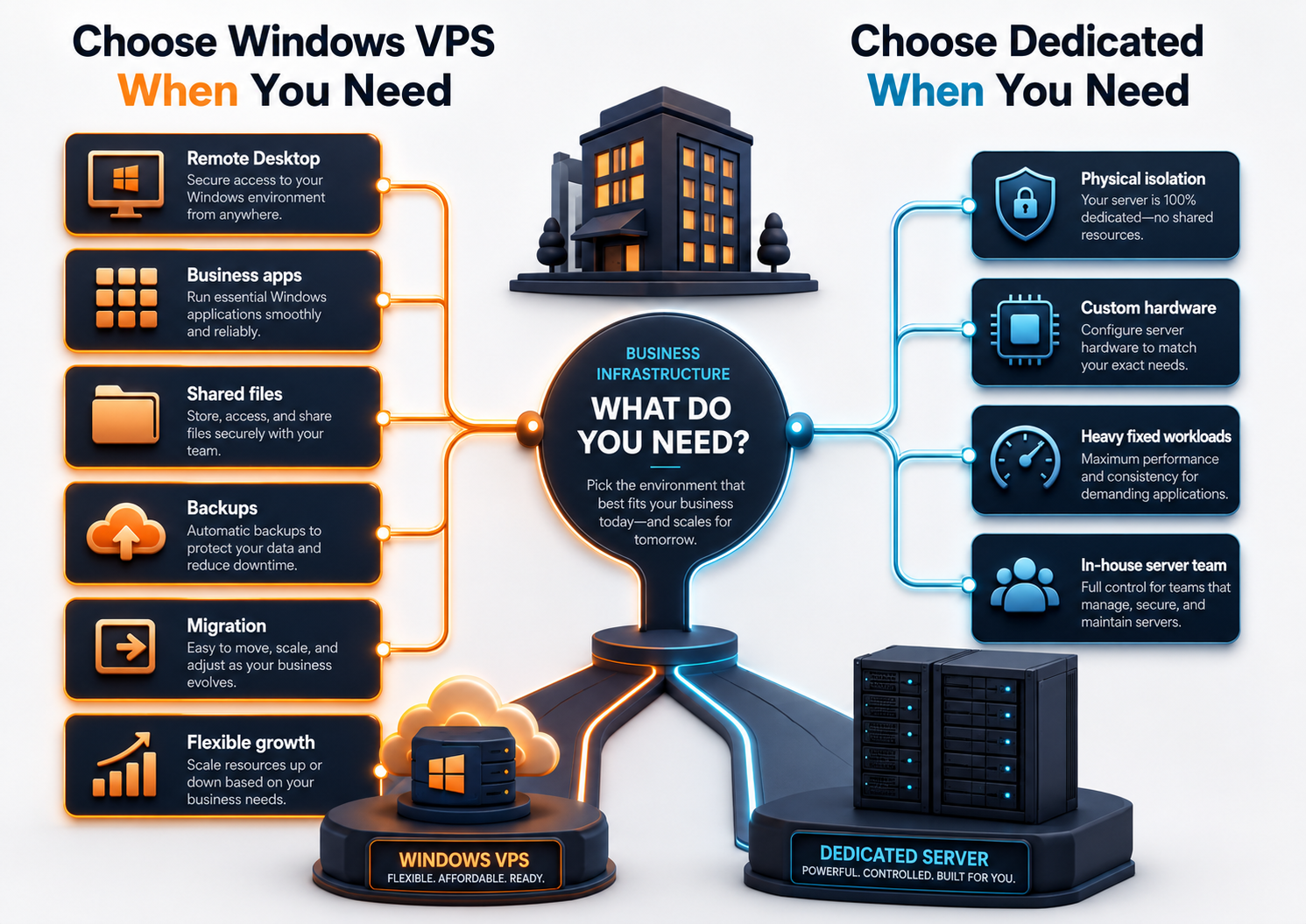
A Windows VPS is usually the better first choice for small businesses that need Remote Desktop access, Windows apps, shared files, backups, office server replacement, or a cloud Windows Server environment without managing physical hardware. A dedicated server can make sense for very large, predictable, hardware-sensitive, or isolation-heavy workloads, but it usually adds more operational responsibility. Raff Technologies provides Windows VMs for teams that want a practical Windows Server foundation for remote users, business apps, files, and migration projects.

The important question is not “which is more powerful?” The real question is:

Which option gives your business the right mix of performance, control, cost, flexibility, recovery, and support?

For many small businesses, the answer is Windows VPS first. It is faster to start, easier to resize, simpler to migrate into, and more aligned with common SMB workloads like Remote Desktop, QuickBooks, Sage, tax software, file shares, law firm case files, accounting firm apps, and remote employee access.

A dedicated server is not wrong. It is just usually not the first infrastructure step a small business needs.

Use Raff Windows VM when your business needs a cloud-hosted Windows Server for remote access, apps, files, and shared workloads.

Quick verdict: Windows VPS or dedicated server?

Use this table as the short answer.

SituationBetter fitWhy
Small business needs Remote Desktop accessWindows VPSEasier to launch, manage, and resize for users.
Business apps need a Windows environmentWindows VPSPractical for accounting, tax, ERP, Access, and legacy apps.
Company is replacing an old office serverWindows VPSCloud server model removes physical office hardware dependency.
Team needs shared files and backupsWindows VPSCentralized file server and backup planning are easier to start.
MSP needs repeatable client environmentsWindows VPSEasier to standardize per client.
Workload needs full physical isolationDedicated serverPhysical server control may matter.
Workload uses sustained high CPU/storage I/O all dayDependsDedicated can fit, but high-spec VPS may also work.
Business needs custom hardware or unusual network/storage setupDedicated serverDedicated hardware offers more physical customization.
Company wants lowest operational complexityWindows VPSLess hardware-level responsibility.
Company has in-house server engineeringDedicated server may fitMore responsibility is manageable with the right team.

For most SMB Windows workloads, start with a Windows VPS unless there is a clear reason to own or rent the full physical server.

What is a Windows VPS?

A Windows VPS is a virtual server running Windows Server. It gives you a cloud-hosted Windows environment with administrator access, Remote Desktop access, storage, networking, and the ability to install supported Windows applications.

Businesses use a Windows VPS for:

Use caseExample
Remote DesktopStaff connect to a shared Windows environment
Business appsQuickBooks, Sage, tax software, ERP, Access, legacy apps
File serverShared folders, mapped drives, client folders, reports
Office server replacementMove from old local hardware to cloud Windows Server
SQL-backed appsApplication databases and reports
MSP clientsStandardized environments for different customers
Remote employeesSecure access to apps and shared files
Migration stagingTest apps and files before cutover

A Windows VPS is not only a developer tool. For small businesses, it often becomes the central Windows environment for daily operations.

What is a dedicated server?

A dedicated server is a physical server assigned to one customer. The customer does not share the underlying physical machine with other tenants.

Dedicated servers are commonly used when a workload needs:

NeedWhy dedicated may fit
Full physical isolationEntire server belongs to one customer
Custom hardwareSpecific CPU, disk, RAID, or network requirements
Sustained heavy workloadsPredictable high load all day
Large storage footprintMany disks or large local storage pools
Custom virtualizationCustomer wants to run their own hypervisor
Specific compliance architecturePhysical isolation may be required
In-house server teamBusiness can manage more infrastructure responsibility

Dedicated servers can be powerful. But more control usually comes with more planning, management, and responsibility.

Windows VPS vs dedicated server: core differences

Comparison visual showing Windows VPS versus dedicated server for small business apps, remote users, files, backups, and hardware control

AreaWindows VPSDedicated server
HardwareVirtualized server on cloud infrastructureEntire physical server
Setup speedUsually fasterUsually slower
ScalingResize or move plan more easilyOften requires hardware change or migration
Cost modelSmaller starting pointHigher commitment
ManagementLess hardware responsibilityMore hardware-level responsibility
IsolationVirtual isolationPhysical isolation
Best for SMBsRemote users, apps, files, migrationHeavy/custom/high-isolation workloads
MigrationEasier to test and cut overOften more involved
Backup planningVM/file/app backupsFull server + hardware-aware planning
Support modelCloud VM supportServer/hardware/network support
FlexibilityStrong for changing needsStrong for fixed known workloads

The dedicated server is not automatically “better.” It is better only when the workload actually benefits from physical hardware control.

Which is better for Remote Desktop users?

For most small businesses, a Windows VPS is the better starting point for Remote Desktop users.

Why?

Remote Desktop needWindows VPS advantage
Start with a few usersSmaller plan can be enough
Add users over timeResize before replacing hardware
Remote employeesHosted environment is not tied to office power/internet
MSP supportStandardized VM environment is easier to document
BackupsVM and file backup planning can be built in
Migration testingBuild and test before moving users
Cost controlAvoid overbuying dedicated hardware too early

A dedicated server can make sense when many users need sustained performance, the environment is large, or the business has a clear physical-isolation requirement. But for 3, 5, 10, or even many small-team Remote Desktop deployments, a Windows VPS is usually more practical to start.

For deeper planning, read:

Review user count, Remote Desktop access, RDS licensing, apps, files, backups, and migration scope before choosing between Windows VPS and dedicated server.

Which is better for business apps?

Many small businesses compare Windows VPS and dedicated servers because they need to host business applications.

Common workloads include:

WorkloadTypical better starting point
QuickBooks DesktopWindows VPS
Sage 50/100/300Windows VPS, sized carefully
Tax softwareWindows VPS
ERP/inventory softwareWindows VPS or larger architecture
Microsoft AccessWindows VPS
Legacy Windows appsWindows VPS after testing
SQL-backed appDepends on database size and load
Heavy custom databaseDepends; dedicated may fit
Large multi-branch environmentDepends on architecture

A Windows VPS is usually enough when the app needs a reliable hosted Windows environment but does not require physical hardware control.

A dedicated server may become relevant when:

  • the app has very high sustained CPU or disk I/O;
  • database size and usage are large;
  • the vendor recommends dedicated hardware;
  • the business needs full physical isolation;
  • the architecture requires custom storage or network design.

For vertical use cases, read:

Which is better for file servers?

For small-business file servers, Windows VPS is usually the better starting point.

A Windows VPS can support:

File server needWhy Windows VPS fits
Shared foldersCentral place for business files
NTFS permissionsUse Windows groups and access rules
Remote usersUsers access files inside the Windows environment
Client/case foldersUseful for accounting, legal, MSP, and service businesses
BackupsFile-level and VM-level backup planning
Migration from office serverTest before cutover
Multi-location accessBranches work from one environment

A dedicated server can make sense when the file workload is extremely large, local disk layout matters, or the business needs custom storage hardware. But most small-business file server needs start with structure, permissions, access model, and backups — not physical server ownership.

Use:

Which is better for backups and recovery?

Both Windows VPS and dedicated servers need backups. Cloud hosting does not remove backup responsibility.

The practical difference is how much infrastructure the business must think about.

Recovery areaWindows VPSDedicated server
VM backupNatural fitPossible, but depends on setup
Snapshot before changeOften easier in VM modelDepends on stack
File-level restoreRequiredRequired
Database backupRequiredRequired
Hardware failure planningProvider abstracts more of itBusiness/provider must plan server hardware risk
Migration testingEasier to clone/test in VM-style workflowMore involved
Scaling recovery planEasier to adaptMore hardware-dependent

For small businesses, the winning model is the one that makes backups understandable, affordable, and tested.

Use: Windows VPS Backup Strategy for Small Businesses.

Protect your Windows workload with backup, snapshot, and restore planning before choosing production infrastructure.

Pricing comparison: Windows VPS vs dedicated server

Dedicated servers usually look attractive when comparing raw hardware. But small businesses should compare total operating cost, not only CPU and RAM.

Cost areaWindows VPSDedicated server
Starting costUsually lowerUsually higher
Overbuying riskLowerHigher
Scaling costMore flexibleMay require migration or hardware change
Hardware responsibilityLowerHigher
Backup planningStill requiredStill required
Support complexityLower for common SMB workloadsHigher if hardware/storage/network issues matter
Migration effortUsually easierUsually more involved
Idle capacityLess waste if sized correctlyMore likely if over-provisioned
Long-term fixed heavy loadCan become expensive at high scaleDedicated may become attractive

The dedicated server may win on raw power per dollar at larger, predictable workloads. The Windows VPS often wins for flexibility, speed, and lower operational burden.

Use: Windows VPS Pricing Explained.

Compare Raff Windows VM plans when weighing CPU, memory, storage, backups, and monthly cost against a dedicated server.

Security comparison

Security depends more on design than on whether the server is VPS or dedicated.

Security areaWindows VPSDedicated server
User accessMust be managedMust be managed
RDP exposureMust be restrictedMust be restricted
Firewall rulesRequiredRequired
PatchingRequiredRequired
BackupsRequiredRequired
Physical isolationVirtual isolationPhysical isolation
Operational simplicityUsually easier for SMBsMore moving parts
Compliance fitDepends on requirementsCan fit physical isolation requirements

A dedicated server gives physical isolation, but that does not automatically make the workload secure. Weak passwords, exposed RDP, missing backups, poor patching, and shared accounts are still risks.

Use:

Migration comparison

A Windows VPS is usually easier for small businesses moving from an office server.

Migration areaWindows VPSDedicated server
Test environmentEasy to buildMore involved
Start smallEasierLess practical
App testingStraightforwardStraightforward, but more infrastructure commitment
File migrationGood fitGood fit
SQL/app migrationGood fit if sized correctlyGood fit for heavy workloads
Rollback planningEasier with snapshots/backupsDepends on architecture
CutoverFlexibleMore planning if hardware-specific
Post-migration resizingEasierHarder

The safest migration pattern is usually side-by-side:

  1. Build the new Windows environment.
  2. Test apps, files, users, and backups.
  3. Move data in stages.
  4. Cut over after validation.
  5. Keep rollback ready.

Use:

Decision matrix

Use this matrix when the choice is still unclear.

Decision matrix visual showing when small businesses should choose Windows VPS or dedicated server

QuestionIf yes, lean Windows VPSIf yes, lean dedicated server
Do you need to start quickly?YesNot the main factor
Do you have under 10-20 active users?Often yesRarely required
Do you expect needs to change?YesNot ideal
Do you need physical isolation?Not enoughYes
Do you need custom hardware?NoYes
Is the workload business-app/RDP/file-server focused?YesOnly if very heavy
Do you have in-house server engineering?Not requiredHelpful
Is cost predictability important?YesDepends
Is raw sustained performance the main goal?DependsOften yes
Are you replacing an old office server?Usually yesOnly for large workloads

When to choose Windows VPS

Choose Windows VPS when your small business needs:

NeedWhy Windows VPS fits
Remote Desktop accessEasier to start and manage
Business app hostingGood fit for many Windows apps
Cloud file serverCentral folders, permissions, backups
Office server replacementAvoids physical office hardware dependency
Remote employeesCentralized access model
Accounting, legal, tax, ERP workflowsPractical Windows environment
MSP client environmentsRepeatable and standardized
Migration testingBuild before cutover
Predictable monthly infrastructureEasier starting point
FlexibilityResize as needs change

Most small businesses should start here unless there is a clear reason not to.

When to choose dedicated server

Choose a dedicated server when the business has a specific reason, such as:

NeedWhy dedicated may fit
Full physical isolationEntire machine belongs to one customer
Very large predictable workloadHardware commitment may make sense
Custom storage or RAID designDedicated hardware gives more control
Custom virtualization layerBusiness wants its own hypervisor
High sustained database loadDedicated hardware may be more cost-effective
Compliance architecture requires physical separationDedicated can support that model
In-house team can manage itMore responsibility is acceptable

A dedicated server should be a deliberate decision, not just the default because it sounds stronger.

How Raff fits this comparison

Raff fits small businesses that need a practical Windows VPS for Remote Desktop, business apps, file servers, accounting firms, law firms, tax software, ERP/inventory systems, remote employees, MSP client environments, and migration away from local office hardware.

Raff Windows VM is the right direction when your business wants:

  • cloud-hosted Windows Server infrastructure;
  • full administrator access;
  • Remote Desktop access;
  • support for Windows-based workloads;
  • a simpler starting point than dedicated hardware;
  • clear monthly infrastructure planning;
  • room to grow before overcommitting to physical servers.

Raff is not a dedicated server provider. That is the point: for many SMB Windows workloads, you do not need to start with dedicated hardware. You need the right Windows VM, sized correctly, protected with backups, and configured around your users and applications.

Create a Raff Windows VM when your business is ready to run remote users, Windows apps, shared files, and SMB workloads in the cloud.

SituationRead next
You need the SMB buyer guideWindows VPS Hosting for Small Businesses
You need pricing clarityWindows VPS Pricing Explained
You need remote user accessRemote Desktop Server for Business
You support remote employeesWindows VPS for Remote Employees
You need shared filesWindows VPS as a Cloud File Server
You are replacing office hardwareCloud Windows Server vs Local Office Server
You are migrating from local serverLocal Office Server to Cloud Windows VPS Migration
You need backupsWindows VPS Backup Strategy for Small Businesses
You are an MSPWindows VPS for MSP Client Environments
You run accounting workloadsWindows VPS for Accounting Firms
You run legal workloadsWindows VPS for Law Firms

Final checklist: Windows VPS or dedicated server?

Before choosing, answer:

QuestionAnswer
How many active users will connect?
What apps will run on the server?
Does the app vendor support Windows Server/RDS?
How much CPU/RAM/storage is needed now?
How much growth is expected in 12-24 months?
Are RDS CALs required?
Is SQL Server involved?
Are backups and snapshots planned?
Is restore testing planned?
Is physical isolation required?
Is custom hardware required?
Is the workload heavy and predictable?
Who manages Windows updates and security?
Who supports applications and users?
What is the rollback plan?

If physical isolation, custom hardware, or sustained heavy workload is not a requirement, a Windows VPS is usually the cleaner starting point for small businesses.

What's next

Sources

Was this article helpful?

Published July 10, 2026 · Updated July 10, 2026

Back to hub
Ready when you are

Your Windows Server, live in ~55 seconds

Genuine, fully-licensed Windows with full admin and RDP. We handle the Microsoft licensing, billed monthly with nothing upfront. On NVMe SSD, backed by a 14-day money-back guarantee.

Related articles