comparisonsintermediate8 min read·Updated May 29, 2026

MSSQL Standard vs Enterprise — When to Pay More

Compare SQL Server Standard and Enterprise for Windows VPS workloads, including SQL Server 2025 limits, licensing, high availability, and when Enterprise is worth paying for.

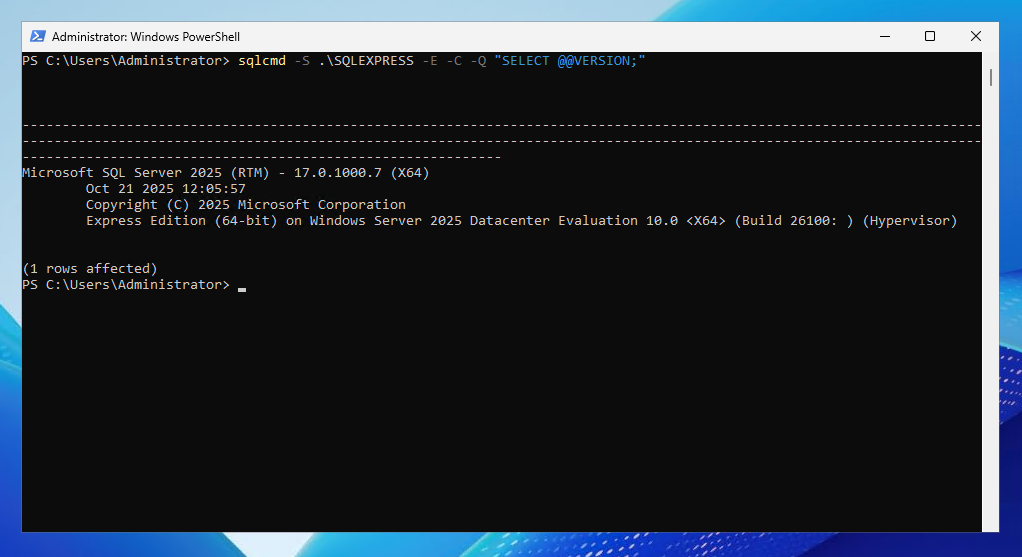
sqlcmd output showing SQL Server edition and version information for a SQLEXPRESS instance.
On this page

Don't have a Windows Server yet?

Deploy Windows Server 2019/2022/2025 in ~2 minutes. 6-month evaluation licence included.

Deploy Windows now

In short

For most SMB workloads on a Windows VPS, SQL Server Standard is the practical paid edition. SQL Server 2025 Standard is much stronger than older Standard releases, with higher compute and memory limits and more features that used to push customers toward Enterprise. Choose Enterprise only when you need advanced high availability, enterprise-scale analytics, specific Enterprise-only security features, or mission-critical scale that Standard cannot support.

Quick verdict

ScenarioBest fit
Dev/test database under Express limitsExpress
Small production app with modest database sizeStandard
QuickBooks, ERP backend, line-of-business app, or internal databaseStandard
SQL workload on a typical SMB Windows VPSStandard
24/7 mission-critical database with advanced HA requirementsEnterprise
Large multi-tenant SaaS with strict workload isolation and scale needsStandard may work in SQL Server 2025, but evaluate Enterprise
Need maximum scale, advanced analytics, or enterprise-only featuresEnterprise

For most Raff Windows VPS customers, the buying path is simple:

Start with Express only for small or test workloads. Move to Standard for real production. Choose Enterprise only when a specific Enterprise-only feature justifies the cost.

Why this decision matters

SQL Server edition choice affects licensing cost, CPU and memory limits, high availability options, security features, analytics features, operational flexibility, and future migration effort.

The mistake is choosing based on fear instead of workload.

Some teams overpay for Enterprise because they think it is required for production. Other teams stay on Express too long and hit limits at the worst possible time.

The right edition is the one that fits the workload, not the most expensive one.

What we checked on Raff

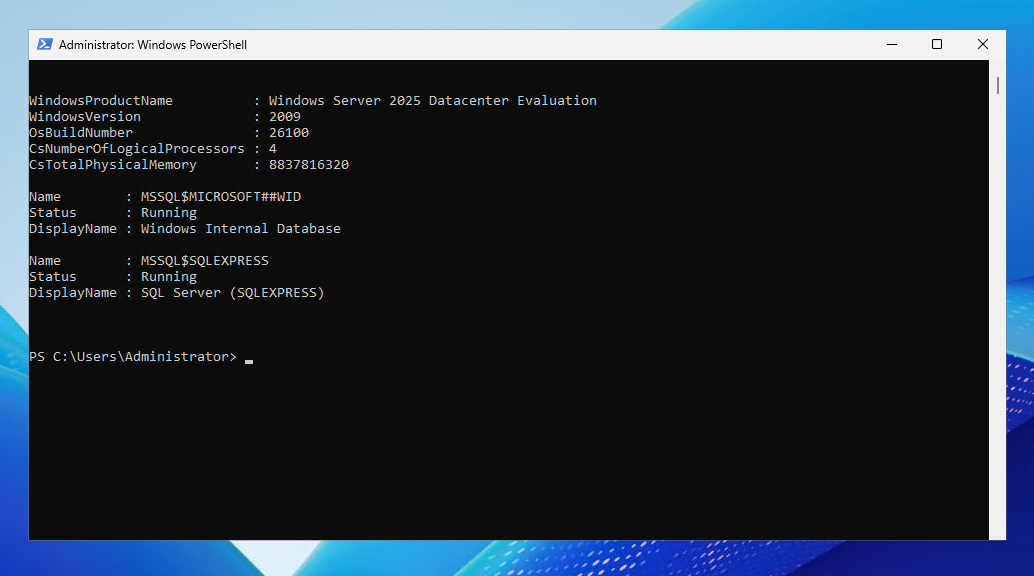
We verified the edition-check workflow on a Raff Windows VPS running Windows Server 2025 and SQL Server 2025 Express.

PowerShell output showing a Raff Windows VPS running Windows Server 2025 with SQL Server SQLEXPRESS service available.

Test environment:

ItemValue
ProviderRaff Technologies
OSWindows Server 2025 Datacenter Evaluation
SQL ServerSQL Server 2025 Express
InstanceSQLEXPRESS
Test date2026-05-26
TesterSerdar Tekin

We did not install Standard or Enterprise for this article. This is a decision guide based on Microsoft SQL Server edition documentation and Raff Windows VPS workload planning. The screenshots show how to check the edition and version on your own server.

How to check your SQL Server edition

Before deciding whether to upgrade, check what you already have.

For a SQL Server Express instance named SQLEXPRESS, run:

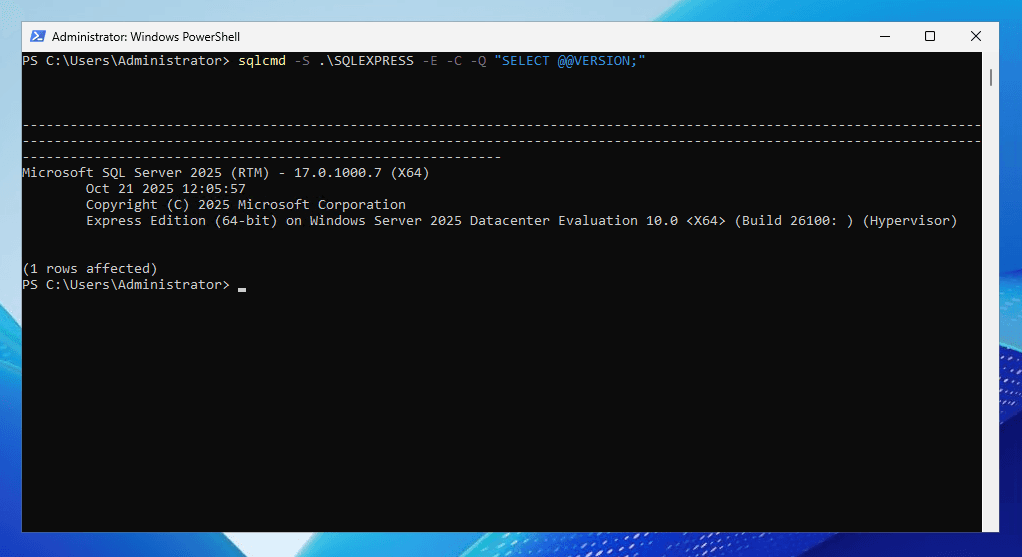
powershellsqlcmd -S .\SQLEXPRESS -E -C -Q "SELECT @@VERSION;"

You can also check edition directly:

powershellsqlcmd -S .\SQLEXPRESS -E -C -Q "SELECT SERVERPROPERTY('Edition') AS Edition;"

sqlcmd output showing SQL Server edition and version information for a SQLEXPRESS instance.

The result may show Express Edition, Standard Edition, Enterprise Edition, Developer Edition, or Evaluation Edition.

Do not assume the edition from the installer name or app documentation. Query the server.

Express vs Standard vs Enterprise

EditionBest forProduction use?
ExpressDev, test, small apps, lightweight databasesYes, but with strict limits
StandardMost SMB production workloadsYes
EnterpriseMission-critical scale, advanced HA, advanced featuresYes
DeveloperDevelopment and testing onlyNo
EvaluationTemporary trial/testingNo long-term production

For most SMBs, the real decision is not Standard vs Enterprise. It is usually:

Is Express still enough, or is it time for Standard?

Enterprise becomes relevant later, when a specific workload or feature requires it.

SQL Server Express: when free is enough

SQL Server Express is free and useful for development, demos, small internal tools, small databases, proof-of-concept projects, and lightweight apps.

Use Express when:

RequirementExpress fit
Small databaseGood
Low trafficGood
Dev/test environmentGood
No SQL Server Agent requirementGood
No large memory requirementGood
No advanced HA requirementGood

But Express has limits. It is not the best choice for growing production workloads.

Move away from Express when the database is approaching edition size limits, you need SQL Server Agent, backup automation becomes awkward, the workload needs more memory or CPU, the app becomes business-critical, downtime becomes expensive, or you need better operational tooling.

Express is not bad. It is just limited.

SQL Server Standard: the default paid choice for SMBs

SQL Server Standard is the right fit for most production workloads on a Windows VPS.

Use Standard for:

  • line-of-business applications
  • accounting or ERP backends
  • internal business databases
  • ASP.NET applications
  • small SaaS workloads
  • reporting databases
  • production SQL workloads that have outgrown Express
  • business software backends where SQL Server is required

SQL Server 2025 Standard is especially attractive because Standard gained stronger limits and features compared with older versions.

For many Raff customers, Standard gives the best balance:

NeedStandard fit
Production supportYes
Larger databases than ExpressYes
More CPU/memory than ExpressYes
SQL Server AgentYes
Backup jobs and maintenanceYes
Typical SMB app workloadsYes
Reasonable licensing cost vs EnterpriseYes

If you do not have a clear Enterprise-only requirement, Standard is usually where you should start.

SQL Server 2025 Standard got stronger

Older edition comparisons often pushed customers toward Enterprise because Standard had lower CPU and memory limits or lacked certain features.

SQL Server 2025 changes that decision for many workloads.

SQL Server 2025 Standard supports higher resource limits than previous Standard versions, including up to 32 cores and 256 GB buffer pool per instance according to Microsoft documentation and release guidance.

That matters because many SMB Windows VPS workloads do not come close to those limits.

Typical SMB SQL Server workloads are more likely to be constrained by poor queries, missing indexes, insufficient backup strategy, undersized VPS plan, mixed RDP/IIS/SQL workloads, disk layout, or maintenance gaps, not by SQL Server Standard edition limits.

When SQL Server Standard is enough

Choose Standard when:

  • you run one production database server
  • the workload fits within Standard limits
  • you need SQL Server Agent
  • you need scheduled backups and maintenance jobs
  • you need a serious production edition but not Enterprise-only features
  • you run business apps on a Windows VPS
  • you want a predictable monthly hosted licensing path
  • you do not need advanced Enterprise high availability

Examples:

WorkloadRecommended edition
Internal ERP databaseStandard
ASP.NET business app databaseStandard
Accounting system backendStandard
Small SaaS backendStandard
Reporting database for SMBStandard
Production database that outgrew ExpressStandard

For most Raff Windows VPS customers, Standard is the practical paid edition.

When Enterprise is worth paying for

Enterprise is not “more production.” Standard is already a production edition.

Enterprise is worth it when you need features or scale that Standard cannot provide.

Advanced high availability

Choose Enterprise when your high availability design requires advanced Always On Availability Groups, multiple readable secondaries, or more complex failover architecture.

If you only need a single production SQL Server on a VPS, Enterprise is usually overkill.

Enterprise-scale analytics or data platform features

Enterprise becomes more relevant when SQL Server is part of a larger analytics platform, data warehouse, or mission-critical reporting architecture.

If your database is mostly powering a single SMB app, Standard is usually enough.

Specific Enterprise-only security or compliance requirements

Some organizations require specific security capabilities because of contracts, audits, or internal policy.

If a compliance requirement explicitly depends on an Enterprise-only feature, the edition choice is no longer optional.

Maximum scale

Enterprise removes or raises limits that matter for very large workloads.

If your workload genuinely exceeds Standard’s CPU, memory, or feature limits, Enterprise may be the right choice.

But if your database is still running on a typical SMB VPS plan, Standard is probably not the bottleneck.

Resource Governor note for SQL Server 2025

Older SQL Server edition guides often list Resource Governor as a reason to buy Enterprise.

That needs updating for SQL Server 2025.

In SQL Server 2025, Microsoft expanded Standard edition capabilities, and Resource Governor is available in Standard according to Microsoft’s SQL Server 2025 documentation and release information.

So for SQL Server 2025, Resource Governor alone is no longer the same Enterprise-only trigger it was in many older edition comparisons.

If you are running SQL Server 2022 or older, verify the feature matrix for that version before making a licensing decision.

TDE and security feature note

Transparent Data Encryption, or TDE, used to be a more common Enterprise driver in older SQL Server versions.

For modern SQL Server versions, do not assume TDE automatically requires Enterprise. Check the feature matrix for your exact SQL Server version.

Security decisions should be based on SQL Server version, edition, encryption requirement, compliance requirement, key management plan, backup encryption needs, and application architecture.

Do not buy Enterprise only because someone remembers an old SQL Server 2016 feature limitation.

Cost thinking: list price vs hosted licensing

SQL Server licensing cost depends on edition, licensing model, number of cores, Server + CAL vs per-core licensing, Software Assurance, virtualization rights, provider/SPLA licensing, BYOL eligibility, and contract terms.

Microsoft list pricing and hosted provider monthly licensing are not the same thing.

For a Raff Windows VPS customer, the practical question is:

What is the monthly hosted licensing cost for the SQL Server edition I actually need?

Use Microsoft pricing only as a rough comparison between Standard and Enterprise. Ask Raff for the current hosted licensing quote before making a buying decision.

BYOL vs hosted licensing

There are two common paths:

PathMeaning
BYOLBring your own SQL Server license
Hosted/SPLA-style licensingPay monthly through the hosting provider, where available

BYOL can make sense if you already own eligible licenses and have the right license mobility or Software Assurance rights.

Hosted licensing can make sense if you want monthly flexibility, simpler onboarding, no large upfront license purchase, easier plan changes, and provider-assisted sizing.

Do not assume you can move any existing SQL Server license to a hosted VPS. Confirm licensing rights first.

Core counting on a VPS

For SQL Server licensing, virtual CPU count matters.

A simple practical rule:

text1 vCPU is generally treated as 1 virtual core for SQL Server licensing discussions.

So:

VPS sizeLicensing planning view
2 vCPU2 virtual cores
4 vCPU4 virtual cores
8 vCPU8 virtual cores
16 vCPU16 virtual cores

SQL Server licensing often has minimum core requirements and pack sizes. Always confirm final licensing with Raff or a Microsoft licensing specialist.

Decision tree

textIs this dev/test only?
|
|-- Yes
|   Use Developer Edition or Express, depending on use case.
|
|-- No
    Is the database small and non-critical?
    |
    |-- Yes
    |   Express may be enough.
    |
    |-- No
        Do you need production SQL Server features like SQL Server Agent,
        larger resource limits, and better operational headroom?
        |
        |-- Yes
        |   Use Standard.
        |
        |-- No
            Stay on Express until the workload outgrows it.

        Do you need Enterprise-only HA, scale, security, or analytics features?
        |
        |-- Yes
        |   Evaluate Enterprise.
        |
        |-- No
        |   Standard is likely the right paid edition.

Practical examples

Small internal tool

A small internal app with a small database and low traffic can start on Express.

Recommended edition:

textExpress

Upgrade later if it becomes production-critical or hits limits.

Production ERP backend

An ERP backend with business-critical data should not rely on Express limits.

Recommended edition:

textStandard

Enterprise is only needed if the architecture requires Enterprise-only capabilities.

ASP.NET business app

A normal ASP.NET app with SQL Server backend usually fits Standard.

Recommended edition:

textStandard

Focus first on backups, indexes, memory, and monitoring.

Multi-region, mission-critical database

A system requiring advanced high availability, readable secondaries, and strict uptime commitments may justify Enterprise.

Recommended edition:

textEnterprise

Only choose it when the architecture truly needs it.

SaaS platform with noisy tenants

If a multi-tenant workload needs advanced workload isolation, review SQL Server 2025 Standard capabilities first because some older Enterprise-only assumptions changed.

Recommended edition:

textStandard or Enterprise after feature review

Do not rely on old SQL Server 2022 comparisons for a SQL Server 2025 decision.

Common mistakes

Buying Enterprise because it sounds safer

Enterprise is not required just because a workload is production. Standard is a production edition.

Staying on Express for a serious production database

Express is useful, but limits can become painful. If the app matters to the business, plan the Standard upgrade before you hit a wall.

Using outdated feature comparisons

SQL Server 2025 changed the Standard vs Enterprise decision. Always check the feature matrix for the exact version.

Ignoring SQL Server Agent

SQL Server Express does not include SQL Server Agent. If you need native scheduled jobs, Standard is often the practical move.

Forgetting licensing rights for BYOL

Owning a license does not automatically mean you can move it to a hosted VPS. Confirm Software Assurance, license mobility, and provider rules.

Counting users but ignoring cores

SQL Server licensing can be core-based or Server + CAL depending on edition and scenario. VPS CPU sizing can affect cost.

Choosing edition before sizing the workload

First understand database size, users, queries, uptime needs, and backup requirements. Then choose edition.

What Raff recommends

For most Windows VPS SQL Server workloads, Raff recommends:

  1. Use Express only for dev/test or small low-risk databases.
  2. Use Standard for real SMB production workloads.
  3. Choose Enterprise only when a specific feature or scale requirement justifies it.
  4. Check SQL Server edition with SERVERPROPERTY.
  5. Size the VPS before finalizing SQL licensing.
  6. Confirm BYOL eligibility before bringing existing licenses.
  7. Ask Raff for current hosted licensing options when you want monthly flexibility.
  8. Pair the edition decision with a backup and memory plan.

The edition choice should support the workload, not inflate the bill.

Tested on

Checked on Raff Windows VPS, Windows Server 2025 Datacenter Evaluation, SQL Server 2025 Express SQLEXPRESS instance, 2026-05-26. We verified SQL Server service state and edition/version query commands. The Standard vs Enterprise comparison is based on Microsoft SQL Server 2025 edition documentation and Raff Windows VPS workload planning. Tester: Serdar Tekin

What's next

Sources

Published May 29, 2026 · Last updated May 29, 2026