
In short
A reliable SQL Server backup strategy starts with the business recovery target, not a fixed schedule copied from another server. Define how much data you can afford to lose (RPO) and how quickly the database must be restored (RTO), choose the correct recovery model, then combine full, differential, and transaction log backups only where they support those targets.
For databases in the FULL recovery model, transaction log backups are what make point-in-time recovery possible and keep the log backup chain moving. For SIMPLE recovery databases, use full and, where useful, differential backups because transaction log backups are not available.
The most important rule is operational:
A backup strategy is not proven until you have restored it successfully and measured how long recovery actually takes.
SQL Server backup strategy: quick answer
| Requirement | Practical starting approach |
|---|---|
| Dev/test database with low recovery requirements | Regular FULL backups may be enough |
| Small production database in SIMPLE recovery | FULL + optional DIFFERENTIAL backups |
| Production database needing point-in-time recovery | FULL + optional DIFFERENTIAL + frequent LOG backups |
| Very low RPO | Shorter transaction log backup interval |
| Large database with long full-backup windows | Use DIFFERENTIAL backups between FULL backups |
| Ad-hoc backup before a risky change | Consider a COPY_ONLY FULL backup |
| SQL Server Express | Automate with Windows Task Scheduler + sqlcmd |
| SQL Server Standard / Enterprise | SQL Server Agent is usually the cleaner scheduler |
| Business-critical workload | Keep an off-server copy and run restore drills |
Do not treat daily full + 4-hour differential + 15-minute logs as a universal best practice. Those intervals can be reasonable for some workloads, but the schedule should follow the RPO, RTO, database size, change rate, backup duration, and restore process.
What are full, differential, and transaction log backups?
SQL Server has several backup types, but these three cover the most common production strategy.
| Backup type | What it contains | Main role in recovery |
|---|---|---|
| FULL database backup | The complete database plus enough transaction log to recover the backed-up data consistently | Main restore baseline |
| DIFFERENTIAL backup | Extents changed since the most recent conventional full backup | Reduces the amount of data and number of log backups needed during restore |
| TRANSACTION LOG backup | Log records not yet backed up in the normal log backup sequence | Point-in-time recovery and shorter data-loss window in FULL/BULK_LOGGED recovery |
A differential backup always depends on its differential base, normally the most recent conventional full backup. A COPY_ONLY full backup does not become a new differential base.
RPO and RTO should determine the schedule
Before deciding how often backups run, define two recovery objectives.
| Term | Question it answers | Example |
|---|---|---|
| RPO — Recovery Point Objective | How much recent data can the business lose? | No more than 15 minutes |
| RTO — Recovery Time Objective | How quickly must the database be operational again? | Within 60 minutes |
If the RPO is 15 minutes, a transaction log backup every hour cannot meet that target. If the RTO is 30 minutes but restoring the latest full backup takes 45 minutes, the backup schedule is also not meeting the requirement.
That is why backup frequency and restore duration must be designed together.
How often should SQL Server backups run?
Use the table below as planning examples, not fixed rules.
| Workload | FULL | DIFFERENTIAL | LOG | Why |
|---|---|---|---|---|
| Dev/test or low-change internal database | Daily or according to need | Optional | Not applicable in SIMPLE | Low recovery requirement |
| Normal production database | Daily | Every 4–6 hours if useful | Every 15–30 minutes when RPO requires it | Balanced restore chain |
| Transaction-heavy business database | Daily | Every 2–4 hours if useful | Every 5–15 minutes when RPO requires it | Smaller potential data-loss window |
| Large database with expensive FULL backups | Based on maintenance window | More frequent differentials | Based on RPO | Avoid unnecessary full-backup overhead |
A 5-minute log interval is not automatically better than 15 minutes. Shorter intervals create more backup files and operational work. Choose the interval that satisfies the business RPO and that your monitoring, copy, retention, and restore processes can reliably manage.
What we tested on Raff
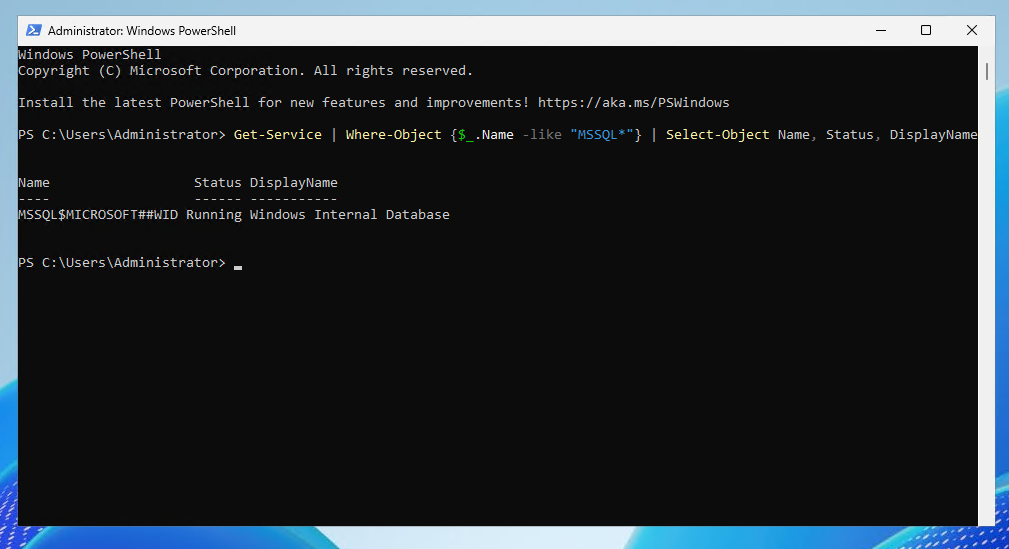
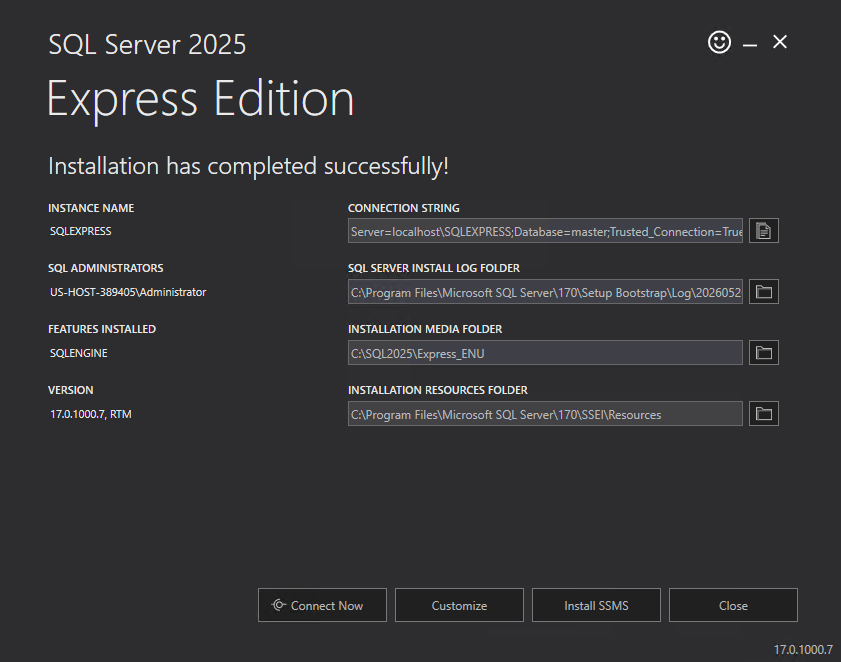
The original backup workflow was tested on a Raff Windows VPS running Windows Server 2025 Datacenter Evaluation and SQL Server 2025 Express.
| Item | Value |
|---|---|
| Provider | Raff Technologies |
| OS | Windows Server 2025 Datacenter Evaluation |
| SQL Server | SQL Server 2025 Express |
| Instance | SQLEXPRESS |
| SQL version | 17.0.1000.7, RTM |
| Test database | RaffBackupTest |
| Original test date | 2026-05-26 |
| Tester | Serdar Tekin |
The lab verified:
- SQL Server 2025 Express installation;
- SQL Server service state and
sqlcmdaccess; - sample database creation;
- recovery model inspection and FULL recovery configuration;
- backup directory permissions;
- FULL, DIFFERENTIAL, and LOG backup commands;
- backup files written to disk;
RESTORE VERIFYONLYagainst the full backup.
SQL Server Express was useful for validating the backup workflow, but it does not include SQL Server Agent and does not support backup compression. Microsoft currently documents backup compression support for Enterprise, Standard, and Developer editions.
This September update reworks the strategy, scheduling, recovery-model, COPY_ONLY, retention, and restore guidance. It does not claim a new end-to-end backup benchmark.
Recovery models determine what backup strategy is possible
Check the recovery model of every user database before designing the schedule:
SELECT name, recovery_model_desc
FROM sys.databases
ORDER BY name;
| Recovery model | Transaction log backups? | Typical use |
|---|---|---|
| SIMPLE | No | Dev/test, reporting, or workloads that do not require point-in-time recovery |
| FULL | Yes | Production workloads where point-in-time recovery and low RPO matter |
| BULK_LOGGED | Yes, with recovery limitations around minimally logged operations | Specialized bulk-load scenarios |
Do not choose FULL only because the database is important. Choose it because the recovery requirement needs a log backup chain and point-in-time recovery.
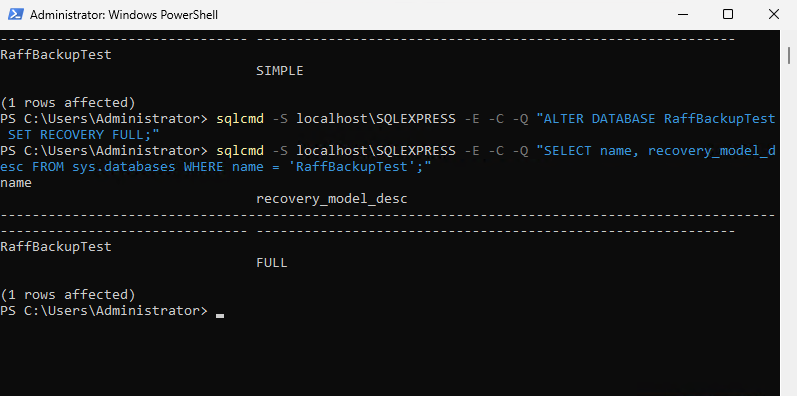
In the original Raff lab, we switched the test database to FULL recovery:
ALTER DATABASE RaffBackupTest SET RECOVERY FULL;
Then verified it:
SELECT name, recovery_model_desc
FROM sys.databases
WHERE name = 'RaffBackupTest';
After moving a database from SIMPLE to FULL, take a new full backup as a clean operational baseline before relying on the transaction log backup chain.
SQL Server Express vs Standard and Enterprise for backups
The core BACKUP DATABASE and BACKUP LOG commands work across SQL Server editions, subject to the recovery model and feature limits. The biggest operational difference for a small self-managed deployment is automation.
| Feature | Express | Standard | Enterprise |
|---|---|---|---|
| FULL database backup | Yes | Yes | Yes |
| DIFFERENTIAL backup | Yes | Yes | Yes |
| Transaction log backup in FULL/BULK_LOGGED | Yes | Yes | Yes |
| SQL Server Agent | No | Yes | Yes |
Windows Task Scheduler + sqlcmd | Yes | Yes | Yes |
| Backup compression | No | Yes | Yes |
Developer edition also supports backup compression, but it is for development/test licensing rather than production use.
For edition planning, see SQL Server Standard vs Enterprise.
Step 1 — Confirm the SQL Server instance and version
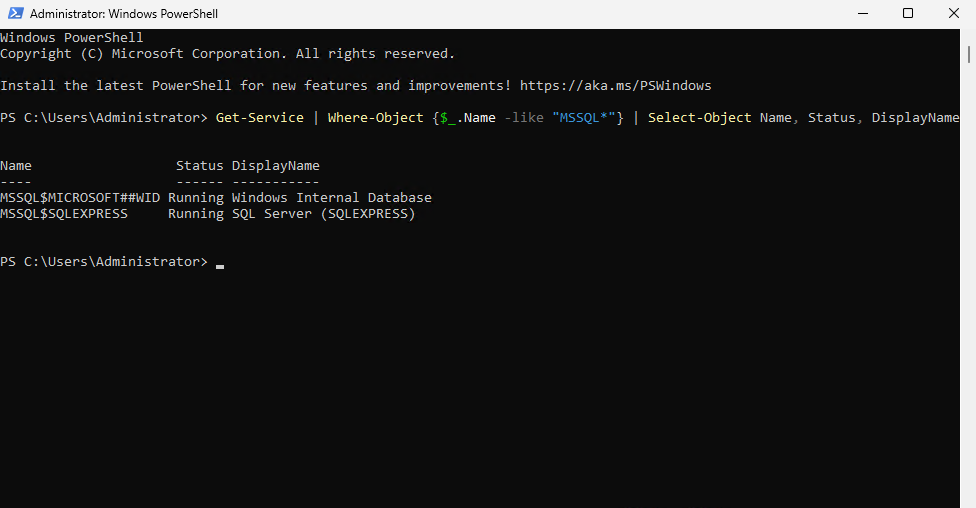
Run PowerShell as Administrator:
Get-Service | Where-Object {$_.Name -like "MSSQL*"} |
Select-Object Name, Status, DisplayName
Check the SQL Server version:
sqlcmd -S localhost\SQLEXPRESS -E -C -Q "SELECT @@VERSION AS SQLVersion;"
The -C option trusts the server certificate for this local sqlcmd connection. Do not use certificate-trust shortcuts as a substitute for a properly trusted production TLS configuration on remote connections.
Step 2 — Create a backup directory and permissions
Create a local backup folder:
New-Item -ItemType Directory -Path 'C:\SQL\Backups' -Force
Grant the SQL Server Express service account access:
icacls 'C:\SQL\Backups' /grant 'NT SERVICE\MSSQL$SQLEXPRESS:(OI)(CI)F'
Verify the directory:
Get-ChildItem C:\SQL
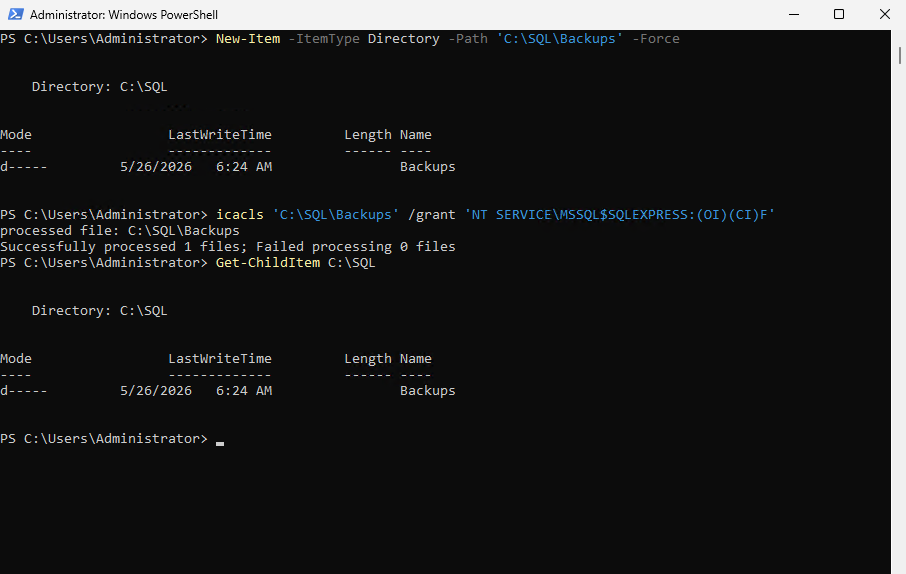
For production, the backup folder is a staging location, not the entire disaster-recovery plan. Keep a copy outside the live SQL Server VM and preferably across a separate security or failure boundary.
Step 3 — Take a full SQL Server backup
A full backup is the main restore baseline.
The Express lab used:
sqlcmd -S localhost\SQLEXPRESS -E -C -Q "BACKUP DATABASE [RaffBackupTest] TO DISK = N'C:\SQL\Backups\RaffBackupTest_FULL.bak' WITH INIT, CHECKSUM, STATS = 10;"
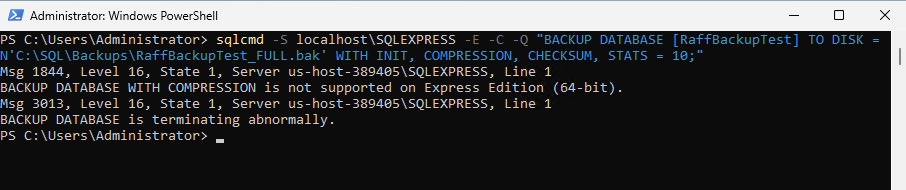
For an edition that supports backup compression:
BACKUP DATABASE [YourDB]
TO DISK = N'C:\SQL\Backups\YourDB_FULL.bak'
WITH INIT, COMPRESSION, CHECKSUM, STATS = 10;
SQL Server 2025 also supports the ZSTD backup-compression algorithm on editions that support backup compression. Do not add a compression algorithm just because it is newer; test backup time, restore time, CPU use, and storage savings for the actual workload.
Why use CHECKSUM?
WITH CHECKSUM asks SQL Server to perform additional verification during the backup operation and write backup checksums. It is a useful integrity control, but it does not replace a restore test.
Avoid one permanent backup file
The fixed file name above exists for a readable lab demonstration. In production, use unique timestamped names so each backup set has an independent file and your retention process can manage them safely.
Example:
YourDB_FULL_20260901_020000.bak
Step 4 — Take a differential SQL Server backup
A differential backup contains data changed since the differential base, normally the most recent conventional full backup.
sqlcmd -S localhost\SQLEXPRESS -E -C -Q "BACKUP DATABASE [RaffBackupTest] TO DISK = N'C:\SQL\Backups\RaffBackupTest_DIFF.bak' WITH DIFFERENTIAL, INIT, CHECKSUM, STATS = 10;"

Differentials become more valuable when the database is large enough that frequent full backups are expensive, but only a portion of the database changes between full backups.
A typical restore with a differential is:
Latest conventional FULL
→ latest DIFFERENTIAL based on that FULL
→ required LOG backups after the differential
→ RECOVERY
As more data changes after the full backup, differential backups usually become larger. Eventually a new full backup creates a new differential base.
Step 5 — Take a transaction log backup
Transaction log backups apply only to databases using the FULL or BULK_LOGGED recovery models.
sqlcmd -S localhost\SQLEXPRESS -E -C -Q "BACKUP LOG [RaffBackupTest] TO DISK = N'C:\SQL\Backups\RaffBackupTest_LOG.trn' WITH INIT, CHECKSUM, STATS = 10;"
After a valid log backup chain exists, regular log backups reduce the amount of work that can be lost and allow log truncation to progress when no other condition is preventing truncation.
A database in FULL recovery with no regular log-backup process can experience continuous transaction-log growth. If the log is growing, check the actual log-reuse wait reason rather than assuming backups are the only possible cause.
Use:
SELECT name, recovery_model_desc, log_reuse_wait_desc
FROM sys.databases
WHERE name = 'RaffBackupTest';
This distinguishes LOG_BACKUP from other causes such as active transactions, replication, availability features, or other log-reuse waits.
Step 6 — Confirm backup files and backup history
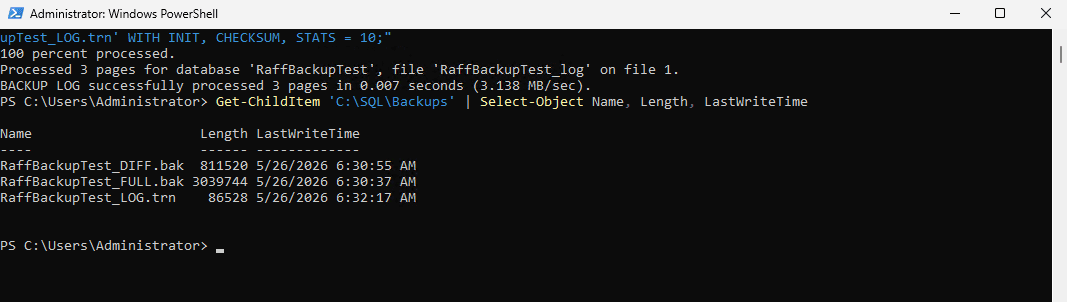
Check the files on disk:
Get-ChildItem 'C:\SQL\Backups' |
Select-Object Name, Length, LastWriteTime
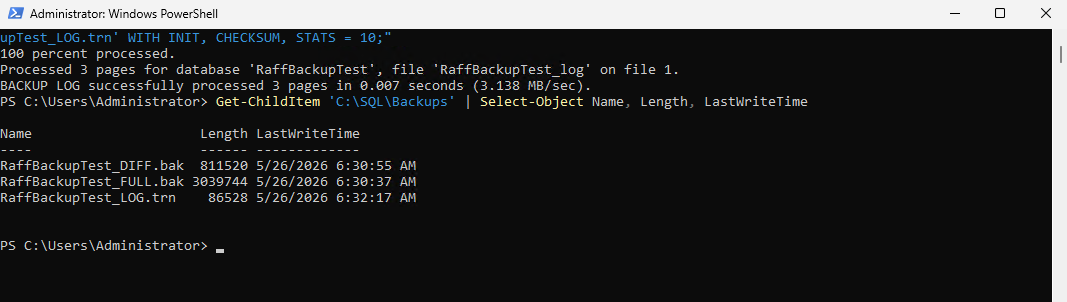
Then inspect SQL Server backup history from msdb:
SELECT TOP (50)
    database_name,
    CASE type
        WHEN 'D' THEN 'Full'
        WHEN 'I' THEN 'Differential'
        WHEN 'L' THEN 'Transaction Log'
        ELSE type
    END AS backup_type,
    backup_start_date,
    backup_finish_date,
    backup_size,
    compressed_backup_size,
    is_copy_only
FROM msdb.dbo.backupset
WHERE database_name = 'RaffBackupTest'
ORDER BY backup_finish_date DESC;
File existence proves that something was written. Backup history helps confirm what SQL Server believes was completed, when it finished, and whether it was a full, differential, log, or copy-only backup.
Step 7 — Verify backups, then perform real restore tests
Run RESTORE VERIFYONLY with checksum against the full backup:
sqlcmd -S localhost\SQLEXPRESS -E -C -Q "RESTORE VERIFYONLY FROM DISK = N'C:\SQL\Backups\RaffBackupTest_FULL.bak' WITH CHECKSUM;"

RESTORE VERIFYONLY is useful because SQL Server reads the backup and verifies that the backup set is complete and readable. It is not the same as restoring the database and validating the application.
A production restore drill should prove:
- the required backup files are available;
- the restore sequence is understood;
- credentials and permissions work;
- the database comes online;
DBCC CHECKDBcan complete successfully where appropriate;- the application can connect to the restored database;
- the measured restore time fits the RTO.
COPY_ONLY backups: use them for ad-hoc full backups
Sometimes you need a one-off full backup before a deployment, migration, or risky maintenance operation but do not want to alter the normal differential backup base.
Use COPY_ONLY:
BACKUP DATABASE [YourDB]
TO DISK = N'C:\SQL\Backups\YourDB_COPY_ONLY.bak'
WITH COPY_ONLY, CHECKSUM, STATS = 10;
A copy-only full backup:
- can be restored like a normal full backup;
- does not become the differential base;
- does not reset the differential bitmap for later scheduled differential backups.
That makes it a good option for ad-hoc administrative backups that should not interfere with the scheduled backup strategy.
Do not combine COPY_ONLY and DIFFERENTIAL expecting a special copy-only differential backup. COPY_ONLY does not apply meaningfully to differential backups.
SQL Server backup compression in 2026
Microsoft currently documents backup compression support for SQL Server Enterprise, Standard, and Developer editions. SQL Server Express does not support creating compressed backups, although editions can restore compatible compressed backups according to Microsoft support rules.
SQL Server 2025 adds ZSTD as a backup-compression algorithm alongside MS_XPRESS.
For a production database, compression should be a measured choice:
| Benefit | Tradeoff to monitor |
|---|---|
| Smaller backup files | Additional CPU use |
| Less backup I/O in many workloads | Compression performance depends on data and workload |
| Faster transfer to off-server storage | Restore behavior should also be tested |
If backup windows are already CPU-constrained, test before changing the default across every database.
Automating SQL Server Express backups
SQL Server Express does not include SQL Server Agent, so Windows Task Scheduler is a practical option.
A scheduled PowerShell or command task can call sqlcmd, for example:
sqlcmd -S localhost\SQLEXPRESS -E -C -Q "BACKUP DATABASE [YourDB] TO DISK = N'C:\SQL\Backups\YourDB_FULL.bak' WITH INIT, CHECKSUM, STATS = 10;"
A production Express setup should automate more than the backup command itself. Include:
- unique timestamped filenames;
- error handling and exit-code checks;
- off-server copy;
- retention cleanup;
- disk-space monitoring;
- alerting when a scheduled task fails;
- periodic restore tests.
A task that silently fails every night is not a backup system.
Automating Standard and Enterprise with SQL Server Agent
For Standard or Enterprise, SQL Server Agent usually provides a cleaner database-native scheduler.
Create separate jobs or job steps for the required backup types and include failure notifications.
At minimum monitor:
- last successful backup time;
- backup duration;
- output file size;
- free disk space;
- failed SQL Agent jobs;
- failed off-server copies;
- age of the newest full and log backup;
- restore-test results.
Automation should make backup failure visible, not merely make backups unattended.
Off-server backups need a separate failure boundary
A .bak file on the same VM protects against some database-level failures, but it does not protect well against loss of the VM, compromised administrator credentials, ransomware, or accidental deletion of the whole server.
Use a second location such as:
- S3-compatible object storage;
- another backup server;
- a separate storage account or project;
- another region when the business continuity design requires it.
Where the storage platform supports it, stronger designs can also use versioning, retention controls, or immutable/object-lock style protection so a compromised server account cannot immediately delete every recovery point.
Keep backup credentials separate from normal application credentials and grant only the permissions the copy process actually needs.
Retention should follow recovery and compliance needs
Do not keep every backup forever, and do not copy an arbitrary seven-day rule without understanding the restore requirement.
A retention design should answer:
- How far back might the business need to recover?
- Are month-end or year-end recovery points required?
- How much backup storage is available?
- What does compliance require?
- How long is the complete restore chain valid?
- When can older full, differential, and log backups be deleted without breaking a required recovery path?
Example only:
| Recovery tier | Example retention |
|---|---|
| Recent operational backups | 7–14 days |
| Daily/weekly recovery points | 30–90 days |
| Monthly archival points | Based on business/compliance requirement |
Make cleanup chain-aware. Do not delete the full backup or required log files while keeping a differential or later log backup that depends on them for a recovery point you still claim to support.
Restore sequence for FULL recovery model
A common restore path is:
- Restore the required FULL backup with
NORECOVERY. - Restore the latest applicable DIFFERENTIAL backup with
NORECOVERY, if used. - Restore the required transaction log backups in sequence with
NORECOVERY. - Recover the database at the final desired point.
Example lab-style sequence:
RESTORE DATABASE [YourDB_RestoreTest]
FROM DISK = 'D:\BackupCopy\YourDB_FULL.bak'
WITH NORECOVERY, REPLACE;

RESTORE DATABASE [YourDB_RestoreTest]
FROM DISK = 'D:\BackupCopy\YourDB_DIFF.bak'
WITH NORECOVERY;

RESTORE LOG [YourDB_RestoreTest]
FROM DISK = 'D:\BackupCopy\YourDB_LOG_001.trn'
WITH NORECOVERY;

RESTORE DATABASE [YourDB_RestoreTest] WITH RECOVERY;
For a point-in-time restore, use the correct transaction log sequence and STOPAT on the appropriate final log restore instead of simply recovering the latest possible point.
After the test restore:
DBCC CHECKDB('YourDB_RestoreTest') WITH NO_INFOMSGS;
Then test the real application path. Database consistency alone does not prove the application can actually recover.
Common SQL Server backup mistakes
Using FULL recovery but not taking transaction log backups
If point-in-time recovery is required, configure and monitor the log backup schedule. Otherwise the log can continue growing when LOG_BACKUP is preventing log reuse.
Keeping every backup on the SQL Server VM
A local backup is useful for fast recovery, but it should not be the only copy of business-critical data.
Assuming a successful job means the database is recoverable
A successful BACKUP command is only one part of recovery. Run actual restore drills.
Resetting the differential base with an ad-hoc full backup
Use a COPY_ONLY full backup when you need a one-off full backup without changing the normal differential base.
Overwriting the same backup file forever
Use timestamped files and controlled retention so multiple recovery points survive.
Ignoring backup duration
If the full backup takes longer than the maintenance window or the restore takes longer than the RTO, redesign the strategy instead of only changing the schedule.
Deleting backups without understanding dependencies
Differential and log backups depend on earlier backups. Retention cleanup must preserve the complete restore chain for every recovery point you promise.
No alerts for failed backups or full disks
Backups often fail because storage fills, permissions change, credentials expire, or scheduled jobs stop running. Monitor the process, not just the configuration.
A practical production checklist
Before calling a SQL Server database protected, verify:
RPO defined
→ RTO defined
→ recovery model chosen
→ full backup scheduled
→ differential schedule chosen if useful
→ log backups scheduled if FULL/BULK_LOGGED
→ unique backup files
→ off-server copy
→ retention policy
→ backup failure alerts
→ disk-space monitoring
→ RESTORE VERIFYONLY checks
→ real restore drill
→ restore time measured
→ application recovery validated