
The best VPS hosting for developers depends on the workflow, not the lowest advertised server price. A developer VPS should give you enough control to build, test, deploy, automate, and troubleshoot applications without forcing every project into a large cloud-platform architecture.
For most developers and small DevOps teams, the buying decision comes down to five things: root access, predictable compute, storage performance, network cost, and how easily the server fits your deployment workflow.
This guide compares five current options: Raff Technologies, DigitalOcean, Hetzner Cloud, Vultr, and Amazon Lightsail. Raff Technologies publishes this guide and operates one of the providers in the comparison, so treat the Raff sections as first-party product information rather than independent third-party review. The goal is to make the trade-offs explicit enough that you can rule Raff in or out quickly.
For broader provider research beyond developer workloads, use Best VPS Hosting Providers.
Best VPS hosting for developers: quick shortlist
| Provider | Shortlist when | Verify carefully |
|---|---|---|
| Raff Technologies | You want simple Linux/Windows cloud VMs, unmetered bandwidth, NVMe storage, private networking, API/Terraform, and direct human infrastructure support | Current public region coverage is narrower than larger providers |
| DigitalOcean | You want a mature developer cloud, Linux Droplets, broad documentation, APIs, VPC, volumes, load balancers, and a large developer ecosystem | Some newer Droplet configurations use usage-based pricing without a monthly cap; bandwidth and add-on costs should be modeled |
| Hetzner Cloud | You care about price/performance, shared or dedicated CPU choices, several Europe/US/Singapore locations, and straightforward cloud primitives | Public IPv4 is separate; attached Volumes are not included in server backups/snapshots |
| Vultr | You want many location choices, API/CLI/Terraform workflows, and both shared and dedicated/optimized compute options | Product families and performance characteristics vary; match the workload to the right compute type |
| Amazon Lightsail | You want a simpler AWS entry point with bundled compute/storage/transfer and optional Windows plans | It is simpler than EC2 but still sits inside AWS; transfer allowances and add-on services need to be checked |
There is no universal winner. A provider can be excellent and still be wrong for your application because of region, operating system, billing model, CPU behavior, support, or network requirements.
What developers should compare before choosing a VPS
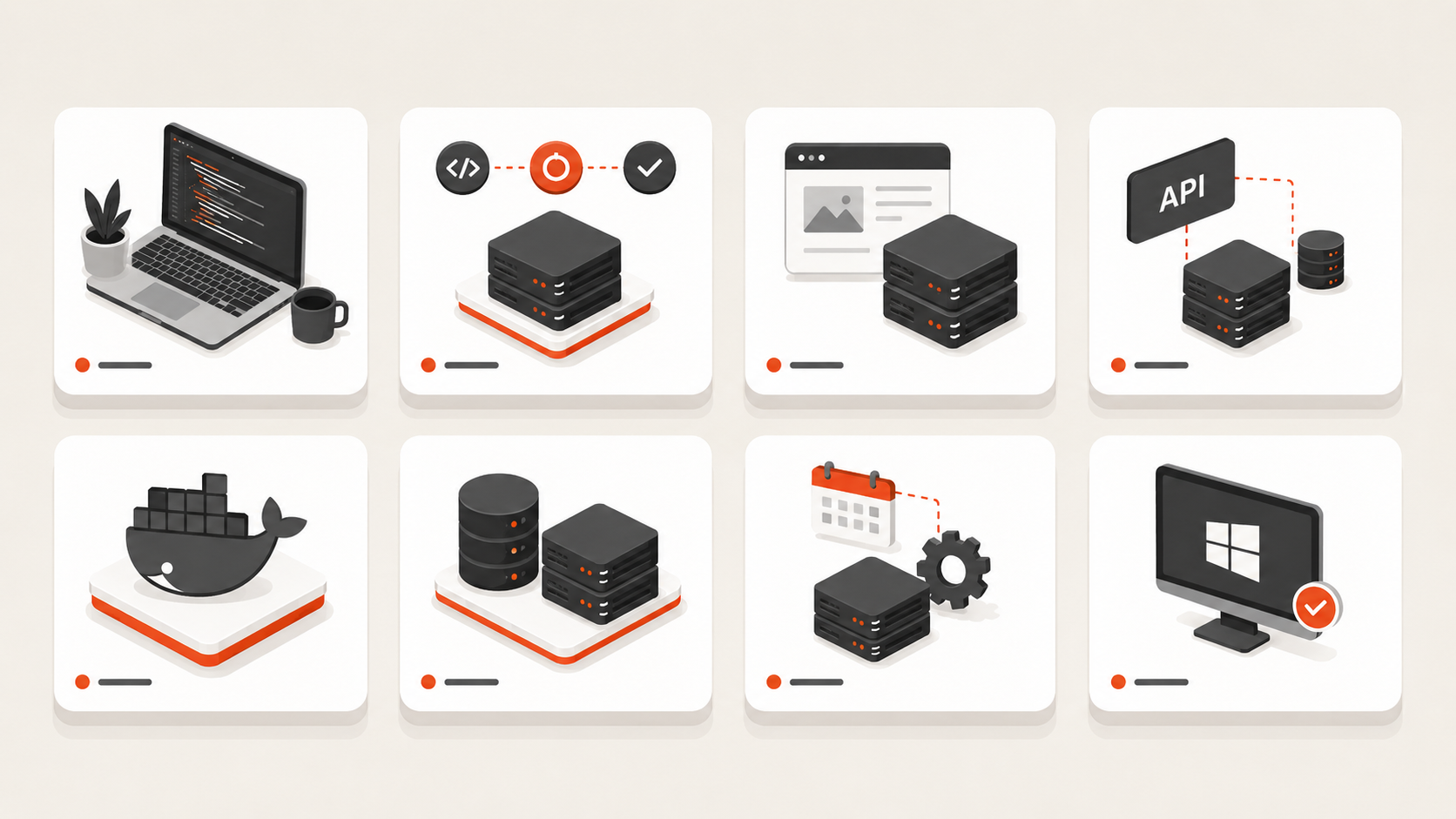
A useful VPS evaluation starts with the workload and works outward.
| Decision area | What to verify | Why developers care |
|---|---|---|
| Access | Root/admin, SSH keys, console access | You can actually control and recover the server |
| CPU | Shared vs dedicated, generation, resize path | Builds, tests, workers, databases, and CI can expose CPU contention |
| RAM | Available sizes and upgrade path | Containers and databases often hit memory limits before CPU |
| Storage | SSD/NVMe, local vs network-backed, expandable volumes | Builds, Docker layers, package installs, logs, and databases are I/O-sensitive |
| Bandwidth | Included transfer, egress charges, unmetered policy | APIs, CI artifacts, backups, images, and downloads can make network cost material |
| OS support | Linux distributions, Windows, custom images/ISO | Application compatibility and administration model |
| Networking | IPv4/IPv6, firewall, private networking | Public edge vs private backend design |
| Recovery | Snapshots, backups, restore workflow | Important environments should be recoverable, not just backed up |
| Automation | API, CLI, Terraform, cloud-init | Repeatable infrastructure reduces manual drift |
| Region | Proximity to users and dependencies | Latency, compliance, and architecture fit |
| Support | Scope, availability, escalation path | Infrastructure issues should not become application debugging sessions |
| Billing | Full monthly architecture cost | A cheap VM can become expensive after storage, IPs, transfer, or backup add-ons |
The best developer VPS is usually the provider that meets the hard requirements first and then minimizes operational friction.
1. Raff Technologies for developers
Raff Technologies is a smaller U.S.-based cloud provider focused on straightforward cloud VMs and adjacent infrastructure services.
For developers, Raff is strongest when the workload needs:
- full root or administrator access;
- Linux or Windows VMs;
- AMD EPYC compute;
- NVMe-backed storage;
- unmetered VM bandwidth;
- private networking;
- snapshots/backups;
- API and Terraform automation;
- a simpler monthly VM model;
- direct access to human infrastructure support.
Typical fits include:
- APIs and web backends;
- Docker Compose workloads;
- staging environments;
- self-hosted CI/CD runners;
- n8n and automation;
- internal tools;
- client environments;
- Windows RDP and IIS workloads;
- small SaaS applications.
Where Raff is commercially different
Raff does not try to match hyperscalers on service count. The trade is narrower platform scope in exchange for a more VM-centered experience.
For developers, the clearest current differentiators are:
- unmetered bandwidth on VM plans;
- monthly VM pricing rather than hourly billing;
- Linux and Windows VM paths;
- private networking and standard cloud primitives;
- API/Terraform access;
- 24/7 human infrastructure support;
- a published 99.9% uptime SLA.
Use the live Raff VM and pricing pages for current configurations rather than relying on static numbers in this guide.
When Raff is not the right choice
Do not choose Raff when the workload depends on capabilities Raff does not currently match well, such as:
- broad multi-continent VM region coverage;
- a very large specialized instance catalog;
- tight dependency on AWS/Azure/GCP-native services;
- procurement or compliance requirements tied to another cloud;
- architecture that requires a hyperscaler-sized managed-service ecosystem.
That limitation matters. A developer VPS should simplify the workload, not force you to reconstruct services you already depend on elsewhere.
2. DigitalOcean Droplets
DigitalOcean is one of the most established developer-focused cloud platforms.
Its official documentation describes Droplets as Linux-based virtual machines that can run standalone or as part of a broader cloud architecture. DigitalOcean supports several CPU families, including shared and dedicated CPU options, and integrates Droplets with VPC networking, volumes, cloud firewalls, load balancers, reserved IPs, and automation tooling.
Shortlist DigitalOcean when you value:
- a mature developer-oriented control plane;
- extensive documentation;
- Linux VM workflows;
- API and infrastructure automation;
- multiple Droplet families;
- broader cloud integrations without moving to a hyperscaler.
DigitalOcean also changed parts of its VM billing model in 2026. Its current documentation states that Droplets are billed per second, while newer v5 configurations do not necessarily carry the same monthly usage cap as bundled plans. That makes it important to verify the exact configuration and billing model before assuming a fixed monthly ceiling.
DigitalOcean is a particularly strong fit for teams already familiar with its developer ecosystem and tooling.
3. Hetzner Cloud
Hetzner Cloud is attractive to developers who prioritize compute value and are comfortable operating their own servers.
Hetzner currently offers both shared-resource and dedicated-resource cloud servers. Its documentation distinguishes shared plans, which can burst above a baseline, from dedicated plans that receive exclusive CPU resources for more predictable CPU-intensive workloads.
Current Hetzner Cloud locations include sites in Germany, Finland, the United States, and Singapore.
Shortlist Hetzner when you need:
- strong price/performance;
- shared or dedicated CPU choices;
- Linux cloud servers;
- European, U.S., or Singapore deployment options;
- networks, firewalls, volumes, backups, snapshots, and load balancers;
- straightforward infrastructure without hyperscaler complexity.
Two implementation details are worth noticing before buying:
- Hetzner Cloud servers do not include a public IP by default; Primary IPs are separate resources.
- Hetzner's server backups and snapshots do not include attached Volumes, so persistent-volume recovery needs its own plan.
Those are not reasons to avoid Hetzner. They are exactly the kind of operational detail a developer should verify before migrating a production workload.
4. Vultr Cloud Compute
Vultr offers developer-friendly VM infrastructure across a broad location footprint and several compute families.
Its current documentation positions standard Cloud Compute as shared-CPU virtual machines suitable for workloads such as development/test environments, lower-traffic sites, and small databases. Vultr also offers optimized and dedicated compute paths for workloads that need more consistent CPU behavior.
Vultr supports provisioning through the console, API, CLI, and Terraform.
Shortlist Vultr when you value:
- many deployment locations;
- simple cloud VM provisioning;
- API/CLI/Terraform workflows;
- a choice between shared and more performance-oriented compute families;
- standard cloud infrastructure features around the VM.
The main buying discipline with Vultr is to compare the specific compute family, not only the provider name. A bursty development environment and a sustained production workload may belong on different instance types.
5. Amazon Lightsail
Amazon Lightsail is AWS's simpler virtual-server product and is often a better comparison to VPS hosting than raw EC2.
Lightsail bundles compute, memory, SSD storage, and a data-transfer allowance into plans. AWS currently offers both Linux/Unix and Windows bundles, plus block storage, snapshots, load balancers, and related services.
Shortlist Lightsail when:
- you want a simple AWS-managed VPS-style experience;
- you may later use more AWS services;
- bundled transfer and storage are easier for your team than assembling EC2 components;
- Linux or Windows plans are required.
Lightsail is especially useful for developers who want the AWS account/ecosystem but do not need the complexity of building directly on EC2, VPC, EBS, and other lower-level AWS services from day one.
The trade-off is that transfer allowances and add-on costs still need to be modeled, and a workload that grows deeply into AWS may eventually outgrow the simpler Lightsail abstraction.
Which VPS is best for each developer workload?
Provider fit changes by workload.
| Workload | What matters most | Providers worth shortlisting |
|---|---|---|
| Learning / sandbox | Low cost, root access, easy rebuild | Raff, DigitalOcean, Hetzner, Vultr, Lightsail |
| Small API/backend | RAM, predictable CPU, network cost | Raff, DigitalOcean, Hetzner, Vultr |
| Docker Compose | RAM, NVMe/SSD, private networking, backups | Raff, DigitalOcean, Hetzner, Vultr |
| CI/CD runner | CPU consistency, fast disk, transfer | Raff, DigitalOcean dedicated plans, Hetzner dedicated, Vultr optimized |
| Staging environment | Low friction, snapshots, easy rebuild | Raff, DigitalOcean, Hetzner, Vultr, Lightsail |
| Windows dev/test | Windows availability, licensing, RAM | Raff, Lightsail, or another provider with a verified Windows path |
| Bandwidth-heavy app | Egress model | Raff if its region/workload fit; otherwise compare transfer allowances carefully |
| Multi-region app | Region breadth | DigitalOcean, Hetzner, Vultr, Lightsail/AWS depending required geography |
This is intentionally not a one-to-five ranking. The same provider can be excellent for one developer workload and wrong for another.
How much CPU and RAM does a developer VPS need?
For many developer workloads, 2 vCPU and 2–4 GB RAM is a practical starting range. That is only a starting point, not a universal recommendation.
| Developer workload | Practical starting point | Main resource to watch |
|---|---|---|
| Learning server / CLI sandbox | 1–2 vCPU / 1–2 GB | RAM |
| Small API or backend | 2 vCPU / 2–4 GB | RAM and CPU |
| Staging environment | 2 vCPU / 2–4 GB | Production parity |
| Docker Compose stack | 2–4 vCPU / 4–8 GB | RAM and disk |
| CI/CD runner | 4+ vCPU / 4–8+ GB | CPU and storage I/O |
| Small development database | 2–4 vCPU / 4–8 GB | RAM and storage latency |
| Windows dev/test server | 2–4 vCPU / 4–8+ GB | RAM |
Watch actual metrics instead of buying years of theoretical headroom.
Signs the VM is too small include:
- swap pressure;
- OOM-killed processes;
- containers restarting under normal load;
- CI jobs slowing during parallel builds;
- database cache pressure;
- consistently high CPU steal or saturation;
- disk queue growth.
For deeper sizing, use Choosing the Right VM Size and How Much RAM Do I Need for a VPS?.
Linux VPS is the default for most developer workloads
Linux fits most web-native engineering stacks:
- Node.js;
- Python;
- PHP/Laravel;
- Go;
- Java;
- Ruby;
- PostgreSQL/MySQL/MariaDB;
- Redis/Valkey;
- Docker and Docker Compose;
- Nginx and Caddy;
- GitHub Actions runners;
- self-hosted tools;
- APIs, webhooks, and workers.
Choose Linux unless the application has a Windows-specific requirement.
When developers should choose Windows VPS
Windows Server is the better fit when the workload depends on:
- RDP administration;
- IIS;
- .NET Framework;
- Windows-only applications;
- Microsoft SQL Server workflows;
- Active Directory testing;
- Windows business software.
Do not choose Windows Server simply because developers use Windows laptops. Choose the server OS from application requirements.
For Raff-specific Windows guidance, use the Windows Server Hub and Windows VM.
Docker on a VPS is enough for many developer teams
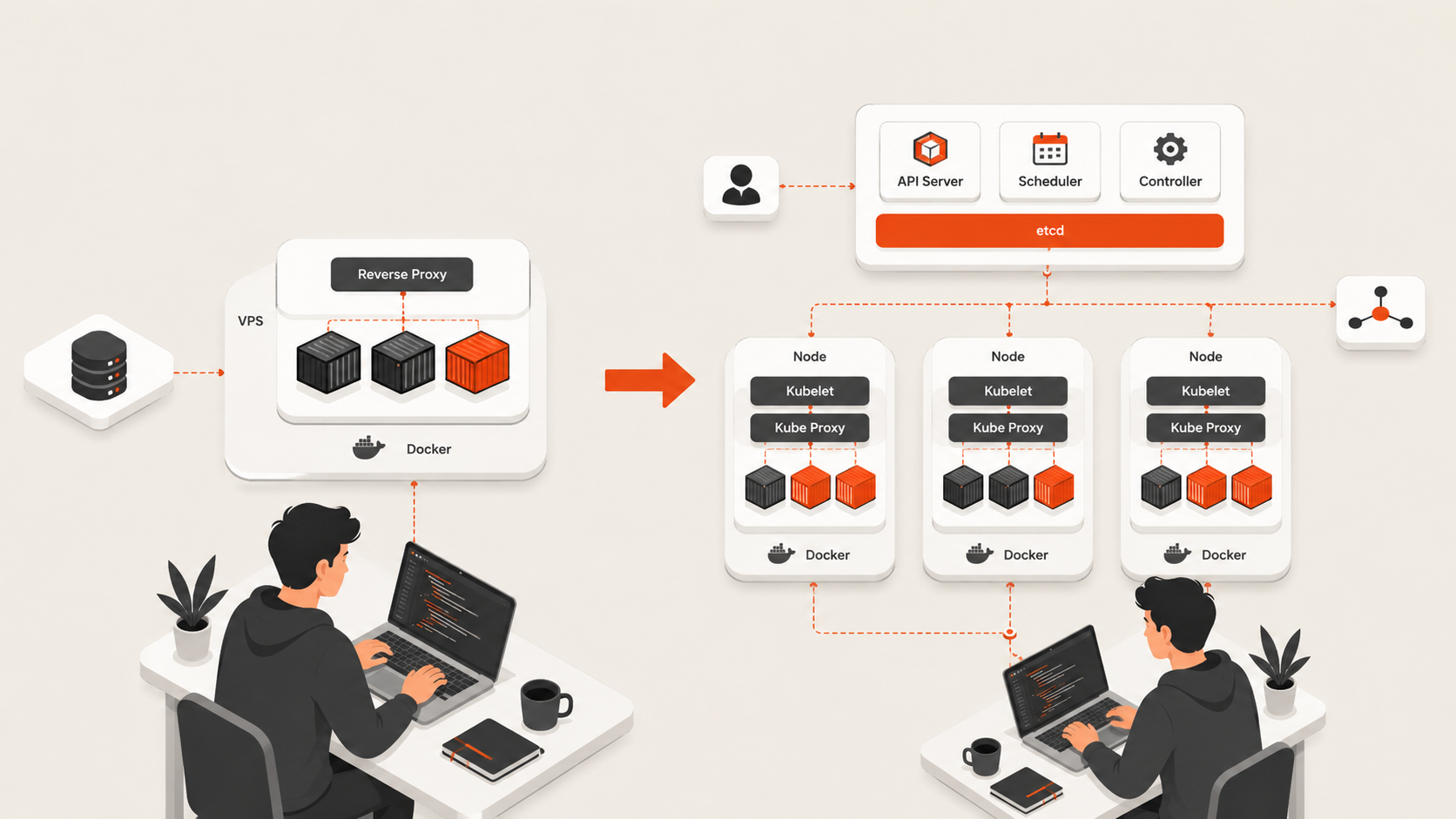
Containers do not automatically require Kubernetes.
One appropriately sized VPS can run:
Reverse proxy
Application
Worker
Redis/Valkey
Small database or managed database client
Monitoring agent
That can be enough for:
- prototypes;
- MVPs;
- staging;
- internal tools;
- small SaaS apps;
- automation;
- self-hosted developer tools.
Kubernetes starts making more sense when multi-node scheduling, service discovery, self-healing, independent scaling, and standardized cluster operations solve problems you already have.
Use Kubernetes vs Docker Compose for Small Teams before adding orchestration only because the app uses containers.
VPS hosting for CI/CD runners
Self-hosted runners can expose weak VM choices quickly.
Build workloads stress:
- CPU during compilation and tests;
- disk during dependency restore and Docker builds;
- RAM during parallel jobs;
- network transfer during checkout and artifact upload.
For short-lived or bursty jobs, a provider with granular usage billing may be attractive. For a runner that stays online continuously, predictable monthly economics and unmetered/included transfer may matter more.
The correct metric is not plan price alone. Measure workflow completion time and total monthly cost.
For GitHub Actions specifically, use GitHub Actions Self-Hosted Runners vs GitHub-Hosted.
Development and staging environments
A persistent VPS works well when local development is not enough or the environment must remain reachable by teammates, webhooks, customers, or external integrations.
Common cases:
- remote development environments;
- QA/staging servers;
- integration-test endpoints;
- demo systems;
- shared development databases;
- preview environments that require a full OS.
Staging does not need production capacity, but it should remain similar enough in runtime, reverse proxy, database engine, networking, and deployment method to reveal real release problems.
Use Dev, Staging, and Production Environments when environment parity is the main decision.
Storage and bandwidth often matter more than the entry price
Developers create I/O and network patterns that do not resemble a static website.
Storage-heavy examples:
- Docker layers;
- package caches;
- repositories;
- CI artifacts;
- database files;
- logs;
- temporary build output.
Network-heavy examples:
- Docker image pulls;
- package downloads;
- artifact transfer;
- public APIs;
- backups and restores;
- software distribution.
That is why a $5 VM and a $15 VM are not automatically comparable.
Normalize:
- CPU model/allocation;
- RAM;
- disk type and size;
- bandwidth policy;
- public IP cost;
- backups;
- region;
- support;
- billing model.
For the network-cost decision, use VPS Bandwidth and Transfer Costs Explained.
Developer trust checklist before paying a provider
A commercial VPS page can look excellent while hiding the details that matter after deployment.
Before buying, verify these points in official documentation or the provider's live product page:
- Is CPU shared or dedicated?
- Does the provider state the processor generation/family?
- Is disk local or network-backed?
- What exactly is included in backup scope?
- Are attached volumes included in backups?
- What does public IPv4 cost?
- Is outbound transfer metered?
- What happens after the included transfer allowance?
- Can the VM be resized without rebuilding?
- Is downgrade supported?
- Which regions actually offer the selected plan?
- What is the provider's support boundary?
- Is the guest OS self-managed?
- What SLA is published?
- Is an API/Terraform provider available?
- How do you export your data if you leave?
This checklist builds more trust than a generic “best performance” claim because it exposes the operational questions that become important after purchase.
When a VPS is no longer the right architecture
A VPS is useful because it is simple. Do not stretch that simplicity past its limit.
Consider moving beyond one VPS when you need:
- multi-node high availability;
- independent scaling of several services;
- managed database failover;
- global traffic distribution;
- strict failure-domain separation;
- large GPU/HPC workloads;
- autoscaling fleets;
- platform-level compliance/governance requirements.
At that point, managed databases, load balancers, multiple VMs, Kubernetes, or a broader cloud platform may be justified.
Developer VPS buying checklist
Before choosing a provider, confirm:
- Required region exists.
- Root/admin access is included.
- Required OS is supported.
- CPU model/allocation fits sustained workload needs.
- RAM is sufficient for normal peak usage.
- Storage performance and capacity fit builds and persistent data.
- Bandwidth/egress policy is understood.
- Public/private networking meets the architecture.
- Backup scope and restore workflow are clear.
- VM resize path is documented.
- API/Terraform exists if repeatability matters.
- Support scope is understood.
- Exit/migration path is practical.
- Complete monthly cost—not only entry price—fits the project.
Which developer VPS should you choose?
Choose Raff Technologies when your workload fits the current Raff region and you value a simpler VM-centered platform, unmetered bandwidth, Linux/Windows options, private networking, automation, and human infrastructure support.
Choose DigitalOcean when a mature developer cloud, extensive docs, Linux VM ecosystem, and broader integrated cloud tooling matter more than Raff's simpler model.
Choose Hetzner Cloud when price/performance and its Europe/US/Singapore footprint fit your workload, and you are comfortable accounting separately for IPs, volume backup strategy, and self-management.
Choose Vultr when deployment-location breadth and flexible compute families are important.
Choose Amazon Lightsail when you want a VPS-style server experience inside AWS, especially if future AWS integration is likely.
If your requirement is simply “a dependable developer VM in US East with predictable monthly billing,” Raff belongs on the shortlist. If your hard requirement is a different region, AWS-native integration, or a broader specialized compute catalog, another provider may be the better choice.