A database backup strategy is the recovery plan that defines how production data is captured, retained, isolated, restored, and tested against the application's acceptable data-loss and downtime limits.
For a SaaS team, backup is not a checkbox. The real question is whether the team can recover the right data, to the right point in time, within the required recovery window. Raff supports both managed and self-hosted database models, so the first decision is which recovery responsibilities should stay with your team and which can move into the managed service boundary.
A production strategy starts with four things: RPO, RTO, independent recovery history, and restore testing. Replication and high availability help keep a database service available. Backups and point-in-time recovery preserve history. Infrastructure snapshots can speed rollback. None replaces the others.
Database backup strategy at a glance
| Recovery requirement | Primary control | What it protects | What it does not replace |
|---|
| Rapid service continuity | HA or replication | Node or service failure | Historical recovery |
| Recovery from bad data changes | Backup + PITR | Accidental deletes, bad migrations, corruption | Availability architecture |
| Fast infrastructure rollback | VM or volume snapshot | Failed server or storage changes | Database-aware recovery |
| Longer recovery history | Multi-point retention | Delayed incident discovery | Restore validation |
| Independent failure boundary | Separate retained copies | Host, credential, or control-plane loss | Database consistency |
| Recovery confidence | Restore testing | Broken procedures and unrealistic RTO assumptions | Prevention of the original incident |
A production strategy should assign each protection layer one clear job.
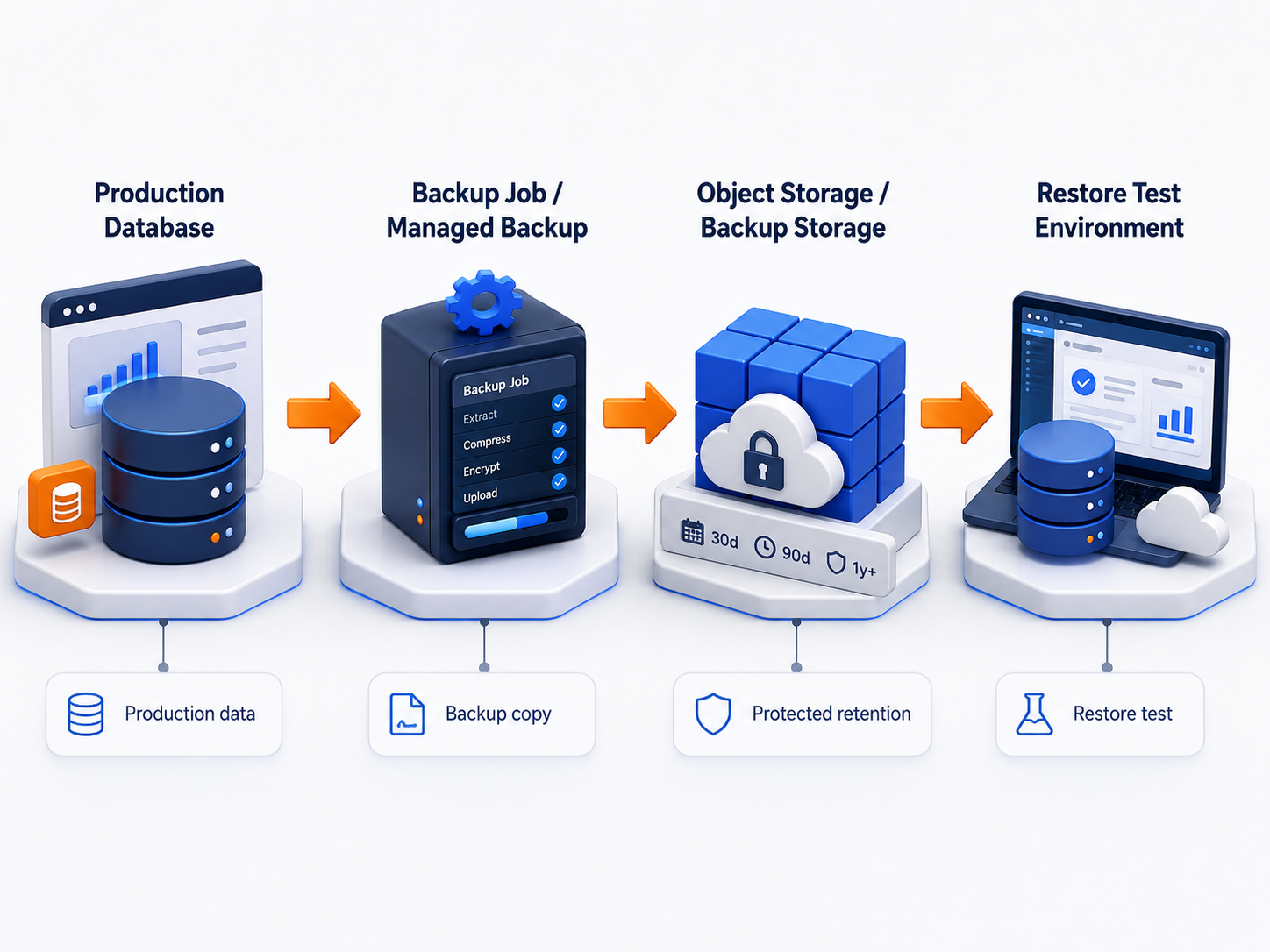
RPO and RTO should be defined before backup frequency
Recovery Point Objective (RPO) defines how much recent data the business can afford to lose.
Recovery Time Objective (RTO) defines how long the database and application can remain unavailable before recovery becomes unacceptable.
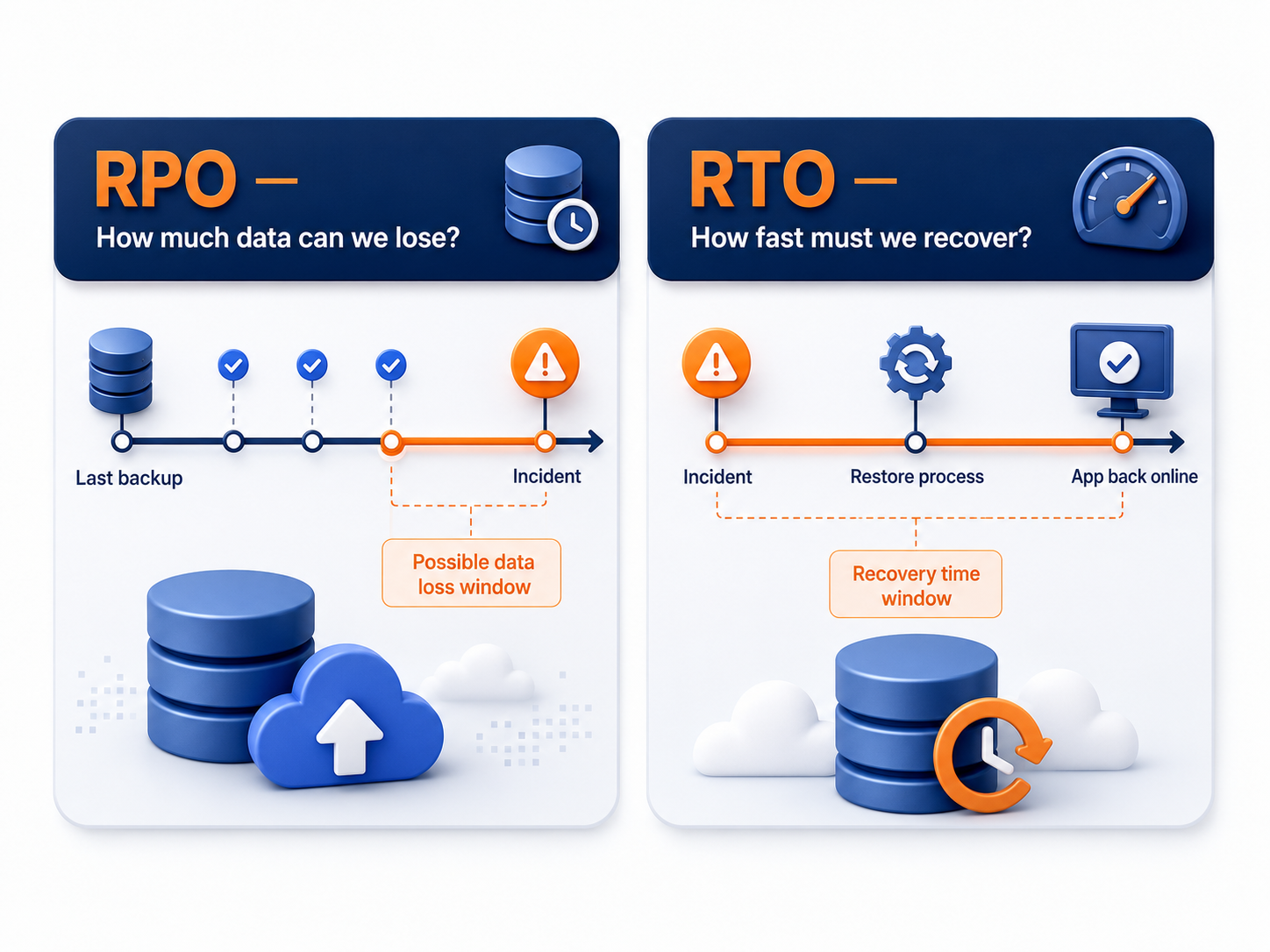
The numbers below are illustrative examples, not universal targets:
| Objective | Business question | Illustrative example |
|---|
| RPO | How much recent data can we lose? | At most 15 minutes of writes |
| RTO | How long can the service remain unavailable? | Critical workflows restored within 1 hour |
Different targets create different technical requirements.
| Recovery target | Practical implication |
|---|
| RPO near 24 hours | A verified daily recovery point may fit a low-change workload |
| RPO near 1 hour | More frequent recovery points or transaction-log recovery are needed |
| RPO measured in minutes | Continuous WAL/binlog capture or managed PITR becomes important |
| RTO of several hours | A documented manual restore may be acceptable |
| RTO near 1 hour | Restore, validation, credentials, and traffic cutover need rehearsed steps |
| RTO measured in minutes | Availability architecture may be required in addition to backups |
Backup frequency does not automatically equal RPO. A scheduled job can fail, a recovery point can be unusable, or required transaction logs can be missing. The newest usable recovery point must meet the target.
RTO is also wider than restore speed. It includes detection, decision-making, replacement infrastructure, data restoration, validation, application reconnect, and returning traffic safely.
Use RPO vs RTO for Cloud Backups when the business targets themselves are still unclear.
Database disaster recovery needs more than one protection layer
A database disaster recovery design must cover both infrastructure failure and logical data failure.
Replication or high availability can help when a database node disappears. They are much less useful when the application successfully commits the wrong data and that change is copied to every healthy replica.
A useful recovery model looks like this:
Availability
  -> HA / replication where required

Historical recovery
  -> backups + PITR

Infrastructure rollback
  -> VM / volume snapshots

Independent retention
  -> separate storage or service boundary

Recovery evidence
  -> restore testing
Map controls to actual incidents:
| Failure scenario | Stronger recovery control |
|---|
| Primary host failure | HA, replica, or replacement path |
| Accidental row deletion | PITR or database-aware restore |
| Bad schema migration | Verified pre-change recovery point + restore plan |
| Database corruption | Independent database recovery history |
| VM or disk failure | Database backup plus infrastructure rebuild/recovery |
| Compromised production credential | Isolated retained copies with narrower access |
| Bug discovered days later | Multi-point retention |
| App server loss | Rebuild or VM recovery; not a database backup problem |
| User-file loss | Object-storage recovery/versioning policy where applicable |
This is why replication is not backup, and snapshots are not a complete database recovery strategy.
For PostgreSQL specifically, see PostgreSQL Replication vs Backups vs Snapshots.
Managed and self-hosted databases move the recovery boundary
The database operating model changes who owns the recovery platform.
| Responsibility | Managed database | Self-hosted database |
|---|
| Backup infrastructure | Provider operates within service scope | Your team designs and operates it |
| Host patching | Provider scope | Your team |
| PITR tooling | Service capability when supported | Your team configures and monitors it |
| Backup monitoring | Provider baseline + customer oversight | Your team |
| Retention configuration | Within service capabilities | Your team designs it |
| Restore-point selection | Customer | Customer |
| Restore validation | Customer | Customer |
| Schema and migration safety | Customer | Customer |
| Application cutover after recovery | Customer | Customer |
A managed service can reduce repetitive platform work, but it cannot decide whether a restored data state is correct for your application.
For self-hosted PostgreSQL, a common historical recovery path combines physical backups with WAL retention when PITR is required. MySQL can use database-aware backups plus binary logs for point-in-time recovery. The correct method is the one that can satisfy the required RPO and RTO at the current data size.
If your workload fits a managed service, compare Raff Managed Databases. For engine-specific decisions, see Postgres Hosting and MySQL Hosting.
Retention protects against incidents discovered late
Keeping only the newest backup is not enough.
A bug may overwrite data on Monday but remain unnoticed until Friday. A destructive migration can appear successful until an older workflow is used. A compromised credential can modify data repeatedly over several days. In all of these cases, the newest backup may already contain the damage.
Retention should preserve multiple useful recovery points. Depending on business risk, this can include:
- frequent recent recovery points for short RPO;
- daily points for recent history;
- longer weekly or monthly retention where justified;
- explicit pre-migration recovery points;
- separate policies for production and non-production data;
- retention long enough to cover realistic incident-detection delays.
Do not copy a generic retention schedule without connecting it to actual business risk, data sensitivity, and recovery needs.
Backup isolation reduces shared failure risk
A backup stored only on the database host shares the same infrastructure failure boundary. A recovery copy removable by the same broad production credentials can share the same security failure boundary.
For self-hosted databases, a separate storage target can provide a useful boundary for database dumps or compatible backup artifacts. Raff Object Storage can serve as an S3-compatible destination where the backup tooling supports object storage.
But moving a backup file to object storage is not enough by itself. The recovery chain still needs:
- successful backup completion;
- integrity or consistency checks appropriate to the engine;
- credentials that remain available during recovery;
- retention controls;
- a documented restore process;
- a tested application recovery path.
For VM-level protection, Raff Data Protection provides infrastructure backup and snapshot workflows. Keep VM-level protection separate from database-native recovery: one protects infrastructure state, while the other protects recoverable database history.
Current Raff Data Protection pricing is $0.06/GB-month for snapshots and $0.06/GB-month for backup storage above the free pool. Backup retention can be configured from 1 to 365 days. These controls complement database-aware recovery rather than replacing it.
Restore testing proves whether the backup strategy works
A backup that has never been restored is an unverified recovery option.
A useful restore test follows the complete path:
Choose recovery point
  -> restore into isolated target
  -> start database
  -> validate schema and known records
  -> connect the application safely
  -> run critical read/write checks
  -> measure recovered data age
  -> measure total recovery time
  -> document gaps
The age of the recovered data validates the practical RPO. The time until critical workflows operate again validates the practical RTO.
A database service starting successfully is not enough. The test should verify:
- expected schemas and objects;
- known records for the chosen recovery point;
- application credentials;
- migration state;
- critical read flows;
- a safe write in the isolated environment;
- related object files if the application depends on them;
- application reconnect behavior;
- the total elapsed recovery time.
Restore tests should run away from production when possible. A recovered test environment should not send live emails, charge payments, trigger customer webhooks, or run production scheduled jobs.
Operational insight from Raff: recovery reviews separate backup success from restore evidence. A green backup job does not prove that credentials, dependencies, application validation, and traffic cutover will work during an incident.
Assign a named recovery owner and record measured recovery time instead of assuming the backup schedule proves readiness.
Use Restore Testing Checklist for Production VMs for the broader infrastructure validation path.
Database migrations require an explicit recovery decision
High-risk schema or data migrations should not begin until the team knows how recovery would work.
Before the change, document:
- which recovery point will be used if rollback is required;
- whether the backup or PITR chain is current;
- whether the required transaction logs are retained;
- expected restore duration;
- how the application behaves against the restored schema;
- what happens to writes created after the chosen recovery point;
- who has authority to stop the migration and recover.
A pre-change VM or volume snapshot can provide useful short-term rollback for a self-hosted database, but it should not replace a database-aware recovery path. An application rollback also does not automatically reverse a schema or data migration.
For managed databases, confirm the required recovery coverage before the change. For self-hosted databases, confirm that the recovery artifacts exist outside the database host and that the restore process is understood.
Monitoring should include recovery readiness, not only database health
Most production dashboards focus on CPU, memory, storage, query latency, and availability. A recovery strategy needs operational signals too.
Useful recovery-readiness checks include:
- age of the newest usable backup;
- last successful backup completion;
- WAL or binary-log archive health where PITR is required;
- retention status;
- backup-storage capacity;
- replication lag where HA is used;
- time since last successful restore test;
- measured restore duration from the last test;
- credential or permission failures affecting recovery paths.
A database can be healthy today while its recovery path has silently degraded for weeks.
Raff supports managed and self-hosted recovery paths
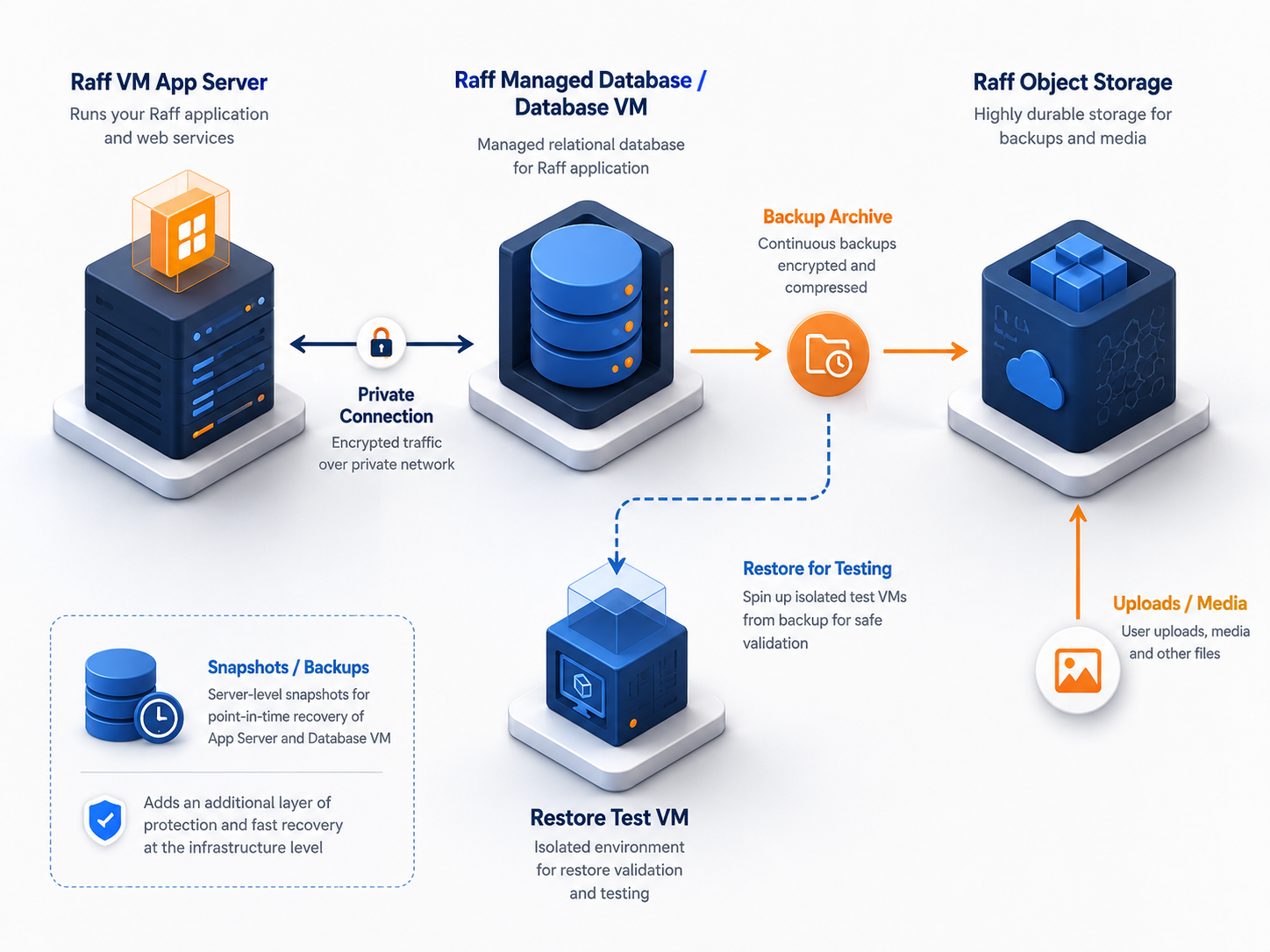
For teams that want a smaller operational surface, Raff Managed Databases provides managed database workflows for supported engines. Current backup, PITR, retention, HA, engine availability, and plan limits should be verified on the live product pages and console before production design.
A managed path can look like:
Application
  -> private or restricted connection
Raff Managed Database
  -> managed backup/recovery platform
  -> customer validates restored state and application cutover
A self-hosted path can look like:
Application VM
  -> private network
Database VM
  -> database-aware backups
  -> separate retained recovery storage
  -> isolated restore test
Use a Raff VM when the workload needs host-level database control and your team can own backup monitoring, PITR configuration, retention, restore testing, patching, and incidents.
Use Raff Object Storage where compatible backup artifacts need an independent S3-compatible destination. Use Raff Data Protection for VM-level snapshots and backup workflows. Keep these infrastructure controls distinct from engine-native database recovery.
Database backup strategy checklist
Before calling the recovery design production-ready, confirm:
- Business RPO is documented.
- Business RTO is documented.
- Backup type matches the database engine and recovery objective.
- PITR logs are retained when point-in-time recovery is required.
- More than one useful recovery point is retained.
- Critical copies do not share every failure and credential boundary with production.
- Restore credentials and procedures are available during an incident.
- Migration recovery is defined before risky changes.
- Backup and archive health are monitored.
- A full restore has been tested recently enough to represent the current architecture.
- Recovered data age has been measured against RPO.
- End-to-end recovery time has been measured against RTO.
- Application validation and traffic cutover are part of the runbook.
Conclusion
A SaaS database backup strategy should begin with the failure the business needs to survive. Define RPO and RTO first, then choose database-aware backups, PITR, retention, isolation, availability controls, infrastructure recovery points, and restore tests that satisfy those targets.
Managed databases can reduce the amount of recovery infrastructure your team operates, but the application team still owns restore-point selection, data validation, safe migrations, credentials, and application cutover. Self-hosting provides deeper control but transfers the complete recovery chain to your team.
The most useful evidence is not a green backup job. It is a successful restore with measured data age and measured recovery time.
Continue with PostgreSQL Replication vs Backups vs Snapshots, Managed vs Self-Hosted Databases, or VPS Database Hosting for the next architecture decision.
Sources