
Shared hosting and VPS hosting solve different stages of a small business website or application.
Stay on shared hosting when the site is simple, traffic is modest, the provider's standard stack is enough, and nobody on your team needs server-level control. Move to a VPS when resource limits, custom software, business-critical uptime, deployment workflows, security controls, or application requirements have become constraints.
For a small business, the deciding factor is usually not raw traffic alone. It is operational need: whether the current host still supports what the business must run and whether the team is prepared to own a server.
At Raff Technologies, we use a three-way decision rather than treating VPS as the automatic upgrade:
| Situation | Better starting point |
|---|---|
| Simple marketing or brochure site | Shared hosting |
| Business-critical site/app with custom stack and technical ownership | VPS / cloud VM |
| Business needs more reliability but does not want server administration | Managed hosting or an app platform |
A VPS gives you more control, but it also moves responsibility for operating-system updates, firewall rules, backups, monitoring, and recovery toward your team or technical partner. That trade-off should be explicit before migration.
This guide explains the practical differences, the signs that shared hosting has become a constraint, and how to prepare for a move without breaking DNS, email, backups, or production traffic.
Shared hosting vs VPS: the simple difference
Shared hosting means your website runs on a server shared with many other customers.
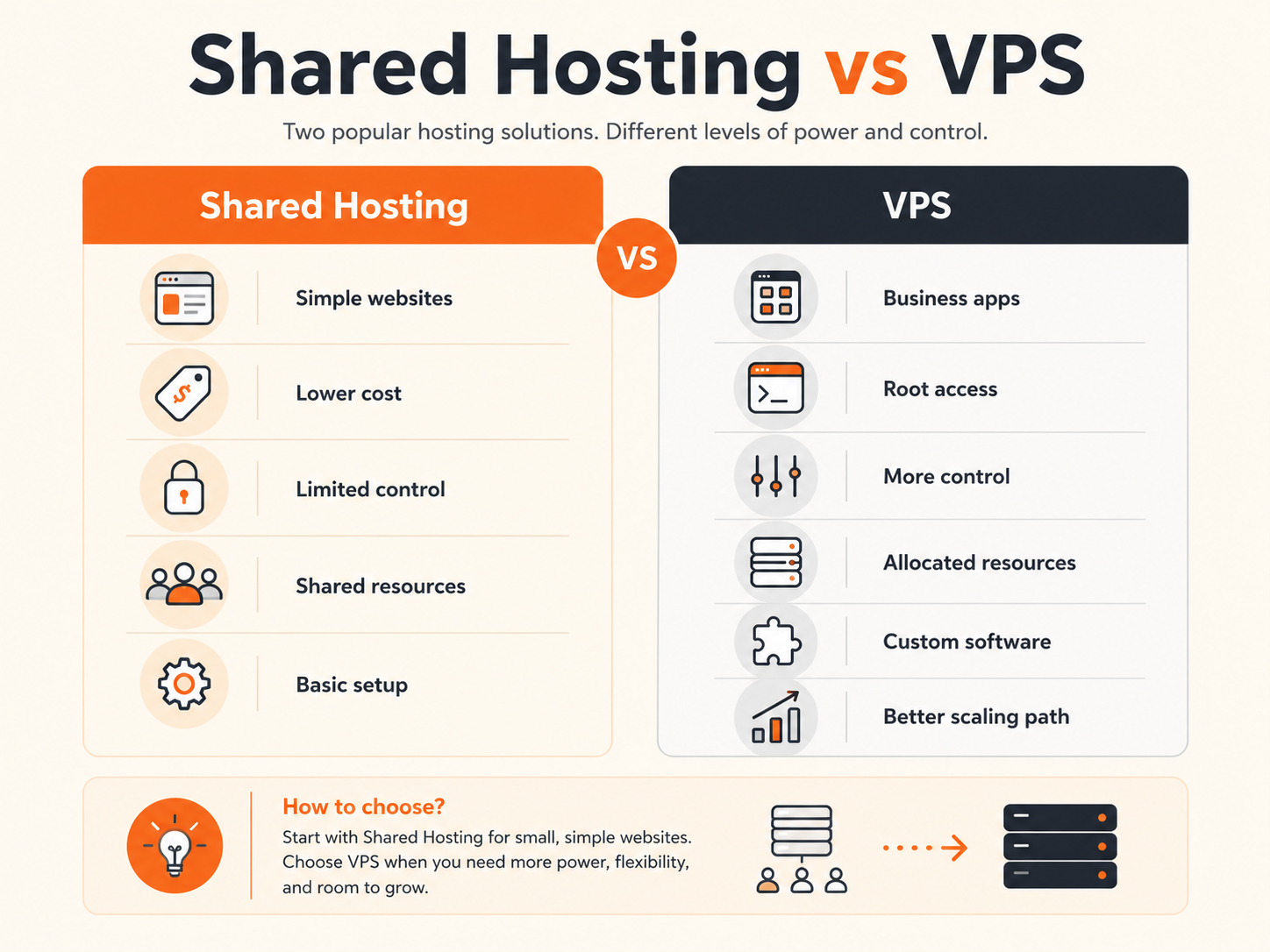
You usually get:
- a hosting account
- a control panel
- limited storage
- limited CPU and memory usage
- shared server resources
- preconfigured PHP, database, and email tools
- restricted server access
- limited customization
A VPS, or virtual private server, gives you a virtual server with dedicated operating system access.
You usually get:
- CPU allocation
- RAM allocation
- storage
- operating system control
- SSH or remote access
- firewall control
- software installation control
- web server control
- database control
- application deployment flexibility
The difference is control.
Shared hosting gives you a managed box inside someone else’s server environment.
A VPS gives you your own server environment.
What shared hosting is good for
Shared hosting is not bad. It is useful for many small businesses.
It can be a good fit for:
- brochure websites
- simple WordPress sites
- local business websites
- small service pages
- early landing pages
- low-traffic blogs
- basic company websites
- simple contact forms
- websites with no custom backend
- businesses without technical support
Shared hosting works best when your website is mostly static or CMS-based and does not need much server customization.
For example, a small law firm, restaurant, consultant, photographer, or local service business may be fine on shared hosting if the website only includes:
- homepage
- service pages
- about page
- contact form
- blog
- basic SEO pages
- simple analytics
- standard plugins
In this stage, the business needs visibility more than infrastructure control.
Shared hosting solves that.
What a VPS gives you that shared hosting does not
A VPS gives your small business a real server environment.
That unlocks more control.
With a VPS, you can usually manage:
- operating system packages
- web server configuration
- database configuration
- firewall rules
- SSL setup
- background workers
- cron jobs
- custom runtimes
- app deployments
- Docker containers
- staging environments
- monitoring tools
- backup scripts
- security hardening
This matters when the website becomes more than a simple website.
For example, a small business may need to run:
- a customer portal
- booking system
- internal dashboard
- API backend
- custom CRM
- private application
- inventory system
- automation tool
- business database
- Laravel, Node.js, Python, or Docker app
- WordPress site with high traffic or heavy plugins
Shared hosting may not give you enough control for these workloads.
A VPS does.
9 signs your small business has outgrown shared hosting
1. Your website is slow even after basic optimization
If your site is slow, first check normal causes:
- large images
- too many plugins
- poor theme performance
- no caching
- heavy third-party scripts
- unoptimized database
- weak frontend structure
But if the site is still slow after basic optimization, shared hosting may be part of the problem.
On shared hosting, your website can be affected by resource limits and other customers on the same server.
A VPS gives your business a cleaner environment where you can control the stack, caching, database, PHP version, web server, and background processes.
Move to a VPS when speed is no longer just a design issue — it is an infrastructure issue.
2. Traffic spikes cause errors or downtime
A small business website may start with low traffic.
Then traffic grows from:
- SEO
- ads
- email campaigns
- seasonal demand
- product launches
- local press
- social posts
- marketplace listings
- partner campaigns
If shared hosting cannot handle spikes, users may see:
- slow pages
- timeout errors
- database connection errors
- 500 errors
- temporary account throttling
- unavailable checkout or forms
That is a strong sign to move.
A VPS gives you more room to handle predictable growth and lets you tune the environment around the workload.
3. Your hosting account keeps hitting resource limits
Shared hosting plans often limit CPU, memory, processes, database usage, file count, or I/O.
You may see messages like:
- CPU usage exceeded
- memory limit reached
- entry process limit reached
- inode limit reached
- database connection limit reached
- account temporarily restricted
- backup limit exceeded
These are warning signs.
They mean your business is asking more from the hosting environment than the plan is designed to provide.
A VPS gives you clearer resource ownership and more control over how those resources are used.
4. You need custom software or server configuration
Shared hosting is usually designed for standard website hosting.
It may not allow:
- custom system packages
- custom Nginx or Apache configuration
- long-running processes
- background workers
- queue workers
- WebSocket servers
- Docker
- advanced cron jobs
- custom database tuning
- custom runtime versions
- private internal services
If your business needs these things, shared hosting becomes limiting.
A VPS is the better fit when you need to control the server, not just upload website files.
5. Your website is now tied to revenue
The hosting decision changes when the site becomes business-critical.
Shared hosting may be fine for an informational site.
But it becomes risky when the site supports:
- lead generation
- paid ads
- checkout
- customer accounts
- appointment booking
- quote requests
- support forms
- SaaS onboarding
- client portals
- internal operations
If downtime or slow performance costs real money, you need stronger infrastructure control.
A VPS gives you more ownership over reliability, monitoring, backups, updates, and recovery planning.
6. You need better security isolation
On shared hosting, many users share the same physical server environment.
Providers isolate accounts, but the model is still shared.
A VPS gives your business a separate operating system environment.
That helps when you need:
- stronger firewall control
- SSH key access
- custom security tools
- private services
- limited open ports
- stronger user permissions
- cleaner separation from other customers
- more control over updates and patches
A VPS does not automatically make your business secure. You still need good configuration.
But it gives you the control needed to build a stronger security posture.
7. You need better backup and recovery control
Shared hosting often includes basic backups, but the level of control varies.
You may not control:
- backup schedule
- retention period
- restore process
- database snapshot timing
- off-server storage
- backup testing
- application-consistent backups
For a small business, backups become important when the site contains:
- customer data
- orders
- bookings
- uploaded files
- form submissions
- account data
- business records
- internal workflows
A VPS lets you design a better backup strategy around your actual workload.
You can combine provider snapshots, application backups, database dumps, and off-server storage.
The important point:
A backup is only useful if you know how to restore it.
A VPS gives you more responsibility, but also more control.
8. You need staging, testing, or deployment workflows
Shared hosting is usually not ideal for modern development workflows.
A growing business may need:
- staging environment
- separate production environment
- Git-based deployment
- CI/CD
- Docker Compose
- automated tests
- rollback process
- private preview environment
- controlled release process
A VPS makes these workflows easier.
You can run a staging VM, test changes safely, then deploy to production with more confidence.
For small businesses working with an agency or developer, this can reduce mistakes and downtime.
9. You are building more than a website
This is the biggest sign.
Shared hosting is for websites.
A VPS is for workloads.
Move when your business needs to run:
- web apps
- APIs
- dashboards
- automation tools
- databases
- background workers
- private business software
- Docker containers
- monitoring services
- internal tools
- customer portals
Once your “website” becomes an application, shared hosting is often the wrong foundation.
Shared hosting vs VPS comparison table
| Factor | Shared hosting | VPS |
|---|---|---|
| Best for | Simple websites | Websites, apps, APIs, business workloads |
| Control | Limited | High |
| Server access | Usually restricted | Root or administrator access |
| Performance | Shared resources | Allocated VM resources |
| Custom software | Limited | Flexible |
| Security control | Provider-controlled | Team-controlled |
| Backups | Depends on host | Can be designed around workload |
| Scaling | Plan upgrade only | Resize, tune, split workloads, add services |
| Technical responsibility | Low | Medium to high |
| Cost | Lower starting cost | Higher, but more control |
| Fit for business-critical apps | Limited | Stronger |
| Fit for Docker | Usually no | Yes |
| Fit for custom backend | Limited | Yes |
The decision is not only about price.
It is about whether the hosting model matches the business requirement.
A VPS is not the only upgrade path
Some small businesses outgrow shared hosting but still should not operate a server themselves.
Consider managed hosting or an application platform when:
- the site is business-critical but nobody owns Linux/server operations;
- you want a managed runtime rather than root access;
- patching, monitoring, and recovery should remain with a provider or technical partner;
- the workload fits a standard web/application platform;
- the business values lower operational overhead more than server-level customization.
Choose a VPS when the business or its technical partner specifically needs OS-level access, custom runtimes, Docker, background services, private networking, firewall control, or a server environment that can be shaped around the application.
For a broader web-hosting decision, see VPS for Web Hosting: What Small Teams Should Know. If the workload is WordPress, use WordPress VPS Hosting: When It Beats Shared and Managed Hosting before assuming a self-managed VPS is the right move.
When you should stay on shared hosting
Do not move to a VPS just because it sounds more professional.
Stay on shared hosting if:
- your website is simple
- traffic is low
- performance is acceptable
- you do not need custom software
- you do not have technical support
- your site is not business-critical
- you only need basic WordPress or static pages
- you are not hitting hosting limits
- you do not need server-level control
- the current setup is stable and cost-effective
A VPS gives you more power, but also more responsibility.
You need to think about:
- updates
- firewall rules
- backups
- monitoring
- security patches
- web server configuration
- database maintenance
- access control
- recovery planning
If no one on your team can manage that, either stay on shared hosting or work with a technical partner.
The wrong VPS setup can be worse than a good shared hosting setup.
When you should move to a VPS
Move to a VPS when at least one of these is true:
- your site is too slow on shared hosting
- your site regularly hits resource limits
- downtime affects sales or leads
- you need custom backend software
- you need Docker or modern app deployment
- you need better control over backups
- you need stronger isolation
- you need staging and production environments
- you need custom firewall rules
- you need database control
- you need root access
- your business app cannot fit inside shared hosting limits
- your traffic is growing and you need room to scale
A strong signal is when you start changing your business plan because of hosting limitations.
Examples:
- “We cannot launch this feature because hosting does not support it.”
- “We cannot run background jobs.”
- “We cannot install the package we need.”
- “We cannot handle traffic spikes.”
- “We do not know if backups are enough.”
- “The site is slow but we cannot tune the server.”
- “Our developer says the host is limiting the app.”
At that point, shared hosting is not saving money.
It is slowing the business down.
The VPS readiness checklist
Before moving from shared hosting to a VPS, check whether your business is ready.
You should know:
- what website or app will move
- which domain will point to the VPS
- which CMS or application stack you use
- which database you use
- how files are stored
- how email is handled
- what DNS records exist
- what SSL certificates are needed
- what ports must be open
- what backup strategy is required
- who will maintain the server
- how updates will be handled
- how rollback will work if migration fails
A VPS migration is not only “copy files to a new server.”
It is a hosting architecture change.
Plan it properly.
What to prepare before migrating
1. Audit the current website
List:
- website files
- database
- plugins
- themes
- custom code
- cron jobs
- forms
- redirects
- DNS records
- SSL settings
- email settings
- third-party integrations
You need to know what exists before moving it.
2. Separate website hosting from email
Many small businesses use the same shared hosting account for website and email.
Be careful.
Moving the website does not mean you must move email.
In many cases, keep business email on a dedicated email provider and move only the website or application to the VPS.
Before migration, confirm:
- MX records
- SPF record
- DKIM
- DMARC
- webmail access
- mailbox provider
- contact form sending method
Do not break business email during a website migration.
3. Choose the right VPS size
Start with the workload.
For a small website or app, you may not need a large server.
Consider:
- traffic level
- CMS or app type
- database size
- plugin weight
- background jobs
- caching
- expected growth
- number of users
- storage needs
- backup size
A simple site can start small.
A busy WordPress site, WooCommerce store, Laravel app, Node.js backend, or database-heavy app may need more RAM and CPU.
Do not only choose the cheapest plan.
Choose the plan that gives your workload enough room to run reliably.
4. Plan DNS cutover
DNS controls where visitors go.
Before migration:
- lower TTL if needed
- confirm current DNS provider
- document existing records
- prepare new A record
- test the new server before switching
- switch during a low-traffic window
- monitor after cutover
DNS mistakes can make a successful migration look broken.
5. Set up security before going live
Before pointing traffic to the VPS, configure:
- SSH keys
- firewall rules
- automatic security updates if appropriate
- non-root user access
- SSL certificates
- database access restrictions
- strong passwords or key-based authentication
- limited open ports
- backups
- monitoring
Do not migrate first and secure later.
Production servers should be hardened before public traffic arrives.
6. Test before switching traffic
Before DNS cutover, test:
- homepage
- inner pages
- forms
- login
- checkout
- database connection
- file uploads
- redirects
- SSL
- admin panel
- cron jobs
- third-party integrations
- mobile layout
- page speed
- error logs
A VPS gives more control, but you still need a careful release process.
What changes after moving to a VPS?
Moving to a VPS changes ownership.
On shared hosting, the provider manages much of the environment.
On a VPS, your team controls more of the environment.
That means more power and more responsibility.
You become responsible for:
- server updates
- web server configuration
- application runtime
- firewall configuration
- access control
- backups
- monitoring
- logs
- SSL renewal
- deployment process
- security hygiene
This is not a reason to avoid VPS.
It is a reason to run it properly.
A VPS is a better tool when your business needs control.
But control only helps if it is managed.
Common VPS mistakes small businesses should avoid
Choosing a VPS with no maintenance plan
A VPS is not “set and forget.”
Decide who will maintain it.
This can be:
- internal developer
- agency
- MSP
- freelance sysadmin
- technical founder
- managed support partner
Someone must own updates, backups, and monitoring.
Moving email without planning
Website hosting and email hosting are different problems.
Do not accidentally break email by changing DNS records too quickly.
Opening too many ports
Only expose the services that must be public.
For most web apps, public ports are usually:
- 80 for HTTP
- 443 for HTTPS
- 22 for SSH, ideally restricted and key-based
Databases, admin panels, and internal tools should not be publicly exposed unless there is a clear reason and proper protection.
Forgetting backups
A VPS gives you control, but it also means you need a backup plan.
Use a layered approach:
- provider snapshots
- application backups
- database dumps
- off-server storage
- restore testing
Backups are not complete until restore has been tested.
Migrating without staging
Do not make the first test happen in production.
Set up the VPS, test the site, then switch DNS.
Shared hosting to VPS: decision framework
Use this simple traffic-light model.
Green: shared hosting is still fine
Stay on shared hosting if:
- the website is simple
- speed is acceptable
- traffic is low
- there are no resource limit issues
- the site is not business-critical
- no custom backend is needed
- no technical team is available
Yellow: start planning a VPS move
Start planning if:
- traffic is growing
- plugins or custom code are increasing
- the site is becoming revenue-related
- the team needs staging
- performance is inconsistent
- backups are unclear
- the business may add a portal, app, or integration soon
Red: move to a VPS
Move if:
- the site regularly slows down or times out
- the host throttles your account
- revenue is affected by downtime
- custom software is blocked
- security or isolation requirements increased
- your developer cannot deploy properly
- you need Docker, background workers, APIs, or app services
- shared hosting is blocking business growth
This framework keeps the decision practical.
Do not move too early for complexity.
Do not wait too long when hosting is already hurting the business.
How Raff VM fits the move from shared hosting to VPS
Raff VM is a strong next step when a small business has outgrown shared hosting and needs a proper cloud server.
You can use Raff VM for:
- WordPress hosting with more control
- business websites
- Laravel apps
- Node.js apps
- Python apps
- Docker workloads
- APIs
- customer portals
- internal dashboards
- databases
- staging environments
- development servers
- automation tools
The key difference is control.
Instead of being limited to a shared hosting account, you get a cloud VM that your team can configure around the workload.
That gives you more room to improve:
- speed
- reliability
- deployment workflow
- security rules
- backups
- operating system control
- application stack
- database setup
- scaling path
Raff VM fits small businesses that want a VPS-style cloud server without unnecessary cloud complexity.
Suggested first VPS setup for a small business website
A practical starter setup can look like this:
Domain
  ↓
DNS
  ↓
VPS public IP
  ↓
Firewall
  ↓
Nginx or Apache
  ↓
Website or app
  ↓
Database
  ↓
Backups and monitoring
For a simple website, everything may run on one VPS.
For a more serious business application, you may later separate:
- web server
- database
- backups
- object storage
- staging environment
- production environment
Start simple.
Make sure the first setup is secure, backed up, and easy to maintain.
Then improve as the business grows.
Conclusion
Shared hosting is still the right choice when a small business needs a simple website and the current provider delivers acceptable performance, reliability, and features.
Move to a VPS when the hosting model itself becomes the constraint: repeated resource limits, custom software requirements, Docker or background processes, revenue-sensitive downtime, stronger network/security control, or a deployment workflow that shared hosting cannot support.
Do not move only because a VPS sounds more advanced. A self-managed VPS introduces operational work. If the business needs a stronger hosting service but nobody should own the server, managed hosting or an app platform may be a better upgrade.
If a VPS is the right boundary, plan the migration as a production change: inventory the application, preserve email/DNS settings, test the new environment before cutover, secure the server, and verify backups and restore ownership.
For the next step, use VPS for Web Hosting to choose the hosting model and Cloud Servers for Small Business for the broader business infrastructure decision. Review Raff VM when you need a configurable cloud VM for the workload.