WordPress VPS hosting runs a WordPress site on a virtual private server where you control the operating system, web server, PHP runtime, database, security rules, and backups. It offers more infrastructure control than shared or managed WordPress hosting, but your team also takes on more operational responsibility.
Raff Technologies treats this as a hosting-model decision, not a promise that every WordPress site needs a server. A small brochure site may be better served by shared hosting, while a growing WooCommerce store, agency portfolio, or plugin-heavy site may justify a VPS. This guide is part of the VPS & Cloud VM Fundamentals series and explains when the additional control is worth the work.
WordPress VPS Hosting Changes the Operating Model
A VPS gives WordPress its own defined server environment. You can choose the Linux distribution, web server, PHP version, database configuration, caching layer, firewall rules, and backup process. You are no longer limited to the packages, process limits, or control-panel settings selected by a shared hosting provider.
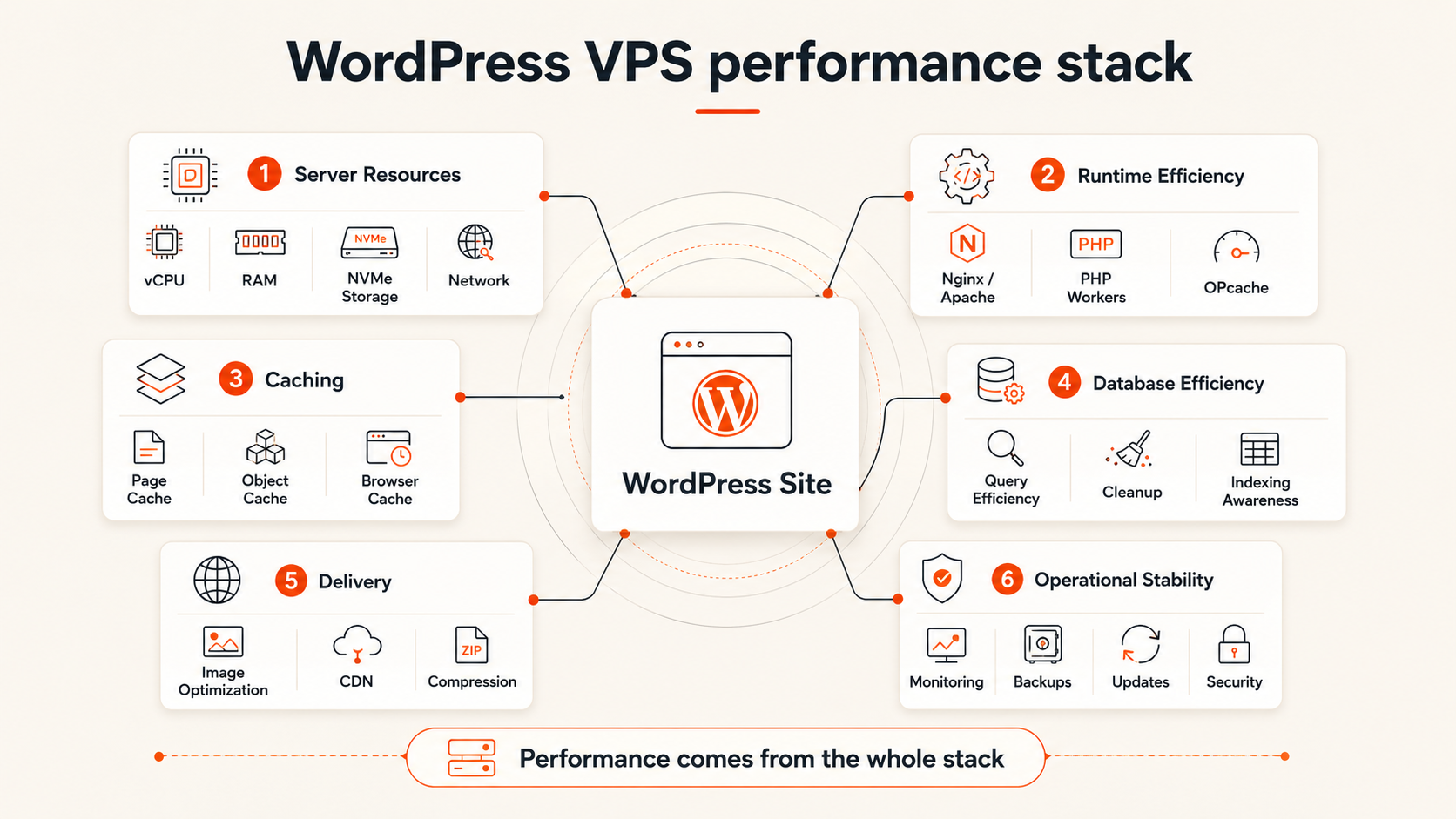
That flexibility is useful only when the site benefits from it. A VPS does not automatically make WordPress faster. Performance still depends on the theme, plugins, PHP workers, database queries, caching, image delivery, storage, and traffic pattern.
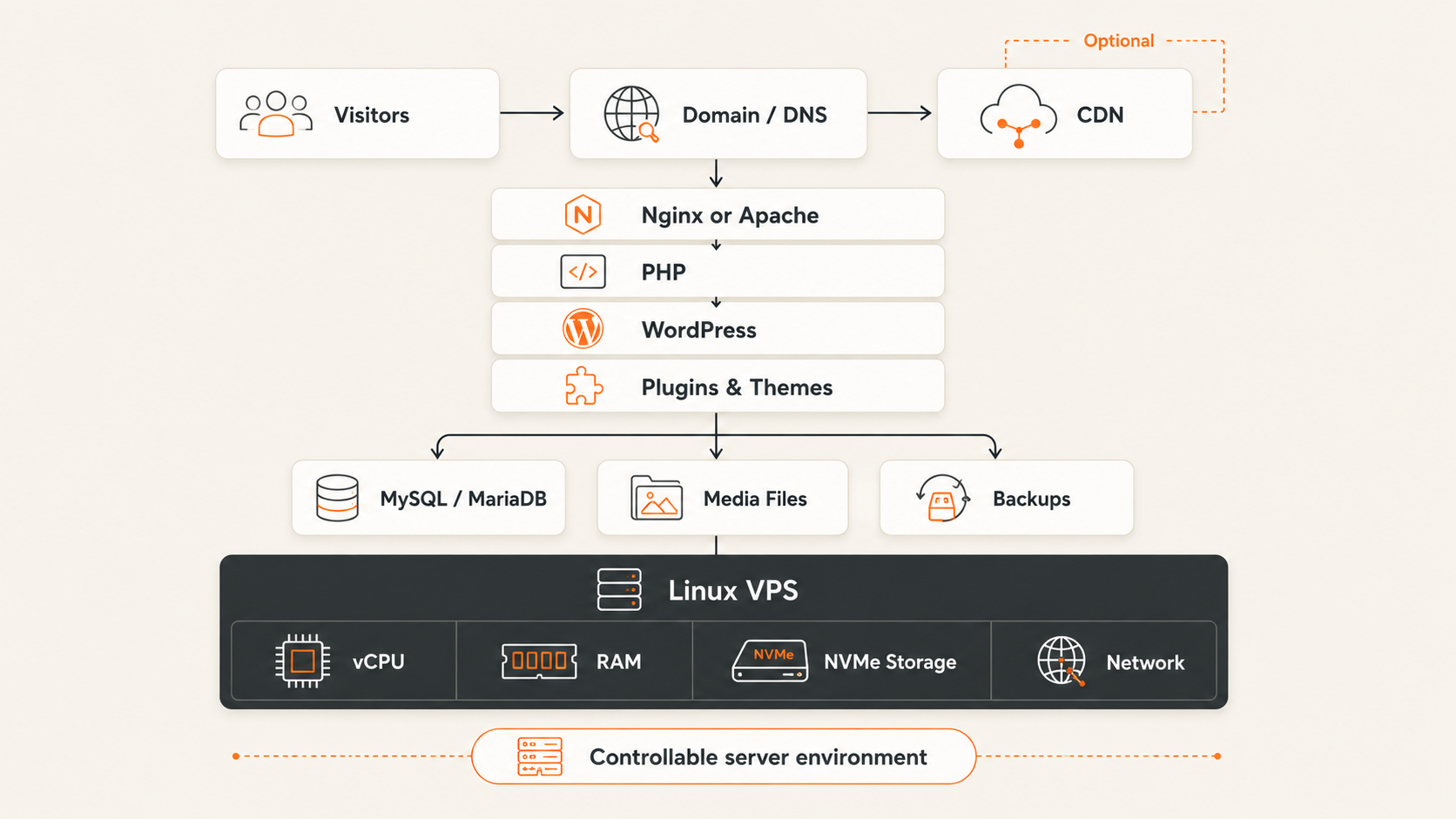 The main change is responsibility. On shared or managed WordPress hosting, the provider handles more of the operating system and platform maintenance. On a self-managed VPS, your team is responsible for:
- operating-system updates
- web server and PHP configuration
- database maintenance
- firewall and SSH access
- malware prevention and incident response
- backup schedules and restore testing
- uptime monitoring
- capacity planning
Raff separates VM infrastructure from WordPress management because the two buyers need different things. Teams that need root access should not be forced into a fixed control-panel workflow. Teams that want someone else to manage WordPress updates and application issues should choose a managed WordPress service instead of assuming a VPS removes operational work.
Shared, Managed WordPress, and VPS Hosting Serve Different Buyers
The three hosting models solve different problems. Shared hosting optimizes for simplicity and low cost. Managed WordPress hosting optimizes for reduced maintenance. A VPS optimizes for control and workload flexibility.
| Decision factor | Shared hosting | Managed WordPress hosting | WordPress VPS hosting |
|---|---|---|---|
| Server control | Limited | Limited to provider tools | Full root-level control |
| WordPress maintenance | Mostly your responsibility | Provider assists with platform tasks | Your responsibility |
| Resource isolation | Account-level limits | Provider-defined | Defined by VM plan and CPU class |
| Custom software | Usually restricted | Usually restricted | Install the stack you need |
| Security scope | Provider secures the platform | Provider secures platform and WordPress layer | You secure the operating system and application |
| Scaling path | Upgrade hosting plan | Upgrade managed tier | Resize VM or separate services |
| Best fit | Small, simple sites | Teams prioritizing convenience | Sites needing control, custom services, or predictable capacity |
Shared hosting remains sensible when a site is small, changes infrequently, and fits the provider’s limits. Managed WordPress hosting is a strong choice when the site matters to the business but the team does not want to maintain Linux, PHP, Nginx, or MariaDB.
A VPS becomes compelling when the hosting environment itself is limiting the site. For the broader small-business decision, see When to Move from Shared Hosting to a VPS.
A VPS Becomes Worthwhile When Hosting Constraints Affect the Site
WordPress VPS hosting is most useful when a site needs capabilities that shared or managed plans cannot provide cleanly.
Custom software and runtime control
A VPS lets you choose the web server, PHP version, extensions, database settings, cache, background services, and deployment tools. This matters when a plugin requires a system package, a custom PHP extension, a queue worker, scheduled processing, or a non-standard proxy configuration.
WooCommerce and dynamic workloads
WooCommerce adds database writes, logged-in sessions, cart operations, checkout requests, scheduled actions, email jobs, and third-party integrations. These workloads cannot be solved by page caching alone.
A VPS gives you room to tune PHP workers, database memory, object caching, cron execution, and storage. It also lets you observe which layer is actually slow before buying more resources.
Multiple production sites
Agencies and developers may prefer one controlled server environment for several client sites. A VPS can reduce per-site hosting costs and standardize the stack, but it also increases blast radius. One compromised plugin or full disk can affect every site on that server.
For multi-site hosting, isolation, backups, update policies, and account permissions matter as much as raw capacity. The VPS with or without cPanel guide explains when a hosting panel reduces operational friction.
Unpredictable limits on shared hosting
Shared hosting providers often enforce CPU, memory, process, database, inode, or execution-time limits. These controls protect the platform, but they can become a constraint when traffic, imports, backups, or plugin jobs grow.
Moving to a VPS replaces hidden account-level limits with a server you can measure. It does not remove limits; it makes CPU, RAM, disk, and network capacity easier to understand and change.
Staging and deployment control
A VPS supports a more deliberate release workflow. You can maintain staging environments, use version control, automate deployments, control PHP versions, and schedule maintenance without depending on a hosting dashboard’s feature set.
A VPS Is the Wrong Choice When Operations Are the Bottleneck
A VPS is not the right upgrade when the team lacks time or confidence to operate the server.
Stay with shared hosting when the site is small, the current host is reliable, and no technical limit is affecting the business. Moving a simple site to a VPS may add patching, monitoring, and security work without creating meaningful value.
Choose managed WordPress hosting when you need stronger WordPress-specific support, automatic platform maintenance, integrated staging, managed caching, or help diagnosing plugin and theme issues. A VM provider manages the infrastructure boundary; it does not automatically become your WordPress administrator.
A VPS is also a weak fit when:
- nobody owns operating-system updates
- backups exist but restores are never tested
- the site needs application-level support rather than infrastructure control
- the team expects cPanel, email hosting, and WordPress support to be included by default
- downtime would be expensive but monitoring and recovery are undefined
The additional control is valuable only when someone is prepared to use and maintain it.
WordPress VPS Sizing Depends on Workload Shape
WordPress sizing depends more on workload behavior than monthly visitor count. Two sites with the same traffic can need very different resources because one serves cached articles while the other runs WooCommerce, membership plugins, search, imports, and logged-in dashboards.
A small WordPress site can begin around 2 GB RAM when the stack is lean and traffic is modest. A 4 GB configuration provides safer headroom for PHP-FPM, the database, updates, backups, and plugin activity. These are planning ranges, not guarantees.
Evaluate these factors before choosing a VM:
- PHP concurrency: More simultaneous uncached requests require more PHP workers and memory.
- Database activity: WooCommerce, membership sites, and complex search create more reads and writes.
- Plugin behavior: Page builders, security scanners, backup plugins, and imports can create CPU and memory spikes.
- Media volume: Large image libraries increase storage, backup size, and transfer work.
- Background jobs: Scheduled actions, email queues, feeds, and exports consume resources outside page views.
- Caching: Full-page and object caching can reduce repeated work but cannot fix slow queries or inefficient plugins.
CPU allocation also matters. Different VM classes can behave differently under sustained checkout, admin work, imports, or scheduled jobs, so size from measured workload behavior rather than assuming one CPU label guarantees application performance. See Shared vs Dedicated vCPU for the broader CPU-allocation framework.
The Hosting Decision Framework
Choose the least operationally complex model that meets the site’s real requirements.
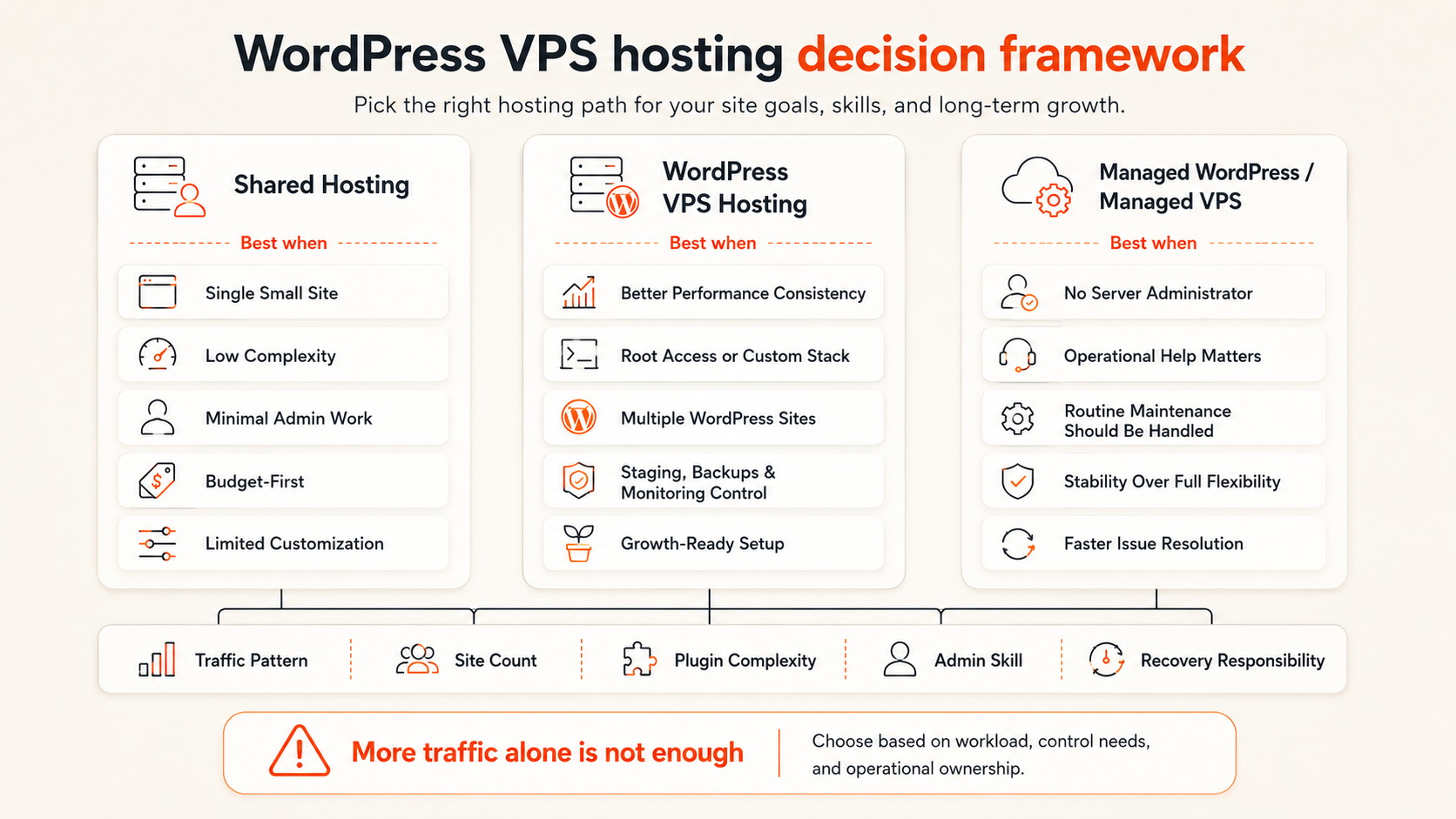
Choose shared hosting when
- the site is a brochure, portfolio, or small content site
- traffic and plugin activity are modest
- the current provider’s limits are not causing problems
- server administration would create more risk than value
- the lowest operational burden matters most
Choose managed WordPress hosting when
- WordPress is business-critical but the team lacks Linux administration time
- platform updates, staging, caching, and WordPress-focused support are priorities
- paying more is acceptable in exchange for reduced maintenance
- the site fits the provider’s supported plugins and workflows
Choose WordPress VPS hosting when
- you need root access or custom system packages
- shared-hosting limits affect performance or background jobs
- WooCommerce or logged-in traffic needs more tuning control
- you operate several sites with a documented maintenance process
- you need a custom deployment, monitoring, or backup architecture
- someone owns security, updates, monitoring, and recovery
| Primary need | Best starting model |
|---|---|
| Lowest effort for a small site | Shared hosting |
| WordPress-specific convenience and support | Managed WordPress hosting |
| Full stack control and custom services | VPS hosting |
| Custom WooCommerce tuning | VPS or managed WordPress, based on operational capability |
| Several sites with standardized administration | VPS with strong isolation and backup practices |
| No in-house server ownership | Managed WordPress hosting |
The deciding question is not whether a VPS is more powerful. It is whether infrastructure control solves a problem your team actually has.
WordPress on Raff Fits Teams That Want Infrastructure Control
Raff Linux VMs provide a configurable environment for WordPress workloads that need full server access. You choose the operating system and software stack, while Raff provides the VM, NVMe storage, unmetered bandwidth, DDoS protection, firewall controls, snapshots, automated backup options, and the ability to resize as requirements change.
This model is a strong fit for developers, agencies, and small teams that want to control Nginx or Apache, PHP-FPM, MariaDB or MySQL, caching, cron jobs, monitoring, and deployment practices. It is not a managed WordPress service. WordPress core, plugins, themes, PHP configuration, database maintenance, and application security remain your responsibility.
Raff uses separate General Purpose and CPU-Optimized VM classes because WordPress workloads do not all need the same CPU behavior. A content site with cacheable traffic may prioritize cost efficiency. A busy store, import process, or admin-heavy site may benefit from more predictable compute.
For the deployment workflow, use How to Install WordPress on Ubuntu 24.04 with Nginx. That tutorial covers the technical installation; this guide owns the decision of whether a VPS is the right hosting model.
Migration Requires a Rollback Plan, Not Only a File Copy
A WordPress migration should preserve both the application and the operating context around it. Before changing DNS, document the current PHP version, extensions, web server rules, cron jobs, email delivery, database size, uploads, redirects, caching, security plugins, and backup process.
Prepare the new environment, copy the site, test it on a temporary hostname or local hosts-file override, and verify login, forms, email, payments, scheduled actions, media, redirects, and backups. Keep the old host available until the new site has passed normal business use.
The migration is also a good time to remove abandoned plugins, rotate credentials, reduce DNS TTL in advance, and define who can roll traffic back if checkout, login, or database writes fail.
Conclusion
WordPress VPS hosting is the right choice when control over the server, runtime, database, background jobs, or scaling path creates more value than the operational work it introduces. Shared hosting remains efficient for simple sites. Managed WordPress hosting remains safer for teams that want WordPress-focused maintenance and support.
Use the VPS Hosting Decision Guide to compare the broader server options, then follow the WordPress installation tutorial when you are ready to deploy.