
A cloud server for small business is a hosted virtual machine used to run business applications, shared services, Windows workloads, databases, internal tools, or other workloads that need their own server environment.
The important decision is not whether a small business should “move to the cloud.” It is which workload actually benefits from a cloud server instead of SaaS, shared hosting, a local server, or object storage. For many SMBs, that decision comes down to remote access, hardware independence, application compatibility, recovery requirements, and who will own the server after deployment.
Raff Technologies provides Linux and Windows cloud servers for teams that have already decided a VM is the right operating model. This guide explains that decision first, including a common source of confusion in SMB searches: when a cloud-based file server makes sense and when a file-sharing SaaS, object storage, or local NAS is the better choice.
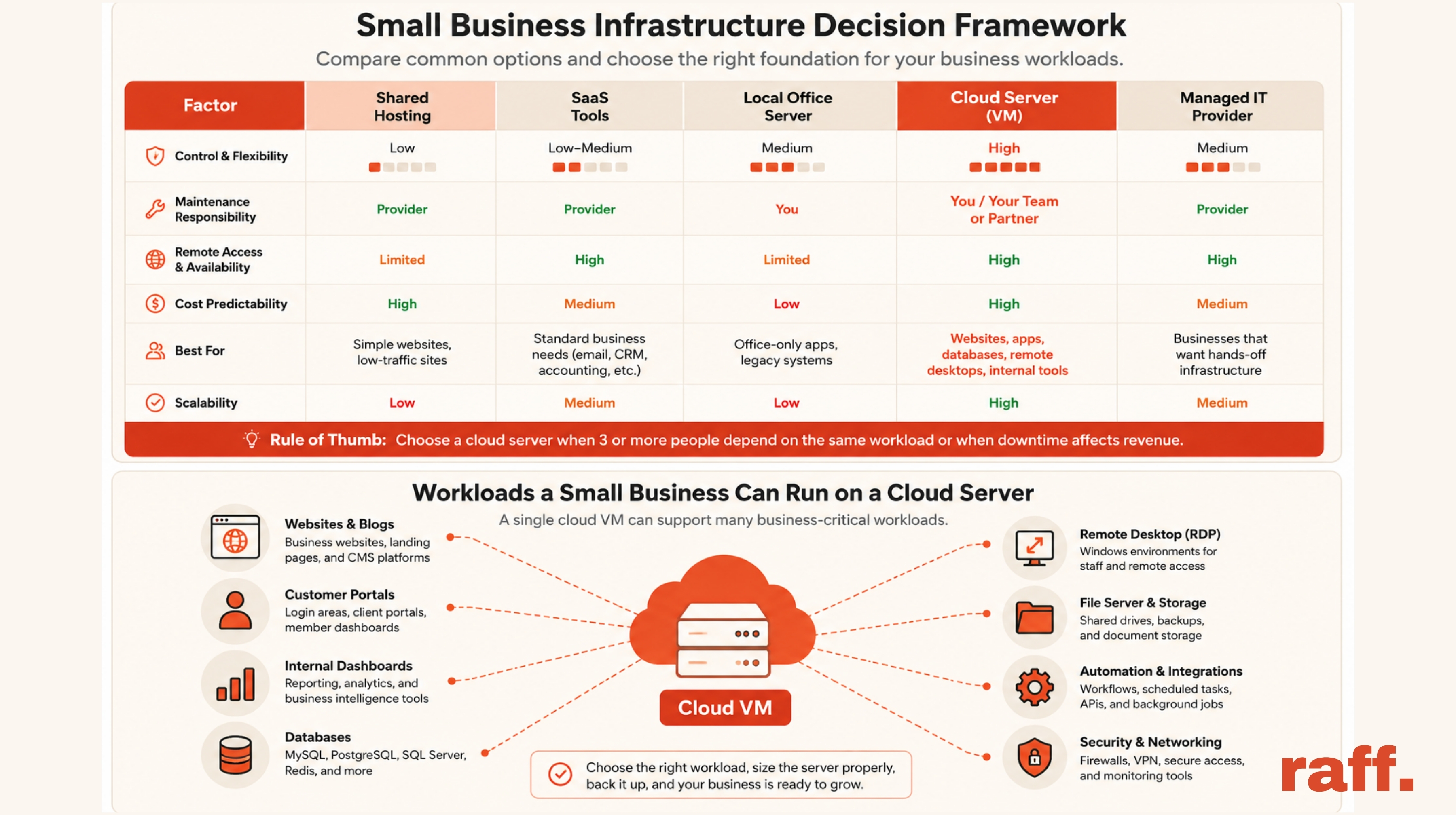
Cloud servers for small business: the short answer
A cloud server is a good fit when a business workload needs:
- its own Linux or Windows operating system;
- persistent runtime control;
- remote administration;
- application-specific networking or firewall rules;
- flexible CPU, memory, or storage sizing;
- independence from one office computer or aging physical server;
- a clearer backup and recovery path;
- an environment an MSP or IT provider can manage remotely.
A cloud server is usually not the best first choice when the business only needs email, office documents, basic file collaboration, or another function already solved well by SaaS.
The practical rule is simple: choose the smallest operating model that fully supports the workload. More infrastructure control is useful only when the business needs it.
Cloud servers change the operating model, not the ownership requirement
A small business can run a workload on an employee computer, a local office server, a SaaS platform, shared hosting, or a cloud VM. A cloud server becomes useful when the workload needs a controlled server environment but the business does not want to own the physical hardware lifecycle.
That changes responsibility rather than removing it.
| Responsibility | Local server | Cloud server |
|---|---|---|
| Physical hardware | Business or MSP | Cloud provider |
| Power and cooling | Business | Cloud provider |
| Operating system | Business | Business |
| Applications | Business | Business |
| User access | Business | Business |
| Firewall and exposure | Business | Business using provider controls |
| Backup policy | Business | Business using provider tools where appropriate |
| Capacity growth | Buy or upgrade hardware | Resize or add resources |
With local infrastructure, the business or its IT provider owns disks, power, cooling, UPS capacity, replacement parts, physical security, and eventual hardware refreshes.
With a cloud server, the provider operates the physical platform while the customer still owns the guest operating system, administrator access, applications, patching, firewall choices, credentials, and recovery process.
That is often a better trade for an SMB whose goal is to run a customer portal, Windows application, internal dashboard, API, automation service, or business database rather than maintain a server room.
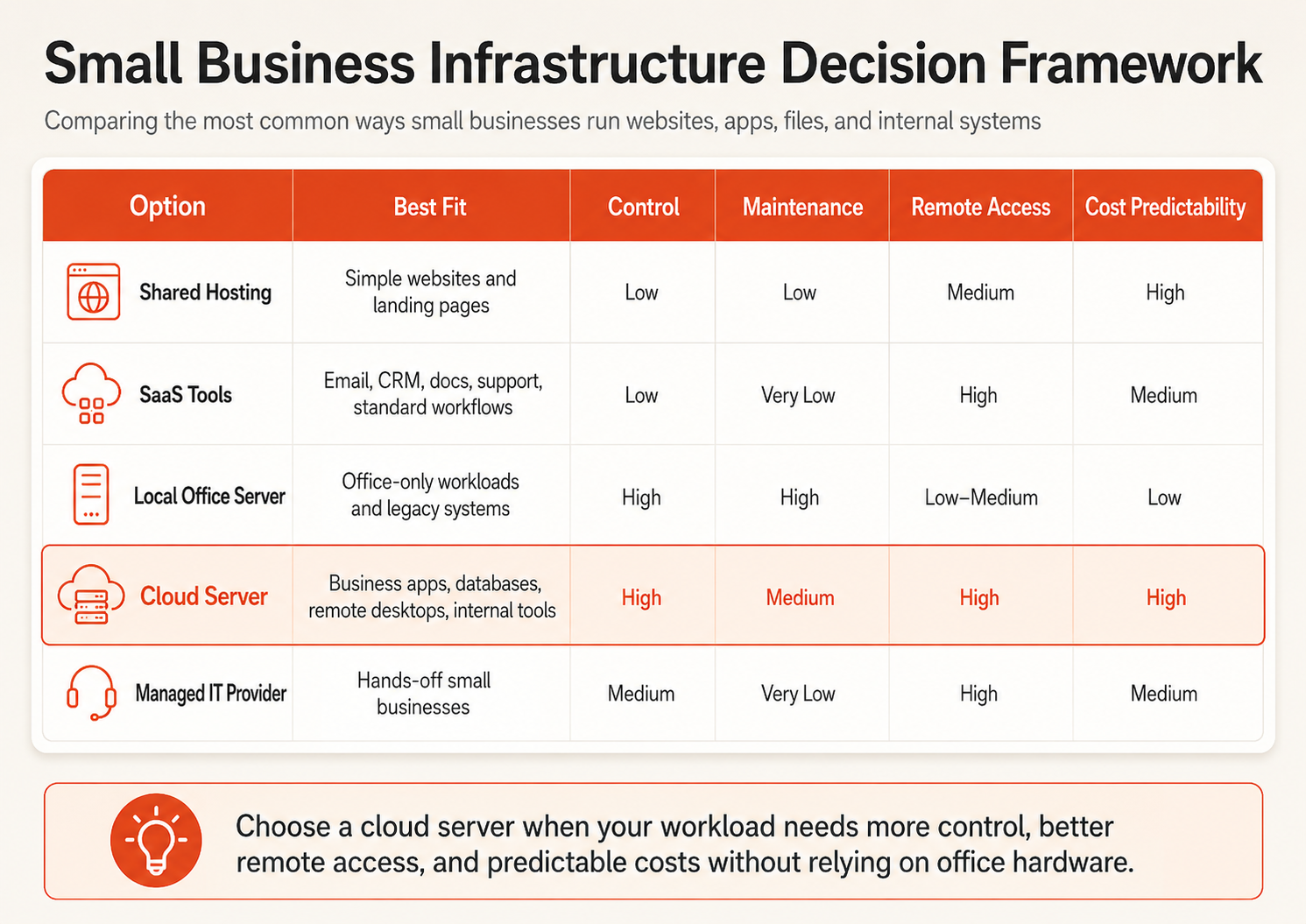
Decide between SaaS, cloud server, local server, and managed service
A cloud VM should be selected workload by workload.
| Workload situation | Better starting point | Why |
|---|---|---|
| Email, calendar, office documents | SaaS | Little value in managing a server |
| Simple brochure website | Managed/shared hosting | Lower operational burden |
| Custom website or portal | Cloud server | More runtime and deployment control |
| Windows-only business software | Windows cloud VM | Dedicated Windows environment |
| Internal API or dashboard | Cloud server | Persistent controlled runtime |
| Shared office files | SaaS, file server, or NAS depending on requirements | File access pattern matters more than “cloud” |
| Hardware-linked system | Local server | Physical dependency may dominate |
| Business wants no server administration | SaaS or managed IT | A VM still requires ownership |
| Aging office server used remotely | Cloud migration assessment | Hardware and access risk may justify a move |
Choose a cloud server when
- users need reliable access from multiple locations;
- the application needs its own OS, runtime, database, or network controls;
- the business wants to stop depending on one office machine;
- the workload may need more CPU, RAM, or storage later;
- an MSP or consultant needs a remotely manageable environment;
- the workload is important enough to justify a defined infrastructure owner.
Stay with SaaS when
- a mature hosted product already solves the problem;
- OS-level control provides little business value;
- the company does not want to own patching, monitoring, or server recovery;
- customization and integration requirements are modest.
Keep a workload local when
- it depends on scanners, machinery, cameras, dongles, or other office hardware;
- it must continue operating through an internet outage;
- very large files are used primarily across a fast local network;
- the current local system is healthy, supported, recoverable, and properly owned.
For the deeper placement decision, see Local Server vs Cloud Server: What SMBs Should Know.
Cloud-based file servers for small business: when they make sense
A large share of current search demand around small-business cloud servers is actually about shared files. That is a different decision from application hosting.
A cloud file server can make sense when a business has an application or workflow that specifically expects a traditional filesystem: shared folders, Windows permissions, mapped drives, SMB-compatible workflows, or NTFS-style access controls.
But many businesses asking for a “cloud file server” do not actually need a server. They need secure file collaboration.
Use this decision table first.
| Requirement | Better fit |
|---|---|
| Shared Word, Excel, PDF, and team documents | Microsoft 365, Google Workspace, or another file-collaboration SaaS |
| Legacy Windows app requires SMB shares or mapped drives | Windows cloud file server may fit |
| Users need Windows ACLs and server-managed shared folders | Windows file server may fit |
| Application uploads, media, exports, archives | Object storage usually fits better |
| Large CAD/media files used mainly inside one office | Local NAS or hybrid design may be better |
| Backup repository | Backup/object-storage design, not a general file server |
| Files must be accessible from multiple app servers | Object storage or shared storage depending on application semantics |
Do not expose SMB directly to the public internet
If a Windows file server is hosted in the cloud, shared folders should not simply be made public by opening SMB ports to the internet.
A safer design uses a private access path such as a VPN, controlled private networking, or another authenticated remote-access layer. Administrator RDP exposure should also be minimized and protected according to the workload’s access model.
A typical pattern is:
Remote users
  ↓ secure remote access / VPN
Windows cloud server
  ↓
SMB shares + permissions
This design is useful when a legacy application genuinely requires Windows file shares. It is unnecessary overhead when employees only need collaborative document storage.
A file server and object storage solve different problems
A file server presents folders and filesystem semantics. Object storage presents objects through an API.
Use a file server when users or applications need traditional mounted/shared folders. Use Object Storage when an application needs durable uploads, media, exports, archives, or S3-compatible access without treating the storage as a Windows or Linux filesystem.
This distinction matters because putting every growing file collection onto a VM disk can turn storage growth into a server-sizing problem.
Common small-business workloads that fit cloud servers
The strongest cloud-server use cases begin with a clear business process rather than a general cloud initiative.
Custom websites and customer portals
Shared hosting may be enough for a basic marketing site. A cloud server becomes more useful when the website includes custom backend logic, authentication, APIs, scheduled jobs, databases, or integrations that require server-level control.
A customer portal is an even stronger candidate because users depend on it as an application. The business can control the runtime, reverse proxy, deployment process, application service, and network exposure in one environment.
If the business is outgrowing entry-level hosting, read Shared Hosting vs VPS for Small Business.
Internal dashboards and business applications
Operational tools often start as spreadsheets, scripts, or applications running on one employee computer. A cloud VM gives that application a permanent home that does not disappear when a laptop is turned off or an employee leaves.
Typical examples include:
- reporting dashboards;
- order or customer-management tools;
- scheduling and inventory applications;
- internal APIs;
- lightweight CRM or workflow systems;
- background jobs and integration services.
These are often good first migrations because the users, data, owner, and success criteria are easier to define.
Windows business software and remote desktops
A Windows VM can fit software that requires Windows Server, Remote Desktop, IIS, .NET, Microsoft SQL Server, or another Windows-specific dependency.
The licensing and user model still matters. Hosting a Windows VM does not remove the need to understand application licensing, concurrent-user requirements, Remote Desktop access, or RDS requirements.
For software-specific hosting decisions, see Windows VPS for Business Software.
APIs, automation, and background services
Small businesses increasingly depend on software even when software is not their product. Booking systems, reporting pipelines, invoice workflows, lead forms, inventory integrations, n8n-style automation, and scheduled jobs all create persistent infrastructure requirements.
A VM can host an API, worker, scheduler, or automation runtime. If the workload becomes more important, the architecture can later separate application, database, and storage roles instead of forcing everything onto one machine.
Databases
A database can run on a VM, but the business should decide whether it actually wants to own database operations.
A self-managed database gives maximum control but also creates responsibility for patches, backups, restore testing, monitoring, and upgrades. A Managed Database can be a better boundary when the business wants the application on a VM but does not want to operate the database host itself.
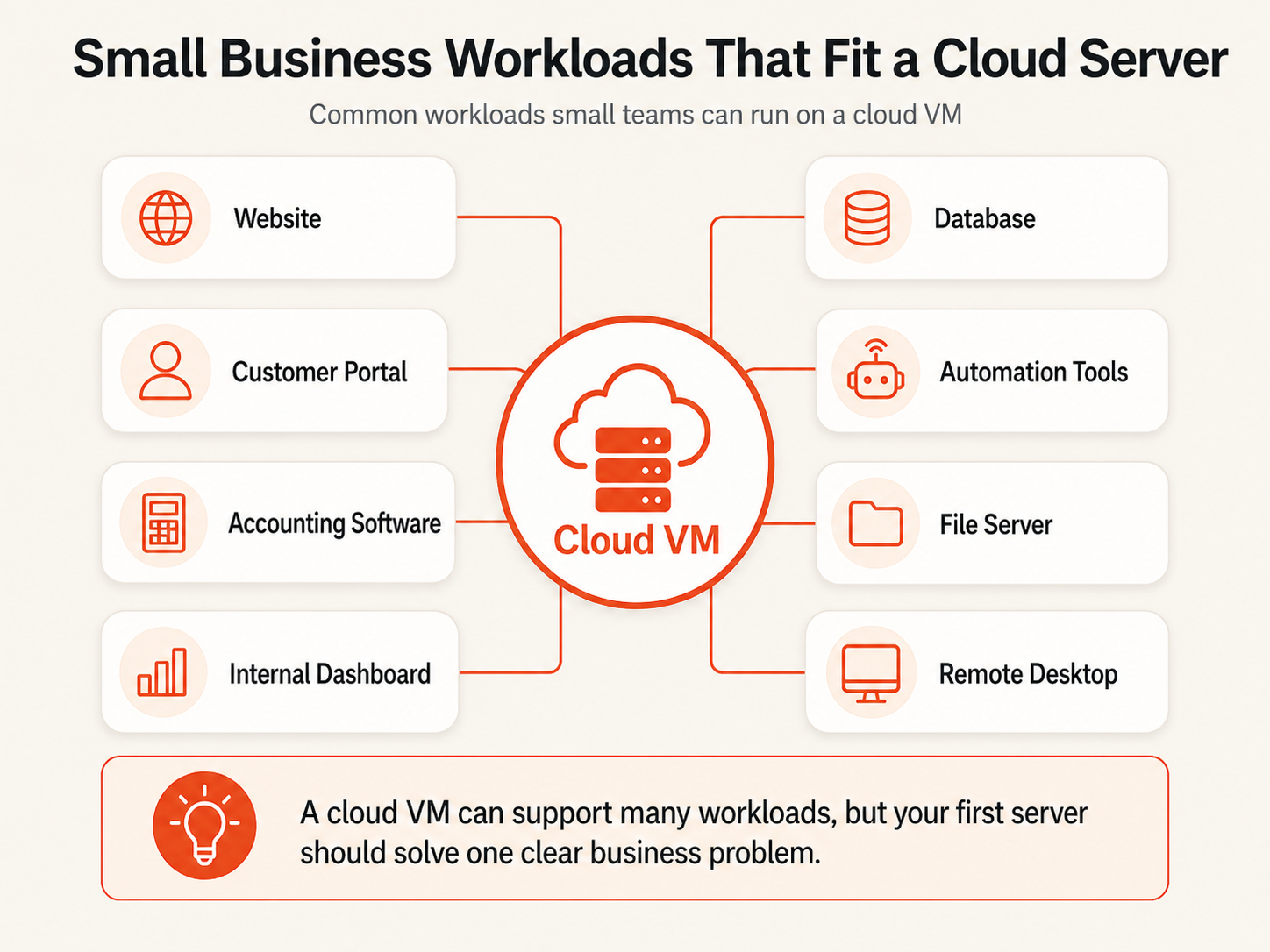
For more workload examples, see When Small Businesses Need a VPS: 9 Practical Use Cases.
A cloud server is a poor fit when nobody owns server operations
Infrastructure control creates recurring responsibility.
Someone needs to own:
- operating-system updates;
- administrator and user access;
- firewall rules;
- application deployment;
- monitoring and logs;
- backup policy;
- restore testing;
- incident response;
- eventual upgrades and migrations.
If nobody owns these tasks, a cloud server can become as fragile as the office computer it replaced.
Three cases deserve particular caution.
Standard SaaS workloads. Email, office productivity, video meetings, file collaboration, and many CRM or accounting functions are usually easier to consume as hosted software when the product already meets the business need.
Physical-device workflows. Manufacturing equipment, specialized scanners, local security systems, and applications requiring hardware dongles may remain easier to operate locally.
Zero-maintenance expectations. A business that wants no technical ownership should choose SaaS, a managed application platform, or an MSP rather than treating an unmanaged VM as a complete business service.
Size the server from the workload, not employee count
A common SMB sizing mistake is asking “How many employees do we have?” before asking “What does the server actually do?”
Different workloads consume resources differently:
| Workload | Sizing driver |
|---|---|
| Website/API | Traffic, application runtime, concurrency |
| Windows remote desktop | Concurrent users, memory, application footprint |
| File server | Storage capacity, working set, file sizes, access pattern |
| Database | Memory, query workload, I/O, dataset size |
| Automation/worker | Job concurrency and CPU/runtime behavior |
| Internal dashboard | User concurrency and source-data processing |
Start from the application’s real requirements, monitor usage, and resize when evidence supports it.
Use the live Raff pricing page for current plans and prices rather than relying on static plan numbers embedded in a long-lived guide. Raff cloud-server plans currently include NVMe storage and unmetered bandwidth, while exact plan composition and pricing should always be checked at purchase time.
Compare total operating cost, not only the VM price
A local server can include:
- hardware purchase;
- power and UPS capacity;
- cooling;
- replacement disks;
- on-site support;
- backup hardware;
- warranties;
- eventual hardware refresh.
A cloud server converts more of this into recurring infrastructure spend, but may also add Windows licensing, backup storage, management, monitoring, or support costs depending on the workload.
A better comparison is:
monthly infrastructure
+ licensing
+ backup/recovery
+ management time
+ migration effort
+ expected downtime risk
For broader cost planning, use Cloud Server Cost in 2026.
Security ownership stays with the business above the infrastructure layer
A server is not secure merely because it is hosted in a data center.
At minimum, define:
- who has administrator access;
- whether SSH keys or controlled RDP access are used;
- which ports are public;
- how firewall rules are reviewed;
- how credentials are stored;
- when the OS and application are patched;
- how former employees and contractors lose access;
- which security and availability events need alerts.
For file-server workloads, also define how remote users reach the server. Avoid designing the system around publicly exposed SMB access.
A small company does not need an enterprise security organization to answer these questions, but it does need a named owner.
Backup and recovery should be designed before migration
A cloud VM is still a server. Data can be deleted, corrupted, encrypted by malware, or made unavailable by a failed change.
Recovery planning begins with two targets:
- RPO: how much recent data can the business afford to lose?
- RTO: how long can the workload remain unavailable?
| Workload | Example recovery posture |
|---|---|
| Marketing site | Recent backup; hours-long recovery may be acceptable |
| Internal dashboard | Recovery based on value and reproducibility of source data |
| File server | Protection frequency based on file-change rate and business impact |
| Customer portal | More frequent protection and tested application restore |
| Financial system | Explicit retention, access controls, and recovery owner |
| Business-critical database | Defined RPO/RTO plus database-aware recovery |
Raff provides backup and snapshot capabilities, but infrastructure-level protection is only one recovery layer. Databases and business applications may also need application-aware backups and restore testing through Data Protection or another appropriate backup design.
A backup that has never been restored is not a complete recovery plan.
Raff fits SMB workloads that have already chosen the VM model
Raff is most relevant when a small business has decided that a VM is the appropriate environment and wants straightforward Linux or Windows infrastructure.
Relevant Raff capabilities for SMB server workloads include:
- Linux and Windows VM options;
- NVMe-backed VM storage;
- unmetered VM bandwidth;
- private networking through VPC;
- DDoS protection and firewall controls;
- snapshots and backup capabilities;
- resize paths as workloads change;
- API and infrastructure automation for teams that need it.
A simple application pattern can look like:
Users / customers
  ↓ HTTPS or controlled remote administration
Raff VM
  ↓ private network where appropriate
Managed database or internal service
  ↓
Backup / recovery layer
A file-server pattern may instead be:
Remote staff
  ↓ secure remote access
Windows VM
  ↓
Shared folders + business application
  ↓
Backup / recovery layer
The point is not to force every SMB workload onto Raff. Use SaaS when SaaS is the simpler fit. Keep physical workflows local when necessary. Use object storage when the workload needs durable objects rather than a filesystem. Choose a VM when the business genuinely needs server-level control.