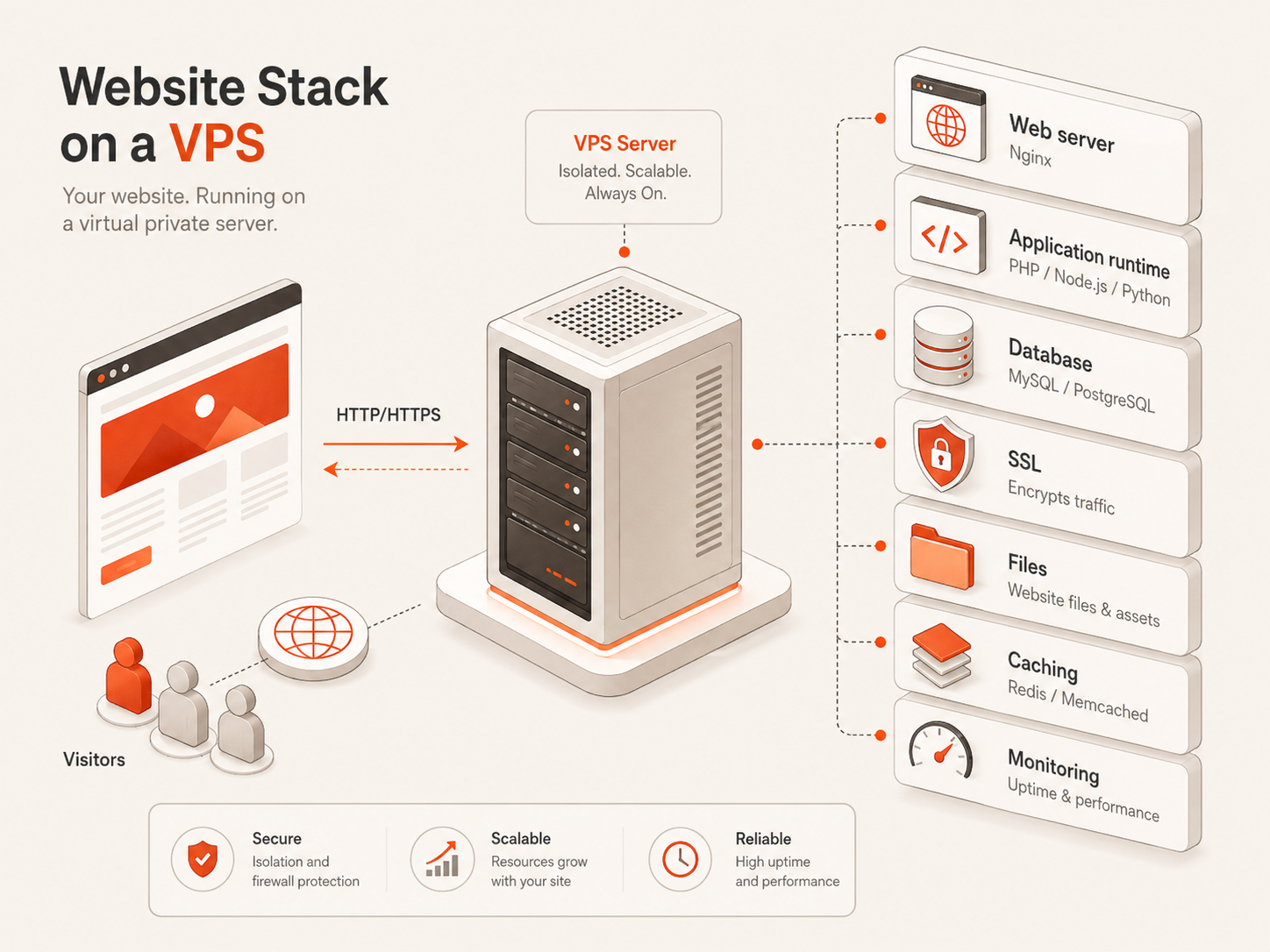
VPS web hosting is a hosting model where a website runs on a virtual private server with isolated CPU, RAM, storage, networking, and operating system control.
For small teams, VPS hosting sits between shared hosting and full cloud architecture. It gives more control than a shared hosting plan, but it does not require the same platform design work as a hyperscaler setup. That makes it useful for websites, WordPress projects, APIs, staging environments, small business sites, and web applications that need better performance and flexibility.
This guide is part of the Virtual Private Server Hosting Guide cluster and explains when VPS web hosting makes sense, when shared hosting is still enough, and how small teams should compare cost, performance, security, and operational effort.
VPS Web Hosting Explained
VPS web hosting means using a virtual private server to host a website or web application.

Instead of sharing one hosting environment with many unrelated websites, your team gets its own virtual server. That server can run a web server, database, application runtime, caching layer, background workers, SSL certificates, monitoring tools, and other software needed by the website.
A VPS can host different types of web workloads:
- Business websites
- WordPress sites
- PHP applications
- Node.js applications
- Static websites
- Landing pages
- Portfolio sites
- Client websites
- Internal dashboards
- APIs
- Staging environments
- Small SaaS applications
- E-commerce experiments
- Web apps with databases
The main benefit is control.
With VPS hosting, you can usually choose the operating system, install packages, configure the web server, manage the database, control security rules, and tune the environment for the workload.
That control is valuable when a website needs more than a basic shared hosting plan can provide.
VPS Hosting Is Not Always the First Web Hosting Choice
A VPS is powerful, but it is not automatically the right starting point for every website.
A simple brochure website, personal blog, or small static site may not need a VPS. Shared hosting, managed WordPress hosting, or static site platforms can be enough when the site has low traffic, minimal customization, and no complex backend requirements.
The decision changes when the website becomes more important.
A VPS becomes more attractive when the site needs custom software, predictable resources, better performance control, direct server access, staging environments, database control, private services, or more flexible deployment options.
The goal is not to choose the most powerful hosting model. The goal is to choose the smallest hosting model that can safely run the website.
For a wider comparison of hosting models, read the Virtual Private Server Hosting Guide.
The VPS Web Hosting Decision Framework
Use this framework before choosing a VPS for web hosting.

| Decision factor | Shared hosting may be enough when... | VPS web hosting is better when... |
|---|---|---|
| Website type | Simple brochure site, basic blog, or low-traffic page | Dynamic website, app, API, dashboard, or database-backed site |
| Control | You do not need server-level access | You need root access, custom packages, or server configuration |
| Performance | Traffic is low and performance needs are basic | You need more predictable CPU, RAM, storage, or caching control |
| Software stack | Standard PHP or CMS setup is enough | You need Node.js, Docker, custom runtimes, queues, or background jobs |
| Database | Basic shared database is enough | You need database tuning, dedicated resources, or direct access |
| Security | Basic hosting controls are enough | You need firewall rules, user management, hardening, and isolation |
| Growth | The site is unlikely to change much | The site may grow into an app, API, or multi-service stack |
| Team skill | Nobody wants to manage a server | The team can manage Linux, Windows, security, backups, and updates |
Choose shared hosting when the website is simple and the team does not want to manage infrastructure.
Choose VPS hosting when the website needs more control, more flexibility, or a stronger foundation for growth.
When Shared Hosting Is Still Enough
Shared hosting can still be a good choice for simple websites.
It is usually enough when the website is small, mostly static, and does not need custom server configuration. A local business website, portfolio, landing page, personal blog, or basic marketing site can run well on shared hosting if traffic is modest and the software stack is standard.
Shared hosting is also useful when the team wants the least operational responsibility. The provider manages much of the hosting environment, and the user mainly uploads content or manages the CMS.
Shared hosting may be enough when:
- The website is simple
- Traffic is low
- Custom software is not required
- Server access is not important
- Performance requirements are modest
- The team does not want to manage updates or server security
- The site can live inside a standard hosting control panel
The trade-off is limited control.
If the website starts needing custom packages, higher performance consistency, staging environments, background jobs, API services, or database control, shared hosting may become restrictive.
When VPS Web Hosting Makes More Sense
VPS web hosting makes more sense when the website becomes closer to an application.
This can happen with WordPress sites, custom PHP apps, Node.js apps, Laravel projects, Django apps, Next.js applications, APIs, dashboards, client portals, e-commerce experiments, or internal business tools.
A VPS gives the team control over the server environment. That means you can install the software you need, configure the web server, manage SSL, run databases, set up caching, tune memory, and create separate staging or production environments.
A VPS is usually a better fit when:
- The website needs root or administrator access
- The site runs custom software
- The team needs SSH or RDP access
- Performance is important
- The website includes an API
- The website uses a database heavily
- The site needs a staging environment
- The project uses Docker or background workers
- The team wants predictable monthly infrastructure cost
- The website may grow into a larger application
For developer-focused workloads, read Best VPS Hosting for Developers and DevOps Teams.
VPS for WordPress, PHP, Node.js, and Static Sites
Different website types place different pressure on a VPS.
A small static site may need very little server power. A WordPress site with plugins, database activity, admin traffic, backups, and media uploads may need more memory and storage performance. A Node.js app may need process management, reverse proxy configuration, logs, and background services.
The workload matters more than the word “website.”
| Website workload | VPS fit | Main thing to watch |
|---|---|---|
| Static website | Often lightweight | Web server setup, SSL, caching, bandwidth |
| WordPress website | Strong fit when control is needed | RAM, database performance, backups, updates |
| PHP application | Strong fit | Web server, PHP version, database, file permissions |
| Node.js application | Strong fit | Process management, reverse proxy, logs, memory |
| API backend | Strong fit | CPU, RAM, latency, database, monitoring |
| E-commerce site | Possible, but needs care | Security, backups, database, uptime, payments |
| Client sites | Strong fit for agencies | Isolation, backups, access control, staging |
| Internal dashboard | Strong fit | Access security, database, uptime, user permissions |
A VPS gives flexibility across these website types, but flexibility also means responsibility.
The team should plan updates, backups, firewall rules, SSL renewal, monitoring, and recovery before treating the VPS as production infrastructure.
VPS vs Managed Hosting for Websites
Managed hosting and VPS hosting solve different problems.
Managed hosting is usually better when the team wants someone else to handle most infrastructure details. Managed WordPress hosting, for example, may include updates, caching, backups, security features, support, and performance tuning for WordPress specifically.
VPS hosting is better when the team wants more control over the server.
| Hosting model | Best for | Main trade-off |
|---|---|---|
| Managed hosting | Teams that want less infrastructure work | Less flexibility and sometimes higher cost |
| VPS hosting | Teams that want control and predictable resources | More responsibility for setup, security, and maintenance |
| Shared hosting | Simple websites with low complexity | Limited control and resource isolation |
| Full cloud platform | Complex applications and cloud-native systems | More billing, networking, and architecture complexity |
Managed hosting can be the right choice for non-technical website owners.
VPS hosting is usually better for developers, agencies, founders, and small teams that want control over the stack and are comfortable managing a server.
For the difference between cloud VPS and older VPS models, read Cloud VPS vs Traditional VPS.
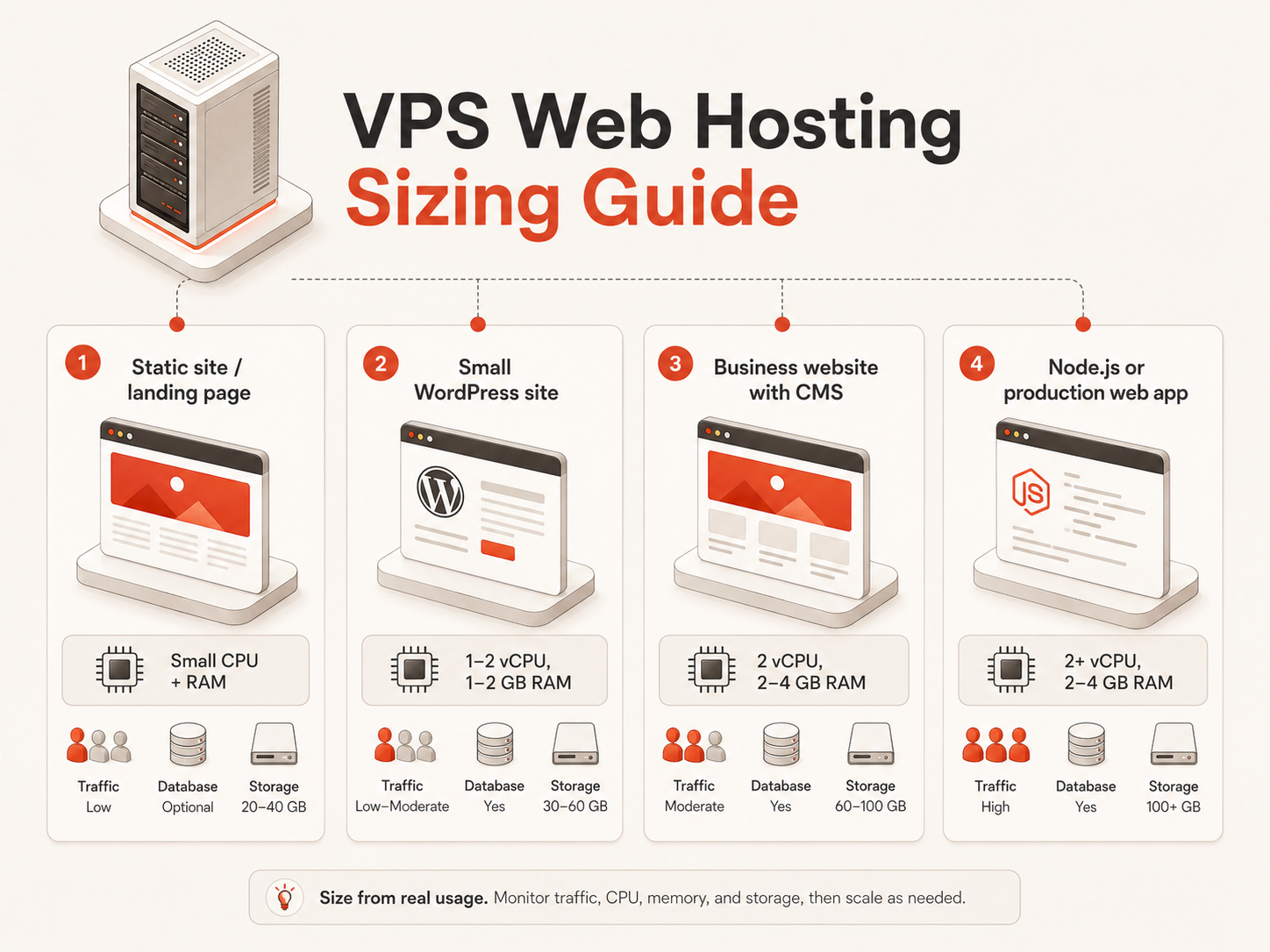
Sizing a VPS for Web Hosting
The right VPS size depends on traffic, software stack, database usage, plugins, background jobs, caching, and the number of sites running on the server.

A small website may start with a modest plan. A dynamic website, WordPress site, or app with database activity usually needs more headroom.
| Web hosting scenario | Typical starting point | Notes |
|---|---|---|
| Static website or landing page | Small CPU and RAM plan | Usually light unless traffic is high |
| Small WordPress site | 1–2 vCPU and 1–2 GB RAM | More plugins and traffic may need more RAM |
| Business website with CMS | 2 vCPU and 2–4 GB RAM | Good for stronger admin and database performance |
| Node.js or PHP app | 2+ vCPU and 2–4 GB RAM | Depends on runtime, database, and background jobs |
| Website plus database | More RAM and fast storage | Database performance often becomes the limit |
| Multiple client websites | More CPU, RAM, and storage | Isolation and backups become important |
| Production web app | Size from real usage | Monitor CPU, RAM, disk, network, and latency |
Avoid choosing the smallest plan only because it is cheaper.
A VPS that is too small may create slow page loads, failed updates, database instability, crashes, swap usage, and poor admin performance. Starting modestly is smart, but the plan should leave enough room for normal website activity.
For more detailed sizing guidance, read Choosing the Right VM Size.
Performance Factors That Matter for VPS Web Hosting
Website performance depends on more than the VPS plan name.
CPU, RAM, storage type, network speed, web server configuration, caching, database behavior, image size, application code, and traffic patterns all affect the result.
The most important VPS performance factors are:
| Factor | Why it matters for websites |
|---|---|
| CPU | Handles application logic, PHP, Node.js, web requests, compression, and background tasks |
| RAM | Supports the operating system, web server, database, cache, and app runtime |
| NVMe SSD storage | Improves database activity, file access, logs, package installs, and responsiveness |
| Bandwidth | Affects public traffic, media delivery, downloads, and predictable cost |
| Network port speed | Helps with transfer capacity and responsiveness under load |
| Caching | Reduces repeated processing and database load |
| Database tuning | Often determines dynamic website performance |
| Web server setup | Nginx, Apache, reverse proxies, SSL, and compression all matter |
| Monitoring | Helps identify pressure before users complain |
A fast VPS does not replace good website optimization. Large images, heavy plugins, inefficient database queries, and poor caching can make any server feel slow.
But a weak server can limit even a well-built website.
The best approach is to combine a properly sized VPS with basic website optimization and monitoring.
Security and Backups for VPS Web Hosting
A VPS gives more control than shared hosting, but that also means more responsibility.
For production web hosting, security and backups should not be treated as optional. A website may contain customer data, business content, admin credentials, forms, user accounts, configuration files, and database records.
Important VPS web hosting security practices include:
- Use SSH keys where possible
- Keep the operating system updated
- Keep the web server updated
- Keep CMS software and plugins updated
- Configure firewall rules
- Use HTTPS with SSL certificates
- Limit admin access
- Disable unnecessary services
- Use strong passwords and access controls
- Monitor logs
- Create backups
- Test recovery before an emergency
Backups matter most when the website stores data that cannot be easily recreated.
A static site may be rebuilt from a repository. A WordPress site, database-backed app, or business dashboard may need regular database and file backups.
For a broader security foundation, read Cloud Security Fundamentals.
Cost Factors for VPS Web Hosting
VPS web hosting cost is not only the server price.
The real monthly cost may include compute, storage, bandwidth, backups, snapshots, operating system requirements, monitoring, domains, SSL management, email services, support, and the time needed to manage the server.
For small teams, predictable cost is often one of the main reasons to choose VPS hosting.
A VPS can be more transparent than large cloud platforms when the website needs one or a few servers. Instead of estimating many separate services, the team can often start with a clear monthly plan and add backups or upgrades as needed.
Still, the cheapest VPS is not always the best value.
A very low-cost plan may become expensive if it causes slow performance, downtime, migrations, support issues, or lost time.
For a full budgeting view, read Cloud Server Cost in 2026.
Raff VM for VPS Web Hosting
Raff VM fits the VPS web hosting path for small teams that want more control than shared hosting without starting inside a complex hyperscaler setup.
Many website projects do not need a full cloud architecture on day one. They need a fast virtual server, predictable pricing, strong storage, clear bandwidth, and the flexibility to run the web stack their project requires.
Raff VM supports web hosting workloads with AMD EPYC processors, NVMe SSD storage, unmetered bandwidth, 3 Gbps port speed, one IPv4 address, optional IPv6 dual-stack support, and Linux or Windows VM options. Plans start from $3.99/month for entry-level workloads.
That makes Raff VM relevant for small business websites, WordPress projects, PHP applications, Node.js apps, APIs, staging servers, internal dashboards, agency projects, and developer-managed websites.
The practical advantage is simplicity. A team can deploy a VM, choose an operating system, configure the web stack, connect over SSH or RDP, and run the workload without designing a full cloud account, complex network architecture, or unpredictable billing model first.
Raff is not a managed WordPress host and not a replacement for every enterprise cloud architecture. It is a cloud VM platform for teams that want VPS-style control, fast deployment, predictable pricing, and infrastructure that can support real web workloads as they grow.
Common Mistakes When Choosing VPS for Web Hosting
Most VPS web hosting mistakes happen before the server is deployed.
The problem is usually not that VPS hosting is too difficult or too expensive. The problem is that the team chooses a server without clearly defining the website type, software stack, traffic pattern, database needs, backup strategy, and who will maintain the environment after launch.
A VPS gives more control than shared hosting, but that control only helps when the team uses it intentionally.
For the broader server decision, read the Virtual Private Server Hosting Guide. For sizing and budget planning, compare this section with Choosing the Right VM Size and Cloud Server Cost in 2026.
| Mistake | What it looks like | Why it becomes a problem |
|---|---|---|
| Choosing VPS before defining responsibility | The team wants more power but has no server maintenance plan | Updates, security, backups, and monitoring are ignored |
| Buying the smallest plan by default | The plan fits the budget, but not the workload | WordPress, databases, plugins, and traffic quickly create pressure |
| Treating backups as an optional add-on | Backups are delayed until the site becomes important | Recovery is difficult after content, forms, orders, or data accumulate |
| Treating dynamic websites like static pages | WordPress or CMS sites are sized like simple landing pages | Database activity, admin traffic, and plugins consume more resources |
| Hosting too many sites on one small VPS | Multiple websites share one weak environment | One busy or compromised site can affect the rest |
| Ignoring operational maintenance | The VPS is deployed and then forgotten | Security patches, logs, SSL, and uptime issues accumulate |
| Planning only for the first version of the website | A landing page later becomes an app, API, or portal | The team needs an urgent migration instead of a controlled upgrade |
Choosing VPS before defining operational responsibility
A VPS is not only a hosting product. It is also an operational responsibility.
With shared hosting, many server-level decisions are handled by the provider. With VPS hosting, the team has more control over the operating system, web server, database, firewall, SSL, packages, updates, backups, and monitoring.
That control is valuable when the team needs it. It becomes a liability when nobody owns it.
Before choosing VPS hosting, define who will manage:
- Operating system updates
- Web server configuration
- Firewall rules
- SSL certificates
- Database updates
- Backups
- Monitoring
- Log review
- Recovery after failure
A VPS is a strong fit when the team wants server-level control and has someone who can manage the environment. If nobody wants that responsibility, managed hosting may be the better choice.
Buying the smallest plan without matching the workload
Starting small is sensible. Starting too small is expensive in a different way.
The smallest VPS plan may work for a static site, landing page, or lightweight test project. It may not work well for a WordPress site with plugins, a PHP application, a Node.js app, a database-backed website, or multiple client sites.
The real question is not “what is the cheapest VPS?” It is “what is the smallest VPS that can run this website safely?”
A web hosting VPS should leave room for:
- The operating system
- Web server processes
- Database activity
- PHP, Node.js, or application runtime
- Admin activity
- Backups
- Updates
- Logs
- Traffic spikes
- Security tools
- Future website changes
If the server is too small, the symptoms may look like website problems: slow admin panels, failed plugin updates, database timeouts, random crashes, high swap usage, or inconsistent page speed.
For practical sizing decisions, use Choosing the Right VM Size.
Treating backups as something to add later
Many websites begin as simple projects and become important gradually.
A landing page gains form submissions. A WordPress site gains months of content. A small store gains orders. A client demo becomes a production portal. A dashboard becomes part of daily business operations.
If backups are not planned early, the website can quietly become business-critical without a recovery path.
For VPS web hosting, backups should match the value of the website:
| Website type | Backup priority |
|---|---|
| Static site deployed from Git | Lower, because the source can usually be redeployed |
| WordPress site | High, because files, media, plugins, and database content change |
| Business website with forms | High, especially if submissions are stored |
| E-commerce site | Very high, because orders and customer data matter |
| Client website | High, because reputation and delivery obligations matter |
| Internal dashboard | Depends on whether business data is stored |
| Database-backed web app | Very high, because application state is difficult to recreate |
A VPS for production web hosting should not be judged only by CPU and RAM. It should also be judged by how easily the site can be restored.
For a wider security and recovery foundation, read Cloud Security Fundamentals.
Treating WordPress like a static website
WordPress is often described as “just a website,” but operationally it behaves like a dynamic application.
A WordPress VPS may need to handle PHP execution, database queries, plugin activity, media uploads, scheduled tasks, admin sessions, cache generation, backups, security scans, and frequent updates.
That means a WordPress site can place more pressure on RAM, CPU, and storage than a simple static page.
This is especially true when the site uses:
- Page builders
- E-commerce plugins
- Membership plugins
- Security plugins
- Backup plugins
- Heavy themes
- Large media libraries
- High admin activity
- Frequent content updates
- Multiple user roles
A WordPress site can run very well on a VPS, but it should be sized and maintained like dynamic software, not like a brochure page.
Consolidating too many websites on one small VPS
Putting multiple websites on one VPS can be efficient for agencies, freelancers, and small teams.
It can also concentrate risk.
When several websites share the same small server, they also share CPU, RAM, disk I/O, bandwidth, security exposure, and maintenance windows. If one website becomes busy, misconfigured, or compromised, the others may be affected.
This does not mean every website needs a separate VPS. It means the consolidation model should be intentional.
Before hosting multiple sites on one VPS, decide:
- How many sites will run on the server
- Whether each site needs its own user or container
- How backups will be separated
- How logs will be reviewed
- How SSL certificates will be managed
- How resource usage will be monitored
- What happens if one site is compromised
- When a site should be moved to its own server
For agencies and developer teams, VPS consolidation can be practical, but it should not be treated as unlimited shared hosting.
Ignoring storage performance
Website owners often compare storage by capacity only.
For active websites, storage speed also matters.
NVMe SSD storage can improve responsiveness for database queries, CMS admin panels, plugin updates, package installs, log writes, file uploads, cache generation, and application deployments.
This matters most for dynamic websites, WordPress, PHP applications, Node.js apps, databases, and web applications with frequent reads and writes.
A plan with more unused storage is not always better than a plan with faster storage and enough capacity for the actual workload.
For cost and storage trade-offs, read Cloud Server Cost in 2026.
Forgetting that web hosting has a lifecycle
A website is not finished when it launches.
After launch, the workload changes. Traffic grows or falls. Plugins are added. Content expands. Databases grow. Logs accumulate. Backups consume storage. Security updates arrive. New pages, APIs, forms, dashboards, and integrations appear.
A VPS should be reviewed after real usage begins.
The review should include:
- CPU usage
- RAM usage
- Disk usage
- Disk I/O
- Network traffic
- Page speed
- Database behavior
- Error logs
- Backup success
- SSL status
- Uptime
- Admin performance
The right VPS plan is not fixed forever. It should evolve with the website.
Best Practices for VPS Web Hosting
A good VPS web hosting decision starts with the website’s operating model, not the server plan.
The goal is to choose infrastructure that matches the website’s current needs, supports the next stage of growth, and remains simple enough for the team to operate confidently.
Use this model before choosing a VPS:
| Decision area | Ask this question | Why it matters |
|---|---|---|
| Website type | Is this static, CMS-based, application-based, or database-backed? | Different website types create different server pressure |
| Stack complexity | Does the site need PHP, Node.js, Docker, database, cache, or background jobs? | The stack determines CPU, RAM, storage, and maintenance needs |
| Business importance | What happens if the site is slow or offline? | Production and revenue-facing sites need stronger reliability planning |
| Data value | Does the site store content, users, orders, forms, or application state? | Data determines backup and recovery requirements |
| Team skill | Who will manage updates, security, logs, and troubleshooting? | VPS hosting requires operational ownership |
| Growth path | Could this become an app, API, portal, or multi-site environment? | The hosting model should avoid urgent migration later |
Build a workload profile before choosing the VPS
Start by describing the website as a workload.
A useful workload profile includes:
- Website type
- Expected traffic
- CMS or framework
- Database requirements
- Runtime requirements
- Storage needs
- Backup needs
- Security requirements
- Number of admins
- Number of websites
- Expected growth over the next 3–12 months
This prevents the team from choosing a VPS based only on price or plan names.
A static landing page, WordPress site, Laravel application, Node.js app, API backend, and client portal should not all use the same hosting decision model.
Choose VPS only when the website benefits from control
VPS hosting is best when control creates real value.
Choose VPS web hosting when the website needs:
- Root or administrator access
- Custom packages
- Nginx or Apache configuration
- PHP, Node.js, Python, or custom runtime support
- Database control
- SSH or RDP access
- Docker or background services
- Staging and production environments
- Predictable resources
- Better isolation than shared hosting
- Room to grow into a larger web application
Do not choose VPS only because it sounds more advanced.
If the website is simple and the team does not want server responsibility, shared hosting or managed hosting may still be the cleaner option.
Design the web stack before deployment
A VPS plan should be chosen after the web stack is understood.
At minimum, define whether the site will need:
- Linux or Windows
- Nginx or Apache
- PHP, Node.js, Python, or another runtime
- MySQL, PostgreSQL, or another database
- Redis or another cache layer
- Docker
- SSL certificates
- File uploads
- Email handling
- Backups
- Monitoring
- CDN or external storage
This matters because every component consumes resources.
A VPS that looks large enough for a basic website may be too small once the database, runtime, cache, backups, logs, and updates are included.
For developer-oriented web stacks, read Best VPS Hosting for Developers and DevOps Teams.
Keep production and experimentation separate when risk increases
Early projects often combine everything on one server.
That can be acceptable at the beginning. Over time, the team should separate workloads when risk increases.
A production website should not always share the same environment as experiments, test scripts, unfinished apps, or unstable side projects. The more important the website becomes, the more carefully the environment should be protected.
Separation may mean:
- A separate staging site
- A separate database server
- Separate users or containers
- Separate backups
- Separate VPS instances for important sites
- A cleaner deployment process
- A stricter firewall and access model
The goal is not to over-engineer. The goal is to prevent one risky workload from damaging an important one.
Size for normal pressure, not perfect conditions
A VPS should not be sized only for the quietest moment of the day.
Real websites have updates, crawlers, traffic spikes, admin sessions, backups, form submissions, scheduled jobs, and occasional inefficient requests. Dynamic sites also need room for database activity and cache rebuilding.
A stable VPS web hosting setup should leave headroom for normal pressure.
For many small websites, this means avoiding the absolute smallest plan once the site becomes dynamic, public, or business-relevant.
Monitor real usage and resize before the server becomes fragile.
Treat storage as a performance factor
Storage is not only where files live.
For web hosting, storage affects:
- Database responsiveness
- CMS admin performance
- Plugin and package installs
- Media uploads
- Log writing
- Cache files
- Docker layers
- Backup creation
- Application deployment
For static websites, storage performance may be less important. For WordPress, databases, dashboards, APIs, and web applications, faster storage can directly affect the user and admin experience.
NVMe SSD storage is especially useful when the site is active, database-backed, or frequently updated.
Make backups part of the hosting model
A production website should have a recovery model before it needs one.
Backups should cover the parts of the site that are hard to recreate:
- Database
- Uploaded files
- Website files
- Configuration files
- SSL and deployment notes
- Application state
- CMS content
- Customer or form data
A backup is only useful if it can be restored.
Small teams should periodically confirm that backups exist, are recent, and can be used in a real recovery scenario.
Secure the server before traffic arrives
A VPS connected to the public internet should be treated as production infrastructure.
Before launch, the team should review:
- SSH or RDP access
- Firewall rules
- User permissions
- OS updates
- Web server updates
- CMS and plugin updates
- SSL certificates
- Database exposure
- Admin URLs
- Logs
- Monitoring
- Backup access
Security is easier to build into the VPS early than to repair after the site is already public.
For the broader checklist, read Cloud Security Fundamentals.
Review the hosting plan after launch
The first VPS choice is an estimate. Real usage gives better evidence.
After launch, review performance and resource usage regularly. Look for patterns, not only emergencies.
Useful signals include:
- Slow page loads
- High RAM usage
- Swap usage
- CPU spikes
- Database slowdowns
- Failed backups
- Growing logs
- SSL renewal issues
- Unusual traffic
- Increasing storage usage
- Admin panel slowness
- Application errors
Resize or adjust the stack before these signals become outages.
A good VPS web hosting setup should remain understandable, maintainable, and ready for the next stage of the website.
Choosing the Right Web Hosting Path
VPS web hosting is strongest when a website needs more control, flexibility, and performance ownership than shared hosting can provide. It is useful for dynamic websites, WordPress, PHP applications, Node.js apps, APIs, staging environments, and small business tools that need room to grow.
Shared hosting can still be enough for simple sites. Managed hosting can be better when the team wants less operational responsibility. Full cloud platforms can be better when the website belongs inside a larger cloud architecture.
For the broader decision, start with the Virtual Private Server Hosting Guide. If your website fits the VPS path, Raff VM gives you a simple way to deploy cloud infrastructure with predictable monthly pricing, NVMe SSD storage, unmetered bandwidth, and Linux or Windows server options.