
Amazon EC2 is a virtual server service, so an EC2 instance can serve the same basic role as a VPS. The difference is scope: a typical VPS is a server-first product, while EC2 is compute inside the much broader AWS platform.
For a small team that mainly needs one or a few Linux or Windows servers, a VPS can mean fewer infrastructure and billing decisions. EC2 becomes more compelling when the workload needs AWS-native services, broad Region and Availability Zone choice, specialized instance families, IAM governance, Auto Scaling, Spot capacity, or other AWS platform capabilities.
So if you are comparing VPS vs AWS EC2, do not compare only vCPU and RAM. Compare the operating model around the VM: storage, networking, public IPs, data transfer, scaling, support, purchase model, and the AWS services the application depends on.
Raff Technologies sits on the simpler cloud-VM side of that comparison. Raff can fit straightforward VM workloads, but it is not a like-for-like replacement for the full AWS ecosystem.
VPS vs AWS EC2: quick comparison
| Requirement | Typical fit | Why |
|---|---|---|
| One or a few straightforward servers | VPS / Raff VM | Fewer architecture and billing decisions |
| Deep AWS service integration | AWS EC2 | Native fit with the AWS ecosystem |
| Predictable server-first pricing | VPS / Raff VM | VM pricing and included resources are easier to see upfront |
| Broad global region/AZ choice | AWS EC2 | Much larger global infrastructure footprint |
| Hundreds of compute shapes and specialized hardware | AWS EC2 | EC2 offers a very broad instance catalog |
| Unmetered bandwidth without separate egress billing | Raff VM | Included on current Raff VM plans |
| Auto Scaling and large fleet automation | AWS EC2 | Mature native tooling for dynamic fleets |
| Linux or Windows VM with less platform overhead | VPS / Raff VM | Simpler VM-centered workflow |
| Spot/preemptible-style cost optimization | AWS EC2 | EC2 Spot can materially reduce eligible interruptible workloads |
| 24/7 human infrastructure support included | Raff VM | Current Raff plans include 24/7 support |
The right question is not “Is AWS better than VPS?” It is how much cloud-platform depth does this workload actually need?
Is EC2 a VPS?
Functionally, an EC2 instance is a virtual server, so it overlaps heavily with what buyers call a VPS. AWS describes Amazon EC2 as resizable compute capacity delivered as virtual servers in its EC2 overview and EC2 documentation.
The distinction is mainly product scope.
A typical VPS product focuses on the server itself:
vCPU
+ RAM
+ disk
+ network
+ operating system
EC2 is one compute layer inside a much larger AWS platform. An EC2 deployment may also involve:
- VPCs and subnets;
- security groups;
- IAM roles and policies;
- EBS volumes;
- Elastic Load Balancing;
- Auto Scaling;
- CloudWatch;
- Route 53;
- RDS;
- S3;
- NAT gateways;
- public IPv4 addresses;
- Savings Plans or Spot purchasing models.
So EC2 can serve the same role as a VPS, but AWS gives you a much larger architecture around the VM.
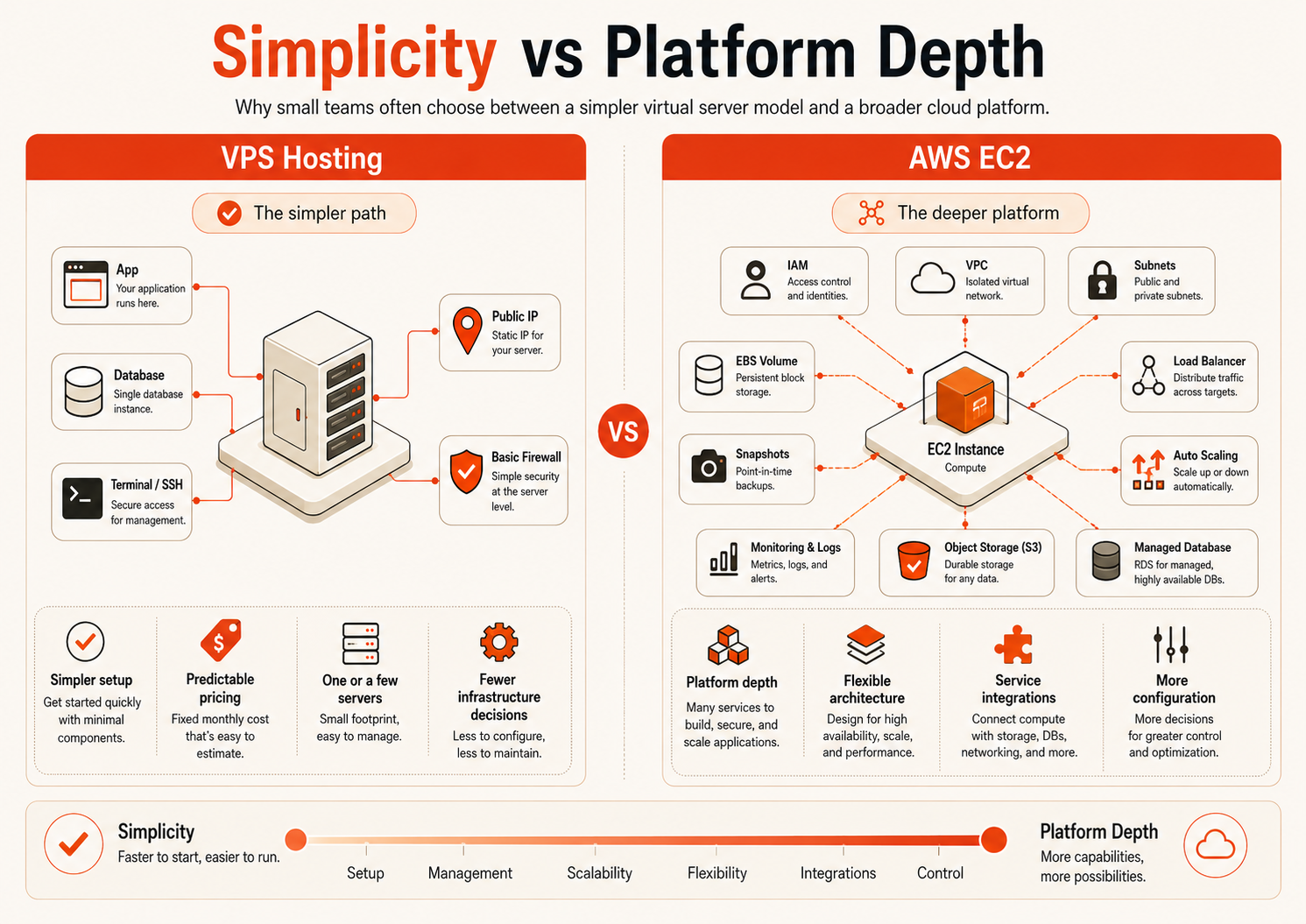
VPS vs EC2: the real difference is responsibility and platform depth
Both models still leave important guest-level work with the customer unless a separate managed service is purchased.
You usually remain responsible for:
- operating-system patching;
- SSH/RDP access;
- application deployment;
- database administration when self-hosted;
- credentials;
- application monitoring;
- backup scope and restore testing;
- firewall/application security inside the guest.
The difference is how much infrastructure platform surrounds that guest.
With a basic VPS, the provider may expose a smaller set of controls. With EC2, you can design a much more granular cloud architecture around compute.
That depth is valuable when it solves a real requirement. It is overhead when the application only needs a stable server.
VPS vs AWS EC2 decision matrix
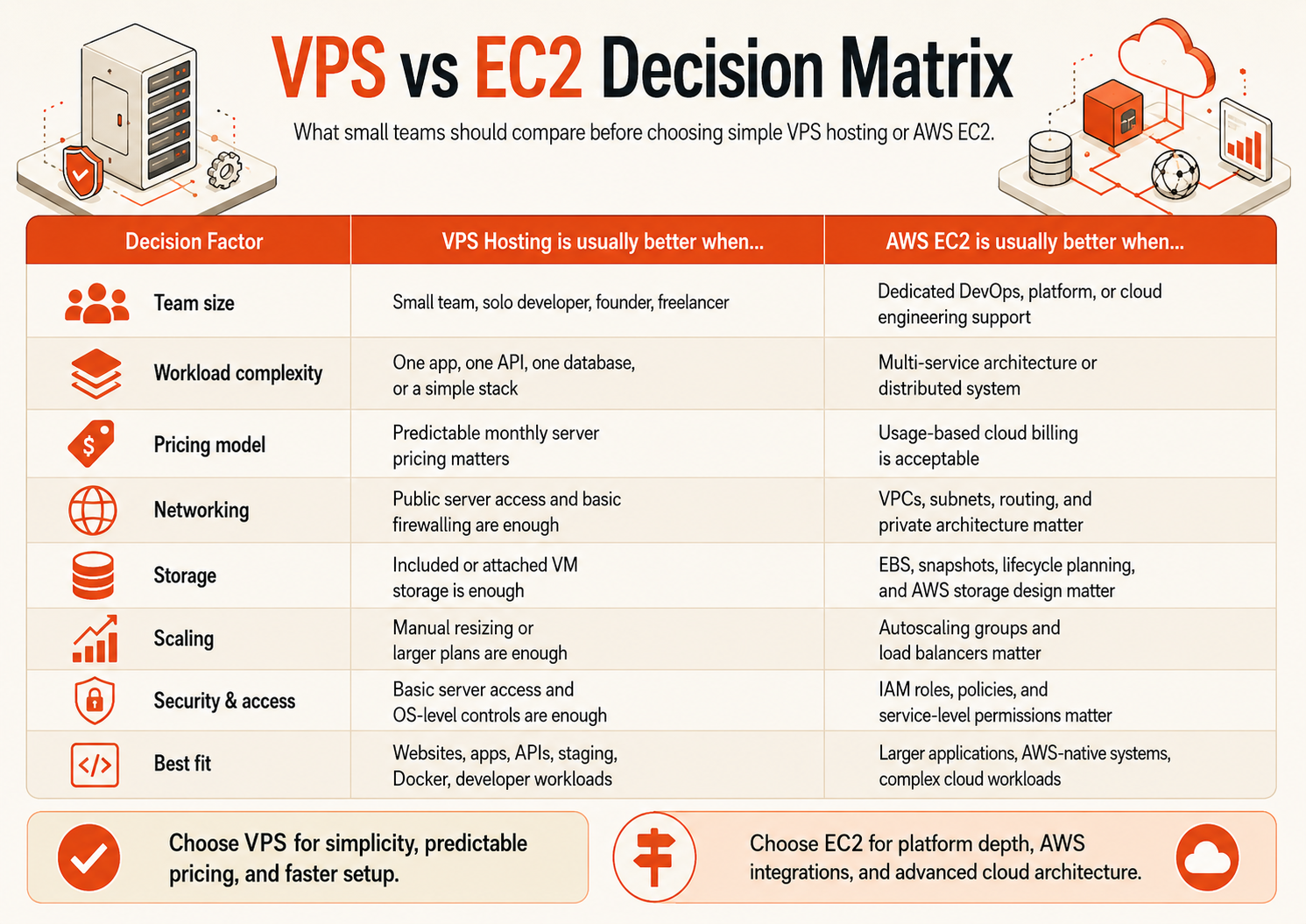
| Decision area | VPS / Raff-style cloud VM | AWS EC2 |
|---|---|---|
| Typical workload | One/few servers | Single VMs through large distributed systems |
| Instance choice | Smaller curated plan catalog | Very large catalog, including specialized compute |
| Global footprint | Provider-specific | Broad global AWS region/AZ footprint |
| Billing model | Usually plan-first | On-Demand, Spot, Savings Plans and other options |
| Persistent storage | Included disk and/or provider volumes | EBS with separate configuration/pricing |
| Public IPv4 | Often included by VPS providers | AWS currently charges for public IPv4 addresses |
| Egress | Provider-specific | Architecture/service/region dependent |
| Private networking | Provider-specific | Deep VPC networking model |
| Identity/governance | Simpler account/server controls | IAM and enterprise account governance |
| Auto Scaling | Often manual/provider-specific | Native EC2 Auto Scaling |
| Infrastructure as code | Varies | Broad AWS tooling/ecosystem |
| Operational learning curve | Usually lower | Higher, but with much greater platform depth |
This is why a fair comparison cannot be reduced to “same RAM, which is cheaper?” The surrounding architecture changes the result.
Where AWS EC2 Has Broader Platform Capabilities
A trustworthy comparison should say where EC2 is the better product.
Global infrastructure
AWS provides broad geographic coverage across Regions and Availability Zones, which matters when an architecture requires multi-region deployment, specific AWS locations, or proximity to AWS-native services across markets.
Raff's current VM offering is centered on its us-east location. If your application needs deployment in several continents or a specific AWS Region, that is a real reason to choose AWS.
Instance and hardware choice
AWS states on its EC2 product page that EC2 offers more than 1,000 instance types across Intel, AMD, and Arm processors, including specialized choices for HPC, ML, memory-intensive workloads, GPU workloads, Windows, macOS, and more.
A smaller cloud provider intentionally offers a more curated set of VM choices. That can simplify buying, but it cannot match AWS's hardware breadth.
AWS-native architecture
If your application relies on services such as S3, RDS, EKS, ECS, Lambda, CloudFront, Route 53, IAM, or other AWS-native components, EC2 often fits naturally into that architecture.
Choosing a VPS elsewhere only to recreate an AWS-native design can create more work, not less.
Dynamic fleets and Auto Scaling
Amazon EC2 Auto Scaling can add or remove instances according to policies you define. If automatic fleet-level scaling is a core requirement, EC2 has a mature native ecosystem around it.
Purchase-model optimization
AWS also gives experienced teams more ways to optimize compute spend:
- On-Demand;
- Spot Instances;
- Savings Plans.
AWS says EC2 Spot Instances can offer discounts of up to 90% versus On-Demand for suitable interruptible workloads, while Savings Plans can provide discounts of up to 72% in exchange for a one- or three-year hourly-spend commitment.
For a team that actively manages cloud economics, these models can be powerful.
Where a Simpler VPS or Raff VM Fits
AWS's strengths do not mean every workload benefits from AWS-level platform depth.
A simpler VM platform is relevant when:
- you need one or a few servers;
- the architecture is understandable without many supporting cloud services;
- predictable infrastructure cost matters;
- your team values a smaller number of operational decisions;
- bandwidth usage would make egress cost important;
- you want direct access to human support;
- you need Linux or Windows VMs, not a large cloud-service catalog.
Common examples include:
- SaaS MVPs;
- small production web apps;
- APIs;
- Docker hosts;
- development/staging servers;
- internal business systems;
- Windows RDP workloads;
- self-hosted tools;
- agency/customer environments;
- small databases where self-management is acceptable.
The commercial advantage of a simpler platform is not that it has more features than AWS. It is that the team can often understand the full architecture and bill faster.
AWS EC2 pricing: compute is only one line of the bill
AWS On-Demand EC2 allows eligible instances to be billed by the second with a 60-second minimum and no long-term commitment.
That flexibility is useful. It also means a complete comparison needs to account for more than compute.
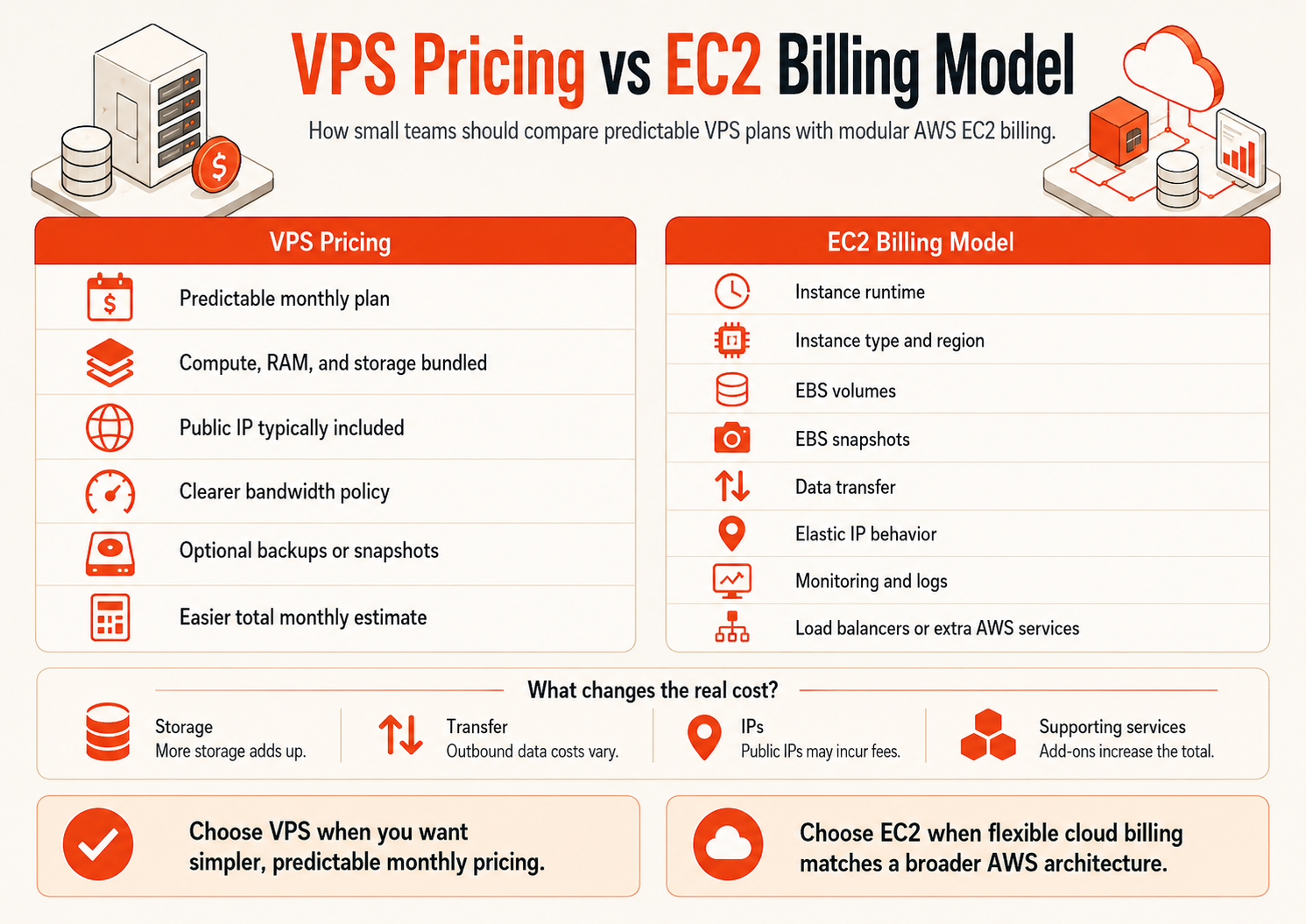
An EC2 architecture may include:
EC2 compute
+ EBS volumes
+ EBS snapshots
+ public IPv4
+ outbound data transfer
+ load balancer
+ NAT gateway
+ monitoring/logging
+ support
+ managed services
Not every deployment uses every item. That is exactly why blanket “AWS costs X” claims are usually misleading.
EBS is a separate storage decision
Persistent EC2 storage commonly uses Amazon EBS. AWS bills EBS storage separately, and provisioned performance can also affect cost depending on the volume type. EBS snapshots have their own storage model and pricing.
Public IPv4 has a current AWS charge
AWS currently lists a $0.005 hourly charge for each public IPv4 address in its Amazon VPC pricing, whether the address is in use or idle, with documented exceptions such as BYOIP.
This is a small line item for one VM, but it is an example of why the compute instance alone is not the whole bill.
Commitments can reduce AWS cost
AWS Savings Plans can materially reduce eligible compute cost, but they trade flexibility for commitment through one- or three-year terms.
That means an experienced AWS team should not compare only On-Demand pricing against a VPS monthly plan. A fair comparison should use the purchase model the team would actually choose.
Raff VM pricing and what is included
Raff's current cloud-server plans publish the VM resources and monthly price together and include unmetered bandwidth. Current plans also list private networking, DDoS protection, backup/snapshot storage allowances, API/Terraform support, monitoring, and 24/7 support as included platform capabilities on the live Raff pricing page and Raff VM page.
Because pricing can change, this guide does not hardcode an entry price. Use the live Raff pricing page for current sizes and terms.
The commercial fit is strongest when you value:
- a VM-centered buying experience;
- no separate egress fee for normal included VM bandwidth;
- Linux or Windows choices;
- private networking;
- API/Terraform automation;
- a VM-centered operating model with current product terms documented on Raff's product and pricing pages.
The trade-off is equally important: Raff does not offer AWS's global footprint, enormous instance catalog, or breadth of managed services.
That boundary should be part of the buying decision, not hidden from it.
Support: compare the operating model, not only the ticket channel
Support is one of the most important differences for small teams.
AWS offers extensive documentation, tooling, partner ecosystems, and paid support plans. Teams with experienced cloud engineers may prefer that ecosystem because they can self-serve most issues and escalate through formal AWS support when necessary.
Raff documents its current infrastructure-support scope on the Raff VM and pricing pages. Verify the current scope there when support coverage is part of the buying decision.
That does not mean Raff manages your guest operating system or application for you. Raff's VM product remains self-managed at the guest level. But a smaller-team buyer may value reaching a human when the question is about the platform, VM, network, storage, billing, or infrastructure behavior.
Commercial trust comes from knowing the boundary before something breaks.
Security: AWS gives more control; simpler platforms reduce some choices
AWS has a deep security model built around IAM, VPCs, security groups, logging, account governance, and a large set of security services. This is a major strength when a company has the people and process to operate it correctly.
A simpler VPS platform gives you fewer cloud-level controls but also fewer architecture choices to misconfigure.
Neither model removes the customer's responsibility for:
- OS patching;
- SSH/RDP hardening;
- application security;
- secrets;
- least privilege inside the workload;
- backups;
- restore testing;
- application monitoring.
If a regulated or enterprise customer specifically requires AWS-native controls, account structures, certifications, or service integrations, that requirement can decide the platform immediately.
If the workload needs a smaller infrastructure surface area, simplicity can itself reduce operational risk.
Bandwidth and egress can change the economics
For public websites, APIs, downloads, backup traffic, media, and SaaS applications, network usage may matter as much as VM price.
AWS data-transfer pricing depends on traffic path, service, and region. A production AWS architecture should be modeled using the expected network flow rather than a generic egress estimate.
Raff currently includes unmetered bandwidth with its VM plans; see Raff pricing for the current policy.
This is one of Raff's clearest commercial differentiators for bandwidth-heavy workloads. But it should still be evaluated alongside location, performance requirements, support, SLA, application architecture, and total workload fit.
Unmetered bandwidth is not enough reason to move a workload that genuinely needs AWS-native architecture.
Windows VPS vs AWS EC2
Both AWS EC2 and Raff can run Windows Server workloads.
AWS EC2 is relevant when the Windows environment needs:
- AWS-native IAM/network integration;
- enterprise-scale architecture;
- broad Region selection;
- specialized instance types;
- integration with other AWS services.
A simpler Windows VM platform can be attractive when the workload is primarily:
- RDP access;
- IIS / ASP.NET hosting;
- business software;
- a small SQL-backed application;
- a dedicated remote Windows environment.
For current Raff Windows capabilities, see Windows VM. Windows licensing, guest administration, and application support requirements should be validated before migration.
Migration: AWS EC2 to VPS is not only a VM copy
A workload that uses EC2 only as a standalone VM can often be moved relatively directly.
A workload tightly coupled to AWS services may be much harder to move.
Before migration, inventory:
| Dependency | Question |
|---|---|
| EC2 | Instance type, OS, CPU/RAM requirements? |
| EBS | Which volumes and snapshots contain required data? |
| S3 | Is the app dependent on S3 APIs or bucket policies? |
| RDS | Is the database managed by AWS? |
| IAM | Does the app rely on instance roles/policies? |
| VPC | Private subnets, peering, VPN, security groups? |
| Route 53 | DNS and health-check dependencies? |
| ELB | Is traffic balanced across multiple instances? |
| CloudWatch | Logs, alarms, dashboards? |
| Auto Scaling | Does capacity change dynamically? |
| Secrets | Where are credentials stored? |
If the list is mostly “one EC2 instance + one EBS volume,” a VPS alternative may be practical.
If the list contains many AWS-native services, staying on AWS may be operationally cheaper than replacing them.
What Raff can replace—and what it cannot
This is the most useful commercial boundary for a buyer evaluating Raff against AWS.
Raff can cover the EC2/VPS role when
- one or a few Linux/Windows VMs are the core architecture;
- the workload primarily needs root/admin access;
- bandwidth cost is important;
- private networking and standard VM automation are sufficient;
- the team wants a simpler pricing/support model;
us-eastis a suitable deployment location.
Raff is not a like-for-like AWS replacement when
- the system requires many AWS Regions/AZs;
- it depends heavily on AWS-native managed services;
- hundreds of specialized instance types matter;
- AWS IAM/account governance is a requirement;
- Auto Scaling/Spot fleet orchestration is central;
- AWS-specific compliance or procurement requirements dictate the platform.
Saying “Raff replaces AWS” would be too broad. Raff can replace the EC2/VPS portion for a narrower set of workloads where simpler cloud compute is the actual requirement.
That is the use case this page is meant to help buyers identify.
A practical buyer checklist
A simpler VPS / Raff VM path aligns with requirements such as:
- We need one or a few VMs.
- Our app does not depend heavily on AWS-native services.
-
us-eastis suitable. - Predictable server cost matters.
- Unmetered VM bandwidth would simplify cost planning.
- Linux or Windows full-control VMs are enough.
- We prefer included human infrastructure support.
- Manual/controlled scaling is acceptable.
AWS EC2 aligns with requirements such as:
- We need several Regions or Availability Zones.
- We depend on S3, RDS, EKS, ECS, Lambda, IAM, or other AWS-native services.
- We need specialized instance families/hardware.
- Auto Scaling is a core requirement.
- Spot or Savings Plan optimization is part of our operating model.
- We already have AWS expertise and governance.
- Enterprise customers require AWS-specific controls or procurement.
How a Small Team Can Decide
For a team that mainly needs one or a few virtual servers, evaluate whether a VPS or simpler cloud VM already covers the compute, root access, private networking, backup, and automation requirements without adding unnecessary platform dependencies.
For an AWS-native architecture, evaluate EC2 as part of the surrounding AWS design rather than as an isolated VM. In that case, integrations with networking, identity, storage, scaling, and managed services are part of the requirement.
If you are specifically comparing Raff with AWS for straightforward VM workloads, use the live Raff VM and pricing pages to compare your actual CPU, RAM, storage, bandwidth, Windows/Linux, and support requirements.