
A cloud VPS and a traditional VPS can both give you an isolated virtual server with root or administrator access. The important difference is usually not the VM itself—it is the infrastructure and operating model around it.
A traditional VPS is commonly sold as a fixed hosting plan on a particular virtualization platform or server fleet. A cloud VPS is usually presented as a VM connected to broader cloud capabilities such as API-driven provisioning, private networking, snapshots, attachable storage, images, automation, and easier lifecycle management.
That distinction matters because VPS and cloud are not mutually exclusive categories. A cloud VM can still be a VPS-like virtual server, and a traditional VPS provider can offer cloud-style features. The useful question is not “is cloud always better?” but which platform gives your workload the right control, recovery, networking, scaling path, and total cost?
Raff Technologies provides full-control Linux and Windows cloud VMs, so this guide approaches the comparison from the workload and operating-model side rather than treating “cloud” as automatically superior.
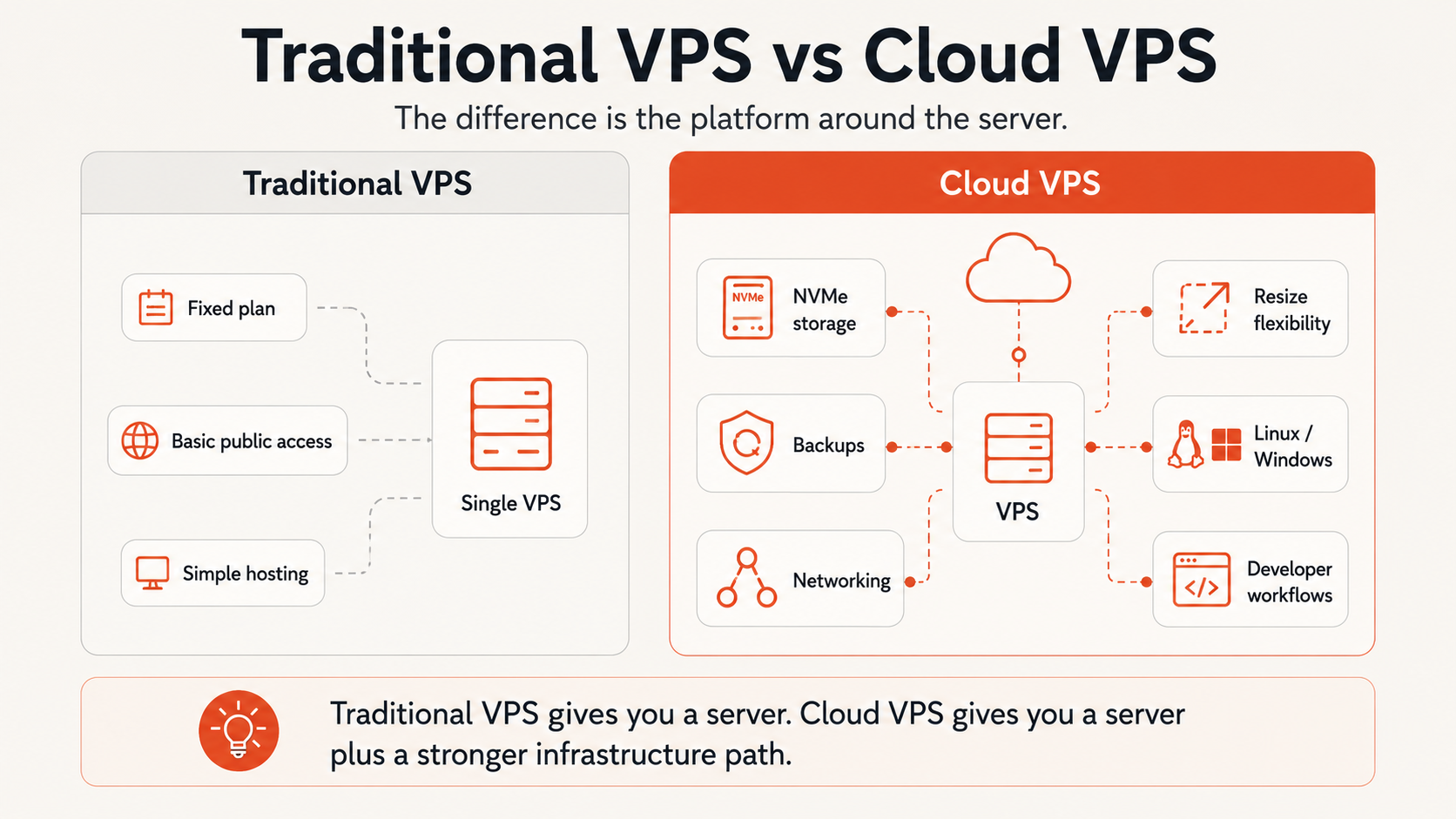
Cloud VPS vs traditional VPS: quick comparison
| Factor | Traditional VPS | Cloud VPS |
|---|---|---|
| Server model | Virtual server | Virtual server |
| Typical purchase model | Fixed hosting plan | VM/service instance |
| Root/admin access | Usually yes | Usually yes |
| Provisioning | Provider panel, often plan-driven | Often API/panel/CLI driven |
| Resizing | Provider-dependent | Often easier, but still provider-dependent |
| Private networking | Sometimes available | More commonly integrated |
| Snapshots/images | Provider-dependent | Commonly part of the platform |
| Block/object storage integration | Less common | More common |
| Automation/API | Varies widely | More commonly exposed |
| Billing | Often fixed monthly | Monthly, hourly, or other provider-specific models |
| HA by default | No | No—one VM is still one VM unless the architecture adds redundancy |
| Best fit | Simple, fixed workloads | Workloads that benefit from cloud platform features |
The biggest misconception is that “cloud VPS” automatically means elastic, highly available, or automatically scalable. A single cloud VM can still fail, run out of memory, or require manual resizing. Cloud features make better architectures easier to build; they do not create redundancy by themselves.
VPS vs cloud: the terms overlap
Searches such as VPS vs cloud, cloud VPS vs normal VPS, and VPS vs cloud server often assume two completely different technologies. In practice, the concepts overlap.
A VPS describes a virtualized server environment. It usually has:
- allocated CPU and memory;
- its own operating system;
- isolated storage and networking;
- root or administrator access;
- a public IP or network interface.
“Cloud” describes more of the platform model around compute. It can include:
- on-demand provisioning;
- APIs and infrastructure automation;
- images/templates;
- snapshots and backups;
- private networks;
- attachable storage;
- load balancers;
- multiple service types;
- a larger lifecycle-management layer.
So a cloud VPS is best understood as a VPS-like virtual server delivered inside a cloud platform.
The terms are also marketing labels, not strict technical standards. Two providers can both sell “cloud VPS” while offering very different storage, CPU allocation, backup, networking, billing, and recovery models.
That is why you should compare the actual platform capabilities instead of choosing from the label alone.
Traditional VPS hosting: what it usually means
Traditional VPS hosting is commonly structured around fixed plan tiers.
You choose something like:
vCPU
+ RAM
+ storage
+ transfer allowance
+ operating system
and receive a virtual server on the provider's virtualization infrastructure.
This model can be excellent for workloads that are simple and predictable. You may not need APIs, private networks, attached volumes, image pipelines, or complex recovery tooling.
Typical traditional-VPS use cases include:
- personal sites;
- small business websites;
- blogs and CMS hosting;
- small web applications;
- development servers;
- VPNs;
- lightweight self-hosted tools;
- projects with stable resource requirements.
Traditional VPS is not inherently old, slow, or unreliable. A well-operated VPS platform can use modern CPUs, SSD/NVMe storage, strong networking, snapshots, and automation.
The limitation is usually platform breadth and flexibility, not virtualization itself.
Cloud VPS: what changes around the VM
A cloud VPS typically adds a more programmable infrastructure layer around the server.
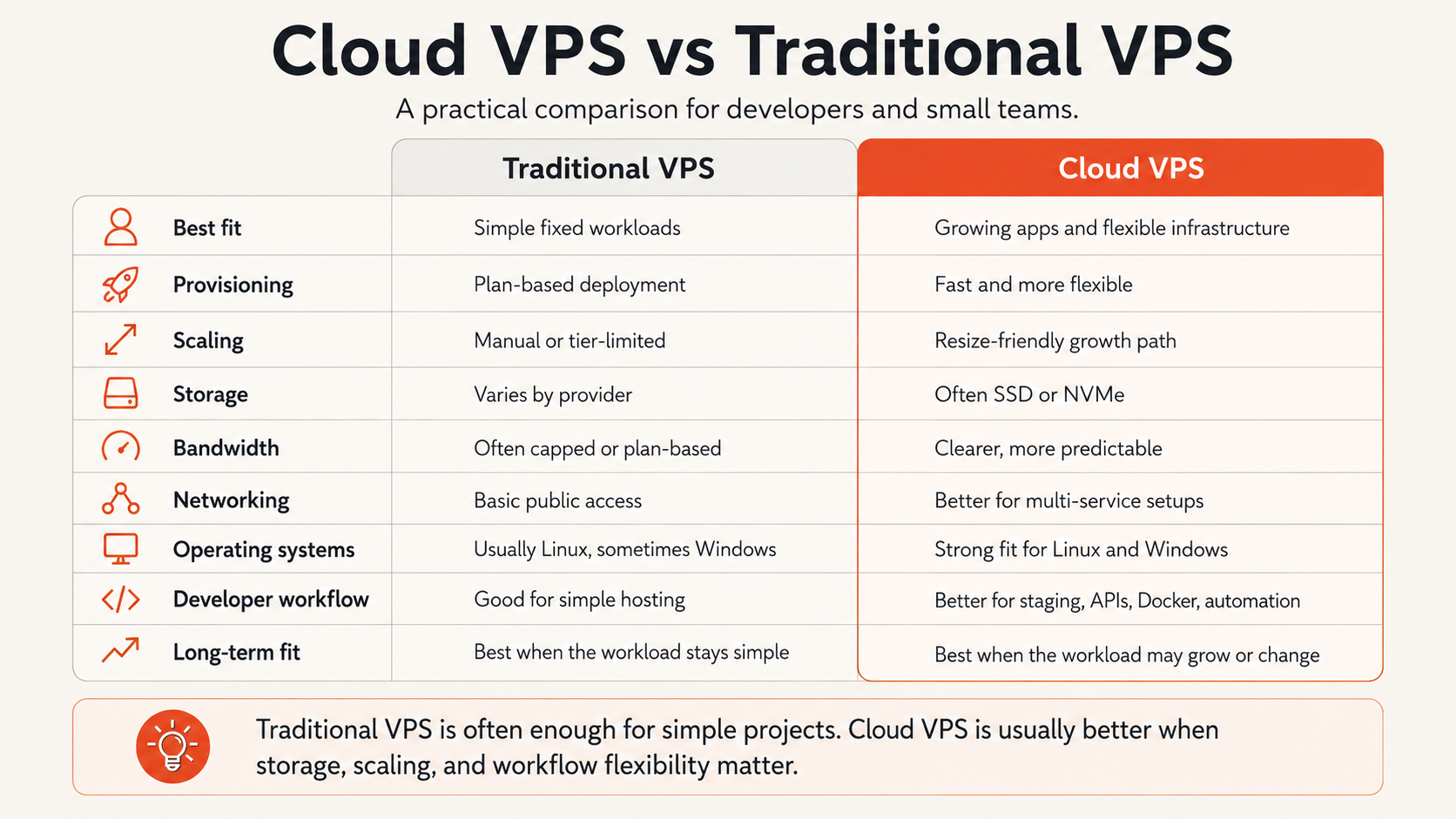
Depending on the provider, that may include:
- quicker VM creation and rebuilds;
- reusable machine images;
- snapshots and backup services;
- VPC/private networking;
- attachable block storage;
- object storage integration;
- API, CLI, or Terraform access;
- load balancers;
- separate VM families for different workloads;
- Linux and Windows images;
- easier creation of dev/staging/production environments.
The main benefit is operational optionality.
A project that begins as one VM can later become:
web VM
+ database VM or managed database
+ private network
+ block volume
+ backup policy
+ load balancer
without requiring a complete platform migration.
But none of those additions happen automatically. Cloud VPS is a better foundation for that architecture, not a substitute for designing it.
Cloud VPS is not automatically more reliable
This is an important distinction.
One traditional VPS and one cloud VPS are both still single virtual machines unless the surrounding architecture adds redundancy.
If that VM becomes unavailable, the application can become unavailable too.
Higher availability generally requires design choices such as:
- more than one application instance;
- a load balancer;
- replicated or managed database architecture;
- independent backups;
- recovery automation;
- DNS/failover planning;
- multiple failure domains where the platform supports them.
Cloud platforms often make these patterns easier to assemble. That is different from saying every cloud VPS is inherently highly available.
When comparing providers, inspect the actual SLA, backup model, storage architecture, maintenance behavior, and recovery controls rather than assuming the word “cloud” guarantees uptime.
Scaling: cloud VPS is usually easier, not unlimited
Cloud VPS is often associated with scalability, but there are several kinds of scaling.
Vertical scaling
Increase the resources of one VM:
2 vCPU / 4 GB
→ 4 vCPU / 8 GB
Many cloud providers make this relatively straightforward, though resize behavior, downtime, storage changes, and downgrade support vary.
Traditional VPS providers can also offer plan upgrades, so this capability is not exclusive to cloud.
Horizontal scaling
Add more application instances:
1 app VM
→ 2+ app VMs
→ load balancer
This is where a broader cloud platform becomes more useful because networking, load balancing, images, APIs, and automation can support repeatable deployment.
The application itself must still support horizontal scaling. A stateful single-server application does not become horizontally scalable just because it runs on cloud infrastructure.
For sizing before scaling, see Choosing the Right VM Size.
Storage differences depend on the provider
It is inaccurate to assume traditional VPS means slow disks and cloud VPS means NVMe.
Both models can use modern storage.
The more useful comparison is:
| Storage question | Why it matters |
|---|---|
| Local SSD/NVMe or network-backed disk? | Affects latency, persistence model, and failure behavior |
| Can storage grow separately from compute? | Important when disk grows faster than CPU/RAM |
| Are block volumes available? | Useful for attachable persistent storage |
| Are snapshots available? | Useful for recovery and cloning workflows |
| Are volumes included in backups? | Backup scope may differ |
| Can data be exported easily? | Important for migration and exit planning |
A cloud platform often provides more storage primitives, but you still need to understand what is local to the VM, what survives rebuilds, and how restore works.
For persistent-storage decisions, see Block Storage vs Local Disk.
Bandwidth and network cost can change the decision
Network pricing varies more by provider than by the words “VPS” or “cloud.”
Some providers include a monthly transfer allowance. Others charge for outbound transfer. Some offer unmetered traffic with a defined port speed or acceptable-use policy.
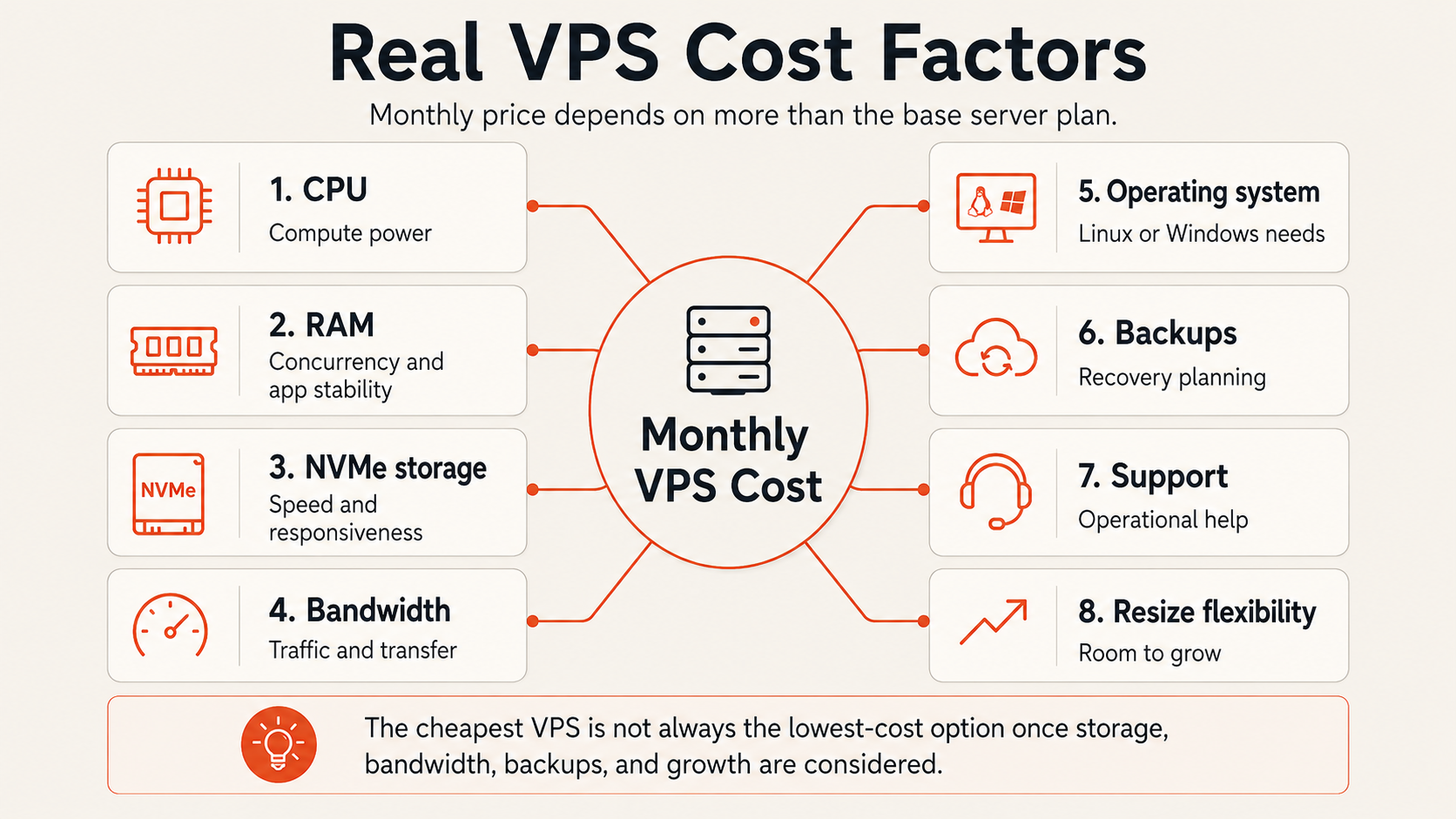
For any VPS vs cloud comparison, check:
- included outbound transfer;
- overage pricing;
- public port speed;
- private-network traffic policy;
- DDoS handling;
- public IPv4 cost;
- load-balancer traffic charges;
- cross-region charges where applicable.
A VM with a cheaper headline price can become more expensive if the application transfers a lot of data.
For Raff, current bandwidth, networking, VM sizes, and pricing should be checked on the live Raff VM and pricing pages rather than relying on static plan numbers in this guide.
Cloud VPS vs traditional VPS cost
Traditional VPS often looks simpler because the monthly bundle is easy to understand.
Cloud VPS can also be predictable, but some providers separate infrastructure components or use usage-based billing.
Compare the complete monthly architecture:
VM
+ backups
+ snapshots
+ block storage
+ public IP
+ outbound transfer
+ Windows/software licenses
+ load balancer
+ support/management
Then compare operational costs such as:
- migration effort;
- rebuild time;
- backup/restore work;
- automation effort;
- downtime exposure;
- support requirements.
A fixed traditional VPS may be the better value for one small stable server. A cloud VPS can be the better value when the application benefits from private networking, attached storage, automation, images, backups, or additional services.
The correct answer depends on the architecture you will actually run—not the entry price of the smallest plan.
Developer workflow and automation
One of the clearest differences between a basic VPS host and a cloud platform is the deployment workflow around the VM.
Traditional VPS often works well when deployment means:
create server
→ SSH/RDP
→ configure manually
→ run workload
Cloud VPS becomes more useful when the workflow needs repeatability:
create image/template
→ deploy VM through API/Terraform
→ attach network/storage
→ inject configuration
→ monitor
→ replace/rebuild consistently
That can matter for:
- development environments;
- staging;
- CI runners;
- Docker hosts;
- APIs;
- multiple customer environments;
- disaster recovery;
- infrastructure-as-code workflows.
If you have only one long-lived server, automation may not matter much. If you create, replace, clone, or manage several servers, it becomes much more valuable.
Windows workloads can fit either model
Windows support is not inherently a cloud-VPS feature.
Both traditional VPS and cloud VM providers may offer Windows Server, but the important questions are:
- Is the Windows license included correctly?
- Which Windows Server versions are offered?
- Is RDP available securely?
- Are snapshots/backups suitable for the workload?
- Does the provider support the required application?
- What is the CPU/RAM/storage requirement?
- Who patches and manages the guest OS?
A cloud platform can make Windows VM lifecycle and networking easier, but the Windows application still determines sizing and licensing requirements.
For Raff's current Windows offering, use Windows VM.
When traditional VPS is the better choice
Choose a traditional VPS when most of these are true:
- the workload is simple and stable;
- one server is enough;
- fixed monthly cost is the main priority;
- you do not need private networking or attached storage;
- API/Terraform automation is unnecessary;
- the provider's backup model is sufficient;
- migration later would be manageable.
Examples can include:
- a small WordPress site;
- a personal project;
- a lightweight VPN;
- a low-traffic application;
- a learning server;
- a single self-hosted tool.
In these cases, a straightforward VPS plan may be exactly the right level of infrastructure.
When cloud VPS is the better choice
Choose cloud VPS when several of these are true:
- the workload is likely to grow or change;
- you need repeatable VM creation;
- private networking matters;
- snapshots/images are part of operations;
- block storage or object storage may be added;
- Linux and Windows environments are both useful;
- API, CLI, or Terraform automation matters;
- multiple application environments are expected;
- the platform should support a path beyond one VM.
Common examples include:
- SaaS applications;
- production APIs;
- Docker hosts;
- dev/staging/production environments;
- managed-service plus VM architectures;
- Windows business applications;
- customer environments operated by an MSP.
Cloud VPS is most valuable when you use the surrounding platform—not simply because the VM has “cloud” in its product name.
Cloud VPS vs cloud server vs cloud VM
These terms are often used interchangeably in hosting marketing.
A practical interpretation is:
- VPS: emphasizes an isolated virtual server.
- Cloud VM: emphasizes the virtual machine as a cloud compute resource.
- Cloud server: broad marketing/technical term for compute delivered from cloud infrastructure.
- Cloud VPS: usually combines VPS-style server control with cloud platform features.
There is no universal industry boundary that guarantees one set of features from each label.
When evaluating a provider, ignore the label for a moment and compare:
- CPU allocation;
- memory;
- storage model;
- networking;
- transfer pricing;
- backup/recovery;
- images/snapshots;
- automation;
- support boundary;
- complete cost.
That tells you more than the product category name.
Where Raff fits
Raff VM fits the cloud-VPS / cloud-VM model: customers receive full-control Linux or Windows virtual machines with surrounding cloud infrastructure capabilities such as private networking, snapshots/backups, storage options, console access, and automation interfaces.
Raff remains a self-managed guest environment. Raff operates the infrastructure/platform layer, while the customer manages the guest operating system, applications, databases, credentials, and application-level recovery unless a separate managed product is used.
Raff is worth considering when:
- a U.S.-east deployment location fits the workload;
- full OS control is needed;
- unmetered bandwidth is valuable;
- NVMe-backed VM storage fits the application;
- private networking or additional cloud services may be needed;
- the team wants a simpler VM-centered platform rather than a hyperscaler-sized catalog.
Use the live Raff VM and pricing pages for current plans and capabilities.
Common mistakes in a VPS vs cloud comparison
Assuming cloud VPS automatically scales
A VM does not automatically gain CPU/RAM or multiply into several instances. Scaling still requires provider features plus application architecture.
Assuming cloud VPS is automatically highly available
One cloud VM is still one failure point. Build redundancy if the workload requires it.
Assuming traditional VPS is always cheaper
Compare the full architecture, bandwidth, backups, storage, licenses, and operational cost.
Assuming traditional VPS uses old infrastructure
Modern VPS providers can use current CPUs, NVMe storage, strong networking, snapshots, and APIs.
Choosing from the product label
“Cloud VPS,” “cloud server,” and “VPS” are not standardized enough to replace technical due diligence.
Ignoring exit and recovery
Before deployment, know how you will export data, rebuild the server, restore backups, and move DNS if the provider no longer fits.
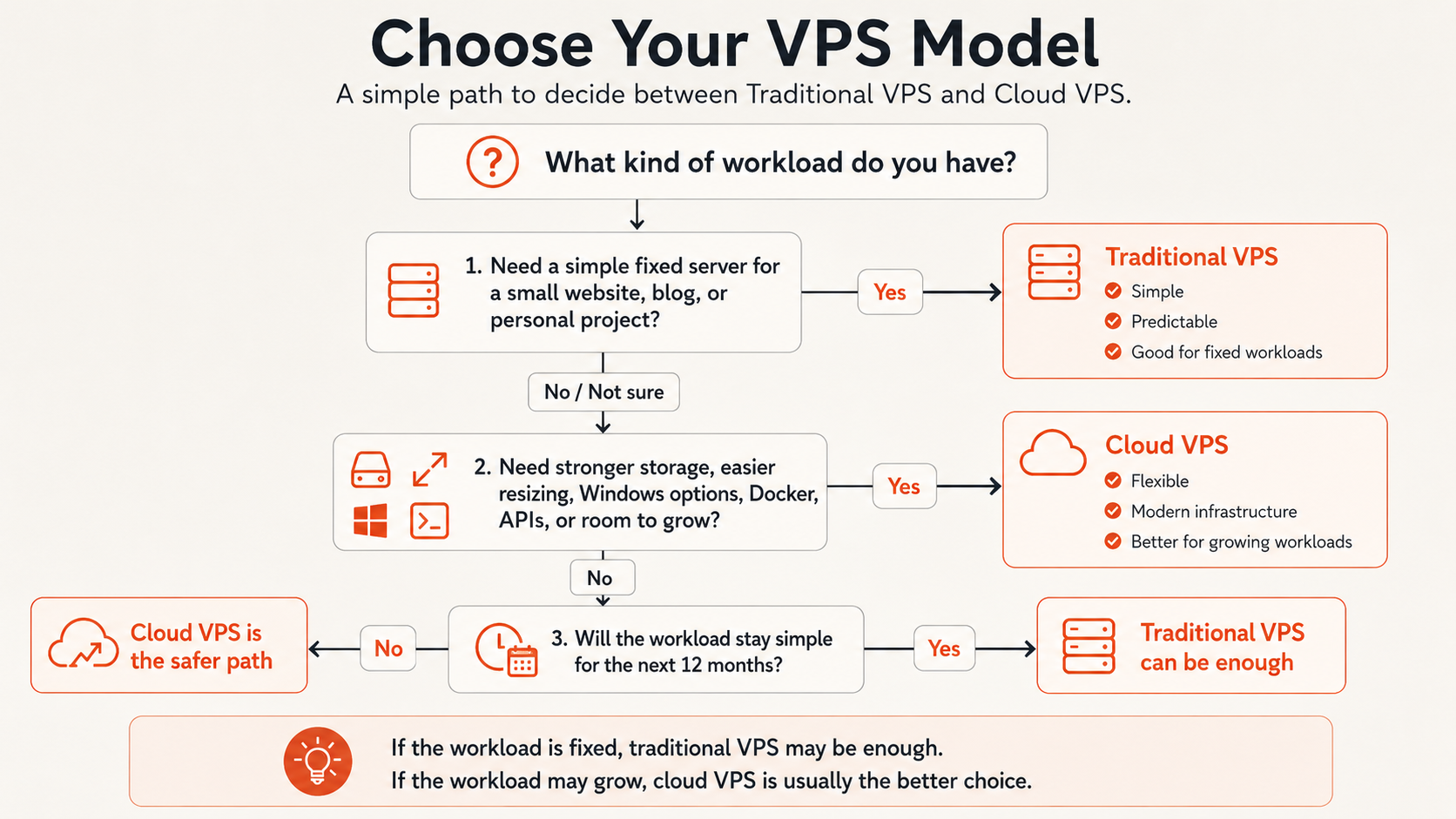
Which should you choose?
Choose traditional VPS for a simple, stable workload when a fixed server plan gives you everything you need.
Choose cloud VPS when the workload benefits from a broader platform: private networking, images, snapshots, storage services, APIs, infrastructure automation, multiple environments, or a clearer path beyond one server.
If two providers offer the same actual capabilities, the labels matter very little. Compare the technical and operational model instead.
For broader buying criteria, read Virtual Private Server Hosting Guide. For provider selection, see Best VPS Hosting Providers.