
A small business needs a VPS when a real workload needs to stay online, needs operating-system or software control, or no longer fits comfortably inside shared hosting, a local office PC, or a standard SaaS product. The decision should start with the workload—not with the idea that every business needs its own server.
In modern hosting, “VPS” and “cloud VM” often overlap in buyer language. Both describe a virtual server where you can run your own operating system and applications. Raff Technologies provides cloud VMs for Linux and Windows workloads, so this guide uses “VPS” in the practical buyer sense while focusing on the business problem the server needs to solve.
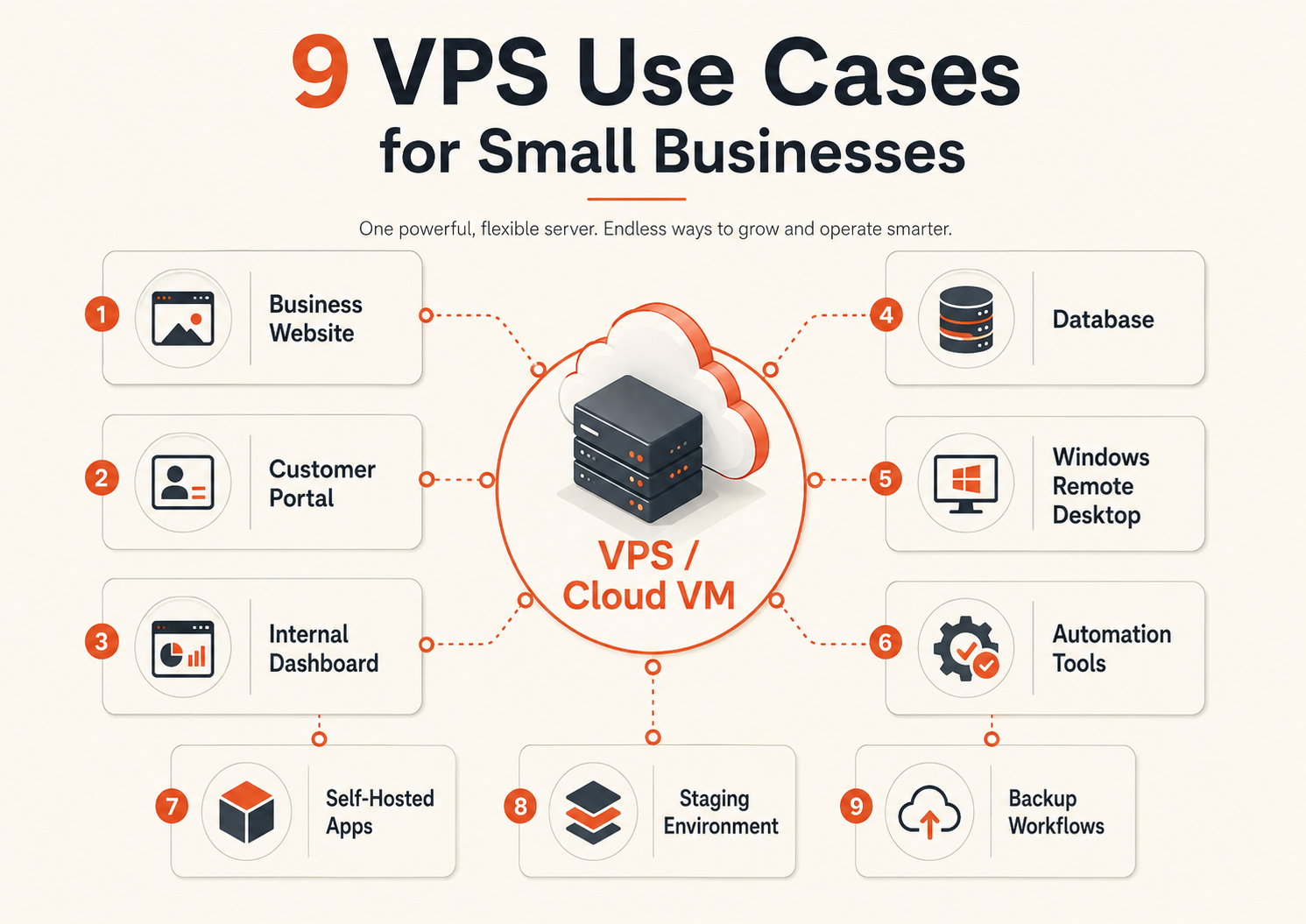
The strongest small-business use cases are customer-facing applications, internal tools, Windows business software, automation, self-hosted services, development environments, and workloads that need more control than managed platforms provide. Just as important: many businesses should not use a VPS for email, simple brochure websites, or software that is already better handled as SaaS.
When does a small business actually need a VPS?
A VPS becomes useful when at least one of these is true:
- the workload must run independently of an employee laptop;
- you need a custom runtime, package, web server, background worker, or operating-system configuration;
- shared hosting limits performance or deployment control;
- a Windows-only application needs a hosted server environment;
- an internal application needs a stable endpoint for remote staff;
- automation or scheduled jobs must run 24/7;
- you need to separate development, staging, and production;
- the application needs private communication with other services;
- the business wants to self-manage a workload instead of accepting a SaaS product's limits.
A VPS is not automatically the right answer because a workload is important. Importance may instead be a reason to use a managed database, specialized SaaS platform, or managed IT provider.
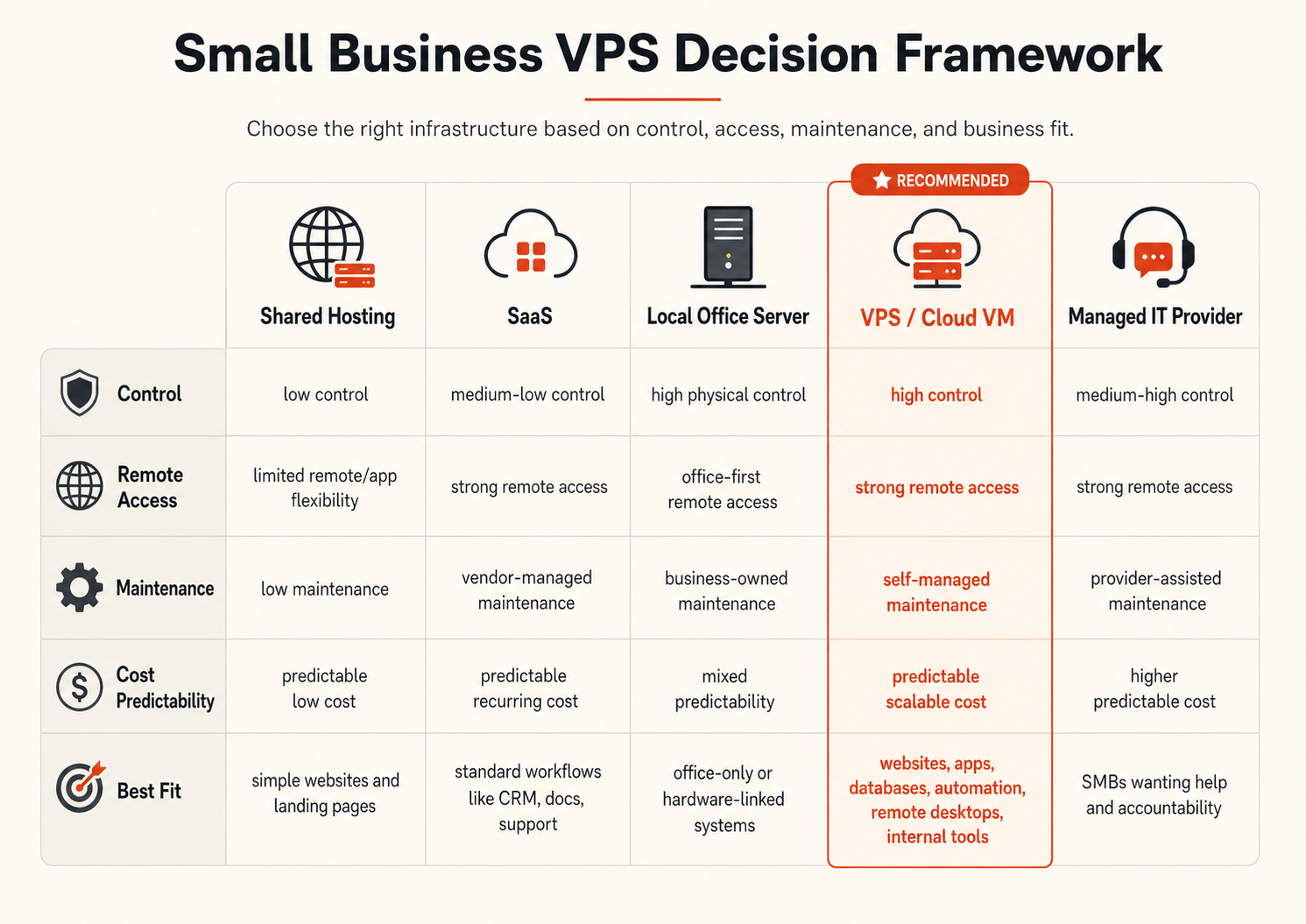
VPS vs the common alternatives
| Option | Best fit | What you gain | What you own |
|---|---|---|---|
| Shared hosting | Simple websites | Low operational effort | Very little server control |
| SaaS | Standard business workflows | Vendor-managed application | Limited infrastructure/customization control |
| Local office server | Hardware-linked or local-only systems | Local physical control | Hardware, power, remote access, backups |
| VPS / cloud VM | Custom apps and server workloads | OS and application control | Patching, access, monitoring, recovery |
| Managed database/service | Workloads where operations are the burden | Less database/platform maintenance | Application integration and usage decisions |
| Managed IT provider | Businesses without internal operators | Operational ownership/support | Provider relationship and service cost |
The right question is: does controlling the server create enough business value to justify operating it?
1. A business website or web application that outgrows shared hosting
A brochure website does not need a VPS simply because it receives business traffic. Managed website hosting or a static platform can be the lower-maintenance choice.
A VPS becomes more useful when the site turns into an application. Examples include:
- customer accounts;
- booking or quoting logic;
- custom APIs;
- background jobs;
- application-specific server configuration;
- private admin tools;
- custom caching or reverse proxy rules;
- deployment workflows that shared hosting cannot support.
The benefit is control over the application runtime and deployment model. The trade-off is that your team now owns server updates, access control, observability, and recovery.
For a Linux-based web app, a Raff Linux VM can provide the environment for the web server, runtime, containers, and application processes. If the workload is still simple enough for managed hosting, keeping it managed may be the better operational decision.
2. A customer portal or private business application
Customer portals are a strong VPS use case because they often sit between a simple website and a larger SaaS platform.
A portal may handle:
- invoices and documents;
- appointment or order status;
- customer-specific reports;
- secure uploads;
- account settings;
- internal approvals;
- API integrations;
- business-specific workflows.
The server is only one part of the design. A production portal also needs authentication, TLS, backups, monitoring, and a plan for database recovery.
For a small deployment, application and database may start on one VM. As the workload becomes more important, separate the application from persistent data or consider Managed Databases so database operations do not compete with application administration.
3. An internal dashboard or business tool
A VPS can give a small team one stable home for an internal dashboard instead of running it on a founder's laptop or an office desktop.
Typical examples include:
- sales dashboards;
- inventory tools;
- operations panels;
- internal APIs;
- reporting applications;
- lightweight ERP or workflow tools;
- admin systems that combine several external APIs.
This is useful when multiple people or automated systems need the application at unpredictable times.
The business case is not “three people use it,” or any other arbitrary user count. The meaningful questions are:
- Does the tool need to be available when the original developer is offline?
- Would losing access interrupt business operations?
- Does the tool need a controlled database, network, or server runtime?
- Is someone clearly responsible for updates and recovery?
If the answers are yes, a dedicated cloud VM can be a sensible boundary.
4. A database workload that needs server-level control
PostgreSQL, MySQL, MariaDB, Redis, SQL Server, and other databases can run on VMs. But “a database can run on a VPS” does not mean a self-managed database is always the right business choice.
A self-managed database may make sense when you need:
- operating-system access;
- custom extensions or configuration;
- a specific database topology;
- direct control of storage and backup tooling;
- software that expects a local or self-managed database server.
A managed database may be better when the main business need is using the database, not operating it.
Compare the two before buying more VM capacity:
| Decision | Self-managed database on VM | Managed database |
|---|---|---|
| OS access | Yes | Usually abstracted |
| Patch responsibility | Your team | More provider-managed |
| Backup design | Your team | Often integrated with service controls |
| Configuration freedom | High | Product-dependent |
| Operational burden | Higher | Lower |
For teams that want to reduce database operations, see Raff Managed Databases. If you self-manage, treat backup and restore testing as part of the database design, not as a later add-on.
5. Windows business software and remote access
A Windows VM is useful when the application genuinely needs Windows Server, IIS, PowerShell, .NET, SQL Server, or Windows-only business software.
Common examples include:
- accounting or line-of-business applications;
- IIS-hosted web applications;
- ASP.NET workloads;
- Windows automation;
- administration tools that need a persistent Windows environment;
- software accessed remotely through Windows Server.
A Raff Windows VM provides a hosted Windows environment rather than requiring an office PC to remain powered on.
RDP is not the same as a multi-user desktop service
Remote Desktop is an access method. It does not automatically make a Windows Server VM a correctly licensed shared desktop for multiple employees.
If several users will have interactive Remote Desktop sessions for day-to-day work, plan Remote Desktop Services licensing and access architecture separately. Microsoft documents RDS licensing with Per User and Per Device CAL models for RD Session Host deployments.
For the broader Windows buyer decision, read Windows VPS Hosting for Small Teams.
6. Automation, n8n, cron jobs, and background workers
Automation is one of the clearest reasons to move work away from an employee laptop.
A VPS can run:
- n8n workflows;
- cron jobs;
- Python or Node.js workers;
- PowerShell automation;
- webhook receivers;
- scheduled reports;
- data import/export jobs;
- queue consumers;
- monitoring or notification jobs.
The advantage is continuity: the workflow runs whether or not an employee computer is online.
The operational questions are equally important:
- Who receives alerts when the job fails?
- Where do logs live?
- Can a failed job run twice safely?
- Which API credentials does it hold?
- How is its configuration backed up?
- What happens when a dependency is unavailable?
A small automation VM can become business-critical quietly. Treat it as production once revenue, customer support, billing, or reporting depends on it.
7. Self-hosted team software
A VPS can run self-hosted tools for teams that want more control over cost, deployment, data location, integrations, or customization.
Potential workloads include:
- monitoring;
- analytics;
- documentation and knowledge bases;
- internal developer tools;
- project or issue tracking;
- helpdesk software;
- private code services;
- lightweight CRM or operations tools.
Self-hosting should be selective. Email, payroll, identity, and other specialist workloads often carry operational or compliance burdens that a purpose-built SaaS provider can handle better.
The decision is not “open source vs SaaS.” It is control vs operating responsibility.
Use Self-Hosting Apps on Raff for the deployment and ownership framework.
8. Development, staging, demos, and build environments
A separate VM can give developers a stable environment that is closer to production than a laptop but isolated from real users and data.
Common uses include:
- staging deployments;
- customer demos;
- CI runners;
- integration testing;
- container testing;
- temporary migration work;
- proof-of-concept environments.
The security benefit is separation. Development credentials should not automatically unlock production, and experimental software should not need to run on the production server.
For agencies or small software teams, environment boundaries also make client projects easier to reason about: each workload can have known ownership, access, and deployment history.
A staging VM does not need to be identical to production in size, but differences that affect application behavior should be understood.
9. An always-on infrastructure or network service
Some workloads are not user-facing applications but still need a stable server environment.
Examples include:
- a VPN endpoint your team operates;
- a jump host or administrative gateway;
- monitoring collectors;
- log aggregation components;
- background processors;
- lightweight API gateways;
- service discovery or internal tooling.
These workloads often benefit from a public endpoint for the required service and private connectivity for everything else.
When application components should communicate privately, Raff VPC can provide a private network boundary between appropriate resources. Do not expose databases, internal dashboards, or administration ports publicly merely because the VM has a public IP.
A VPS can participate in a backup workflow, but it should not be the only copy of business data. Independent recovery matters more than simply having a second directory on another server.
When a small business should not use a VPS
A VPS adds flexibility, but it also creates operational work.
You may be better off without one when:
The website is simple
If it is a brochure site, landing page, or basic CMS and the current managed platform works well, a VPS can add maintenance without creating business value.
A mature SaaS product already solves the problem
Email, payroll, accounting, CRM, and collaboration software often have operational complexity that specialist SaaS providers absorb for you.
Nobody owns server operations
A server without a named owner eventually accumulates missed patches, unknown credentials, stale software, and uncertain backups.
You need a database but not database operations
If the application simply needs PostgreSQL or another supported database, compare a managed database before deciding to self-host it.
You want “cheap storage” as a backup plan
A server is not automatically a backup system. Backups need separation, retention, integrity checks, and tested restore procedures. Use an intentional recovery design such as Data Protection where it fits the workload.
You need large-scale shared Windows desktops
Plan RDS licensing, user isolation, application compatibility, profiles, and capacity first. A single Windows VM plus an administrator login is not a multi-user desktop architecture.
Linux VPS or Windows VPS for a small business?
Choose the operating system based on the software, not on a generic “best VPS” label.
| Requirement | Linux VM | Windows VM |
|---|---|---|
| Nginx/Apache web stack | Strong fit | Possible, less typical |
| Docker and common open-source tooling | Strong fit | Workload-dependent |
| Node.js/Python/PHP apps | Strong fit | Supported where needed |
| IIS / ASP.NET on Windows | No | Strong fit |
| Windows-only business app | No | Strong fit |
| PowerShell / Windows administration | Limited | Strong fit |
| RDP-based Windows access | No | Strong fit |
| Lowest OS licensing complexity | Usually simpler | Windows licensing needs planning |
If the workload does not need Windows, Linux is often operationally simpler for web and automation workloads. If the software explicitly requires Windows, choosing Linux to save money creates the wrong kind of complexity.
How much CPU, RAM, and storage does a small business VPS need?
Do not choose a VPS size from a universal table without looking at the application.
Start with four questions:
- CPU: Is the workload compute-heavy, bursty, or mostly waiting on I/O?
- RAM: How much memory does the application, database, and operating system need under realistic load?
- Storage: How much data exists now, how fast is it growing, and what I/O pattern does it create?
- Network: How much traffic, latency sensitivity, and private/public connectivity does the workload require?
Then leave reasonable headroom and measure the real workload.
A lightweight automation service may need little CPU but enough memory for its runtime. A database may care more about memory and disk behavior. A Windows business application may have minimum software requirements that matter more than generic VM guidance.
Use VM Sizing Guide: How Much CPU, RAM, and Storage Do You Need? for the sizing process rather than treating one small-business plan as universal.
A single VPS is not high availability
A well-managed VPS can be reliable, but one VM is still one application failure domain.
If the business impact of downtime grows, the architecture may need to evolve:
One VM
→ separate persistent data
→ private networking
→ tested backups/recovery
→ multiple application nodes where justified
→ load balancing / failover where justified
Backups protect recovery; they do not provide high availability by themselves.
This distinction matters commercially. Before buying a larger VM, ask whether the next dollar should go toward more CPU/RAM—or toward reducing recovery risk.
Security baseline before the VPS becomes business-critical
At minimum:
- use SSH keys or appropriately protected Windows administrator access;
- expose only ports the workload actually needs;
- patch the operating system and application stack;
- use TLS for public web services;
- separate development and production credentials;
- keep databases and internal services private where practical;
- monitor availability and resource pressure;
- back up persistent data independently of the running application;
- test a restore before assuming the backup works;
- document who owns the server and how emergency access works.
See Cloud Security Fundamentals for the broader baseline.
What does a VPS really cost a small business?
The monthly VM price is only one part of total cost.
A useful total-cost model includes:
VM + storage + backups + software/licensing + monitoring + operator time + expected recovery cost
This is why a managed service can sometimes be cheaper even when its sticker price is higher. If the team spends hours every month maintaining a database that could be managed, infrastructure cost is being hidden inside payroll.
The opposite is also true: a VPS may reduce cost when a standard SaaS product charges heavily per user but the team can operate the self-hosted application safely.
Compare the full operating model, then use Raff pricing for current VM pricing rather than relying on a hard-coded price in an evergreen guide.
How Raff fits small-business VPS workloads
Raff gives small teams several infrastructure paths without forcing every workload into the same model:
| Business need | Raff path |
|---|---|
| General application or server workload | Raff Cloud VM |
| Linux web app, container, automation, internal tool | Linux VM |
| Windows Server, IIS, RDP, Windows business software | Windows VM |
| Private application/database communication | VPC |
| VM backup and recovery planning | Data Protection |
| Database without full self-management | Managed Databases |
The important point is fit. A customer portal may begin on one VM. A production database may later move to a managed service. An internal API may become private behind VPC networking. A Windows application may need licensing and RDS planning before more users are added.
Raff supplies infrastructure controls; your team still owns the application, access model, operating-system administration, and architecture choices appropriate to the workload.