VPS application hosting is a deployment model where an application runs on a virtual private server with isolated CPU, RAM, storage, networking, and operating system control.
For small teams, this sits between basic website hosting and complex cloud architecture. A VPS gives developers enough control to run applications, APIs, dashboards, background workers, databases, and internal tools without forcing the team into Kubernetes, managed cloud services, or hyperscaler billing from day one.
Raff Technologies builds cloud VM infrastructure for developers, founders, startups, and small teams that want fast deployment, predictable pricing, NVMe SSD storage, unmetered bandwidth, and Linux or Windows options. This guide explains when VPS application hosting makes sense, when a different hosting model may be better, and how to compare cost, performance, security, and operational responsibility before deploying.
For the broader VPS foundation, read the Virtual Private Server Hosting Guide. For a practical deployment walkthrough, use the Host Your App on a VPS with Cloudflare tutorial.
VPS Application Hosting Explained
VPS application hosting means using a virtual private server to run an application instead of relying on shared hosting, a managed platform, or a full hyperscaler architecture.
The VPS becomes the environment where your application runs. Depending on the stack, it may include:
- Application runtime
- Web server or reverse proxy
- API service
- Database
- Background workers
- File uploads
- Logs
- Environment variables
- SSL certificates
- Scheduled jobs
- Docker containers
- Monitoring tools
- Backup processes
This model works well when the team wants server-level control without unnecessary platform complexity.
Common VPS application hosting workloads include:
| Workload | Typical VPS use |
|---|---|
| SaaS MVP | Run the first production version of a small software product |
| API backend | Serve requests for a frontend, mobile app, or integration |
| Internal dashboard | Host a private business tool or reporting interface |
| Admin panel | Run a custom operational interface for a team |
| Customer portal | Host authenticated app pages and user-facing workflows |
| Docker app | Run one or more containers on a single virtual server |
| Background worker | Process queues, jobs, scheduled tasks, or automations |
| Staging environment | Test releases before production deployment |
| Database-backed app | Run app and database together for small workloads |
| Prototype | Validate an idea before moving to larger infrastructure |
A VPS is not only a place to put files. It is a full server environment.
That is why the decision should consider the application’s runtime, traffic, database, background jobs, security needs, and maintenance model.
Application Hosting Is Different From Basic Website Hosting
A website and an application may look similar in the browser, but they create different infrastructure pressure.
A basic website often serves pages, images, and content. An application usually handles sessions, authentication, database writes, API requests, background jobs, logs, user actions, file uploads, and changing state.
That difference matters when choosing infrastructure.
A simple website may only need web hosting. An application often needs a server environment that can support the full software stack.
| Area | Website hosting | Application hosting |
|---|---|---|
| Main purpose | Serve pages and content | Run software logic and user workflows |
| Runtime | Often PHP, static files, or CMS | Node.js, Python, PHP, Go, Java, Docker, or custom stack |
| State | Sometimes limited | Often database-backed and session-aware |
| Background work | Usually limited | Jobs, queues, cron tasks, workers, automations |
| Deployment | Content or CMS updates | Releases, builds, services, process management |
| Security | Website and admin protection | App secrets, API security, user data, access control |
| Monitoring | Uptime and page speed | Uptime, logs, errors, jobs, latency, resources |
| Failure impact | Depends on site importance | Often affects users, data, or business workflows |
This is why VPS application hosting deserves its own decision process.
For website-focused infrastructure, read VPS for Web Hosting. For developer-focused buying criteria, read Best VPS Hosting for Developers and DevOps Teams.
The VPS Application Hosting Decision Framework
Use this framework before choosing a VPS for application hosting.

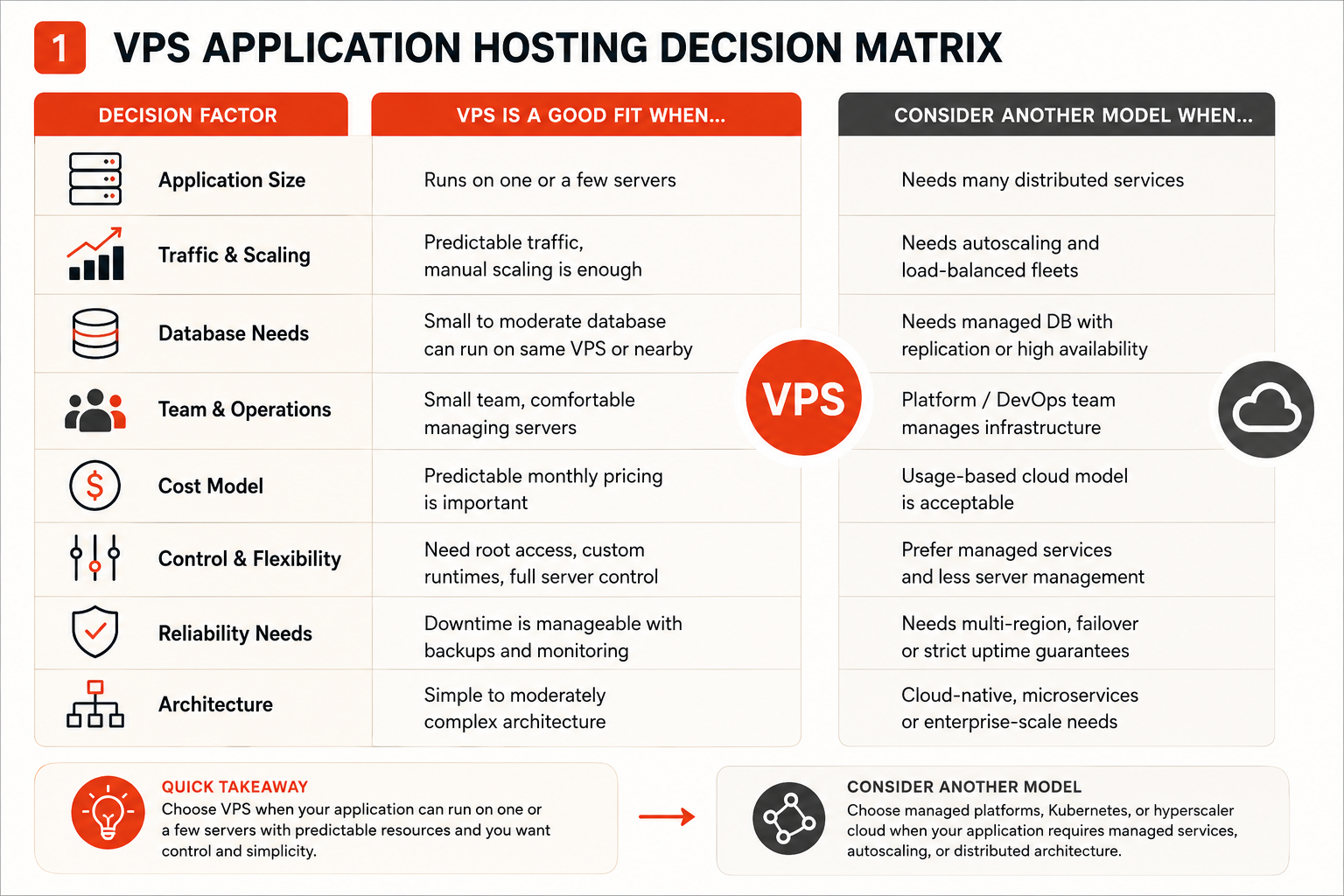
| Decision factor | VPS application hosting is usually a fit when... | Another model may be better when... |
|---|---|---|
| Application size | The app can run on one or a few servers | The app needs many distributed services |
| Team size | A small team wants control without platform complexity | A platform or DevOps team manages cloud architecture |
| Runtime needs | The app needs custom packages, runtimes, or services | The app fits a managed platform with less server control |
| Database | A small or moderate database can run on the same VPS or nearby VM | The database needs managed scaling, replication, or high availability |
| Scaling | Manual resizing or vertical scaling is enough | Autoscaling and load-balanced fleets are required |
| Cost preference | Predictable monthly pricing matters | Usage-based cloud billing can be modeled and optimized |
| Operations | The team can manage updates, logs, backups, and security | The team wants the platform to hide most operations |
| Deployment | The team wants SSH, Git, Docker, or CI/CD control | The team wants fully managed app deployment |
| Risk level | Downtime is manageable with clear backups and monitoring | The app needs formal uptime architecture and failover |
| Long-term path | The app may grow gradually | The app is already cloud-native or enterprise-scale |
A useful rule:
If the application needs a clear server environment, VPS hosting may be enough.
If the application needs a cloud architecture, VPS hosting may only be one small part of the answer.
A VPS Is Enough When the App Has a Clear Operating Model
A VPS can be a strong application hosting choice when the app is understandable, bounded, and does not require distributed infrastructure from the beginning.
This often includes:
- SaaS MVPs
- Small production apps
- APIs
- Internal tools
- Admin dashboards
- Staging environments
- Private business applications
- Developer tools
- Small customer portals
- Docker Compose applications
- Backend services
- Automation apps
- Lightweight databases
- Apps with predictable traffic
In these cases, the value of VPS hosting is clarity.
You know where the application runs. You know which server owns the process. You can inspect logs, install packages, configure the web server, tune the runtime, manage the firewall, and resize when usage grows.
For small teams, that clarity can be more useful than starting inside a large platform before the workload justifies it.
A VPS also gives practical control over the app environment. You can choose the operating system, install the runtime, configure Nginx or Apache, run Docker, add background workers, use a database, and connect a domain through Cloudflare or another DNS provider.
For a hands-on example of this deployment pattern, read Host Your App on a VPS with Cloudflare.
A VPS Becomes Risky When the Architecture Outgrows One Server
VPS application hosting has limits.
Those limits usually appear when the application needs more than a single-server or small multi-server pattern can comfortably provide.
A VPS may become the wrong primary model when the application needs:
- Autoscaling across multiple instances
- Load-balanced fleets
- Multi-region availability
- Managed database replication
- Managed queues
- Managed object storage lifecycle policies
- Kubernetes orchestration
- Service mesh architecture
- Enterprise IAM
- Multi-account cloud governance
- Formal disaster recovery architecture
- High-volume event processing
- Large-scale observability
- Strict compliance workflows
This does not mean a VPS is weak. It means the application has moved into a different infrastructure category.
At that point, the question changes from “which VPS size should we use?” to “what platform architecture should support this system?”
A VPS can still be part of that architecture. But for larger distributed systems, managed cloud services, Kubernetes, or hyperscaler infrastructure may be more appropriate.
The key is not to overbuild too early or underbuild too late.
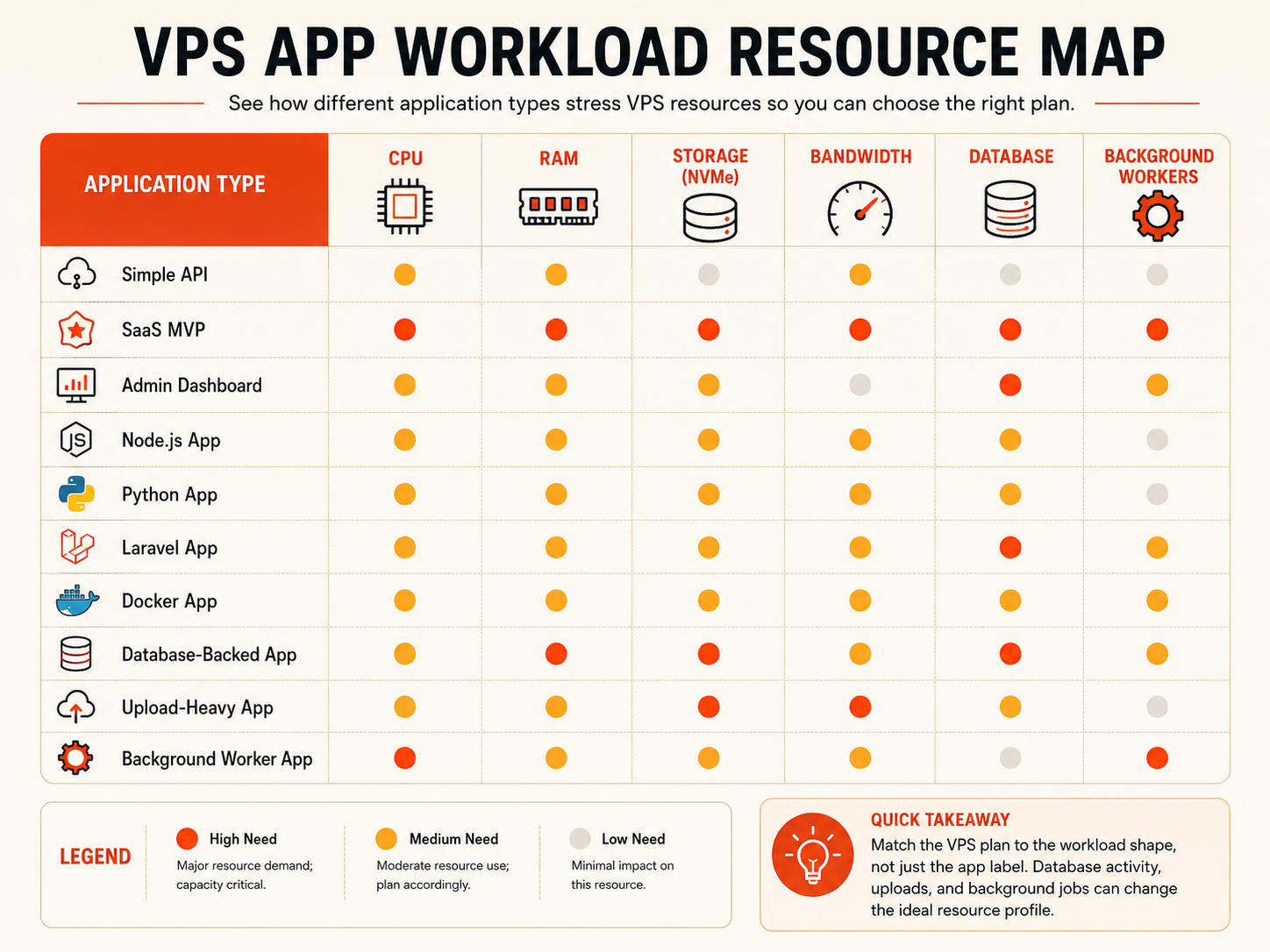
Application Workloads Need Different Resource Profiles
Not every application stresses the VPS in the same way.

One app may need more CPU. Another may need more RAM. A database-backed app may need faster storage. A file-heavy app may need more disk space. A public API may need predictable bandwidth and monitoring.
Before choosing a plan, identify the main pressure points.
| Application type | Main pressure points | VPS planning notes |
|---|---|---|
| Simple API | CPU, memory, latency | Start modestly, monitor request time and logs |
| SaaS MVP | CPU, RAM, database, uptime | Leave headroom for users, jobs, and releases |
| Dashboard | Database, memory, access security | Watch query performance and authentication |
| Node.js app | RAM, process management, logs | Use a service manager and reverse proxy |
| Python app | CPU, RAM, workers, dependencies | Plan process management and virtual environment |
| Laravel app | PHP workers, database, queues, cache | Plan Redis, workers, cron, and storage |
| Docker app | RAM, disk, container overhead | Leave extra capacity for images and logs |
| Database-backed app | RAM, NVMe storage, backup strategy | Storage speed and recovery matter |
| App with uploads | Disk, bandwidth, backups | Plan file growth and retention |
| Background worker | CPU, RAM, queues, logs | Monitor failures and job duration |
A small app may start with a modest VPS. A production app with users, uploads, workers, and a database needs more headroom.
For workload-specific planning, read Choosing the Right VM Size.
Runtime, Reverse Proxy, and Process Management Shape the Setup
A production application usually needs more than the app process itself.

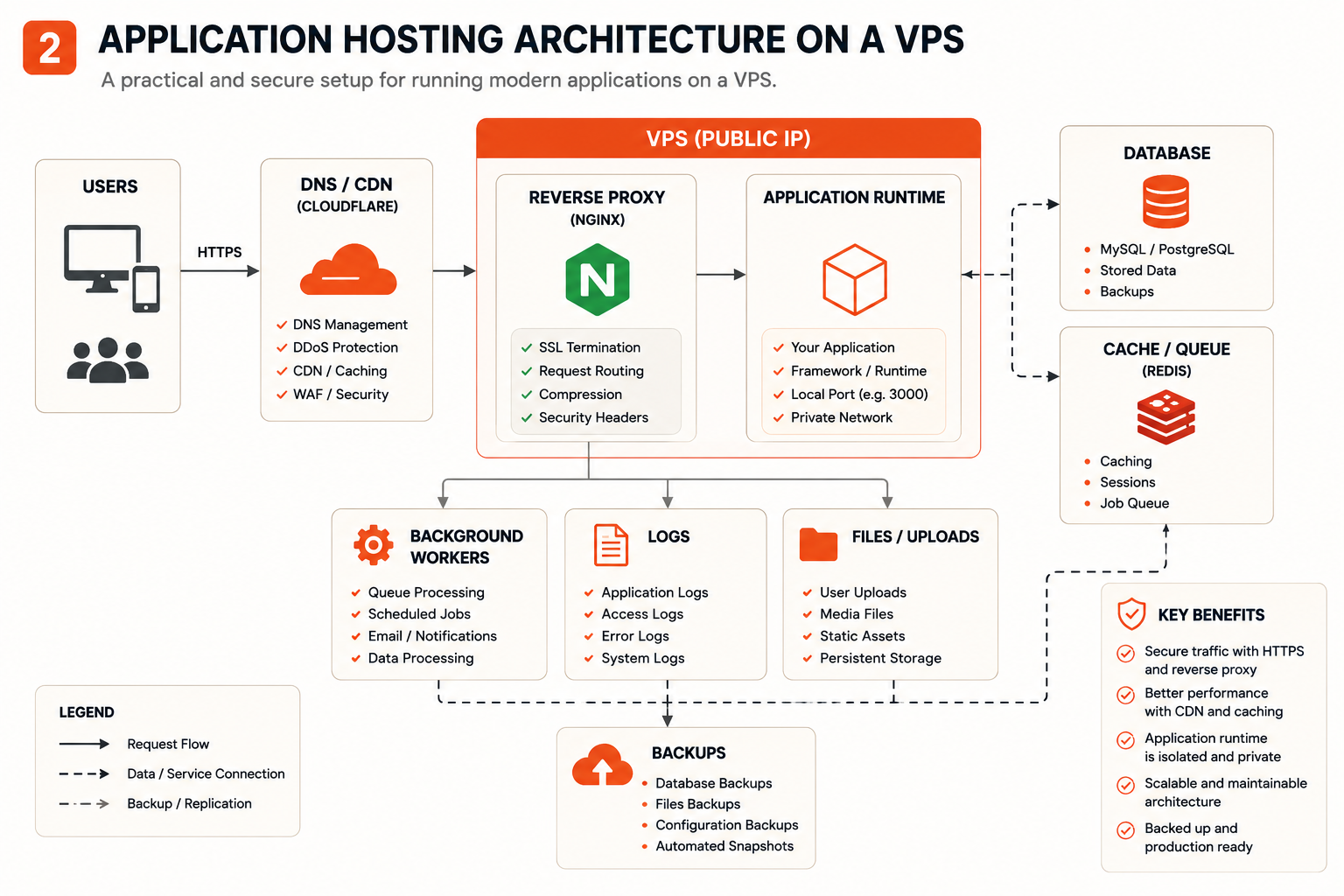
A clean VPS application setup often includes:
Public traffic ↓ DNS / CDN / proxy layer ↓ VPS public IP ↓ Nginx or Apache ↓ Application runtime ↓ Database, files, workers, logs
The reverse proxy receives web traffic and forwards requests to the application. The app process usually listens locally on a private port. A process manager or system service keeps the app running after the SSH session closes.
This structure is common for Node.js, Python, Laravel, Django, Go, and Docker-based deployments.
For example:
| Component | Role |
|---|---|
| Nginx | Receives HTTP/HTTPS traffic and forwards requests |
| Application runtime | Runs the app logic |
| Systemd, PM2, or Docker | Keeps the app process alive |
| Database | Stores application data |
| Firewall | Controls public access |
| SSL certificate | Encrypts traffic |
| Logs | Help debug errors and performance |
| Backups | Protect application state |
This is where VPS hosting gives developers practical control.
The team can decide how the app runs, what services are installed, how traffic is routed, and how logs are reviewed.
That control is useful, but it must be managed intentionally.
Databases and State Change the Hosting Decision
The moment an application stores important data, the hosting decision becomes more serious.
A stateless app can often be rebuilt from code. A stateful app needs recovery planning.
State may include:
- User accounts
- Customer data
- Orders
- Messages
- Files
- Form submissions
- Uploaded media
- Application settings
- Analytics data
- Business records
- Database rows
- Queue state
A VPS can host a database for many small and moderate workloads, especially early-stage applications. This can keep the architecture simple and cost predictable.
But the team should understand the trade-off.
Running the app and database on the same VPS is simple. It also means one server carries more responsibility. If the server becomes overloaded, both the application and database are affected. If the server fails, recovery depends on backups.
A database-backed VPS app should include:
- Regular database backups
- File backups if uploads exist
- Storage monitoring
- Slow query awareness
- Recovery testing
- Security rules around database access
- Enough RAM for database activity
- Fast storage for active reads and writes
For production systems, the database often becomes more important than the application server.
The code can be redeployed. The data must be protected.
Docker Can Simplify VPS Application Hosting
Docker can make VPS application hosting cleaner when it is used for the right reason.
A Docker setup can package the application, runtime, dependencies, and related services into a repeatable environment. This can make deployment more consistent across local development, staging, and production.
Docker is useful when the app has:
- Multiple services
- Specific runtime versions
- Repeatable deployment needs
- Local-to-production parity requirements
- Background workers
- Queues or caches
- Team-based development
- Dependency complexity
A simple Docker Compose setup may include:
app database redis worker reverse proxy
That can work well on a VPS.
But Docker does not remove the need to size and manage the server. Containers still consume CPU, RAM, disk space, network, and logs. Images accumulate. Volumes need backups. Exposed ports need security review.
Docker can simplify application packaging, but the VPS still needs operations.
For many small teams, Docker on a VPS is a practical middle ground before Kubernetes becomes necessary.
Cost Planning Should Include the Whole Application Stack
The cost of VPS application hosting is not only the VM price.
The full cost depends on the application stack and operating model.
Include:
- CPU
- RAM
- NVMe storage
- Bandwidth
- Backups
- Snapshots
- Monitoring
- Domain
- SSL management
- Database needs
- File storage
- Support
- Security tools
- Team time
- Migration risk
- Upgrade path
For small teams, predictable pricing is one reason VPS hosting is attractive.
If the app can run on one or a few virtual servers, VPS hosting may be easier to budget than a platform with many separate services and usage-based charges.
Still, the cheapest server is not always the lowest-cost path.
A server that is too small can create slow responses, crashes, failed jobs, support issues, emergency migrations, and wasted engineering time.
The right cost question is:
What is the smallest reliable setup for this application?
For broader budgeting, read Cloud Server Cost in 2026.
Security, Backups, and Monitoring Turn a VPS into Production Infrastructure
A VPS becomes production infrastructure when real users, data, or business workflows depend on it.
At that point, the setup needs more than a running process.
A production VPS application should consider:
| Area | What to plan |
|---|---|
| Access | SSH keys, user permissions, admin access |
| Firewall | Only required ports open |
| Secrets | Environment variables and safe credential storage |
| SSL | HTTPS certificates and renewal |
| Updates | Operating system and dependency patching |
| Logs | Application logs, reverse proxy logs, error logs |
| Backups | Database, uploads, config, and recovery tests |
| Monitoring | CPU, RAM, disk, network, uptime, latency |
| Deployment | Repeatable release process |
| Recovery | Clear plan when something fails |
Security is not a separate final step. It is part of the hosting model.
A simple app can still expose sensitive data. An internal tool can still become business-critical. A small database can still be painful to lose.
Before treating a VPS application as production, confirm that the team knows how to update, back up, monitor, and restore it.
For a broader server security checklist, read Cloud Security Fundamentals.
Raff VM in the Application Hosting Context
Raff VM fits the VPS application hosting path for teams that need practical compute without starting inside a complex cloud platform.
Many small teams do not need a full hyperscaler architecture for the first version of an app. They need a Linux or Windows VM where they can run the application, install the runtime, configure the reverse proxy, manage logs, connect a domain, and control deployment.
Raff VM supports this model with AMD EPYC processors, NVMe SSD storage, unmetered bandwidth, 3 Gbps port speed, one IPv4 address, optional IPv6 dual-stack support, and Linux or Windows VM options. Plans start from $3.99/month for entry-level workloads.
This makes Raff VM relevant for:
- APIs
- SaaS MVPs
- Dashboards
- Internal tools
- Customer portals
- Node.js apps
- Python apps
- Laravel apps
- Django apps
- Docker Compose applications
- Staging servers
- Small databases
- Developer-managed production apps
The first-hand product decision is intentional. Raff is not trying to replace every enterprise cloud architecture. Raff focuses on the many cases where a team needs a dependable VM, predictable pricing, and enough control to run real application workloads without turning the deployment into a full platform engineering project.
For apps that need one or a few clear servers, this model can keep infrastructure understandable. For apps that need autoscaling, managed databases, Kubernetes, multi-region failover, or deep hyperscaler integrations, a larger cloud architecture may be the better fit.
Common Mistakes When Choosing VPS for Application Hosting
Most mistakes happen when teams choose a VPS plan before understanding the application’s operating model.
An application is not just a folder of code. It has runtime needs, traffic patterns, database behavior, logs, background work, deployment requirements, and recovery risk.
| Mistake | What it looks like | What it can cause |
|---|---|---|
| Treating an app like a static website | The team sizes only for page serving | Runtime crashes, slow APIs, database pressure |
| Choosing the smallest plan by default | Price decides before workload is understood | Memory pressure, failed jobs, unstable releases |
| Exposing the app port directly | Users reach the app runtime without a proxy | Security and routing problems |
| Ignoring background workers | Only web requests are planned | Queues fail, jobs pile up, automations break |
| Running app and database without backups | The setup works until data loss occurs | Hard recovery or permanent data loss |
| Forgetting logs and monitoring | Problems are discovered by users first | Slow troubleshooting and unreliable operations |
| Overbuilding too early | The team starts with complex cloud architecture | Slower launch, higher cost, unnecessary operations |
| Waiting too long to resize | The app stays on the first small plan | Performance problems during real usage |
Treating an application like a static website
An application usually does more than serve pages.
It may authenticate users, process requests, write to a database, handle uploads, run jobs, send emails, store sessions, and expose APIs.
That means the VPS needs enough capacity for the full workload, not only the public web page.
For website-specific hosting decisions, read VPS for Web Hosting.
Choosing the smallest plan before testing the workload
A small VPS can be enough for early apps, but the application should be measured.
Watch CPU, RAM, disk, database behavior, response time, and error logs after deployment. If pressure appears during normal usage, the server should be resized before reliability suffers.
Starting small is good. Staying too small after real usage appears is not.
Exposing application ports directly
Public traffic should usually reach Nginx or another reverse proxy first.
The application process can listen locally on an internal port, while the reverse proxy handles HTTP, HTTPS, headers, routing, and SSL termination.
This is the pattern used in the Host Your App on a VPS with Cloudflare tutorial.
Forgetting background jobs
Many applications have work that happens outside the main request path.
Examples include email sending, billing tasks, report generation, image processing, queue workers, scheduled imports, and automation jobs.
If the VPS is sized only for web traffic, background jobs can quietly create CPU, RAM, disk, or database pressure.
Treating backups as optional
Backups become mandatory when the app stores data that matters.
Code can often be redeployed. User data, files, orders, messages, and business records cannot always be recreated.
A production VPS application should have a backup and recovery process before the first real users arrive.
Overbuilding before the app proves demand
Some teams start with Kubernetes, autoscaling, and complex cloud architecture before they have users.
That may be justified for some products, but many small apps can launch faster with a simpler VPS setup.
Build for the next real stage, not for imaginary scale.
Best Practices for VPS Application Hosting
A good VPS application hosting decision starts with the application’s operating model.
Before choosing a server, define what the application does, how it stores data, how it handles traffic, and who will operate it after launch.
Use this model before deployment:
| Decision area | Ask this question | Why it matters |
|---|---|---|
| Runtime | What language, framework, or container model does the app use? | Determines packages, memory, and process management |
| Traffic | How many users and requests should the app handle? | Shapes CPU, RAM, bandwidth, and monitoring needs |
| State | Does the app store data, files, sessions, or uploads? | Determines backup and recovery planning |
| Database | Will the database run on the same VPS or separately? | Affects RAM, storage, backups, and failure risk |
| Workers | Does the app run queues, cron jobs, or background tasks? | Changes CPU and memory requirements |
| Deployment | How will updates be released safely? | Reduces downtime and manual mistakes |
| Security | What ports, secrets, and user access need protection? | Reduces exposure after launch |
| Growth | Can the app stay on one server, or will it need more architecture? | Prevents urgent migrations later |
Define the application shape first
Start by describing the app clearly.
A useful application profile includes:
- App type
- Runtime
- Framework
- Database
- File upload needs
- Background workers
- Expected traffic
- User count
- Admin activity
- API usage
- Deployment method
- Backup requirements
- Security requirements
- Growth expectations over the next 3–12 months
This gives the VPS decision a real foundation.
Without this profile, the team is only guessing.
Choose the simplest infrastructure that fits the next stage
Do not choose VPS hosting because it sounds simple.
Choose it because the app can realistically run on one or a few virtual servers.
A VPS is often enough for early SaaS apps, APIs, dashboards, staging environments, internal tools, and small production workloads. It may not be enough for distributed systems, high-traffic platforms, or apps that need managed cloud services from the beginning.
The right infrastructure is the one that fits the next real stage of the product.
Put a reverse proxy in front of the app
A reverse proxy gives the deployment a cleaner public traffic layer.
Nginx or Apache can handle domain traffic, HTTPS, redirects, headers, and routing while forwarding requests to the application process.
This keeps the app runtime behind the web server instead of exposing it directly.
For a practical setup, use Host Your App on a VPS with Cloudflare.
Run the app as a managed service
An application should not depend on an open SSH session.
Use a process manager or service model that restarts the app when needed and starts it after server reboot.
Common options include:
- Systemd
- PM2
- Docker
- Docker Compose
- Supervisor
The exact tool depends on the stack. The goal is the same: the app should be managed, observable, and restartable.
Plan database and backup strategy early
Database decisions should not be postponed.
Decide whether the database will run on the same VPS, a separate VM, or a managed database service. For small apps, running the database on the same VPS may be practical. For more important workloads, separation or managed database options may be worth considering.
Backups should cover:
- Database
- Uploaded files
- Environment files
- Configuration files
- Deployment notes
- Any state that cannot be recreated from code
A backup is not complete until restore has been tested.
Monitor real usage after launch
The first VPS size is an estimate.
After launch, monitor:
- CPU usage
- RAM usage
- Disk usage
- Disk I/O
- Network traffic
- Response time
- Error rate
- App logs
- Database behavior
- Worker failures
- Backup success
- Uptime
Resize or change architecture based on evidence.
The safest upgrade is the one you make before users feel the problem.
Keep deployment repeatable
Manual deployment can work at the beginning, but it should not stay fragile.
A repeatable deployment process helps the team update the app without guessing every time.
That can be as simple as:
- Pull from Git
- Install dependencies
- Build the app
- Restart the service
- Check logs
- Verify the domain
For more mature teams, it may involve CI/CD, Docker images, staging environments, and automated checks.
The important point is consistency.
Know when to move beyond VPS
A VPS is a practical foundation, not a permanent requirement.
Move beyond a single VPS when the application clearly needs:
- Autoscaling
- Load balancing
- Managed databases
- Separate storage services
- Kubernetes
- Multi-region availability
- High-availability architecture
- Large-scale monitoring
- Enterprise cloud governance
Do not migrate because it sounds more advanced.
Migrate when the app’s real requirements justify the complexity.
Choosing the Right Application Hosting Path
VPS application hosting is strongest when a team needs practical server control without full cloud platform complexity. It works well for SaaS MVPs, APIs, dashboards, staging environments, internal tools, Docker applications, and small production workloads that can run on one or a few virtual servers.
It is not the right answer for every application. Managed platforms, Kubernetes, or hyperscaler cloud may be better when the app needs autoscaling, distributed services, managed databases, advanced governance, or high-availability architecture from the beginning.
For the broader VPS foundation, start with the Virtual Private Server Hosting Guide. For the hands-on deployment path, use Host Your App on a VPS with Cloudflare.
If your application fits the VPS path, Raff VM gives you a simple way to deploy cloud infrastructure with predictable monthly pricing, NVMe SSD storage, unmetered bandwidth, and Linux or Windows server options.