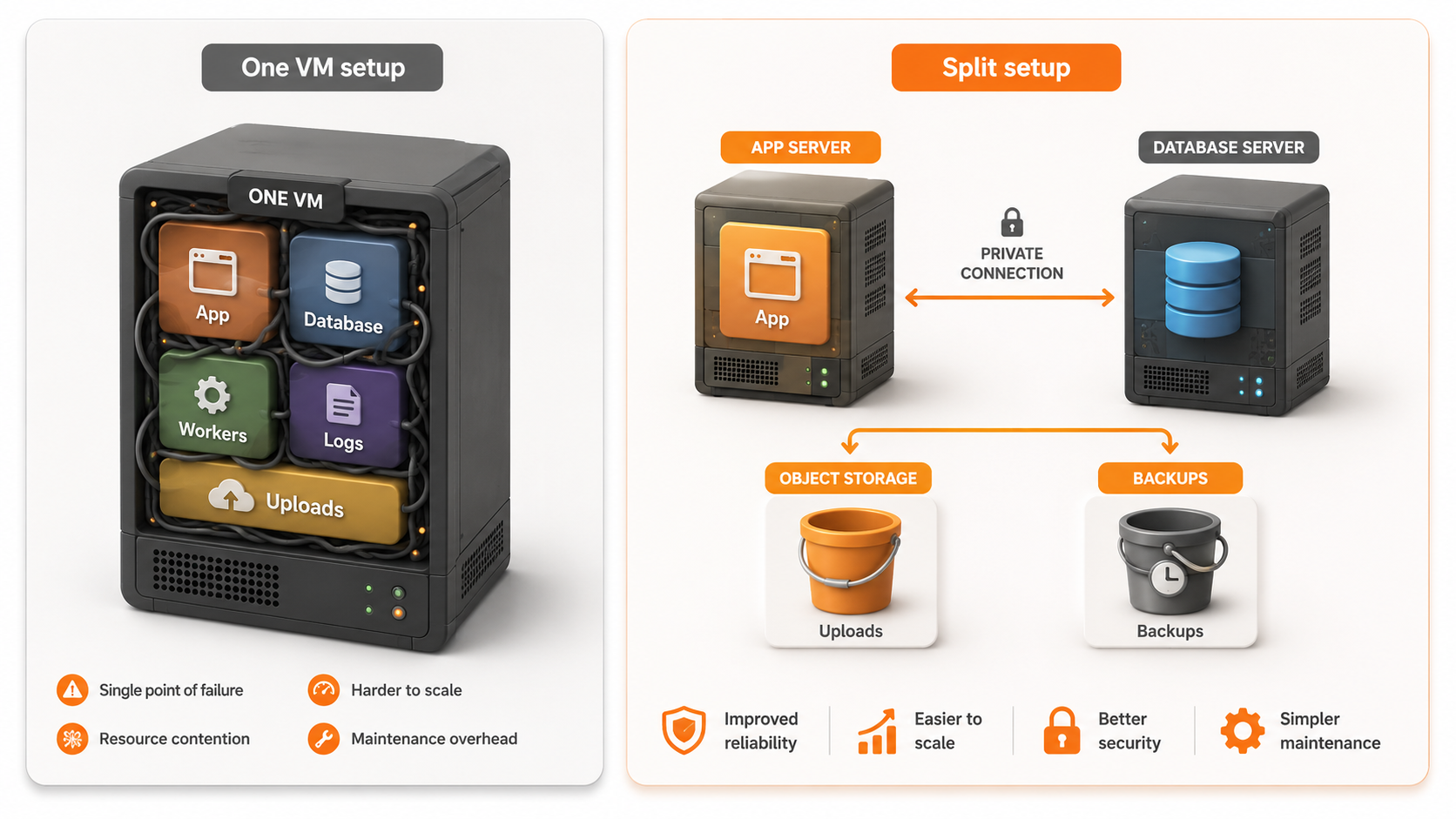
Separate app and database server is an architecture decision that moves your application runtime and database onto different infrastructure so each layer can scale, fail, and recover more safely.
For small teams, this split is not about looking more advanced. It is about reducing production risk when one server is carrying too much responsibility. Raff Technologies operates 10,000+ VMs from Vint Hill, Virginia, and gives teams both paths: Raff VMs for app and database servers you control, and Raff Managed Databases when you want PostgreSQL, MySQL, or Redis operated for you.
This guide explains when one VM is still enough, when to separate the app server and database server, and how to choose between a separate database VM and a managed database. It connects directly to the production VPS checklist for SaaS apps, managed vs self-hosted databases, and VPS for databases.
App and database separation creates different failure domains
App and database separation means your application process and database process no longer compete inside the same server.
On a single VM, the app server, background workers, reverse proxy, database, logs, uploads, package updates, cron jobs, and deploy scripts can all fight for the same CPU, RAM, disk, and I/O. That setup can be acceptable early. It becomes risky when one layer can break the other.
A separate database server changes the failure boundary:
Users ↓ App server ↓ private network Database server
The app server can restart without directly restarting the database. The database can get more memory without resizing the app. Backups can focus on data. Monitoring can show whether the problem is app traffic, worker load, slow queries, disk growth, or database connections.
The point is not to add complexity early. The point is to separate responsibilities when the single-server model starts hiding risk.
A good rule is simple:
Keep app and database together while the workload is small, low-risk, and easy to restore. Separate them when customer data, resource pressure, recovery time, or team responsibility becomes harder to manage.
The quick decision framework
Use this table if you need the decision first.
| Situation | Better default | Why |
|---|---|---|
| Prototype or demo | App and database on one VM | Simple, cheap, and fast to change |
| Early MVP with low traffic | One VM can still work | Risk is acceptable if backups and monitoring exist |
| Production SaaS with customer data | Separate database | Data recovery and access control become more important |
| App and database compete for RAM | Separate database | The database can be sized independently |
| Database CPU or I/O is visible in monitoring | Separate database | Query load should not slow app processes |
| Backups are becoming important | Separate database or managed database | Recovery planning becomes cleaner |
| Team lacks database operations experience | Managed database | Less host-level database responsibility |
| Team needs custom extensions or tuning | Separate self-hosted database VM | Full control over database version and configuration |
| Uploads are filling the server disk | Separate storage first | User files should not pressure the database/app VM |
| App has heavy workers | Separate app/worker/database layers | Background jobs can affect both app and database stability |
| High availability is required | Managed database or designed database architecture | A second VM alone is not HA |
| Cost is the only reason to delay separation | Recheck risk | A database incident can cost more than the extra server |
A single VM is not wrong. The wrong move is keeping everything on one VM after the app has become important enough that a database problem hurts customers.
A single VM is fine while the blast radius is acceptable
A single VM is a good starting point when the product is young and the team needs speed.
The app and database can live together when:
- Traffic is low
- Customer data risk is low
- The database is small
- Backups are configured
- Restore has been tested
- CPU and RAM stay below warning levels
- Disk growth is predictable
- Logs do not fill storage
- Deploys are simple
- One person can understand the whole system
This pattern works well for prototypes, internal tools, demos, staging environments, and early MVPs.
Users ↓ Single VM ↓ App + database + workers
The benefit is simplicity. There is one server to deploy, monitor, back up, resize, and debug.
The risk is that every failure shares the same boundary. A bad app deploy can affect the database. A large query can slow the app. Log growth can fill the same disk that stores data. A backup job can create I/O pressure during user traffic. A memory leak in the app can push the database into swap.
A single-server setup should have a defined exit point before production grows.
Use a trigger like:
- Move the database when CPU or RAM stays above 70% during normal traffic.
- Move the database when user data becomes hard to restore quickly.
- Move the database when app deploys create database risk.
- Move the database when disk growth is no longer predictable.
- Move the database when one incident would affect both app and data.
The exit point matters because teams often wait too long. They split the database only after the first serious incident. It is better to split when the warning signs appear.
Separate servers reduce resource contention
The first reason to separate the app and database is resource contention.
Application servers and database servers use resources differently. App workloads often create short CPU bursts, memory spikes, network traffic, and worker processes. Databases often need steady memory, predictable disk I/O, connection control, and stable storage behavior.
On one VM, the app and database compete for the same pool.
| Resource | App pressure | Database pressure | Risk on one VM |
|---|---|---|---|
| CPU | Web requests, API traffic, workers, image jobs | Queries, indexing, maintenance, replication | One layer slows the other |
| RAM | App runtime, caches, workers | Buffer/cache, connections, query memory | Swapping or OOM risk |
| Disk | Deploys, logs, uploads, temporary files | Data files, WAL/binlogs, indexes, backups | Disk fills or I/O stalls |
| Network | User traffic, API calls, file transfer | App queries, replication, backups | Harder bottleneck diagnosis |
| Maintenance | Deploys, package updates, restarts | Vacuum, backups, upgrades | Maintenance windows collide |
When the database moves to its own server, each layer gets clearer capacity planning.
The app server can be resized for CPU and web traffic. The database server can be sized for memory, disk, and query behavior. Monitoring becomes easier because the symptoms are separated.
A separate database server is not automatically faster. It is easier to operate because the resource ownership is clearer.
Raff's CPU-Optimized 2 vCPU / 4 GB VM costs $19.99/month with 80 GB NVMe SSD and unmetered VM traffic.
That tier is a practical reference point for an early app server or small dedicated database server. Heavier databases should be sized from memory, storage growth, and I/O behavior, not from the smallest plan that boots the engine.
The database should move first when data becomes the product
The database should move first when customer data becomes the part of the product you cannot easily recreate.
You can redeploy app code. You can rebuild containers. You can replace a reverse proxy. You can recreate a worker process. You cannot casually recreate customer records, billing events, messages, documents, orders, analytics history, or account data.
That is why the database deserves a cleaner boundary earlier than many teams expect.
Move the database off the app server when:
- Paying users depend on the data
- Restore time matters
- Database backups need their own schedule
- Database disk growth is outpacing app growth
- Queries are slowing app requests
- Deploys and migrations need clearer rollback
- App workers create database pressure
- You need private networking between app and database
- You want database access controlled separately
- You need monitoring focused on query latency and connections
PostgreSQL's official documentation describes several backup approaches, including SQL dumps, file-system level backup, continuous archiving, and point-in-time recovery: PostgreSQL Backup and Restore.
That matters because database recovery is not just "copy the server." A production database needs a recovery plan that matches how much data loss and downtime the business can tolerate.
If your app is still early, a self-hosted database on its own VM can be enough. If the team does not want to own database host operations, Raff Managed Databases is the cleaner path.
Separate database VM vs managed database
Separating the app and database does not always mean running another database VM yourself. You have two main paths.
| Path | Best for | Main trade-off |
|---|---|---|
| Separate self-hosted database VM | Teams that need full control, extensions, tuning, or VM-level access | Your team owns database operations |
| Managed database | Teams that want backups, monitoring, scaling controls, and lower operational burden | Less low-level control |
A separate database VM gives you control. You choose the operating system, database version, extensions, configuration files, backup method, filesystem behavior, and monitoring stack.
A managed database gives you a database service. The provider handles more of the host-level work: provisioning, backups, monitoring, patching, SSL/TLS, scaling controls, and recovery tooling.
For small teams, the decision should start with responsibility:
- Choose managed when you want fewer database operations.
- Choose self-hosted when you need database control and can operate it safely.
This is the same decision covered in Managed vs Self-Hosted Databases. The difference here is timing: this guide helps you decide when the database should leave the app server.
:::cta Compare Raff Managed Databases Use Raff Managed Databases when you want PostgreSQL, MySQL, or Redis without operating the database host yourself. :::
Cost changes after the split
Separating the app and database adds visible cost, but it can reduce hidden risk.
A single VM looks cheaper because there is only one server bill. A split architecture adds a second VM or managed database plan. But the cost comparison should include the operational value of separation.
| Cost area | Single VM | Separate database server |
|---|---|---|
| Monthly infrastructure | Lower | Higher |
| Debugging clarity | Lower | Higher |
| Recovery planning | Harder | Cleaner |
| Scaling flexibility | Limited | Better |
| App/database isolation | Weak | Stronger |
| Backup design | Mixed with server state | More focused on data |
| Incident blast radius | Wider | Narrower |
| Team complexity | Lower at first | Higher, but clearer |
A separate database server costs more than a single VM. It can still be the cheaper decision if it prevents downtime, data loss, slow recovery, or emergency migration work.
The cost question is not:
Can we save one server bill?
The better question is:
Is the current single-server setup still cheaper after we include incident risk, recovery time, and engineering attention?
For Raff, compare both paths with Raff pricing. One team may choose two Raff VMs: one for the app and one for the database. Another team may choose a Raff VM for the app and a Raff Managed Database for production data.
The right answer depends on data value and operational capacity.
Security improves when the database is private by default
A separate database server makes it easier to keep the database private.
The safer pattern is:
Public users ↓ Public app endpoint ↓ private network or restricted firewall path Database server
The database should not be exposed to the public internet. App users should reach the app, not the database. Admins should use controlled paths, not open database ports.
OWASP lists Broken Access Control as A01 in the OWASP Top 10:2021, with access-control failures appearing across a large share of tested applications: OWASP Top 10:2021 Broken Access Control.
For app/database separation, the practical security rule is simple: public traffic should stop at the application layer.
A split setup helps because the database can live behind:
- Private networking
- Firewall rules
- Restricted source IPs
- VPN or bastion access
- Managed database access controls
- Separate credentials
- Separate monitoring
- Separate audit ownership
A separate database server does not create security automatically. It creates a better place to enforce security.
A database on the same VM as the app can still be private. A database on a separate VM can still be misconfigured. The separation helps only when access rules are deliberate.
Backups and recovery become cleaner after separation
Backups become easier to reason about when the database has its own boundary.
On a single VM, snapshots can mix operating system state, app files, logs, uploads, temporary files, and database data. That can be useful for rollback, but it is not always enough for database recovery.
Database recovery needs specific answers:
- How much data can you lose?
- How long can recovery take?
- Where are backups stored?
- How often are backups created?
- Have restores been tested?
- Who performs recovery?
- What happens after a bad migration?
- What happens if disk fills?
- What happens if the VM fails?
NIST SP 800-34 frames contingency planning around recovery priorities, recovery strategies, and maintaining viable recovery procedures for information systems: NIST SP 800-34 Rev. 1.
For database architecture, that means you need Recovery Point Objective and Recovery Time Objective before the incident.
A separate database server makes it easier to define database-specific backups and restore tests. A managed database can make this easier again by standardizing backup and recovery tooling.
For self-hosted PostgreSQL, use PostgreSQL Replication vs Backups vs Snapshots and Back Up PostgreSQL to Raff Object Storage with Restic as supporting resources.
Object storage should be separated from the database decision
Do not solve upload storage by moving the database to another VM.
User uploads and database data are different storage problems.
The database stores structured records: users, sessions, orders, transactions, permissions, messages, metadata, and application state. Object storage is better suited for user files, exports, media, reports, backups, and generated assets.
A common mistake is keeping everything on the same VM disk:
App code + database + uploads + logs + backups
That creates avoidable pressure. Uploads can fill disk. Logs can grow. Backups can compete with database writes. A restore may become harder because the VM contains too many data types.
A cleaner production layout is:
App server ↓ Database server or managed database ↓ Object storage for uploads, exports, and backup retention
For a deeper storage decision, read Object Storage vs Block Storage vs VM Disk.
Raff Object Storage starts at $7.00/month for the first 100 GB and is S3-compatible.
That makes it a practical place for app uploads, exports, media, and database backup retention when those files should not live on the app server disk.
Raff supports both split architecture paths
Raff supports both paths for teams separating app and database infrastructure.
The self-hosted path looks like this:
Users ↓ Raff VM for app ↓ private network Raff VM for database ↓ Backups, snapshots, and object storage retention
The managed path looks like this:
Users ↓ Raff VM for app ↓ private network Raff Managed Database
Use Raff VMs when you need full control over the app server, database server, operating system, extensions, configuration, and backup tooling.
Use Raff Managed Databases when you want PostgreSQL, MySQL, or Redis without operating the database host yourself.
Raff VM traffic uses a 3 Gbps unmetered port with no VM egress fees.
That matters when an app and database are split across production infrastructure. You still need to design the network correctly, but your VM traffic model is easier to understand than platforms where every transfer creates a separate surprise cost.
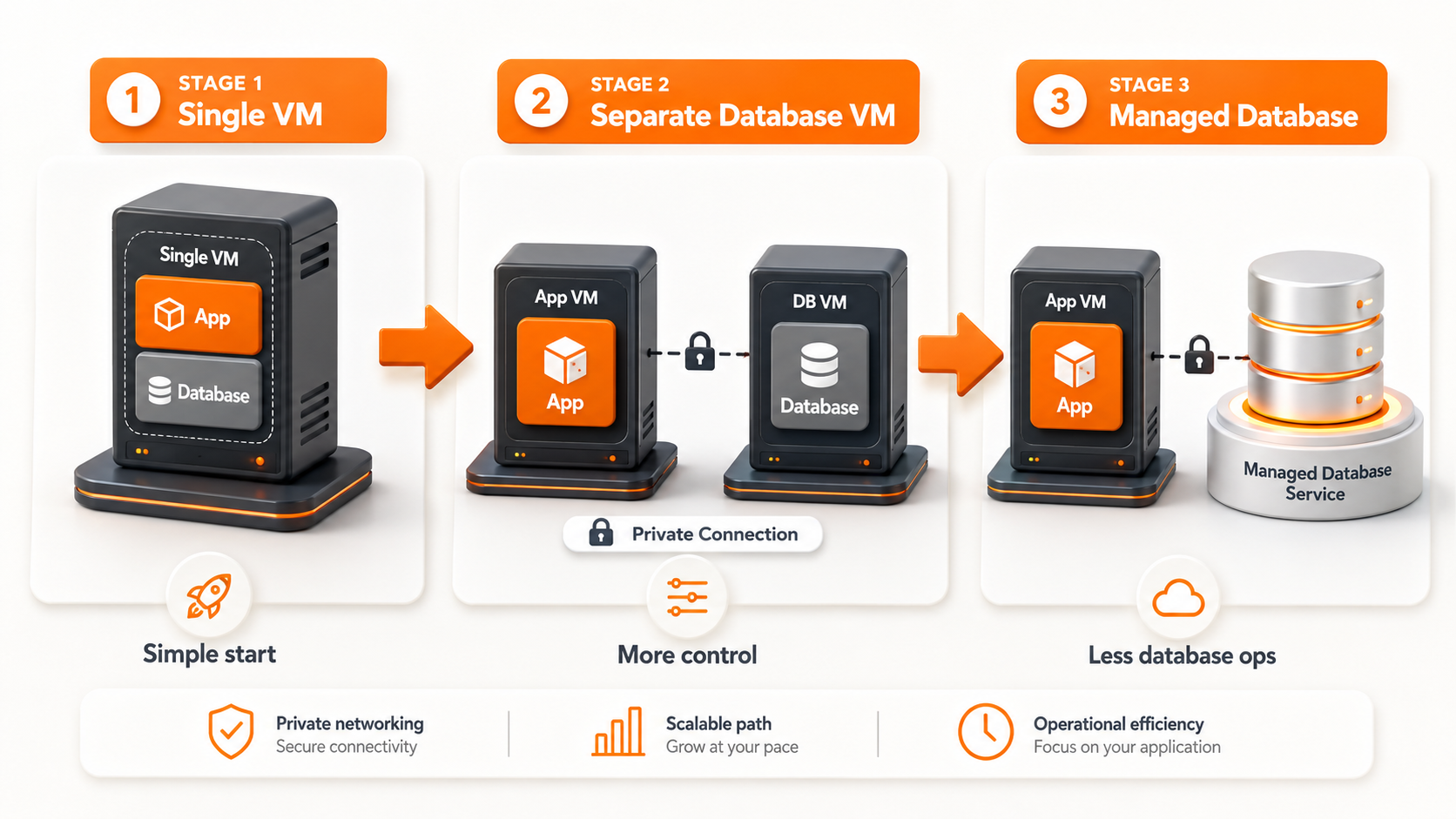
At Raff, the product decision is to let teams start simple and split when the workload justifies it. A team can begin with one VM, move the database to a separate Raff VM, then use Raff Managed Databases when database operations become more important than low-level control.
:::cta Deploy a Raff VM Choose Raff VM when your team wants full control over the app server, database server, and production architecture. :::
The staged migration path reduces risk
The safest split is staged, not rushed.
Do not move the database only because an architecture diagram looks cleaner. Move it because there is a clear operational reason and a controlled migration path.

A practical staged path looks like this:
Stage 1: Single VM
Use one VM for app and database while the product is early.
Single VM ↓ App + database
Good for:
- Prototypes
- Demos
- Internal tools
- Early MVPs
- Low-risk staging environments
Exit when customer data, disk growth, restore requirements, or resource pressure increases.
Stage 2: Separate database VM
Move the database to its own VM when you need cleaner resource separation and more control.
App VM ↓ private network Database VM
Good for:
- Teams with database knowledge
- Self-hosted PostgreSQL, MySQL, Redis, or MongoDB
- Custom extensions
- Tuning control
- Predictable VM-based architecture
At this stage, the database needs its own backup, monitoring, restore, and access plan.
Stage 3: Managed database
Move to managed when database operations should not be the team's bottleneck.
App VM ↓ private network Managed database
Good for:
- Production SaaS apps
- Customer data
- Teams without database operators
- Backup and recovery standardization
- Faster operational readiness
- Cleaner scaling and monitoring controls
This is often the right long-term path for small teams that want to focus on product instead of database host operations.
The pre-split checklist
Before separating the app server and database server, review this checklist.
- The current single-server setup has clear resource pressure or recovery risk.
- The app and database responsibilities are documented.
- The database owner is defined.
- Current database backups are working.
- Restore has been tested before migration.
- The target database server or managed database is sized.
- The app connection string can be changed safely.
- Firewall rules are planned.
- The database will not be publicly exposed.
- Private networking or restricted access is planned.
- The migration window is defined.
- A rollback plan exists.
- A snapshot or backup exists before migration.
- Monitoring is ready on both app and database layers.
- Slow queries and connection count can be observed.
- The team knows who decides go or rollback.
If restore has not been tested, do not treat the split as low-risk.
If the rollback owner is unclear, the migration is not ready.
The post-split checklist
After the app and database are separated, confirm that the new architecture is actually safer.
- The app connects to the database over the intended private or restricted path.
- Public users cannot reach the database directly.
- Application requests still complete normally.
- Background workers can reach the database.
- Scheduled jobs can reach the database.
- Database backups run after the move.
- Restore process is still documented.
- App server monitoring works.
- Database monitoring works.
- CPU, RAM, disk, I/O, and connections are visible.
- Database latency is acceptable.
- Error logs are clean after migration.
- Old database access paths are closed.
- Old credentials are rotated if needed.
- The team knows the new recovery path.
- The architecture diagram is updated.
The goal of separation is not only to make the diagram cleaner. The goal is to make production easier to recover and operate.
Common mistakes to avoid
Splitting before the team understands the current bottleneck
Do not split only because "separate app and database server" sounds more professional.
First, identify the actual risk: CPU, RAM, disk, I/O, backups, security, restore time, deploy safety, or team ownership.
A split should solve a known problem.
Moving the database but leaving it public
A separate database server is not safer if it is exposed to the public internet.
The database should be private by default. Use private networking, firewall rules, VPN, bastion access, or managed access controls.
Treating a second VM as high availability
A separate database VM is not the same as high availability.
It reduces resource contention and clarifies responsibility. It does not automatically create failover, replication, or zero-downtime recovery.
If high availability matters, use a managed database or design replication and failover deliberately.
Moving uploads to the database server
A database server should not become the new storage dump.
User uploads, exports, media, and long-term files usually belong in object storage, not on the database VM disk.
Skipping restore testing before migration
A migration is the wrong time to discover that backups do not restore.
Test restore before moving production data.
Keeping app and database credentials too broad
After the split, review credentials.
The app should have only the database access it needs. Admin credentials should be separate. Old credentials should be removed or rotated when needed.
Forgetting monitoring after the move
A split architecture needs monitoring on both sides.
You need to see app health and database health separately. Otherwise, the split creates more moving parts without better visibility.
Separate app and database server decisions come down to risk
Separate the app and database server when the single-server model creates more risk than simplicity.
A single VM is fine for prototypes, demos, staging, internal tools, and early MVPs with low traffic and tested recovery. It stops being enough when customer data, database growth, resource contention, restore expectations, security boundaries, or uptime requirements become more important.
For small teams, the best path is usually staged:
- Start simple on one VM.
- Separate the database when production risk increases.
- Use a managed database when database operations should not slow the team down.
If you want full control over both layers, deploy separate Raff VMs for app and database servers. If you want database operations handled for you, use Raff Managed Databases for PostgreSQL, MySQL, or Redis.
Compare both paths on Raff pricing, then choose the architecture your team can operate safely for the next 6-12 months.
:::cta Compare Raff Managed Databases Move production data to Raff Managed Databases when recovery, monitoring, and database operations matter more than host-level control. :::