Ubuntu 26.04 vs 24.04: What Every Server Admin Needs to Know

Aybars Altınyay
Aybars Altınyay
Platform Engineer & Technical Writer
Updated Nov 19, 202610 min read
Written for: Sysadmins and developers choosing between Ubuntu 24.04 and 26.04 LTS for new or existing cloud servers
Ubuntu 26.04Ubuntu 24.04LinuxLTSServer Hardening
Last reviewed:
Guide
Ubuntu 26.04 vs 24.04: What Every Server Admin Needs to Know
rafftechnologies.com/learn
On this page

Key Takeaways

Ubuntu 26.04 LTS gets free security updates until 2031, two years longer than Ubuntu 24.04 LTS, whose standard support ends in 2029. Ubuntu 26.04 replaces sudo with sudo-rs, uses Rust core utilities, mounts /tmp in memory, removes cgroup v1 and apt-key, and syncs time with chrony and NTS on new installs. PHP 8.5 moves the PHP-FPM socket and MySQL 8.4 locks accounts that use mysql_native_password, so PHP and MySQL applications need a test before a server moves to 26.04. On the same Raff 2 vCPU / 4 GB server, a fresh Ubuntu 26.04 install used 57 MiB more RAM at idle and 460 MiB more disk than Ubuntu 24.04, and it was not faster in CPU or crypto tests. Ubuntu 24.04 remains the safer choice where CIS or DISA-STIG profiles are required, since Canonical lists both as planned for 26.04.

Start your next server on Ubuntu 26.04 with free updates until 2031.

  1. 1Pick a Linux imageUbuntu, Debian and more, with your SSH key added.
  2. 2Choose a sizeFrom $4.99 a month. Resize when your app grows.
  3. 3Connect over SSHYour server is up in about 55 seconds.

Ubuntu, Debian and other Linux distributions with full root and SSH access, up and running in about 55 seconds.

Ubuntu 26.04 vs 24.04 is a choice between two supported LTS stacks: 26.04 ships Linux 7.0, PHP 8.5, MySQL 8.4 and PostgreSQL 18 with free security updates until 2031, while 24.04 keeps Linux 6.8, PHP 8.3, MySQL 8.0 and PostgreSQL 16 until 2029.

Both are long-term support releases, so neither is a wrong pick in 2026. The difference is what changes under your applications. Raff runs 15,000+ VMs for 3,000+ customers and offers both images, so on 2026-11-19 we installed each one fresh on the same 2 vCPU / 4 GB server and measured boot time, memory, disk use, default services and the settings that break existing setups.

The 26.04.1 point release arrived on August 27, 2026, and Ubuntu has offered 24.04 servers the move since September 29, which is when most teams start asking whether to take it. This guide compares the two releases for servers, gives a decision framework, and shows what we measured. It is part of the VPS Setup Checklist series on preparing a new server.

Ubuntu 26.04 vs 24.04 at a Glance

The versions below come from each release's own archive, read on fresh Raff servers on 2026-11-19.

ComponentUbuntu 24.04 LTSUbuntu 26.04 LTS
Free security updates until20292031
Linux kernel6.87.0
systemd255259
sudosudo 1.9.15sudo-rs 0.2 (Rust)
Core utilities (ls, cat, sort)GNU coreutils 9.4uutils (Rust); cp, mv, rm stay GNU
Time syncsystemd-timesyncdchrony with NTS
OpenSSH9.6p110.2p1
OpenSSL3.0.133.5.5
Python3.123.14
PHP8.38.5
Nginx1.241.28
MySQL8.08.4 LTS
PostgreSQL1618
Valkey7.29.0
Node.js1822
MariaDB10.1111.8
Redis7.08.0
HAProxy2.83.2
OpenJDK (default)2125
Go1.221.26
APT2.83.2

Nearly every component changes, several by a major version or a full replacement, so moving a server between the two is a software migration, not a routine patch.

Changes That Affect a Running Server

Most new versions are drop-in replacements. These are the ones that changed behavior on our test servers, or that Canonical's release notes flag as breaking.
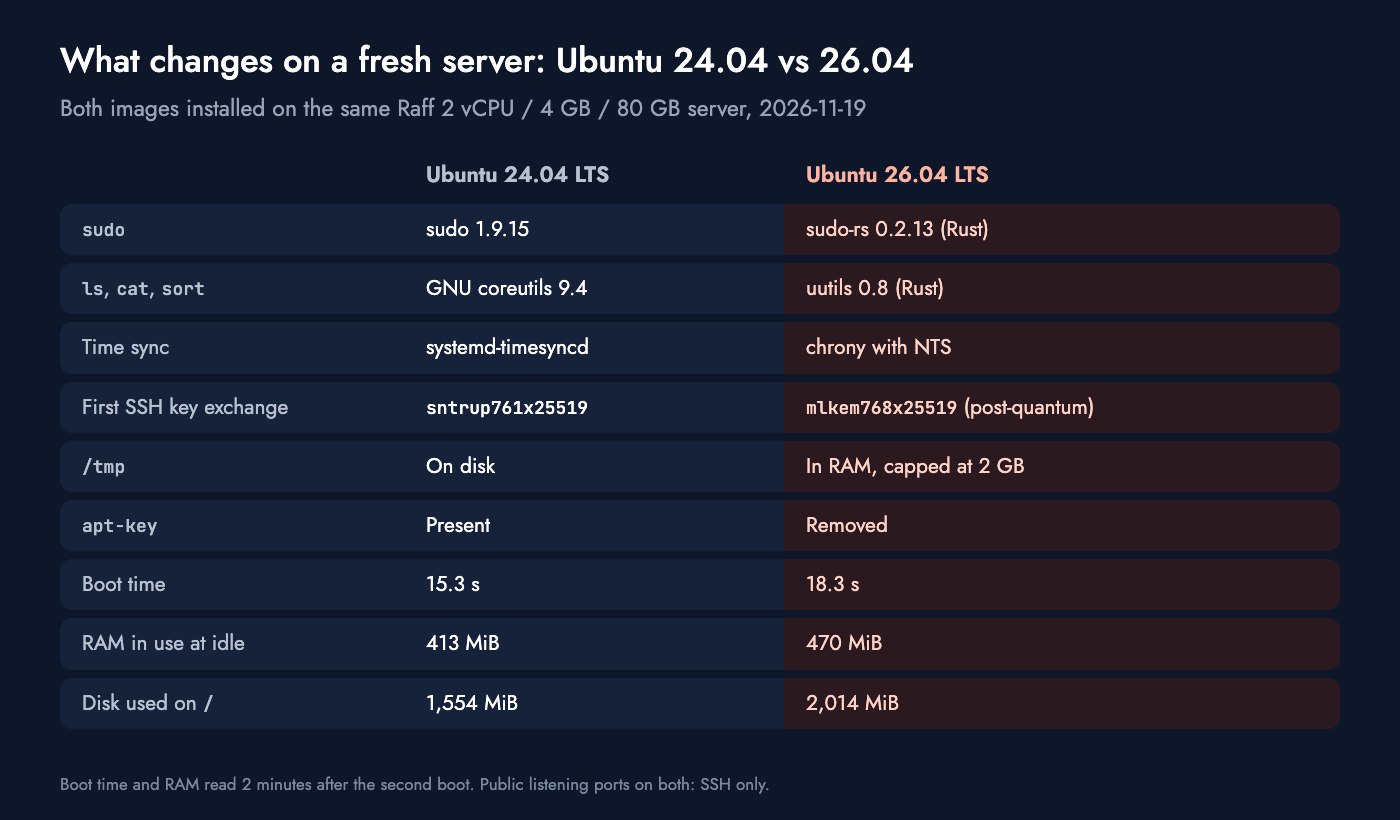
Ubuntu 24.04 vs 26.04 on a fresh Raff server: sudo-rs, uutils, chrony with NTS, post-quantum SSH, /tmp in RAM, boot, RAM and disk.

sudo and the core utilities are rewritten in Rust

On 26.04, sudo is sudo-rs, and commands such as ls, cat and sort come from uutils, both rewritten in Rust. Scripts that use common options keep working, while scripts that depend on rare GNU options or exact error text can fail. The original tools stay installed: sudo.ws runs the classic sudo, and each GNU utility is available with a gnu prefix, for example gnuls. Our server upgraded from 24.04 also switched to sudo-rs and uutils, so this is not only a fresh-install change.

Time sync moves to chrony with NTS

New 26.04 installs use chrony with Network Time Security, which authenticates the time servers instead of trusting plain NTP. Our fresh 26.04 server ran chrony against Ubuntu's NTS pools out of the box. A server upgraded from 24.04 keeps systemd-timesyncd until you install chrony, so two servers on the same release can keep time differently.

/tmp lives in memory

systemd now mounts /tmp as tmpfs, so files there use RAM and disappear at reboot. On our 4 GB server the limit was 2 GB, half the memory. An application that writes large temporary files to /tmp, such as database dumps or image processing, can now run a small server out of memory instead of filling the disk.

cgroup v1 and System V scripts are on the way out

systemd 259 removed cgroup v1, so older container runtimes, Java versions and monitoring agents that only understand cgroup v1 can stop working. 26.04 is also the last Ubuntu release that runs System V init scripts, so anything still started from /etc/init.d should get a systemd unit before the next LTS.

OpenSSH 10 drops DSA and leads with post-quantum key exchange

OpenSSH 10.2 removes DSA keys entirely and puts the hybrid post-quantum key exchange mlkem768x25519-sha256 first. Our fresh 26.04 server offered it as its first choice, while 24.04 offered sntrup761x25519-sha512. RSA and Ed25519 keys work as before; very old SSH clients and DSA keys are the risk.

APT 3 removes apt-key

apt-key does not exist on 26.04. Install instructions that still pipe a key into apt-key add fail, and the current method stores the key in /etc/apt/keyrings and points to it with Signed-By. Most vendors already document the new method, and Docker lists Ubuntu 26.04 as a supported release.

PHP 8.5 and MySQL 8.4 change paths and logins

PHP 8.5 replaces PHP 8.3, so the PHP-FPM socket moves from php8.3-fpm.sock to php8.5-fpm.sock. On our upgraded test server, an Nginx site that pointed at the old socket returned 502 Bad Gateway until we changed it. MySQL 8.4 locks accounts that still use the mysql_native_password plugin, and Canonical's notes give two ways out: move those accounts to caching_sha2_password, or switch the old plugin back on in mysqld.cnf. The step-by-step upgrade tutorial with a snapshot rollback shows these fixes on a real server.

Choosing Between Ubuntu 24.04 and 26.04 for a Server

A server installed on 26.04 gets free security updates until 2031, two years longer than the same server on 24.04, whose standard support ends in 2029. That gap is the strongest reason to pick 26.04 for new work, and the release notes are the strongest reason to test before moving existing work.

Choose Ubuntu 26.04 if:

  • You are building a new server and your software supports 26.04.
  • You want PHP 8.5, PostgreSQL 18, MySQL 8.4 or Python 3.14 from the Ubuntu archive instead of third-party repositories.
  • You want the longest free support window: until 2031.
  • You want post-quantum SSH key exchange and authenticated time sync without extra setup.

Stay on Ubuntu 24.04 if:

  • You need CIS or DISA-STIG hardening profiles today. Canonical lists both as achieved for 24.04 and as planned for 26.04.
  • A vendor has not certified 26.04 yet, for example a control panel, a commercial agent, or a container tool that still needs cgroup v1.
  • Your applications use MySQL accounts with mysql_native_password or PHP code not yet tested on PHP 8.5.
  • The server is stable and you have no time to test this quarter, since 24.04 keeps free updates until 2029.
SituationRecommendationWhy
New server, current stack26.04Two more years of free updates and current packages
New server for vendor-certified softwareThe release the vendor certifiesSupport contracts follow certification
Existing 24.04 server that worksStay, and plan the move before 2029No security deadline until 2029
Existing server with PHP or MySQL appsTest on a copy firstSocket path and login changes break apps quietly
CIS or DISA-STIG compliance24.04 for now26.04 profiles are still planned
Container hosts and Kubernetes nodes26.04 if every runtime supports cgroup v2cgroup v1 is gone

Ubuntu 26.04 or 24.04, ready in 55 seconds.

14-day money-back guarantee

Deploy Your Server

What We Measured on Fresh Raff Installs

We reinstalled one General Purpose server (2 vCPU, 4 GB RAM, 80 GB NVMe) with each image, rebooted once after the first-boot setup, and read the numbers two minutes after the second boot. The benchmarks ran three rounds on each release, and the table shows the median.

MeasurementUbuntu 24.04Ubuntu 26.04Change
Boot time (second boot)15.3 s18.3 s+3.0 s
RAM in use at idle413 MiB470 MiB+57 MiB
Disk used on /1,554 MiB2,014 MiB+460 MiB
Installed packages680691+11
Processes at idle141146+5
Public listening portsSSH onlySSH onlynone
CPU, 1 thread (sysbench events/s)3,6223,433-5%
CPU, 2 threads (sysbench events/s)6,8156,869+1%
Memory copy (sysbench MiB/s)5,2814,791-9%
AES-256-GCM (OpenSSL, 16 KB blocks)8.84 GB/s7.83 GB/s-11%
SHA-256 (OpenSSL, 16 KB blocks)1.54 GB/s1.57 GB/s+2%
RSA-2048 signatures/s (OpenSSL)2,8532,8480%

26.04 costs a little more at rest: 57 MiB more RAM at idle, 460 MiB more disk and 3 seconds more boot time, partly because its image also runs snapd. On a 4 GB server none of that matters; on a 1 GB server, 57 MiB is about 6% of the memory.

Two-thread CPU, SHA-256 and RSA signing came out within 2% of each other. Single-thread CPU was 5% lower on 26.04 and AES-256-GCM 11% lower, in every round, while memory copy was 9% lower by median but its rounds overlapped with 24.04's. We ran the two releases at different times on a shared vCPU plan, so treat gaps of this size as a reason to benchmark your own workload, not as a verdict on the release. Nothing we measured makes 26.04 faster for a typical web server: pick it for support length and newer packages, not for speed.

Support Timelines for Ubuntu 24.04 and 26.04

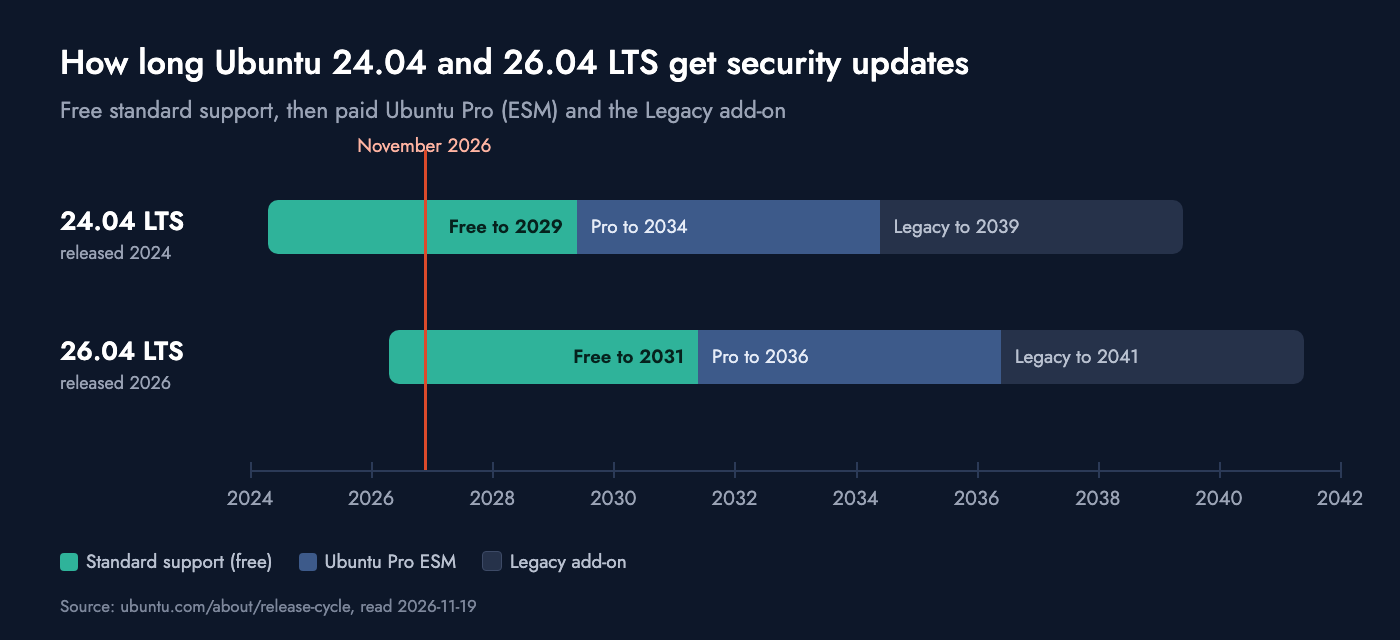
Ubuntu 24.04 and 26.04 LTS support timeline: free updates to 2029 and 2031, Ubuntu Pro to 2034 and 2036, Legacy to 2039 and 2041.

Each release gets five years of free standard security maintenance. A paid Ubuntu Pro subscription adds five more years of Expanded Security Maintenance, and the Legacy add-on adds five after that. For 24.04 that means 2029, 2034 and 2039; for 26.04 it means 2031, 2036 and 2041, per Canonical's release cycle table.

The end of standard support does not stop a server, but it stops free security fixes. A server left on an unsupported release is the kind of stale infrastructure the server decommissioning checklist is written to catch.

Ubuntu 26.04 and 24.04 on Raff

Raff's image list includes Ubuntu 26.04 LTS, 24.04 LTS and 22.04 LTS for Linux servers. General Purpose servers start at $4.99 a month for 1 vCPU and 1 GB RAM, and the 2 vCPU / 4 GB server used for these tests is $17.99 a month. Both Ubuntu images we tested came with SSH key login for root, password login off, fail2ban running and UFW installed but inactive, so the only public port on a new server was SSH.

There are two ways to change the release of a Raff server. Reinstalling with the other image erases the disk and gives you a clean build, which suits a new deployment. Upgrading in place keeps your data, and a snapshot taken first gives you a way back: in our tests, restoring the snapshot took 5 to 8 seconds and the server was back on 24.04 in under 1.5 minutes.

The test that matters most is your own stack. On our upgraded Nginx, PHP and Docker server, the only running service that changed between 24.04 and 26.04 was PHP-FPM, which is why the PHP socket is the first thing to check on any web server. A fresh 26.04 server costs the same as a 24.04 one, so the cheapest test is a copy of your application on a new 26.04 server before the production one moves.

Conclusion

In the Ubuntu 26.04 vs 24.04 choice, 26.04 is the stronger default for a new server: two more years of free updates, current packages, and safer SSH and time sync defaults. For a server already on 24.04, nothing forces a move before 2029, so move when your stack is tested on 26.04, not when the release arrives. The decision table above covers the cases in between, such as compliance profiles and vendor-certified software.

Whichever release you pick, work through the VPS Setup Checklist on the new server before it goes live. Raff runs 15,000+ VMs for 3,000+ customers, and a new server is ready in 55 seconds, so a 26.04 copy of your own stack is a quick first test.

Sources

Was this article helpful?
Aybars Altınyay
Aybars Altınyay
Platform Engineer & Technical Writer

Aybars is a Platform Engineer & Technical Writer at Raff Technologies. He works on Linux VM templates, self-hosted application workflows, and security-focused deployment validation, turning tested infrastructure procedures into clear, practical tutorials for developers and teams.

Start your next server on Ubuntu 26.04 with free updates until 2031.

Ubuntu, Debian and other Linux distributions with full root and SSH access, up and running in about 55 seconds.

14-day money-back guarantee

Frequently asked questions

What is the difference between Ubuntu 26.04 and 24.04?
Ubuntu 26.04 LTS ships Linux 7.0, sudo-rs, chrony with NTS, PHP 8.5, MySQL 8.4 and PostgreSQL 18, with free security updates until 2031. Ubuntu 24.04 LTS ships Linux 6.8, classic sudo, PHP 8.3, MySQL 8.0 and PostgreSQL 16, with free updates until 2029.
What kernel is Ubuntu 26.04 using?
Ubuntu 26.04 LTS uses Linux kernel 7.0 on its standard kernel stack, up from 6.8 in Ubuntu 24.04. On 2026-11-19 the 26.04 archive offered kernel 7.0.0-44.
Is Ubuntu 26.04 stable enough for production servers?
For most server workloads, yes, since the 26.04.1 point release on August 27, 2026. Test applications that depend on PHP 8.3, MySQL native passwords, cgroup v1 or GNU-only command options first, and wait for vendor certification for commercial software.
When does Ubuntu 24.04 reach end of life?
Free standard security updates for Ubuntu 24.04 LTS end in 2029. Ubuntu Pro extends security maintenance to 2034, and the Legacy add-on to 2039, according to Canonical's release cycle table.
Should I use Ubuntu 24.04 or 26.04 for a new server?
Use 26.04 unless a vendor, a compliance profile or an untested application ties you to 24.04. 26.04 gets free updates two years longer and ships current versions of PHP, MySQL, PostgreSQL and Python.
Does Raff offer Ubuntu 26.04 servers?
Yes. Raff offers Ubuntu 26.04 LTS, 24.04 LTS and 22.04 LTS images on Linux servers, with General Purpose plans from $4.99 a month for 1 vCPU and 1 GB RAM. A new server is ready in 55 seconds.