VPS database hosting means running PostgreSQL, MySQL, MariaDB, MongoDB, Valkey or Redis-compatible software, or another database engine on a virtual machine your team controls.
For small teams, the important question is not whether a database can run on a VPS. It can. The real decision is whether host-level control is valuable enough to justify owning patching, backups, monitoring, storage growth, failover, and recovery.
Raff supports both operating models. Teams that need full host control can run databases on a Raff VM. Teams that want less database-platform work can use Raff Managed Databases, which currently supports PostgreSQL, MySQL, Valkey, ClickHouse, and Kafka. MongoDB is not currently a Raff Managed Database engine, but it can be self-hosted on Raff VM.
For most small teams, the decision should start with operational ownership and recovery requirements, not the lowest monthly infrastructure price.
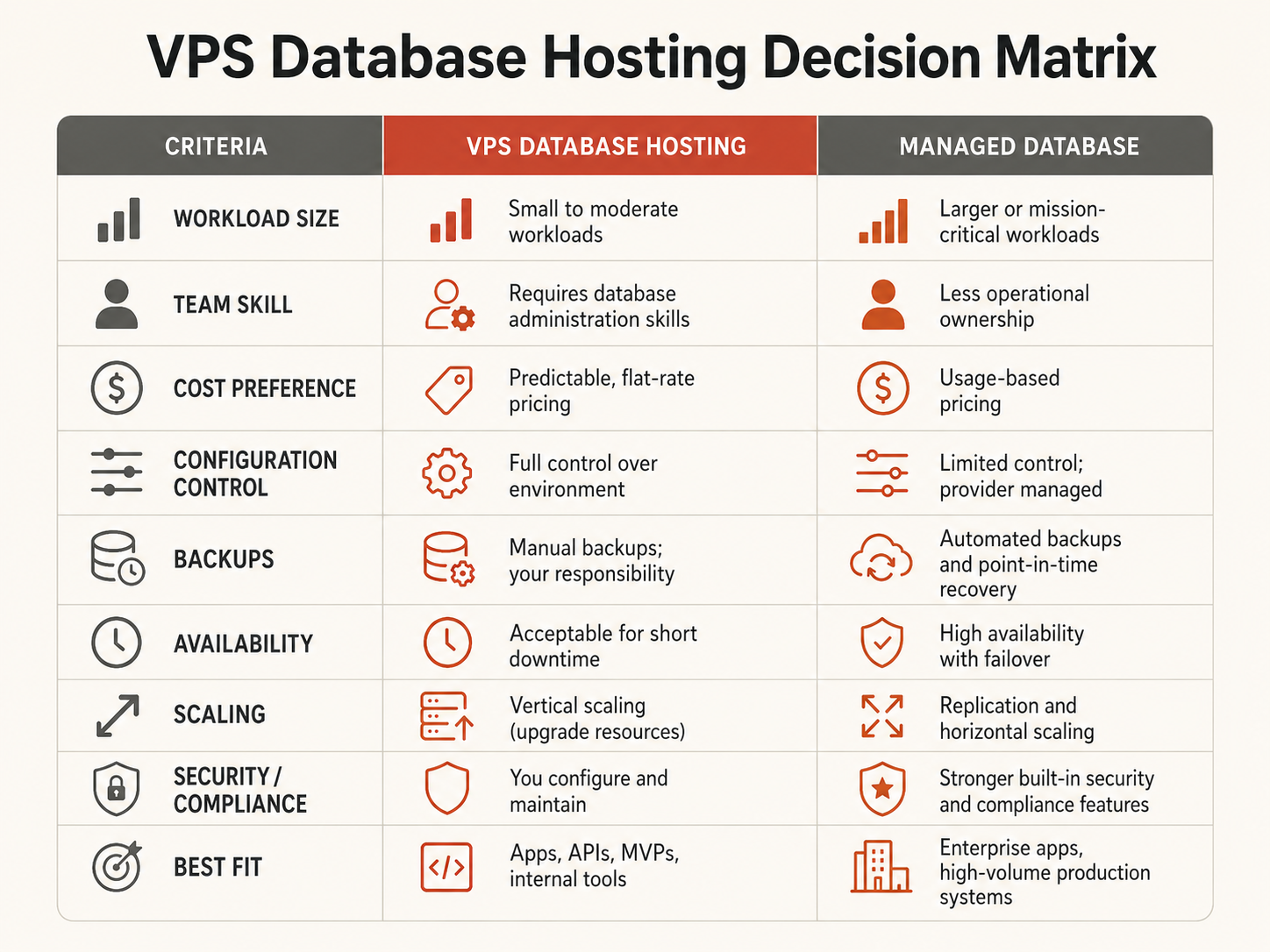
VPS database hosting vs managed databases
| Decision factor | VPS database hosting | Managed database |
|---|
| Operating-system access | Full control | Restricted |
| Database installation | Your team | Provider |
| OS and database patching | Your team | Provider within service policy |
| Backup platform | Your team designs and operates it | Provider-operated within plan scope |
| Restore testing | Your team | Shared responsibility; application validation remains yours |
| Monitoring platform | Your team builds or integrates it | Usually included to a defined scope |
| High availability | Your team designs and operates it | Available where supported by the service |
| Storage expansion | Your team plans and executes it | Service workflow |
| Custom packages/extensions | Broad control | Limited to supported catalog |
| Root/filesystem access | Yes | Usually no |
| Typical fit | Hard host-level control requirements | Teams reducing recurring database operations |
A VPS database fits when a specific requirement needs root access, filesystem control, custom packages, exact maintenance timing, or a topology outside the managed-service boundary.
A managed database fits when the supported engine and features match the workload and the team would rather spend engineering time on the application than on database-host operations.
For the broader ownership model, see Managed Database vs Self-Hosted.
When a database VPS is the right choice
A database VPS remains useful when self-hosting solves a real technical or operational requirement.
Typical reasons include:
- MariaDB or another engine outside the managed catalog;
- MongoDB, which is not currently a Raff Managed Database engine;
- PostgreSQL extensions or packages outside a managed provider's supported set;
- custom authentication modules;
- direct database-file or filesystem access;
- exact package, version, or patch timing;
- custom replication or clustering topology;
- database-adjacent processes that must run on the same host;
- migration, recovery, testing, or forensic environments requiring complete host access.
A simple self-hosted architecture can look like:
Application VM
  -> private VPC
Database VM
  -> customer-operated monitoring, backups, patching, and recovery
If the application and database still share one VM, that can be reasonable for early or low-risk workloads. Separation becomes useful when the database needs a different scaling, security, maintenance, or recovery lifecycle. See Separate App and Database Server.
Self-hosting should solve a hard requirement. Installing PostgreSQL or MySQL is easy; operating and restoring it reliably is the expensive part.
When managed databases are the better fit
A managed database is a practical starting point when the provider supports the required engine, version, extensions, networking, and recovery model.
The commercial value is operational. A managed service can reduce the amount of work your team owns around provisioning, operating-system and service maintenance, backup infrastructure, point-in-time recovery tooling where supported, monitoring, storage expansion, supported high-availability and failover workflows, private connectivity, and maintenance operations.
Your application team still owns schemas, indexes, query performance, migrations, credentials, connection behavior, capacity decisions, recovery-point selection, and validating the application after a restore.
Raff Managed Databases currently supports PostgreSQL, MySQL, Valkey, ClickHouse, and Kafka. PostgreSQL and MySQL also have permanent $0 free tiers with 1 vCPU, 1 GB RAM, and 2 GB storage for compatibility testing. Paid PostgreSQL and MySQL plans start at $7.99/month.
If PostgreSQL or MySQL is already selected, use the engine-specific guides: Postgres Hosting: Managed vs Self-Hosted and MySQL Hosting: Managed vs Self-Hosted.
Customer pattern from Raff: small teams usually lean toward managed databases when backup, restore, patching, and database-host incidents are competing with product work. Self-hosting remains useful when the workload has a concrete host-level requirement.
VPS database cost should include operations, not only VM price
A self-hosted database can have a lower infrastructure invoice and still have a higher total operating cost.
A realistic VPS database cost model includes:
VM compute
+ block storage
+ backup storage
+ monitoring
+ optional standby capacity
+ engineering time
+ patching
+ restore testing
+ incident response
+ major upgrades
A managed database cost model includes:
managed database plan
+ optional HA or replicas
+ additional storage where applicable
+ application engineering time
Compare both models against the same RPO, RTO, availability, security, and performance target. Comparing one self-hosted VM with a managed HA database is not a fair cost comparison because the operational outcomes differ.
For a small team, engineering attention is often the hidden database cost. If the same engineer is responsible for product work and database operations, backup failures, disk growth, upgrades, and incidents compete directly with application development.
Storage and memory still determine database behavior
Whether the database is self-hosted or managed, workload evidence should drive capacity decisions.
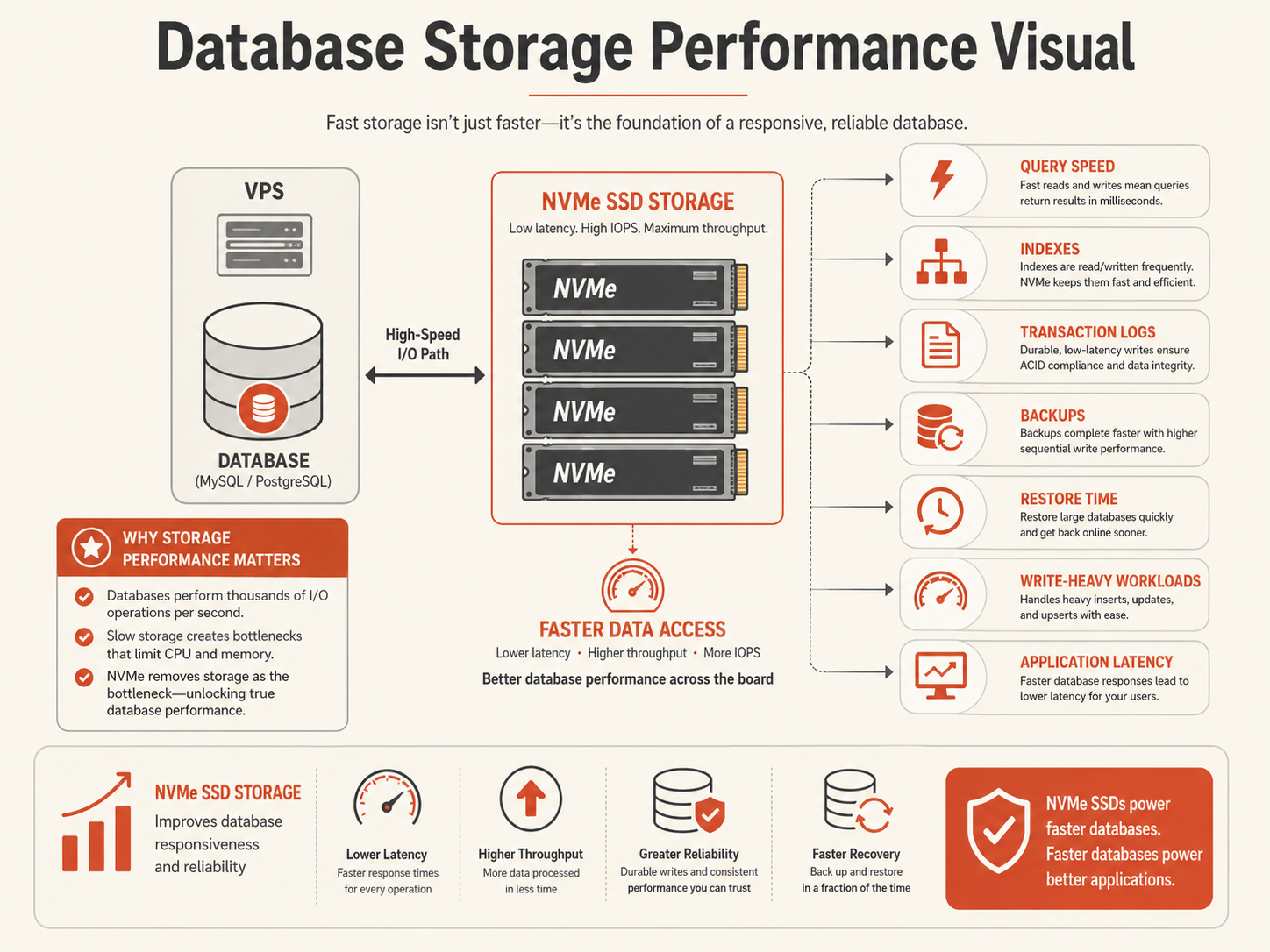
For a self-hosted database VPS, monitor data and index size, storage growth, transaction-log growth, storage latency, temporary files, backup size, restore duration, memory pressure, swapping, and CPU saturation under representative queries.
A database volume should include operational headroom:
data + indexes
+ transaction logs
+ temporary work
+ migration and maintenance headroom
+ expected growth
+ recovery safety margin
For self-hosted databases that need storage independent from the VM system disk, Raff Volumes provide block storage that can be managed separately from the VM lifecycle. Volumes currently cost $0.08/GB-month. See Database Storage on Block Volumes for layout and recovery considerations.
Managed databases reduce host-level storage work but do not remove capacity planning. The application team still needs to understand growth, query behavior, connections, and recovery objectives.
Connection budgets can fail before CPU does
Database capacity is not only vCPU and RAM. Connection behavior can become the first practical limit.
Estimate total planned demand across every process:
maximum application instances
x pool size per instance
+ background workers
+ scheduled jobs
+ migrations
+ monitoring
+ administrative reserve
= planned database connection demand
A database can have available CPU and still reject application traffic because every connection slot is occupied.
For a self-hosted database, your team owns server limits, pooling, and monitoring. For a managed service, connection limits and built-in pooling depend on the engine and plan.
Monitor active and idle connections, connection acquisition time, long-running transactions, rejected connections, pool queue depth, deployment overlap, retry storms, and slow-query behavior.
A larger database plan does not automatically fix oversized application pools.
Backups and restore testing determine whether self-hosting is responsible
A self-hosted database should not become business-critical before its recovery path exists.
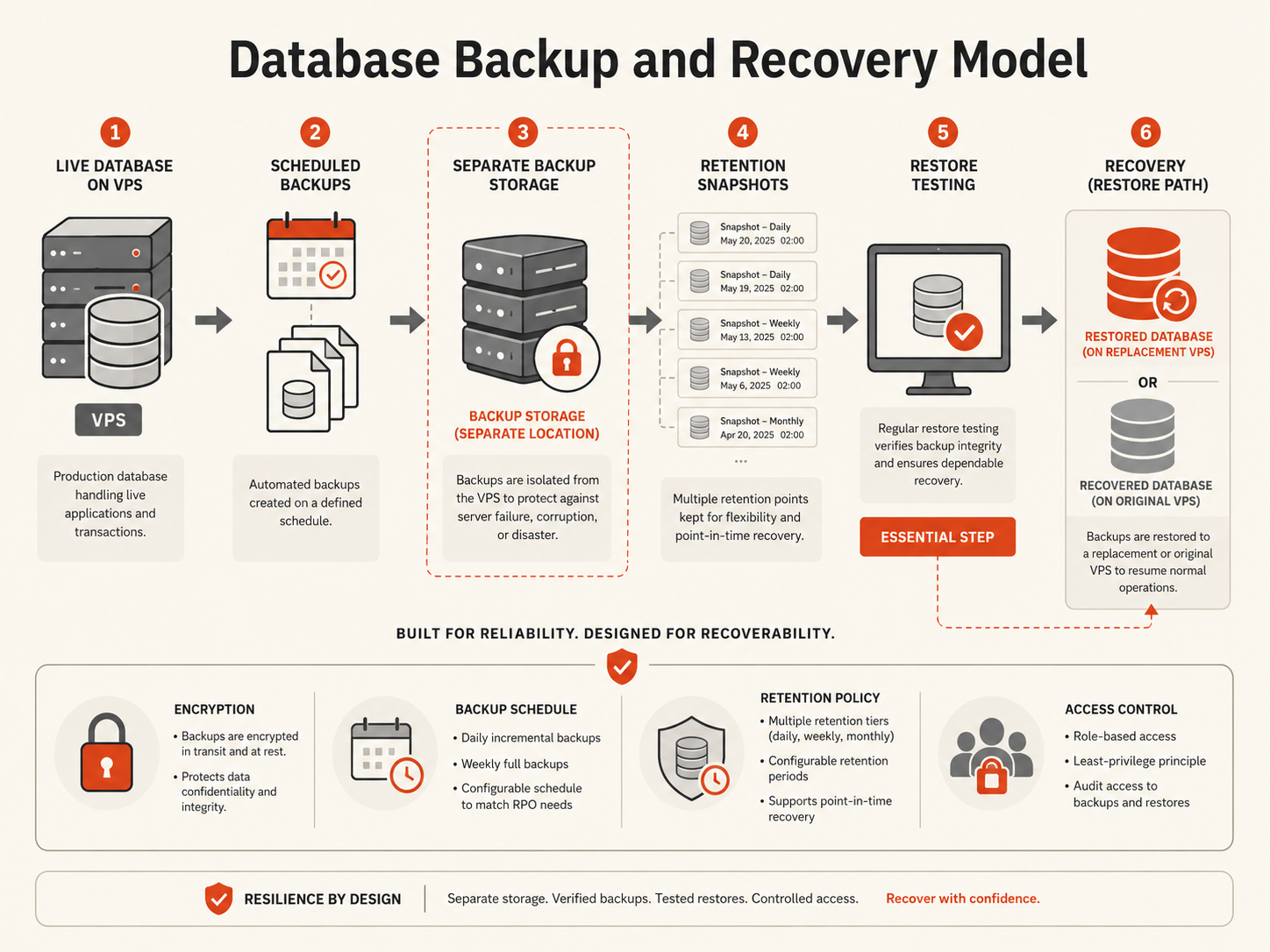
Define two business targets:
- RPO: how much recent data the business can afford to lose.
- RTO: how long the database and application can remain unavailable.
Then map controls to actual failure modes:
| Failure | Useful protection |
|---|
| Database host failure | Replacement VM, replica, or HA path |
| Accidental deletion | Database-aware backup or PITR |
| Bad migration | Pre-change recovery point plus tested rollback |
| Disk loss | Independent database backup and rebuild path |
| Compromised credentials | Isolated retained recovery copies |
| Delayed corruption discovery | Multi-point retention |
Replication is not a backup. A replica can faithfully reproduce an accidental deletion or destructive migration.
For self-hosted databases, Raff Data Protection can add VM-level backup and snapshot controls, while database-native backups remain necessary for transactional recovery. Object Storage can be used for compatible backup artifacts kept away from the database VM.
Managed databases move more of the backup platform into the service boundary, but the application team still owns recovery-point selection and application validation.
Use Database Backup Strategy for SaaS Apps for the complete recovery framework.
Private networking should be the default database path
A database should not receive broad public exposure merely because it runs on a VPS.
For separated application and database servers, prefer a private network path:
Internet
  -> HTTPS
Application VM
  -> private VPC
Database VM or Managed Database
Raff VPC provides private networking between supported Raff resources. Private networking does not replace database authentication, least privilege, TLS where required, firewall policy, or scoped credentials; it removes unnecessary public routing from the normal application-to-database path.
For a self-hosted database, restrict the database port to approved application and administrative sources. For a managed database accessed externally, use the service's supported TLS, allowlist, and credential controls.
Which Raff database path should you choose?
Choose Raff VM for a self-hosted database when root or filesystem access is required, a custom package or extension is mandatory, exact patch timing matters, custom replication or clustering is required, the engine is outside the managed catalog, or your team already has mature database operations and a concrete reason for host control.
Choose Raff Managed Databases when the supported engine and features fit, host-level control is unnecessary, and your team wants less patching, backup-platform, monitoring, storage, and failover work.
If PostgreSQL fits, compare Raff Managed PostgreSQL. If MySQL fits, compare Raff Managed MySQL. For cache, sessions, queues, or Redis-compatible data structures, review Managed Valkey.
VPS database hosting buying checklist
Before choosing a VPS database or managed service, document the required database engine and version, extensions or packages, whether root access is mandatory, current data size and growth, peak connection demand, RPO and RTO, HA requirement, backup retention, network requirements, incident ownership, and total operating cost including engineering time.
If these are unknown, comparing only monthly VM and managed-service prices is premature.
Conclusion
VPS database hosting is useful when a workload genuinely needs operating-system, filesystem, package, version, extension, or topology control. It should not be the automatic starting point just because a database can run on a VM.
Use a managed database when the supported service fits and reducing recurring database-platform work is more valuable than host control. Use a Raff VM when a documented requirement makes that additional control worth the operational responsibility.
The useful decision is not "Can I run this database on a VPS?" It is "Which operating model can my team run and recover reliably?"
Continue with Managed Database vs Self-Hosted, Postgres Hosting, or MySQL Hosting for the next decision layer.
Sources
