
VPS, cloud VM, and cloud server overlap, but they are not strict synonyms. A VPS describes a virtual private server product, a cloud VM describes a virtual-machine compute resource delivered through cloud infrastructure, and cloud server is a broader commercial term that providers may use for VM-based servers.
The labels alone do not tell you whether a provider has multi-host failover, live migration, distributed storage, automatic recovery, or other cloud architecture features. Those capabilities must be verified separately.
Raff Technologies uses Raff VM for its virtual-machine product. Buyers may still use terms such as VPS or cloud server when searching for the same type of workload, but this guide is specifically about terminology. For the infrastructure-model comparison, see Cloud VPS vs Traditional VPS.
Quick answer
| Term | Simple meaning | Best way to think about it |
|---|---|---|
| VPS | Virtual private server | Product category used by hosting providers |
| Cloud VM | Cloud virtual machine | Technical compute resource running on virtualized infrastructure |
| Cloud server | Server deployed online | User-friendly term for a VM-based server in the cloud |
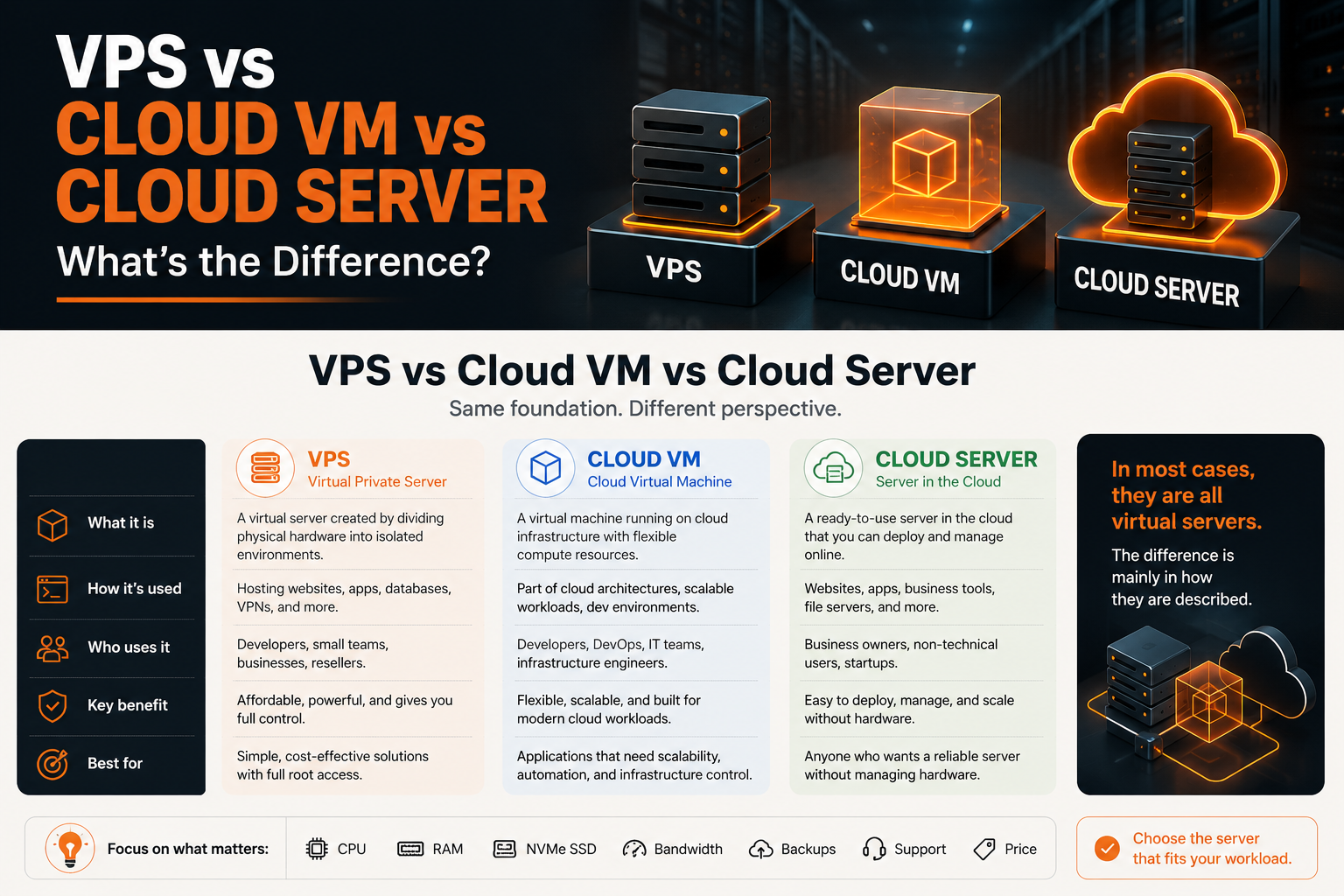
The short version:
VPS is commonly a hosting-product term. Cloud VM describes the virtual-machine resource more precisely. Cloud server is a broader product term whose exact architecture depends on the provider.
For most users, the more important question is not the label.
The better question is:
Does this server give me the CPU, RAM, storage, bandwidth, operating system, access, security, and reliability my workload needs?
What is a VPS?
A VPS, or virtual private server, is a virtual server created by dividing physical server hardware into separate virtual environments.
Each VPS usually has its own:
- CPU allocation
- RAM allocation
- storage
- operating system
- IP address
- SSH or remote access
- firewall rules
- application environment
A VPS feels like a server you control, even though it runs on shared physical infrastructure.
You can use a VPS to host:
- websites
- APIs
- SaaS apps
- staging environments
- databases
- Docker workloads
- VPN servers
- automation tools
- game servers
- business applications
- internal dashboards
The word “VPS” is common in the hosting industry. Buyers often search for VPS when they want a server that is more flexible than shared hosting but simpler than large enterprise cloud platforms.
A VPS is usually a good fit when you want:
- root access
- predictable monthly pricing
- full server control
- the ability to install packages
- a public IP address
- Linux or Windows server access
- a place to run apps, websites, or services
What is a cloud VM?
A cloud VM, or cloud virtual machine, is a virtual machine running on cloud infrastructure.
Technically, a VM is created by a virtualization layer. It behaves like a standalone server with virtual CPU, memory, disk, and networking.
A cloud VM usually includes:
- vCPU
- RAM
- virtual disk
- network interface
- public or private IP
- operating system image
- firewall and network controls
- console or SSH access
- snapshot or backup options
The term “cloud VM” is common among developers, DevOps teams, and infrastructure teams.
It sounds more technical than VPS because it describes the actual compute unit: a virtual machine.
You might use a cloud VM for:
- production app servers
- Docker hosts
- CI/CD runners
- databases
- monitoring tools
- internal services
- development servers
- private network workloads
- reverse proxy servers
- load-balanced app nodes
A cloud VM can be part of a larger cloud architecture.
For example:
Load balancer
  ↓
Cloud VM 1
Cloud VM 2
Cloud VM 3
  ↓
Private database VM
In that setup, each VM is a building block in the infrastructure.
What is a cloud server?
A cloud server is a broader, user-friendly term for a server that runs in a cloud environment.
In most cases, a cloud server is a cloud VM presented as a usable product.
The phrase “cloud server” is often used when the audience does not need to think about virtualization details. It focuses on the outcome:
You get a server online, deploy an operating system, connect to it, and run your workload.
A cloud server usually provides:
- online deployment
- public IP address
- operating system selection
- compute resources
- storage
- network access
- security controls
- backup or snapshot options
- remote management
Cloud server is a practical term for buyers who care less about whether the provider calls it a VPS or VM and more about what they can run on it.
Examples:
- “I need a cloud server for my web app.”
- “I need a cloud server for a database.”
- “I need a Windows cloud server for accounting software.”
- “I need a Linux cloud server for Docker.”
In many product pages, “cloud server” and “cloud VM” mean nearly the same thing.
Are VPS and cloud VM the same thing?
Often, yes.
A VPS and a cloud VM can both describe a virtual server with CPU, RAM, storage, networking, and an operating system.
The difference is usually product positioning.
| Question | VPS | Cloud VM |
|---|---|---|
| Is it virtualized? | Yes | Yes |
| Does it run an operating system? | Yes | Yes |
| Can you access it remotely? | Usually yes | Yes |
| Can it host apps and websites? | Yes | Yes |
| Is it a technical compute unit? | Sometimes | Yes |
| Is it a hosting product term? | Yes | Sometimes |
| Is it used in cloud architecture diagrams? | Less often | More often |
The term VPS is more common in hosting and search behavior.
The term cloud VM is more common in infrastructure, DevOps, and cloud architecture.
A provider might sell “cloud servers,” but technically those servers are virtual machines.
A buyer might search for “VPS,” but the product they choose may be a cloud VM.
The terms overlap heavily.
VPS vs cloud VM vs cloud server comparison
| Factor | VPS | Cloud VM | Cloud server |
|---|---|---|---|
| Main meaning | Virtual private server | Virtual machine in cloud infrastructure | Online server product |
| Audience | Hosting buyers, developers, SMBs | Developers, DevOps, infrastructure teams | General buyers and technical users |
| Technical depth | Medium | High | Low to medium |
| Typical access | SSH, RDP, console | SSH, RDP, console, API | SSH, RDP, console |
| Common use | Websites, apps, VPS hosting | App nodes, databases, CI/CD, infrastructure | Websites, apps, business workloads |
| Pricing style | Often monthly | Monthly or usage-based depending on provider | Usually plan-based |
| Best for | Buyers who want a controllable server | Teams designing cloud infrastructure | Users who want a simple server in the cloud |
The safest interpretation:
These terms overlap, but provider terminology is not a technical guarantee. Verify the virtualization, storage, networking, availability, scaling, and recovery model behind the product.
Why providers use different terms
Providers use different terms because different buyers search for different things.
A developer may search for:
cloud VM for Docker
A small business owner may search for:
cloud server for accounting software
A hosting buyer may search for:
cheap VPS hosting
A DevOps team may search for:
Linux VM with private networking
These searches can point to similar products.
The terminology changes based on audience:
- VPS sounds familiar to hosting buyers.
- Cloud VM sounds precise to technical teams.
- Cloud server sounds clear to business and general users.
This is why you may see one provider use all three terms on different pages.
That is not always a contradiction. It is often a way to describe the same infrastructure from different angles.
Which term should you care about?
If you are choosing infrastructure, do not over-focus on the term alone.
Focus on what the server actually provides.
Check:
- How many vCPUs does it include?
- How much RAM does it include?
- What type of storage is used?
- Is the storage NVMe SSD?
- How much bandwidth is included?
- Is bandwidth metered or unmetered?
- What operating systems are available?
- Can you use Linux or Windows?
- Do you get root or administrator access?
- Are backups and snapshots available?
- Is private networking available?
- Are firewall rules available?
- Is there DDoS protection?
- How fast is deployment?
- Is support responsive?
- Is pricing predictable?
These factors matter more than whether the page says VPS, cloud VM, or cloud server.
A product labeled “cloud VM” does not automatically provide a more resilient architecture than a product labeled “VPS.” Compare the actual compute, storage, networking, availability, recovery, pricing, support, and operational model.
When should you choose a VPS?
Choose a VPS when you want a simple, controllable server for a clear workload.
A VPS is a good fit for:
- websites
- web apps
- small SaaS apps
- APIs
- staging servers
- developer environments
- Linux services
- Windows workloads
- Docker Compose apps
- internal tools
- small databases
- VPN servers
- automation tools
A VPS is usually better than shared hosting when you need:
- root access
- custom packages
- server-level control
- better isolation
- app runtimes
- background workers
- custom firewall rules
- Docker
- database control
For many teams, VPS is the practical starting point before larger cloud architecture becomes necessary.
When should you choose a cloud VM?
Choose a cloud VM when you are designing infrastructure at the VM level.
A cloud VM is a good fit when you need:
- app server nodes
- database server nodes
- private networking
- load-balanced app servers
- CI/CD runners
- monitoring servers
- worker VMs
- separate dev/staging/production environments
- infrastructure automation
- API-based provisioning
- snapshots and backups
- repeatable deployment patterns
Cloud VM is the better term when you are thinking in architecture diagrams.
Example:
VM 1: reverse proxy
VM 2: application server
VM 3: database server
VM 4: worker server
This is more infrastructure-oriented than saying “four VPS plans,” even if the underlying product is similar.
When should you choose a cloud server?
Choose a cloud server when your main goal is to deploy and manage a server online without worrying too much about terminology.
A cloud server is a good fit for:
- business websites
- company applications
- remote access workloads
- internal systems
- simple app hosting
- managed infrastructure replacement
- general-purpose Linux or Windows hosting
Cloud server is the broadest term.
It is useful when explaining infrastructure to non-specialists.
For example:
We moved the app from an office server to a cloud server.
That sentence is easier for many business users than:
We moved the app to a Linux virtual machine running on cloud infrastructure.
Both may describe the same architecture.
How Raff VM fits this terminology
Raff VM is best understood as a cloud server product built around virtual machines.
That means it can be described in all three ways depending on the user’s intent:
| User says | Raff answer |
|---|---|
| I need a VPS | Raff VM gives you a virtual server with CPU, RAM, storage, and OS access |
| I need a cloud VM | Raff VM gives you a deployable virtual machine for apps and workloads |
| I need a cloud server | Raff VM gives you an online server you can deploy and manage quickly |
Raff VM is designed for teams that want cloud servers without unnecessary cloud complexity.
You can use Raff VM for:
- Linux app hosting
- Windows workloads
- Docker deployments
- APIs
- staging environments
- internal tools
- business applications
- remote access workloads
- databases
- automation servers
- development environments
Raff’s role is to provide the compute foundation: a cloud server / VM / VPS that you can deploy, access, secure, and scale based on your workload.
Common mistakes when comparing VPS and cloud servers
Mistake 1: Thinking cloud VM always means better than VPS
A cloud VM is not automatically better than a VPS.
Compare the actual specs, storage, networking, reliability, support, and pricing.
Mistake 2: Choosing only by the lowest monthly price
The cheapest plan may not be the best value.
Slow storage, weak CPU performance, limited bandwidth, poor support, or missing backups can cost more later.
Mistake 3: Ignoring bandwidth
Bandwidth can matter for APIs, media-heavy websites, SaaS apps, backups, downloads, and customer-facing workloads.
Always check whether bandwidth is metered, capped, or unmetered.
Mistake 4: Ignoring storage type
NVMe SSD storage is usually better for modern applications than older disk or basic SSD storage.
Storage speed affects database performance, builds, file operations, and app responsiveness.
Mistake 5: Forgetting backups
A virtual server is not a backup strategy.
Check whether backups, snapshots, or recovery options are available before production use.
Mistake 6: Choosing cloud complexity too early
A large cloud platform may be unnecessary for a simple app, internal tool, or early SaaS product.
Start with the simplest infrastructure that meets the reliability and growth needs.
Decision framework
Use this framework if you are still unsure.
| Need | Best term to search | What to choose |
|---|---|---|
| Simple website or app hosting | VPS or cloud server | General-purpose cloud server |
| Technical infrastructure node | Cloud VM | VM with clear CPU/RAM/storage/networking |
| Business app online | Cloud server | Easy-to-manage VM product |
| Docker host | VPS or cloud VM | Linux VM with enough CPU/RAM/NVMe |
| Windows workload | Windows VPS or Windows cloud server | Windows VM |
| Private app/database architecture | Cloud VM | Multiple VMs with private networking |
| Predictable monthly server cost | VPS or cloud server | Plan-based VM pricing |
| Developer environment | VPS or cloud VM | Small Linux VM |
| Scaling application tier | Cloud VM | Multiple app VMs behind a load balancer |
The name is less important than the fit.
Choose the server that matches the workload.
Conclusion
VPS, cloud VM, and cloud server are overlapping terms, not reliable architecture specifications.
- VPS usually describes a virtual private server sold as a hosting product.
- Cloud VM describes a virtual-machine compute resource delivered through a cloud platform.
- Cloud server is a broader commercial term and can refer to different underlying architectures.
Do not infer redundancy, automatic failover, distributed storage, live migration, or elastic scaling from the word cloud alone. Verify those capabilities with the provider.
If you are deciding between infrastructure models rather than terminology, continue with Cloud VPS vs Traditional VPS. If you are deciding whether a VPS is the right hosting model at all, use the VPS Hosting Decision Guide.
For Raff's current virtual-machine capabilities, see Raff VM and the live pricing page.