
A virtual private server (VPS) is an isolated operating environment created on a physical server, with assigned CPU, memory, storage, networking, and an independent operating system.
From the user’s perspective, a VPS behaves much like a separate computer: it boots its own operating system, receives an IP address, runs applications, stores data, and accepts administrator access. Behind that experience, a virtualization layer coordinates the physical hardware and keeps multiple virtual servers logically separated. Raff uses the same customer-facing model for Raff VM: each deployment becomes a controllable server environment with defined resources.
Understanding how VPS hosting works matters because “private” does not always mean every component is physically dedicated. CPU time, storage systems, and network capacity can still be shared at the infrastructure level. This guide explains that boundary, how a VPS is created and started, how resources reach the operating system, and which technical details affect performance. For provider selection and workload sizing, continue with the VPS hosting decision guide.
VPS Hosting Works Through Logical Server Isolation
A physical server contains processors, memory, storage connections, and network interfaces. Without virtualization, one operating system normally controls those hardware resources directly. VPS hosting adds a software control layer between the hardware and the virtual servers.
That control layer creates multiple virtual machines on the same physical host. Each virtual machine receives a virtual hardware profile that can include:
- One or more virtual CPUs
- A defined memory allocation
- One or more virtual disks
- Virtual network interfaces
- Firmware and boot settings
- An operating-system image
The operating system inside the VPS sees these virtual devices as if they were server hardware. Linux or Windows can then boot, load drivers, create users, start services, and accept remote connections.
This is the central idea behind VPS hosting: the customer controls an independent operating environment, while the provider controls the physical host and the virtualization layer beneath it.
Isolation creates separate operating systems, filesystems, processes, users, and network settings. A process running inside one VPS does not normally appear inside another VPS. Rebooting one virtual server does not require rebooting every virtual server on the host.
However, isolation is not identical to owning a physical machine. The infrastructure still schedules access to underlying processors, memory, disks, and network capacity. The quality of that scheduling and the provider’s capacity planning affect the user experience.
A Virtualization Layer Divides the Physical Host
The virtualization layer is responsible for presenting virtual hardware to each VPS and controlling how virtual machines access the physical server.
When a provider creates a VPS, the platform defines a virtual machine configuration. That configuration specifies the number of virtual CPUs, memory limit, virtual disk, network settings, boot image, and other policies.
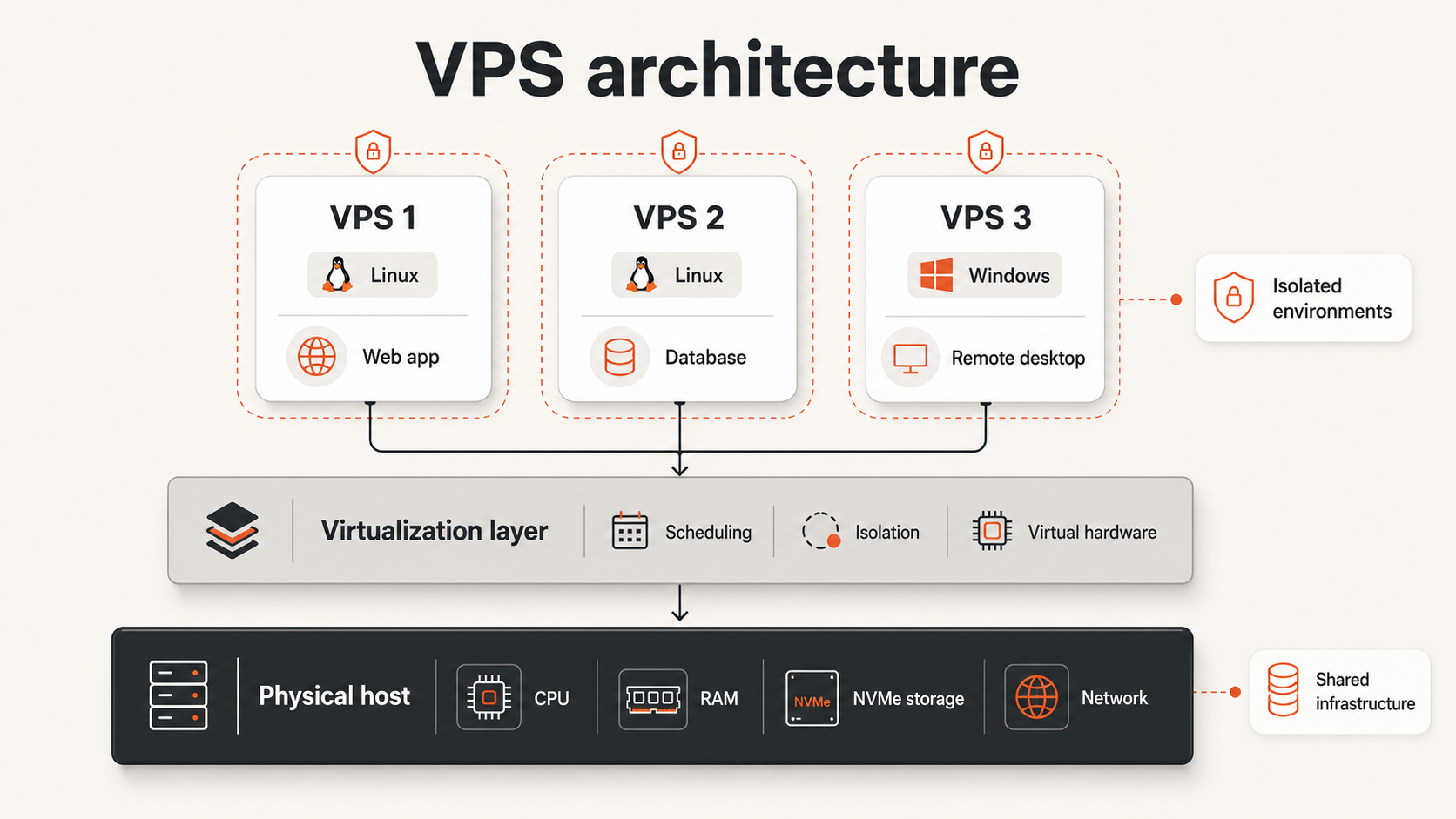
A simplified architecture looks like this:
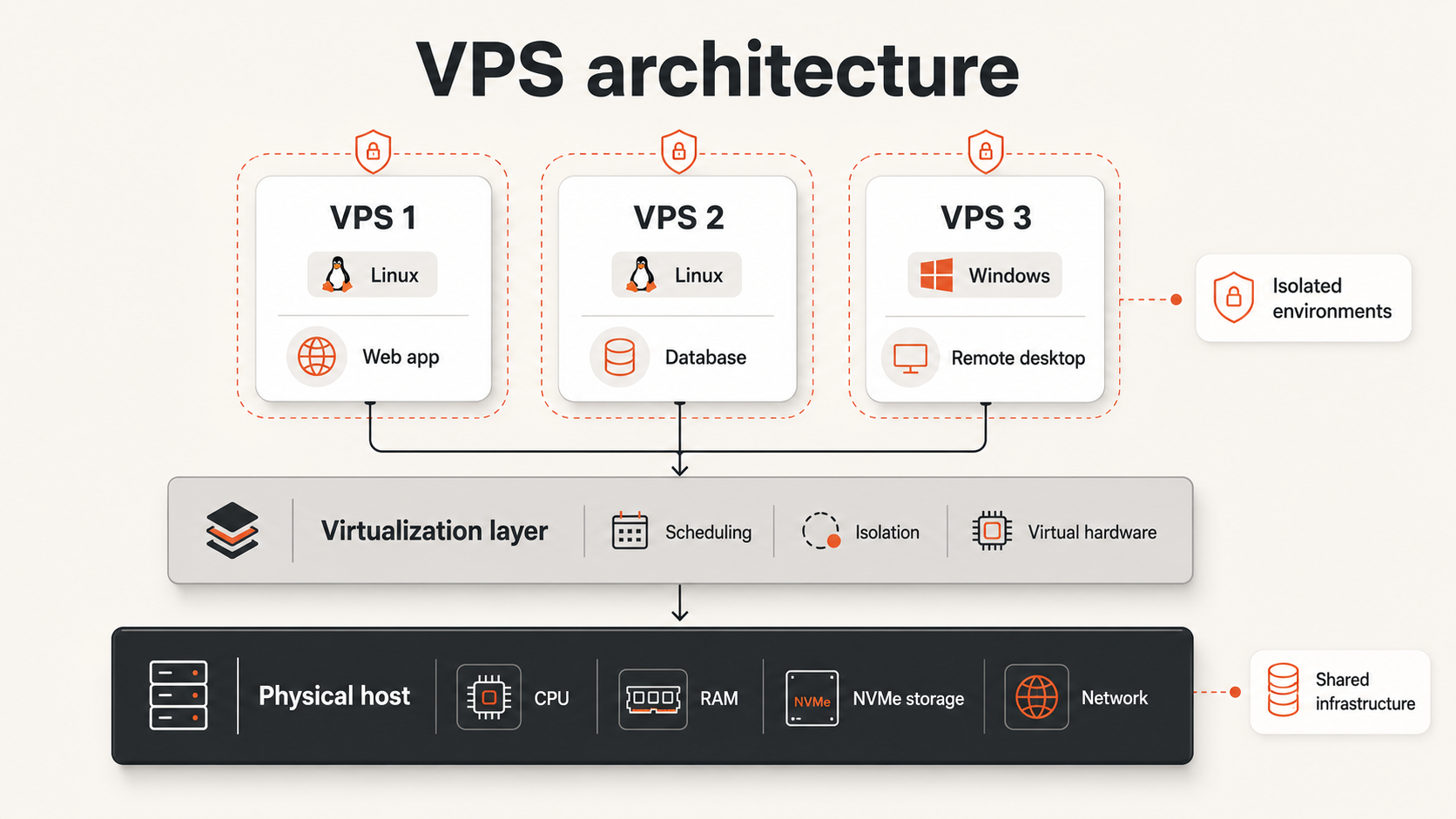
Each VPS can run a different operating system or software stack because the environments are separated. One server might run a web application, another might run a database, and another might provide a Windows remote desktop.
The virtualization layer performs several important functions:
- It maps virtual CPUs to physical processor time.
- It reserves or limits memory for each virtual machine.
- It connects virtual disks to physical or distributed storage.
- It connects virtual network interfaces to the provider’s network.
- It starts, stops, pauses, snapshots, and migrates virtual machines.
- It prevents one virtual machine from directly controlling another.
From the customer’s perspective, these functions are mostly invisible. The customer interacts with the VPS through SSH, Remote Desktop, a browser console, or an API. The provider manages the host-level systems that make those interfaces possible.
CPU, Memory, Storage, and Networking Are Assigned Differently
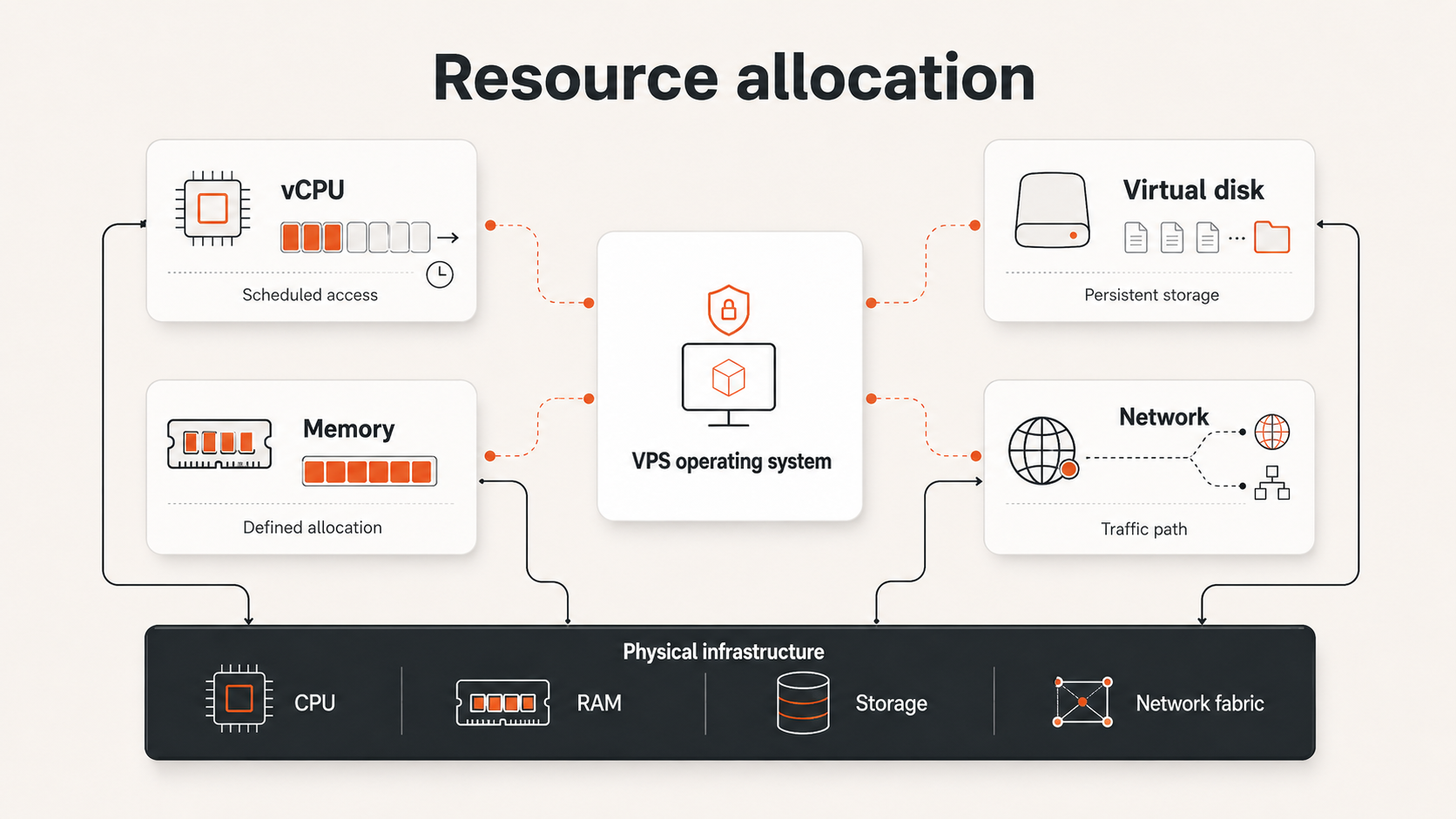
A VPS plan usually lists CPU, RAM, storage, and bandwidth, but those resources do not all behave in the same way.
Virtual CPUs represent scheduled processor access
A virtual CPU, or vCPU, is a processor execution resource presented to the guest operating system. The operating system schedules application threads onto its vCPUs, while the virtualization layer schedules those vCPUs onto physical processor cores or threads.
Shared CPU plans allow multiple virtual machines to use the same physical processor capacity over time. They are suitable for websites, development environments, APIs, and workloads with variable CPU demand.
Dedicated CPU plans assign a more exclusive processor allocation. They are better suited to sustained builds, encoding, compute-heavy services, busy databases, and applications where consistent CPU availability matters.
Memory provides the working space for the operating system
RAM holds active application data, operating-system components, caches, and running processes. A VPS with 4 GB of memory cannot safely treat all 4 GB as application capacity because the operating system and supporting services need memory too.
The provider enforces the memory allocation at the virtualization layer. Inside the VPS, the operating system manages that allocation as normal system memory.
When available memory becomes too low, the operating system may reclaim caches, terminate processes, or use disk-backed swap. These responses can reduce performance. This is why VPS sizing should include operating headroom rather than matching only the application’s average usage.
Virtual disks connect the VPS to persistent storage
The VPS sees a virtual disk, but the data ultimately resides on provider-managed storage. The operating system formats the disk, creates filesystems, and reads or writes data through virtual storage devices.
Storage performance depends on more than the number of included gigabytes. Important factors include latency, throughput, input/output operations, contention, caching, and whether the workload performs many small random operations or large sequential transfers.
The virtual disk normally persists across a VPS reboot. It should not be treated as the only copy of important data. Backups, snapshots, and application-level database exports serve different recovery purposes.
Virtual networking gives the VPS its network identity
A VPS receives one or more virtual network interfaces. These interfaces connect the guest operating system to the provider network.
The VPS may receive:
- A public IPv4 or IPv6 address
- A private network address
- A default gateway
- DNS configuration
- Firewall or security policies
- A bandwidth or port-speed policy
Applications bind to ports inside the operating system. The virtual network carries traffic between those services, other private resources, and the public internet.
A VPS Boots Like an Independent Server
A VPS begins as a configuration plus an operating-system image. When deployment starts, the platform creates or attaches the virtual disk, applies the selected image, assigns resources, connects networking, and powers on the virtual machine.
The boot process then follows the same general pattern as a physical server:
The operating system detects virtual CPU, memory, disk, and network devices. It loads the required drivers and starts configured services.
For a Linux VPS, the user commonly connects through SSH. For a Windows VPS, the user commonly connects through Remote Desktop. Browser-based consoles provide another access path when normal network access is unavailable or misconfigured.
After boot, the VPS behaves as a persistent server. Applications keep running until they stop, crash, or the server is shut down. Files remain on persistent storage. Users can install packages, configure services, change firewall rules, schedule tasks, and create application environments.
A reboot restarts the guest operating system. It does not normally recreate the VPS from the original image. A rebuild or factory-reset action is different because it replaces or reinitializes the operating-system disk and can remove existing data.
Isolation Improves Control but Does Not Remove Shared Infrastructure
VPS isolation provides practical separation, but buyers should understand what it guarantees and what it does not.
A VPS normally isolates:
- Operating-system processes
- User accounts and permissions
- Filesystems
- Application services
- Network interfaces
- System configuration
- Reboots and service failures
That means one customer cannot normally browse another customer’s files, manage their processes, or change their operating-system settings.
The physical host, storage platform, upstream network, and some processor capacity can still be shared. The practical limitation is that excessive oversubscription or contention can reduce performance even when operating-system isolation remains intact.
A useful distinction is:
VPS isolation separates operating environments; dedicated allocation determines how exclusively the underlying capacity is available.
This is why buyers should compare shared and dedicated CPU policies, storage characteristics, bandwidth terms, backup options, and provider capacity practices rather than relying only on the word “private.”
Performance depends on allocation, contention, and workload shape
A VPS can provide consistent performance when its allocation matches the workload and the underlying infrastructure has sufficient capacity.
Three factors interact:
- Allocation — the resources assigned to the virtual server.
- Contention — the number and behavior of workloads sharing lower-level capacity.
- Workload shape — whether the application uses short bursts, sustained compute, random disk access, memory-heavy processing, or high network transfer.
A small website may use very little CPU most of the day and briefly consume more resources during traffic spikes. A database may depend more heavily on memory and storage latency. A build server may keep every available CPU busy for several minutes. These workloads should not be evaluated using the same metric.
The “noisy neighbor” problem occurs when another workload consumes a disproportionate amount of shared capacity. Providers reduce this risk through scheduling controls, resource limits, monitoring, and capacity planning. Dedicated CPU options reduce one form of contention, but storage and networking still need to be evaluated separately.
The most useful performance questions are therefore specific:
- Is CPU shared or dedicated?
- What happens during sustained CPU usage?
- How is storage performance described?
- Is bandwidth metered, capped, or unmetered?
- Can the server be resized when memory becomes the limit?
- Are monitoring and recovery tools available?
The Management Boundary Remains Inside the VPS
Virtualization creates the server environment, but it does not automatically manage the software inside that environment.
The provider is generally responsible for the physical infrastructure, virtualization layer, host networking, and the ability to run the virtual machine. In an unmanaged VPS model, the customer is responsible for the guest operating system and applications.
Customer responsibilities commonly include:
- Creating and protecting administrator accounts
- Applying operating-system updates
- Configuring firewalls and exposed ports
- Installing and updating applications
- Monitoring services and resource usage
- Managing TLS certificates
- Configuring backups
- Testing restores
- Investigating application incidents
This boundary explains why a VPS can be simple to purchase but still require operational skill. Root or administrator access is valuable because it provides control. The same access also means a configuration mistake can expose a service, remove data, or interrupt an application.
Snapshots and backups support recovery, but they do not replace security, maintenance, or patching.
Managed VPS services move some responsibilities to the provider, but the exact scope varies. Buyers should confirm whether management covers operating-system patches, application support, monitoring, backup verification, incident response, and recovery.
Use a Technical Fit Framework Before Choosing VPS Hosting
A VPS is a good technical fit when the workload needs an independent operating system and can run within a defined server allocation.
| Requirement | VPS fit | Alternative to consider |
|---|---|---|
| Root or administrator access | Strong fit | Managed app platform if server access is unnecessary |
| Custom packages and services | Strong fit | Shared hosting for standard websites |
| Stable or predictable workload | Strong fit | Elastic platform for rapidly changing demand |
| One server or a small server set | Strong fit | Distributed cloud architecture for many managed components |
| Team can manage the operating system | Strong fit | Managed service when no administrator is available |
| Physical hardware exclusivity | Limited fit | Dedicated server |
| Automatic application scaling | Requires additional architecture | Managed app or container platform |
| Strict recovery objectives | Possible with planning | Managed database or specialized managed service |
Use VPS hosting when the server itself is a useful unit of architecture, such as a web application, API, Docker host, internal tool, or remote Windows system.
Avoid choosing a VPS only because it appears inexpensive. The technical fit includes administration, monitoring, backups, security, and the consequences of downtime.
For the next decision, use the guide to choosing the right VM size. To separate related product terms, see VPS vs cloud VM vs cloud server.
Raff VM Applies the Same VPS Resource Model
Raff VM follows the same core VPS model described above: a customer deploys an isolated virtual machine with an operating system, vCPU allocation, memory, storage, networking, and administrative access.
The important buying distinction is the resource class rather than the word “VPS.” Raff separates general-purpose shared-CPU workloads from CPU-optimized dedicated-CPU workloads so teams can choose based on how continuously the application uses compute.
The virtualization layer does not remove customer operating responsibility. Inside a self-managed Raff VM, the customer still owns operating-system updates, application configuration, access control, monitoring, and recovery planning.
Current plan specifications and data-protection options can change over time, so use the live Raff VM, Pricing, and Data Protection pages when comparing exact resources or backup features.
Understand How the VPS Works Before Choosing the Plan
VPS hosting works by using a virtualization layer to create independent server environments on physical infrastructure. Each VPS receives virtual CPU, memory, storage, networking, and an operating system that can be managed like a separate server.
The environment is isolated, but not every lower-level resource is necessarily physically dedicated. Shared CPU policies, storage architecture, network capacity, and provider capacity planning all influence performance. Inside the VPS, the customer remains responsible for the operating system, applications, access, monitoring, and recovery unless a managed service explicitly covers those tasks.
Understanding this model makes provider and plan comparisons more meaningful. Instead of asking only how many vCPUs or gigabytes are included, ask how resources are allocated, which components can contend, how the server is protected, and who owns each operating responsibility.
Return to the VPS hosting decision guide to compare VPS hosting with shared hosting, managed platforms, dedicated servers, and broader cloud architectures.
