
A hypervisor is software that creates and runs virtual machines (VMs) by allocating physical CPU, memory, storage, and networking to isolated guest operating systems. It is the layer that lets one physical server run several independent VMs without giving each VM direct control of the underlying hardware.
There are two main hypervisor types:
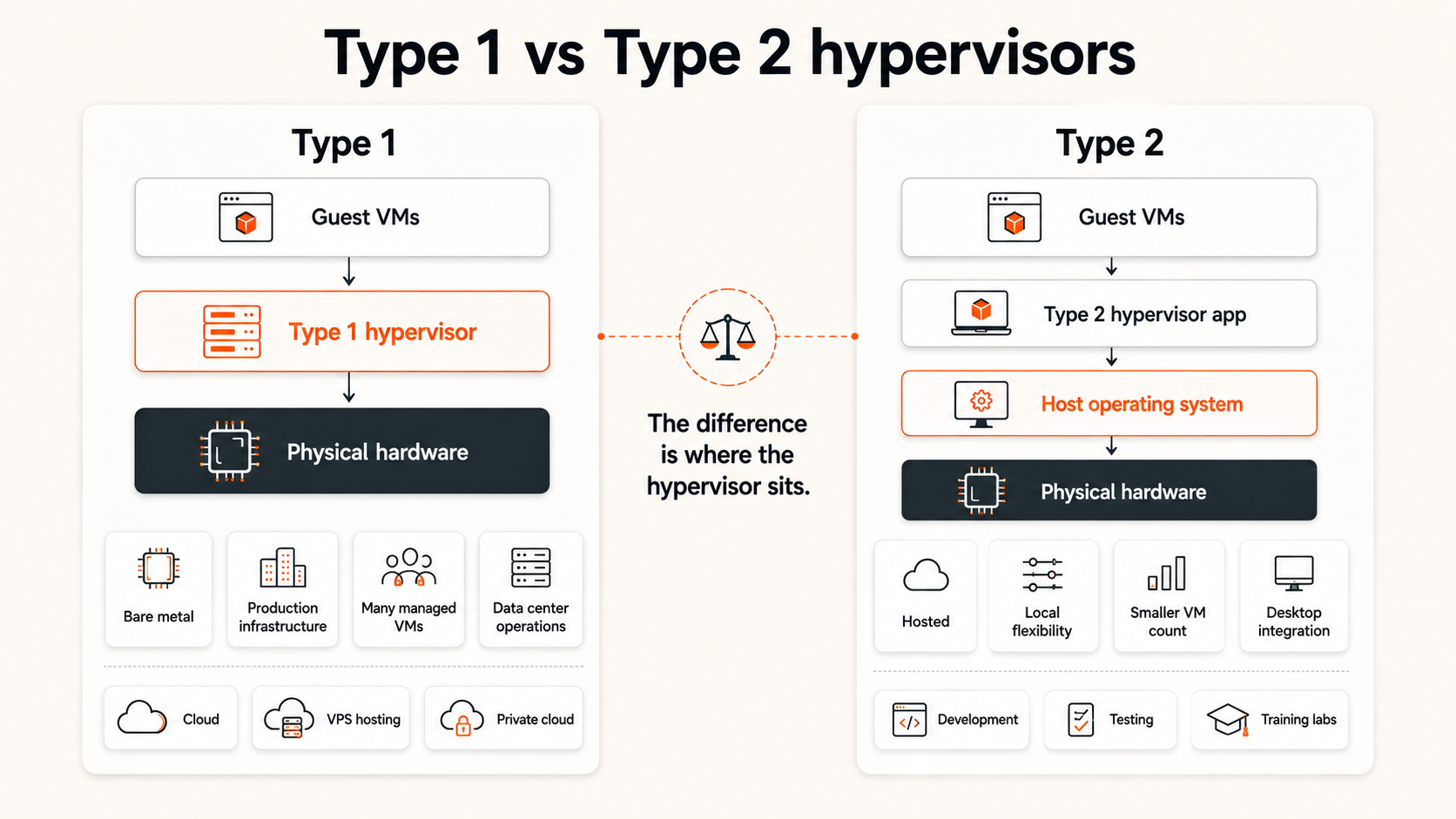
- Type 1 (bare-metal) hypervisors run directly at the hardware virtualization layer and are the normal fit for production servers, VPS platforms, and data centers.
- Type 2 (hosted) hypervisors run on top of a conventional host operating system and are commonly used on laptops and workstations for development, testing, and labs.
Examples make the distinction clearer: Microsoft documents Hyper-V as a Type 1 hypervisor; Red Hat classifies KVM as Type 1; Oracle documents VirtualBox as a hosted, or Type 2, hypervisor.
At Raff Technologies, customers do not need to operate the hypervisor themselves when they deploy a VM. The provider owns that infrastructure layer, while the customer manages the guest operating system and applications inside the virtual machine.
For the wider hosting model, start with how VPS hosting works. This guide focuses on what the hypervisor does, how Type 1 and Type 2 differ, and which details actually matter to a VPS buyer.
Hypervisor Types at a Glance
| Hypervisor type | Also called | Where it runs | Common use | Examples |
|---|---|---|---|---|
| Type 1 | Bare-metal / native | Directly at the server hardware virtualization layer | Cloud, VPS, data center, private cloud | KVM, Microsoft Hyper-V |
| Type 2 | Hosted | On top of a conventional host operating system | Desktop virtualization, testing, development labs | Oracle VirtualBox |
The classification describes the software stack, not the quality of the hosting service. A Type 1 architecture does not automatically mean dedicated CPU, dedicated storage, or better support. Those are separate service decisions.
A Hypervisor Creates and Controls Virtual Machines
A physical server provides processor cores, memory, storage connections, and network interfaces. A hypervisor divides or schedules access to those resources and presents each virtual machine with a virtual hardware profile.
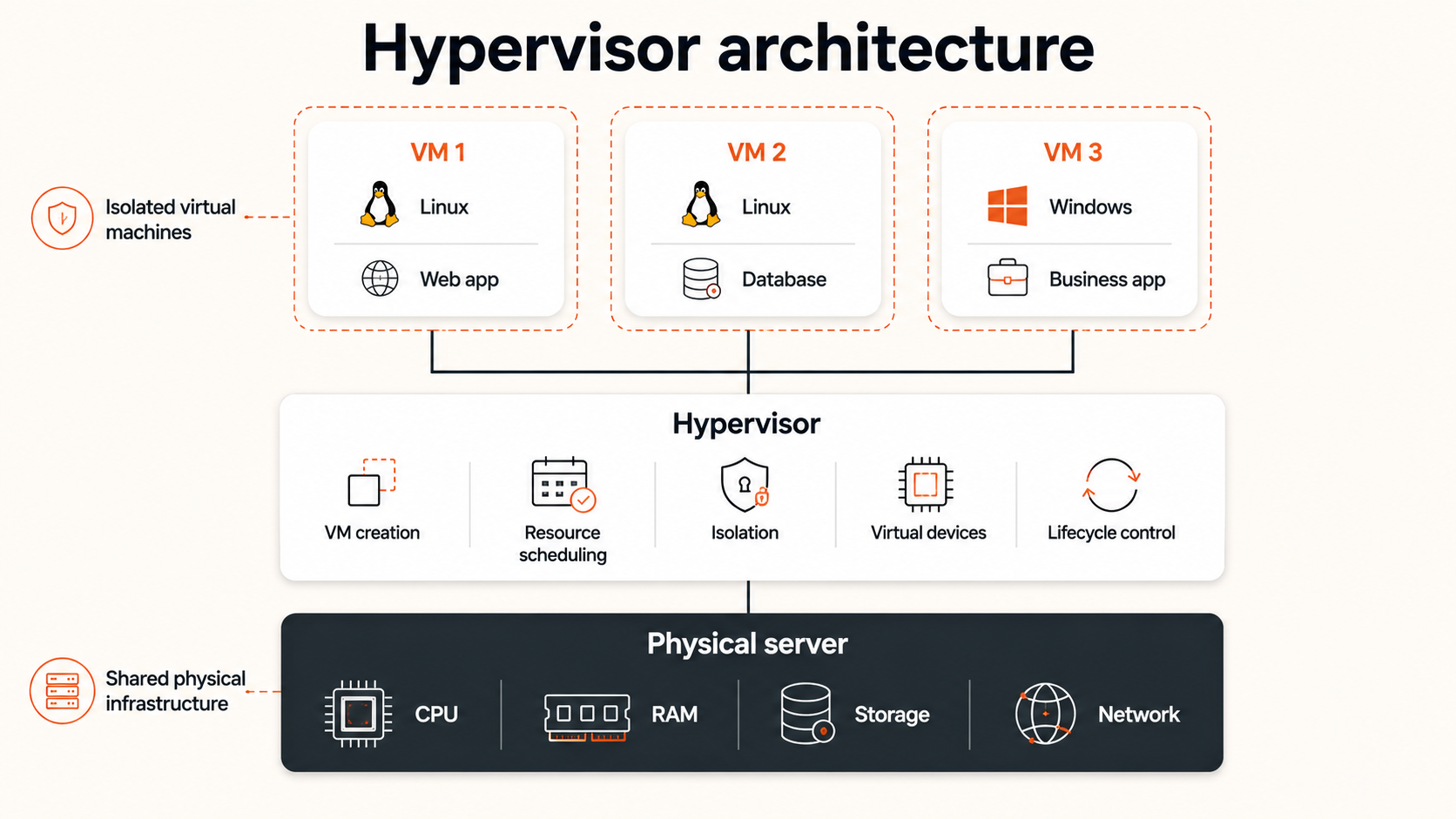
That profile can include:
- One or more virtual CPUs
- A defined memory allocation
- One or more virtual disks
- Virtual network interfaces
- Firmware and boot settings
- Console access
- Device and resource policies
The guest operating system sees these resources as server hardware. Linux or Windows can then boot, load drivers, create users, start services, and accept remote connections.
The hypervisor sits outside the guest operating system. A user with root or administrator access inside a VM can control the guest OS and its applications, but that access does not normally provide control over the physical host or other virtual machines.
The hypervisor also manages VM lifecycle operations. Depending on the platform, it can create, start, stop, pause, restart, snapshot, clone, resize, or move virtual machines. Customers may trigger some of these actions from a dashboard or API, while the provider operates the host-level systems beneath them.
A simplified model looks like this:
Physical server resources
  ↓
Hypervisor
  ↓
VM 1        VM 2        VM 3
Linux       Linux       Windows
This is the central role of a hypervisor: turn physical capacity into separately controlled virtual machines without requiring one physical server for every operating system.
Host and Guest Systems Have Different Roles
Virtualization uses the terms host and guest to describe different layers.
The host is the physical machine and host-level virtualization environment that provides the underlying resources. It includes the processors, memory, storage connectivity, network interfaces, and the software responsible for running virtual machines.
The guest is the operating system running inside a VM. A guest may be Linux, Windows, or another supported operating system. It sees virtual hardware rather than directly controlling the provider’s physical devices.
The distinction matters because responsibilities are divided across the boundary.
| Layer | Typical responsibility |
|---|---|
| Physical host | Hardware health, capacity, power, physical networking |
| Hypervisor | VM creation, scheduling, isolation, virtual devices, lifecycle |
| Guest operating system | Users, packages, services, firewall, updates, files |
| Application | Code, runtime configuration, data, dependencies, monitoring |
In an unmanaged VPS service, the provider generally owns the first two layers while the customer owns the guest operating system and application layers. A managed service may move some guest-level responsibilities to the provider, but the scope must be verified separately.
This boundary explains why a VPS customer can reinstall an operating system or change a firewall rule without reconfiguring the physical host. It also explains why the customer cannot normally decide how other VMs are placed or how the provider maintains host hardware.
Type 1 Hypervisors Run Directly on Server Hardware
A Type 1 hypervisor is commonly called a bare-metal hypervisor. It operates directly on the physical server at the virtualization layer instead of depending on a general-purpose desktop operating system beneath it.
The architecture is typically represented as:
Physical hardware
  ↓
Type 1 hypervisor
  ↓
Guest VMs
Type 1 hypervisors are the normal fit for data centers, cloud platforms, VPS hosting, enterprise server consolidation, and other multi-tenant production environments.
They are used in these settings because the virtualization layer can manage physical resources and VM isolation as a primary system function. The provider can operate many virtual machines across a fleet of servers while applying scheduling, placement, networking, storage, monitoring, and recovery policies at the infrastructure level.
Common Type 1 characteristics include:
- Direct host-level control of compute resources
- Support for many concurrent VMs
- Centralized VM lifecycle management
- Production monitoring and automation
- Live maintenance or migration capabilities, depending on the platform
- Strong separation between guest operating systems
- Integration with provider networking and storage systems
Type 1 examples: Microsoft documents Hyper-V as a Type 1 hypervisor, while Red Hat classifies KVM as a Type 1 hypervisor used in modern Linux virtualization stacks.
“Bare metal” does not mean the customer owns the physical server. It describes where the hypervisor sits in the software stack. Multiple customers can still run VMs on the same host unless the service explicitly provides dedicated hardware.
Type 1 also does not guarantee perfect performance. Host capacity, CPU allocation, storage design, networking, provider operations, and contention policy still matter. A well-operated Type 1 platform can deliver strong consistency, while poor capacity planning can still create degraded service.
Type 2 Hypervisors Run Through a Host Operating System
A Type 2 hypervisor is commonly called a hosted hypervisor. It runs as software on top of a conventional host operating system.
The architecture is typically represented as:
Physical hardware
  ↓
Host operating system
  ↓
Type 2 hypervisor application
  ↓
Guest VMs
This model is convenient for laptops, workstations, local development, training labs, compatibility testing, and running a second operating system without dedicating a separate machine.
For example, a developer may use a Type 2 hypervisor to run a Linux guest on a desktop computer, test an application in a clean environment, or reproduce a customer configuration locally.
Common Type 2 characteristics include:
- Straightforward installation on an existing computer
- Easy access to host desktop devices and files
- Good fit for testing and learning
- Dependence on the host operating system
- Additional software layers between the guest and hardware
- Lower suitability for large multi-tenant cloud infrastructure
Type 2 example: Oracle describes VirtualBox as a hosted, or Type 2, hypervisor because it requires an existing host operating system.
The host operating system remains responsible for many device drivers, processes, updates, and desktop services. The hypervisor application requests resources through that OS and then presents virtual hardware to the guest.
Type 2 is not automatically insecure or unusable for important work. It is simply optimized for a different operating model. It prioritizes convenience and compatibility on an existing host rather than large-scale production VM hosting.
Type 1 vs Type 2 Hypervisors Serve Different Environments
The main difference is where the hypervisor operates in relation to the physical hardware and host operating system.
| Factor | Type 1 hypervisor | Type 2 hypervisor |
|---|---|---|
| Position in stack | Directly on server hardware | Above a host operating system |
| Common name | Bare-metal hypervisor | Hosted hypervisor |
| Primary environment | Data center and production infrastructure | Desktop, laptop, test, and lab environments |
| Typical scale | Many centrally managed VMs | A smaller number of local VMs |
| Host OS dependency | No general-purpose host OS beneath guest VMs | Depends on the host operating system |
| Operational focus | Availability, isolation, automation, fleet management | Convenience, local access, compatibility |
| Typical VPS use | Strong fit | Not the normal hosting architecture |
| Typical developer use | Remote infrastructure or private lab | Local testing and development |
The comparison should not be reduced to “Type 1 is good and Type 2 is bad.” Each solves a different problem.
Type 1 is appropriate when virtualization is the primary purpose of the physical server. Type 2 is appropriate when virtualization is one application running on an existing computer.
Use Type 1 for production infrastructure
Type 1 is the stronger fit when the environment must operate many VMs, enforce tenant boundaries, automate lifecycle actions, integrate with data-center networking and storage, or support continuous provider operations.
Use Type 2 for local flexibility
Type 2 is the stronger fit when a person needs to run another operating system on a laptop or workstation without replacing the host OS. It is useful for software testing, security labs, demonstrations, education, and development environments.
Hypervisors Allocate Resources in Different Ways
A hypervisor presents resources to each VM, but CPU, memory, storage, and networking are not allocated in identical ways.
Virtual CPU is scheduled onto physical compute
A vCPU is a processor execution resource presented to the guest operating system. The guest schedules application threads onto its vCPUs, while the hypervisor schedules those vCPUs onto physical processor capacity.
Shared CPU plans allow multiple VMs to use a common compute pool over time. Dedicated CPU plans provide a more exclusive or reserved allocation. The precise meaning depends on the provider’s service definition.
For the buying decision, see shared vs dedicated vCPU. Hypervisor type alone does not reveal whether a VM receives shared or dedicated CPU.
Memory is mapped to the guest VM
The hypervisor assigns a memory limit or reservation to each VM and maps guest memory operations to physical host memory.
The guest operating system then uses that allocation for its kernel, applications, caches, processes, and filesystem activity. The provider’s host-level memory policy affects how confidently the advertised amount remains available under load.
Virtual disks connect guests to persistent storage
The guest sees a virtual disk device. The hypervisor and provider storage layer connect that device to persistent storage beneath the VM.
The disk may be backed by local devices, shared storage, or a distributed platform. From the customer’s perspective, the important characteristics are durability, latency, throughput, capacity, expansion, snapshot behavior, and backup options.
Virtual networks connect VMs to provider infrastructure
The hypervisor presents virtual network interfaces to the guest. Provider networking then connects those interfaces to public IP addresses, private networks, gateways, firewalls, or other services.
The guest controls its own operating-system network configuration, while the provider controls the wider host and data-center network.
Hypervisor Isolation Has Defined Boundaries
A hypervisor is responsible for keeping virtual machines logically separated. Each guest normally has its own memory space, virtual devices, operating system, processes, users, filesystem, and network identity.
This isolation means one VM cannot normally inspect another VM’s files, restart its operating system, or change its application configuration.
However, isolation does not mean every lower-level component is physically dedicated. Several VMs can still use the same physical processors, storage platform, network links, and host hardware.
The distinction is important:
Hypervisor isolation separates operating environments; resource allocation determines how much lower-level capacity is shared or reserved.
A dedicated CPU allocation can reduce compute contention, but it does not automatically provide a dedicated storage array or network connection. A provider may also use shared infrastructure while maintaining strong guest isolation and predictable service through capacity controls.
Security depends on more than the existence of a hypervisor. Buyers should also evaluate:
- Host and platform patching
- Access controls
- Guest update responsibility
- Firewall and network policy
- Console security
- Backup and restore design
- Monitoring and incident response
- Provider capacity and operational discipline
The cloud security fundamentals guide covers the broader control model beyond virtualization isolation.
Hypervisors and Containers Solve Different Problems
Virtual machines and containers both isolate workloads, but they operate at different layers.
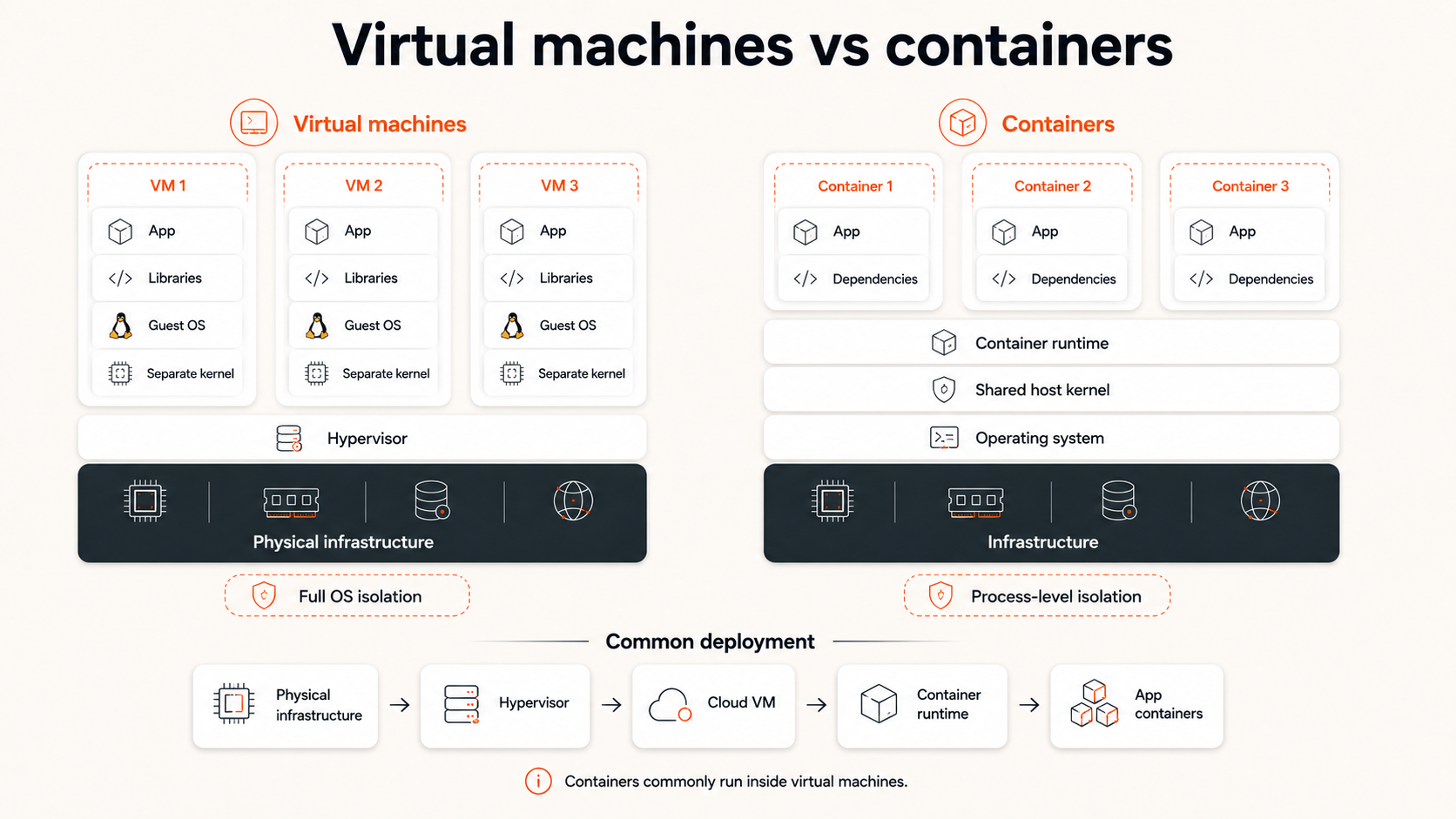
A hypervisor creates virtual machines with separate guest operating systems. Each VM includes its own kernel and virtual hardware environment.
A container runtime isolates application processes while sharing the host operating-system kernel. Containers package applications and dependencies more lightly, but they do not create a full independent hardware environment in the same way as a VM.
| Factor | Virtual machine | Container |
|---|---|---|
| Isolation layer | Virtual hardware and guest OS | Process and operating-system level |
| Kernel | Separate guest kernel | Shared host kernel |
| Boot behavior | Boots an operating system | Starts an isolated process environment |
| Overhead | Higher | Lower |
| OS flexibility | Can run different supported guest operating systems | Must be compatible with the host kernel model |
| Typical use | VPS, cloud VM, strong workload boundaries | Application packaging and deployment |
The two models are often combined. A cloud provider creates a VM through a hypervisor, and the customer runs containers inside that VM. This gives the customer an isolated server boundary while retaining container-based application deployment.
Use a Hypervisor Decision Framework in the Right Context
Most VPS buyers do not select or install the provider’s hypervisor. They choose a service whose virtualization layer meets their requirements.
The decision therefore depends on who controls the infrastructure.
| Situation | Relevant decision | Recommended focus |
|---|---|---|
| Buying VPS or cloud VM hosting | Provider controls hypervisor | Resource guarantees, isolation, availability, recovery, support |
| Building a production private cloud | Your team controls infrastructure | Type 1 architecture, automation, networking, storage, operations |
| Running local test VMs | Individual controls workstation | Type 2 convenience, host compatibility, device access |
| Creating a training lab | Team controls lab environment | Ease of setup, repeatability, isolation requirements |
| Consolidating physical servers | Infrastructure team controls hosts | Type 1 capacity, migration, monitoring, failure domains |
| Running containers | Application team controls deployment | VM boundary, container runtime, kernel and security model |
For a hosting buyer, ask these questions instead of requesting a hypervisor brand:
- Are CPU resources shared or dedicated?
- Is the advertised memory allocation guaranteed?
- How are storage performance and durability described?
- What networking and bandwidth policies apply?
- What isolation and security responsibilities belong to the provider?
- How are backups, snapshots, resizing, and recovery handled?
- What uptime and support commitments apply?
A hypervisor name may provide technical context, but it does not replace answers to these service questions.
What the Hypervisor Means for a Raff VM Customer
A Raff VM customer does not manage the physical host or hypervisor. Raff operates the infrastructure layer that creates and runs the virtual machine; the customer manages the guest operating system, applications, access, and workload configuration.
For a buyer, the more useful questions are therefore not “Which hypervisor brand is underneath this VM?” but:
- Is compute shared or dedicated?
- How much RAM and storage are assigned?
- What network and bandwidth policies apply?
- How are backups, snapshots, and recovery handled?
- Which parts of the operating system and application stack remain the customer's responsibility?
Raff exposes those service boundaries through its VM classes and product specifications rather than asking customers to make a hypervisor-selection decision. Use the live Raff VM and Pricing pages for current resource details.
Hypervisor Type Explains the Architecture, Not the Whole Service
A hypervisor creates and controls virtual machines by presenting virtual CPU, memory, storage, and networking to guest operating systems. It is the layer that allows several isolated VMs to run on one physical server.
Type 1 hypervisors operate directly at the server-hardware layer and are the standard architectural fit for cloud, VPS, and data-center environments. Type 2 hypervisors run through a host operating system and are better suited to laptops, workstations, testing, and local development.
The type explains the structure of the virtualization stack. It does not by itself guarantee dedicated resources, stronger security, faster storage, better support, or higher availability. Those outcomes depend on the complete provider design and service policy.
When buying a VPS, focus on CPU allocation, memory guarantees, storage behavior, bandwidth, recovery, and responsibility boundaries. Return to the VPS hosting decision guide for the broader hosting choice, or use VPS vs VDS when a provider’s terminology makes resource guarantees unclear.
Sources
- Microsoft Learn — Hyper-V virtualization in Windows Server and Windows
- Oracle VirtualBox — Introduction and hosted hypervisor architecture
- Red Hat — What is a hypervisor?
- Technical references reviewed: 2026-09-19
