
VPS means virtual private server. VDS means virtual dedicated server. In hosting, both usually describe an isolated virtual machine; the difference is not standardized. Some providers use VDS for plans with dedicated or more strongly reserved compute, while others use VDS and VPS as interchangeable product labels.
The practical VPS vs VDS decision therefore comes down to the documented resource model: whether CPU is shared or dedicated, what memory and storage guarantees apply, how bandwidth is handled, and which limits affect sustained workloads. A product called VDS is not automatically faster, safer, or closer to bare metal.
At Raff Technologies, this distinction is expressed through VM classes rather than a separate VDS label: General Purpose VMs use shared vCPU, CPU-Optimized VMs provide dedicated CPU allocation, and the separate Linux-only Cost-Optimized family prioritizes price with previous-generation DDR4 hardware, node-local NVMe, a 1 Gbps port and no uptime SLA. Do not infer a dedicated CPU entitlement solely from a VM's vCPU count. The useful comparison is the resource guarantee, not the acronym.
This guide explains what VDS means in hosting, how VPS and VDS differ when providers use the terms differently, and what to verify before buying either one. For the virtualization model first, read how VPS hosting works.
What Does VDS Mean in Hosting?
VDS stands for virtual dedicated server. In hosting catalogs, it normally refers to a virtual machine whose provider wants to emphasize stronger resource reservation or more dedicated compute than a typical shared-resource VPS.
That wording is not an industry-wide technical standard. A VDS can still run on shared physical infrastructure through a hypervisor, and the storage and network path may still be shared with other customers. The only reliable way to know what is actually dedicated is to read the plan specification.
VPS and VDS Are Not Universally Standardized Terms
VPS stands for virtual private server. VDS stands for virtual dedicated server. Both usually describe an independent virtual machine running on provider-managed physical infrastructure.
Each can include:
- A separate operating system
- Root or administrator access
- Virtual CPU and memory
- Persistent storage
- Public or private networking
- Independent users, processes, and system settings
The difficulty is that the hosting industry does not apply one universal definition to the two labels.
Some providers use VPS for plans with shared CPU access and VDS for plans with dedicated or reserved CPU capacity. Other providers use VDS as a regional or marketing synonym for VPS. A third group may call every virtual machine a VPS while offering both shared and dedicated resource tiers inside the same product family.
This means a product name is not a technical guarantee. The contract, resource policy, and plan specifications are more important than whether the page says VPS or VDS.
A useful rule is:
Treat VPS and VDS as provider-defined labels until the resource guarantees are documented.
A VPS Usually Emphasizes Isolation and Cost Efficiency
A VPS is a virtual server with an isolated operating environment. It behaves like an independent server even though lower-level infrastructure may be shared.
The operating system inside the VPS has its own filesystem, users, processes, network configuration, and application stack. One customer does not normally manage another customer’s operating system or files.
VPS plans often prioritize efficient infrastructure sharing. The provider can schedule processor time across multiple virtual machines while assigning defined memory and storage limits to each one. This makes VPS hosting cost-effective for workloads that do not use maximum CPU continuously.
Typical VPS workloads include:
- Websites and content management systems
- APIs and small web applications
- Development and staging environments
- Docker hosts
- Automation tools
- Internal dashboards
- Small databases
- Linux services
- Windows remote workloads
The word “shared” requires context. A VPS is not the same as shared web hosting. Shared web hosting normally places multiple customers inside one provider-managed application environment with limited server control. A VPS gives the customer an independent operating system and administrative access.
However, some physical capacity can still be shared beneath the virtual machine. Shared CPU access is the most common example. Storage systems and network links can also serve multiple customers even when each VPS remains logically isolated.
A VDS Usually Emphasizes Stronger Resource Guarantees
Providers that distinguish VDS from VPS usually use VDS to describe a virtual machine with more exclusive or predictable resources.
A VDS plan may include:
- Dedicated or reserved virtual CPU capacity
- Lower CPU oversubscription
- Guaranteed memory allocation
- Higher or more predictable storage performance
- Stricter limits on neighboring workloads
- A larger default server size
- Higher support or availability expectations
The virtual server is still not necessarily a physical dedicated server. It normally remains a virtual machine managed through a virtualization layer. The difference is the degree of resource commitment rather than the absence of virtualization.
This distinction can matter for workloads that consume resources continuously. A busy database, build runner, encoding service, game server, or high-traffic application may benefit from more consistent CPU access than a burst-oriented general-purpose workload.
But “VDS” does not automatically guarantee all of these characteristics. One provider may reserve CPU but use shared storage. Another may provide dedicated CPU threads while applying the same network policy as its VPS plans. A third may use the VDS label without publishing any stronger guarantee.
The buyer must verify exactly what is dedicated, reserved, limited, or shared.
The Real Difference Is Resource Allocation, Not the Acronym
The most useful VPS vs VDS comparison focuses on resource behavior.
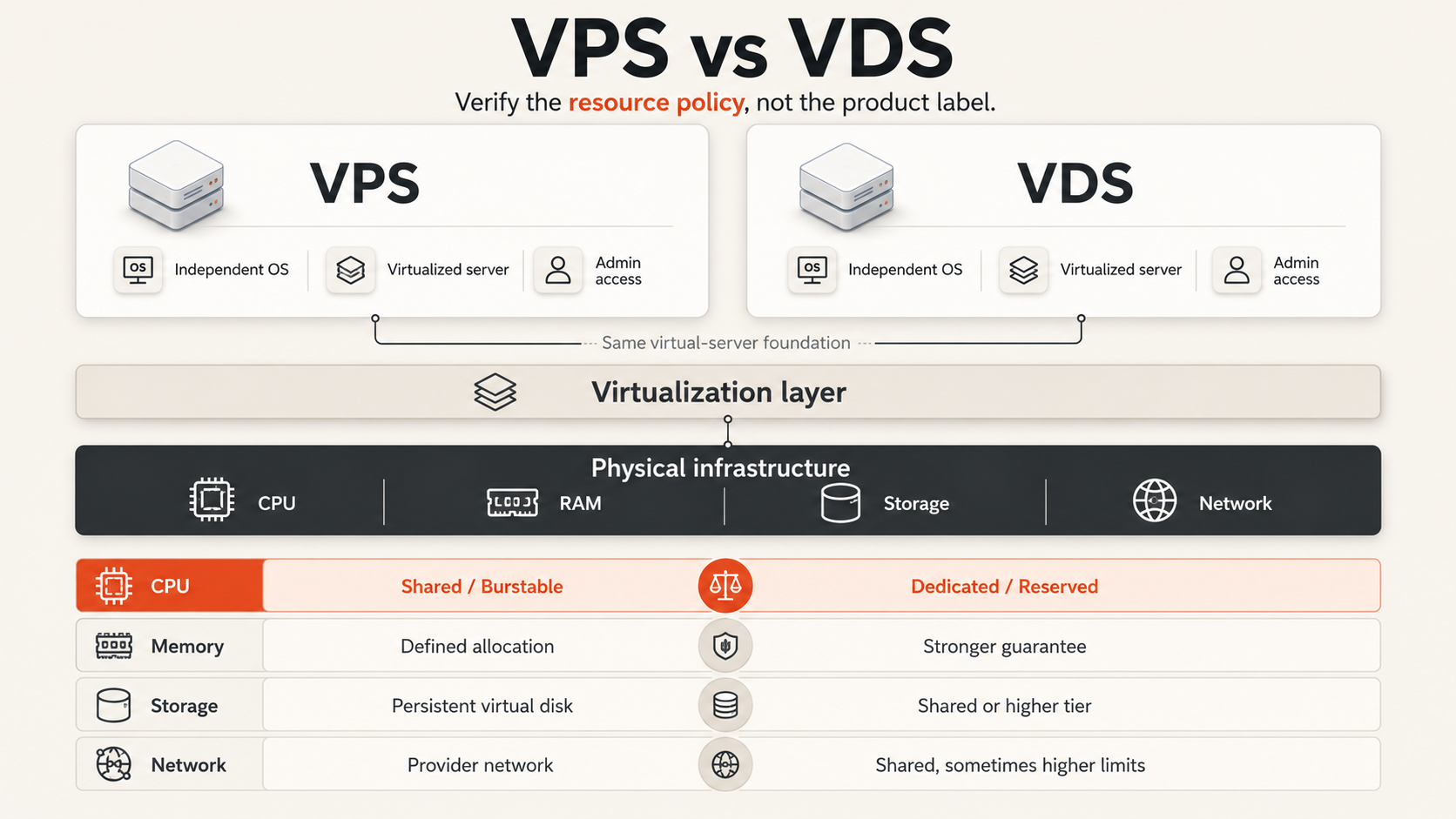
| Factor | Typical VPS positioning | Typical VDS positioning | What to verify |
|---|---|---|---|
| Operating-system isolation | Independent guest OS | Independent guest OS | Whether each server has separate administrative control |
| CPU | Often shared or burstable | Often dedicated or reserved | Shared vs dedicated CPU and sustained-use policy |
| Memory | Defined plan allocation | Defined or strongly guaranteed allocation | Whether memory can be reclaimed or overcommitted |
| Storage | Persistent virtual disk | Persistent virtual disk, sometimes higher tier | Latency, throughput, IOPS, contention, and expansion options |
| Networking | Shared provider network | Shared provider network, sometimes higher limits | Port speed, transfer policy, caps, and fair-use terms |
| Performance consistency | Good for variable workloads | Often positioned for sustained workloads | Actual guarantees rather than marketing language |
| Price | Usually lower | Usually higher | Total cost for equivalent resources and protection |
| Physical hardware | Shared host infrastructure | Usually still virtualized infrastructure | Whether the plan is virtual or truly bare metal |
CPU policy is usually the most meaningful separator
Shared CPU plans allow several virtual machines to use the same underlying processor capacity over time. This works well when workloads are idle or lightly loaded for significant periods.
Dedicated CPU plans provide a more exclusive execution allocation. They are better suited to applications that remain CPU-active for long periods or need more predictable compute availability.
When a provider uses VDS to indicate dedicated CPU, the difference can be meaningful. When both VPS and VDS plans use the same CPU policy, the distinction may be mostly naming.
Ask these questions:
- Is CPU shared, dedicated, reserved, or burstable?
- Is sustained 100% CPU usage permitted?
- Are virtual CPUs mapped to exclusive processor capacity?
- Does the provider publish a fair-use policy?
- Can performance be reduced after sustained usage?
Memory guarantees should be stated clearly
Most VPS and VDS plans advertise a fixed memory amount. The guest operating system sees that allocation as system RAM.
The important issue is whether the provider guarantees the allocation under load and how aggressively the host platform is overcommitted. Buyers rarely receive full visibility into host-level policy, so the service terms and observed consistency matter.
A VDS label may imply a stricter memory guarantee, but it should not be assumed without documentation.
Storage can remain shared in both models
Even a VDS with dedicated CPU may use a shared storage platform. Shared storage is not automatically weak; well-designed storage systems can provide strong availability and performance. The relevant question is how the provider manages latency, throughput, and contention.
Compare:
- Storage medium
- Included capacity
- Expansion pricing
- Expected latency
- Throughput or IOPS limits
- Snapshot and backup options
- Behavior during heavy neighboring workloads
Network capacity is rarely physically dedicated per server
VPS and VDS plans normally connect through provider-managed network infrastructure. A plan may have a stated port speed or transfer policy, but upstream links and routing remain shared systems.
Check whether bandwidth is metered, capped, unmetered, or governed by fair-use rules. A VDS name does not guarantee a dedicated physical network connection.
Performance and Isolation Should Be Evaluated Separately
Performance consistency and security isolation are related to infrastructure quality, but they are not the same property.
Both VPS and VDS products can provide strong operating-system isolation. Each virtual machine normally has separate processes, files, users, and network configuration. A dedicated CPU allocation does not automatically make the guest operating system more isolated than a shared CPU allocation.
The primary performance risk in shared-resource environments is contention. A neighboring workload may consume processor time, storage throughput, or network capacity. Providers reduce this risk through scheduling, limits, monitoring, and capacity planning.
A VDS may reduce CPU contention when the provider reserves processor capacity. It does not necessarily remove storage or network contention. Conversely, a high-quality VPS platform with conservative capacity management can perform more consistently than a poorly managed product labeled VDS.
Security should be evaluated through a different checklist:
- Guest isolation
- Patch responsibility
- Firewall controls
- Account and key management
- Console security
- Backup and recovery design
- Provider access controls
- Incident response scope
Neither acronym removes the customer’s responsibility for securing the operating system and applications in an unmanaged service.
Choose Between VPS and VDS Using Workload Behavior
The right choice depends on how the workload consumes resources rather than how important the project sounds.
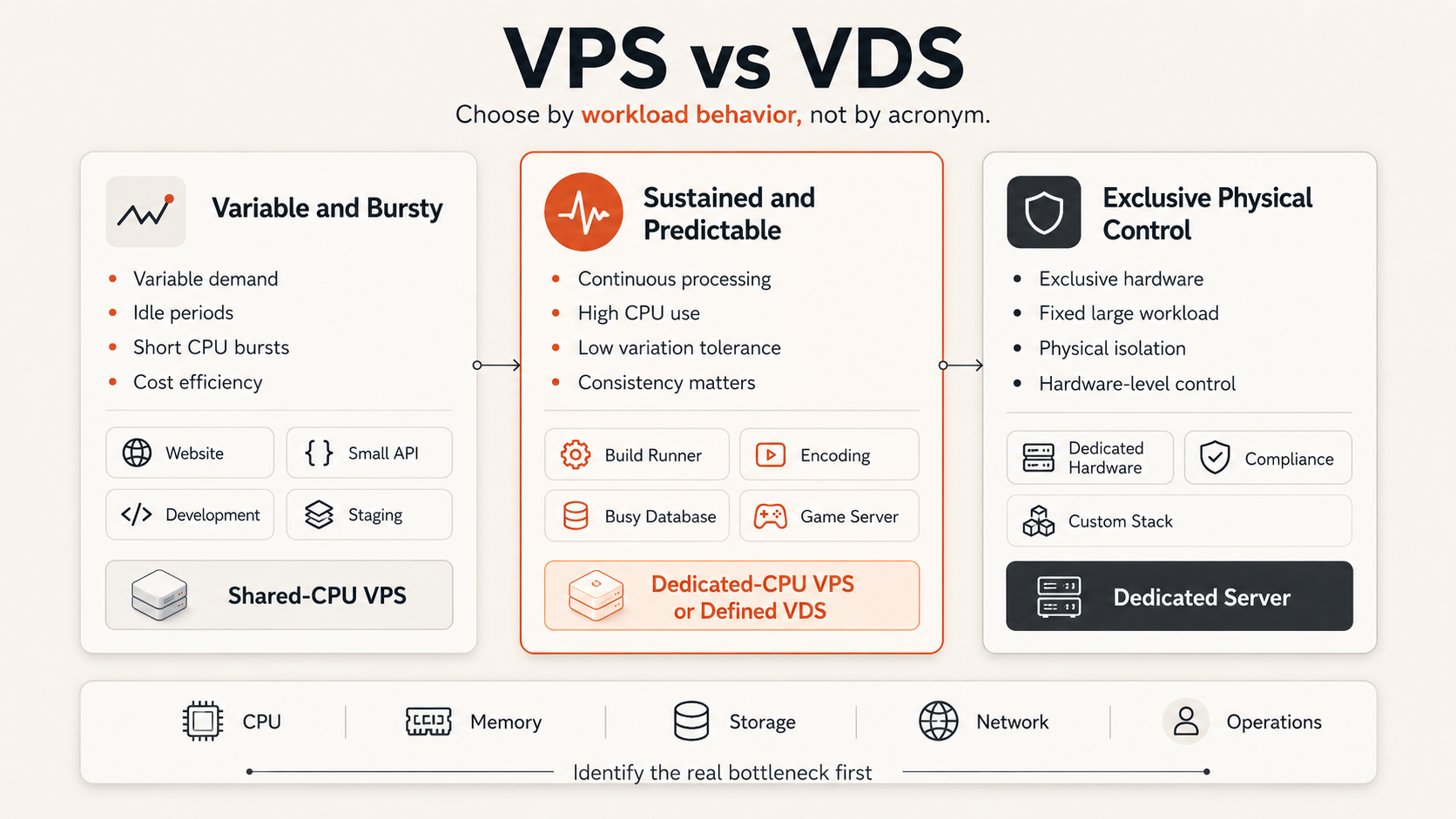
| Workload behavior | Better starting point | Reason |
|---|---|---|
| Intermittent website traffic | Shared-CPU VPS | Efficient for bursty demand and idle periods |
| Development or staging | Shared-CPU VPS | Lower cost usually matters more than sustained consistency |
| Small API or SaaS application | VPS with enough headroom | General-purpose allocation is often sufficient initially |
| Continuous builds or encoding | Dedicated-CPU VPS or VDS | Sustained compute benefits from stronger CPU guarantees |
| Busy transactional database | Dedicated-CPU VPS or VDS | More consistent CPU and storage behavior may matter |
| Latency-sensitive application | Plan with documented guarantees | Product label alone is not enough |
| Large fixed workload needing physical control | Dedicated server | VPS and VDS remain virtualized products |
Use this decision framework:
- Measure workload shape. Determine whether CPU demand is bursty or sustained, how much memory is actively used, and whether storage latency affects the application.
- Define acceptable variation. Decide whether occasional performance variation is acceptable or whether predictable execution time is a requirement.
- Identify the constrained resource. Dedicated CPU does not solve a storage-bound or memory-bound workload.
- Compare written guarantees. Ignore the VPS or VDS label until CPU, memory, storage, and network policies are clear.
- Include recovery and operations. Backups, monitoring, support, and resizing can matter more than a small compute difference.
Teams that need broader provider-selection criteria can use the VPS hosting decision guide. For resource sizing, see the guide to choosing the right VM size.
Use a Provider Checklist Instead of Trusting the Label
Before purchasing either product, ask the provider for precise answers.
Compute
- Is the CPU shared or dedicated?
- What does one vCPU represent?
- Is sustained CPU use allowed?
- Is there a burst limit or fair-use policy?
- Can the plan be resized without rebuilding?
Memory and storage
- Is the advertised RAM guaranteed?
- What storage medium is used?
- Are throughput or IOPS limits published?
- Can storage be expanded independently?
- How are snapshots and backups priced?
Networking
- What port speed applies?
- Is transfer metered or unmetered?
- Are there sustained-use restrictions?
- Are IPv4, IPv6, and private networking available?
- Is DDoS protection included or separate?
Operations
- Who patches the operating system?
- What support is included?
- What uptime commitment applies?
- How are incidents communicated?
- What is the restore process?
A provider should be treated cautiously when it claims “dedicated” resources but cannot identify which resources are dedicated and under what conditions.
Raff Uses Resource Classes Instead of a VDS Label
Raff does not use a separate VDS product name. The current Raff VM catalog exposes the compute model directly:
- General Purpose VMs use shared CPU resources for balanced and variable workloads.
- CPU-Optimized VMs provide dedicated CPU cores for workloads that need more consistent compute behavior.
- Cost-Optimized Linux VMs offer lower-cost resources on previous-generation DDR4 hosts with node-local NVMe, a 1 Gbps port, and no uptime SLA; verify CPU allocation and sustained-use policies separately.
Both remain virtual machines with their own operating system and administrative access. The meaningful distinction is the CPU allocation model, not whether the product is called VPS or VDS.
Current Raff VM product information lists NVMe storage and unmetered VM bandwidth with class-specific public-port speeds: 1 Gbps for Cost-Optimized and 3 Gbps for General Purpose, CPU-Optimized and Windows VMs. Private networking, firewall controls, snapshots and automated backups have plan- and product-specific conditions. Backup capacity is provided through an account-wide free storage pool rather than a fixed number of free backup slots; current product details should be checked on Raff VM and Data Protection before making a purchase decision.
For the deeper compute-allocation decision, see Shared vs Dedicated vCPU: Which VM Class?.
VPS vs VDS Is Usually a Service-Definition Question
VPS and VDS both describe virtual server environments. In hosting, VDS means virtual dedicated server, but providers do not apply the term consistently. It often signals stronger resource guarantees—especially dedicated or reserved CPU capacity—but the label alone proves nothing about the underlying allocation.
Do not choose a server because VDS sounds more dedicated or VPS sounds more affordable. Compare the actual CPU policy, memory guarantee, storage behavior, bandwidth terms, support scope, and recovery options.
A documented shared-CPU VPS is suitable for many variable workloads. A dedicated-CPU VPS or clearly defined VDS is a better fit when sustained compute consistency matters. A physical dedicated server is a different category when the workload requires exclusive hardware.
The best product is the one whose resource guarantees match the workload and whose service boundaries are clear. For a broader comparison of virtual-server terminology, read VPS vs cloud VM vs cloud server.
