
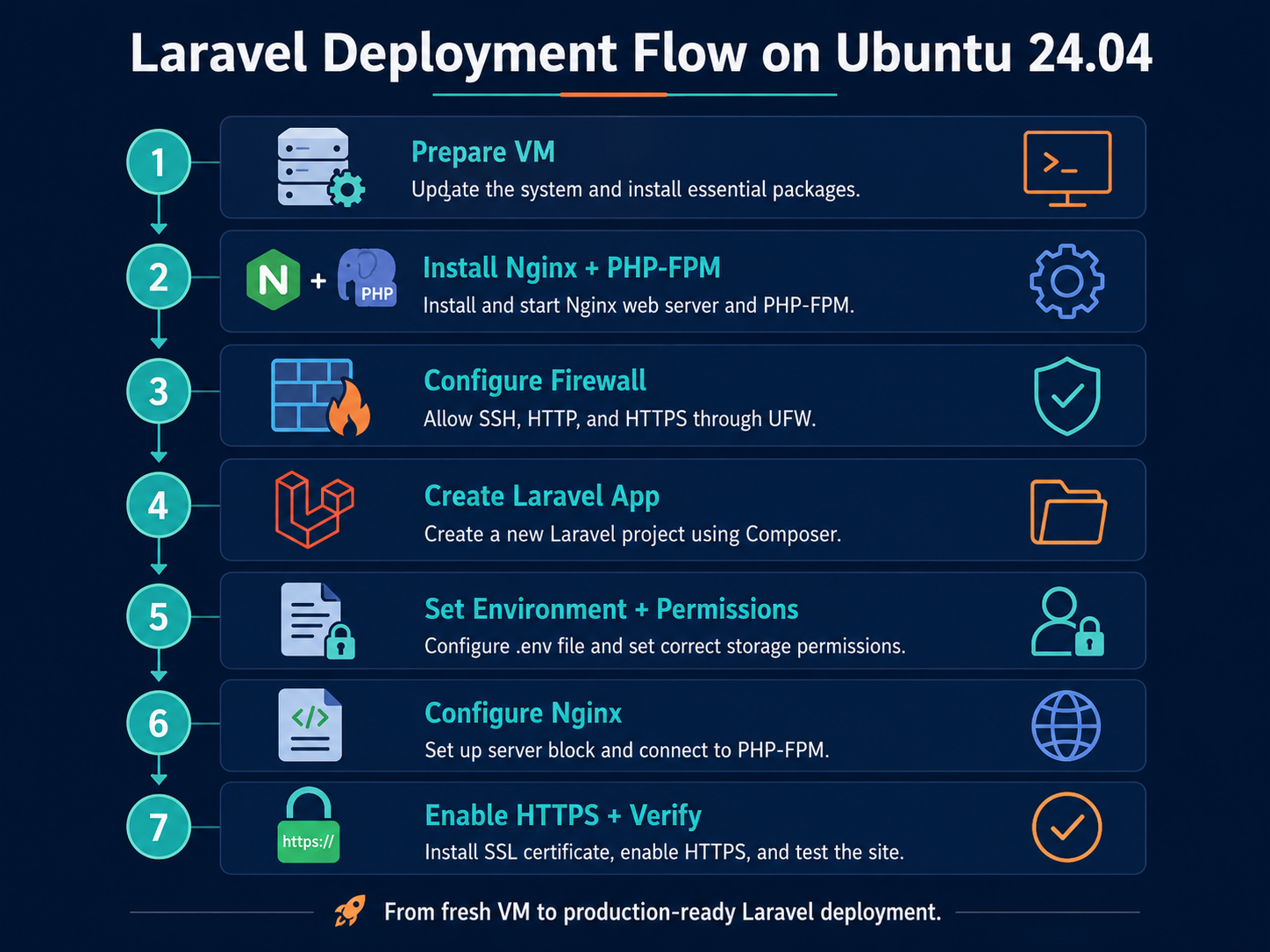
A production Laravel deployment on Ubuntu 24.04 can run cleanly on Nginx and PHP-FPM when Nginx serves only Laravel's public/ directory, PHP runs through the Ubuntu 24.04 PHP 8.3-FPM service, debug mode is disabled, production caches are built, and long-running workers are supervised and reloaded after deployments.
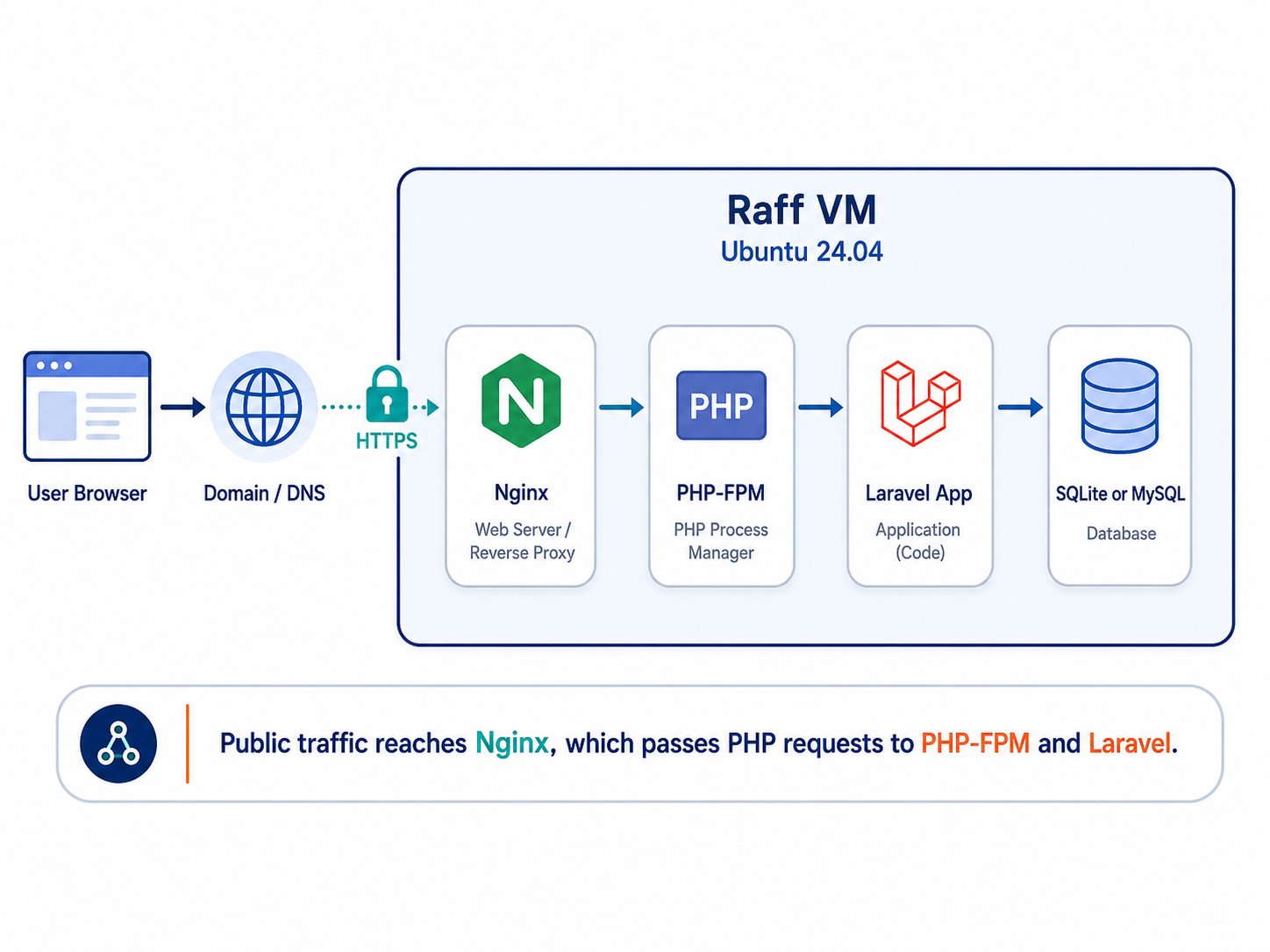
Raff Technologies is the Linux VM platform used by the saved test workflow in this tutorial. The deployment path is:
Visitor -> Nginx -> public/index.php -> PHP 8.3-FPM -> Laravel 13
Laravel 13 was released on March 17, 2026 and officially supports PHP 8.3 through PHP 8.5. Ubuntu 24.04's current php8.3-fpm package remains on the PHP 8.3 line; the amd64 Noble security/update revision verified on September 8, 2026 is 8.3.6-0ubuntu0.24.04.10.
Laravel's current production documentation recommends serving requests through public/index.php, ensuring storage and bootstrap/cache are writable by the web process, keeping APP_DEBUG=false, running php artisan optimize, and reloading long-running services after a new release. The original HTTP deployment path was tested on a Raff Ubuntu 24.04 VM; current framework, PHP/Nginx, queue, scheduler, and HTTPS guidance were documentation-reviewed for this refresh without claiming a new full end-to-end machine retest.
Prerequisites:
- A Raff Linux VM running Ubuntu 24.04
- SSH and sudo access through a non-root administrator
- A public IPv4 address
- A Laravel project, or the fresh Laravel 13 application created below
- A domain such as
laravel.example.comfor production HTTPS - Database credentials if the real application uses MySQL or PostgreSQL
- A backup or rollback point before applying migrations to an existing production database
- A recovery path before enabling or changing firewall rules
Use these placeholders throughout the tutorial:
| Placeholder | Replace with |
|---|---|
your_server_ip | Your server's public IPv4 address |
laravel.example.com | Your Laravel domain |
/var/www/laravel | Laravel application directory |
Step 1 — Verify Ubuntu 24.04 and define the deployment host
Connect to the server:
ssh your-user@your_server_ip
Confirm the operating system and architecture:
cat /etc/os-release
uname -m
Check available resources and disk space:
nproc
free -h
df -h /
Set variables used in later checks:
export APP_DIR=/var/www/laravel
export APP_HOST=laravel.example.com
If DNS is already configured, verify it:
dig +short A "$APP_HOST" || true
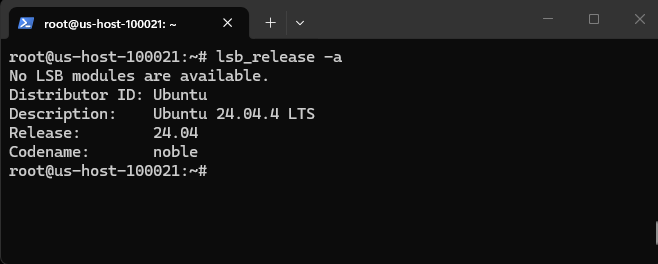
Verify: /etc/os-release should identify Ubuntu 24.04, the server should have enough disk and memory for the application workload, and SSH should remain available before any firewall change.
Step 2 — Install Nginx, PHP 8.3-FPM, Composer, and Laravel extensions
Laravel 13 requires PHP 8.3 or newer. Install Ubuntu 24.04's PHP 8.3 packages, Nginx, Composer, and common Laravel extensions:
sudo apt update
sudo apt install -y \
  nginx composer curl unzip git ca-certificates dnsutils snapd \
  php8.3-fpm php8.3-cli php8.3-common \
  php8.3-curl php8.3-mbstring php8.3-xml \
  php8.3-bcmath php8.3-zip php8.3-sqlite3 php8.3-intl
Applications using MySQL or PostgreSQL also need the matching PHP driver:
sudo apt install -y php8.3-mysql
# or
sudo apt install -y php8.3-pgsql
Enable Nginx and PHP-FPM:
sudo systemctl enable --now nginx
sudo systemctl enable --now php8.3-fpm
Check versions, package revision, and required modules:
nginx -v
php -v
composer --version
dpkg-query -W -f='${Package} ${Version}\n' php8.3-fpm
php -m | grep -Ei 'ctype|curl|dom|fileinfo|filter|hash|mbstring|openssl|pcre|pdo|session|tokenizer|xml'
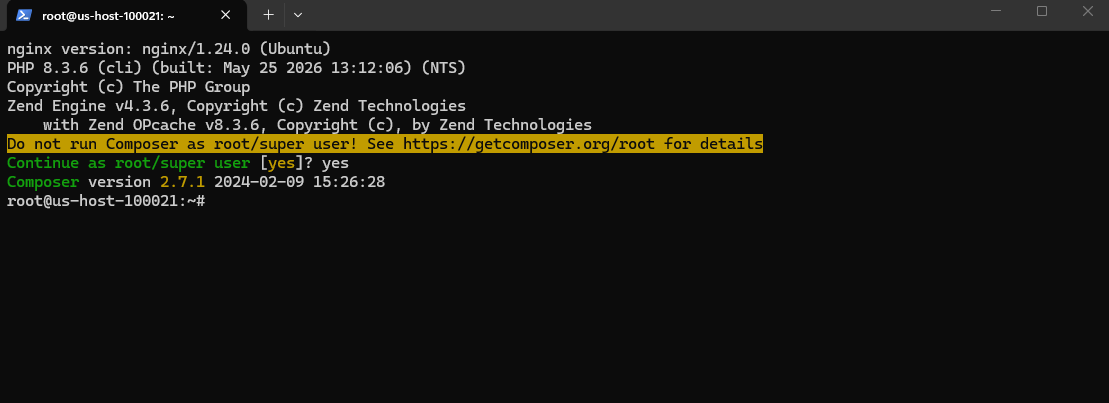
Verify: Nginx and php8.3-fpm should be active, PHP should report 8.3 or newer, Composer should run successfully, and Laravel's required PHP extensions should be loaded.
Step 3 — Configure UFW without risking SSH lockout
Inspect the firewall and determine the actual SSH port before changing anything:
sudo ufw status verbose
SSH_PORT="$(sudo sshd -T | awk '/^port / {print $2}')"
echo "$SSH_PORT"
Allow the working SSH port and Nginx web traffic:
sudo ufw allow "${SSH_PORT}/tcp"
sudo ufw allow 'Nginx Full'
sudo ufw default deny incoming
sudo ufw default allow outgoing
sudo ufw status numbered
Keep the current SSH session open. Before enabling an inactive firewall, open a second SSH session using the same real SSH port and verify that it works.
If UFW is currently inactive, enable it only after the second session succeeds:
sudo ufw enable
Check again:
sudo ufw status numbered
Do not use ufw --force enable as a shortcut around validating SSH access.
Verify: the real SSH port should remain reachable, Nginx HTTP/HTTPS traffic should be allowed, and a second SSH session should work before the original recovery session is closed.
Step 4 — Create or deploy the Laravel 13 application
Create the application directory and assign the deployment user as owner with www-data as the group:
sudo mkdir -p /var/www/laravel
sudo chown -R "$USER":www-data /var/www/laravel
cd /var/www/laravel
For a fresh Laravel 13 sample application:
composer create-project laravel/laravel . "^13.0" --prefer-dist
For an existing project, deploy your Git checkout or release artifact and install the versions recorded in composer.lock:
composer install \
  --no-dev \
  --prefer-dist \
  --no-interaction \
  --optimize-autoloader
Do not run composer update as a routine production deployment step; production should normally install the dependency set already tested and committed in the lock file.
Check the framework and web entry point:
php artisan --version
ls -l artisan public/index.php composer.lock
Verify: php artisan --version should report Laravel 13.x for the fresh sample, public/index.php should exist, and production deployments should use a committed composer.lock.
Step 5 — Configure the production environment and protect .env
If the project does not yet have an environment file, create it from its example:
cd /var/www/laravel
test -f .env || cp .env.example .env
Generate an application key only when one does not already exist:
grep -q '^APP_KEY=base64:' .env || php artisan key:generate
Set the core production values:
sed -i 's/^APP_ENV=.*/APP_ENV=production/' .env
sed -i 's/^APP_DEBUG=.*/APP_DEBUG=false/' .env
sed -i 's#^APP_URL=.*#APP_URL=https://laravel.example.com#' .env
chmod 600 .env
For IP-only HTTP verification before DNS/TLS is ready, temporarily use:
APP_URL=http://your_server_ip
Do not overwrite an existing production APP_KEY; changing it can invalidate encrypted application data and sessions.
Check only non-secret values:
grep -E '^APP_ENV=|^APP_DEBUG=|^APP_URL=' .env
stat -c '%a %n' .env
Verify: APP_ENV=production, APP_DEBUG=false, and the intended APP_URL should be present; .env should be mode 600; and an existing production key should remain unchanged.
Step 6 — Configure the database, migrations, and writable directories
For this reproducible sample, SQLite keeps the tutorial self-contained:
cd /var/www/laravel
sed -i 's/^DB_CONNECTION=.*/DB_CONNECTION=sqlite/' .env
touch database/database.sqlite
For a real application, configure its MySQL or PostgreSQL connection instead. If you prefer the database lifecycle to be separate from the VM, Raff also offers Managed PostgreSQL.
Before applying migrations to an existing production database, take an application-consistent backup or snapshot appropriate to that database.
Run migrations:
php artisan migrate --force
Laravel's deployment documentation requires the web process to be able to write to storage and bootstrap/cache:
sudo chown -R "$USER":www-data /var/www/laravel
sudo chmod -R ug+rwX storage bootstrap/cache
sudo find storage bootstrap/cache -type d -exec chmod g+s {} \;
For this tutorial's SQLite database, also allow the PHP-FPM group to write the database file and directory:
sudo chgrp www-data database database/database.sqlite
sudo chmod g+rwX database database/database.sqlite
Never use chmod -R 777 on a Laravel application.
Check migration state:
php artisan migrate:status
Verify: migrations should succeed, Laravel's writable directories should be group-writable for www-data, and no broad world-writable permissions should be present.
Step 7 — Configure Nginx to serve only Laravel's public directory
Laravel's official Nginx deployment example routes requests through public/index.php. Serving the project root can expose .env, source code, logs, and configuration files.
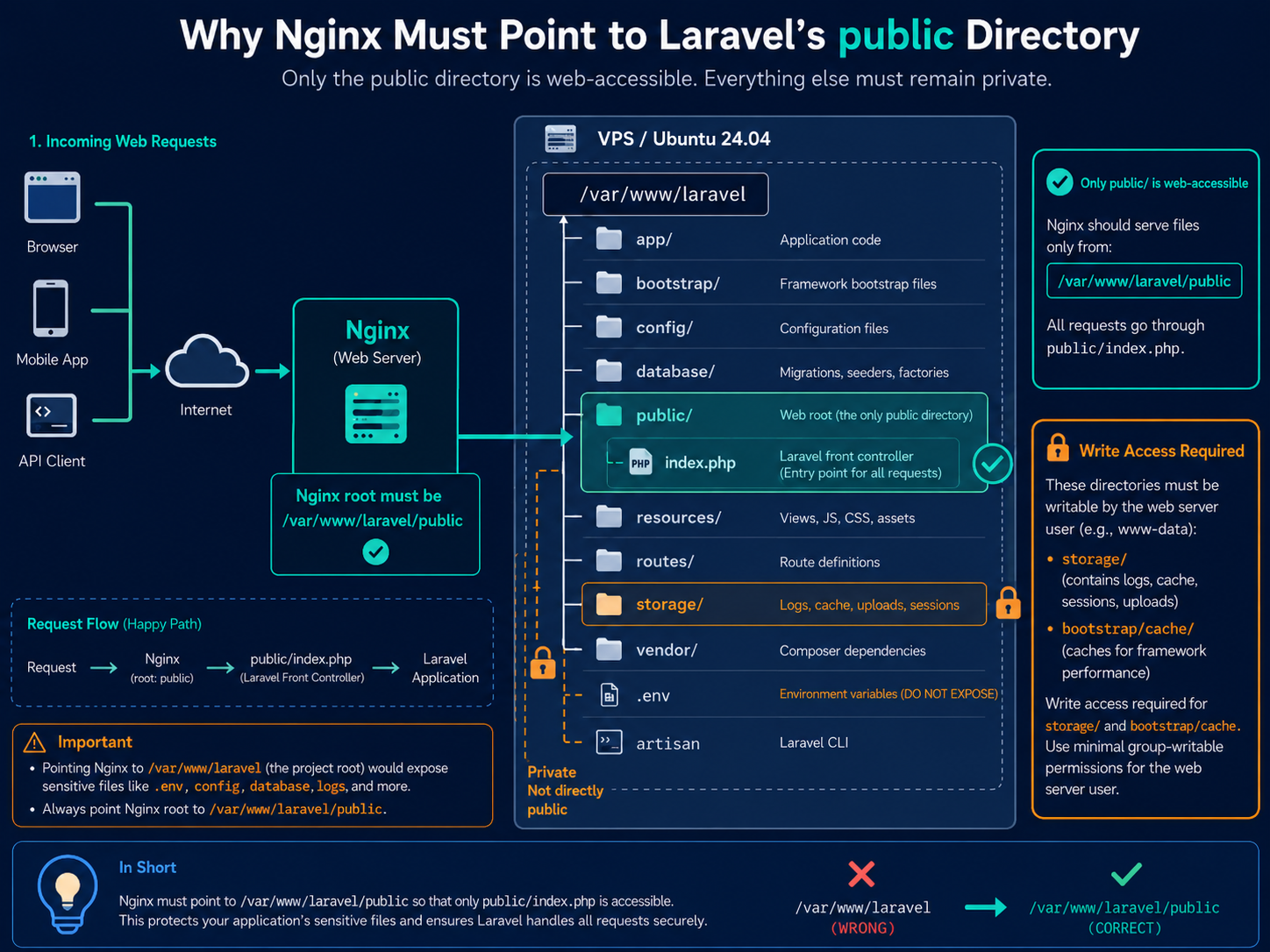
Create the server block:
APP_HOST="your_server_ip"
APP_DIR="/var/www/laravel"

sudo tee /etc/nginx/sites-available/laravel > /dev/null <<NGINX
server {
    listen 80;
    listen [::]:80;

    server_name ${APP_HOST};
    root ${APP_DIR}/public;

    add_header X-Frame-Options "SAMEORIGIN";
    add_header X-Content-Type-Options "nosniff";

    index index.php;
    charset utf-8;

    location / {
        try_files \$uri \$uri/ /index.php?\$query_string;
    }

    location = /favicon.ico { access_log off; log_not_found off; }
    location = /robots.txt  { access_log off; log_not_found off; }

    error_page 404 /index.php;

    location ~ ^/index\.php(/|$) {
        fastcgi_pass unix:/run/php/php8.3-fpm.sock;
        fastcgi_param SCRIPT_FILENAME \$realpath_root\$fastcgi_script_name;
        include fastcgi_params;
        fastcgi_buffer_size 32k;
        fastcgi_buffers 8 32k;
        fastcgi_busy_buffers_size 64k;
        fastcgi_hide_header X-Powered-By;
    }

    location ~ /\.(?!well-known).* {
        deny all;
    }
}
NGINX
Enable the site and disable the Ubuntu default site:
sudo rm -f /etc/nginx/sites-enabled/default
sudo ln -sfn /etc/nginx/sites-available/laravel /etc/nginx/sites-enabled/laravel
sudo nginx -t
sudo systemctl reload nginx
Verify: nginx -t should succeed, the active site should use /var/www/laravel/public as its root, and PHP requests should go to the PHP 8.3-FPM socket.
Step 8 — Verify the HTTP deployment and Laravel health route
Test Nginx through the server IP:
curl -I http://your_server_ip
Open the same address in a browser. The fresh application should load through Nginx and PHP-FPM.
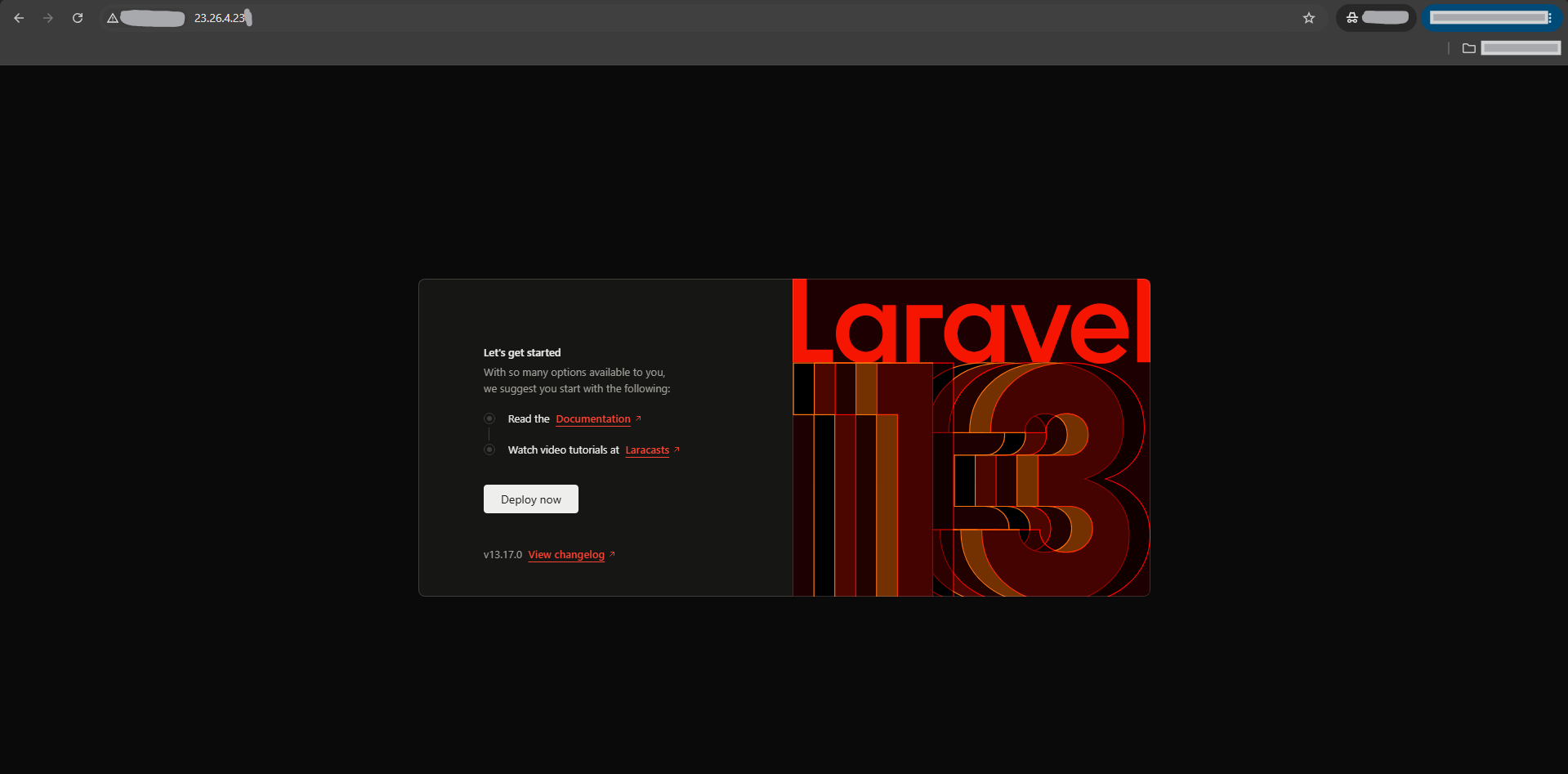
Laravel includes a built-in health endpoint at /up:
curl -i http://your_server_ip/up
Laravel returns HTTP 200 when the application boots without exceptions and HTTP 500 when application boot fails.
Check runtime services and logs:
sudo systemctl is-active nginx
sudo systemctl is-active php8.3-fpm
sudo tail -n 30 /var/log/nginx/error.log
sudo test -f /var/www/laravel/storage/logs/laravel.log \
  && sudo tail -n 30 /var/www/laravel/storage/logs/laravel.log \
  || true
Verify: the home page and /up should succeed, Nginx and PHP-FPM should be active, and the deployment should not produce new fatal errors.
Step 9 — Point the domain to the server and enable HTTPS
For a public production Laravel application, use a domain and HTTPS.
Create an A record such as:
| Type | Name | Value |
|---|---|---|
| A | laravel | your_server_ip |
Verify DNS:
dig +short A laravel.example.com
Update Laravel and Nginx to the real hostname:
cd /var/www/laravel
APP_HOST="laravel.example.com"

sed -i "s#^APP_URL=.*#APP_URL=https://${APP_HOST}#" .env
php artisan optimize:clear

sudo sed -i "s/server_name .*/server_name ${APP_HOST};/" /etc/nginx/sites-available/laravel
sudo nginx -t
sudo systemctl reload nginx
Certbot currently recommends the snap distribution for most Linux users. Install it and prepare the command:
sudo snap install --classic certbot
sudo ln -sf /snap/bin/certbot /usr/local/bin/certbot
Request the certificate and let Certbot configure Nginx:
sudo certbot --nginx -d "$APP_HOST" --redirect
Test HTTPS and automatic renewal:
curl -I https://laravel.example.com
sudo certbot renew --dry-run
Verify: DNS should resolve to the server, HTTPS should use a trusted certificate, HTTP should redirect as intended, and certbot renew --dry-run should succeed.
Step 10 — Build production dependencies and Laravel caches
For an existing application, install the versions from composer.lock without development dependencies:
cd /var/www/laravel
composer install \
  --no-dev \
  --prefer-dist \
  --no-interaction \
  --optimize-autoloader
If the project uses Vite or another frontend build process, build those assets according to the project's locked Node/package-manager workflow before switching production traffic to the release.
Clear stale framework caches and build production caches:
php artisan optimize:clear
php artisan optimize
Laravel documents optimize as the single deployment command that caches configuration, events, routes, and views.
Check environment and health-route registration:
php artisan about --only=environment
php artisan route:list --path=up
After configuration caching, application code should read environment-backed values through Laravel configuration rather than calling env() outside configuration files.
Verify: Composer should complete without dependency errors, php artisan optimize should succeed, production mode should remain active, and /up should still be registered and healthy.
Step 11 — Configure Laravel's scheduler if the application uses scheduled tasks
Laravel's scheduler needs one cron invocation every minute. Laravel then decides which application tasks are due.
Inspect the application's schedule:
cd /var/www/laravel
php artisan schedule:list
Edit the deployment user's crontab:
crontab -e
Add one scheduler entry:
* * * * * cd /var/www/laravel && php artisan schedule:run >> /dev/null 2>&1
Verify it:
crontab -l | grep 'artisan schedule:run'
If the application defines sub-minute tasks, Laravel documents php artisan schedule:interrupt as a deployment command so an already-running scheduler stops executing old code for the rest of that minute.
Verify: applications that use scheduling should show expected tasks in schedule:list and exactly one intended schedule:run cron entry.
Step 12 — Run Laravel queue workers under Supervisor when required
Skip this step if the application does not use asynchronous queues.
Install Supervisor:
sudo apt install -y supervisor
sudo systemctl enable --now supervisor
Determine the deployment user:
DEPLOY_USER="$(id -un)"
echo "$DEPLOY_USER"
Create a conservative single-worker configuration. Increase concurrency only after measuring workload and server capacity:
sudo tee /etc/supervisor/conf.d/laravel-worker.conf > /dev/null <<EOF
[program:laravel-worker]
process_name=%(program_name)s_%(process_num)02d
command=/usr/bin/php /var/www/laravel/artisan queue:work --sleep=3 --tries=3 --max-time=3600
directory=/var/www/laravel
autostart=true
autorestart=true
stopasgroup=true
killasgroup=true
user=${DEPLOY_USER}
numprocs=1
redirect_stderr=true
stdout_logfile=/var/www/laravel/storage/logs/worker.log
stopwaitsecs=3600
EOF
Load and start the worker:
sudo supervisorctl reread
sudo supervisorctl update
sudo supervisorctl status
Laravel recommends a process monitor for long-running queue:work processes. Keep stopwaitsecs longer than the longest expected job so Supervisor does not kill valid work prematurely during a graceful stop.
Verify: supervisorctl status should report the Laravel worker as RUNNING, and the configured user should have access to the application's queue backend and writable paths.
Step 13 — Reload long-running Laravel services after deployments
After deploying new code, Laravel 13 provides a general reload command for long-running framework services:
cd /var/www/laravel
php artisan reload
Laravel documents this for queue workers, Reverb, Octane, and other reloadable long-running services. On a self-managed server, a process monitor must restart those services when they exit.
For queue-only deployments, Laravel also continues to support:
php artisan queue:restart
For sub-minute schedules after a deployment:
php artisan schedule:interrupt
Before applying a release with schema changes, preserve a tested database backup/rollback strategy. Code rollback alone may not safely reverse destructive migrations.
Re-check long-running services:
sudo supervisorctl status 2>/dev/null || true
php artisan about --only=environment
Verify: reloadable processes should return under their process monitor, the new code should be active, and database changes should have an explicit recovery plan.
Step 14 — Verify the Laravel production deployment end to end
Set the final public URL:
APP_TEST_URL="https://laravel.example.com"
If DNS/TLS is not yet part of the saved test state, use the HTTP IP endpoint instead:
APP_TEST_URL="http://your_server_ip"
Test the application and built-in health route:
curl -I "$APP_TEST_URL"
curl -i "$APP_TEST_URL/up"
Check services and Nginx syntax:
sudo systemctl is-active nginx
sudo systemctl is-active php8.3-fpm
sudo nginx -t
Check production configuration without printing secrets:
cd /var/www/laravel
grep -E '^APP_ENV=|^APP_DEBUG=|^APP_URL=' .env
php artisan about --only=environment
Check writable paths and confirm the project root is not served directly:
namei -l /var/www/laravel/storage
namei -l /var/www/laravel/bootstrap/cache
grep -R 'root ' /etc/nginx/sites-enabled/laravel
If queues or the scheduler are used, verify them too:
sudo supervisorctl status 2>/dev/null || true
crontab -l | grep 'artisan schedule:run' || true
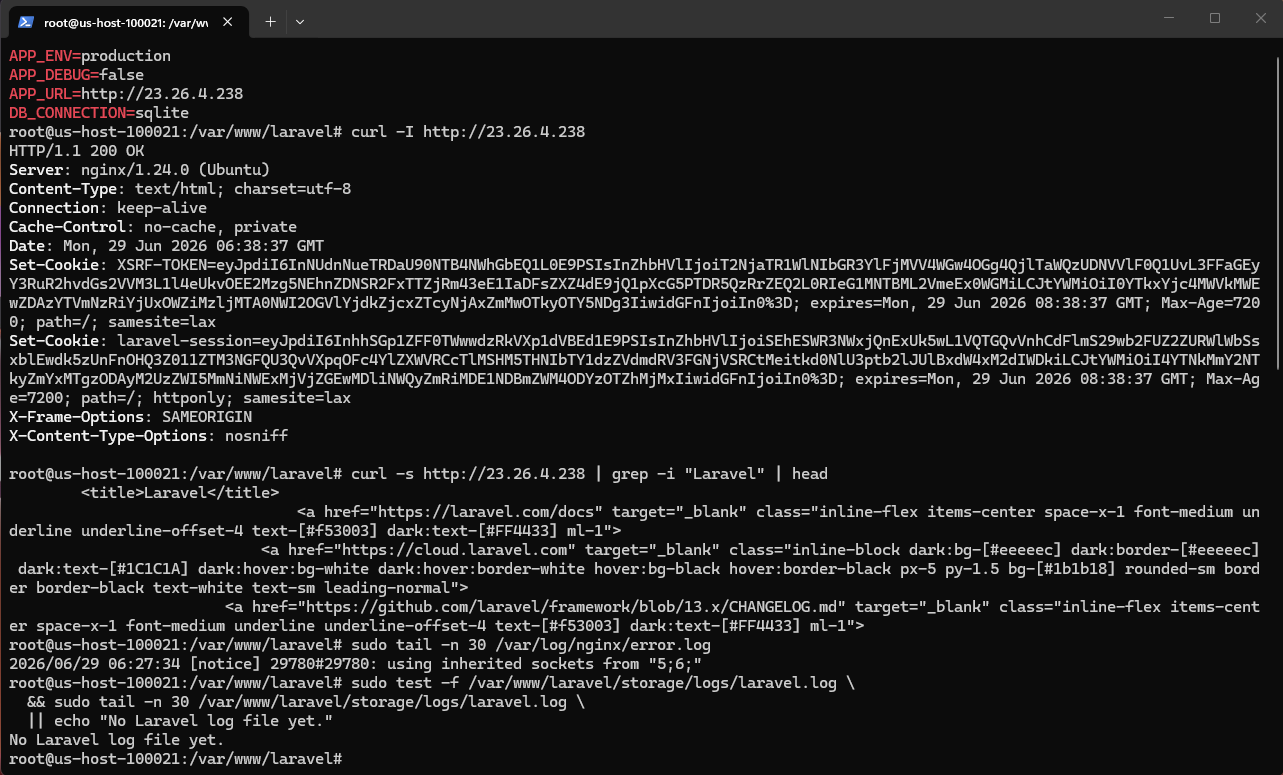
Verify: the home page and /up should return successfully, Nginx and PHP-FPM should be healthy, APP_DEBUG=false should remain active, Nginx should serve only /var/www/laravel/public, writable paths should be correct, and any configured scheduler or queue worker should be running under its intended production mechanism.