On this page
Key Takeaways
Object storage events are useful when file uploads should trigger code automatically. Prefix filters prevent functions from processing their own outputs. File-processing functions should store status and metadata in a database, while inputs and outputs live in object storage. Raff Functions works well for bounded file workflows, while Raff VM is better for persistent workers, custom binaries, or always-on processing.
Object storage events let an application trigger processing when a new object is created or uploaded to a bucket. In an S3-style workflow, the event can start a serverless function that validates a file, generates a thumbnail, parses a CSV, extracts metadata, or writes a processed result without keeping an always-on worker running.
This pattern is useful when the file itself is the trigger and the work is bounded. It is less suitable when processing is continuously active, requires a persistent runtime, or depends on large local state.
At Raff Technologies, object-storage-triggered functions can separate upload processing from the main application path. Raff Object Storage holds inputs and outputs, a function performs the work, and a database can track durable job state.
A typical flow is:
Upload -> Object Storage -> object-created event -> Function
       -> processed object + database status
This guide covers the architecture and operational controls for that pattern: prefix filtering, duplicate-event handling, idempotency, output storage, status tracking, security, and when a VM worker is the better choice.
File uploads should not overload the app server
File uploads often look harmless at the beginning.
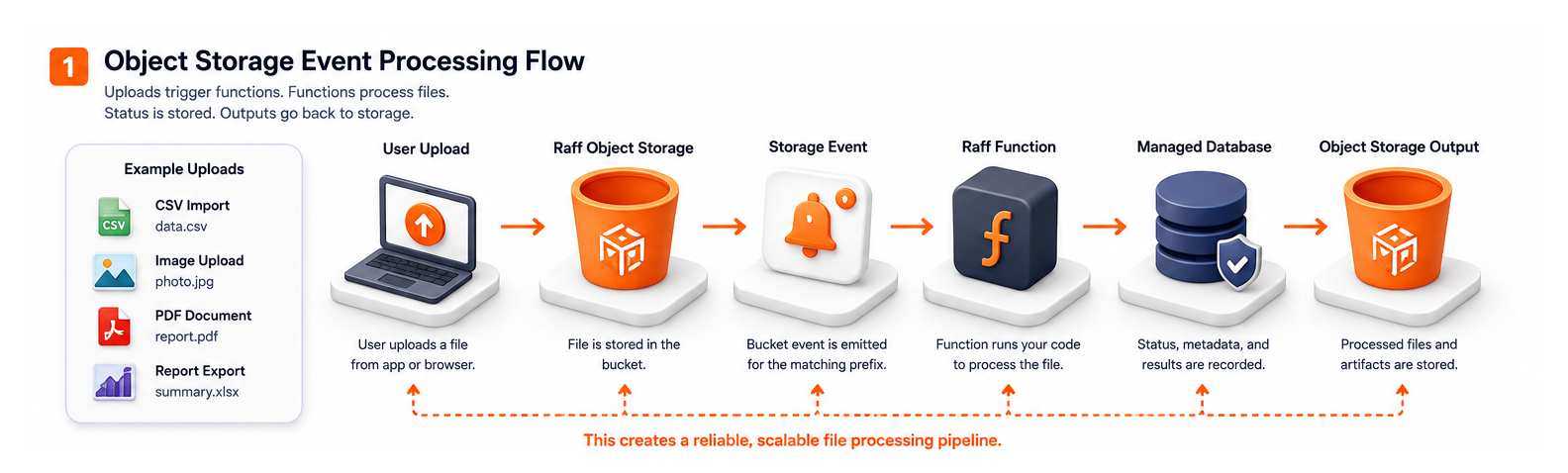
A small app lets users upload:
- Profile images
- Attachments
- CSV imports
- PDFs
- Reports
- Product images
- Documents
- Audio or video files
- Backup archives
- Data exports
- Signed files
- Generated artifacts
Then the app starts doing work after each upload:
- Validate file type
- Read metadata
- Resize images
- Generate thumbnails
- Convert formats
- Parse CSV rows
- Extract text
- Scan or classify content
- Create previews
- Update database records
- Send notifications
- Trigger imports
- Write processed output
That work can compete with the customer-facing app for CPU, memory, disk, and database connections.
A safer production pattern is:
User upload
  ↓
Object Storage
  ↓
Storage event
  ↓
Raff Function
  ↓
Processed output + database metadata
The app handles user flow. Object storage holds files. The function handles file work. The database records status and metadata.
This keeps upload processing out of the main request path.
The quick decision framework
Use this table before deciding between object-storage events, VM workers, app-server processing, or Kubernetes jobs.
| File workflow | Better default | Why |
|---|
| Image thumbnail generation | Object storage event + function | Event-driven and bounded |
| CSV import after upload | Function or worker VM | Depends on file size and duration |
| PDF metadata extraction | Function | File-driven and isolated |
| Large video processing | VM or Kubernetes worker | Heavy runtime and long processing may need full environment |
| Small file validation | Function | Quick and independent |
| Virus scanning | Function or VM worker | Depends on tooling and runtime |
| Customer export generation | Function or worker VM | Depends on duration and frequency |
| Backup archive validation | Function | Triggered by new object |
| Continuous file pipeline | VM or Kubernetes | Always-on processing may fit workers |
| File task needs SSH debugging | VM | Full server control helps |
| File task needs custom binaries | Dockerfile function or VM | Choose by dependency complexity |
| File task writes many outputs | Function + object storage | Keep files out of compute |
A useful rule:
Use object-storage events when the file is the trigger. Use a worker VM when the processing environment is the product.
If a task starts because a file landed in a bucket, a function is often the cleanest first option.
Object storage events are strongest for bounded file work
Object-storage events work best when a file appears and a bounded task should run.
Good candidates include:
- Resize uploaded images
- Generate thumbnails
- Convert documents
- Extract PDF metadata
- Parse uploaded CSV files
- Validate file schema
- Check file size and MIME type
- Create report previews
- Store import status
- Move files from incoming to processed
- Notify users when processing finishes
- Update search metadata
- Trigger a follow-up workflow
A function can receive an event, read the uploaded object, process it, write output back to object storage, and update the database.
Example:
incoming/avatar.png
  ↓
Raff Function starts
  ↓
Create 128px, 512px, and 1024px versions
  ↓
Write outputs to processed/avatars/
  ↓
Update database with image paths
That design is easier to scale than doing image processing inside the web request.
The user upload can finish quickly, and the app can show a processing state until the function completes.
Prefix filters prevent accidental loops
Prefix filters are important for file-processing workflows.
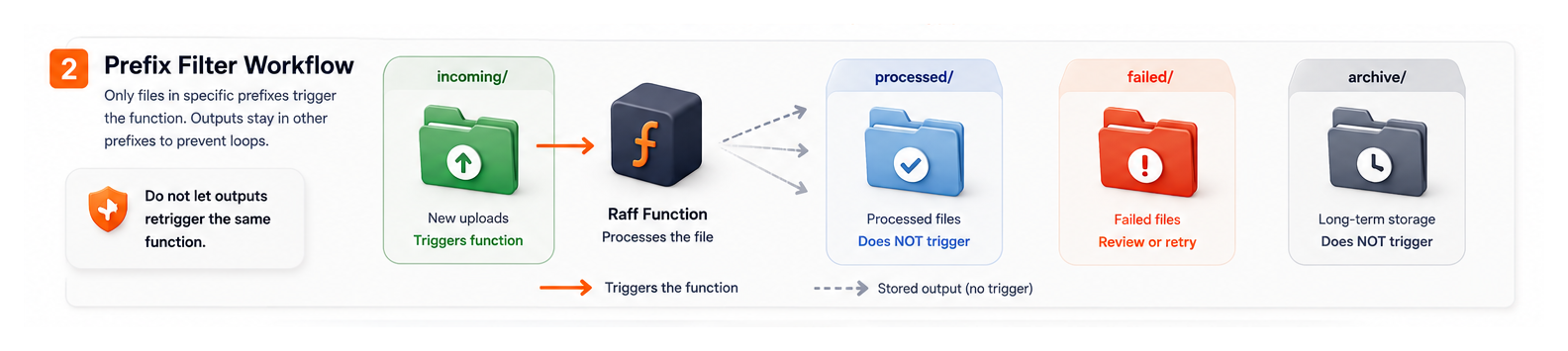
Without a prefix filter, a function may trigger on every object in a bucket. That can cause accidental loops. For example, the function reads an uploaded image and writes a thumbnail. If the thumbnail lands in the same bucket and also triggers the function, the function may process its own output.
A safer pattern uses prefixes:
incoming/
processed/
failed/
archive/
For example:
incoming/customer-file.csv
  ↓ triggers function

processed/customer-file-normalized.csv
  ↓ does not trigger same function
A prefix-based design can separate file stages:
| Prefix | Purpose |
|---|
incoming/ | New user uploads |
processing/ | Optional temporary work area |
processed/ | Completed outputs |
failed/ | Failed or quarantined inputs |
archive/ | Long-term storage |
exports/ | Generated files for download |
thumbs/ | Generated image variants |
Raff Functions supports object-storage events such as bucket uploads with prefix filters. Use that feature to make event scope explicit.
Do not let output files retrigger the same workflow unless that behavior is intentional.
Store job status in a database
An object-storage event tells you a file arrived. It does not replace application state.
A file-processing workflow should store status in a database so the app can show progress and recover from failures.
A simple status model:
| Field | Purpose |
|---|
| file_id | Internal file record |
| account_id | Tenant or customer owner |
| input_key | Original object path |
| output_key | Processed output path |
| status | uploaded, processing, processed, failed |
| attempts | Retry count |
| error_message | Safe failure summary |
| metadata | Size, type, row count, image dimensions |
| created_at | Upload time |
| processed_at | Completion time |
A clean flow:
Upload starts
  ↓
App creates database record
  ↓
File lands in object storage
  ↓
Function processes event
  ↓
Function updates database record
The app should not depend only on whether a file exists in a bucket. It should have a durable record that explains the file's current state.
This is especially important for SaaS apps with tenants, permissions, billing, imports, compliance, or customer-visible processing status.
Make file processing idempotent
Object-storage events can be delivered more than once. Users can upload the same file twice. A function can fail halfway through and retry. A developer can manually replay a job.
File-processing functions must be idempotent.
That means the same file event can run more than once without corrupting data or creating duplicate outputs.
Use these techniques:
| Technique | Use |
|---|
| File ID | Track each upload |
| Object key | Identify input path |
| Content hash | Detect repeated content |
| Status transitions | Avoid reprocessing completed files |
| Output key versioning | Prevent overwriting the wrong output |
| Database constraints | Prevent duplicate records |
| Attempt counter | Limit retry loops |
| Processing lock | Prevent concurrent processing |
| Failed prefix | Separate files that need review |
Example:
if file.status == "processed":
    return success
else:
    process file and update status
This is better than assuming every event is unique.
Idempotency is not only a backend concern. It protects users from duplicate imports, duplicate notifications, duplicate invoices, or broken file state.
Return durable outputs to object storage
The function runtime should not be the final home for generated files.
Use object storage for:
- Thumbnails
- Converted files
- CSV exports
- Report PDFs
- Processed images
- Import result files
- Validation reports
- Transformed documents
- Batch artifacts
- Generated archives
A good output pattern:
incoming/report.csv
  ↓
processed/report-normalized.csv
  ↓
database output_key = processed/report-normalized.csv
The database stores metadata and object keys. Object storage stores the actual files.
This keeps compute stateless and makes retries safer. If a function fails, the app can inspect the database status and object storage paths to decide what happened.
For broader storage design, read Object Storage vs Block Storage vs VM Disk.
When a VM worker is still better
Not every file-processing job should be a function.
Use a VM worker when the processing environment matters more than the event trigger.
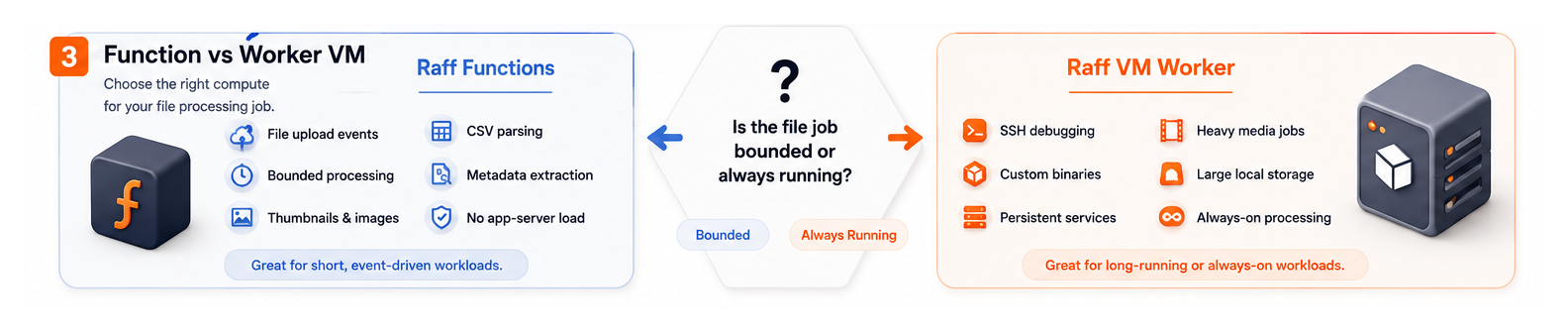
A Raff VM may be better when the workflow needs:
- SSH debugging
- Large system packages
- Persistent local cache
- Long-running workers
- Constant queue processing
- Heavy CPU all day
- Several coordinated processes
- Large local temporary storage
- Manual inspection during incidents
- Custom binaries or complex toolchains
- Existing Docker Compose services
- Stateful processing environment
- Predictable capacity-based cost
A VM worker pattern:
Object Storage
  ↓
Queue or database job table
  ↓
Worker VM
  ↓
Object Storage + database update
This is useful for continuous pipelines, large media processing, or workloads where developers need direct server access.
A function is best when the job starts and ends cleanly. A VM worker is best when the processing environment must stay alive.
Some file tasks take longer than expected.
Examples:
- Large CSV imports
- AI document processing
- Multi-page PDF conversion
- Large report generation
- Video or audio conversion
- Many image variants
- Large archive validation
- Customer data migration
Long-running file jobs still need extra design even when the function platform supports the required execution window. Check the live Raff Functions documentation for current runtime limits rather than copying mutable limits into an evergreen architecture guide.
These jobs need guardrails:
- Job status in database
- Progress markers
- Retry limits
- Idempotent output paths
- Chunking for large inputs
- Safe failure messages
- Logs at each stage
- Spend cap review
- Clear owner
- Manual replay path
If restarting from zero would be painful, split the work into chunks.
Example:
large-import.csv
  ↓
Function validates file
  ↓
Create chunk jobs
  ↓
Process chunks
  ↓
Write result summary
For deeper long-running design, read Long-Running Serverless Functions for AI, ETL, and Batch Jobs.
Logs and metrics make file events trustworthy
File events can fail in quiet ways.
A file may upload successfully, but processing may fail. A function may write output but fail to update the database. A bad file may retry repeatedly. A user may wait for an import that never completes.
A file-processing function should log:
- File ID
- Account or tenant ID
- Input object key
- File size
- Detected file type
- Processing stage
- Output object key
- Row count or image dimensions
- Validation errors
- Retry attempt
- Completion status
- Safe failure reason
Example log shape:
file_event_received file_id=file_123 key=incoming/report.csv
file_validation_passed file_id=file_123 size_mb=12
file_processing_started file_id=file_123
file_output_written file_id=file_123 output_key=processed/report.csv
file_processing_completed file_id=file_123 duration_ms=8421
Use the live Raff Functions documentation for current logging, metrics, and retention capabilities. Regardless of platform limits, logs should explain the workflow without exposing sensitive file content.
Security and tenant boundaries matter
File uploads often contain sensitive data.
A file-processing function should not have broad access to every bucket, every prefix, or every database table unless there is a clear reason.
Use scoped access:
- Only required bucket
- Only required prefix
- Separate input and output paths
- Narrow database permissions
- Tenant-aware file records
- Safe logs
- Secrets outside code
- Validation before processing
- Access checks before user download
Raff Functions can bind to Raff Object Storage with scoped S3 keys per bucket and Raff Managed Databases with scoped per-function credentials. Use those scoped bindings to limit each function's access.
For SaaS apps, also check tenant boundaries:
- Does the file record belong to the right account?
- Is the output path tenant-specific?
- Can one tenant guess another tenant's file key?
- Does the app authorize downloads through database metadata?
- Are temporary files cleaned up?
- Are failed files quarantined?
A function should not process a file only because the object exists. It should confirm that the file belongs to the expected account and workflow.
Cost planning for object-storage events
Object-storage event cost depends on how often files arrive and how expensive processing is.
Estimate:
- Uploads per month
- Average file size
- Average processing duration
- Memory setting
- Active CPU behavior
- Retry frequency
- Number of output files
- Whether work can be chunked
- Whether processing is CPU-heavy or I/O-heavy
- Whether large files should use a VM worker
Function and object-storage pricing can change, so use the live Raff Pricing page for the current billing model. File retention, processing duration, retries, and download patterns should still be included in the workload estimate.
A function can be cost-effective for bursty file events. A VM worker may be easier to forecast if processing runs constantly.
A practical rule:
| Workload shape | Cost-friendly model |
|---|
| Occasional uploads | Function |
| Bursty file events | Function with spend cap |
| Short processing | Function |
| Long but bounded processing | Long-running function |
| Continuous file pipeline | VM or Kubernetes worker |
| Heavy media processing all day | VM or Kubernetes worker |
| Large durable file storage | Object Storage |
For the function cost model, read Serverless Function Pricing: CPU, Memory, Requests, and Egress.
A practical Raff object-event architecture
A clean Raff architecture separates upload, processing, state, and output.
User or system uploads file
  ↓
Raff Object Storage incoming/ prefix
  ↓
Raff Function triggered by storage event
  ↓
Raff Managed Database updates status and metadata
  ↓
Raff Object Storage processed/ prefix stores output
  ↓
App notifies user or shows result
Each layer has a clear job:
| Layer | Responsibility |
|---|
| App | User upload flow, authorization, status UI |
| Object Storage | Input files, outputs, artifacts, archives |
| Raff Function | Validation, processing, conversion, metadata extraction |
| Managed Database | File records, job status, tenant ownership, output paths |
| Worker VM | Optional always-on processing for heavy or constant workloads |
| Logs and metrics | Visibility into success, duration, errors, and retries |
This pattern works for:
- SaaS app uploads
- CSV imports
- image processing
- PDF processing
- report generation
- document automation
- backup validation
- media workflows
- data enrichment
- internal file pipelines
Start with the simplest event-driven path. Add queues, worker VMs, or Kubernetes when the workflow becomes continuous or coordination-heavy.
Object-storage event checklist
Before launching a production file-processing function, check:
This checklist prevents file-processing functions from becoming hidden production risk.
Common mistakes to avoid
Triggering on every object in a bucket
Use prefix filters.
Do not let processed outputs retrigger the same function by accident.
Processing files inside the web request
User uploads should not wait for heavy processing.
Upload the file, create a record, trigger processing, and show status.
Storing outputs only in the function runtime
Generated files should go back to object storage.
The database should store metadata and output paths.
Ignoring duplicate events
Storage events can repeat.
Use file IDs, object keys, hashes, and database status to prevent duplicate processing.
Giving the function broad storage access
Scope credentials to the required bucket or prefix.
A file processor should not have access to unrelated storage.
Skipping tenant ownership checks
A SaaS app should confirm that a file belongs to the expected tenant before processing or exposing results.
Using functions for constant heavy processing without checking cost
If the pipeline runs all day, a worker VM or Kubernetes job may be cleaner and easier to forecast.
File events should turn uploads into workflows
Object-storage events are useful because they turn a file upload into a clear workflow.
Use Raff Functions when file processing is event-driven, bounded, isolated, and should not slow the main app server. Use Raff Object Storage for input files, outputs, artifacts, and archives. Use Raff Managed Databases for file records, tenant ownership, status, metadata, and output paths. Use Raff VM when file processing needs a persistent worker, SSH debugging, custom binaries, or always-on capacity.
The safest Raff pattern is simple: uploads land in object storage, a function processes the event, the database records state, and outputs go back to object storage.
That keeps file workflows clean, observable, and easier to scale without overloading the app server.
Was this article helpful? 
Serdar TekinCo-Founder & CTO
Co-Founder & CTO at Raff, focused on cloud infrastructure, systems architecture, security, reliability, and production operations.
Spin up a Raff server, follow the steps above on real infrastructure, and you are live. Linux or Windows, backed by a 14-day money-back guarantee.
What are object storage events?+
Object storage events are notifications generated when an operation such as creating or uploading an object occurs in a bucket. Applications can use those events to trigger downstream processing such as validation, conversion, metadata extraction, or thumbnail generation.
When should teams use object storage events with serverless functions?+
Teams should use object storage events when file uploads should start bounded work such as validation, thumbnail generation, CSV parsing, conversion, or metadata extraction.
Why are prefix filters important for object storage events?+
Prefix filters prevent functions from triggering on every object in a bucket and help stop processed outputs from accidentally retriggering the same workflow.
Where should file-processing status be stored?+
File-processing status should be stored in a database so the app can track uploaded, processing, processed, failed, retry, and output states.
Should processed files be stored inside a function runtime?+
Processed files should not be stored inside a function runtime. Inputs, outputs, reports, thumbnails, and artifacts should usually live in object storage.
When is a VM worker better than a serverless function?+
A VM worker is better when file processing needs SSH debugging, custom binaries, persistent services, large local temporary storage, or always-on capacity.
How should duplicate storage events be handled?+
Duplicate storage events should be handled with file IDs, object keys, content hashes, database status checks, idempotent writes, and retry limits.
How does Raff support object-storage file processing?+
Raff supports file processing with Raff Object Storage for files, Raff Functions for upload events, Managed Databases for status, and Raff VM for persistent workers.
