Serverless function pricing is easiest to understand when you separate four things: how long code runs, how much memory it holds, how much CPU it actually uses, and which extra billing dimensions the provider adds around execution. Requests, egress, warm capacity, logging, gateways, and observability can matter as much as the compute meter itself.
For small teams, the practical goal is not to find the lowest-looking unit price. It is to understand which variables make the monthly bill move and whether the workload fits usage-based execution at all.
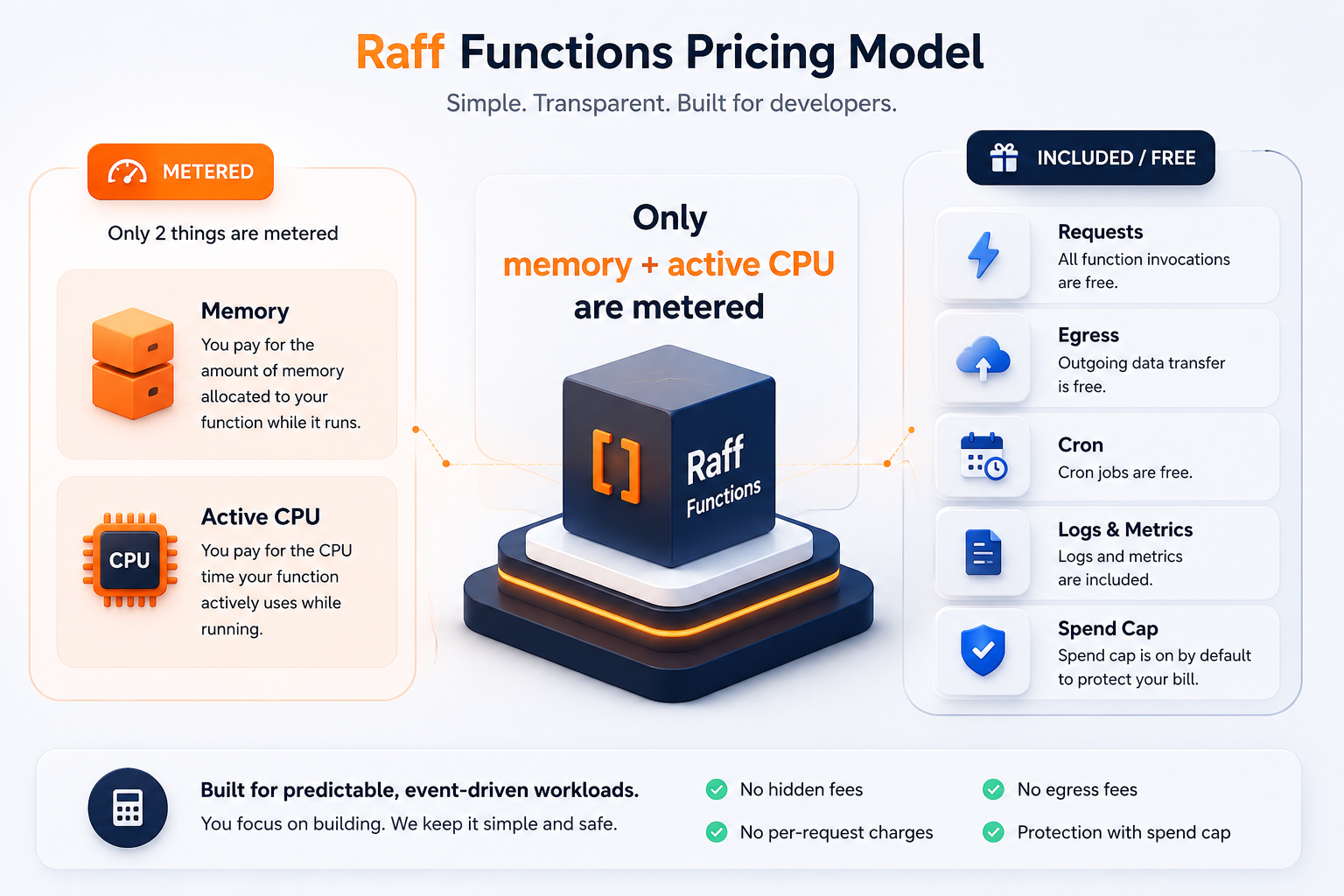
At Raff Technologies, Raff Functions currently uses two primary compute meters: memory GB-seconds and active CPU vCPU-seconds. Requests and function egress are currently free, and a spend cap is enabled by default. Because pricing and product limits can change, this guide treats the exact Raff rates as a dated pricing snapshot and points purchasing decisions back to the live Raff Functions and Pricing pages.
If you are still deciding whether the workload belongs on functions or a persistent server, start with Serverless Functions vs VMs.
Serverless function pricing at a glance
Most function bills are built from a combination of these dimensions:
| Pricing dimension | What it measures | Why it matters |
|---|
| Memory duration | Provisioned memory × execution time | Larger runtimes and longer jobs consume more GB-seconds |
| CPU | CPU allocation or CPU time | CPU-heavy work can cost differently from I/O-heavy work |
| Requests | Number of invocations | High-volume lightweight endpoints may accumulate request fees |
| Egress | Outbound data | Large responses and downloads can dominate some bills |
| Warm/minimum instances | Always-ready capacity | Improves latency but adds a baseline cost |
| Logs/metrics | Observability data | High-volume telemetry can become a separate bill |
| Gateways/triggers | Supporting services | HTTP gateways, queues, schedulers, or event services may add cost |
The first question should therefore be:
What exactly does the provider meter, and which parts of my workload drive those meters?
Current Raff Functions pricing snapshot
The following public Raff Functions pricing was verified on September 16, 2026:
| Meter | Current public rate |
|---|
| Memory | $0.0000035 per GB-second |
| Active CPU | $0.000020 per vCPU-second |
| Requests | Free |
| Function egress | Free |
| Monthly free tier | 100,000 GB-s + 10,000 vCPU-s |
| Spend cap | On by default |
The free tier currently activates after a one-time $5 top-up, which remains usable account balance rather than a separate activation fee.
These values are intentionally dated. For a real purchasing estimate, check the live Raff Functions page immediately before deployment.
What does GB-second pricing mean?
A GB-second combines memory and time.
The basic formula is:
memory GB-seconds
= provisioned memory in GB
× execution duration in seconds
× number of executions
Example:
1,000,000 executions
× 0.25 GB memory
× 0.20 seconds
= 50,000 GB-seconds
That number tells you the memory-duration footprint before any free tier or provider-specific adjustments.
The most important levers are:
- invocation count;
- memory setting;
- average duration;
- p95/p99 duration;
- concurrency;
- warm or minimum instances;
- retry volume.
A common mistake is assuming that lowering memory always lowers cost. If too little memory slows execution significantly, the longer duration can offset some of the expected savings.
For production estimation, measure actual runtime behavior rather than optimizing one meter in isolation.
Active CPU pricing separates compute work from waiting
Not every millisecond of wall-clock execution means the processor was doing useful work.
A function may spend time:
- calculating;
- compressing;
- parsing;
- encrypting;
- resizing media;
- waiting for a database;
- waiting for an external API;
- waiting for object storage;
- waiting on network I/O.
Raff currently bills active CPU separately from memory duration. The useful mental model is:
Wall-clock duration
= total time the function exists

Active CPU time
= time the code is actually executing on CPU
This distinction matters because a webhook that spends most of its life waiting on APIs has a different compute profile from an image-processing function that saturates CPU continuously.
CPU-heavy function examples
- image resizing;
- compression;
- PDF generation;
- encryption;
- large JSON/CSV transformation;
- data processing;
- some AI inference workloads.
I/O-heavy function examples
- webhooks;
- API orchestration;
- database reads/writes;
- storage metadata operations;
- external-service integrations.
Understanding whether a workload is CPU-heavy or I/O-heavy is more useful than estimating cost from invocation count alone.
Requests can matter even when each function is tiny
Some function platforms add a per-request charge.
That becomes important for workloads such as:
- public APIs;
- high-volume webhooks;
- telemetry ingestion;
- lightweight redirects or transformations;
- very short handlers.
A function that executes for only a few milliseconds may use little compute but still generate millions of billable requests.
Raff Functions currently does not add a request fee. That simplifies one part of forecasting, but it does not make execution free: memory and active CPU still scale with usage.
When comparing providers, keep request pricing as its own row instead of mixing it into compute.
Egress can dominate a serverless bill
Outbound traffic can be much more expensive than function execution when a workload returns large responses or moves files directly through compute.
Typical high-egress patterns include:
- file downloads;
- generated reports;
- image transformation endpoints;
- media responses;
- large API payloads;
- data-export functions.
Raff currently lists function egress as free. Other providers may price outbound transfer separately or route traffic through another metered service.
Even when egress is not separately billed, architecture still matters. Large durable files usually belong in Object Storage rather than being regenerated or streamed through a function every time.
A strong pattern is:
Function
  → generate / authorize / transform
  → store artifact in Object Storage
  → return object reference or download path
This keeps compute focused on the work that actually needs execution.
Free tiers should be treated as discounts, not architecture
Free tiers can be useful for development, early traffic, internal tools, and low-volume workloads.
But a production architecture should remain sensible after the free tier is exhausted.
Ask:
- What will the workload cost without the free allowance?
- How quickly will usage grow past it?
- Does the free tier reset monthly?
- Does it require account funding or another activation condition?
- Are requests or egress excluded from the free allowance?
- Do warm instances consume billable capacity?
For Raff Functions, the current public free tier is 100,000 GB-seconds and 10,000 vCPU-seconds per month, activated after the one-time $5 account top-up described above.
Do not design around that number remaining unchanged indefinitely. Treat it as a current commercial benefit and verify it on the product page before relying on it.
Estimate serverless cost from workload shape
Before deploying a production function, collect these inputs:
- Monthly executions.
- Average and p95 duration.
- Memory allocation.
- CPU intensity.
- Retry/duplicate rate.
- Response or output size.
- Whether warm capacity is required.
- Supporting service costs.
A useful worksheet is:
| Input | Example |
|---|
| Executions/month | 1,000,000 |
| Memory | 256 MB |
| Average duration | 200 ms |
| Memory usage | 50,000 GB-s |
| CPU profile | Mostly I/O-bound |
| Response size | Small JSON |
| Warm instances | No |
| Primary downstream service | Managed Database |
Then calculate each provider-specific meter separately.
Do not invent an active CPU ratio if you have no measurement. For Raff, memory GB-seconds can be estimated directly from configuration and duration, but active CPU should ideally come from observed workload behavior or the live pricing calculator.
Example: webhook pricing
A webhook is often a strong serverless workload because it has a clear event boundary and usually performs short bursts of work.
A typical flow is:
External provider
  ↓
Function
  ↓
verify event
  ↓
write durable record
  ↓
trigger downstream processing
  ↓
return response
Cost is driven by:
- webhook volume;
- retry rate;
- duration;
- memory;
- signature verification;
- database/API waiting;
- logging volume.
A good webhook function should return quickly and move heavy downstream work out of the request path.
For architecture and security details, use Serverless Functions for Webhooks.
Example: image processing pricing
Image processing is much more CPU-sensitive.
Object upload
  ↓
Function
  ↓
resize / encode
  ↓
Object Storage output
Cost depends on:
- image count;
- source dimensions;
- number of generated variants;
- memory requirement;
- CPU time;
- retries;
- duplicate processing.
The optimization target is not only execution time. Avoid generating unnecessary sizes, avoid reprocessing existing variants, and keep output in object storage.
Example: scheduled jobs
Scheduled functions are easy to model because invocation frequency is known in advance.
Examples include:
- daily reports;
- cleanup jobs;
- subscription checks;
- sync jobs;
- cache refreshes;
- recurring imports.
Cost is usually driven by duration and the amount of database/API work performed per run.
Before choosing a function, ask whether the task needs a full application environment or local server state. If yes, VM cron may remain simpler.
For that wider decision, use Cron Jobs vs Queues vs Workflow Automation.
Warm instances change the cost shape
Scale-to-zero reduces idle cost, but some latency-sensitive workloads need ready capacity.
Keeping warm or minimum instances changes the economics because part of the runtime remains allocated even when user traffic is low.
Raff currently offers optional warm instances and publishes their current commercial treatment on the Functions product page. Because that rate is a mutable product detail, use the live page rather than an evergreen article when calculating a production baseline.
Warm capacity is most defensible when:
- latency is user-visible;
- cold-start measurements show a real problem;
- traffic is predictable enough to justify a baseline;
- the business cost of added latency exceeds the always-ready cost.
Do not keep every function warm by default.
Observability is part of serverless cost
A production function needs enough observability to answer:
- how many times it ran;
- duration distribution;
- failure rate;
- retry rate;
- trigger source;
- logs for a specific execution;
- resource usage;
- usage/cost movement.
Some providers bill observability separately through another logging or monitoring product.
Raff currently includes function logs and core metrics with the product. Retention periods and exact observability features can change, so use the live product page for current operational limits.
When comparing providers, include observability in total cost rather than pretending the compute meter is the whole platform bill.
Spend caps reduce runaway-cost risk
Functions are easy to trigger, which means a bug or retry loop can multiply usage quickly.
Common causes include:
- webhook retry storms;
- recursive storage events;
- broken cron schedules;
- abusive public endpoints;
- client retry loops;
- unexpected batch fanout.
Raff currently enables a per-account Functions spend cap by default and pauses Functions when the cap is reached.
That is useful, but it is not a substitute for application safeguards.
Production functions should also use:
- idempotency;
- retry limits;
- rate limiting where appropriate;
- event deduplication;
- monitoring;
- ownership alerts;
- explicit budget reviews.
For API-level protection, see API Rate Limiting Explained.
When a VM can be cheaper
Serverless pricing is attractive when usage is intermittent. It becomes less obviously advantageous as utilization becomes continuous.
A VM may be economically and operationally cleaner when:
- the process runs continuously;
- CPU usage stays high for long periods;
- several services need one environment;
- Docker Compose is already the deployment model;
- SSH debugging is valuable;
- full filesystem or OS control is required;
- the workload uses provisioned capacity consistently.
A simple comparison is:
Function
= execution-based compute
+ any request / egress / observability / warm-capacity charges

VM
= provisioned server capacity
+ storage / backup / operations
Do not compare only one unit rate. Compare the full operating model.
Use Serverless Functions vs VMs for the architecture decision before doing the final cost comparison.
When Kubernetes or workers make more sense
Not every high-volume function workload belongs on a VM.
A worker pool or Kubernetes may fit better when:
- there are many long-running workers;
- jobs need queue-driven horizontal scaling;
- several workloads share a container platform;
- placement and resource policies matter;
- multi-node orchestration is already justified.
At that point, compare total cluster cost with function execution rather than forcing the workload into a binary functions-vs-VM decision.
For the cluster cost side, use Kubernetes Cost Optimization.
How Raff Functions fits pricing-sensitive workloads
Raff Functions is positioned for teams that want an execution-based model without adding separate request and function-egress fees.
The current product model is strongest for workloads such as:
- webhooks;
- scheduled jobs;
- object-storage events;
- lightweight APIs;
- file processing;
- batch/ETL work that fits the runtime model;
- one-off tasks.
Use Raff Functions when those workloads benefit from independent execution and scale-to-zero behavior.
Use Raff VM when the workload wants a persistent server environment.
Use Managed Databases and Object Storage to keep durable records and files outside ephemeral function runtimes.
Current Raff Functions pricing in this guide was reviewed on September 16, 2026. Always verify the live product and pricing pages before quoting a customer or making a purchasing decision.
Serverless pricing checklist
Before production, confirm:
Frequently asked questions
How does serverless function pricing work?
Most platforms combine execution duration with memory or CPU usage and may add separate request, egress, warm-instance, gateway, or observability charges.
What is a GB-second?
A GB-second is one gigabyte of provisioned memory used for one second. Multiply memory in GB by duration in seconds and by the number of executions.
What is active CPU pricing?
Active CPU pricing meters the time function code is actually using CPU rather than treating all wall-clock waiting time as equivalent compute.
Are serverless functions cheaper than VMs?
They can be for intermittent or bursty workloads. VMs can be cheaper or simpler for continuously running services that use provisioned capacity consistently.
Does Raff charge per request for Functions?
As of September 16, 2026, Raff lists Functions requests as free. Verify the live product page before relying on that for a future pricing estimate.
Does Raff charge function egress?
As of September 16, 2026, Raff lists function egress as free. This does not mean all Raff products have identical transfer pricing, so verify the product-specific pricing page.
What is the Raff Functions free tier?
As of September 16, 2026, the public product page lists 100,000 GB-seconds and 10,000 vCPU-seconds per month after the required one-time $5 top-up that remains usable account balance.
How do I estimate Raff Functions cost?
Estimate memory GB-seconds from memory, duration, and execution count; estimate active CPU from observed workload behavior; then apply the current live rates and free tier using Raff's pricing calculator.
Conclusion
Serverless function pricing becomes predictable when every meter is visible.
Start with memory duration and CPU behavior, then add request, egress, warm-capacity, observability, and supporting-service costs. Model retries and concurrency instead of assuming every invocation behaves like a clean benchmark.
For Raff Functions, the current public model uses memory and active CPU as the primary compute meters, with requests and function egress currently free. That can simplify forecasting, but the architecture decision still comes first: use functions for bounded event-driven work and persistent infrastructure when the workload actually needs it.
Estimate with current production assumptions, then verify the live Raff Functions and Pricing pages before deployment.
Sources

