On this page
Key Takeaways
Long-running functions are useful when AI, ETL, file processing, exports, imports, or batch jobs are event-driven and bounded. Raff Functions supports 1-hour default timeouts and up to 24 hours on request. Durable job state should live in a database, while files and artifacts should live in object storage. Raff VM is still better for always-on workers, SSH debugging, custom packages, and persistent services.
Long-running serverless functions are functions designed for workloads that need minutes or hours to complete instead of a short request-response window.
For small teams, this matters because not every background task fits into a tiny handler. AI inference, document processing, file conversion, ETL jobs, exports, imports, streaming tasks, and data cleanup can run longer than a normal web request. Traditionally, teams moved those jobs to a VM or worker server because their serverless platform had strict duration limits or pricing that became difficult to forecast.
Raff Technologies gives teams another option with Raff Functions: run event-driven jobs as functions with timeouts up to 1 hour by default and up to 24 hours on request. The same product also supports HTTP live URLs, timezone-aware cron schedules, one-off future runs, object-storage events, standard handlers, logs and metrics, and pricing based on memory plus active CPU.
This guide explains when a long-running serverless function makes sense, when a VM or worker server is still better, and how to design AI, ETL, and batch jobs so they remain observable, retryable, and cost-aware.
If you are still comparing deployment models, read Serverless Functions vs VMs: What Small Teams Should Choose and Serverless Function Pricing: CPU, Memory, Requests, and Egress first.
Long-running functions change the serverless decision
Serverless functions are often associated with short tasks: webhooks, API handlers, cron jobs, and quick file events.
That is still a strong use case. But many real SaaS tasks do not finish in a few seconds.
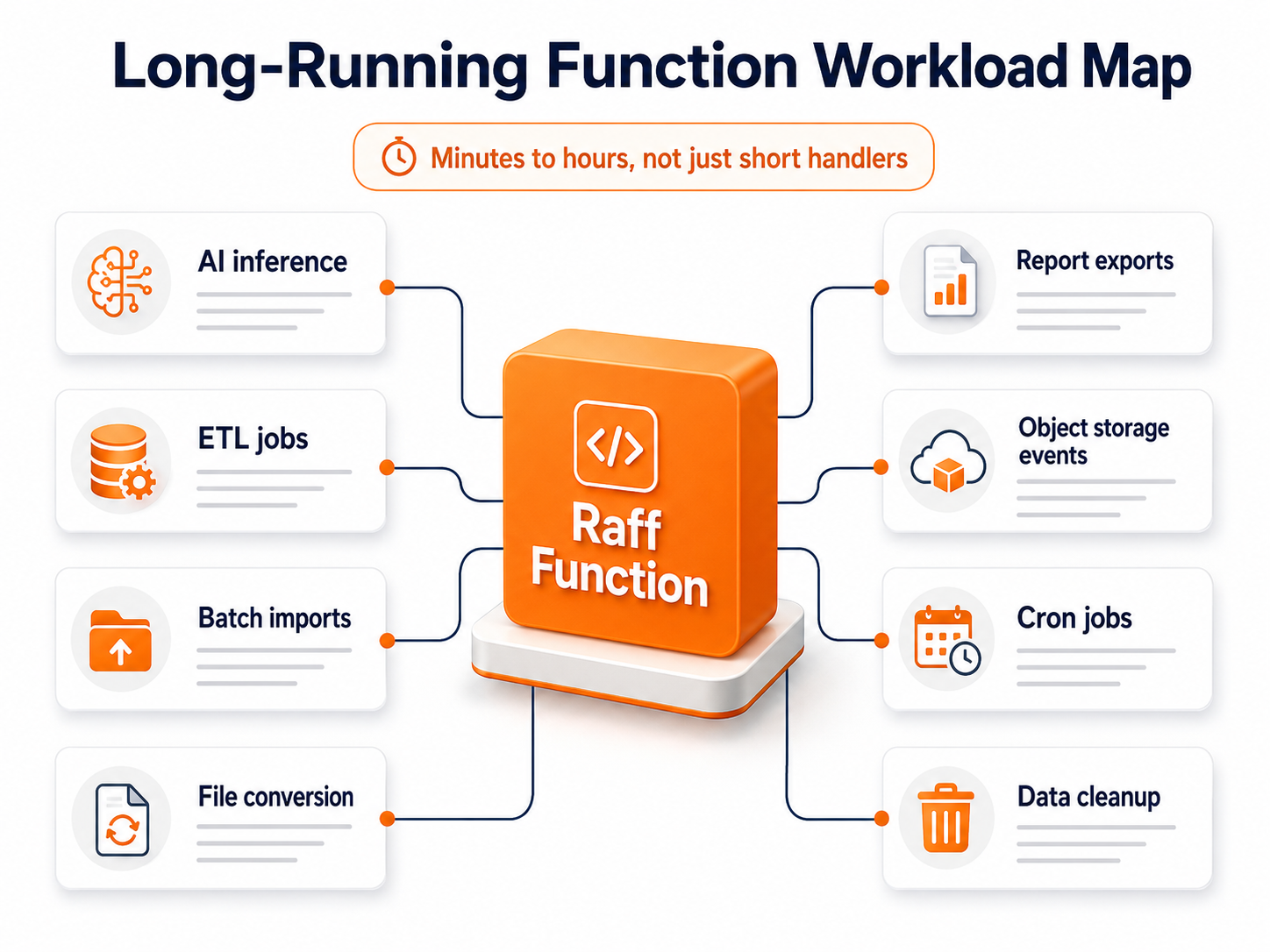
Examples include:
- AI inference
- ETL jobs
- Batch imports
- CSV processing
- PDF generation
- Image or media processing
- Large report exports
- Data enrichment
- Web scraping jobs
- Scheduled database cleanup
- Object-storage file processing
- Long third-party API syncs
- Streaming or chunked responses
- Customer data migration tasks
When serverless duration is too short, teams often create a second system: a worker VM, queue worker, batch container, or Kubernetes job. That can be the right decision, but it also adds another operational layer.
Long-running functions reduce that pressure. If a job is event-driven, isolated, and can write progress or output to a durable service, it may not need a full worker server.
The question is not only "Can a function run this long?"
The better question is:
Can this long task run safely as an isolated, observable, retryable function?
If yes, long-running functions can simplify the architecture.
The quick decision framework
Use this table before choosing a long-running function, VM, worker, or Kubernetes job.
| Workload | Better default | Why |
|---|
| AI inference triggered by request or event | Long-running function | Event-driven and bounded |
| Nightly ETL job | Function or worker VM | Depends on runtime, duration, and dependencies |
| Always-on queue worker | VM or Kubernetes | Constant work may fit capacity-based compute |
| Large file conversion after upload | Function | Storage event can trigger isolated processing |
| Long report export | Function | Output can be written to object storage |
| Continuous stream processor | VM or Kubernetes | Persistent process may be cleaner |
| One-time migration | Function if bounded; VM if manual control is needed | Choose by debugging and runtime needs |
| Webhook with heavy downstream processing | Function plus queue/worker | Return quickly and process separately |
| CPU-heavy batch job all day | VM or Kubernetes | Always-on compute may be easier to forecast |
| Short scheduled cleanup | Function | Cron trigger and scale-to-zero fit well |
| Complex multi-step workflow | Function chain, queue, or workflow tool | Needs state and failure handling |
| Job needing SSH debugging | VM | Full server access helps investigation |
A useful rule:
Use a long-running function when the task is event-driven and bounded. Use a VM when the environment must stay alive.
Long duration alone does not decide the architecture. Workload shape does.
Good long-running function candidates
A long-running function works best when the job has a clear input, clear output, and clear completion point.
AI inference
AI inference can take longer when models, prompts, files, or external APIs are involved.
A function can receive the request, run the inference step, write the result to a database or object storage, and return a status or output.
Trigger
  ↓
Raff Function
  ↓
AI inference or model/API call
  ↓
Database status + Object Storage output
This is useful when inference is occasional, user-triggered, or bursty.
ETL jobs
ETL tasks extract data, transform it, and load it somewhere else.
A function can run on a schedule or one-off trigger, process a bounded dataset, and write results to a database or object storage.
Cron schedule
  ↓
Function extracts data
  ↓
Function transforms records
  ↓
Database or Object Storage receives output
This works best when the ETL job can be chunked or bounded.
File processing after upload
Object-storage events are a natural trigger for long-running functions.
File uploaded
  ↓
Object Storage event
  ↓
Function processes file
  ↓
Output saved to Object Storage
  ↓
Metadata saved to database
Examples:
- Resize images
- Convert PDFs
- Parse CSV files
- Generate thumbnails
- Extract metadata
- Validate uploaded files
- Compress or transform assets
Batch exports and reports
Large reports should not block the main application server.
A function can generate the report, store it in object storage, and update the database when the report is ready.
User requests export
  ↓
Function generates file
  ↓
Object Storage stores report
  ↓
Database stores status and download link
This keeps the web app responsive while the longer job runs independently.
When a VM or worker is still better
Long-running functions do not replace every worker server.
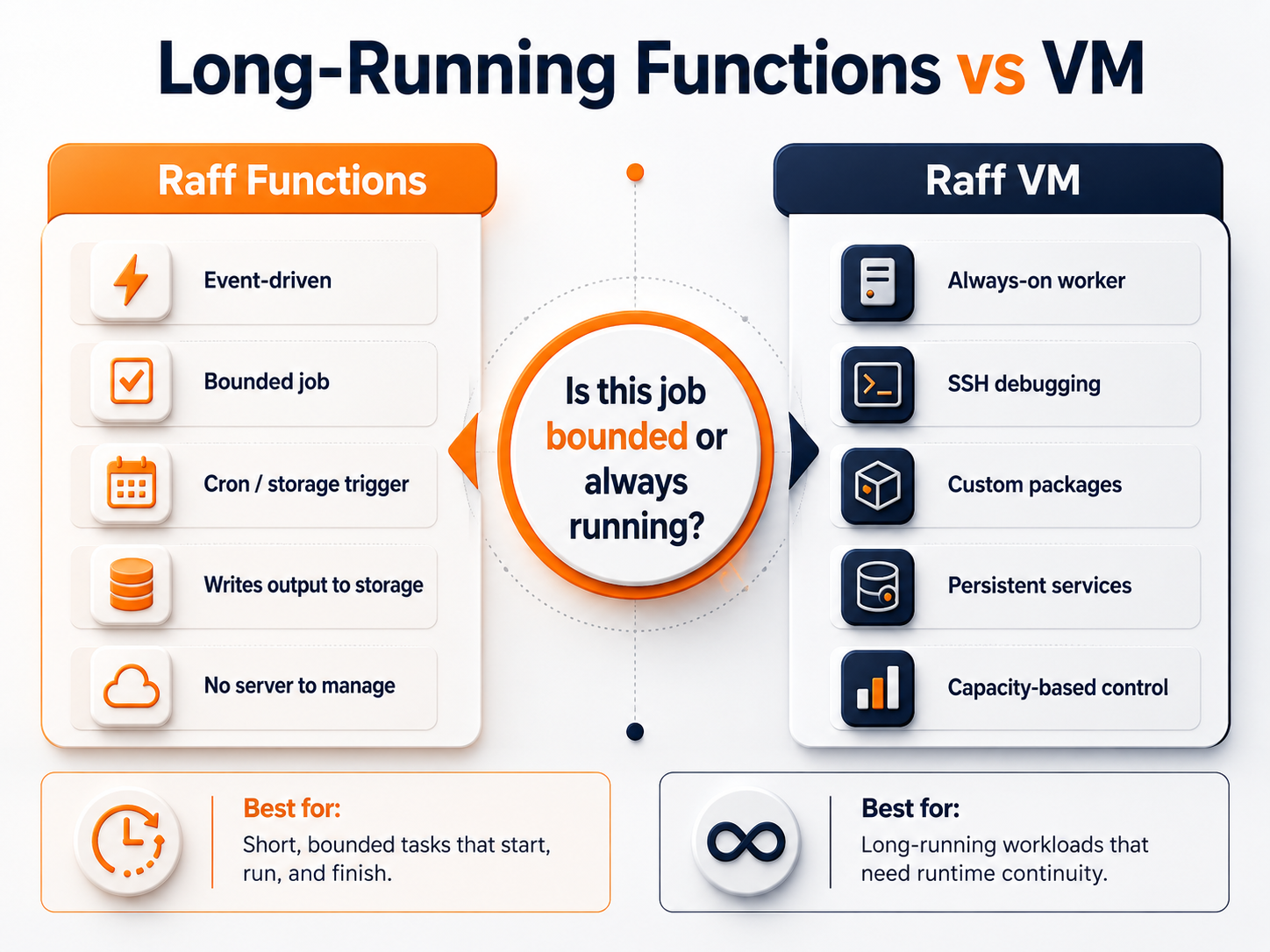
Use a VM, worker VM, or Kubernetes worker when the job needs:
- Constant processing
- Always-on queue consumption
- SSH debugging
- Complex system packages
- Heavy local dependencies
- Persistent local state
- Long-lived TCP connections
- Custom networking
- GPU or specialized host access
- Manual inspection during runtime
- Several processes coordinating together
- A stable filesystem across jobs
- Capacity-based cost control
A constant worker may be cleaner on a Raff VM:
Raff VM
  ↓
Worker process
  ↓
Queue
  ↓
Managed Database + Object Storage
That pattern is still valid when work is continuous. If the worker is busy all day, usage-based function execution may not be the simplest or cheapest operating model.
A long-running function is strongest when the workload starts from a clear trigger and can finish independently. A VM is strongest when the service itself needs to keep running.
Design long-running functions around durable state
Long-running functions should not keep important state only in memory.
A job may run for minutes or hours. During that time, the platform, network, external API, database, or code path can fail. The function needs a way to resume, retry, or at least explain what happened.
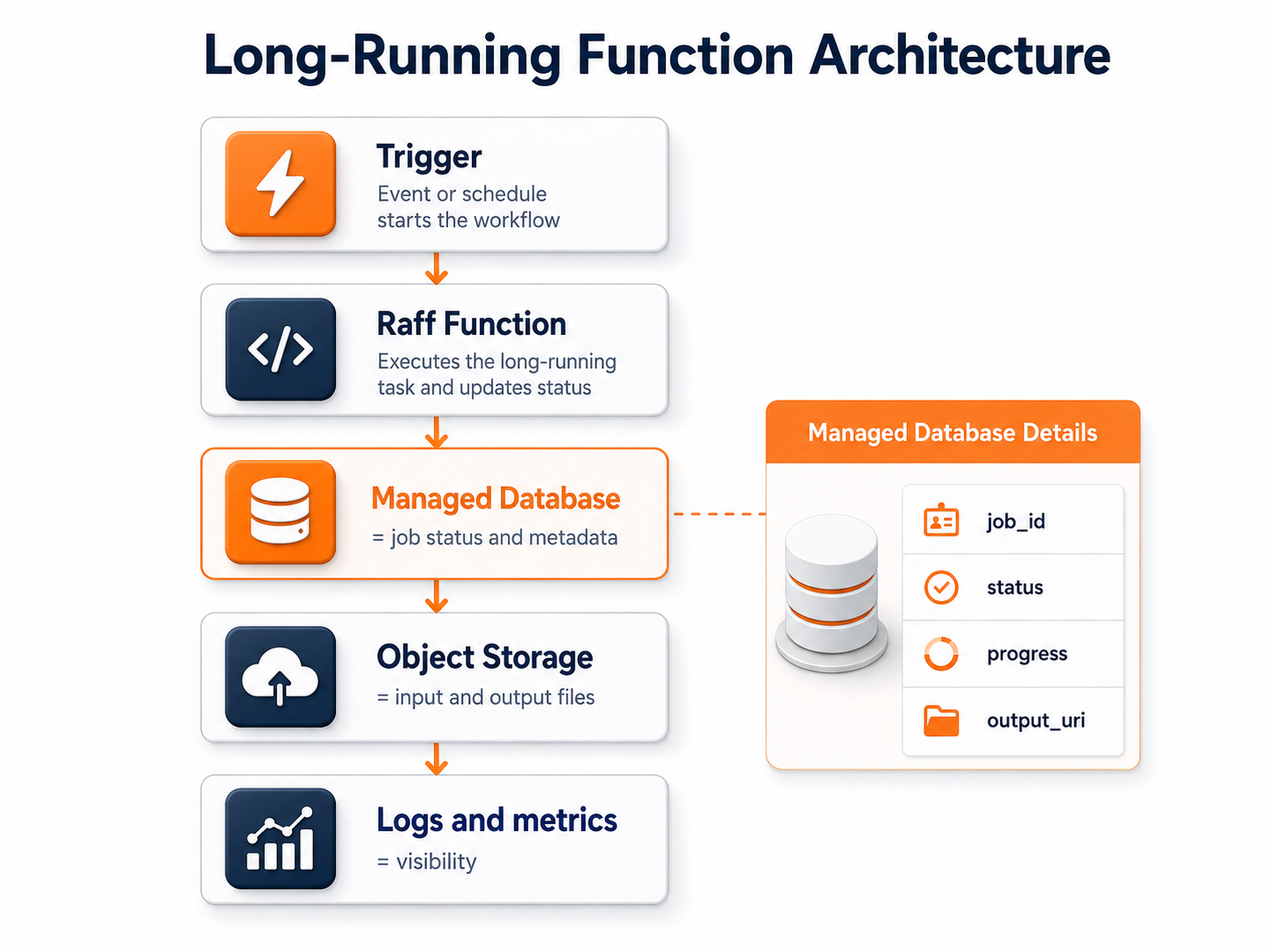
Use durable state for:
- Job status
- Job ID
- Input location
- Output location
- Start time
- Last progress marker
- Failure reason
- Retry count
- User/account ownership
- Result metadata
- Audit trail
A simple model:
Database = job status and metadata
Object Storage = input and output files
Function = execution logic
That keeps the function stateless enough to retry and observable enough to debug.
A good job table might track:
| Field | Purpose |
|---|
| job_id | Unique job identifier |
| account_id | Tenant or customer owner |
| status | queued, running, succeeded, failed |
| input_uri | Object storage path or source reference |
| output_uri | Result file path |
| progress | Optional percentage or step marker |
| attempts | Retry count |
| error_message | Safe failure summary |
| started_at | Runtime visibility |
| finished_at | Completion visibility |
The function should not be the only place that knows whether the job succeeded.
Store files and artifacts outside the function
Long-running functions often handle files.
Do not depend on local function storage as the final home for generated files, uploads, or artifacts. Use Raff Object Storage for durable outputs.
Good object-storage outputs include:
- Generated PDFs
- Exported CSV files
- Processed images
- Model output files
- ETL artifacts
- Validation reports
- Import logs
- Compressed archives
- Transformed media
- Batch results
A clean file-processing pattern:
Input file in Object Storage
  ↓
Function reads input
  ↓
Function writes output
  ↓
Database stores metadata
This makes the job easier to retry. If a function fails after writing partial output, the database can mark the job failed and the next run can decide whether to overwrite, resume, or write a new object.
For related storage decisions, read App Uploads: VM Disk vs Object Storage for SaaS Teams.
Make long-running jobs idempotent
Idempotency means the same job can run more than once without creating duplicate or corrupted results.
This is important for long-running functions because retries can happen. Users may click the same action twice. External APIs may send duplicate events. A function may fail after doing part of the work. A job may be restarted manually.
A long-running job should answer:
- Can the same job ID run twice safely?
- Can the same input file be processed twice?
- Can the output object be overwritten safely?
- Does the database update use a unique key?
- Are duplicate webhooks ignored?
- Are partial outputs cleaned up?
- Can the job resume from a checkpoint?
- Is a failed job distinguishable from an unfinished job?
Common idempotency techniques:
| Technique | Use |
|---|
| Job IDs | Prevent duplicate job creation |
| Unique database constraints | Prevent duplicate records |
| Output paths with versioning | Avoid overwriting the wrong file |
| Status transitions | Control running, succeeded, failed states |
| Checkpoints | Resume large jobs |
| Input hashes | Detect repeated file processing |
| Retry counters | Prevent infinite retries |
A long-running function should be designed as if it may run again.
That mindset prevents many production issues.
Break very large work into chunks
A single long-running function can be useful, but not every job should be one huge run.
If a task processes 5 million rows, thousands of files, or a large customer dataset, chunking may be safer.
Chunking helps with:
- Retry behavior
- Partial progress
- Memory control
- Parallelism
- Cost visibility
- Failure isolation
- Time-window control
- Debugging
A chunked pattern:
Parent job
  ↓
Create chunk jobs
  ↓
Function processes each chunk
  ↓
Database tracks progress
  ↓
Final function merges or marks complete
Chunking is useful for:
- Large CSV imports
- Customer data migrations
- ETL batches
- Backfills
- Image sets
- Search index rebuilds
- Report generation
- AI batch inference
Do not chunk too early for small jobs. Chunk when the job size makes retries or progress tracking important.
A good rule:
If restarting from zero would hurt, add checkpoints or chunks.
Use cron for scheduled long-running jobs
Cron triggers are useful when long work happens on a schedule.
Raff Functions supports timezone-aware cron schedules, which can fit recurring jobs such as:
- Nightly ETL
- Daily reports
- Weekly summaries
- Hourly syncs
- Cleanup jobs
- Expired subscription checks
- Data warehouse exports
- Cache refreshes
- Security scans
- Scheduled file processing
A scheduled long-running function should still be bounded.
Before running it daily, define:
- Expected runtime
- Maximum runtime
- Input size
- Output location
- Failure notification path
- Retry behavior
- Duplicate-run prevention
- Whether overlapping runs are allowed
- Whether the job can skip if the last run is still active
For example:
Daily 02:00
  ↓
Check whether previous job is still running
  ↓
Create new job record
  ↓
Process dataset
  ↓
Write output
  ↓
Mark job succeeded or failed
Cron is simple. Production cron needs guardrails.
Use object-storage events for file-driven jobs
Object-storage events are useful when work should start after a file arrives.
Examples:
- User uploads a video
- Customer uploads a CSV
- App writes a PDF for processing
- Backup archive lands in a bucket
- External system drops files into a prefix
- Image upload needs thumbnails
- Import folder receives a new file
A good pattern:
Object uploaded to bucket prefix
  ↓
Raff Function starts
  ↓
Function validates file
  ↓
Function processes file
  ↓
Function writes output to Object Storage
  ↓
Function updates database status
Use prefix filters to avoid triggering functions on every object in a bucket. For example, input files can land under:
and outputs can be written to:
This prevents output files from retriggering the same function by accident.
File-driven jobs should also validate file type, size, tenant ownership, and expected schema before processing.
Logs and metrics are part of long-running function design
Long-running functions need more than "it failed."
A job that runs for 20 minutes should produce enough visibility to answer:
- When did it start?
- What input did it process?
- Which customer/account owned the job?
- Which step is running?
- How many records were processed?
- What external dependency was slow?
- What failed?
- Was the failure safe to retry?
- Did the function write any output?
- How long did each phase take?
Raff Functions includes logs and metrics for every invocation, with live log tail, search and level filters, 14-day retention, count, p50, p95, and error rate per function.
For long-running jobs, log at important boundaries:
job_started
input_validated
chunk_started
chunk_completed
output_written
database_updated
job_completed
job_failed
Avoid logging sensitive data. Log identifiers, counts, timings, and safe error summaries.
Good logs make long-running functions safer because the team can understand progress without SSH access.
Cost planning for long-running functions
Long-running functions need cost planning before launch.
The main cost inputs are:
- Invocation count
- Average duration
- Memory setting
- Active CPU time
- Optional warm instance behavior
- Retry frequency
- Data read and write patterns
- Whether work can be chunked
Raff Functions bills memory and active CPU. Requests and egress are free. That means the cost conversation should focus on runtime size and compute behavior.
Ask:
- Is the job CPU-heavy or I/O-heavy?
- Does more memory reduce runtime?
- Does the job wait on external APIs?
- Can the job be split into smaller chunks?
- How often will it run?
- What happens during retries?
- What spend cap should protect the account?
- Would a VM be cheaper if the job runs constantly?
A long-running function can be cost-effective for bursty or scheduled jobs. A VM may be cleaner for work that runs all day.
For the full pricing discussion, read Serverless Function Pricing: CPU, Memory, Requests, and Egress.
Security and access should be scoped per job
Long-running functions often touch sensitive systems: databases, object storage, customer files, internal APIs, or third-party credentials.
Do not give every function broad access.
Use scoped access for:
- Database credentials
- Object storage buckets
- API tokens
- Environment variables
- Customer-specific data
- Internal service endpoints
A file-processing function should not automatically have access to every bucket. A reporting function should not automatically have write access to unrelated systems. An ETL function should not expose credentials through logs.
Raff Functions supports bindings to Raff Managed Databases and Raff Object Storage with scoped credentials. Use those bindings to keep each function's access focused on what the job actually needs.
For production, also define:
- Who can deploy the function
- Who can view logs
- Who can change triggers
- Who can rotate credentials
- Who owns the spend cap
- Who receives failure alerts
Long-running jobs often have wider impact than small handlers. Treat their access accordingly.
A practical Raff architecture for long-running functions
A strong Raff architecture keeps compute, state, and files separated.
HTTP / cron / object-storage event
  ↓
Raff Function
  ↓
Raff Managed Database = job status and durable records
  ↓
Raff Object Storage = input and output files
  ↓
Raff VM or Kubernetes = optional always-on workers
This architecture gives each layer a clear job:
| Layer | Responsibility |
|---|
| Raff Function | Executes the event-driven task |
| Managed Database | Stores status, metadata, records, and progress |
| Object Storage | Stores files, artifacts, and outputs |
| Raff VM | Runs persistent workers or full server environments |
| Kubernetes | Runs orchestrated services when cluster coordination is needed |
A small team does not need all layers on day one.
Start with the simplest version:
Raff Function
  ↓
Database
  ↓
Object Storage
Add a VM or Kubernetes only when the workload becomes constant, complex, or coordination-heavy.
Common mistakes to avoid
Treating a long function like a web request
A job that runs for minutes or hours needs status tracking, progress, and failure handling.
Do not make users wait on a browser tab for a long operation.
Storing output only inside the function
Generated files should go to object storage. Job metadata should go to a database.
The function should not be the final storage layer.
Forgetting retries and duplicate runs
Long-running jobs can fail after partial progress.
Design job IDs, status transitions, idempotent writes, and retry rules before production.
Processing huge datasets as one block
If restarting from zero would be painful, split the work into chunks.
Chunking improves retry behavior and progress visibility.
Running constant work as functions without checking cost
If the job runs all day, a VM or Kubernetes worker may be simpler and easier to forecast.
Logging too much or too little
Logs should show progress and failures without exposing secrets or customer data.
Log job IDs, step names, counts, timings, and safe summaries.
Giving every function broad credentials
Scope credentials to the database, bucket, API, or service the function actually needs.
Long-running jobs often have more access than small handlers, so access control matters.
Long-running functions should simplify the workload
A long-running function is useful when it removes operational weight without hiding complexity.
Use long-running Raff Functions for AI inference, ETL, file processing, scheduled jobs, imports, exports, and batch work when the task is event-driven, bounded, observable, and writes durable state to the right layer. Use Raff VM or Kubernetes when the workload is constant, needs a full server environment, requires SSH debugging, or depends on persistent local services.
The safest pattern is simple: let Raff Functions execute the task, let Raff Managed Databases store job state and records, and let Raff Object Storage store files and artifacts.
Then choose the model your team can operate reliably for the next 6-12 months.
Was this article helpful? 
Serdar TekinCo-Founder & CTO
Co-Founder & CTO at Raff, focused on cloud infrastructure, systems architecture, security, reliability, and production operations.
Spin up a Raff server, follow the steps above on real infrastructure, and you are live. Linux or Windows, backed by a 14-day money-back guarantee.
What are long-running serverless functions?+
Long-running serverless functions are functions designed for workloads that need minutes or hours to complete instead of a short request-response window.
What workloads fit long-running serverless functions?+
Long-running serverless functions fit AI inference, ETL jobs, batch imports, file processing, report exports, cron jobs, and object-storage event processing.
How long can Raff Functions run?+
Raff Functions supports timeouts up to 1 hour by default and up to 24 hours on request for longer AI, ETL, batch, and file-processing workloads.
When should a VM be used instead of a long-running function?+
Use a VM when the workload runs constantly, needs SSH debugging, custom packages, persistent services, local state, or predictable always-on capacity.
Should long-running functions store files locally?+
Long-running functions should not use local storage as the final home for files. Store inputs, outputs, exports, and artifacts in object storage.
Why do long-running functions need durable job state?+
Durable job state helps track status, progress, retries, failures, input files, output files, and completion even if a function fails or restarts.
Should large jobs be split into chunks?+
Large jobs should be chunked when restarting from zero would be painful, or when progress tracking, retries, memory control, and failure isolation matter.
How should Raff users design long-running function architecture?+
Raff users can run long jobs on Raff Functions, store job state in Managed Databases, store files in Object Storage, and use Raff VM for persistent workers.
