Cron jobs on serverless functions vs cron on a VM is really a question about ownership, reliability, visibility, and workload shape.
A cron job is a scheduled task. It might run every minute, every hour, every night, every Monday, or on a custom business schedule. Small teams use cron jobs for cleanup, billing checks, reports, API syncs, cache refreshes, imports, exports, and background maintenance. The problem is not cron itself. The problem is where the scheduled work should live.
For Raff Technologies users, there are two clean paths: use Raff Functions when the scheduled job is event-driven, bounded, stateless, and should run only when needed; use Raff VM when the scheduled job depends on a full server environment, local packages, SSH debugging, persistent services, or existing VM-based application code.
This guide explains when serverless cron is the better fit, when VM cron is still the simpler choice, and how to design scheduled jobs so they do not silently become production risk.
If you are still comparing the broader models, read Serverless Functions vs VMs: What Small Teams Should Choose first.
Cron jobs are simple until they become production infrastructure
Cron starts as a convenience.
A developer adds one scheduled script:
0 2 * * * run-nightly-cleanup
Then the product grows.
Soon the server has jobs for:
- Daily reports
- Subscription checks
- Invoice generation
- Email digests
- Expired session cleanup
- Cache refreshes
- Third-party API syncs
- Failed webhook retries
- CSV imports
- Object storage cleanup
- Data warehouse exports
- Search index updates
- Security checks
- Backup verification
At that point, scheduled work is no longer a small helper. It is part of the production system.
A production cron job needs answers:
- Where does it run?
- Who owns it?
- What happens if it fails?
- What happens if it runs twice?
- What happens if the previous run is still active?
- Where are logs stored?
- How is success measured?
- How are credentials scoped?
- How is runtime cost controlled?
- Should this be a function, VM job, worker, or queue?
The scheduling syntax is the easy part. The operating model is the real decision.
The quick decision framework
Use this table before deciding between serverless cron and VM cron.
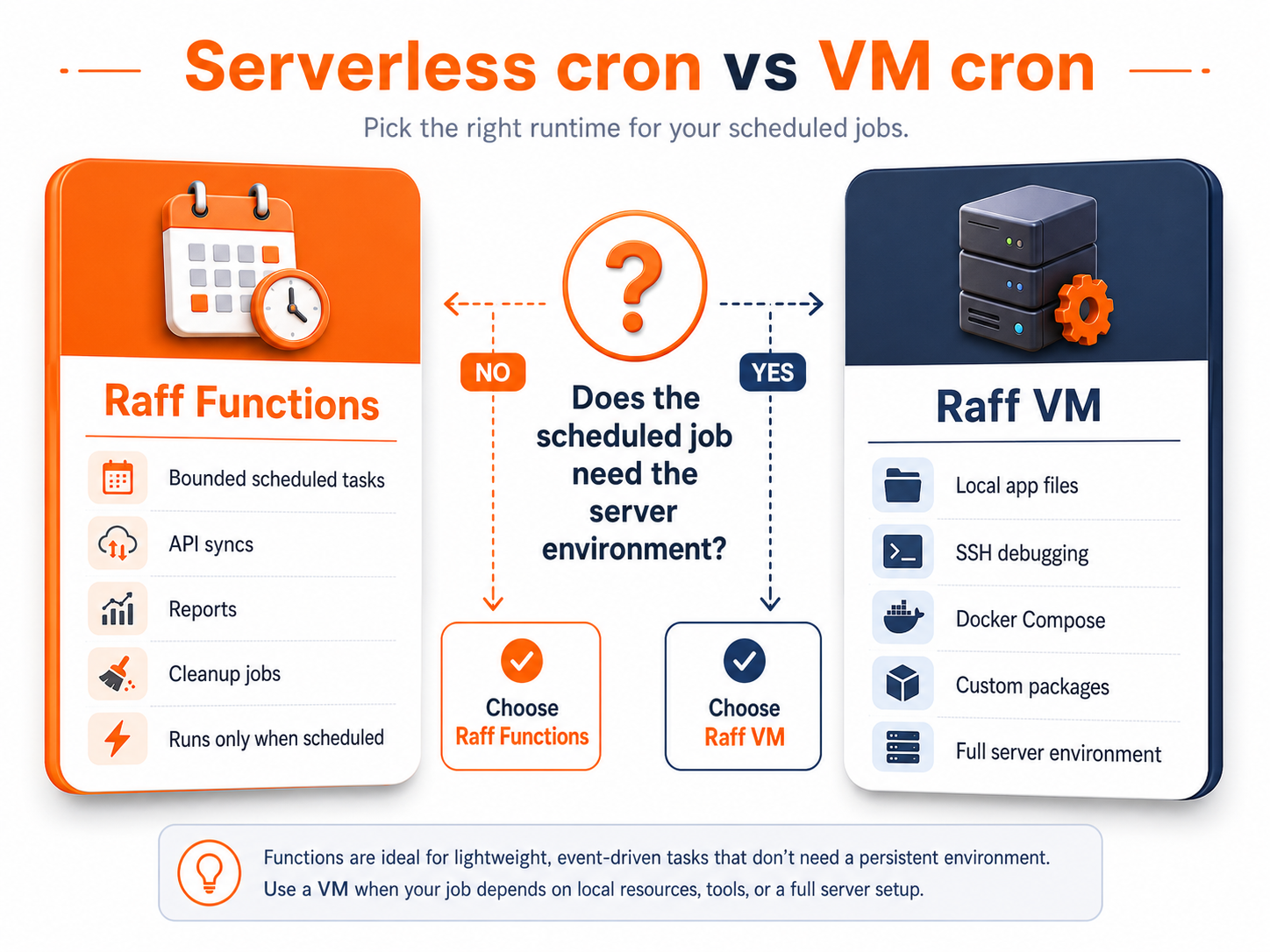
| Scheduled job | Better default | Why |
|---|
| Short cleanup task | Serverless function | Runs only when needed |
| Nightly API sync | Serverless function | Scheduled, bounded, easy to isolate |
| Daily report generation | Serverless function | Output can go to object storage |
| Job that needs local app files | VM cron | Runs inside existing server environment |
| Job that needs SSH debugging | VM cron | Direct server inspection helps |
| Job that runs every minute all day | Depends | Function if bounded; VM if effectively always-on |
| Job that uses custom system packages | VM cron | Full OS control is easier |
| File processing after upload | Function trigger or cron function | Better separated from app server |
| Database maintenance script | VM or managed database tooling | Depends on access and risk |
| Long ETL job | Long-running function or worker VM | Choose by duration, dependencies, and control |
| Queue retry processor | Worker VM or function | Depends on retry pattern and volume |
| Security scan | Function or VM | Depends on target and required tools |
A useful rule:
Use serverless cron when the schedule starts a bounded task. Use VM cron when the task depends on the server environment.
Cron should not be chosen because "the VM already exists." It should be chosen because it is the right place for that scheduled workload.
Serverless cron is best for bounded scheduled work
Serverless cron is a good fit when a job has a clear start, clear finish, and no need to keep a server alive between runs.
Good examples include:
- Send daily email digest
- Sync an external API every hour
- Clean expired temporary records
- Refresh a cached summary
- Generate a weekly report
- Check failed webhook retries
- Rotate short-lived tokens
- Run a scheduled import
- Process small batches
- Create invoice drafts
- Validate uploaded files on a schedule
- Update usage counters
- Export data to object storage
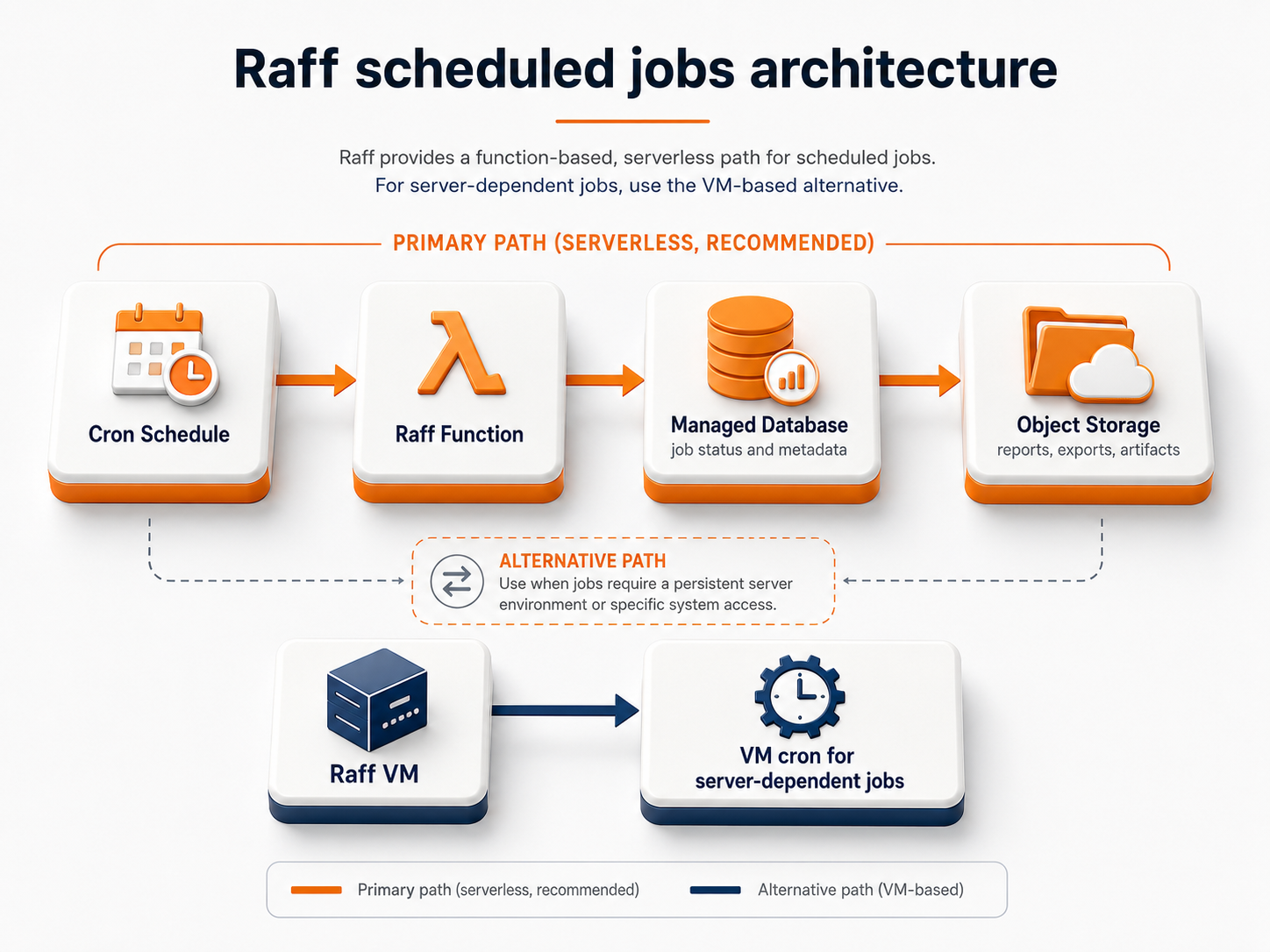
The architecture is simple:
Cron schedule
  ↓
Raff Function
  ↓
Managed Database / Object Storage / API
The function runs because the schedule fires. It finishes. Then it disappears until the next run.
That has clear benefits:
- No idle server process
- No shared app-server resources
- Separate logs per invocation
- Easier isolation from the main app
- Lower risk of cron jobs slowing web traffic
- Clear trigger ownership
- Better fit for spiky or occasional scheduled tasks
Raff Functions supports timezone-aware cron schedules, so jobs can be configured around the business schedule instead of only server-local assumptions.
VM cron is still useful when the server environment matters
VM cron is not outdated. It is still the right choice when the scheduled task belongs inside a full server environment.
Use VM cron when the job needs:
- Local application code
- Existing server packages
- Shell scripts already deployed on the VM
- Full filesystem access
- SSH debugging
- Custom binaries
- Local Docker Compose services
- Internal tools installed on the server
- Server-level network configuration
- A job that coordinates with local services
- Always-on worker behavior
- Manual inspection during incidents
A VM cron pattern looks like this:
Raff VM
  ↓
cron schedule
  ↓
local script or app command
  ↓
database / files / external API
This can be the simplest solution for early SaaS apps. If the app already runs on one VM and the job is closely tied to that app environment, server cron may be easier to maintain than creating a separate function too early.
The risk is that VM cron can become invisible.
Jobs may run on a server that only one developer understands. Logs may live in local files. Failures may not alert anyone. Scripts may accumulate without ownership. Jobs may compete with the web app for CPU, memory, or disk.
VM cron is fine. Hidden VM cron is not.
Scheduled work should not slow the main app
One of the strongest reasons to move cron jobs into functions is isolation.
On a single VM, scheduled jobs can compete with the main application:
Web app
  ↓ shares CPU / memory / disk with
Cron jobs
This is usually fine for small tasks. It becomes risky when jobs are CPU-heavy, memory-heavy, or unpredictable.
Warning signs:
- Web requests slow down during scheduled jobs
- Nightly reports increase CPU or disk load
- API syncs cause memory spikes
- Cleanup jobs lock database rows
- Cron scripts produce large logs
- File exports fill local disk
- Several jobs start at the same time
- The team avoids running jobs during business hours
- Cron failures are discovered by customers
When scheduled work starts affecting user experience, separate it.
A serverless cron function can run outside the main app server:
Raff Function
  ↓
scheduled job
  ↓
database / object storage
A worker VM can also be the right separation layer:
App VM
  ↓
Worker VM with cron or queue processor
  ↓
database / object storage
The right choice depends on whether the work is occasional and bounded or constant and environment-heavy.
Cron jobs need idempotency
Idempotency means a job can run more than once without creating duplicate or corrupted results.
This matters for both function cron and VM cron.
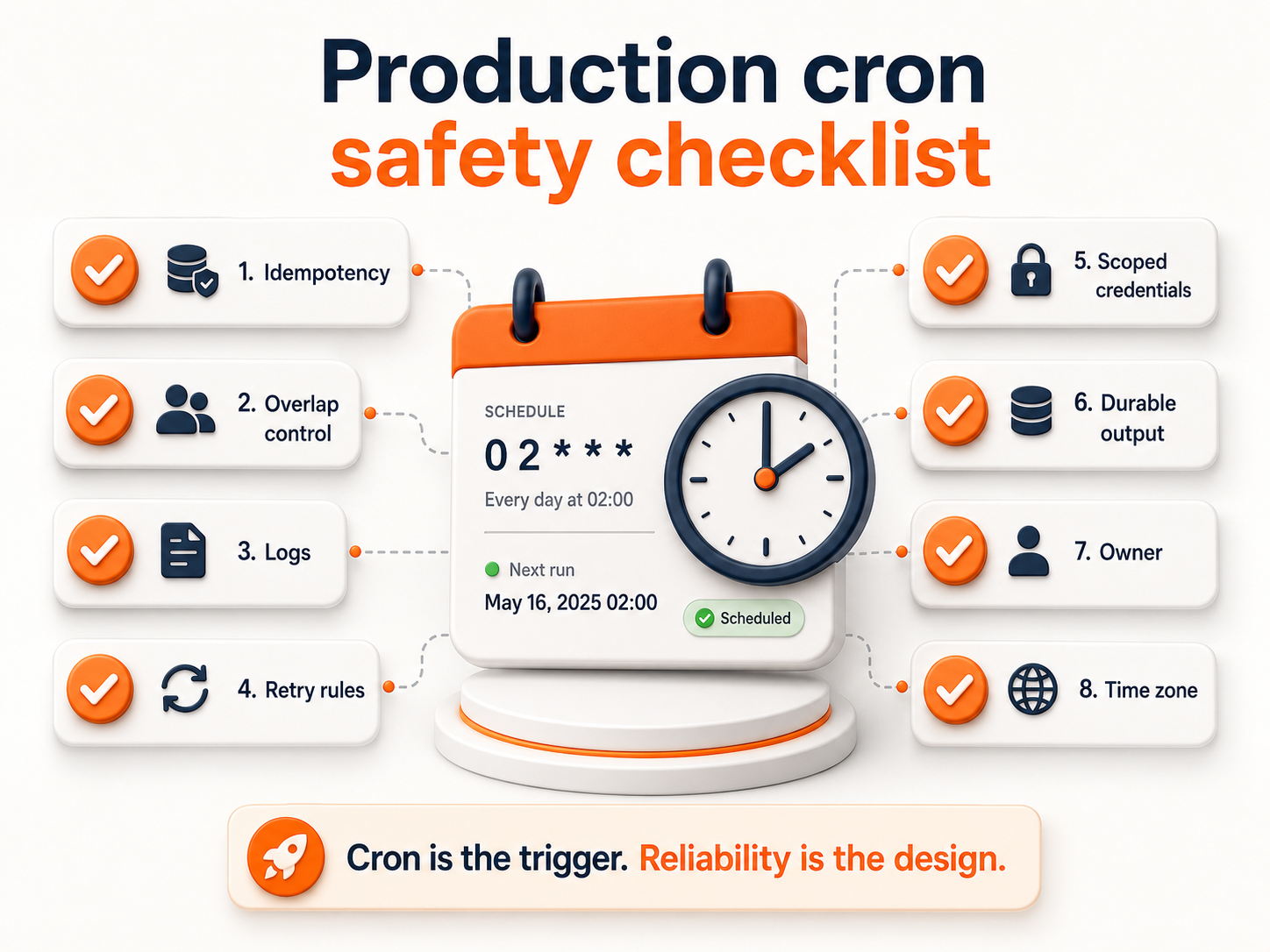
Scheduled tasks can run twice because:
- A retry happens
- A developer manually reruns a job
- A deployment restarts a worker
- Two environments share the same schedule
- The previous run has not finished
- The schedule was copied into another service
- A time-zone or daylight-saving change creates confusion
A cron job should answer:
- Can this job run twice safely?
- Does it use a unique job ID?
- Does the database prevent duplicate records?
- Can it resume from a checkpoint?
- Does it know if a previous run is still active?
- Does it skip, queue, or overlap when a prior run is active?
- Does it write output with a stable or versioned path?
- Does it update status only after output is complete?
For example, invoice generation should not create duplicate invoices if it runs twice. A report export should not overwrite the wrong file. A cleanup job should not delete data outside the expected window.
A safe pattern:
Create job record
  ↓
Check if job already completed
  ↓
Run work
  ↓
Write output
  ↓
Mark job complete
Cron is scheduling. It is not correctness. The application must handle correctness.
Overlapping jobs are a real production risk
A job that runs every 5 minutes may take 7 minutes during peak load.
Now the next scheduled run starts while the previous run is still active.
That can cause:
- Duplicate processing
- Database lock contention
- API rate-limit issues
- Object overwrite conflicts
- Excess memory use
- Confusing logs
- Incorrect status
- Higher function cost
- Slower app performance
Before production, decide how overlapping runs should behave.
| Overlap policy | What it means | Good for |
|---|
| Skip | If previous run is active, do nothing | Cleanup jobs, periodic syncs |
| Queue | Run after current job finishes | Important sequential jobs |
| Parallelize | Allow multiple runs | Independent chunks or per-tenant jobs |
| Fail fast | Mark as failed and alert | Jobs that should never overlap |
| Lock | Use database or distributed lock | Critical jobs with strict exclusivity |
For small teams, skip or lock is often enough.
A simple database lock or job status check can prevent many incidents:
if existing_job.status == "running":
    skip new run
else:
    start new run
For high-volume background processing, a queue may be better than cron alone. Cron can create jobs, while workers process them.
For related background-work design, read Cron Jobs vs Queues vs Workflow Automation.
Logs and metrics decide whether cron is trustworthy
A scheduled job without logs is a guess.
A production cron job should show:
- When it started
- When it finished
- Whether it succeeded
- Whether it failed
- How long it ran
- Which input it processed
- How many records changed
- Which external API failed
- Whether it retried
- Whether it skipped because another run was active
- Which output file or record was produced
VM cron often fails here because logs are stored in local files or shell output. That can work, but only if the team has a consistent pattern.
Function cron can make this easier because each invocation has its own runtime logs and metrics.
Raff Functions includes logs and metrics for every invocation, with live log tail, search and level filters, 14-day retention, invocation count, p50, p95, and error rate per function.
That is useful for scheduled jobs because the team can answer:
Did the 09:00 job run?
Did it fail?
How long did it take?
Did it get slower this week?
Did error rate change?
Cron is only reliable if the team can observe it.
Credentials should be scoped to the scheduled task
Cron jobs often need privileged access.
They may read customer records, call billing APIs, write reports, delete old data, rotate credentials, or access object storage. That makes credential scope important.
Do not give every scheduled job broad credentials.
A report job may need read access to specific database tables and write access to a specific object-storage prefix. A cleanup job may need write access to a narrow set of records. A sync job may need one external API token.
Good credential rules:
- Use separate credentials per job when possible
- Avoid sharing root credentials
- Keep secrets out of code
- Rotate credentials when ownership changes
- Do not print secrets in logs
- Scope object-storage keys to the required bucket or prefix
- Scope database users by job responsibility
- Remove credentials when a job is retired
Raff Functions can bind to Raff Managed Databases and Raff Object Storage with scoped credentials. VM cron can also be secured, but the team must manage server-level files, environment variables, secret rotation, and access control carefully.
Scheduled jobs are often trusted. That is exactly why they should be scoped.
Store files in object storage, not the cron environment
Scheduled jobs often create files:
- Daily reports
- CSV exports
- Invoices
- Backup summaries
- Import results
- PDF reports
- Data validation logs
- Generated artifacts
- Compressed archives
Do not treat the function runtime or app VM as the final file store.
Use Raff Object Storage for durable files and use the database for metadata.
A clean scheduled-report pattern:
Cron schedule
  ↓
Function or VM job generates report
  ↓
Object Storage stores file
  ↓
Database stores status and output_uri
This keeps files separate from compute.
It also makes retry behavior clearer. If the job fails, the database can mark the job failed. If the job succeeds, the database can point to the exact output object.
For related reading, use App Uploads: VM Disk vs Object Storage for SaaS Teams.
Cost planning for scheduled work
Cron cost depends on job frequency, duration, and resource use.
A job that runs once per day for 10 seconds is very different from a job that runs every minute for 45 seconds.
For function cron, estimate:
- Runs per month
- Average duration
- Memory setting
- Active CPU behavior
- Retry frequency
- Whether the job overlaps
- Whether it needs warm instances
- Whether it produces large files
For VM cron, estimate:
- VM size
- Whether the VM already runs the main app
- CPU/memory pressure during jobs
- Whether jobs force a larger VM
- Disk usage from logs or files
- Operations time
- Whether a separate worker VM is needed
A simple comparison:
| Job shape | Cost-friendly model |
|---|
| Runs once per day | Function |
| Runs once per hour | Function |
| Runs every minute but finishes quickly | Depends |
| Runs constantly | VM or Kubernetes worker |
| Uses heavy CPU for hours daily | Compare both |
| Needs full app environment | VM |
| Triggers on file upload | Function |
| Produces files | Function or VM + object storage |
Raff Functions bills memory and active CPU, with requests and egress free. Raff VM uses capacity-based pricing. Choose based on how the scheduled work behaves, not only on which tool feels newer.
A practical Raff cron architecture
A small team can use a staged approach.
Stage 1: VM cron inside one app server
Early on, one VM may be enough.
Raff VM
  ↓
App + cron jobs
  ↓
Database
This is simple, but watch for resource contention and invisible failures.
Stage 2: Move files and durable outputs out
Scheduled jobs should write durable files to object storage.
Raff VM cron
  ↓
Database status
  ↓
Object Storage output
This prevents local disk from becoming a hidden dependency.
Stage 3: Move bounded scheduled jobs into functions
When cron jobs are independent and bounded, move them to Raff Functions.
Raff Function
  ↓
Managed Database
  ↓
Object Storage
This isolates scheduled work from the main app server.
Stage 4: Use worker VMs for constant background work
If scheduled work becomes constant or queue-based, move it to a worker VM.
App VM
  ↓
Worker VM
  ↓
Managed Database + Object Storage
This keeps the main app responsive while preserving full server control for background processing.
Stage 5: Use Kubernetes only when coordination justifies it
If many services, workers, schedules, and environments need orchestration, Kubernetes may become useful.
Kubernetes workloads
  ↓
CronJobs / workers / services
  ↓
Managed Database + Object Storage
Do not jump to Kubernetes only because cron jobs grew. First separate the workload cleanly.
Serverless cron checklist
Use this checklist before moving scheduled jobs to production.
The difference between a harmless cron job and a production incident is usually not syntax. It is the missing operating rules.
Common mistakes to avoid
Letting cron jobs become invisible
If nobody knows which jobs run, when they run, and where they log, the system is fragile.
Document schedules and owners.
Running heavy jobs on the main app VM
If scheduled work slows user-facing traffic, move it to a function, worker VM, or separate system.
Ignoring time zones
A job that runs at the wrong business hour can break billing, reports, notifications, or customer workflows.
Use explicit time-zone configuration.
Allowing overlapping runs accidentally
Jobs that run longer than their schedule interval can overlap.
Use locks, skip rules, or queues.
Storing reports on local disk
Generated files should live in object storage with metadata in a database.
Local disk should not become the hidden archive.
Using broad credentials
Scheduled jobs often have powerful access.
Scope credentials to the exact database, bucket, API, or action the job needs.
Assuming function cron is always cheaper
Serverless cron is strong for bounded scheduled work.
VM cron or a worker VM may be better for constant, heavy, or environment-dependent work.
Cron should run where the workload belongs
Cron is only the trigger. The real decision is where the scheduled work should execute.
Use Raff Functions for scheduled jobs that are bounded, independent, event-driven, and do not need a full server environment. Use Raff VM when the job depends on local packages, SSH debugging, persistent services, Docker Compose, or a full application server.
The clean Raff pattern is simple: scheduled job logic runs in the right compute layer, durable state lives in Raff Managed Databases, and generated files live in Raff Object Storage. That keeps cron from becoming a hidden operational risk.
Start with the simplest place that keeps the job observable, safe to retry, and easy to operate for the next 6-12 months.

